Instructional Technology for the K-12 Teacher
INTC 2610
 Business/Technology Teacher – Southern Regional HS
 Years in Education: 30
 BS –Business Administration – Monmouth University
 MA – Masters of Art – Instructional Technology –
Stockton College
Sharon Faith
609-709-3970 Cell
609-597-9481 vm 2272
Sharon.faith@stockton.edu
sfaith@srsd.net
Website
https://sites.google.com/site/sharonfaith2610/
 Name
 Major
 Freshman, sophomore, junior, senior
 Career Goal
 Cell phone #
 Other email
 What technology(ies) do use in your daily
life.
 Use Google Form
September 4, 2013
INTC 2610
Instructor: Sharon Faith
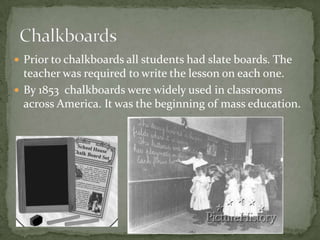
 Prior to chalkboards all students had slate boards. The
teacher was required to write the lesson on each one.
 By 1853 chalkboards were widely used in classrooms
across America. It was the beginning of mass education.
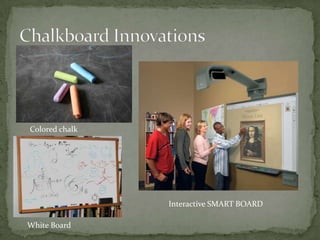
Colored chalk
Interactive SMART BOARD
White Board
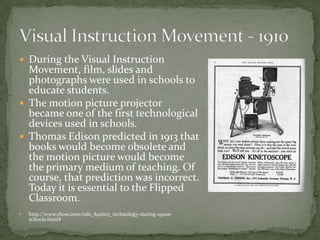
 During the Visual Instruction
Movement, film, slides and
photographs were used in schools to
educate students.
 The motion picture projector
became one of the first technological
devices used in schools.
 Thomas Edison predicted in 1913 that
books would become obsolete and
the motion picture would become
the primary medium of teaching. Of
course, that prediction was incorrect.
Today it is essential to the Flipped
Classroom.
 http://www.ehow.com/info_8416115_technology-during-1900s-
schools.html#
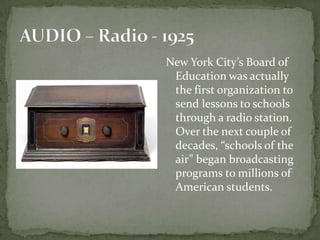
New York City’s Board of
Education was actually
the first organization to
send lessons to schools
through a radio station.
Over the next couple of
decades, “schools of the
air” began broadcasting
programs to millions of
American students.
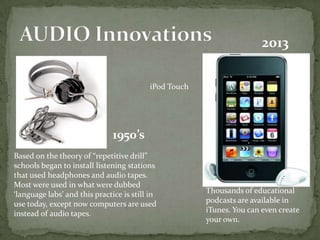
Based on the theory of “repetitive drill”
schools began to install listening stations
that used headphones and audio tapes.
Most were used in what were dubbed
‘language labs’ and this practice is still in
use today, except now computers are used
instead of audio tapes.
1950’s
2013
Thousands of educational
podcasts are available in
iTunes. You can even create
your own.
iPod Touch
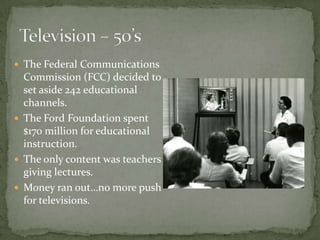
 The Federal Communications
Commission (FCC) decided to
set aside 242 educational
channels.
 The Ford Foundation spent
$170 million for educational
instruction.
 The only content was teachers
giving lectures.
 Money ran out…no more push
for televisions.
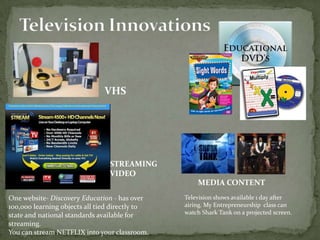
VHS
STREAMING
VIDEO
One website- Discovery Education - has over
100,000 learning objects all tied directly to
state and national standards available for
streaming.
You can stream NETFLIX into your classroom.
Television shows available 1 day after
airing. My Entrepreneurship class can
watch Shark Tank on a projected screen.
MEDIA CONTENT
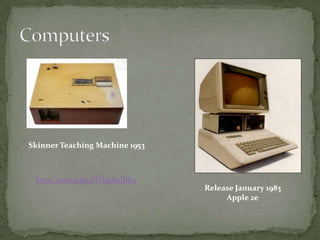
Release January 1983
Apple 2e
Skinner Teaching Machine 1953
http://youtu.be/jTH3ob1IRFo
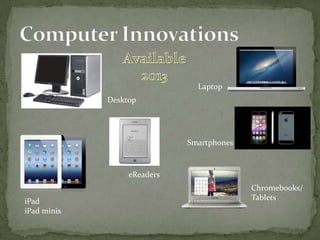
Desktop
Laptop
iPad
iPad minis
Smartphones
eReaders
Chromebooks/
Tablets
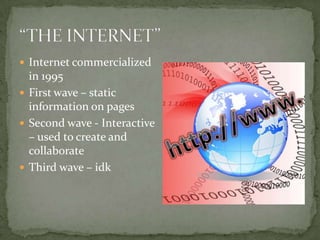
 Internet commercialized
in 1995
 First wave – static
information on pages
 Second wave - Interactive
– used to create and
collaborate
 Third wave – idk
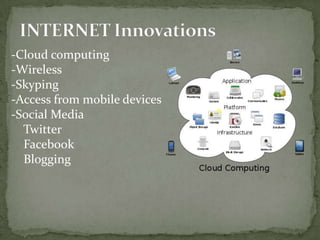
-Cloud computing
-Wireless
-Skyping
-Access from mobile devices
-Social Media
Twitter
Facebook
Blogging
 Fastest Internet speeds
 #1 Hong Kong – 63.6 Mbps
 #11 United States – 36.6 Mbps (in 2000 56kbps dial up)
 Global Average – 18.4 MBPS
 -Download Speed –
 #1 Luxembourg 68.3 Mbps
 #30 US 19.05 Mbps
 #186 Burkina Faso #.20 mbps (last on list)
 Global Average 14.31 Mbps
Video
PDF
 Created by the New Media Consortium,
 Consortium for School Networking
 the International Society for Technology in Education.
 It identifies and describes emerging technologies
likely to have a large impact over the coming five years
in education around the globe.
 2013 K-12 Edition, examines emerging technologies for
their potential impact on and use in teaching,
learning, and creative inquiry within the environment
of pre-college education.
Route 21
 Available technologies change our relationship with
information and thus, suggest changes in educational
goals.
 Less memorization, and focus more on higher order
skills such as analysis, synthesis, and evaluation.
 Technologies give us the means to work smarter and
learn more effectively.
 Critical Thinking and Problem Solving
 Creativity and Innovation
 Communication and Collaboration
 One Sunday New York Times Newspaper holds more
information then a student in 1880 would get in a
LIFETIME.
 Information is doubling every 5.5 years, according to
the American Association of School Librarians
(AASL), technical information is doubling every two
years.
All students will use digital tools to access, manage,
evaluate, and synthesize information in order to solve
problems individually and collaboratively and to create
and communicate knowledge.
A. Technology Operations and Concepts
B. Creativity and Innovation
C. Communication and Collaboration
D. Digital Citizenship
E. Research and Information Literacy
F. Critical Thinking, Problem Solving, and
Decision-Making
ISTE
1. Creativity and Innovation
 Students demonstrate creative thinking, construct
knowledge, and develop innovative products and
processes using technology.
2. Communication and
Collaboration
 Students use digital media and environments to
communicate and work collaboratively, including at a
distance, to support individual learning and contribute
to the learning of others.
3. Research and Information
Fluency
 Students apply digital tools to gather, evaluate, and use
information.
4. Critical Thinking, Problem
Solving, and Decision Making
 Students use critical thinking skills to plan and
conduct research, manage projects, solve problems,
and make informed decisions using appropriate digital
tools and resources.
5. Digital Citizenship
 Students understand human, cultural, and societal
issues related to technology and practice legal and
ethical behavior.
6. Technology Operations and
Concepts
 Students demonstrate a sound understanding of
technology concepts, systems, and operations.
 Creativity
 Collaboration
 Critical Thinking
 Communication
A blog is a
 personal diary.
 A daily pulpit.
 A collaborative space.
 A political soapbox.
 A breaking-news outlet.
 A collection of links.
 Your own private thoughts.
 What are they?
 Who is using them?
 Do you read them?
 Do you have one?
 Do they value?
 Have you used a blog as a resource for any projects?
 Who blogs? …Anyone who wants to
 What to blog about…something that matters.
 Why do people blog…so their voice is heard
 How do you get started? …Find a FREE blogging site
BLOGGER by Google (Free)
Wordpress
EDUBLOG (Free students & Teachers)
10 Ways to Use eduBLOG
 Provide information anytime and anywhere
 Post assignments, events, class projects, etc.
 Acts a parent information portal
 Use with group projects, school newspapers, class
websites, reflection journals, and more.
Go to Blogger by Google
Or
Edublog.org

Lesson1 tools for the classroom

  • 1.
    Instructional Technology forthe K-12 Teacher INTC 2610
  • 2.
     Business/Technology Teacher– Southern Regional HS  Years in Education: 30  BS –Business Administration – Monmouth University  MA – Masters of Art – Instructional Technology – Stockton College
  • 3.
    Sharon Faith 609-709-3970 Cell 609-597-9481vm 2272 Sharon.faith@stockton.edu sfaith@srsd.net Website https://sites.google.com/site/sharonfaith2610/
  • 4.
     Name  Major Freshman, sophomore, junior, senior  Career Goal  Cell phone #  Other email  What technology(ies) do use in your daily life.  Use Google Form
  • 5.
    September 4, 2013 INTC2610 Instructor: Sharon Faith
  • 6.
     Prior tochalkboards all students had slate boards. The teacher was required to write the lesson on each one.  By 1853 chalkboards were widely used in classrooms across America. It was the beginning of mass education.
  • 7.
  • 8.
     During theVisual Instruction Movement, film, slides and photographs were used in schools to educate students.  The motion picture projector became one of the first technological devices used in schools.  Thomas Edison predicted in 1913 that books would become obsolete and the motion picture would become the primary medium of teaching. Of course, that prediction was incorrect. Today it is essential to the Flipped Classroom.  http://www.ehow.com/info_8416115_technology-during-1900s- schools.html#
  • 9.
    New York City’sBoard of Education was actually the first organization to send lessons to schools through a radio station. Over the next couple of decades, “schools of the air” began broadcasting programs to millions of American students.
  • 10.
    Based on thetheory of “repetitive drill” schools began to install listening stations that used headphones and audio tapes. Most were used in what were dubbed ‘language labs’ and this practice is still in use today, except now computers are used instead of audio tapes. 1950’s 2013 Thousands of educational podcasts are available in iTunes. You can even create your own. iPod Touch
  • 11.
     The FederalCommunications Commission (FCC) decided to set aside 242 educational channels.  The Ford Foundation spent $170 million for educational instruction.  The only content was teachers giving lectures.  Money ran out…no more push for televisions.
  • 12.
    VHS STREAMING VIDEO One website- DiscoveryEducation - has over 100,000 learning objects all tied directly to state and national standards available for streaming. You can stream NETFLIX into your classroom. Television shows available 1 day after airing. My Entrepreneurship class can watch Shark Tank on a projected screen. MEDIA CONTENT
  • 13.
    Release January 1983 Apple2e Skinner Teaching Machine 1953 http://youtu.be/jTH3ob1IRFo
  • 14.
  • 15.
     Internet commercialized in1995  First wave – static information on pages  Second wave - Interactive – used to create and collaborate  Third wave – idk
  • 16.
    -Cloud computing -Wireless -Skyping -Access frommobile devices -Social Media Twitter Facebook Blogging
  • 17.
     Fastest Internetspeeds  #1 Hong Kong – 63.6 Mbps  #11 United States – 36.6 Mbps (in 2000 56kbps dial up)  Global Average – 18.4 MBPS  -Download Speed –  #1 Luxembourg 68.3 Mbps  #30 US 19.05 Mbps  #186 Burkina Faso #.20 mbps (last on list)  Global Average 14.31 Mbps
  • 18.
  • 19.
  • 20.
     Created bythe New Media Consortium,  Consortium for School Networking  the International Society for Technology in Education.  It identifies and describes emerging technologies likely to have a large impact over the coming five years in education around the globe.  2013 K-12 Edition, examines emerging technologies for their potential impact on and use in teaching, learning, and creative inquiry within the environment of pre-college education.
  • 21.
  • 22.
     Available technologieschange our relationship with information and thus, suggest changes in educational goals.  Less memorization, and focus more on higher order skills such as analysis, synthesis, and evaluation.  Technologies give us the means to work smarter and learn more effectively.
  • 23.
     Critical Thinkingand Problem Solving  Creativity and Innovation  Communication and Collaboration
  • 24.
     One SundayNew York Times Newspaper holds more information then a student in 1880 would get in a LIFETIME.  Information is doubling every 5.5 years, according to the American Association of School Librarians (AASL), technical information is doubling every two years.
  • 26.
    All students willuse digital tools to access, manage, evaluate, and synthesize information in order to solve problems individually and collaboratively and to create and communicate knowledge. A. Technology Operations and Concepts B. Creativity and Innovation C. Communication and Collaboration D. Digital Citizenship E. Research and Information Literacy F. Critical Thinking, Problem Solving, and Decision-Making
  • 27.
  • 28.
    1. Creativity andInnovation  Students demonstrate creative thinking, construct knowledge, and develop innovative products and processes using technology.
  • 29.
    2. Communication and Collaboration Students use digital media and environments to communicate and work collaboratively, including at a distance, to support individual learning and contribute to the learning of others.
  • 30.
    3. Research andInformation Fluency  Students apply digital tools to gather, evaluate, and use information.
  • 31.
    4. Critical Thinking,Problem Solving, and Decision Making  Students use critical thinking skills to plan and conduct research, manage projects, solve problems, and make informed decisions using appropriate digital tools and resources.
  • 32.
    5. Digital Citizenship Students understand human, cultural, and societal issues related to technology and practice legal and ethical behavior.
  • 33.
    6. Technology Operationsand Concepts  Students demonstrate a sound understanding of technology concepts, systems, and operations.
  • 34.
     Creativity  Collaboration Critical Thinking  Communication
  • 36.
    A blog isa  personal diary.  A daily pulpit.  A collaborative space.  A political soapbox.  A breaking-news outlet.  A collection of links.  Your own private thoughts.
  • 37.
     What arethey?  Who is using them?  Do you read them?  Do you have one?  Do they value?  Have you used a blog as a resource for any projects?
  • 38.
     Who blogs?…Anyone who wants to  What to blog about…something that matters.  Why do people blog…so their voice is heard  How do you get started? …Find a FREE blogging site BLOGGER by Google (Free) Wordpress EDUBLOG (Free students & Teachers) 10 Ways to Use eduBLOG
  • 39.
     Provide informationanytime and anywhere  Post assignments, events, class projects, etc.  Acts a parent information portal  Use with group projects, school newspapers, class websites, reflection journals, and more.
  • 40.
    Go to Bloggerby Google Or Edublog.org