© 2016 Cengage Learning®. May not be scanned, copied or
Introduction to Programming in C++
Eighth Edition
Lesson 8:
More on the Repetition Structure
duplicated, or posted to a publicly accessible website, in
whole or in part.
• Include aposttest loop in pseudocode
• Include aposttest loop in aflowchart
• Codeaposttest loop using the C++do while
statement
• Nest repetition structures
© 2016 Cengage Learning®. May not be scanned, copied or
duplicated, or posted to a publicly accessible website, in
whole or in part.
An Introduction to Programming with C++, Eighth Edition 2
Objectives
• Repetition structures can be either pretest orposttest
loops
• Pretest loop – condition evaluated before instructions
are processed
• Posttest loop – condition evaluated afterinstructions
are processed
• Posttest loop’s instructions are always processedat
least once
• Pretest loop’s instructions may never beprocessed
© 2016 Cengage Learning®. May not be scanned, copied or
duplicated, or posted to a publicly accessible website, in
whole or in part.
An Introduction to Programming with C++, Eighth Edition 3
Posttest Loops
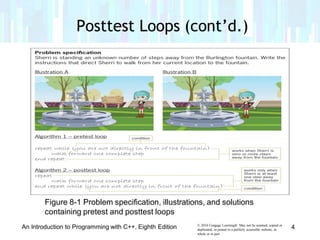
Figure 8-1 Problem specification, illustrations, and solutions
containing pretest and posttest loops
Posttest Loops (cont’d.)
© 2016 Cengage Learning®. May not be scanned, copied or
duplicated, or posted to a publicly accessible website, in
whole or in part.
An Introduction to Programming with C++, Eighth Edition 4
Posttest Loops (cont’d.)
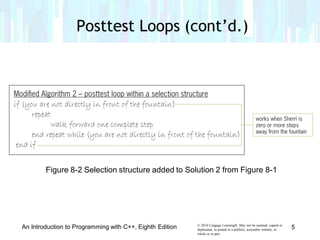
Figure 8-2 Selection structure added to Solution 2 from Figure 8-1
© 2016 Cengage Learning®. May not be scanned, copied or
duplicated, or posted to a publicly accessible website, in
whole or in part.
An Introduction to Programming with C++, Eighth Edition 5
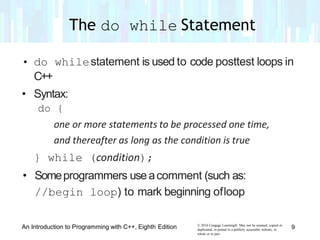
• Decision symbol in aflowchart (a diamond)
representing arepetition structure contains the loop
condition
• Decision symbol appears at the top ofapretest loop,
but at the bottom of aposttest loop
© 2016 Cengage Learning®. May not be scanned, copied or
duplicated, or posted to a publicly accessible website, in
whole or in part.
An Introduction to Programming with C++, Eighth Edition 6
Flowcharting a Posttest Loop
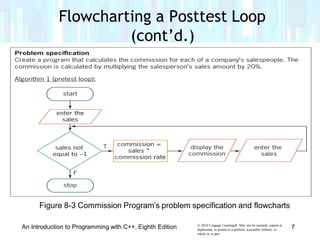
Figure 8-3 Commission Program’s problem specification and flowcharts
Flowcharting a Posttest Loop
(cont’d.)
© 2016 Cengage Learning®. May not be scanned, copied or
duplicated, or posted to a publicly accessible website, in
whole or in part.
An Introduction to Programming with C++, Eighth Edition 7
Figure 8-3 Commission Program’s problem specification and flowchart
Flowcharting a Posttest Loop
(cont’d.)
© 2016 Cengage Learning®. May not be scanned, copied or
duplicated, or posted to a publicly accessible website, in
whole or in part.
An Introduction to Programming with C++, Eighth Edition 8
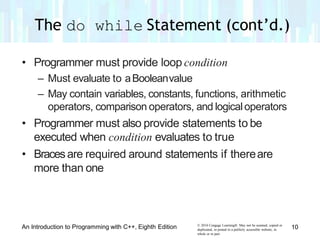
• do whilestatement is used to code posttest loops in
C++
• Syntax:
do {
one or more statements to be processed one time,
and thereafter as long as the condition is true
} while (condition);
• Someprogrammers useacomment (such as:
//begin loop) to mark beginning ofloop
© 2016 Cengage Learning®. May not be scanned, copied or
duplicated, or posted to a publicly accessible website, in
whole or in part.
An Introduction to Programming with C++, Eighth Edition 9
The do while Statement
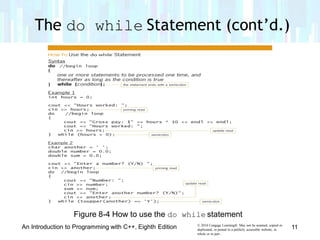
• Programmer must provide loop condition
– Must evaluate to aBooleanvalue
– May contain variables, constants, functions, arithmetic
operators, comparison operators, and logicaloperators
• Programmer must also provide statements to be
executed when condition evaluates to true
• Bracesare required around statements if thereare
more than one
© 2016 Cengage Learning®. May not be scanned, copied or
duplicated, or posted to a publicly accessible website, in
whole or in part.
An Introduction to Programming with C++, Eighth Edition 10
The do while Statement (cont’d.)
Figure 8-4 How to use the do while statement
The do while Statement (cont’d.)
© 2016 Cengage Learning®. May not be scanned, copied or
duplicated, or posted to a publicly accessible website, in
whole or in part.
An Introduction to Programming with C++, Eighth Edition 11
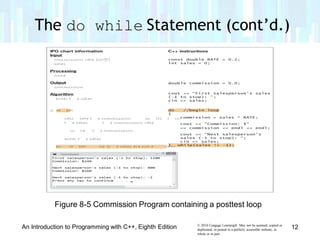
Figure 8-5 Commission Program containing a posttest loop
The do while Statement (cont’d.)
© 2016 Cengage Learning®. May not be scanned, copied or
duplicated, or posted to a publicly accessible website, in
whole or in part.
An Introduction to Programming with C++, Eighth Edition 12
• Like selection structures, repetition structures canbe
nested
• Youcan place one loop (the inner, or nestedloop)
inside another loop (the outerloop)
• Both loops can be pretest loops or posttest loops,or
the two loops may be differenttypes
• Programmer decides whether aproblem requires a
nested loop by analyzing the problemspecification
© 2016 Cengage Learning®. May not be scanned, copied or
duplicated, or posted to a publicly accessible website, in
whole or in part.
An Introduction to Programming with C++, Eighth Edition 13
Nested Repetition Structures
(cont’d.)
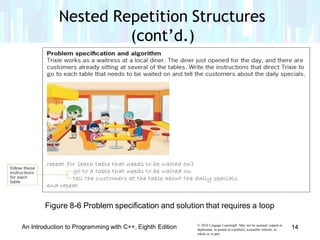
Figure 8-6 Problem specification and solution that requires a loop
© 2016 Cengage Learning®. May not be scanned, copied or
duplicated, or posted to a publicly accessible website, in
whole or in part.
An Introduction to Programming with C++, Eighth Edition 14
Nested Repetition Structures
(cont’d.)
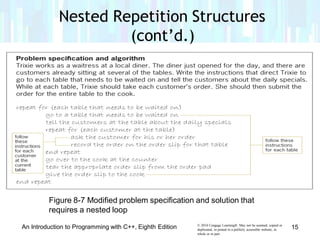
Figure 8-7 Modified problem specification and solution that
requires a nested loop
© 2016 Cengage Learning®. May not be scanned, copied or
duplicated, or posted to a publicly accessible website, in
whole or in part.
An Introduction to Programming with C++, Eighth Edition 15
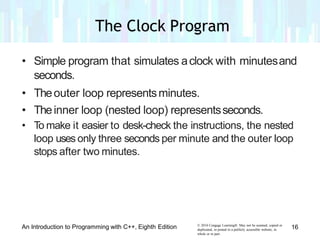
• Simple program that simulates aclock with minutesand
seconds.
• Theouter loop representsminutes.
• Theinner loop (nested loop) representsseconds.
• To make it easier to desk-check the instructions, the nested
loop uses only three seconds per minute and the outer loop
stops after two minutes.
© 2016 Cengage Learning®. May not be scanned, copied or
duplicated, or posted to a publicly accessible website, in
whole or in part.
An Introduction to Programming with C++, Eighth Edition 16
The Clock Program
The Clock Program (cont’d.)
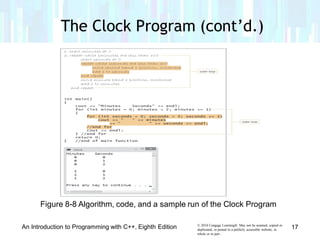
Figure 8-8 Algorithm, code, and a sample run of the Clock Program
© 2016 Cengage Learning®. May not be scanned, copied or
duplicated, or posted to a publicly accessible website, in
whole or in part.
An Introduction to Programming with C++, Eighth Edition 17
The Clock Program (cont’d.)
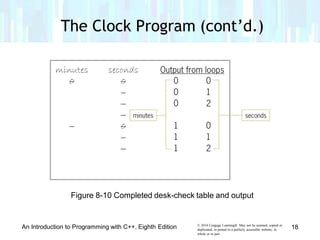
Figure 8-10 Completed desk-check table and output
© 2016 Cengage Learning®. May not be scanned, copied or
duplicated, or posted to a publicly accessible website, in
whole or in part.
An Introduction to Programming with C++, Eighth Edition 18
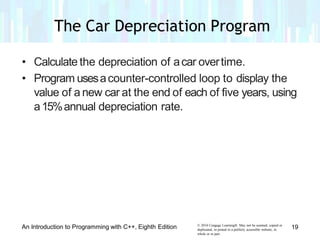
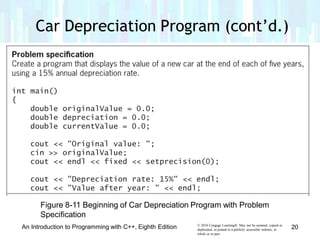
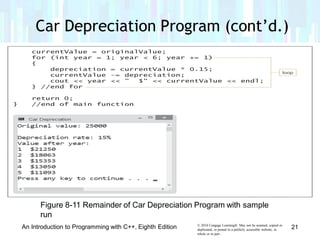
• Calculate the depreciation of acar overtime.
• Program usesacounter-controlled loop to display the
value of a new car at the end of each of five years, using
a15%annual depreciation rate.
© 2016 Cengage Learning®. May not be scanned, copied or
duplicated, or posted to a publicly accessible website, in
whole or in part.
An Introduction to Programming with C++, Eighth Edition 19
The Car Depreciation Program
Car Depreciation Program (cont’d.)
Figure 8-11 Beginning of Car Depreciation Program with Problem
Specification
© 2016 Cengage Learning®. May not be scanned, copied or
duplicated, or posted to a publicly accessible website, in
whole or in part.
An Introduction to Programming with C++, Eighth Edition 20
Car Depreciation Program (cont’d.)
Figure 8-11 Remainder of Car Depreciation Program with sample
run
© 2016 Cengage Learning®. May not be scanned, copied or
duplicated, or posted to a publicly accessible website, in
whole or in part.
An Introduction to Programming with C++, Eighth Edition 21
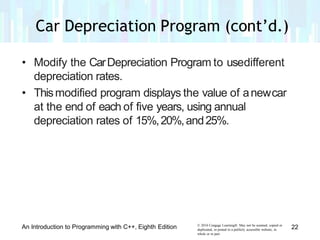
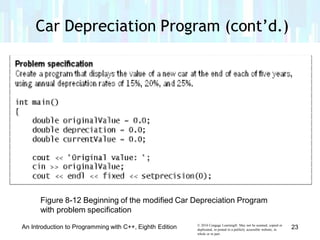
• Modify the CarDepreciation Program to usedifferent
depreciation rates.
• Thismodified program displays the value of anewcar
at the end of each of five years, using annual
depreciation rates of 15%,20%,and25%.
© 2016 Cengage Learning®. May not be scanned, copied or
duplicated, or posted to a publicly accessible website, in
whole or in part.
An Introduction to Programming with C++, Eighth Edition 22
Car Depreciation Program (cont’d.)
Figure 8-12 Beginning of the modified Car Depreciation Program
with problem specification
© 2016 Cengage Learning®. May not be scanned, copied or
duplicated, or posted to a publicly accessible website, in
whole or in part.
An Introduction to Programming with C++, Eighth Edition 23
Car Depreciation Program (cont’d.)
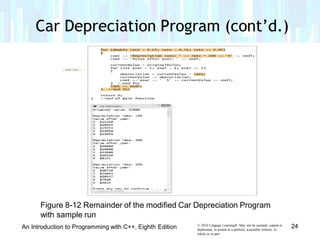
Figure 8-12 Remainder of the modified Car Depreciation Program
with sample run
© 2016 Cengage Learning®. May not be scanned, copied or
duplicated, or posted to a publicly accessible website, in
whole or in part.
24An Introduction to Programming with C++, Eighth Edition
Car Depreciation Program (cont’d.)
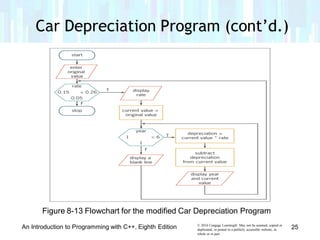
Figure 8-13 Flowchart for the modified Car Depreciation Program
© 2016 Cengage Learning®. May not be scanned, copied or
duplicated, or posted to a publicly accessible website, in
whole or in part.
An Introduction to Programming with C++, Eighth Edition 25
• Arepetition structure can be either apretest loop ora
posttest loop
• In apretest loop, the loop condition is evaluatedbefore
the instructions in the loop are processed
• In aposttest loop, the evaluation occurs afterthe
instructions within the loop areprocessed
• Usethe do whilestatement to code aposttest loop
in C++
• Useeither the while statement or the for statement
to code apretest loop inC++
© 2016 Cengage Learning®. May not be scanned, copied or
duplicated, or posted to a publicly accessible website, in
whole or in part.
An Introduction to Programming with C++, Eighth Edition 26
Summary
• Repetition structures can be nested, which meansone
loop (called the inner or nested loop) can be placed
inside another loop (called the outerloop)
• For nested repetition structures towork correctly, the
entire inner loop must be contained within the outer
loop
© 2016 Cengage Learning®. May not be scanned, copied or
duplicated, or posted to a publicly accessible website, in
whole or in part.
An Introduction to Programming with C++, Eighth Edition 27
Summary (cont’d.)

Lesson 8 more on repitition structure

  • 1.
    © 2016 CengageLearning®. May not be scanned, copied or Introduction to Programming in C++ Eighth Edition Lesson 8: More on the Repetition Structure duplicated, or posted to a publicly accessible website, in whole or in part.
  • 2.
    • Include aposttestloop in pseudocode • Include aposttest loop in aflowchart • Codeaposttest loop using the C++do while statement • Nest repetition structures © 2016 Cengage Learning®. May not be scanned, copied or duplicated, or posted to a publicly accessible website, in whole or in part. An Introduction to Programming with C++, Eighth Edition 2 Objectives
  • 3.
    • Repetition structurescan be either pretest orposttest loops • Pretest loop – condition evaluated before instructions are processed • Posttest loop – condition evaluated afterinstructions are processed • Posttest loop’s instructions are always processedat least once • Pretest loop’s instructions may never beprocessed © 2016 Cengage Learning®. May not be scanned, copied or duplicated, or posted to a publicly accessible website, in whole or in part. An Introduction to Programming with C++, Eighth Edition 3 Posttest Loops
  • 4.
    Figure 8-1 Problemspecification, illustrations, and solutions containing pretest and posttest loops Posttest Loops (cont’d.) © 2016 Cengage Learning®. May not be scanned, copied or duplicated, or posted to a publicly accessible website, in whole or in part. An Introduction to Programming with C++, Eighth Edition 4
  • 5.
    Posttest Loops (cont’d.) Figure8-2 Selection structure added to Solution 2 from Figure 8-1 © 2016 Cengage Learning®. May not be scanned, copied or duplicated, or posted to a publicly accessible website, in whole or in part. An Introduction to Programming with C++, Eighth Edition 5
  • 6.
    • Decision symbolin aflowchart (a diamond) representing arepetition structure contains the loop condition • Decision symbol appears at the top ofapretest loop, but at the bottom of aposttest loop © 2016 Cengage Learning®. May not be scanned, copied or duplicated, or posted to a publicly accessible website, in whole or in part. An Introduction to Programming with C++, Eighth Edition 6 Flowcharting a Posttest Loop
  • 7.
    Figure 8-3 CommissionProgram’s problem specification and flowcharts Flowcharting a Posttest Loop (cont’d.) © 2016 Cengage Learning®. May not be scanned, copied or duplicated, or posted to a publicly accessible website, in whole or in part. An Introduction to Programming with C++, Eighth Edition 7
  • 8.
    Figure 8-3 CommissionProgram’s problem specification and flowchart Flowcharting a Posttest Loop (cont’d.) © 2016 Cengage Learning®. May not be scanned, copied or duplicated, or posted to a publicly accessible website, in whole or in part. An Introduction to Programming with C++, Eighth Edition 8
  • 9.
    • do whilestatementis used to code posttest loops in C++ • Syntax: do { one or more statements to be processed one time, and thereafter as long as the condition is true } while (condition); • Someprogrammers useacomment (such as: //begin loop) to mark beginning ofloop © 2016 Cengage Learning®. May not be scanned, copied or duplicated, or posted to a publicly accessible website, in whole or in part. An Introduction to Programming with C++, Eighth Edition 9 The do while Statement
  • 10.
    • Programmer mustprovide loop condition – Must evaluate to aBooleanvalue – May contain variables, constants, functions, arithmetic operators, comparison operators, and logicaloperators • Programmer must also provide statements to be executed when condition evaluates to true • Bracesare required around statements if thereare more than one © 2016 Cengage Learning®. May not be scanned, copied or duplicated, or posted to a publicly accessible website, in whole or in part. An Introduction to Programming with C++, Eighth Edition 10 The do while Statement (cont’d.)
  • 11.
    Figure 8-4 Howto use the do while statement The do while Statement (cont’d.) © 2016 Cengage Learning®. May not be scanned, copied or duplicated, or posted to a publicly accessible website, in whole or in part. An Introduction to Programming with C++, Eighth Edition 11
  • 12.
    Figure 8-5 CommissionProgram containing a posttest loop The do while Statement (cont’d.) © 2016 Cengage Learning®. May not be scanned, copied or duplicated, or posted to a publicly accessible website, in whole or in part. An Introduction to Programming with C++, Eighth Edition 12
  • 13.
    • Like selectionstructures, repetition structures canbe nested • Youcan place one loop (the inner, or nestedloop) inside another loop (the outerloop) • Both loops can be pretest loops or posttest loops,or the two loops may be differenttypes • Programmer decides whether aproblem requires a nested loop by analyzing the problemspecification © 2016 Cengage Learning®. May not be scanned, copied or duplicated, or posted to a publicly accessible website, in whole or in part. An Introduction to Programming with C++, Eighth Edition 13 Nested Repetition Structures
  • 14.
    Nested Repetition Structures (cont’d.) Figure8-6 Problem specification and solution that requires a loop © 2016 Cengage Learning®. May not be scanned, copied or duplicated, or posted to a publicly accessible website, in whole or in part. An Introduction to Programming with C++, Eighth Edition 14
  • 15.
    Nested Repetition Structures (cont’d.) Figure8-7 Modified problem specification and solution that requires a nested loop © 2016 Cengage Learning®. May not be scanned, copied or duplicated, or posted to a publicly accessible website, in whole or in part. An Introduction to Programming with C++, Eighth Edition 15
  • 16.
    • Simple programthat simulates aclock with minutesand seconds. • Theouter loop representsminutes. • Theinner loop (nested loop) representsseconds. • To make it easier to desk-check the instructions, the nested loop uses only three seconds per minute and the outer loop stops after two minutes. © 2016 Cengage Learning®. May not be scanned, copied or duplicated, or posted to a publicly accessible website, in whole or in part. An Introduction to Programming with C++, Eighth Edition 16 The Clock Program
  • 17.
    The Clock Program(cont’d.) Figure 8-8 Algorithm, code, and a sample run of the Clock Program © 2016 Cengage Learning®. May not be scanned, copied or duplicated, or posted to a publicly accessible website, in whole or in part. An Introduction to Programming with C++, Eighth Edition 17
  • 18.
    The Clock Program(cont’d.) Figure 8-10 Completed desk-check table and output © 2016 Cengage Learning®. May not be scanned, copied or duplicated, or posted to a publicly accessible website, in whole or in part. An Introduction to Programming with C++, Eighth Edition 18
  • 19.
    • Calculate thedepreciation of acar overtime. • Program usesacounter-controlled loop to display the value of a new car at the end of each of five years, using a15%annual depreciation rate. © 2016 Cengage Learning®. May not be scanned, copied or duplicated, or posted to a publicly accessible website, in whole or in part. An Introduction to Programming with C++, Eighth Edition 19 The Car Depreciation Program
  • 20.
    Car Depreciation Program(cont’d.) Figure 8-11 Beginning of Car Depreciation Program with Problem Specification © 2016 Cengage Learning®. May not be scanned, copied or duplicated, or posted to a publicly accessible website, in whole or in part. An Introduction to Programming with C++, Eighth Edition 20
  • 21.
    Car Depreciation Program(cont’d.) Figure 8-11 Remainder of Car Depreciation Program with sample run © 2016 Cengage Learning®. May not be scanned, copied or duplicated, or posted to a publicly accessible website, in whole or in part. An Introduction to Programming with C++, Eighth Edition 21
  • 22.
    • Modify theCarDepreciation Program to usedifferent depreciation rates. • Thismodified program displays the value of anewcar at the end of each of five years, using annual depreciation rates of 15%,20%,and25%. © 2016 Cengage Learning®. May not be scanned, copied or duplicated, or posted to a publicly accessible website, in whole or in part. An Introduction to Programming with C++, Eighth Edition 22 Car Depreciation Program (cont’d.)
  • 23.
    Car Depreciation Program(cont’d.) Figure 8-12 Beginning of the modified Car Depreciation Program with problem specification © 2016 Cengage Learning®. May not be scanned, copied or duplicated, or posted to a publicly accessible website, in whole or in part. An Introduction to Programming with C++, Eighth Edition 23
  • 24.
    Car Depreciation Program(cont’d.) Figure 8-12 Remainder of the modified Car Depreciation Program with sample run © 2016 Cengage Learning®. May not be scanned, copied or duplicated, or posted to a publicly accessible website, in whole or in part. 24An Introduction to Programming with C++, Eighth Edition
  • 25.
    Car Depreciation Program(cont’d.) Figure 8-13 Flowchart for the modified Car Depreciation Program © 2016 Cengage Learning®. May not be scanned, copied or duplicated, or posted to a publicly accessible website, in whole or in part. An Introduction to Programming with C++, Eighth Edition 25
  • 26.
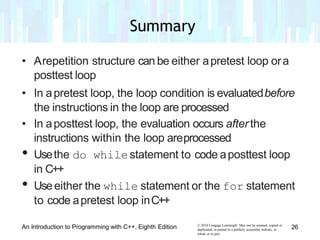
    • Arepetition structurecan be either apretest loop ora posttest loop • In apretest loop, the loop condition is evaluatedbefore the instructions in the loop are processed • In aposttest loop, the evaluation occurs afterthe instructions within the loop areprocessed • Usethe do whilestatement to code aposttest loop in C++ • Useeither the while statement or the for statement to code apretest loop inC++ © 2016 Cengage Learning®. May not be scanned, copied or duplicated, or posted to a publicly accessible website, in whole or in part. An Introduction to Programming with C++, Eighth Edition 26 Summary
  • 27.
    • Repetition structurescan be nested, which meansone loop (called the inner or nested loop) can be placed inside another loop (called the outerloop) • For nested repetition structures towork correctly, the entire inner loop must be contained within the outer loop © 2016 Cengage Learning®. May not be scanned, copied or duplicated, or posted to a publicly accessible website, in whole or in part. An Introduction to Programming with C++, Eighth Edition 27 Summary (cont’d.)