© 2016 Cengage Learning®. May not be scanned, copied or
Introduction to Programming in C++
Eighth Edition
Lesson 7.1:
The Repetition Structure
duplicated, or posted to a publicly accessible website, in whole
or in part.
• Differentiate between apretest loop and aposttestloop
• Include apretest loop in pseudocode
• Include apretest loop in aflowchart
• Codeapretest loop using the C++whilestatement
• Utilize counter and accumulator variables
• Codeapretest loop using the C++forstatement
© 2016 Cengage Learning®. May not be scanned, copied or
duplicated, or posted to a publicly accessible website, in whole
or in part.
2An Introduction to Programming with C++, Eighth Edition
Objectives
• Therepetition structure, or loop, processes one or
more instructions repeatedly
• Every loop contains aBoolean condition that controls
whether the instructions arerepeated
• Alooping condition sayswhether to continue looping
through instructions
• Aloop exit condition sayswhether to stop looping
through the instructions
• Every looping condition can be expressed asaloop exit
condition (its opposite)
© 2016 Cengage Learning®. May not be scanned, copied or
duplicated, or posted to a publicly accessible website, in whole
or in part.
3An Introduction to Programming with C++, Eighth Edition
Repeating Program Instructions
• C++useslooping conditions in repetitionstructures
• Arepetition structure can be pretest orposttest
• In apretest loop, the condition is evaluated beforethe
instructions in the loop areprocessed
• In aposttest loop, the condition is evaluated after the
instructions in the loop areprocessed
• In both cases,the condition is evaluated witheach
repetition
© 2016 Cengage Learning®. May not be scanned, copied or
duplicated, or posted to a publicly accessible website, in whole
or in part.
4An Introduction to Programming with C++, Eighth Edition
Repeating Program Instructions
(cont’d.)
• Theinstructions in aposttest loop will alwaysbe
processed at least once
• Instructions in apretest loop may not beprocessed if
the condition initially evaluates tofalse
• Therepeatable instructions in aloop are called the loop
body
• Thecondition in aloop must evaluate to aBoolean
value
© 2016 Cengage Learning®. May not be scanned, copied or
duplicated, or posted to a publicly accessible website, in whole
or in part.
5An Introduction to Programming with C++, Eighth Edition
Repeating Program Instructions
(cont’d.)
Repeating Program Instructions
(cont’d.)
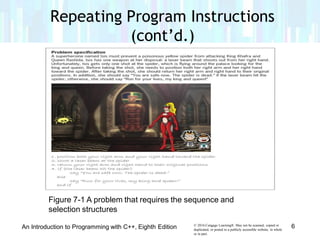
Figure 7-1 A problem that requires the sequence and
selection structures
© 2016 Cengage Learning®. May not be scanned, copied or
duplicated, or posted to a publicly accessible website, in whole
or in part.
6An Introduction to Programming with C++, Eighth Edition
Repeating Program Instructions
(cont’d.)
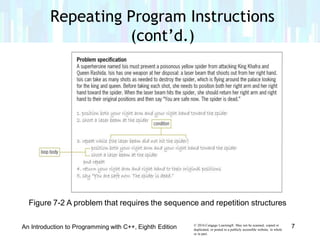
Figure 7-2 A problem that requires the sequence and repetition structures
© 2016 Cengage Learning®. May not be scanned, copied or
duplicated, or posted to a publicly accessible website, in whole
or in part.
7An Introduction to Programming with C++, Eighth Edition
• Most loops have acondition and aloop body
• Someloops require the user to enter aspecialsentinel
value to end theloop
• Sentinel values should be easily distinguishable from
the valid data recognized by theprogram
• When aloop’s condition evaluates to true,the
instructions in the loop bodyare processed
• Otherwise, the instructions are skipped andprocessing
continues with the first instruction after the loop
© 2016 Cengage Learning®. May not be scanned, copied or
duplicated, or posted to a publicly accessible website, in whole
or in part.
8An Introduction to Programming with C++, Eighth Edition
Using a Pretest Loop to Solve a Real-
World Problem
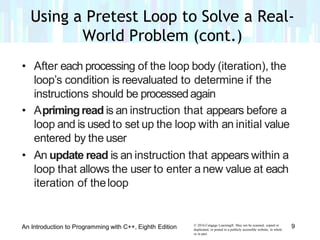
• After each processing of the loop body (iteration), the
loop’s condition is reevaluated to determine if the
instructions should be processedagain
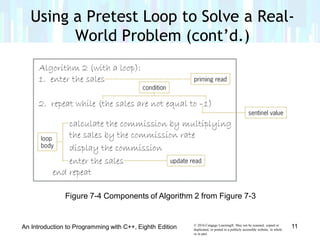
• Aprimingread is an instruction that appears before a
loop and is used to set up the loop with an initial value
entered by the user
• An update read is an instruction that appears within a
loop that allows the user to enter a new value at each
iteration of theloop
© 2016 Cengage Learning®. May not be scanned, copied or
duplicated, or posted to a publicly accessible website, in whole
or in part.
9An Introduction to Programming with C++, Eighth Edition
Using a Pretest Loop to Solve a Real-
World Problem (cont.)
Using a Pretest Loop to Solve a Real-
World Problem (cont’d.)
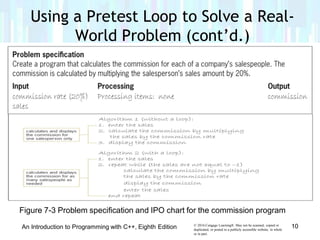
Figure 7-3 Problem specification and IPO chart for the commission program
© 2016 Cengage Learning®. May not be scanned, copied or
duplicated, or posted to a publicly accessible website, in whole
or in part.
10An Introduction to Programming with C++, Eighth Edition
Figure 7-4 Components of Algorithm 2 from Figure 7-3
Using a Pretest Loop to Solve a Real-
World Problem (cont’d.)
© 2016 Cengage Learning®. May not be scanned, copied or
duplicated, or posted to a publicly accessible website, in whole
or in part.
11An Introduction to Programming with C++, Eighth Edition
• Thediamond symbol in aflowchart is the decision
symbol – represents repetition structures
• Adiamond representing arepetition structure contains
aBoolean condition
• Thecondition determines whether the instructionsin
the loop areprocessed
• Adiamond representing arepetition structure hasone
flowline leading into it and two leading out
© 2016 Cengage Learning®. May not be scanned, copied or
duplicated, or posted to a publicly accessible website, in whole
or in part.
12An Introduction to Programming with C++, Eighth Edition
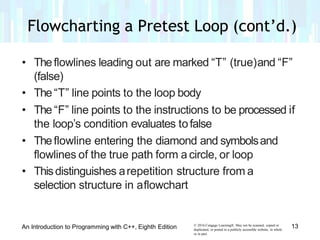
Flowcharting a Pretest Loop
• Theflowlines leading out are marked “T” (true)and “F”
(false)
• The“T” line points to the loop body
• The “F” line points to the instructions to be processed if
the loop’s condition evaluates tofalse
• Theflowline entering the diamond and symbolsand
flowlines of the true path form a circle, or loop
• Thisdistinguishes arepetition structure from a
selection structure in aflowchart
© 2016 Cengage Learning®. May not be scanned, copied or
duplicated, or posted to a publicly accessible website, in whole
or in part.
13An Introduction to Programming with C++, Eighth Edition
Flowcharting a Pretest Loop (cont’d.)
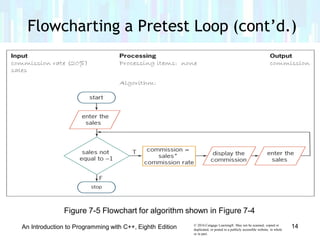
Figure 7-5 Flowchart for algorithm shown in Figure 7-4
© 2016 Cengage Learning®. May not be scanned, copied or
duplicated, or posted to a publicly accessible website, in whole
or in part.
14An Introduction to Programming with C++, Eighth Edition
Flowcharting a Pretest Loop (cont’d.)
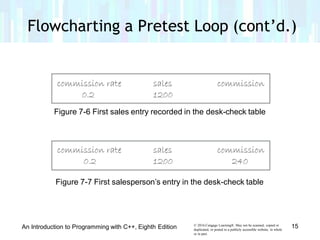
Figure 7-6 First sales entry recorded in the desk-check table
Figure 7-7 First salesperson’s entry in the desk-check table
© 2016 Cengage Learning®. May not be scanned, copied or
duplicated, or posted to a publicly accessible website, in whole
or in part.
15An Introduction to Programming with C++, Eighth Edition
Flowcharting a Pretest Loop (cont’d.)
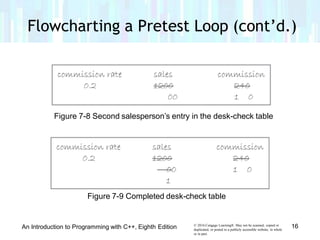
Figure 7-8 Second salesperson’s entry in the desk-check table
Figure 7-9 Completed desk-check table
© 2016 Cengage Learning®. May not be scanned, copied or
duplicated, or posted to a publicly accessible website, in whole
or in part.
16An Introduction to Programming with C++, Eighth Edition
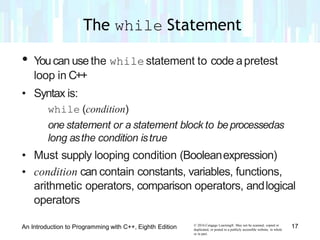
• Youcan usethe while statement to code apretest
loop in C++
• Syntax is:
while (condition)
one statement or a statement block to beprocessedas
long asthe condition istrue
• Must supply looping condition (Booleanexpression)
• condition can contain constants, variables, functions,
arithmetic operators, comparison operators, andlogical
operators
© 2016 Cengage Learning®. May not be scanned, copied or
duplicated, or posted to a publicly accessible website, in whole
or in part.
17An Introduction to Programming with C++, Eighth Edition
The while Statement
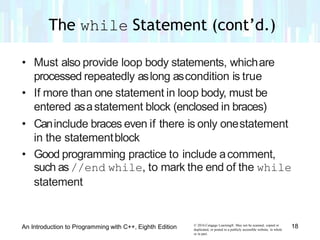
• Must also provide loop body statements, whichare
processed repeatedly aslong ascondition is true
• If more than one statement in loop body, must be
entered asastatement block (enclosed in braces)
• Caninclude braces even if there is only onestatement
in the statementblock
• Good programming practice to include acomment,
such as//end while, to mark the end of the while
statement
© 2016 Cengage Learning®. May not be scanned, copied or
duplicated, or posted to a publicly accessible website, in whole
or in part.
18An Introduction to Programming with C++, Eighth Edition
The while Statement (cont’d.)
• Aloop whose instructions are processed indefinitely is
called an infinite loopor endlessloop
• Youcan usually stop aprogram that hasentered an
infinite loop by pressingCtrl+c
© 2016 Cengage Learning®. May not be scanned, copied or
duplicated, or posted to a publicly accessible website, in whole
or in part.
19An Introduction to Programming with C++, Eighth Edition
The while Statement (cont’d.)
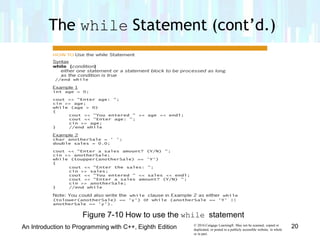
Figure 7-10 How to use the while statement
The while Statement (cont’d.)
© 2016 Cengage Learning®. May not be scanned, copied or
duplicated, or posted to a publicly accessible website, in whole
or in part.
20An Introduction to Programming with C++, Eighth Edition
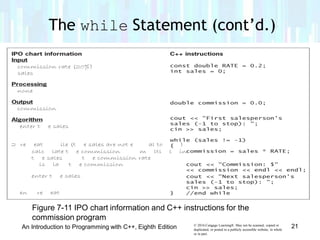
Figure 7-11 IPO chart information and C++ instructions for the
commission program
The while Statement (cont’d.)
© 2016 Cengage Learning®. May not be scanned, copied or
duplicated, or posted to a publicly accessible website, in whole
or in part.
21An Introduction to Programming with C++, Eighth Edition
The while Statement (cont’d.)
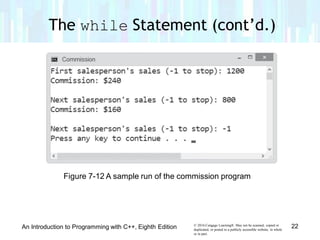
Figure 7-12 A sample run of the commission program
© 2016 Cengage Learning®. May not be scanned, copied or
duplicated, or posted to a publicly accessible website, in whole
or in part.
22An Introduction to Programming with C++, Eighth Edition

Lesson 7.1 repitition structure

  • 1.
    © 2016 CengageLearning®. May not be scanned, copied or Introduction to Programming in C++ Eighth Edition Lesson 7.1: The Repetition Structure duplicated, or posted to a publicly accessible website, in whole or in part.
  • 2.
    • Differentiate betweenapretest loop and aposttestloop • Include apretest loop in pseudocode • Include apretest loop in aflowchart • Codeapretest loop using the C++whilestatement • Utilize counter and accumulator variables • Codeapretest loop using the C++forstatement © 2016 Cengage Learning®. May not be scanned, copied or duplicated, or posted to a publicly accessible website, in whole or in part. 2An Introduction to Programming with C++, Eighth Edition Objectives
  • 3.
    • Therepetition structure,or loop, processes one or more instructions repeatedly • Every loop contains aBoolean condition that controls whether the instructions arerepeated • Alooping condition sayswhether to continue looping through instructions • Aloop exit condition sayswhether to stop looping through the instructions • Every looping condition can be expressed asaloop exit condition (its opposite) © 2016 Cengage Learning®. May not be scanned, copied or duplicated, or posted to a publicly accessible website, in whole or in part. 3An Introduction to Programming with C++, Eighth Edition Repeating Program Instructions
  • 4.
    • C++useslooping conditionsin repetitionstructures • Arepetition structure can be pretest orposttest • In apretest loop, the condition is evaluated beforethe instructions in the loop areprocessed • In aposttest loop, the condition is evaluated after the instructions in the loop areprocessed • In both cases,the condition is evaluated witheach repetition © 2016 Cengage Learning®. May not be scanned, copied or duplicated, or posted to a publicly accessible website, in whole or in part. 4An Introduction to Programming with C++, Eighth Edition Repeating Program Instructions (cont’d.)
  • 5.
    • Theinstructions inaposttest loop will alwaysbe processed at least once • Instructions in apretest loop may not beprocessed if the condition initially evaluates tofalse • Therepeatable instructions in aloop are called the loop body • Thecondition in aloop must evaluate to aBoolean value © 2016 Cengage Learning®. May not be scanned, copied or duplicated, or posted to a publicly accessible website, in whole or in part. 5An Introduction to Programming with C++, Eighth Edition Repeating Program Instructions (cont’d.)
  • 6.
    Repeating Program Instructions (cont’d.) Figure7-1 A problem that requires the sequence and selection structures © 2016 Cengage Learning®. May not be scanned, copied or duplicated, or posted to a publicly accessible website, in whole or in part. 6An Introduction to Programming with C++, Eighth Edition
  • 7.
    Repeating Program Instructions (cont’d.) Figure7-2 A problem that requires the sequence and repetition structures © 2016 Cengage Learning®. May not be scanned, copied or duplicated, or posted to a publicly accessible website, in whole or in part. 7An Introduction to Programming with C++, Eighth Edition
  • 8.
    • Most loopshave acondition and aloop body • Someloops require the user to enter aspecialsentinel value to end theloop • Sentinel values should be easily distinguishable from the valid data recognized by theprogram • When aloop’s condition evaluates to true,the instructions in the loop bodyare processed • Otherwise, the instructions are skipped andprocessing continues with the first instruction after the loop © 2016 Cengage Learning®. May not be scanned, copied or duplicated, or posted to a publicly accessible website, in whole or in part. 8An Introduction to Programming with C++, Eighth Edition Using a Pretest Loop to Solve a Real- World Problem
  • 9.
    • After eachprocessing of the loop body (iteration), the loop’s condition is reevaluated to determine if the instructions should be processedagain • Aprimingread is an instruction that appears before a loop and is used to set up the loop with an initial value entered by the user • An update read is an instruction that appears within a loop that allows the user to enter a new value at each iteration of theloop © 2016 Cengage Learning®. May not be scanned, copied or duplicated, or posted to a publicly accessible website, in whole or in part. 9An Introduction to Programming with C++, Eighth Edition Using a Pretest Loop to Solve a Real- World Problem (cont.)
  • 10.
    Using a PretestLoop to Solve a Real- World Problem (cont’d.) Figure 7-3 Problem specification and IPO chart for the commission program © 2016 Cengage Learning®. May not be scanned, copied or duplicated, or posted to a publicly accessible website, in whole or in part. 10An Introduction to Programming with C++, Eighth Edition
  • 11.
    Figure 7-4 Componentsof Algorithm 2 from Figure 7-3 Using a Pretest Loop to Solve a Real- World Problem (cont’d.) © 2016 Cengage Learning®. May not be scanned, copied or duplicated, or posted to a publicly accessible website, in whole or in part. 11An Introduction to Programming with C++, Eighth Edition
  • 12.
    • Thediamond symbolin aflowchart is the decision symbol – represents repetition structures • Adiamond representing arepetition structure contains aBoolean condition • Thecondition determines whether the instructionsin the loop areprocessed • Adiamond representing arepetition structure hasone flowline leading into it and two leading out © 2016 Cengage Learning®. May not be scanned, copied or duplicated, or posted to a publicly accessible website, in whole or in part. 12An Introduction to Programming with C++, Eighth Edition Flowcharting a Pretest Loop
  • 13.
    • Theflowlines leadingout are marked “T” (true)and “F” (false) • The“T” line points to the loop body • The “F” line points to the instructions to be processed if the loop’s condition evaluates tofalse • Theflowline entering the diamond and symbolsand flowlines of the true path form a circle, or loop • Thisdistinguishes arepetition structure from a selection structure in aflowchart © 2016 Cengage Learning®. May not be scanned, copied or duplicated, or posted to a publicly accessible website, in whole or in part. 13An Introduction to Programming with C++, Eighth Edition Flowcharting a Pretest Loop (cont’d.)
  • 14.
    Flowcharting a PretestLoop (cont’d.) Figure 7-5 Flowchart for algorithm shown in Figure 7-4 © 2016 Cengage Learning®. May not be scanned, copied or duplicated, or posted to a publicly accessible website, in whole or in part. 14An Introduction to Programming with C++, Eighth Edition
  • 15.
    Flowcharting a PretestLoop (cont’d.) Figure 7-6 First sales entry recorded in the desk-check table Figure 7-7 First salesperson’s entry in the desk-check table © 2016 Cengage Learning®. May not be scanned, copied or duplicated, or posted to a publicly accessible website, in whole or in part. 15An Introduction to Programming with C++, Eighth Edition
  • 16.
    Flowcharting a PretestLoop (cont’d.) Figure 7-8 Second salesperson’s entry in the desk-check table Figure 7-9 Completed desk-check table © 2016 Cengage Learning®. May not be scanned, copied or duplicated, or posted to a publicly accessible website, in whole or in part. 16An Introduction to Programming with C++, Eighth Edition
  • 17.
    • Youcan usethewhile statement to code apretest loop in C++ • Syntax is: while (condition) one statement or a statement block to beprocessedas long asthe condition istrue • Must supply looping condition (Booleanexpression) • condition can contain constants, variables, functions, arithmetic operators, comparison operators, andlogical operators © 2016 Cengage Learning®. May not be scanned, copied or duplicated, or posted to a publicly accessible website, in whole or in part. 17An Introduction to Programming with C++, Eighth Edition The while Statement
  • 18.
    • Must alsoprovide loop body statements, whichare processed repeatedly aslong ascondition is true • If more than one statement in loop body, must be entered asastatement block (enclosed in braces) • Caninclude braces even if there is only onestatement in the statementblock • Good programming practice to include acomment, such as//end while, to mark the end of the while statement © 2016 Cengage Learning®. May not be scanned, copied or duplicated, or posted to a publicly accessible website, in whole or in part. 18An Introduction to Programming with C++, Eighth Edition The while Statement (cont’d.)
  • 19.
    • Aloop whoseinstructions are processed indefinitely is called an infinite loopor endlessloop • Youcan usually stop aprogram that hasentered an infinite loop by pressingCtrl+c © 2016 Cengage Learning®. May not be scanned, copied or duplicated, or posted to a publicly accessible website, in whole or in part. 19An Introduction to Programming with C++, Eighth Edition The while Statement (cont’d.)
  • 20.
    Figure 7-10 Howto use the while statement The while Statement (cont’d.) © 2016 Cengage Learning®. May not be scanned, copied or duplicated, or posted to a publicly accessible website, in whole or in part. 20An Introduction to Programming with C++, Eighth Edition
  • 21.
    Figure 7-11 IPOchart information and C++ instructions for the commission program The while Statement (cont’d.) © 2016 Cengage Learning®. May not be scanned, copied or duplicated, or posted to a publicly accessible website, in whole or in part. 21An Introduction to Programming with C++, Eighth Edition
  • 22.
    The while Statement(cont’d.) Figure 7-12 A sample run of the commission program © 2016 Cengage Learning®. May not be scanned, copied or duplicated, or posted to a publicly accessible website, in whole or in part. 22An Introduction to Programming with C++, Eighth Edition