Introduction to Programming in C++
Eight Edition
Lesson 4.2:
5th step : Desk Check
An Introduction to Programming with C++, Eight Edition
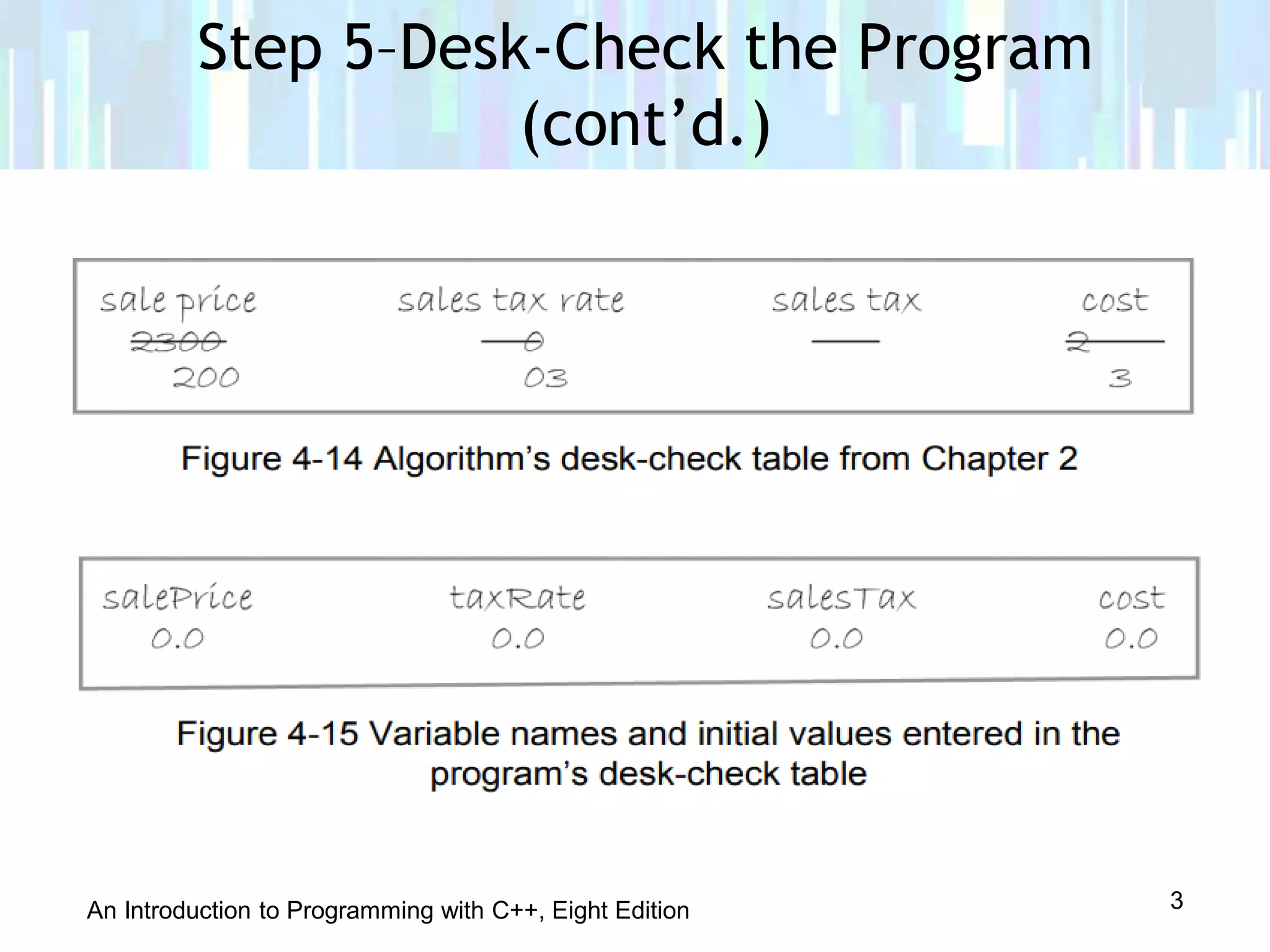
• Fifth step is to desk-check the program to make sure
instructions were translated correctly
• You should desk-check the program using sample data
used to desk-check the algorithm
• Results of both desk-checks should be the same
• First, place names of the declared memory locations in a
new desk-check table along with each memory location’s
initial value
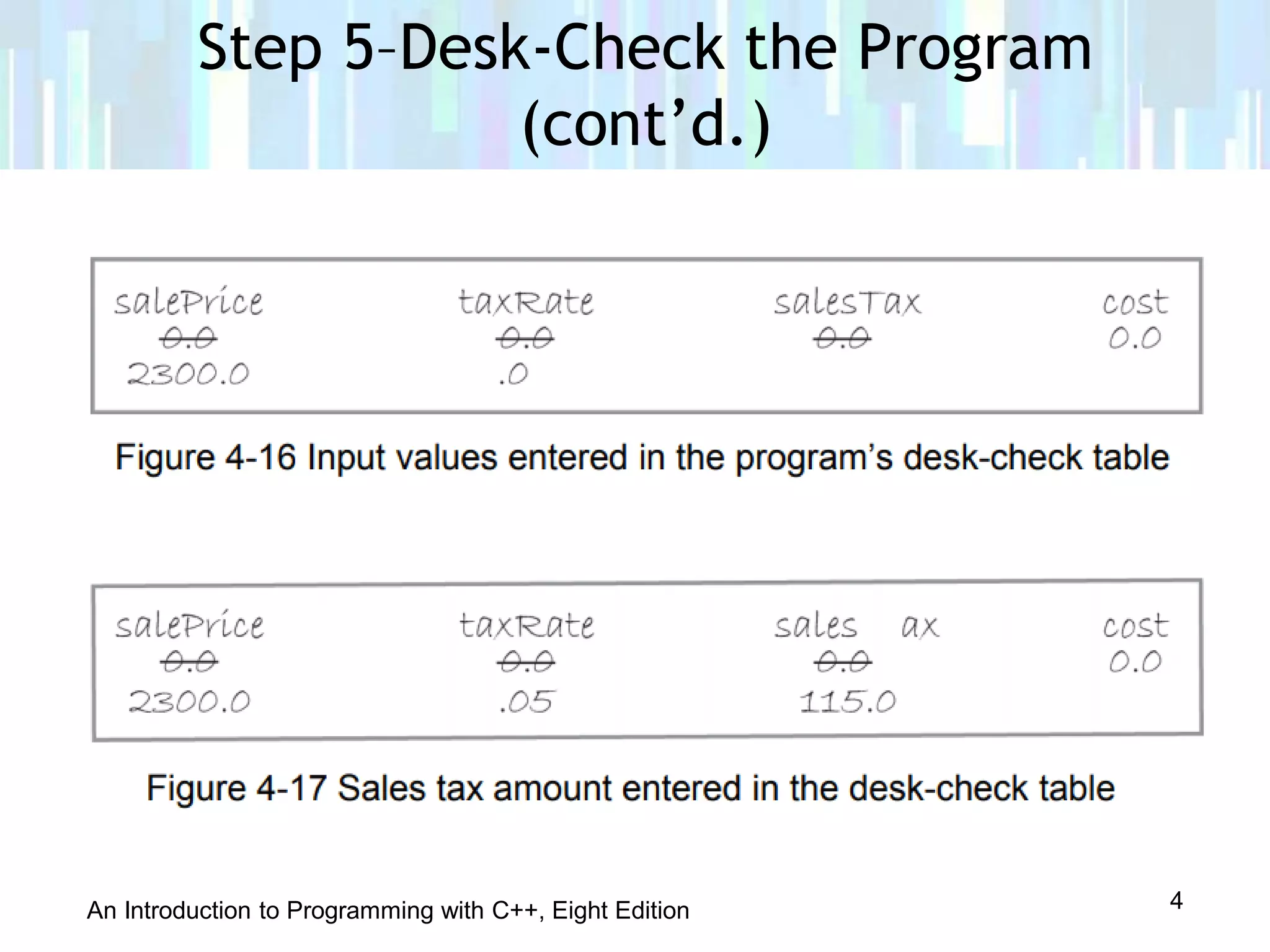
• Next, desk-check remaining C++ instructions in order,
recording any changes made to the variables
Step 5–Desk-Check the Program
2
An Introduction to Programming with C++, Eight Edition
Step 5–Desk-Check the Program
(cont’d.)
3
An Introduction to Programming with C++, Eight Edition
Step 5–Desk-Check the Program
(cont’d.)
4
An Introduction to Programming with C++, Eight Edition
• Final step in the problem-solving process
• You evaluate a program by running the program on the
computer and entering the sample data used when desk-
checking the program
• If evaluation reveals errors (known as bugs), they must
be fixed
• Process of locating and fixing errors is called debugging
• Two types of bugs: syntax errors and logic errors
Step 6–Evaluate and Modify the
Program
5
An Introduction to Programming with C++, Eight Edition
• Syntax errors result from breaking programming
language’s rules; cause compiler errors
• Logic errors don’t cause compiler errors; can be hard to
identify – Example: entering instructions in the wrong
order
• Need a text editor to enter C++ instructions
• Instructions are called source code and are saved in
source files with extension .cpp
• Need a compiler to translate source code into machine
code (also called object code)
Step 6–Evaluate and Modify the
Program (cont’d.)
6
An Introduction to Programming with C++, Eight Edition
• Compiler saves object code in object files with
extension .obj
• Linker combines .obj files with other machine code
necessary to run the program and produces an executable
file with extension .exe
• An IDE (integrated development environment) is a
development tool that contains both an editor and
compiler
• A command-line compiler contains only the compiler
and requires a separate editor to enter source code
Step 6–Evaluate and Modify the
Program (cont’d.)
7
An Introduction to Programming with C++, Eight Edition
• A comment is a form of internal documentation;
written by placing // in front of the comment text
– Ignored by the compiler
– Considered good programming practice; makes code
more readable
• A #include directive allows you to merge the source code
in one file with that in another file
• The #include <iostream> is required when using the cin
or cout stream objects
– Not a statement, so no semicolon needed at the
end
Step 6–Evaluate and Modify the
Program (cont’d.)
8
An Introduction to Programming with C++, Eight Edition
• A using directive tells the compiler where in internal
memory it can find definitions of C++ keywords and
classes like double or string
• The using namespace std; directive indicates that the
definitions of the standard C++ keywords and classes are
located in the std (standard) namespace
– Is a statement, so semicolon required at the end
• A namespace is a special area in internal memory
Step 6–Evaluate and Modify the
Program (cont’d.)
9
An Introduction to Programming with C++, Eight Edition
• A function is a block of code that performs a task
• Functions have parentheses following their name
(Example: main())
• Some functions require information between the
parentheses; others do not
• Every C++ program has one (and only one) main
function; this is where program execution begins
• Some functions return a value, and the data type they
return appears to the left of the function name
– Example: int main()
Step 6–Evaluate and Modify the
Program (cont’d.)
10
An Introduction to Programming with C++, Eight Edition
• Other functions do not return a value, and void appears
to the left of the function name
• The return type, name, and parameters (information in
parentheses) constitute the function header, which marks
the beginning of the function
• After the function header, you enter the function’s code
• You enclose a function’s code in a set of braces ({})
• The code between the braces is called the function body
Step 6–Evaluate and Modify the
Program (cont’d.)
11
An Introduction to Programming with C++, Eight Edition
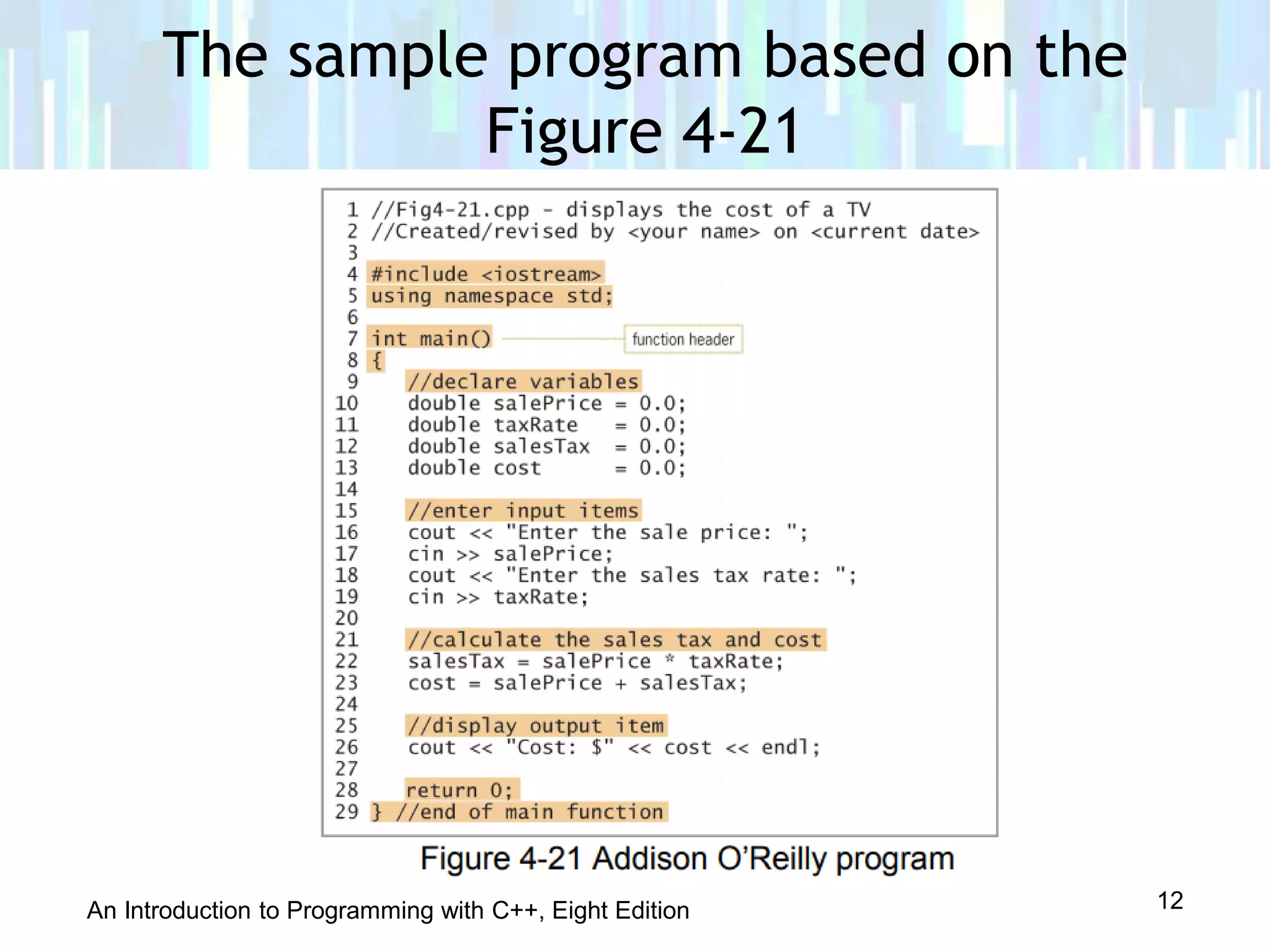
The sample program based on the
Figure 4-21
12
An Introduction to Programming with C++, Eight Edition
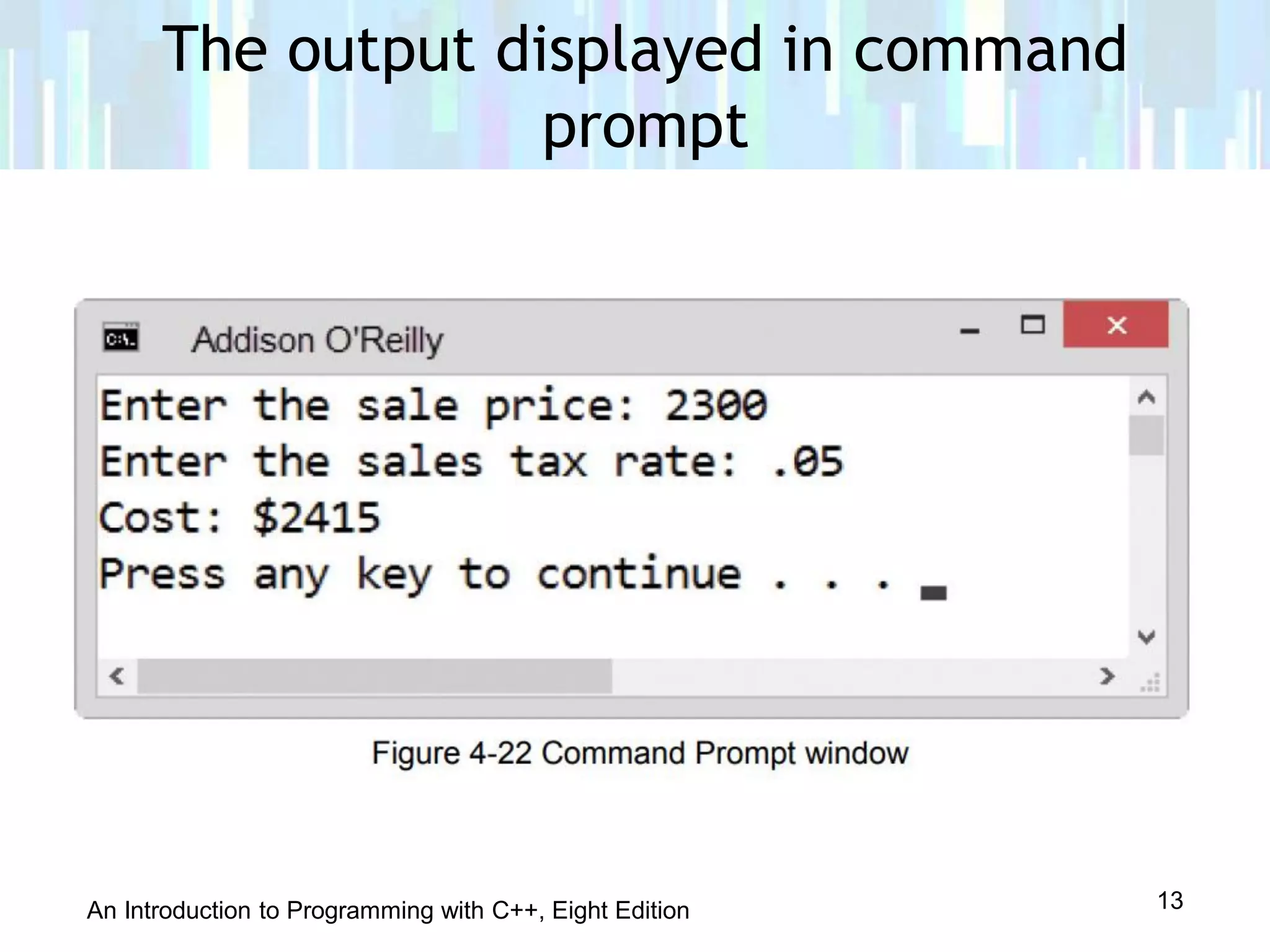
The output displayed in command
prompt
13
An Introduction to Programming with C++, Eight Edition
The End ♥ ♥ ♥
14

Lesson 4.2 5th and 6th step

  • 1.
    Introduction to Programmingin C++ Eight Edition Lesson 4.2: 5th step : Desk Check
  • 2.
    An Introduction toProgramming with C++, Eight Edition • Fifth step is to desk-check the program to make sure instructions were translated correctly • You should desk-check the program using sample data used to desk-check the algorithm • Results of both desk-checks should be the same • First, place names of the declared memory locations in a new desk-check table along with each memory location’s initial value • Next, desk-check remaining C++ instructions in order, recording any changes made to the variables Step 5–Desk-Check the Program 2
  • 3.
    An Introduction toProgramming with C++, Eight Edition Step 5–Desk-Check the Program (cont’d.) 3
  • 4.
    An Introduction toProgramming with C++, Eight Edition Step 5–Desk-Check the Program (cont’d.) 4
  • 5.
    An Introduction toProgramming with C++, Eight Edition • Final step in the problem-solving process • You evaluate a program by running the program on the computer and entering the sample data used when desk- checking the program • If evaluation reveals errors (known as bugs), they must be fixed • Process of locating and fixing errors is called debugging • Two types of bugs: syntax errors and logic errors Step 6–Evaluate and Modify the Program 5
  • 6.
    An Introduction toProgramming with C++, Eight Edition • Syntax errors result from breaking programming language’s rules; cause compiler errors • Logic errors don’t cause compiler errors; can be hard to identify – Example: entering instructions in the wrong order • Need a text editor to enter C++ instructions • Instructions are called source code and are saved in source files with extension .cpp • Need a compiler to translate source code into machine code (also called object code) Step 6–Evaluate and Modify the Program (cont’d.) 6
  • 7.
    An Introduction toProgramming with C++, Eight Edition • Compiler saves object code in object files with extension .obj • Linker combines .obj files with other machine code necessary to run the program and produces an executable file with extension .exe • An IDE (integrated development environment) is a development tool that contains both an editor and compiler • A command-line compiler contains only the compiler and requires a separate editor to enter source code Step 6–Evaluate and Modify the Program (cont’d.) 7
  • 8.
    An Introduction toProgramming with C++, Eight Edition • A comment is a form of internal documentation; written by placing // in front of the comment text – Ignored by the compiler – Considered good programming practice; makes code more readable • A #include directive allows you to merge the source code in one file with that in another file • The #include <iostream> is required when using the cin or cout stream objects – Not a statement, so no semicolon needed at the end Step 6–Evaluate and Modify the Program (cont’d.) 8
  • 9.
    An Introduction toProgramming with C++, Eight Edition • A using directive tells the compiler where in internal memory it can find definitions of C++ keywords and classes like double or string • The using namespace std; directive indicates that the definitions of the standard C++ keywords and classes are located in the std (standard) namespace – Is a statement, so semicolon required at the end • A namespace is a special area in internal memory Step 6–Evaluate and Modify the Program (cont’d.) 9
  • 10.
    An Introduction toProgramming with C++, Eight Edition • A function is a block of code that performs a task • Functions have parentheses following their name (Example: main()) • Some functions require information between the parentheses; others do not • Every C++ program has one (and only one) main function; this is where program execution begins • Some functions return a value, and the data type they return appears to the left of the function name – Example: int main() Step 6–Evaluate and Modify the Program (cont’d.) 10
  • 11.
    An Introduction toProgramming with C++, Eight Edition • Other functions do not return a value, and void appears to the left of the function name • The return type, name, and parameters (information in parentheses) constitute the function header, which marks the beginning of the function • After the function header, you enter the function’s code • You enclose a function’s code in a set of braces ({}) • The code between the braces is called the function body Step 6–Evaluate and Modify the Program (cont’d.) 11
  • 12.
    An Introduction toProgramming with C++, Eight Edition The sample program based on the Figure 4-21 12
  • 13.
    An Introduction toProgramming with C++, Eight Edition The output displayed in command prompt 13
  • 14.
    An Introduction toProgramming with C++, Eight Edition The End ♥ ♥ ♥ 14