
Protecting yourself on the
         Internet

Take charge of your computer
Objectives

• Learn the terms involved in Internet safety
• Discuss the types of security & how to be
  protected online
• Discover how to tell if your computer is
  infected, and then what to do
• Discuss safe online browsing, social
  networking and email
Terminology
•   Spam: Unsolicited mail
•   Virus: Self replicating software
•   Malware: Malicious software
•   Spyware: Collects your personal info
•   Phishing: Looks like the real website
•   Pharming: Sends you to a bad site

                      Go to next screen for more…
Terminology (continued)
• Browser hijacking: Replaces your homepage
• Hoax: Email with erroneous information
• Mousetrapping: Keeps you locked into a
  window
• Trojan horse: Software that appears to be OK
Good security for your computer
• Anti-virus software is KEY
  • Scans files & computer for patterns which may
    signal infection
  • Can be set up for automatic , daily scanning
  • Should run a manual scan if you think you have
    a virus
  • May clean automatically, may quarantine
  • To install new one, must uninstall old one
  • Good free one: Microsoft Security Essentials
                                             More…
Good security for your computer
• Anti Malware and Spyware (Often can be taken care of with same
   program. Check the program)
• Firewall: (blocks connections between your computers and other
   computers.. Keep it turned on)
• If infected, run a one time virus scanner like Microsoft
  Security Scanner
• Keep important software up to date including: Operating
  system, Adobe flash, Adobe reader, Java, Apple, Microsoft
  Office, etc.
• Install Web of Trust on browsers
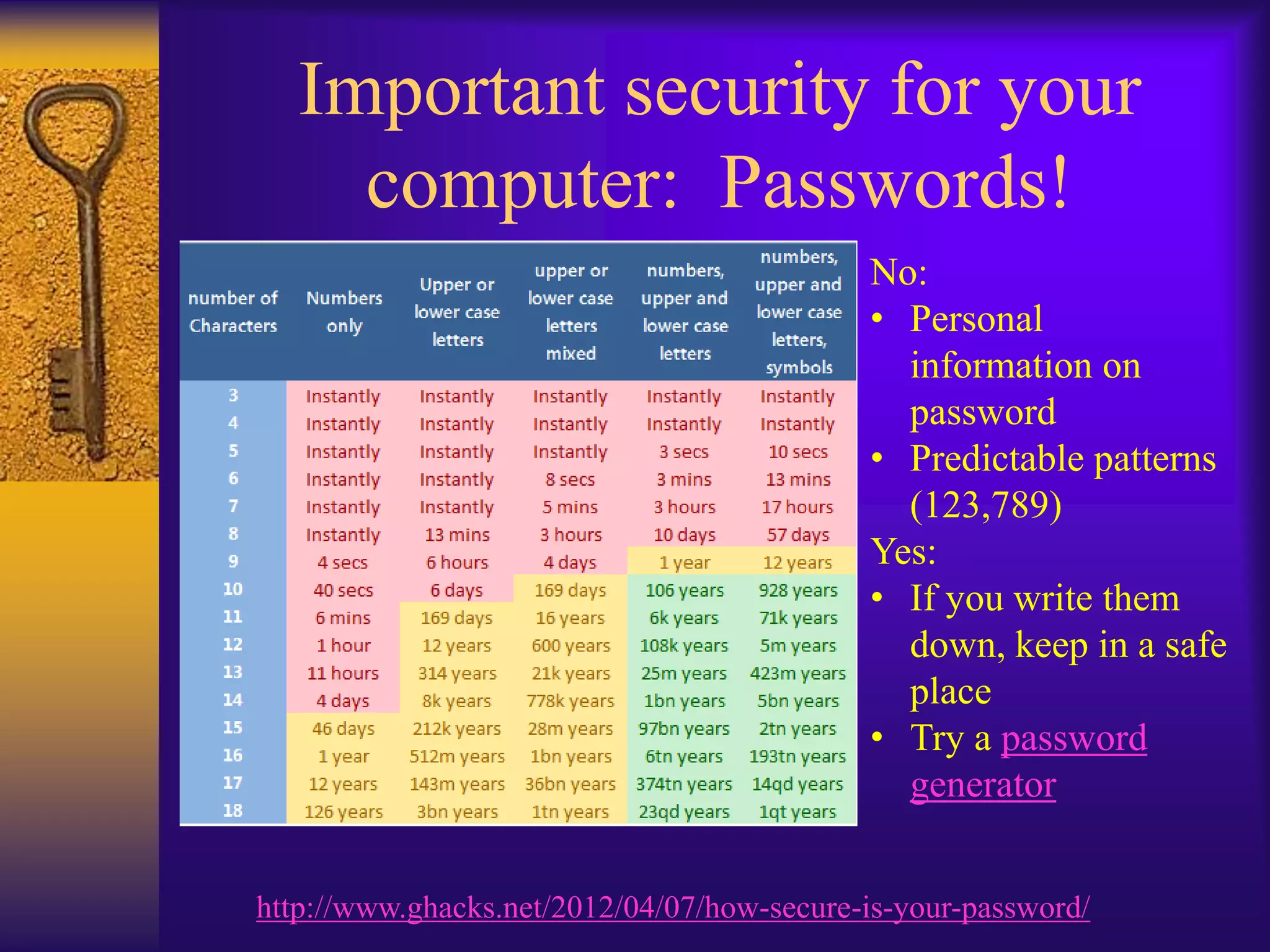
Important security for your
     computer: Passwords!
                                            No:
                                            • Personal
                                              information on
                                              password
                                            • Predictable patterns
                                              (123,789)
                                            Yes:
                                            • If you write them
                                              down, keep in a safe
                                              place
                                            • Try a password
                                              generator


http://www.ghacks.net/2012/04/07/how-secure-is-your-password/
How do I get a virus?
• Download an infected file (or open email
  attachment)
  •   .exe: most dangerous, program file
  •   .zip: compressed file, can contain a virus
  •   .scr: free screen saver, can contain virus
  •   .doc: a Microsoft word file, can be infected
  •   Can have other extensions so CAREFUL!
  •   Can be spread with a thumb drive
• Visit bad website
• Clicking on a bad link
Signs my computer may have a
            virus
Note: Only guidelines: Other things may
cause these computer behaviors
• Computer running slowly
• Unexpected messages or programs that start
  automatically
• Modem or hard drive seem to be working
  all the time
Signs that my computer may
          have Spyware
• New toolbars, links or favorites on your
  web browser
• Home page, mouse pointer or search
  program changes
• You type an address into the web browser
  but end up at an unrelated site
• Pop-up ads, even without the Internet
• Computer may be running slowly
What to do if you think you are
            infected
• Download and run a one time scanner such as
  Microsoft Safety Scanner
  http://www.microsoft.com/security/scanner/en-
  us/default.aspx
• Or use other online virus scanners such as:
  Symantec Security Check, McAfee
  FreeScan, Kaspersky lab, & Bitdefender. (They
  might not cure your computer, but at least can tell
  you if you are infected.)
Email security
• Don’t forward hoax emails…(try
  snopes.com or factcheck.org)
• Don’t open attachments unless you are
  certain of their source (just reading email is
  OK)
• Don’t be too sure even if they are from a
  friend!
• Don’t click on links in the body of the email
               Continue for Email Red Flags…
Email Red Flags
• Images blocked: Don’t open unless you are
  sure!
• Urgent letters needing your personal
  information or money
• Statements from your bank to click here
• A claim that seems far fetched
• Anything from an online pharmacy, Western
  Union and PayPal. Go directly to the site
  instead.
• A note from a friend that seem strange
Safe social networking…DO
•   Caution when clicking on links
•   Limit personal information on sites
•   Create multiple aliases for some
•   Don’t believe it is really from Uncle Joe
•   Type network address directly
•   Be careful of your “friends”
•   Understand Privacy terms on the site

          Next: Safe social networking…Don’t
Safe social networking…DON’T
•   Use personal information for passwords
•   Install programs from the social networks
•   Click on links on the page
•   Allow social network to scan your contacts
•   Respond to “flames”
•   Say anything you may regret later
Safe Online Browsing
• Set own homepage (Options, settings)
• Use InPrivate browsing for sensitive use
• Don’t use public Wi Fi for personal data
• Double check web addresses if it seems
  different…Best to type it in directly
• HTTPS always when privacy is important

               More on Safe online browsing
Safe Online Browsing (cont.)
• Install Web of Trust on all browsers
• If money is involved:
   •   HTTPS
   •   Credit card or PayPal is best
   •   Beware if money is required up front
   •   Research to make sure company is legitimate
   •   Do not respond to unsolicited emails
• Use caution even if it looks authentic (Fake
  campaigns for Windows security updates,
  Facebook apps, 9/11 scams, Anti-Virus)
• Download only from reputable sources!
FACTS AND FIGURES
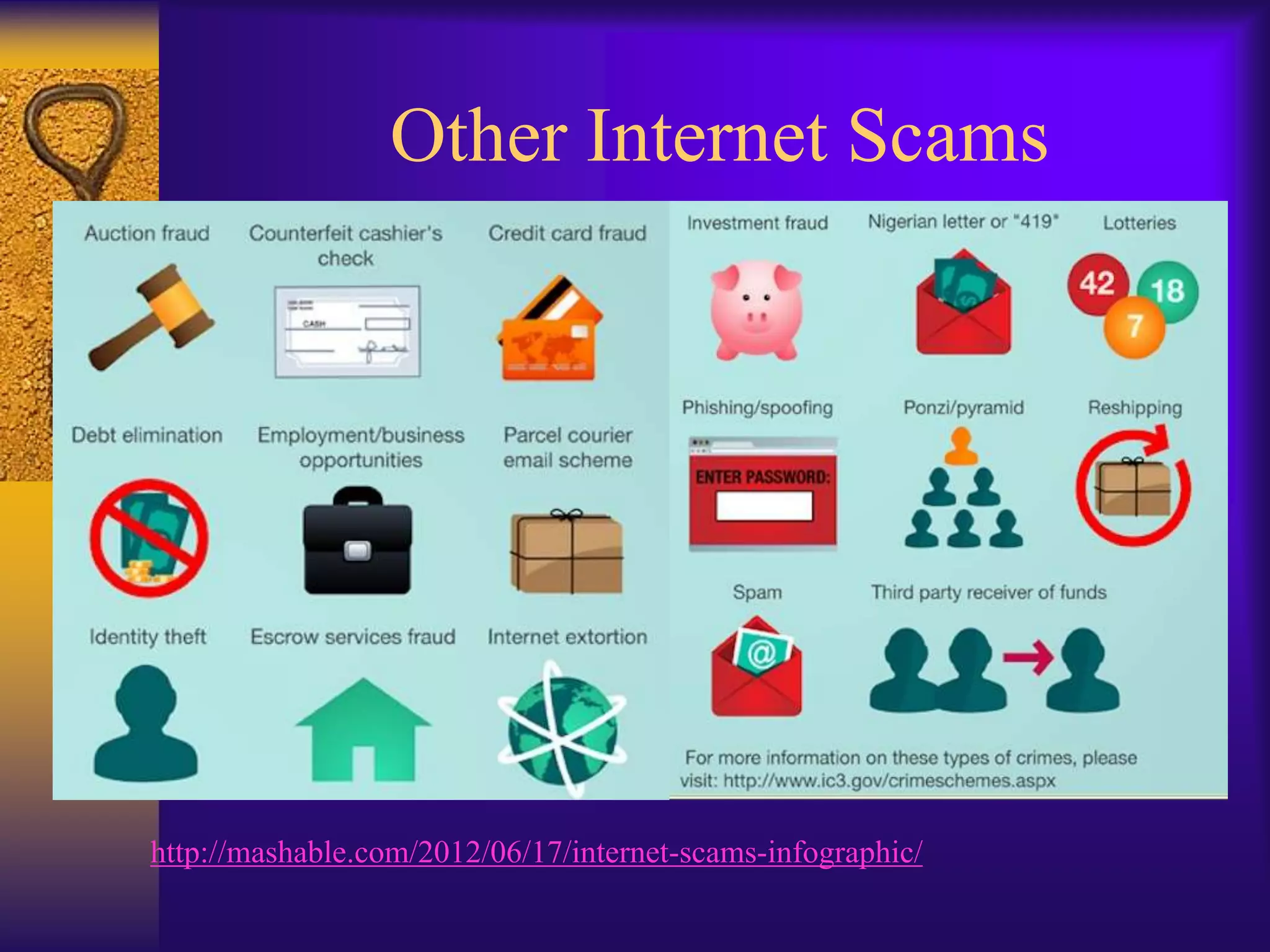
Internet Scams with the most
                     complaints:


http://mashable.com/2012/06/17/internet-scams-infographic/internet-scam-hotspots-972/
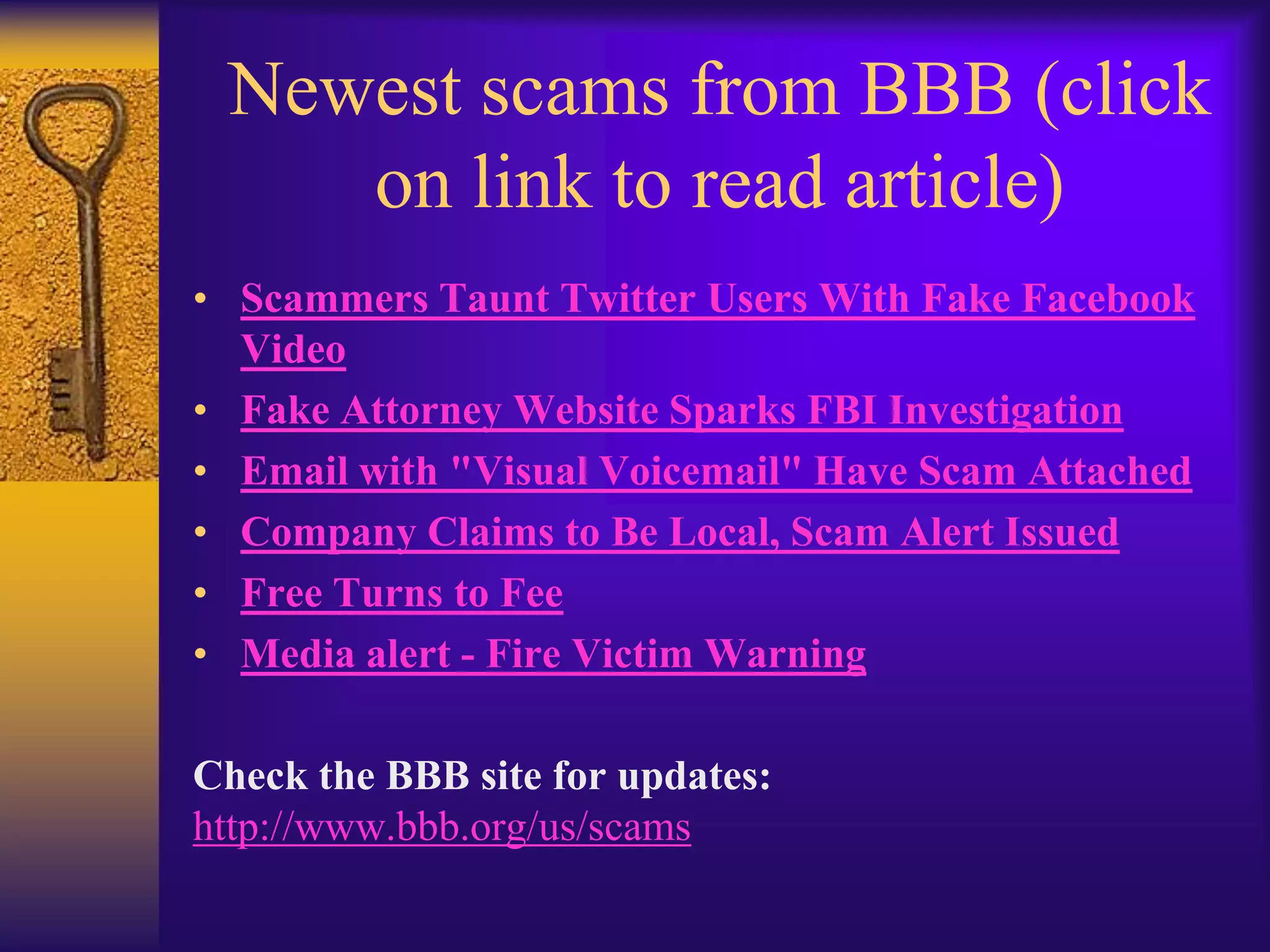
Other Internet Scams


http://mashable.com/2012/06/17/internet-scams-infographic/
Newest scams from BBB (click
    on link to read article)
• Scammers Taunt Twitter Users With Fake Facebook
  Video
• Fake Attorney Website Sparks FBI Investigation
• Email with "Visual Voicemail" Have Scam Attached
• Company Claims to Be Local, Scam Alert Issued
• Free Turns to Fee
• Media alert - Fire Victim Warning

Check the BBB site for updates:
http://www.bbb.org/us/scams
DON’T FALL FOR A
 SCAM: BE SAFE
    ONLINE!

Lesson 5 protecting yourself on the internet

  • 1.
    Protecting yourself onthe Internet Take charge of your computer
  • 2.
    Objectives • Learn theterms involved in Internet safety • Discuss the types of security & how to be protected online • Discover how to tell if your computer is infected, and then what to do • Discuss safe online browsing, social networking and email
  • 3.
    Terminology • Spam: Unsolicited mail • Virus: Self replicating software • Malware: Malicious software • Spyware: Collects your personal info • Phishing: Looks like the real website • Pharming: Sends you to a bad site Go to next screen for more…
  • 4.
    Terminology (continued) • Browserhijacking: Replaces your homepage • Hoax: Email with erroneous information • Mousetrapping: Keeps you locked into a window • Trojan horse: Software that appears to be OK
  • 5.
    Good security foryour computer • Anti-virus software is KEY • Scans files & computer for patterns which may signal infection • Can be set up for automatic , daily scanning • Should run a manual scan if you think you have a virus • May clean automatically, may quarantine • To install new one, must uninstall old one • Good free one: Microsoft Security Essentials More…
  • 6.
    Good security foryour computer • Anti Malware and Spyware (Often can be taken care of with same program. Check the program) • Firewall: (blocks connections between your computers and other computers.. Keep it turned on) • If infected, run a one time virus scanner like Microsoft Security Scanner • Keep important software up to date including: Operating system, Adobe flash, Adobe reader, Java, Apple, Microsoft Office, etc. • Install Web of Trust on browsers
  • 7.
    Important security foryour computer: Passwords! No: • Personal information on password • Predictable patterns (123,789) Yes: • If you write them down, keep in a safe place • Try a password generator http://www.ghacks.net/2012/04/07/how-secure-is-your-password/
  • 8.
    How do Iget a virus? • Download an infected file (or open email attachment) • .exe: most dangerous, program file • .zip: compressed file, can contain a virus • .scr: free screen saver, can contain virus • .doc: a Microsoft word file, can be infected • Can have other extensions so CAREFUL! • Can be spread with a thumb drive • Visit bad website • Clicking on a bad link
  • 9.
    Signs my computermay have a virus Note: Only guidelines: Other things may cause these computer behaviors • Computer running slowly • Unexpected messages or programs that start automatically • Modem or hard drive seem to be working all the time
  • 10.
    Signs that mycomputer may have Spyware • New toolbars, links or favorites on your web browser • Home page, mouse pointer or search program changes • You type an address into the web browser but end up at an unrelated site • Pop-up ads, even without the Internet • Computer may be running slowly
  • 11.
    What to doif you think you are infected • Download and run a one time scanner such as Microsoft Safety Scanner http://www.microsoft.com/security/scanner/en- us/default.aspx • Or use other online virus scanners such as: Symantec Security Check, McAfee FreeScan, Kaspersky lab, & Bitdefender. (They might not cure your computer, but at least can tell you if you are infected.)
  • 12.
    Email security • Don’tforward hoax emails…(try snopes.com or factcheck.org) • Don’t open attachments unless you are certain of their source (just reading email is OK) • Don’t be too sure even if they are from a friend! • Don’t click on links in the body of the email Continue for Email Red Flags…
  • 13.
    Email Red Flags •Images blocked: Don’t open unless you are sure! • Urgent letters needing your personal information or money • Statements from your bank to click here • A claim that seems far fetched • Anything from an online pharmacy, Western Union and PayPal. Go directly to the site instead. • A note from a friend that seem strange
  • 14.
    Safe social networking…DO • Caution when clicking on links • Limit personal information on sites • Create multiple aliases for some • Don’t believe it is really from Uncle Joe • Type network address directly • Be careful of your “friends” • Understand Privacy terms on the site Next: Safe social networking…Don’t
  • 15.
    Safe social networking…DON’T • Use personal information for passwords • Install programs from the social networks • Click on links on the page • Allow social network to scan your contacts • Respond to “flames” • Say anything you may regret later
  • 16.
    Safe Online Browsing •Set own homepage (Options, settings) • Use InPrivate browsing for sensitive use • Don’t use public Wi Fi for personal data • Double check web addresses if it seems different…Best to type it in directly • HTTPS always when privacy is important More on Safe online browsing
  • 17.
    Safe Online Browsing(cont.) • Install Web of Trust on all browsers • If money is involved: • HTTPS • Credit card or PayPal is best • Beware if money is required up front • Research to make sure company is legitimate • Do not respond to unsolicited emails • Use caution even if it looks authentic (Fake campaigns for Windows security updates, Facebook apps, 9/11 scams, Anti-Virus) • Download only from reputable sources!
  • 18.
  • 19.
    Internet Scams withthe most complaints: http://mashable.com/2012/06/17/internet-scams-infographic/internet-scam-hotspots-972/
  • 20.
  • 21.
    Newest scams fromBBB (click on link to read article) • Scammers Taunt Twitter Users With Fake Facebook Video • Fake Attorney Website Sparks FBI Investigation • Email with "Visual Voicemail" Have Scam Attached • Company Claims to Be Local, Scam Alert Issued • Free Turns to Fee • Media alert - Fire Victim Warning Check the BBB site for updates: http://www.bbb.org/us/scams
  • 22.
    DON’T FALL FORA SCAM: BE SAFE ONLINE!