Internet Security Dave Palmer Instructional Media Agent South Central Extension District How to  Protect Yourself from Existing  Internet Threats 2.0
Disclaimer The information presented here are only options, not recommendations.  You alone are responsible for what you do on your own computer.
Agenda Part 1 - Existing threats   Scams, Phishing, Viruses, Worms, Trojans   Backdoors, Spyware, Rootkits, Botnets Part 2 - Protection   Layered Security   Best Practices   Security Software & Suites   Backups   Support
Best Practices Update your operating system regularly Update other programs and applications regularly Backup your data or your whole system on a regular basis. Handout
Best Practices Use multiple layers of security for the best protection There are no “safe” websites. Any  website can be compromised. Use STRONG passwords where money or sensitive information is involved. Handout
Malware –  mal icious soft ware Intent is to damage, disrupt, steal, control or otherwise inflict problems on computers, data, hosts, or networks.
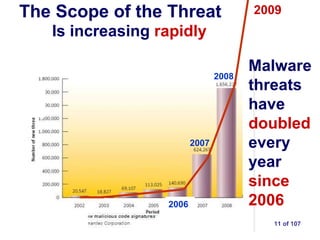
Latest Statistics In 2006 there was 1 infected website for every 20,000 websites. Now it’s 1 in 150. 1 in 78 links in instant messages leads to malware. Experts predict that will rise to 1 in 12.
Latest Statistics 25 million new strains of malware detected in 2009 66% of these new strains were Trojans McAfee reported a new record in the 2 nd  quarter of 2010 -  6 million new malware recorded
Social Networking Threats Sites like MySpace, Facebook, LinkedIn, etc. Threats include 3 rd  party applications and quizzes, games,  shortened links May contain malware, worms viruses, etc.  but not the main threat
Social Networking Threats Main risk -  information you post about yourself  that can jeopardize privacy and security like… Date of birth, phone number, address, resume, current activities or other ways to  specifically identify who you are and where you are .
The Scope of the Threat Is increasing   rapidly Malware threats have   doubled   every year   since 2006 2007 2008 2006 2009
Why the Dramatic Increase? Signature-based recognition is the basis of most Internet security software Many malware variants now create  unique versions of themselves  for individual users to avoid  signature-based recognition . Such malware is called “polymorphic.”
Malware Stories  You Might Have Missed Handout Also available at: http://techteachtoo.com/category/internet-security/ Handout
What are the Threats? Tracking Cookies* Flash Cookies* Adware Hoaxes Scams* Phishing* Not malware Backdoors* Keyloggers Viruses Worms Trojans* Spyware* Rootkits* Bots* Malware
Tracking Cookies Not malware Sometimes useful No personal info unless offered Storage can be limited Can be set to expire Easy to remove
Flash Cookies – ‘Super’ Cookies Largely unknown widely used Never expires Difficult to find & remove Can send info w/o your permission Not a big threat Adobe  Flash  logo
Flash Cookies Widely used… … including in Extension
Controlling Flash Cookies Go thru each tab and set each accordingly http://www.macromedia.com/support/documentation/en/flashplayer/help/settings_manager03.html
Anatomy of a Web address http://collier.ifas.ufl.edu/HomeGarden/A-ZPubs.shtml Top Level Domain (TLD) Domains  never  have  a single slash on both ends 2 Handouts Handout Web folder domain subdomains Webpage URL or Web address Notice the slashes (/)
Is this URL part of the University of Florida? /webmail.ufl.edu/ premline.ru /img/ http://www. Handout This is the actual domain This is a domain registered in Russia. It’s  not  connected with UF. See the slashes? This is not the domain!
Shortened Links TinyURL.com, Bit.ly.com, many others Can make a long URL into a short URL They change this: http://hillsborough.extension.ufl.edu/internetsecurityresources.html Into this: http://tinyurl.com/2eqmr32
The Answer? URL Decoders Untiny.me website   http://untiny.me/ True URL   http://www.trueurl.net/service/   website or FF addon LongURLplease –   http://www.longurlplease.com/   Firefox addon and bookmarklet More information at:   http://techteachtoo.com/url-decoders/
Spam "...most non-commercial spam these days is aimed solely   to get you to click on a link ,  even out of curiosity.   As soon as you click on that link,   you're infected ,  most likely to become yet another   botnet victim ,  have your   identity and information stolen   and go on to participate, all unknowingly in the   infection of further victims ."  Rik Ferguson senior security analyst Trend Micro
Spam E-mail About 90% of all e-mail is spam Most gets caught in e-mail filters Spam increased 14% in 1 st  half of 2010 Just 2 botnets generate 53% of all spam Spam is the primary means of distributing malware
Social Engineering Means: Manipulating people to do things or to divulge confidential information
Scams Appeal to curiosity, compassion, greed Disasters generate large numbers of scams  Appear legitimate
Scams DO NOT  click on links in these e-mails Typically offer  something of value,  ask for money in advance Nearly impossible to track the monetary transactions
Scam Targets Dating sites  - exploit the victims’ desire for a companionship Religious sites  - seek donations for “worthy cause” Social websites  - exploit personal info
Scams US - $1-$2 billion UK – 150 million pounds Australia - $36 million AUD Estimated  annual  losses
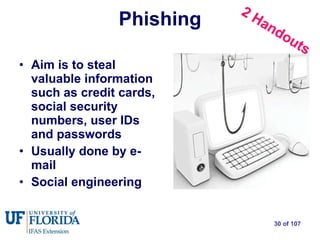
Phishing Aim is to steal valuable information such as credit cards, social security numbers, user IDs and passwords  Usually done by e-mail Social engineering 2 Handouts
Phishing Often masquerades as legitimate business, or government Often contains a threat or consequence E-mails try look genuine, trustworthy Excellent Phishing IQ test:  www.sonicwall/phishing/
Phishing Example Link #1 Link #2
Place your cursor over the e-mail link. Right  click (If you left click on the link you might get infected) Click on ‘Copy Shortcut’ Open a Word doc or Notepad Paste
The URL: http://stproofing.com /living/bankofamerica.repution/Online_BofA_Banking.UpdatingScreen.dostate=CAupdating.cfmpage=corp_bofacom.BankofAmricaScreen.dostate=CA/ The link: Link #1
This instruction has been send to all bank customers and is obligatory to follow. Actual URL: http://pushplaydj.ca /photos/albums/userpics/notice/www.bankofamerica.com/ Link #2
Phishing Sites 1 st  half of 2009  nearly 100% Increase Source: Anti-Phishing Working Group
Bottom line:  Legitimate organizations  never  ask for sensitive information through e-mail Phishing
Backdoor - malware Backdoors allow access to a computer without a password or user name. Allows downloading of more malware
Trojans Programs that masquerade as “good” programs Often carry a “payload” or open a backdoor Can spy, steal information, log keystrokes, phone home & download other malware
Spyware Purpose is to capture information of value Email addresses, usernames, passwords, credit card info, etc. Can transmit this information
Rootkit Actively  avoids detection Has the ability to  hide & change appearance Can  turn off  System Restore, anti-virus, anti spyware programs Very difficult  to remove even for experts
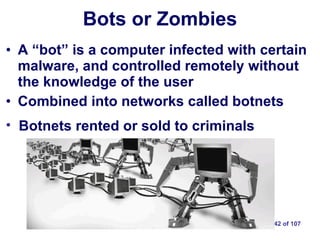
Bots or Zombies A “bot” is a computer infected with certain malware, and controlled remotely without the knowledge of the user Combined into networks called botnets Botnets rented or sold to criminals
Simple Botnet
Botnet Statistics Mariposa botnet, shutdown in 2010 controlled  12.7 million  compromised computers Over 3,000 botnets are believed to exist Botnets use compromised computers send  100+ billion  spam messages daily Botnets also used to attack commercial & government websites.
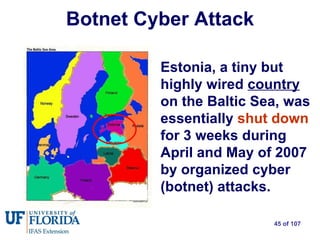
Botnet Cyber Attack Estonia, a tiny but highly wired  country  on the Baltic Sea, was essentially   shut down   for 3 weeks during April and May of 2007 by organized cyber (botnet) attacks.
Another Botnet Attack Dozens of S. Korean & U.S. agencies  attacked in July 2009. Dept. of Defense, FAA, Homeland Security, NYSE, NASDAQ, etc.
The Child Porn Connection Multiple cases of innocent people accused of child porn Malware may redirect a computer to webpages Or visit child porn sites at a rate of 40/minute Use remotely controlled computers for storage http://www.theregister.co.uk/2009/11/09/malware_child_abuse_images_frame_up/
Part 2 – The Protection We’ve covered the threats, but how do we protect ourselves?
7-Layer Security Options 2) Wireless Router w/ hardware firewall 3) ZoneAlarm software firewall 4) Spybot w/ tea timer 5) Super Anti Spyware 6) Anti virus software 1) Use Best Practices 7) Backup Data Optional: Create user accounts Data
4-Layer Security Options 2) Wireless Router w/ hardware firewall 3) Use a Security Suite should include a software firewall, anti-virus and anti-spyware 4) Backup Data Data 1) Use Best Practices   Optional: Create user accounts
Best Practices Treat your laptop as though it were  a wallet or purse  when away from home Backup regularly Don’t conduct financial transactions online on  non-encrypted  sites  ( look for https:// or the padlock icon ) Handout
Encrypted websites Look for
Best Practices Be paranoid about e-mail attachments There’s no such thing as a “safe” website Analysis of domains by Symantec revealed that 90% of infected websites are legitimate sites that had been compromised without the owners knowledge.  ( July 2010 )
Best Practices Don’t open obvious spam –  delete it Never trust unsolicited e-mails Don’t click on links in e-mail –  type them in Use strong passwords when $$ is involved Watch URLs  to know where you are Turn computer off when not in use Nothing is foolproof – be prepared Handout
Read the Fine Print When you click on the box, you are  signing a legal contract. Read before agreeing Keep a copy (paper or digital) esp. if money is involved.
Use  Good  Passwords Great Internet security means nothing if the bad guys can guess your passwords Use strong passwords when dealing with $$ Handout
More Passwords henearkrxern
Keep Passwords Safe Need a “system” of choosing and using passwords?  see handout Password management software Roboform, KeePass,  FreePass , Password Safe, others KeePass RoboForm Handout
Password Management Software Password generator Master password Encrypted database of passwords Desktop, portable, Web-based
USB Malware Flash drives  banned by US Army  in 2008 due to malware issues. Ban lifted in 2010 Lots of malware is written to move on a flash drive.
USB Flash Drive w/ Read-Only ‘ Read-only’ or ‘write-protect’ switch prevents malware being written to the flash drive Useful if using multiple unfamiliar computers
Update Your Operating System Install all security patches Go to Windows Update website windowsupdate .microsoft.com/
Update/ Upgrade Your Applications Hackers embed malware in applications  4 times  2009-10 it happened to Adobe PDF files. Adobe issued patches. Without the patches, you’re vulnerable to infection when viewing PDFs Alternative – use 3 rd  party (not Adobe) application to read pdfs – FoxIt reader
Update Your Applications Average computer holds 60+ programs Use auto-update if available Update manually if needed Use  Secunia.com , others Free, safe, checks your programs, notifies you if updates are needed
7-Layer Security Options 2) Wireless Router w/ hardware firewall 3) ZoneAlarm software firewall 4) Spybot w/ tea timer 5) Super Anti Spyware 6) Anti virus software 1) Use Best Practices 7) Backup Data Optional: Create user accounts Data
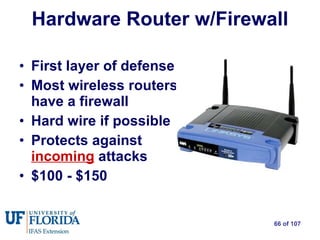
Hardware Router w/Firewall First layer of defense Most wireless routers have a firewall Hard wire if possible Protects against  incoming  attacks $100 - $150
Software Firewall Protects against inbound attacks and  outbound communication  by malware ZoneAlarm, Comodo free & paid versions  just get basic firewall, Vista and Windows 7 has good firewall too Outbound Communication
Software Firewall Vista or Windows 7 - Use the pre-installed Windows firewall. Turn it off  before installing another, including security suites  DO NOT use more than 1 software firewall If you have the XP operating system you SHOULD obtain a software firewall.  DO NOT use XP’s firewall .
7-Layer Security Options 2) Wireless Router w/ hardware firewall 3) ZoneAlarm software firewall 4) Spybot w/ tea timer 5) Super Anti Spyware 6) Anti virus software 1) Use Best Practices 7) Backup Data Optional: Create user accounts Data
Anti-spyware: Spybot Search & Destroy Detects and removes: adware spyware Trojans keyloggers dialers Free - Real-time protection - Donations only
Spybot Search & Destroy Installation of software, including malware, changes the registry Spybot warns of potential registry changes with “TeaTimer” feature
Spybot Search and Destroy ‘ Immunization’ feature helps block installation of some malware, plus it tweaks browser settings to help block cookies, malware installations, bad websites and more.
Anti-spyware: Super AntiSpyware Detects & removes: spyware Adware Trojans Dialers Worms HiJackers KeyLoggers Rootkits - Free version available - Paid version includes   Real-time protection   Scheduling of scans   $29.95  $14.95  $9.95
Only tracking cookies
Trojan location
Removal Reboot
Anti-spyware: MalwareBytes Detects & removes many types of malware Free version Full version $24.95 one-time fee real-time protection automatic updates automated scheduling
Antivirus Software Most detect & remove only viruses Many software options, free, free trial, paid UF faculty has access to McAfee for free Do not install multiple anti-virus programs
“Rogue” or fake anti-malware
Rogue Anti-Malware Products  600% Increase  1 st  Half of 2009 Also known as “scareware, ransomware”
“ Rogue” Anti-malware products Includes fake anti-virus, fake anti-spyware products They DO NOT protect you They may install or download malware Very difficult to uninstall May ask for money to uninstall This type called “ransomeware” Investigate before buying
To buy products other than those mentioned  Type the name of the software into Google and read the results that appear.
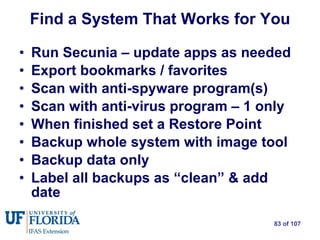
Find a System That Works for You Run Secunia – update apps as needed Export bookmarks / favorites Scan with anti-spyware program(s) Scan with anti-virus program – 1 only When finished set a Restore Point Backup whole system with image tool Backup data only Label all backups as “clean” & add date
7-Layer Security Options 2) Wireless Router w/ hardware firewall 3) ZoneAlarm software firewall 4) Spybot w/ tea timer 5) Super Anti Spyware 6) Anti virus software 1) Use Best Practices 7) Backup Data Optional: Create user accounts Data
Backup Your Data Why backup? Data loss or corruption Human error, fire, flood, malware Backing up is cheaper, easier than re-creating the data
Backup Your Data Many ways to backup Data only, whole system, online, local Compressed, uncompressed, automated
Data-Only Backup Dozens of software choices for every budget including free Backs up selected files Paid products typically use proprietary compression SyncToy – Free MS program – no compression Back2Zip free software
Whole-System Backup Takes an “image” of the whole system not  each file individually Included in Win 7, others include Acronis, Norton Ghost Backup in 20-30 min, restore - 30 min to 1 hr
Online Backup Options Advantages Inexpensive Some operate in the background Disadvantages Monthly fee Depends on Internet access
Local External Backup Advantages Low one-time cost 1 TB less than $100 Multi-purpose Easily accessible Disadvantage Risks similar to  original data Note  – keep unit  unplugged  unless in use External  Hard Drive
7-Layer Security Options 2) Wireless Router w/ hardware firewall 3) ZoneAlarm software firewall 4) Spybot w/ tea timer 5) Super Anti Spyware 6) Anti virus software 1) Use Best Practices 7) Backup Data Optional: Create user accounts Data
User Accounts All users should be required to log in, even at home  A PC with no log-in password is like a car with the keys in the ignition.  Most malware requires administrator privileges to work 2 Handouts
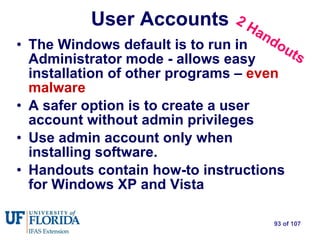
The Windows default is to run in Administrator mode - allows easy installation of other programs –  even malware A safer option is to create a user account without admin privileges Use admin account only when installing software. Handouts contain how-to instructions for Windows XP and Vista User Accounts 2 Handouts
4-Layer Security Options 2) Wireless Router w/ hardware firewall 3) Use a Security Suite 4) Backup Data Data 1) Use Best Practices Optional: Create user accounts
Security Suite Options Webroot  Kaspersky BitDefender Norton ESET Trend Micro AVG ZoneAlarm McAfee F-Secure Avira Panda Symantec PC Tools
Security Suite Information Security Software Testing service http://www.matousec.com/projects/proactive-security-challenge/results.php Comprehensive information http://www.firewallguide.com/suites.htm#More_Security_Suites
Secure Browsing Options FireFox with Security Plugins Plugins are a feature that can be added to a larger program to expand capabilities NoScript  – plugin to stop web scripts from running Better Privacy  – plugin to control Flash cookies
Creates a small “virtual” space inside your computer called a “sandbox.” Can run a program or  a browser  inside the sandbox.  Whatever happens in there stays in there unless you say otherwise Secure Browsing Options - Sandboxie
CompUSA, Geek Squad,  Local repair shop When you do need help… 3) Online help   forums 4) Commercial   Repair 2) Local PC Users   Group 1) Friends & family You
Don’t Forget ‘Safe Mode’ Stops malware from running & defending itself Windows versions have different process Boots using minimal programs - no malware You should see “Safe Mode” in all 4 corners of your screen Run your scanning programs normally To exit Safe Mode, reboot
50+ groups around the state. Dues avg $12-$35/yr Classes, meetings, learn about computers, build relationships Members help members with problems For more info go to Fla Assn of Computer User Groups  http://www.facug.org/ PC Users Groups
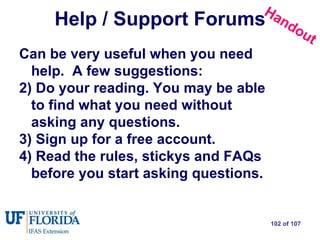
Help / Support Forums Can be very useful when you need help.  A few suggestions:  Do your reading. You may be able to find what you need without asking any questions.  Sign up for a free account.  Read the rules, stickys and FAQs before you start asking questions. Handout
Support Forums
Resources My website is at :  TechTeachToo.com - Practical technology tips & tricks - Relevant tech news  - Software reviews & tutorials - A brief weekly newsletter
Many thanks to… Bill Black – IT Support Ninja Brent Broaddus – Local IT Jedi DarryD – Obi-Wan & IT Master My Time is UP!

100812 internet security2.0

  • 1.
    Internet Security DavePalmer Instructional Media Agent South Central Extension District How to Protect Yourself from Existing Internet Threats 2.0
  • 2.
    Disclaimer The informationpresented here are only options, not recommendations. You alone are responsible for what you do on your own computer.
  • 3.
    Agenda Part 1- Existing threats Scams, Phishing, Viruses, Worms, Trojans Backdoors, Spyware, Rootkits, Botnets Part 2 - Protection Layered Security Best Practices Security Software & Suites Backups Support
  • 4.
    Best Practices Updateyour operating system regularly Update other programs and applications regularly Backup your data or your whole system on a regular basis. Handout
  • 5.
    Best Practices Usemultiple layers of security for the best protection There are no “safe” websites. Any website can be compromised. Use STRONG passwords where money or sensitive information is involved. Handout
  • 6.
    Malware – mal icious soft ware Intent is to damage, disrupt, steal, control or otherwise inflict problems on computers, data, hosts, or networks.
  • 7.
    Latest Statistics In2006 there was 1 infected website for every 20,000 websites. Now it’s 1 in 150. 1 in 78 links in instant messages leads to malware. Experts predict that will rise to 1 in 12.
  • 8.
    Latest Statistics 25million new strains of malware detected in 2009 66% of these new strains were Trojans McAfee reported a new record in the 2 nd quarter of 2010 - 6 million new malware recorded
  • 9.
    Social Networking ThreatsSites like MySpace, Facebook, LinkedIn, etc. Threats include 3 rd party applications and quizzes, games, shortened links May contain malware, worms viruses, etc. but not the main threat
  • 10.
    Social Networking ThreatsMain risk - information you post about yourself that can jeopardize privacy and security like… Date of birth, phone number, address, resume, current activities or other ways to specifically identify who you are and where you are .
  • 11.
    The Scope ofthe Threat Is increasing rapidly Malware threats have doubled every year since 2006 2007 2008 2006 2009
  • 12.
    Why the DramaticIncrease? Signature-based recognition is the basis of most Internet security software Many malware variants now create unique versions of themselves for individual users to avoid signature-based recognition . Such malware is called “polymorphic.”
  • 13.
    Malware Stories You Might Have Missed Handout Also available at: http://techteachtoo.com/category/internet-security/ Handout
  • 14.
    What are theThreats? Tracking Cookies* Flash Cookies* Adware Hoaxes Scams* Phishing* Not malware Backdoors* Keyloggers Viruses Worms Trojans* Spyware* Rootkits* Bots* Malware
  • 15.
    Tracking Cookies Notmalware Sometimes useful No personal info unless offered Storage can be limited Can be set to expire Easy to remove
  • 16.
    Flash Cookies –‘Super’ Cookies Largely unknown widely used Never expires Difficult to find & remove Can send info w/o your permission Not a big threat Adobe Flash logo
  • 17.
    Flash Cookies Widelyused… … including in Extension
  • 18.
    Controlling Flash CookiesGo thru each tab and set each accordingly http://www.macromedia.com/support/documentation/en/flashplayer/help/settings_manager03.html
  • 19.
    Anatomy of aWeb address http://collier.ifas.ufl.edu/HomeGarden/A-ZPubs.shtml Top Level Domain (TLD) Domains never have a single slash on both ends 2 Handouts Handout Web folder domain subdomains Webpage URL or Web address Notice the slashes (/)
  • 20.
    Is this URLpart of the University of Florida? /webmail.ufl.edu/ premline.ru /img/ http://www. Handout This is the actual domain This is a domain registered in Russia. It’s not connected with UF. See the slashes? This is not the domain!
  • 21.
    Shortened Links TinyURL.com,Bit.ly.com, many others Can make a long URL into a short URL They change this: http://hillsborough.extension.ufl.edu/internetsecurityresources.html Into this: http://tinyurl.com/2eqmr32
  • 22.
    The Answer? URLDecoders Untiny.me website http://untiny.me/ True URL http://www.trueurl.net/service/ website or FF addon LongURLplease – http://www.longurlplease.com/ Firefox addon and bookmarklet More information at: http://techteachtoo.com/url-decoders/
  • 23.
    Spam "...most non-commercialspam these days is aimed solely to get you to click on a link , even out of curiosity. As soon as you click on that link, you're infected , most likely to become yet another botnet victim , have your identity and information stolen and go on to participate, all unknowingly in the infection of further victims ." Rik Ferguson senior security analyst Trend Micro
  • 24.
    Spam E-mail About90% of all e-mail is spam Most gets caught in e-mail filters Spam increased 14% in 1 st half of 2010 Just 2 botnets generate 53% of all spam Spam is the primary means of distributing malware
  • 25.
    Social Engineering Means:Manipulating people to do things or to divulge confidential information
  • 26.
    Scams Appeal tocuriosity, compassion, greed Disasters generate large numbers of scams Appear legitimate
  • 27.
    Scams DO NOT click on links in these e-mails Typically offer something of value, ask for money in advance Nearly impossible to track the monetary transactions
  • 28.
    Scam Targets Datingsites - exploit the victims’ desire for a companionship Religious sites - seek donations for “worthy cause” Social websites - exploit personal info
  • 29.
    Scams US -$1-$2 billion UK – 150 million pounds Australia - $36 million AUD Estimated annual losses
  • 30.
    Phishing Aim isto steal valuable information such as credit cards, social security numbers, user IDs and passwords Usually done by e-mail Social engineering 2 Handouts
  • 31.
    Phishing Often masqueradesas legitimate business, or government Often contains a threat or consequence E-mails try look genuine, trustworthy Excellent Phishing IQ test: www.sonicwall/phishing/
  • 32.
  • 33.
    Place your cursorover the e-mail link. Right click (If you left click on the link you might get infected) Click on ‘Copy Shortcut’ Open a Word doc or Notepad Paste
  • 34.
    The URL: http://stproofing.com/living/bankofamerica.repution/Online_BofA_Banking.UpdatingScreen.dostate=CAupdating.cfmpage=corp_bofacom.BankofAmricaScreen.dostate=CA/ The link: Link #1
  • 35.
    This instruction hasbeen send to all bank customers and is obligatory to follow. Actual URL: http://pushplaydj.ca /photos/albums/userpics/notice/www.bankofamerica.com/ Link #2
  • 36.
    Phishing Sites 1st half of 2009 nearly 100% Increase Source: Anti-Phishing Working Group
  • 37.
    Bottom line: Legitimate organizations never ask for sensitive information through e-mail Phishing
  • 38.
    Backdoor - malwareBackdoors allow access to a computer without a password or user name. Allows downloading of more malware
  • 39.
    Trojans Programs thatmasquerade as “good” programs Often carry a “payload” or open a backdoor Can spy, steal information, log keystrokes, phone home & download other malware
  • 40.
    Spyware Purpose isto capture information of value Email addresses, usernames, passwords, credit card info, etc. Can transmit this information
  • 41.
    Rootkit Actively avoids detection Has the ability to hide & change appearance Can turn off System Restore, anti-virus, anti spyware programs Very difficult to remove even for experts
  • 42.
    Bots or ZombiesA “bot” is a computer infected with certain malware, and controlled remotely without the knowledge of the user Combined into networks called botnets Botnets rented or sold to criminals
  • 43.
  • 44.
    Botnet Statistics Mariposabotnet, shutdown in 2010 controlled 12.7 million compromised computers Over 3,000 botnets are believed to exist Botnets use compromised computers send 100+ billion spam messages daily Botnets also used to attack commercial & government websites.
  • 45.
    Botnet Cyber AttackEstonia, a tiny but highly wired country on the Baltic Sea, was essentially shut down for 3 weeks during April and May of 2007 by organized cyber (botnet) attacks.
  • 46.
    Another Botnet AttackDozens of S. Korean & U.S. agencies attacked in July 2009. Dept. of Defense, FAA, Homeland Security, NYSE, NASDAQ, etc.
  • 47.
    The Child PornConnection Multiple cases of innocent people accused of child porn Malware may redirect a computer to webpages Or visit child porn sites at a rate of 40/minute Use remotely controlled computers for storage http://www.theregister.co.uk/2009/11/09/malware_child_abuse_images_frame_up/
  • 48.
    Part 2 –The Protection We’ve covered the threats, but how do we protect ourselves?
  • 49.
    7-Layer Security Options2) Wireless Router w/ hardware firewall 3) ZoneAlarm software firewall 4) Spybot w/ tea timer 5) Super Anti Spyware 6) Anti virus software 1) Use Best Practices 7) Backup Data Optional: Create user accounts Data
  • 50.
    4-Layer Security Options2) Wireless Router w/ hardware firewall 3) Use a Security Suite should include a software firewall, anti-virus and anti-spyware 4) Backup Data Data 1) Use Best Practices Optional: Create user accounts
  • 51.
    Best Practices Treatyour laptop as though it were a wallet or purse when away from home Backup regularly Don’t conduct financial transactions online on non-encrypted sites ( look for https:// or the padlock icon ) Handout
  • 52.
  • 53.
    Best Practices Beparanoid about e-mail attachments There’s no such thing as a “safe” website Analysis of domains by Symantec revealed that 90% of infected websites are legitimate sites that had been compromised without the owners knowledge. ( July 2010 )
  • 54.
    Best Practices Don’topen obvious spam – delete it Never trust unsolicited e-mails Don’t click on links in e-mail – type them in Use strong passwords when $$ is involved Watch URLs to know where you are Turn computer off when not in use Nothing is foolproof – be prepared Handout
  • 55.
    Read the FinePrint When you click on the box, you are signing a legal contract. Read before agreeing Keep a copy (paper or digital) esp. if money is involved.
  • 56.
    Use Good Passwords Great Internet security means nothing if the bad guys can guess your passwords Use strong passwords when dealing with $$ Handout
  • 57.
  • 58.
    Keep Passwords SafeNeed a “system” of choosing and using passwords? see handout Password management software Roboform, KeePass, FreePass , Password Safe, others KeePass RoboForm Handout
  • 59.
    Password Management SoftwarePassword generator Master password Encrypted database of passwords Desktop, portable, Web-based
  • 60.
    USB Malware Flashdrives banned by US Army in 2008 due to malware issues. Ban lifted in 2010 Lots of malware is written to move on a flash drive.
  • 61.
    USB Flash Drivew/ Read-Only ‘ Read-only’ or ‘write-protect’ switch prevents malware being written to the flash drive Useful if using multiple unfamiliar computers
  • 62.
    Update Your OperatingSystem Install all security patches Go to Windows Update website windowsupdate .microsoft.com/
  • 63.
    Update/ Upgrade YourApplications Hackers embed malware in applications 4 times 2009-10 it happened to Adobe PDF files. Adobe issued patches. Without the patches, you’re vulnerable to infection when viewing PDFs Alternative – use 3 rd party (not Adobe) application to read pdfs – FoxIt reader
  • 64.
    Update Your ApplicationsAverage computer holds 60+ programs Use auto-update if available Update manually if needed Use Secunia.com , others Free, safe, checks your programs, notifies you if updates are needed
  • 65.
    7-Layer Security Options2) Wireless Router w/ hardware firewall 3) ZoneAlarm software firewall 4) Spybot w/ tea timer 5) Super Anti Spyware 6) Anti virus software 1) Use Best Practices 7) Backup Data Optional: Create user accounts Data
  • 66.
    Hardware Router w/FirewallFirst layer of defense Most wireless routers have a firewall Hard wire if possible Protects against incoming attacks $100 - $150
  • 67.
    Software Firewall Protectsagainst inbound attacks and outbound communication by malware ZoneAlarm, Comodo free & paid versions just get basic firewall, Vista and Windows 7 has good firewall too Outbound Communication
  • 68.
    Software Firewall Vistaor Windows 7 - Use the pre-installed Windows firewall. Turn it off before installing another, including security suites DO NOT use more than 1 software firewall If you have the XP operating system you SHOULD obtain a software firewall. DO NOT use XP’s firewall .
  • 69.
    7-Layer Security Options2) Wireless Router w/ hardware firewall 3) ZoneAlarm software firewall 4) Spybot w/ tea timer 5) Super Anti Spyware 6) Anti virus software 1) Use Best Practices 7) Backup Data Optional: Create user accounts Data
  • 70.
    Anti-spyware: Spybot Search& Destroy Detects and removes: adware spyware Trojans keyloggers dialers Free - Real-time protection - Donations only
  • 71.
    Spybot Search &Destroy Installation of software, including malware, changes the registry Spybot warns of potential registry changes with “TeaTimer” feature
  • 72.
    Spybot Search andDestroy ‘ Immunization’ feature helps block installation of some malware, plus it tweaks browser settings to help block cookies, malware installations, bad websites and more.
  • 73.
    Anti-spyware: Super AntiSpywareDetects & removes: spyware Adware Trojans Dialers Worms HiJackers KeyLoggers Rootkits - Free version available - Paid version includes Real-time protection Scheduling of scans $29.95 $14.95 $9.95
  • 74.
  • 75.
  • 76.
  • 77.
    Anti-spyware: MalwareBytes Detects& removes many types of malware Free version Full version $24.95 one-time fee real-time protection automatic updates automated scheduling
  • 78.
    Antivirus Software Mostdetect & remove only viruses Many software options, free, free trial, paid UF faculty has access to McAfee for free Do not install multiple anti-virus programs
  • 79.
    “Rogue” or fakeanti-malware
  • 80.
    Rogue Anti-Malware Products 600% Increase 1 st Half of 2009 Also known as “scareware, ransomware”
  • 81.
    “ Rogue” Anti-malwareproducts Includes fake anti-virus, fake anti-spyware products They DO NOT protect you They may install or download malware Very difficult to uninstall May ask for money to uninstall This type called “ransomeware” Investigate before buying
  • 82.
    To buy productsother than those mentioned Type the name of the software into Google and read the results that appear.
  • 83.
    Find a SystemThat Works for You Run Secunia – update apps as needed Export bookmarks / favorites Scan with anti-spyware program(s) Scan with anti-virus program – 1 only When finished set a Restore Point Backup whole system with image tool Backup data only Label all backups as “clean” & add date
  • 84.
    7-Layer Security Options2) Wireless Router w/ hardware firewall 3) ZoneAlarm software firewall 4) Spybot w/ tea timer 5) Super Anti Spyware 6) Anti virus software 1) Use Best Practices 7) Backup Data Optional: Create user accounts Data
  • 85.
    Backup Your DataWhy backup? Data loss or corruption Human error, fire, flood, malware Backing up is cheaper, easier than re-creating the data
  • 86.
    Backup Your DataMany ways to backup Data only, whole system, online, local Compressed, uncompressed, automated
  • 87.
    Data-Only Backup Dozensof software choices for every budget including free Backs up selected files Paid products typically use proprietary compression SyncToy – Free MS program – no compression Back2Zip free software
  • 88.
    Whole-System Backup Takesan “image” of the whole system not each file individually Included in Win 7, others include Acronis, Norton Ghost Backup in 20-30 min, restore - 30 min to 1 hr
  • 89.
    Online Backup OptionsAdvantages Inexpensive Some operate in the background Disadvantages Monthly fee Depends on Internet access
  • 90.
    Local External BackupAdvantages Low one-time cost 1 TB less than $100 Multi-purpose Easily accessible Disadvantage Risks similar to original data Note – keep unit unplugged unless in use External Hard Drive
  • 91.
    7-Layer Security Options2) Wireless Router w/ hardware firewall 3) ZoneAlarm software firewall 4) Spybot w/ tea timer 5) Super Anti Spyware 6) Anti virus software 1) Use Best Practices 7) Backup Data Optional: Create user accounts Data
  • 92.
    User Accounts Allusers should be required to log in, even at home A PC with no log-in password is like a car with the keys in the ignition. Most malware requires administrator privileges to work 2 Handouts
  • 93.
    The Windows defaultis to run in Administrator mode - allows easy installation of other programs – even malware A safer option is to create a user account without admin privileges Use admin account only when installing software. Handouts contain how-to instructions for Windows XP and Vista User Accounts 2 Handouts
  • 94.
    4-Layer Security Options2) Wireless Router w/ hardware firewall 3) Use a Security Suite 4) Backup Data Data 1) Use Best Practices Optional: Create user accounts
  • 95.
    Security Suite OptionsWebroot Kaspersky BitDefender Norton ESET Trend Micro AVG ZoneAlarm McAfee F-Secure Avira Panda Symantec PC Tools
  • 96.
    Security Suite InformationSecurity Software Testing service http://www.matousec.com/projects/proactive-security-challenge/results.php Comprehensive information http://www.firewallguide.com/suites.htm#More_Security_Suites
  • 97.
    Secure Browsing OptionsFireFox with Security Plugins Plugins are a feature that can be added to a larger program to expand capabilities NoScript – plugin to stop web scripts from running Better Privacy – plugin to control Flash cookies
  • 98.
    Creates a small“virtual” space inside your computer called a “sandbox.” Can run a program or a browser inside the sandbox. Whatever happens in there stays in there unless you say otherwise Secure Browsing Options - Sandboxie
  • 99.
    CompUSA, Geek Squad, Local repair shop When you do need help… 3) Online help forums 4) Commercial Repair 2) Local PC Users Group 1) Friends & family You
  • 100.
    Don’t Forget ‘SafeMode’ Stops malware from running & defending itself Windows versions have different process Boots using minimal programs - no malware You should see “Safe Mode” in all 4 corners of your screen Run your scanning programs normally To exit Safe Mode, reboot
  • 101.
    50+ groups aroundthe state. Dues avg $12-$35/yr Classes, meetings, learn about computers, build relationships Members help members with problems For more info go to Fla Assn of Computer User Groups http://www.facug.org/ PC Users Groups
  • 102.
    Help / SupportForums Can be very useful when you need help. A few suggestions: Do your reading. You may be able to find what you need without asking any questions. Sign up for a free account. Read the rules, stickys and FAQs before you start asking questions. Handout
  • 103.
  • 104.
    Resources My websiteis at : TechTeachToo.com - Practical technology tips & tricks - Relevant tech news - Software reviews & tutorials - A brief weekly newsletter
  • 105.
    Many thanks to…Bill Black – IT Support Ninja Brent Broaddus – Local IT Jedi DarryD – Obi-Wan & IT Master My Time is UP!