READING SOURCES WITHA CRITICAL EYE
How to determine source credibility
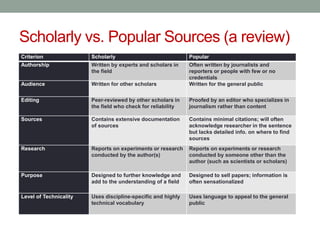
Scholarly vs. Popular Sources (a review)
Criterion Scholarly Popular
Authorship Written by experts and scholars in
the field
Often written by journalists and
reporters or people with few or no
credentials
Audience Written for other scholars Written for the general public
Editing Peer-reviewed by other scholars in
the field who check for reliability
Proofed by an editor who specializes in
journalism rather than content
Sources Contains extensive documentation
of sources
Contains minimal citations; will often
acknowledge researcher in the sentence
but lacks detailed info. on where to find
sources
Research Reports on experiments or research
conducted by the author(s)
Reports on experiments or research
conducted by someone other than the
author (such as scientists or scholars)
Purpose Designed to further knowledge and
add to the understanding of a field
Designed to sell papers; information is
often sensationalized
Level of Technicality Uses discipline-specific and highly
technical vocabulary
Uses language to appeal to the general
public
Peer Reviewed Academic Sources
• Sources you find in a library database can be credible,
scholarly sources if you limit them to peer reviewed,
academic sources.
• When you research using the database Academic Search
Complete, you have the option to check the box to limit
your returns to only peer reviewed academic sources.
These are the best sources for your paper.
• A peer reviewed source is one that has been through a
review by other scholars in the field.
• Essentially, it means that the article has been approved by
other academics; therefore, you can count on it’s
credibility.
Books and Online Sources
• Using a book in your paper sounds like a good idea, but
not all books are intended for a college audience.
Therefore, verifying its credibility for your college paper is
vital.
• Furthermore, online sources like newspapers,
organizations, and governmental sites can also be
credible, but sometimes, it can be hard to verify their
truthfulness and/or credibility.
• The following slides can help you in verifying that an
online article (or book) is valid and credible, and not fake
news, clickbate, or satire.
Ask Questions: Who?
• Who wrote it?
• Is this person credible? What makes the author an expert? Professor?
Critic? Researcher? Scientist?
• Can you verify his or her credentials?
• Is the author with a credible organization?
• Who is the publisher?
• Is it a University Press or a popular press? The United States
government?
• Who is the sponsor of the website?
• Political group? University?
• Who is the intended audience?
• Adults? Children? A certain gender/ethnicity? Political group?
Researchers? Does that imply bias or not for collegiate use?
• Who reviewed the book?
• What are their credentials? Where are they from? Magazine?
University?
Ask Questions: What?
• What is the purpose of the information?
• Is it to share new discoveries or research? Is it a new
argument/analysis about a topic? A new theory?
• Or is it simply to make money?
• What type of information is presented?
• General or specific? Comprehensive or selective?
• Do you get the whole picture?
• What is the stance?
• Is it biased? Are both sides of the argument presented?
• What do the reviews say about the book?
• Positive or negative?
• What is the level of expertise of the author?
• General or specific (written for general public or researchers).
Ask Questions: When?
• When was the information published?
• Is it current or out of date?
• Has new theory or research made the information irrelevant or
inconsequential?
• Is publication date relevant? Depending on your research field, it
may not be.
• When was it last updated?
• If the source is a website, can you find the date?
• Do other links on the page work?
Ask Questions: Why?
• Why was the information published?
• Was the information published for the general public or specifically
for researchers or scientists?
• Tertiary texts do not make good sources. They are too general but
are good for background info.
• Is the purpose to support a specific ideology, theory, or claim at the
expense of another? Is it biased?
• Read the fine print. Is there an ulterior motive behind the author,
publisher, or sponsor?
• Is it all in fun? Is the information on the level or satire (The Onion)?
Be careful of information that looks credible but is really intended to
fool or mislead you.
Ask Questions: How?
• How can you tell if the source is accurate?
• Can the information be verified in another source?
• Are there obvious factual errors? If so, there might be others.
• Are there grammatical errors or typos? Was the information
published without careful editing?
• If the source is a website, is it easy to navigate? Sometimes,
disreputable sites make finding the truth difficult.
Check Domain and URL names
• Avoid websites that end in “lo” like Newslo.
• These sites take pieces of accurate information and then packaging
that information with other false or misleading “facts” (sometimes
for the purposes of satire or comedy).
• Watch out for common news websites that end in
“.com.co” as they are often fake versions of real news
sources.
• .co is also the domain for Colombia!
• Odd domain names generally equal odd and rarely
truthful news.
• If it seems childish or unreliable, it probably is.
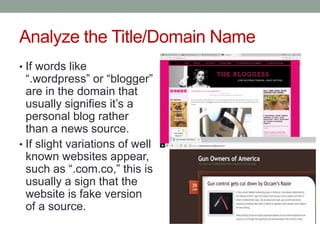
Analyze the Title/Domain Name
• If words like
“.wordpress” or “blogger”
are in the domain that
usually signifies it’s a
personal blog rather
than a news source.
• If slight variations of well
known websites appear,
such as “.com.co,” this is
usually a sign that the
website is fake version
of a source.
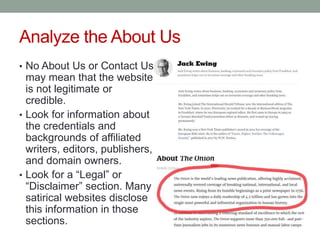
Analyze the About Us
• No About Us or Contact Us
may mean that the website
is not legitimate or
credible.
• Look for information about
the credentials and
backgrounds of affiliated
writers, editors, publishers,
and domain owners.
• Look for a “Legal” or
“Disclaimer” section. Many
satirical websites disclose
this information in those
sections.
Analyze the About Us
• Google every title/domain name/anyone listed in the
“About Us” section to see if anyone has previously
reported on the website (Snopes, hoax-slayer, PolitiFact,
factcheck.org, etc.) or whether it has a Wikipedia page or
something similar detailing its background.
• Verifying the domain and writers/owners is useful for
identifying and correctly interpreting lesser known and/or
newer websites such as satirical sources or websites that
have a specific political agenda.
Analyze Sources within the Article
• Does the website mention or link to a study or source?
• Look up the source/study. Click on any links and verify they are
working and are correct.
• Do you think the study is being accurately reflected and reported on
in the article?
• Are officials or experts being cited?
• Can you confirm their quotes elsewhere?
• Try to verify details, facts, quotes, etc. with multiple
sources.
Verify What You Can
• Verify that other reputable news sources are reporting it.
• Sometimes lack of coverage is the result of corporate media bias or
other factors, but there should typically be more than one source
reporting on a topic or event.
• Lack of author attribution is suspect. The information may
not be credible.
• Blogger posts are not always verified and edited, so they
lack credibility.
• Some news organizations are also letting bloggers post under their
news brands (ex: BuzzFeed Community Posts, Kinja blogs, Forbes
blogs). Be wary of these posts. They may not be as reputable.
Analyze the Writing Style
• Does the website follow AP Style Guide or another style
guide?
• Typically, lack of style guide may indicate an overall lack of editing
or fact-checking process.
• Does it frequently use ALL CAPS in headlines and/or
body text? Does the headline or body of the text use
words like WOW!, SLAUGHTER!, DESTROY!?
• This stylistic practice and these types of hyperbolic word choices
are often used to create emotional responses with readers that is
avoided in more traditional styles of journalism.
Analyze the Aesthetics
• Like the style-guide, many fake and questionable news
sites utilize very bad design. Usually this means screens
are cluttered with text and heavy-handed photoshopping
or bad digital images.
• If an article has obvious grammar and/or spelling
mistakes, it’s probably not reputable.
• Credible news sources have editors to review web design and
grammar.
• Is it easy to navigate?
• Sometimes, disreputable sites make finding the truth difficult.
Analyze Social Media and Check YourAnger
• Look up the website on Facebook.
• Do the headlines and posts rely on sensational or provocative
language—aka clickbait—in order to attract attention and encourage
likes, click-throughs, and shares?
• Do the headlines and social media descriptions match or
accurately reflect the content of the linked article?
• This step isn’t particularly good at identifying fake news, but it can also
help identify other misleading news sources.
• If the site encourages you to DOX individuals, it’s unlikely to be
a legitimate source of news.
• If the story makes you REALLY ANGRY it’s probably a good
idea to keep reading about the topic via other sources to make
sure what you read wasn’t purposefully trying to make you
angry (with potentially misleading or false information) in order
to generate shares and ad revenue.
What to Do and Where to Get Help
• It’s always best to read multiple sources of information to
get a variety of viewpoints and media frames.
• Sources such as The Daily Kos, The Huffington Post, and
Fox News vacillate between providing important,
legitimate, problematic, and/or hyperbolic news coverage,
requiring readers and viewers to verify and contextualize
information with other sources.
• For more tips on analyzing the credibility and reliability of
sources, please check out School Library Journal (they
also provide an extensive list of media literacy resources)
and the Digital Resource Center.
• False, Misleading, Clickbait-y, and Satirical ‘News’
Sources.
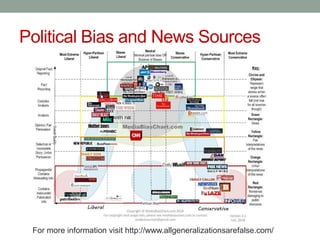
Political Bias and News Sources
For more information visit http://www.allgeneralizationsarefalse.com/
Works Cited
• Zimdars, Melissa. “False, Misleading, Clickbait-y, and
Satirical ‘News’ Sources.” South Texas College, 2016.
• All Generalizations Are False

Lecture - Source Credibility

  • 1.
    READING SOURCES WITHACRITICAL EYE How to determine source credibility
  • 2.
    Scholarly vs. PopularSources (a review) Criterion Scholarly Popular Authorship Written by experts and scholars in the field Often written by journalists and reporters or people with few or no credentials Audience Written for other scholars Written for the general public Editing Peer-reviewed by other scholars in the field who check for reliability Proofed by an editor who specializes in journalism rather than content Sources Contains extensive documentation of sources Contains minimal citations; will often acknowledge researcher in the sentence but lacks detailed info. on where to find sources Research Reports on experiments or research conducted by the author(s) Reports on experiments or research conducted by someone other than the author (such as scientists or scholars) Purpose Designed to further knowledge and add to the understanding of a field Designed to sell papers; information is often sensationalized Level of Technicality Uses discipline-specific and highly technical vocabulary Uses language to appeal to the general public
  • 3.
    Peer Reviewed AcademicSources • Sources you find in a library database can be credible, scholarly sources if you limit them to peer reviewed, academic sources. • When you research using the database Academic Search Complete, you have the option to check the box to limit your returns to only peer reviewed academic sources. These are the best sources for your paper. • A peer reviewed source is one that has been through a review by other scholars in the field. • Essentially, it means that the article has been approved by other academics; therefore, you can count on it’s credibility.
  • 4.
    Books and OnlineSources • Using a book in your paper sounds like a good idea, but not all books are intended for a college audience. Therefore, verifying its credibility for your college paper is vital. • Furthermore, online sources like newspapers, organizations, and governmental sites can also be credible, but sometimes, it can be hard to verify their truthfulness and/or credibility. • The following slides can help you in verifying that an online article (or book) is valid and credible, and not fake news, clickbate, or satire.
  • 5.
    Ask Questions: Who? •Who wrote it? • Is this person credible? What makes the author an expert? Professor? Critic? Researcher? Scientist? • Can you verify his or her credentials? • Is the author with a credible organization? • Who is the publisher? • Is it a University Press or a popular press? The United States government? • Who is the sponsor of the website? • Political group? University? • Who is the intended audience? • Adults? Children? A certain gender/ethnicity? Political group? Researchers? Does that imply bias or not for collegiate use? • Who reviewed the book? • What are their credentials? Where are they from? Magazine? University?
  • 6.
    Ask Questions: What? •What is the purpose of the information? • Is it to share new discoveries or research? Is it a new argument/analysis about a topic? A new theory? • Or is it simply to make money? • What type of information is presented? • General or specific? Comprehensive or selective? • Do you get the whole picture? • What is the stance? • Is it biased? Are both sides of the argument presented? • What do the reviews say about the book? • Positive or negative? • What is the level of expertise of the author? • General or specific (written for general public or researchers).
  • 7.
    Ask Questions: When? •When was the information published? • Is it current or out of date? • Has new theory or research made the information irrelevant or inconsequential? • Is publication date relevant? Depending on your research field, it may not be. • When was it last updated? • If the source is a website, can you find the date? • Do other links on the page work?
  • 8.
    Ask Questions: Why? •Why was the information published? • Was the information published for the general public or specifically for researchers or scientists? • Tertiary texts do not make good sources. They are too general but are good for background info. • Is the purpose to support a specific ideology, theory, or claim at the expense of another? Is it biased? • Read the fine print. Is there an ulterior motive behind the author, publisher, or sponsor? • Is it all in fun? Is the information on the level or satire (The Onion)? Be careful of information that looks credible but is really intended to fool or mislead you.
  • 9.
    Ask Questions: How? •How can you tell if the source is accurate? • Can the information be verified in another source? • Are there obvious factual errors? If so, there might be others. • Are there grammatical errors or typos? Was the information published without careful editing? • If the source is a website, is it easy to navigate? Sometimes, disreputable sites make finding the truth difficult.
  • 10.
    Check Domain andURL names • Avoid websites that end in “lo” like Newslo. • These sites take pieces of accurate information and then packaging that information with other false or misleading “facts” (sometimes for the purposes of satire or comedy). • Watch out for common news websites that end in “.com.co” as they are often fake versions of real news sources. • .co is also the domain for Colombia! • Odd domain names generally equal odd and rarely truthful news. • If it seems childish or unreliable, it probably is.
  • 11.
    Analyze the Title/DomainName • If words like “.wordpress” or “blogger” are in the domain that usually signifies it’s a personal blog rather than a news source. • If slight variations of well known websites appear, such as “.com.co,” this is usually a sign that the website is fake version of a source.
  • 12.
    Analyze the AboutUs • No About Us or Contact Us may mean that the website is not legitimate or credible. • Look for information about the credentials and backgrounds of affiliated writers, editors, publishers, and domain owners. • Look for a “Legal” or “Disclaimer” section. Many satirical websites disclose this information in those sections.
  • 13.
    Analyze the AboutUs • Google every title/domain name/anyone listed in the “About Us” section to see if anyone has previously reported on the website (Snopes, hoax-slayer, PolitiFact, factcheck.org, etc.) or whether it has a Wikipedia page or something similar detailing its background. • Verifying the domain and writers/owners is useful for identifying and correctly interpreting lesser known and/or newer websites such as satirical sources or websites that have a specific political agenda.
  • 14.
    Analyze Sources withinthe Article • Does the website mention or link to a study or source? • Look up the source/study. Click on any links and verify they are working and are correct. • Do you think the study is being accurately reflected and reported on in the article? • Are officials or experts being cited? • Can you confirm their quotes elsewhere? • Try to verify details, facts, quotes, etc. with multiple sources.
  • 15.
    Verify What YouCan • Verify that other reputable news sources are reporting it. • Sometimes lack of coverage is the result of corporate media bias or other factors, but there should typically be more than one source reporting on a topic or event. • Lack of author attribution is suspect. The information may not be credible. • Blogger posts are not always verified and edited, so they lack credibility. • Some news organizations are also letting bloggers post under their news brands (ex: BuzzFeed Community Posts, Kinja blogs, Forbes blogs). Be wary of these posts. They may not be as reputable.
  • 16.
    Analyze the WritingStyle • Does the website follow AP Style Guide or another style guide? • Typically, lack of style guide may indicate an overall lack of editing or fact-checking process. • Does it frequently use ALL CAPS in headlines and/or body text? Does the headline or body of the text use words like WOW!, SLAUGHTER!, DESTROY!? • This stylistic practice and these types of hyperbolic word choices are often used to create emotional responses with readers that is avoided in more traditional styles of journalism.
  • 17.
    Analyze the Aesthetics •Like the style-guide, many fake and questionable news sites utilize very bad design. Usually this means screens are cluttered with text and heavy-handed photoshopping or bad digital images. • If an article has obvious grammar and/or spelling mistakes, it’s probably not reputable. • Credible news sources have editors to review web design and grammar. • Is it easy to navigate? • Sometimes, disreputable sites make finding the truth difficult.
  • 18.
    Analyze Social Mediaand Check YourAnger • Look up the website on Facebook. • Do the headlines and posts rely on sensational or provocative language—aka clickbait—in order to attract attention and encourage likes, click-throughs, and shares? • Do the headlines and social media descriptions match or accurately reflect the content of the linked article? • This step isn’t particularly good at identifying fake news, but it can also help identify other misleading news sources. • If the site encourages you to DOX individuals, it’s unlikely to be a legitimate source of news. • If the story makes you REALLY ANGRY it’s probably a good idea to keep reading about the topic via other sources to make sure what you read wasn’t purposefully trying to make you angry (with potentially misleading or false information) in order to generate shares and ad revenue.
  • 19.
    What to Doand Where to Get Help • It’s always best to read multiple sources of information to get a variety of viewpoints and media frames. • Sources such as The Daily Kos, The Huffington Post, and Fox News vacillate between providing important, legitimate, problematic, and/or hyperbolic news coverage, requiring readers and viewers to verify and contextualize information with other sources. • For more tips on analyzing the credibility and reliability of sources, please check out School Library Journal (they also provide an extensive list of media literacy resources) and the Digital Resource Center. • False, Misleading, Clickbait-y, and Satirical ‘News’ Sources.
  • 20.
    Political Bias andNews Sources For more information visit http://www.allgeneralizationsarefalse.com/
  • 21.
    Works Cited • Zimdars,Melissa. “False, Misleading, Clickbait-y, and Satirical ‘News’ Sources.” South Texas College, 2016. • All Generalizations Are False