The document discusses various types of arrays in Java, including one-dimensional arrays, multi-dimensional arrays, and jagged arrays. It explains how to declare, initialize, access, and pass array elements. Key points include that arrays are dynamically allocated objects that can store primitive values or objects, arrays inherit from Object and implement Serializable and Cloneable, and the class name of an array returns [ followed by the data type (e.g. [I for int array). The document also demonstrates various array examples using for loops and exceptions like ArrayIndexOutOfBoundsException.

![One dimensional array
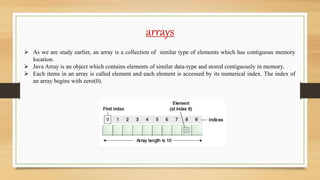
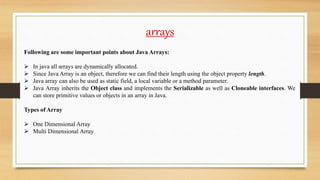
Syntax to Declare one dimensional Array:
<Data-Type> <Array-Name>[];
OR
<Data-Type>[] <Array-Name>;
Instantiation of Array:
ArrayRefVar = new <Data-Type>[Size];
Example –
int arr[]; // Declaration of array
arr = new int[10]; // Initialization of array
OR int arr[] = new int[10] // Declaration and initialization
OR
int arr[] = {10,20,30};](https://image.slidesharecdn.com/lecture-7arrays-201012110823/85/Lecture-7-arrays-5-320.jpg)
![One dimensional array
//ArrayDemo1.java
class ArrayDemo1 {
public static void main(String args[]) {
int arr[];
arr = new int[5];
arr[0] = 10;
arr[1] = 11;
arr[2] = 12;
arr[3] = 13;
arr[4] = 14;
for(int i=0; i<arr.length; i++) {
System.out.println(arr[i]);
}
}
}
Output-
10
11
12
13
14
//ArrayDemo2.java
class ArrayDemo2 {
public static void main(String args[]) {
int arr[] = {10,20,30,40,50};
for(int i=0; i<arr.length; i++) {
System.out.println(arr[i]);
}
}
}
Output-
10
20
30
40
50](https://image.slidesharecdn.com/lecture-7arrays-201012110823/85/Lecture-7-arrays-6-320.jpg)
![One dimensional array
//ArrayDemo3.java
import java.util.Scanner;
class ArrayDemo3 {
public static void main(String args[]) {
int n, sum = 0;
Scanner sc = new Scanner(System.in);
System.out.println("Enter the number of elements in array: ");
n = sc.nextInt();
int arr[] =new int[n];
System.out.println("Enter all the Elements: ");
for(int i=0; i<arr.length; i++) {
arr[i] = sc.nextInt();
sum = sum+arr[i];
}
System.out.println("Sum of all the Elements = "+sum);
}}
Output-
Enter the number of elements in array:
4
Enter all the Elements:
23
23
23
23
Sum of all the Elements = 92
Input through Keyboard in Java Array.](https://image.slidesharecdn.com/lecture-7arrays-201012110823/85/Lecture-7-arrays-7-320.jpg)
![One dimensional array
Passing an array as a parameter to a
Method in java
//ArrayDemo4.java
class ArrayDemo4 {
void display(int ar[]) {
for(int i=0; i<ar.length; i++) {
System.out.println(ar[i]);
}
}
public static void main(String args[]) {
ArrayDemo ad = new ArrayDemo();
int a[] = {10,20,30};
ad.display(a);
}
}
Output-
10
20
30](https://image.slidesharecdn.com/lecture-7arrays-201012110823/85/Lecture-7-arrays-8-320.jpg)
![One dimensional array
ArrayIndexOutOfBoundsException
If length of the array in negative, equal to
the array size or greater than the array size
while traversing the array.
//ArrayDemo5.java
class ArrayDemo4 {
void display(int ar[]) {
for(int i=0; i<=ar.length; i++) {
System.out.println(ar[i]);
}
}
public static void main(String args[]) {
ArrayDemo ad = new ArrayDemo();
int a[] = {10,20,30};
ad.display(a);
}
}
Output-
10
20
30
Exception in thread "main"
java.lang.ArrayIndexOutOfBoundsException: 3
at ArrayDemo.display(ArrayDemo.java:4)
at ArrayDemo.main(ArrayDemo.java:10)](https://image.slidesharecdn.com/lecture-7arrays-201012110823/85/Lecture-7-arrays-9-320.jpg)
![Multi - dimensional array
In Multi – Dimensional Array, Data are stored in the form of table i.e., row and column or we can say that
in the form of matrix.
Syntax of Declaration
<DataType>[][] arr (or) <DataType> arr[][]; (or) <DataType> []arr[];
Instantiate Multidimensional Array in Java
int [][]arr = new int[3][3]; // 3 row and 3 column
First index represent the Row and Second represent the column.
arr[0][0] arr[0][1] arr[0][2]
arr[1][0] arr[1][1] arr[1][2]
arr[2][0] arr[2][1] arr[2][2]](https://image.slidesharecdn.com/lecture-7arrays-201012110823/85/Lecture-7-arrays-10-320.jpg)
![Multi - dimensional array
//TwoDArray1.java
class TwoDArray1 {
public static void main(String args[]){
int ar[][] = {{10,20,30},{40,50,60},{70,80,90}};
for(int i=0; i<3; i++) {
for(int j=0; j<3; j++) {
System.out.print(ar[i][j]+" ");
}
System.out.println();
}
}
}
Output-
10 20 30
40 50 60
70 80 90](https://image.slidesharecdn.com/lecture-7arrays-201012110823/85/Lecture-7-arrays-11-320.jpg)
![Multi - dimensional array
//TwoDArray2.java
import java.util.Scanner;
class TwoDArray2 {
public static void main(String args[]){
int ar[][] = new int[3][3];
Scanner sc = new Scanner(System.in);
System.out.println("Enter Array's Elements :");
for(int i=0; i<3; i++) {
for(int j=0; j<3; j++) {
ar[i][j] = sc.nextInt();
System.out.println("ar["+i+"]["+j+"] = "+" "+ar[i][j]);
}
System.out.println();
}}
}
Enter Array's Elements :
12
ar[0][0] = 12
13
ar[0][1] = 13
14
ar[0][2] = 14
16
ar[1][0] = 16
18
ar[1][1] = 18
19
ar[1][2] = 19
20
ar[2][0] = 20
21
ar[2][1] = 21
22
ar[2][2] = 22](https://image.slidesharecdn.com/lecture-7arrays-201012110823/85/Lecture-7-arrays-12-320.jpg)
![Jagged array
Jagged Array is array of arrays such that member
arrays can be of different sizes, i.e., we can create a
2-D arrays but with variable number of columns in
each row. These type of arrays are also known as
Jagged arrays.
//TwoDArray3.java
class TwoDArray3 {
public static void main(String[] args) {
int arr[][] = new int[2][];
arr[0] = new int[3];
arr[1] = new int[2];
int count = 0;
for (int i=0; i<arr.length; i++)
for(int j=0; j<arr[i].length; j++)
arr[i][j] = count++;
System.out.println("Contents of 2D Jagged Array");
for (int i=0; i<arr.length; i++) {
for (int j=0; j<arr[i].length; j++)
System.out.print(arr[i][j] + " ");
System.out.println();
} }
}
Output-
Contents of 2D Jagged Array
0 1 2
3 4](https://image.slidesharecdn.com/lecture-7arrays-201012110823/85/Lecture-7-arrays-13-320.jpg)
![Class name of java array
In Java, an array is an object. For array object, a
proxy class is created whose name can be
obtained by getClass().getName() method on the
object.
//TwoDArray4.java
class TwoDArray4 {
public static void main(String[] args) {
int arr[]={10,20,30};
Class c=arr.getClass();
String name=c.getName();
System.out.println(name);
}
}
Output -
[I](https://image.slidesharecdn.com/lecture-7arrays-201012110823/85/Lecture-7-arrays-14-320.jpg)