COMPUTER-BASED
ASSESSMENT
                               1

        GEORGIY          G. GERKUSHENKO
           P H D , A S S O C I AT E P R O F E S S O R

 RUSSIAN FEDERATION, VOLGOGRAD STATE TECHNICAL
                   UNIVERSITY,
DEPARTMENT OF "COMPUTER -AIDED DESIGN AND SEARCH
                 ENGINE DESIGN"

                     20.05.2011
              CHINA, CHANGCHUN, NENU
CONTENT
                           2

 Defining of computer testing and its types
 Requirements to tests
 Algorithm of tests creation
 United state exam in Russia
DEFINITION
                            3

 A Computer-Based Assessment (CBA), also known
 as Computer-Based Testing (CBT), e-assessment,
 computerized testing and computer-administered
 testing, is a method of administering tests in which the
 responses are electronically recorded, assessed, or both.
 As the name implies, Computer-Based Assessment
 makes use of a computer or an equivalent electronic
 device such as a cell phone or PDA. CBA systems enable
 educators and trainers to author, schedule, deliver, and
 report on surveys, quizzes, tests and exams. Computer-
 Based Assessment may be a stand-alone system or a part
 of a virtual learning environment, possibly accessed via
 the World Wide Web.
Benefits of Computer-Based Testing
                        4


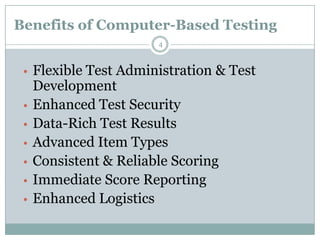
 • Flexible Test Administration & Test
     Development
 •   Enhanced Test Security
 •   Data-Rich Test Results
 •   Advanced Item Types
 •   Consistent & Reliable Scoring
 •   Immediate Score Reporting
 •   Enhanced Logistics
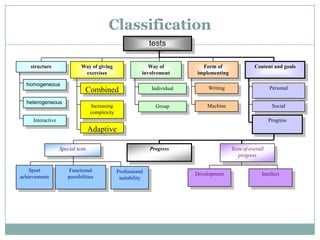
Classification
                                                               tests
                                                                  5


    structure                Way of giving                    Way of          Form of                 Content and goals
                              exercises                    involvement      implementing

  homogeneous
                               Combined                        Individual        Writing                      Personal

  heterogeneous
                                   Increasing                    Group          Machine                        Social
                                   complexity
     Interactive                                                                                              Progress
                                   Adaptive

                   Special tests                               Progress                    Tests of overall
                                                                                              progress

    Sport               Functional              Professional                Development                   Intellect
achievements           possibilities             suitability
Classification
      6


more…
Classification
      7


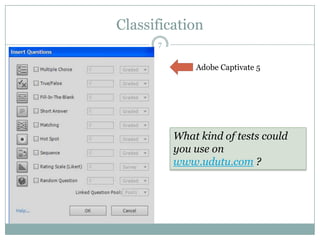
              Adobe Captivate 5


          What kind of tests could
          you use on
          www.udutu.com ?
Classification
                                  8

Type of evaluation:
 Objective type tests (on the base of comparing
  answers with an etalon)
    Recognition level
    Reproduction level
    Heuristic (creative) level
 Subjective type tests (free form of answering –
 problem solving, practice e tc.)
Classification
                       9


 Input
 Preliminary
 Current
 Topical
 Transitional
 Final
CRITICAL PROPERTIES
                          10


 VALIDITY– equivalence of test exercises to
 learning content and test results.

 RELIABILITY.
 Test is reliable if we can see the same results for
 each person after second time of the same testing
Rules for test developing
                            11

 Reasonable choice of scale for evaluation test results
 The quantity of exercises should be 30–40 for
  science subjects and twice more for humanitarian
  ones
 The quantity of exercises in a data base should be 10
  times more then in one test (so 300-400 exercises).
Rules for tests giving
                           12

 Student should be informed about the quantity of
  exercises and time limit
 Student should have opportunity to do
  demonstrative test at least one time before starting
  the attestation test. It is important for introduction
  the interface of testing program and ways of
  answering.
Rules for tests giving
                           13


 During testing there should be only one exercise on
 the screen

 The way of answering should be simple and
 comfortable
Students opportunities during testing:
                           14


 To submit each answer;


 To correct answers before submission the answer;


 To skip exercises more then one time;
Students opportunities during testing:
                            15

 To click the instruction for answering anytime;


 To see the result immediately after finishing test.
Rules for test designing
                         16

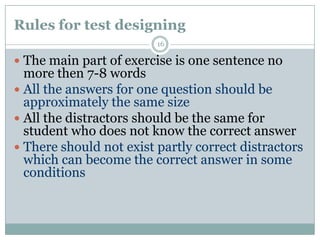
 The main part of exercise is one sentence no
  more then 7-8 words
 All the answers for one question should be
  approximately the same size
 All the distractors should be the same for
  student who does not know the correct answer
 There should not exist partly correct distractors
  which can become the correct answer in some
  conditions
Requirements to test exercises
                         1718
                         1111


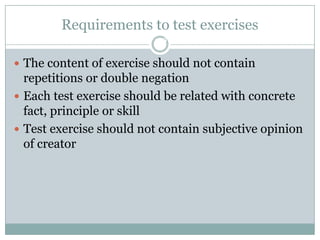
 The content of exercise should not contain
  repetitions or double negation
 Each test exercise should be related with concrete
  fact, principle or skill
 Test exercise should not contain subjective opinion
  of creator
Requirements to test exercises
                         18


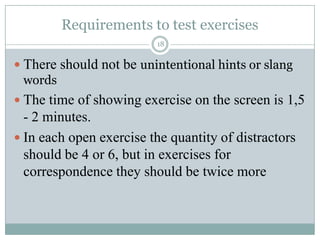
 There should not be unintentional hints or slang
  words
 The time of showing exercise on the screen is 1,5
  - 2 minutes.
 In each open exercise the quantity of distractors
  should be 4 or 6, but in exercises for
  correspondence they should be twice more
Requirements to test exercises
                          19

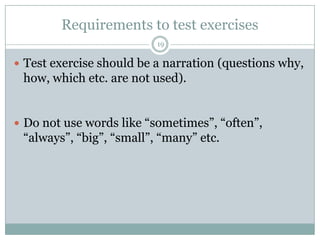
 Test exercise should be a narration (questions why,
 how, which etc. are not used).


 Do not use words like “sometimes”, “often”,
 “always”, “big”, “small”, “many” etc.
Requirements to test exercises
                          20


 The key word or definition should be in the first
 part of an exercise


 It is better to make long exercise and short
 distractors than contrary
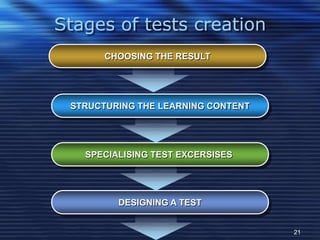
Stages of tests creation
       CHOOSING THE RESULT


 STRUCTURING THE LEARNING CONTENT


   SPECIALISING TEST EXCERSISES


         DESIGNING A TEST


                                    21
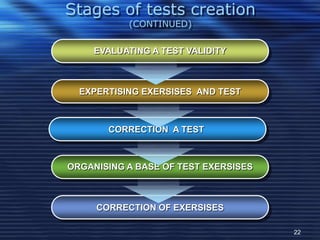
Stages of tests creation
           (CONTINUED)


     EVALUATING A TEST VALIDITY


  EXPERTISING EXERSISES AND TEST


       CORRECTION A TEST


ORGANISING A BASE OF TEST EXERSISES


     CORRECTION OF EXERSISES

                                      22
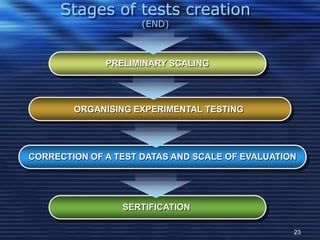
Stages of tests creation
                     (END)


              PRELIMINARY SCALING


        ORGANISING EXPERIMENTAL TESTING


CORRECTION OF A TEST DATAS AND SCALE OF EVALUATION


                 SERTIFICATION

                                                 23
24


United state exam
    (Russia)
25


mail@gerkushenko.ru

Lecture 3. Computer-based assessment

  • 1.
    COMPUTER-BASED ASSESSMENT 1 GEORGIY G. GERKUSHENKO P H D , A S S O C I AT E P R O F E S S O R RUSSIAN FEDERATION, VOLGOGRAD STATE TECHNICAL UNIVERSITY, DEPARTMENT OF "COMPUTER -AIDED DESIGN AND SEARCH ENGINE DESIGN" 20.05.2011 CHINA, CHANGCHUN, NENU
  • 2.
    CONTENT 2  Defining of computer testing and its types  Requirements to tests  Algorithm of tests creation  United state exam in Russia
  • 3.
    DEFINITION 3  A Computer-Based Assessment (CBA), also known as Computer-Based Testing (CBT), e-assessment, computerized testing and computer-administered testing, is a method of administering tests in which the responses are electronically recorded, assessed, or both. As the name implies, Computer-Based Assessment makes use of a computer or an equivalent electronic device such as a cell phone or PDA. CBA systems enable educators and trainers to author, schedule, deliver, and report on surveys, quizzes, tests and exams. Computer- Based Assessment may be a stand-alone system or a part of a virtual learning environment, possibly accessed via the World Wide Web.
  • 4.
    Benefits of Computer-BasedTesting 4 • Flexible Test Administration & Test Development • Enhanced Test Security • Data-Rich Test Results • Advanced Item Types • Consistent & Reliable Scoring • Immediate Score Reporting • Enhanced Logistics
  • 5.
    Classification tests 5 structure Way of giving Way of Form of Content and goals exercises involvement implementing homogeneous Combined Individual Writing Personal heterogeneous Increasing Group Machine Social complexity Interactive Progress Adaptive Special tests Progress Tests of overall progress Sport Functional Professional Development Intellect achievements possibilities suitability
  • 6.
    Classification 6 more…
  • 7.
    Classification 7 Adobe Captivate 5 What kind of tests could you use on www.udutu.com ?
  • 8.
    Classification 8 Type of evaluation:  Objective type tests (on the base of comparing answers with an etalon)  Recognition level  Reproduction level  Heuristic (creative) level  Subjective type tests (free form of answering – problem solving, practice e tc.)
  • 9.
    Classification 9  Input  Preliminary  Current  Topical  Transitional  Final
  • 10.
    CRITICAL PROPERTIES 10  VALIDITY– equivalence of test exercises to learning content and test results. RELIABILITY. Test is reliable if we can see the same results for each person after second time of the same testing
  • 11.
    Rules for testdeveloping 11  Reasonable choice of scale for evaluation test results  The quantity of exercises should be 30–40 for science subjects and twice more for humanitarian ones  The quantity of exercises in a data base should be 10 times more then in one test (so 300-400 exercises).
  • 12.
    Rules for testsgiving 12  Student should be informed about the quantity of exercises and time limit  Student should have opportunity to do demonstrative test at least one time before starting the attestation test. It is important for introduction the interface of testing program and ways of answering.
  • 13.
    Rules for testsgiving 13  During testing there should be only one exercise on the screen  The way of answering should be simple and comfortable
  • 14.
    Students opportunities duringtesting: 14  To submit each answer;  To correct answers before submission the answer;  To skip exercises more then one time;
  • 15.
    Students opportunities duringtesting: 15  To click the instruction for answering anytime;  To see the result immediately after finishing test.
  • 16.
    Rules for testdesigning 16  The main part of exercise is one sentence no more then 7-8 words  All the answers for one question should be approximately the same size  All the distractors should be the same for student who does not know the correct answer  There should not exist partly correct distractors which can become the correct answer in some conditions
  • 17.
    Requirements to testexercises 1718 1111  The content of exercise should not contain repetitions or double negation  Each test exercise should be related with concrete fact, principle or skill  Test exercise should not contain subjective opinion of creator
  • 18.
    Requirements to testexercises 18  There should not be unintentional hints or slang words  The time of showing exercise on the screen is 1,5 - 2 minutes.  In each open exercise the quantity of distractors should be 4 or 6, but in exercises for correspondence they should be twice more
  • 19.
    Requirements to testexercises 19  Test exercise should be a narration (questions why, how, which etc. are not used).  Do not use words like “sometimes”, “often”, “always”, “big”, “small”, “many” etc.
  • 20.
    Requirements to testexercises 20  The key word or definition should be in the first part of an exercise  It is better to make long exercise and short distractors than contrary
  • 21.
    Stages of testscreation CHOOSING THE RESULT STRUCTURING THE LEARNING CONTENT SPECIALISING TEST EXCERSISES DESIGNING A TEST 21
  • 22.
    Stages of testscreation (CONTINUED) EVALUATING A TEST VALIDITY EXPERTISING EXERSISES AND TEST CORRECTION A TEST ORGANISING A BASE OF TEST EXERSISES CORRECTION OF EXERSISES 22
  • 23.
    Stages of testscreation (END) PRELIMINARY SCALING ORGANISING EXPERIMENTAL TESTING CORRECTION OF A TEST DATAS AND SCALE OF EVALUATION SERTIFICATION 23
  • 24.
  • 25.