McGraw-Hill ©The McGraw-Hill Companies, Inc., 2000
Chapter 20
File Transfer
Protocol
(FTP)
McGraw-Hill ©The McGraw-Hill Companies, Inc., 2000
CONTENTS
CONTENTS
• CONNECTIONS
• COMMUNICATION
• COMMAND PROCESSING
• FILE TRANSFER
• USER INTERFACE
• ANONYMOUS FTP
McGraw-Hill ©The McGraw-Hill Companies, Inc., 2000
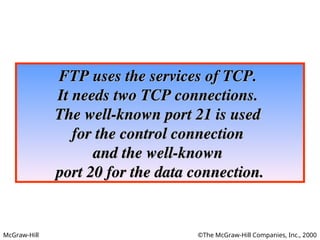
FTP uses the services of TCP.
It needs two TCP connections.
The well-known port 21 is used
for the control connection
and the well-known
and the well-known
port 20 for the data connection.
McGraw-Hill ©The McGraw-Hill Companies, Inc., 2000
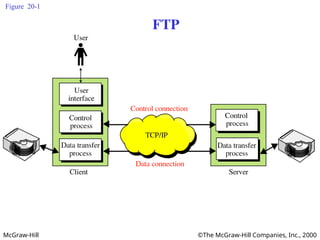
Figure 20-1
FTP
McGraw-Hill ©The McGraw-Hill Companies, Inc., 2000
20.1 Connections: The control connection
McGraw-Hill ©The McGraw-Hill Companies, Inc., 2000
The Data Connection
• Uses Server’s well-known port 20
1. Client issues a passive open on an ephemeral
port, say x.
2. Client uses PORT command to tell the server
about the port number x.
3. Server issues an active open from port 20 to
port x.
4. Server creates a child server/ephemeral port
number to serve the client
McGraw-Hill ©The McGraw-Hill Companies, Inc., 2000
Creating
the data
connection
McGraw-Hill ©The McGraw-Hill Companies, Inc., 2000
Figure 20-4
20.2 Communication
Using the control connection
McGraw-Hill ©The McGraw-Hill Companies, Inc., 2000
NVT
FTP FTP
McGraw-Hill ©The McGraw-Hill Companies, Inc., 2000
Format of NVT ASCII characters
McGraw-Hill ©The McGraw-Hill Companies, Inc., 2000
Format of NVT control characters
McGraw-Hill ©The McGraw-Hill Companies, Inc., 2000
Figure 20-5
Using the data connection
McGraw-Hill ©The McGraw-Hill Companies, Inc., 2000
File Type
• ASCII or EBCDIC
– Nonprint
– TELNET
• Image
McGraw-Hill ©The McGraw-Hill Companies, Inc., 2000
Data Structure
• File Structure
• Record Structure
• Page Structure
McGraw-Hill ©The McGraw-Hill Companies, Inc., 2000
Transmission Mode
• Stream mode
• Block mode
• Compressed mode
McGraw-Hill ©The McGraw-Hill Companies, Inc., 2000
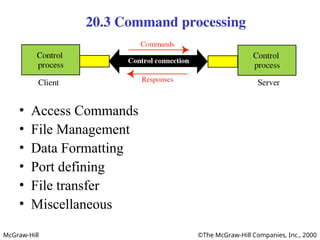
20.3 Command processing
• Access Commands
• File Management
• Data Formatting
• Port defining
• File transfer
• Miscellaneous
McGraw-Hill ©The McGraw-Hill Companies, Inc., 2000
20.4 File transfer
McGraw-Hill ©The McGraw-Hill Companies, Inc., 2000
Figure 20-8
Example 1
McGraw-Hill ©The McGraw-Hill Companies, Inc., 2000
Figure 20-9
Example 2
McGraw-Hill ©The McGraw-Hill Companies, Inc., 2000
USER
INTERFACE
20.5
20.5
McGraw-Hill ©The McGraw-Hill Companies, Inc., 2000
Solution
Solution
% ftp challenger.atc.fhda.edu
Connected to challenger.atc.fhda.edu
220 Server ready
Name: forouzan
Password: xxxxxxx
ftp > ls /usr/user/report
200 OK
McGraw-Hill ©The McGraw-Hill Companies, Inc., 2000
Solution
Solution
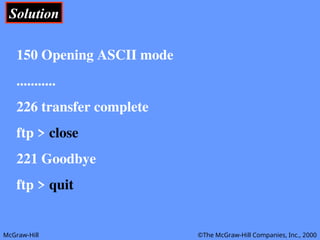
150 Opening ASCII mode
...........
226 transfer complete
ftp > close
221 Goodbye
ftp > quit
McGraw-Hill ©The McGraw-Hill Companies, Inc., 2000
ANONYMOUS
FTP
20.6
20.6
McGraw-Hill ©The McGraw-Hill Companies, Inc., 2000
Solution
Solution
% ftp internic.net
Connected to internic.net
220 Server ready
Name: anonymous
331 Guest login OK, send “guest” as password
Password: guest
ftp > pwd
257 ’/’ is current directory
McGraw-Hill ©The McGraw-Hill Companies, Inc., 2000
Solution
Solution
ftp > ls
200 OK
150 Opening ASCII mode
bin
…
ftp> close
221 Goodbye
ftp> quit

Lecture 22- FTP file transfer protocol.ppt