Slide 1
                                                                      Slide 1


Authentication Server (OAuth2 or similar)
    The objective of this presentation is to implement an Authentication
    provider that can be used simply to authenticate users only once. This
    may be like the one you use for authenticating yourself on
    Facebook, LinkedIn, or Google.

    The authentication should be Web-based and/or API-based and should
    authenticate against our LDAP Server.
    This provider should also remember which third-party systems are
    authorized to authenticate against this server and what information, if
    any, shared.


                                            Authentication Client
    Once a user is authenticated, they should not be required to enter login
    details again in this system.
                   If the user is not logged in, a login screen should be
                   presented similar to Facebook connect or Google login.
                   Authentication will be done on Authentication provider
                   server and client will get no username/password ever.
Slide 2


Authentication
Server
        Abhishek Chikane
Slide 3


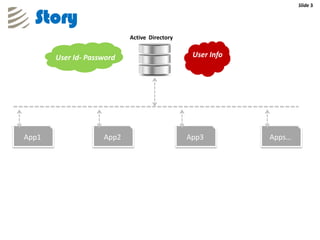
  Story
                           Active Directory


       User Id- Password                       User Info


App1                App2                      App3         Apps…
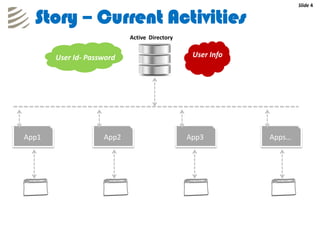
Slide 4


  Story – Current Activities
                           Active Directory


       User Id- Password                       User Info


App1                App2                      App3         Apps…
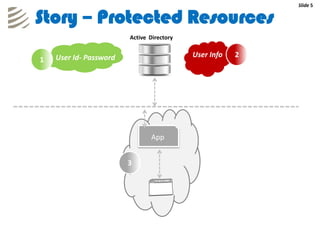
Slide 5


Story – Protected Resources
                        Active Directory


    User Id- Password                      User Info   2
1


                               App


                        3
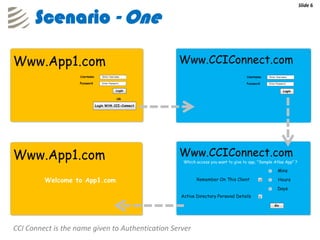
Slide 6


      Scenario - One


CCI Connect is the name given to Authentication Server
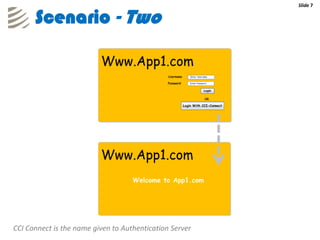
Slide 7


      Scenario - Two


CCI Connect is the name given to Authentication Server
Slide 8


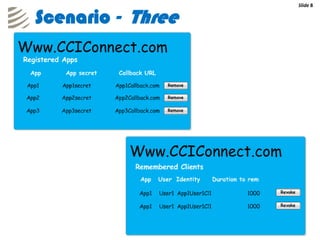
Scenario - Three
Slide 9


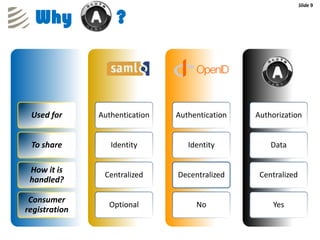
  Why              ?


 Used for      Authentication   Authentication   Authorization


 To share         Identity         Identity          Data

 How it is
                Centralized     Decentralized     Centralized
 handled?

 Consumer
                 Optional            No              Yes
registration
Slide 10


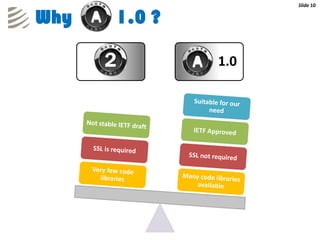
Why   1.0 ?

              1.0
Slide 11


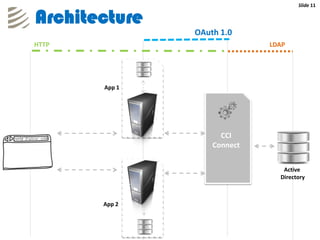
Architecture
               OAuth 1.0
HTTP                         LDAP


       App 1


                     CCI
                   Connect


                                Active
                               Directory


       App 2
Slide 12


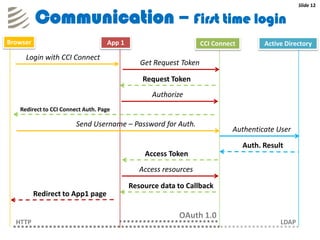
          Communication – First time login
Browser                            App 1                          CCI Connect         Active Directory
     Login with CCI Connect
                                              Get Request Token

                                               Request Token
                                                 Authorize
   Redirect to CCI Connect Auth. Page

                        Send Username – Password for Auth.
                                                                            Authenticate User

                                                                                Auth. Result
                                               Access Token
                                              Access resources

                                           Resource data to Callback
          Redirect to App1 page

                                                         OAuth 1.0
  HTTP                                                                                     LDAP
Slide 13


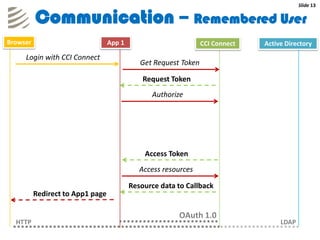
          Communication – Remembered User
Browser                           App 1                          CCI Connect   Active Directory
     Login with CCI Connect
                                             Get Request Token

                                              Request Token
                                                Authorize


                                              Access Token
                                             Access resources

                                          Resource data to Callback
          Redirect to App1 page

                                                        OAuth 1.0
  HTTP                                                                              LDAP
Slide 14


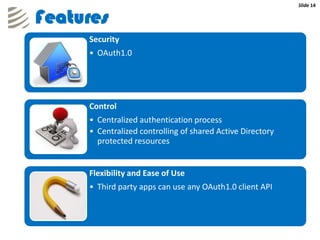
Features
     Security
     • OAuth1.0


     Control
     • Centralized authentication process
     • Centralized controlling of shared Active Directory
       protected resources


     Flexibility and Ease of Use
     • Third party apps can use any OAuth1.0 client API
Slide 15


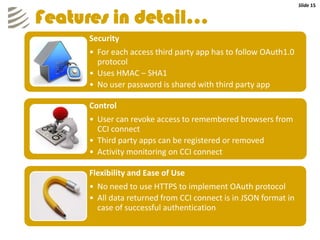
Features in detail…
     Security
     • For each access third party app has to follow OAuth1.0
       protocol
     • Uses HMAC – SHA1
     • No user password is shared with third party app

     Control
     • User can revoke access to remembered browsers from
       CCI connect
     • Third party apps can be registered or removed
     • Activity monitoring on CCI connect

     Flexibility and Ease of Use
     • No need to use HTTPS to implement OAuth protocol
     • All data returned from CCI connect is in JSON format in
       case of successful authentication
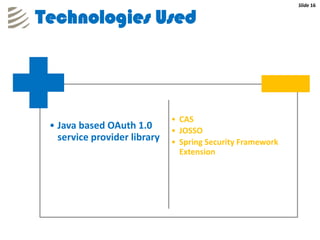
Slide 16


Technologies Used


                              • CAS
 • Java based OAuth 1.0       • JOSSO
   service provider library   • Spring Security Framework
                                Extension
Slide 22
         Slide 17


Thanks

Authentication Server

  • 1.
    Slide 1 Slide 1 Authentication Server (OAuth2 or similar) The objective of this presentation is to implement an Authentication provider that can be used simply to authenticate users only once. This may be like the one you use for authenticating yourself on Facebook, LinkedIn, or Google. The authentication should be Web-based and/or API-based and should authenticate against our LDAP Server. This provider should also remember which third-party systems are authorized to authenticate against this server and what information, if any, shared. Authentication Client Once a user is authenticated, they should not be required to enter login details again in this system. If the user is not logged in, a login screen should be presented similar to Facebook connect or Google login. Authentication will be done on Authentication provider server and client will get no username/password ever.
  • 2.
  • 3.
    Slide 3 Story Active Directory User Id- Password User Info App1 App2 App3 Apps…
  • 4.
    Slide 4 Story – Current Activities Active Directory User Id- Password User Info App1 App2 App3 Apps…
  • 5.
    Slide 5 Story –Protected Resources Active Directory User Id- Password User Info 2 1 App 3
  • 6.
    Slide 6 Scenario - One CCI Connect is the name given to Authentication Server
  • 7.
    Slide 7 Scenario - Two CCI Connect is the name given to Authentication Server
  • 8.
  • 9.
    Slide 9 Why ? Used for Authentication Authentication Authorization To share Identity Identity Data How it is Centralized Decentralized Centralized handled? Consumer Optional No Yes registration
  • 10.
    Slide 10 Why 1.0 ? 1.0
  • 11.
    Slide 11 Architecture OAuth 1.0 HTTP LDAP App 1 CCI Connect Active Directory App 2
  • 12.
    Slide 12 Communication – First time login Browser App 1 CCI Connect Active Directory Login with CCI Connect Get Request Token Request Token Authorize Redirect to CCI Connect Auth. Page Send Username – Password for Auth. Authenticate User Auth. Result Access Token Access resources Resource data to Callback Redirect to App1 page OAuth 1.0 HTTP LDAP
  • 13.
    Slide 13 Communication – Remembered User Browser App 1 CCI Connect Active Directory Login with CCI Connect Get Request Token Request Token Authorize Access Token Access resources Resource data to Callback Redirect to App1 page OAuth 1.0 HTTP LDAP
  • 14.
    Slide 14 Features Security • OAuth1.0 Control • Centralized authentication process • Centralized controlling of shared Active Directory protected resources Flexibility and Ease of Use • Third party apps can use any OAuth1.0 client API
  • 15.
    Slide 15 Features indetail… Security • For each access third party app has to follow OAuth1.0 protocol • Uses HMAC – SHA1 • No user password is shared with third party app Control • User can revoke access to remembered browsers from CCI connect • Third party apps can be registered or removed • Activity monitoring on CCI connect Flexibility and Ease of Use • No need to use HTTPS to implement OAuth protocol • All data returned from CCI connect is in JSON format in case of successful authentication
  • 16.
    Slide 16 Technologies Used • CAS • Java based OAuth 1.0 • JOSSO service provider library • Spring Security Framework Extension
  • 17.
    Slide 22 Slide 17 Thanks