Pictures
Arthur Charpentier
UQAM
Actuarial Summer School 2019
@freakonometrics freakonometrics freakonometrics.hypotheses.org 1 / 57
Statistics & ML Toolbox : Neural Nets
Very popular for pictures...
Picture xi is
• a n×n matrix in {0, 1}n2
for black & white
• a n × n matrix in [0, 1]n2
for grey-scale
• a 3 × n × n array in ([0, 1]3)n2
for color
• a T ×3×n ×n tensor in (([0, 1]3)T )n2
for
video
y here is the label (“8", “9", “6", etc)
Suppose we want to recognize a “6" on a
picture
m(x) =
+1 if x is a “6"
−1 otherwise
@freakonometrics freakonometrics freakonometrics.hypotheses.org 2 / 57
Statistics & ML Toolbox : Neural Nets
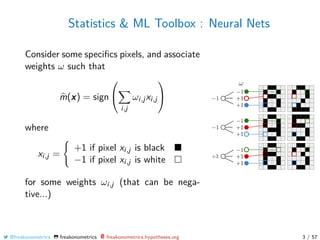
Consider some specifics pixels, and associate
weights ω such that
m(x) = sign


i,j
ωi,jxi,j


where
xi,j =
+1 if pixel xi,j is black
−1 if pixel xi,j is white
for some weights ωi,j (that can be nega-
tive...)
@freakonometrics freakonometrics freakonometrics.hypotheses.org 3 / 57
Statistics & ML Toolbox : Neural Nets
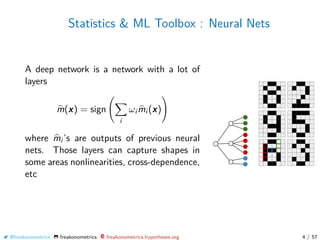
A deep network is a network with a lot of
layers
m(x) = sign
i
ωi mi (x)
where mi ’s are outputs of previous neural
nets. Those layers can capture shapes in
some areas nonlinearities, cross-dependence,
etc
@freakonometrics freakonometrics freakonometrics.hypotheses.org 4 / 57
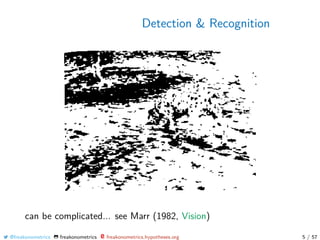
Detection & Recognition
can be complicated... see Marr (1982, Vision)
@freakonometrics freakonometrics freakonometrics.hypotheses.org 5 / 57
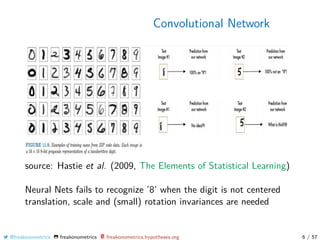
Convolutional Network
source: Hastie et al. (2009, The Elements of Statistical Learning)
Neural Nets fails to recognize ’8’ when the digit is not centered
translation, scale and (small) rotation invariances are needed
@freakonometrics freakonometrics freakonometrics.hypotheses.org 6 / 57
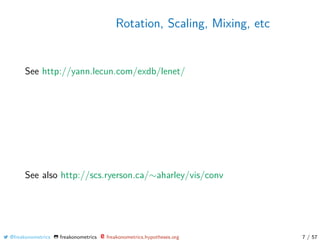
Rotation, Scaling, Mixing, etc
See http://yann.lecun.com/exdb/lenet/
See also http://scs.ryerson.ca/∼aharley/vis/conv
@freakonometrics freakonometrics freakonometrics.hypotheses.org 7 / 57
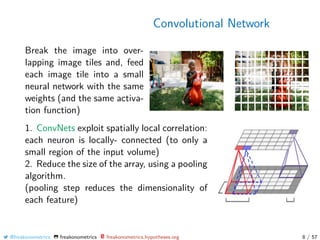
Convolutional Network
Break the image into over-
lapping image tiles and, feed
each image tile into a small
neural network with the same
weights (and the same activa-
tion function)
1. ConvNets exploit spatially local correlation:
each neuron is locally- connected (to only a
small region of the input volume)
2. Reduce the size of the array, using a pooling
algorithm.
(pooling step reduces the dimensionality of
each feature)
@freakonometrics freakonometrics freakonometrics.hypotheses.org 8 / 57
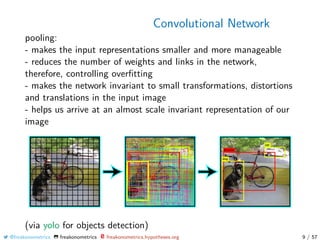
Convolutional Network
pooling:
- makes the input representations smaller and more manageable
- reduces the number of weights and links in the network,
therefore, controlling overfitting
- makes the network invariant to small transformations, distortions
and translations in the input image
- helps us arrive at an almost scale invariant representation of our
image
(via yolo for objects detection)
@freakonometrics freakonometrics freakonometrics.hypotheses.org 9 / 57
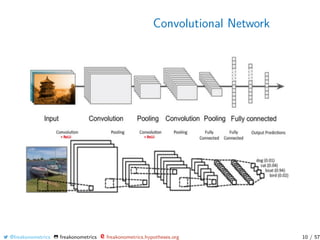
Convolutional Network
@freakonometrics freakonometrics freakonometrics.hypotheses.org 10 / 57
Convolutional Network
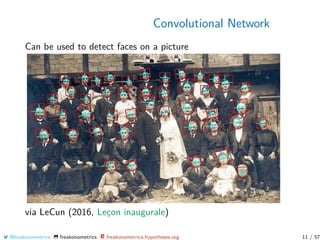
Can be used to detect faces on a picture
via LeCun (2016, Leçon inaugurale)
@freakonometrics freakonometrics freakonometrics.hypotheses.org 11 / 57
Convolutional Network
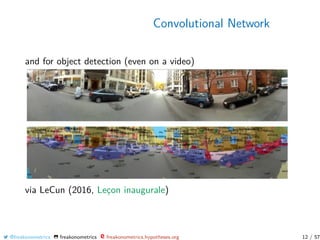
and for object detection (even on a video)
via LeCun (2016, Leçon inaugurale)
@freakonometrics freakonometrics freakonometrics.hypotheses.org 12 / 57
Convolutional Network
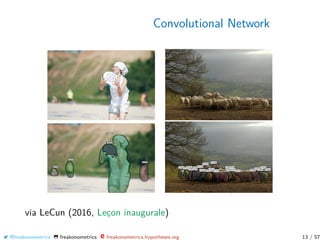
via LeCun (2016, Leçon inaugurale)
@freakonometrics freakonometrics freakonometrics.hypotheses.org 13 / 57
Convolutional Network
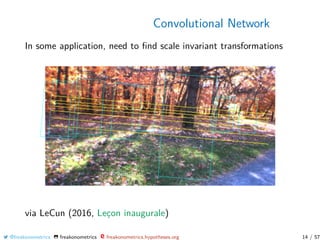
In some application, need to find scale invariant transformations
via LeCun (2016, Leçon inaugurale)
@freakonometrics freakonometrics freakonometrics.hypotheses.org 14 / 57
Recognition with Neural Nets
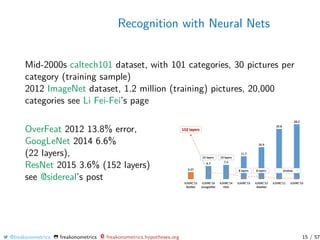
Mid-2000s caltech101 dataset, with 101 categories, 30 pictures per
category (training sample)
2012 ImageNet dataset, 1.2 million (training) pictures, 20,000
categories see Li Fei-Fei’s page
OverFeat 2012 13.8% error,
GoogLeNet 2014 6.6%
(22 layers),
ResNet 2015 3.6% (152 layers)
see @sidereal’s post
@freakonometrics freakonometrics freakonometrics.hypotheses.org 15 / 57
From Pictures to Videos
A picture is a w × h × 3 tensor
A video is a w × h × 3 × t tensor
One can use RNN
recurrent neural nets (or LSTM)
Can also be use to identify objects
see https://towardsdatascience.com
@freakonometrics freakonometrics freakonometrics.hypotheses.org 16 / 57
Which Pictures? Satellite
From https://unequalscenes.com/, Hout Bay, about 15km south
of Cape Town, South Africa and Dar es Salaam, Tanzania.
@freakonometrics freakonometrics freakonometrics.hypotheses.org 17 / 57
Which Pictures? Satellite
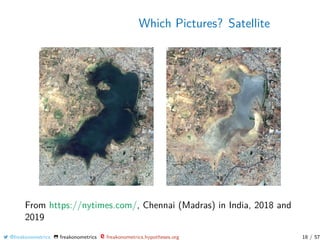
From https://nytimes.com/, Chennai (Madras) in India, 2018 and
2019
@freakonometrics freakonometrics freakonometrics.hypotheses.org 18 / 57
Which Pictures? Satellite
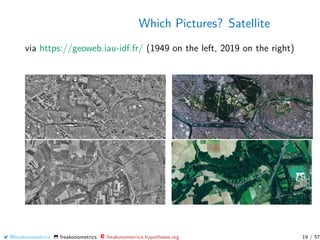
via https://geoweb.iau-idf.fr/ (1949 on the left, 2019 on the right)
@freakonometrics freakonometrics freakonometrics.hypotheses.org 19 / 57
Which Pictures? Satellite
Possible use for crop insurance:
- To assess crop share (relative proportions) in a large area (no
georeference available of the fields)
- To estimate yield of an specific crop/season in a large area (no
georeference available of the fields)
- To detect and to georeference fields with specific crops
- To detect kind-of-crop info from specific fields
Various sources can be used :
- MODIS (Moderate Resolution Imaging Spectroradiometer)
250m × 250m, 2 images per day
- LANDSAT, 15m × 15m, 1 image every 16 days
(see also https://landsat.visibleearth.nasa.gov )
@freakonometrics freakonometrics freakonometrics.hypotheses.org 20 / 57
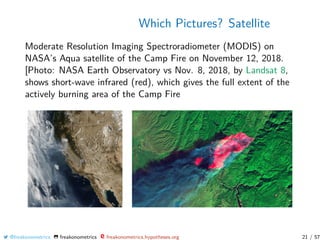
Which Pictures? Satellite
Moderate Resolution Imaging Spectroradiometer (MODIS) on
NASA’s Aqua satellite of the Camp Fire on November 12, 2018.
[Photo: NASA Earth Observatory vs Nov. 8, 2018, by Landsat 8,
shows short-wave infrared (red), which gives the full extent of the
actively burning area of the Camp Fire
@freakonometrics freakonometrics freakonometrics.hypotheses.org 21 / 57
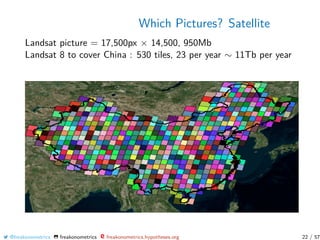
Which Pictures? Satellite
Landsat picture = 17,500px × 14,500, 950Mb
Landsat 8 to cover China : 530 tiles, 23 per year ∼ 11Tb per year
@freakonometrics freakonometrics freakonometrics.hypotheses.org 22 / 57
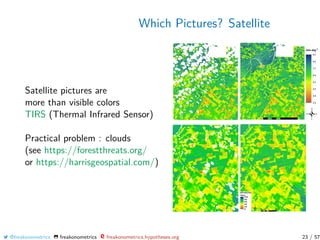
Which Pictures? Satellite
Satellite pictures are
more than visible colors
TIRS (Thermal Infrared Sensor)
Practical problem : clouds
(see https://forestthreats.org/
or https://harrisgeospatial.com/)
@freakonometrics freakonometrics freakonometrics.hypotheses.org 23 / 57
Which Pictures? Satellite
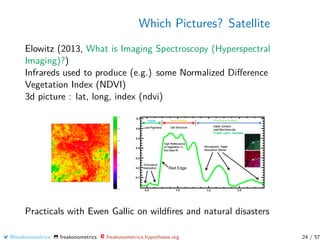
Elowitz (2013, What is Imaging Spectroscopy (Hyperspectral
Imaging)?)
Infrareds used to produce (e.g.) some Normalized Difference
Vegetation Index (NDVI)
3d picture : lat, long, index (ndvi)
Practicals with Ewen Gallic on wildfires and natural disasters
@freakonometrics freakonometrics freakonometrics.hypotheses.org 24 / 57
Convolutional Network
The light blue grid is called the input feature
map. A kernel (shaded area) of value



0 1 2
2 2 0
0 1 2



slides across the input feature map.
(see http://deeplearning.net/)
@freakonometrics freakonometrics freakonometrics.hypotheses.org 25 / 57
Extracting Shapes & Contours
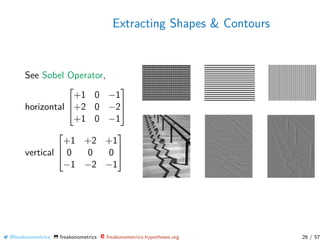
See Sobel Operator,
horizontal



+1 0 −1
+2 0 −2
+1 0 −1



vertical



+1 +2 +1
0 0 0
−1 −2 −1



@freakonometrics freakonometrics freakonometrics.hypotheses.org 26 / 57
Extracting Shapes & Contours
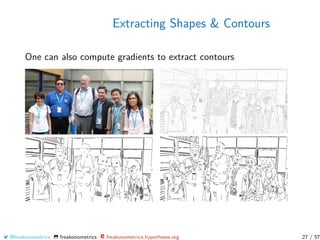
One can also compute gradients to extract contours
@freakonometrics freakonometrics freakonometrics.hypotheses.org 27 / 57
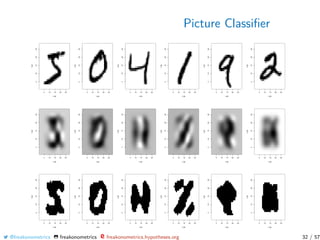
Picture Classifier
use https://github.com/bnosac/image to extract contours
1 install.packages (" image. LineSegmentDetector ", repos =
"https :// bnosac.github.io/drat ")
2 library(image. LineSegmentDetector )
3 library(imager)
4 img_path <- "../ grey -lausanne.png"
5 im <- load.image(img_path)[,,1,1]
6 linesegments <- image_line_segment_detector (im *255)
7 plot(linesegments)
or
8 library(image. ContourDetector )
9 contourlines <- image_contour_detector (im *255)
10 plot(contourlines)
@freakonometrics freakonometrics freakonometrics.hypotheses.org 28 / 57
Picture Classifier
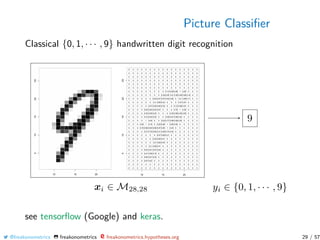
Classical {0, 1, · · · , 9} handwritten digit recognition
see tensorflow (Google) and keras.
@freakonometrics freakonometrics freakonometrics.hypotheses.org 29 / 57
Picture Classifier
See https://www.tensorflow.org/install
1 library(tensorflow)
2 install_tensorflow (method = "conda ")
3 library(keras)
4 install_keras(method = "conda ")
5 mnist <- dataset_mnist ()
6 idx123 = which(mnist$train$y %in% c(1,2,3))
7 V <- mnist$train$x[idx123 [1:800] , ,]
8 MV = NULL
9 for(i in 1:800) MV=cbind(MV ,as.vector(V[i,,]))
10 MV=t(MV)
11 df=data.frame(y=mnist$train$y[idx123 ][1:800] ,x=MV)
12 reg=glm((y==1)~.,data=df ,family=binomial)
Here xi ∈ R784 (for a small greyscale picture).
@freakonometrics freakonometrics freakonometrics.hypotheses.org 30 / 57
Picture Classifier
Still with those handwritten digit pictures, from the mnist dataset.
Here {(yi , xi )} with yi = “3” and xi ∈ [0, 1]28×28
One can define a multilinear principal component analysis
see also Tucker decomposition, from Hitchcock (1927, The
expression of a tensor or a polyadic as a sum of products)
We can use those decompositions to derive a simple classifier.
@freakonometrics freakonometrics freakonometrics.hypotheses.org 31 / 57
Picture Classifier
@freakonometrics freakonometrics freakonometrics.hypotheses.org 32 / 57
Picture Classifier
To reduce dimension use (classical) PCA
1 V <- (mnist$train$x [1:1000 , ,])
2 MV <- NULL
3 for(i in 1:1000) MV <- cbind(MV ,as.vector(V[i,,]))
4 pca <- prcomp(t(MV))
or Multivariate PCA
5 library(rTensor)
6 T <- as.tensor(mnist$train$x [1:1000 , ,])
7 tensor_svd <- hosvd(T)
8 tucker_decomp <- tucker(T, ranks = c(100, 3, 3))
9 T_approx <- ttl(tucker_decomp$Z , tucker_decomp$U , 1:3)
10 pca <- T_approx@data
or directly
11 pca <- mpca(T)
@freakonometrics freakonometrics freakonometrics.hypotheses.org 33 / 57
Picture Classifier
with the (classical) PCA
1 library(factoextra)
2 res.ind <- get_pca_ind(pca)
3 PTS <- res.ind$coord
4 value <- mnist$train$y[idx123 ][1:1000]
Consider a multinomial logistic regression, on the first k
components
5 k <- 10
6 df <- data.frame(y=as.factor(value), x=PTS[,1:k])
7 library(nnet)
8 reg <- multinom(y~.,data=df ,trace=FALSE)
9 df$pred <- predict(reg ,type =" probs ")
@freakonometrics freakonometrics freakonometrics.hypotheses.org 34 / 57
Picture Classifier
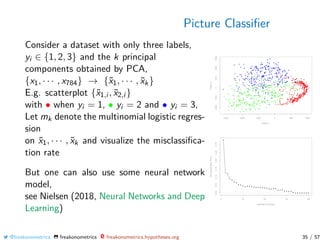
Consider a dataset with only three labels,
yi ∈ {1, 2, 3} and the k principal
components obtained by PCA,
{x1, · · · , x784} → {˜x1, · · · , ˜xk}
E.g. scatterplot {˜x1,i , ˜x2,i }
with • when yi = 1, • yi = 2 and • yi = 3,
Let mk denote the multinomial logistic regres-
sion
on ˜x1, · · · , ˜xk and visualize the misclassifica-
tion rate
But one can also use some neural network
model,
see Nielsen (2018, Neural Networks and Deep
Learning)
@freakonometrics freakonometrics freakonometrics.hypotheses.org 35 / 57
Neural Nets
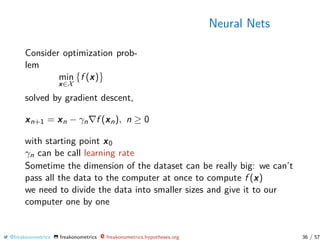
Consider optimization prob-
lem
min
x∈X
f (x)
solved by gradient descent,
xn+1 = xn − γn f (xn), n ≥ 0
with starting point x0
γn can be call learning rate
Sometime the dimension of the dataset can be really big: we can’t
pass all the data to the computer at once to compute f (x)
we need to divide the data into smaller sizes and give it to our
computer one by one
@freakonometrics freakonometrics freakonometrics.hypotheses.org 36 / 57
Neural Nets
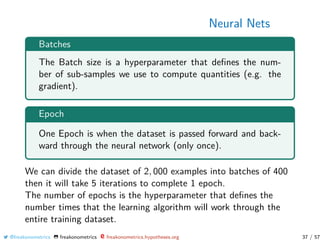
Batches
The Batch size is a hyperparameter that defines the num-
ber of sub-samples we use to compute quantities (e.g. the
gradient).
Epoch
One Epoch is when the dataset is passed forward and back-
ward through the neural network (only once).
We can divide the dataset of 2, 000 examples into batches of 400
then it will take 5 iterations to complete 1 epoch.
The number of epochs is the hyperparameter that defines the
number times that the learning algorithm will work through the
entire training dataset.
@freakonometrics freakonometrics freakonometrics.hypotheses.org 37 / 57
Picture Classifier
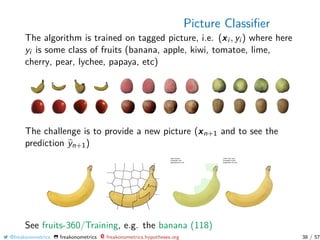
The algorithm is trained on tagged picture, i.e. (xi , yi ) where here
yi is some class of fruits (banana, apple, kiwi, tomatoe, lime,
cherry, pear, lychee, papaya, etc)
The challenge is to provide a new picture (xn+1 and to see the
prediction yn+1)
See fruits-360/Training, e.g. the banana (118)
@freakonometrics freakonometrics freakonometrics.hypotheses.org 38 / 57
Picture Classifier
1 library(keras)
2 library(lime)
3 library(magick)
4 model <- application_vgg16 (weights = "imagenet",
include_top = TRUE)
5 test_image_files_path <- "/fruits -360/ Test"
6 img <- image_read(’https :// upload.wikimedia.org/
wikipedia/commons/thumb /8/8a/Banana -Single.jpg /272
px -Banana -Single.jpg ’)
7 img_path <- file.path(test_image_files_path , "Banana",
’banana.jpg ’)
8 image_write(img , img_path)
9 plot(as.raster(img))
10 plot_superpixels (img_path , n_superpixels = 35, weight
= 10)
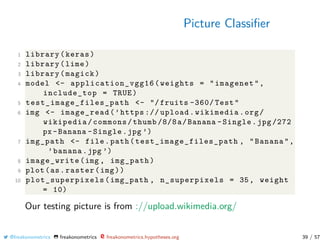
Our testing picture is from ://upload.wikimedia.org/
@freakonometrics freakonometrics freakonometrics.hypotheses.org 39 / 57
Picture Classifier
We use here (pre-trained) VGG16 and VGG19 models for Keras,
see Simonyan & Zisserman (2014, Very Deep Convolutional
Networks for Large-Scale Image Recognition)
1 image_prep <- function(x) {
2 arrays <- lapply(x, function(path) {
3 img <- image_load(path , target_size = c(224 ,224))
4 x <- image_to_array(img)
5 x <- array_reshape(x, c(1, dim(x)))
6 x <- imagenet_preprocess_input (x)
7 })
8 do.call(abind ::abind , c(arrays , list(along = 1)))
9 }
10 res <- predict(model , image_prep(img_path))
To create our own model, see Chollet & Allaire (2018, Deep
Learning with R) [github]
@freakonometrics freakonometrics freakonometrics.hypotheses.org 40 / 57
Picture Classifier
1 imagenet_decode_predictions (res)
2 [[1]]
3 class_name class_description score
4 1 n07753592 banana 0.9929747581
5 2 n03532672 hook 0.0013420789
6 3 n07747607 orange 0.0010816196
7 4 n07749582 lemon 0.0010625814
8 5 n07716906 spaghetti_squash 0.0009176208
with 99.29% chance, the wikipedia picture of a
banana is a banana
@freakonometrics freakonometrics freakonometrics.hypotheses.org 41 / 57
Picture Classifier
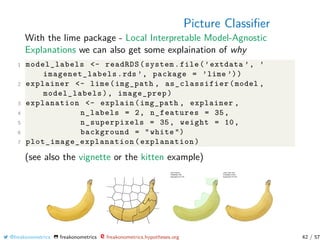
With the lime package - Local Interpretable Model-Agnostic
Explanations we can also get some explaination of why
1 model_labels <- readRDS(system.file(’extdata ’, ’
imagenet_labels .rds ’, package = ’lime ’))
2 explainer <- lime(img_path , as_classifier(model ,
model_labels), image_prep)
3 explanation <- explain(img_path , explainer ,
4 n_labels = 2, n_features = 35,
5 n_superpixels = 35, weight = 10,
6 background = "white ")
7 plot_image_explanation (explanation)
(see also the vignette or the kitten example)
@freakonometrics freakonometrics freakonometrics.hypotheses.org 42 / 57
Picture Classifier
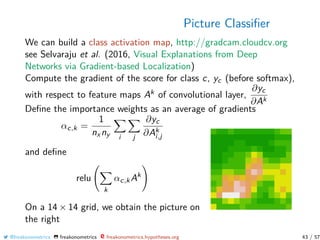
We can build a class activation map, http://gradcam.cloudcv.org
see Selvaraju et al. (2016, Visual Explanations from Deep
Networks via Gradient-based Localization)
Compute the gradient of the score for class c, yc (before softmax),
with respect to feature maps Ak of convolutional layer,
∂yc
∂Ak
Define the importance weights as an average of gradients
αc,k =
1
nx ny i j
∂yc
∂Ak
i,j
and define
relu
k
αc,kAk
On a 14 × 14 grid, we obtain the picture on
the right
@freakonometrics freakonometrics freakonometrics.hypotheses.org 43 / 57
Picture Classifier
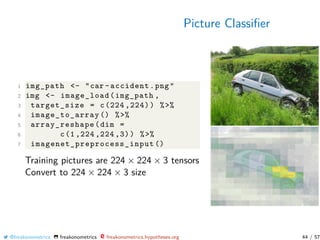
1 img_path <- "car -accident.png"
2 img <- image_load(img_path ,
3 target_size = c(224 ,224)) %>%
4 image_to_array () %>%
5 array_reshape(dim =
6 c(1 ,224 ,224 ,3)) %>%
7 imagenet_preprocess_input ()
Training pictures are 224 × 224 × 3 tensors
Convert to 224 × 224 × 3 size
@freakonometrics freakonometrics freakonometrics.hypotheses.org 44 / 57
Picture Classifier
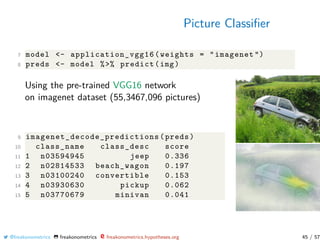
7 model <- application_vgg16 (weights = "imagenet ")
8 preds <- model %>% predict(img)
Using the pre-trained VGG16 network
on imagenet dataset (55,3467,096 pictures)
9 imagenet_decode_predictions (preds)
10 class_name class_desc score
11 1 n03594945 jeep 0.336
12 2 n02814533 beach_wagon 0.197
13 3 n03100240 convertible 0.153
14 4 n03930630 pickup 0.062
15 5 n03770679 minivan 0.041
@freakonometrics freakonometrics freakonometrics.hypotheses.org 45 / 57
Picture Classifier
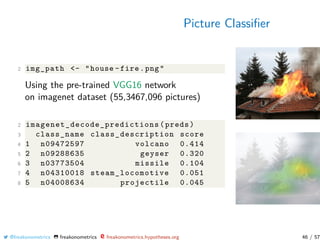
2 img_path <- "house -fire.png"
Using the pre-trained VGG16 network
on imagenet dataset (55,3467,096 pictures)
2 imagenet_decode_predictions (preds)
3 class_name class_description score
4 1 n09472597 volcano 0.414
5 2 n09288635 geyser 0.320
6 3 n03773504 missile 0.104
7 4 n04310018 steam_locomotive 0.051
8 5 n04008634 projectile 0.045
@freakonometrics freakonometrics freakonometrics.hypotheses.org 46 / 57
Picture Classifier
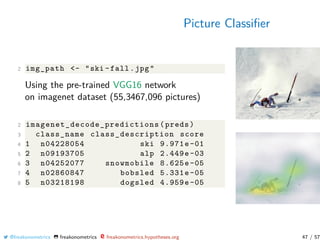
2 img_path <- "ski -fall.jpg"
Using the pre-trained VGG16 network
on imagenet dataset (55,3467,096 pictures)
2 imagenet_decode_predictions (preds)
3 class_name class_description score
4 1 n04228054 ski 9.971e-01
5 2 n09193705 alp 2.449e-03
6 3 n04252077 snowmobile 8.625e-05
7 4 n02860847 bobsled 5.331e-05
8 5 n03218198 dogsled 4.959e-05
@freakonometrics freakonometrics freakonometrics.hypotheses.org 47 / 57
Picture Classifier
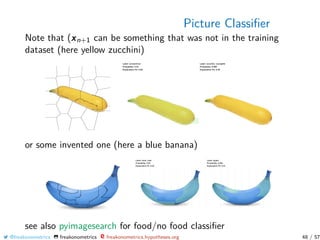
Note that (xn+1 can be something that was not in the training
dataset (here yellow zucchini)
or some invented one (here a blue banana)
see also pyimagesearch for food/no food classifier
@freakonometrics freakonometrics freakonometrics.hypotheses.org 48 / 57
Picture Classifier
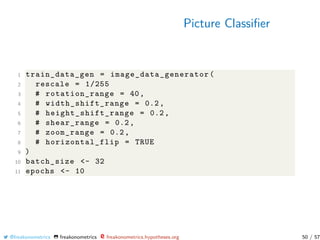
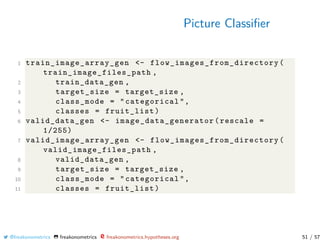
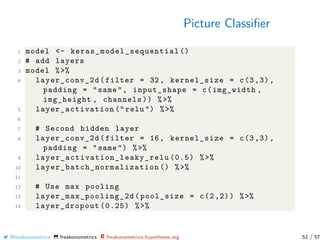
To train our own neural networks, use Chollet & Allaire (2018,
Deep Learning with R) [github]’s code (with keras)
1 channels <- 3
2 img_width <- 20
3 img_height <- 20
4 target_size <- c(img_width , img_height)
5 train_image_files_path <- "../ fruits -360/ Training /"
6 valid_image_files_path <- "../ fruits -360/ Validation /"
7 library(keras)
8 library(lime)
9 library(magick)
10 library(ggplot2)
11 train_samples <- train_image_array_gen$n
12 valid_samples <- valid_image_array_gen$n
@freakonometrics freakonometrics freakonometrics.hypotheses.org 49 / 57
Picture Classifier
1 train_data_gen = image_data_generator (
2 rescale = 1/255
3 # rotation_range = 40,
4 # width_shift_range = 0.2,
5 # height_shift_range = 0.2,
6 # shear_range = 0.2,
7 # zoom_range = 0.2,
8 # horizontal_flip = TRUE
9 )
10 batch_size <- 32
11 epochs <- 10
@freakonometrics freakonometrics freakonometrics.hypotheses.org 50 / 57
Picture Classifier
1 train_image_array_gen <- flow_images_from_directory (
train_image_files_path ,
2 train_data_gen ,
3 target_size = target_size ,
4 class_mode = "categorical",
5 classes = fruit_list)
6 valid_data_gen <- image_data_generator (rescale =
1/255)
7 valid_image_array_gen <- flow_images_from_directory (
valid_image_files_path ,
8 valid_data_gen ,
9 target_size = target_size ,
10 class_mode = "categorical",
11 classes = fruit_list)
@freakonometrics freakonometrics freakonometrics.hypotheses.org 51 / 57
Picture Classifier
1 model <- keras_model_sequential ()
2 # add layers
3 model %>%
4 layer_conv_2d(filter = 32, kernel_size = c(3,3),
padding = "same", input_shape = c(img_width ,
img_height , channels)) %>%
5 layer_activation (" relu ") %>%
6
7 # Second hidden layer
8 layer_conv_2d(filter = 16, kernel_size = c(3,3),
padding = "same ") %>%
9 layer_activation_leaky_relu (0.5) %>%
10 layer_batch_normalization () %>%
11
12 # Use max pooling
13 layer_max_pooling_2d (pool_size = c(2,2)) %>%
14 layer_dropout (0.25) %>%
@freakonometrics freakonometrics freakonometrics.hypotheses.org 52 / 57
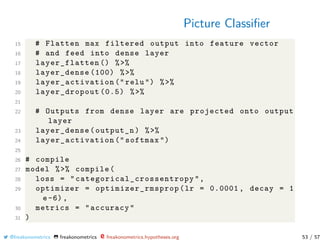
Picture Classifier
15 # Flatten max filtered output into feature vector
16 # and feed into dense layer
17 layer_flatten () %>%
18 layer_dense (100) %>%
19 layer_activation (" relu ") %>%
20 layer_dropout (0.5) %>%
21
22 # Outputs from dense layer are projected onto output
layer
23 layer_dense(output_n) %>%
24 layer_activation (" softmax ")
25
26 # compile
27 model %>% compile(
28 loss = " categorical_crossentropy ",
29 optimizer = optimizer_rmsprop (lr = 0.0001 , decay = 1
e-6),
30 metrics = "accuracy"
31 )
@freakonometrics freakonometrics freakonometrics.hypotheses.org 53 / 57
Picture Classifier
1 hist <- model %>% fit_generator(
2 # training data
3 train_image_array_gen ,
4 # epochs
5 steps_per_epoch = as.integer(train_samples /
batch_size),
6 epochs = epochs ,
7 # validation data
8 validation_data = valid_image_array_gen ,
9 validation_steps = as.integer(valid_samples /
batch_size),
10 # print progress
11 verbose = 2,
12 callbacks = list(
13 # save best model after every epoch
14 callback_model_checkpoint (" fruits_checkpoints .h5",
save_best_only = TRUE),
15 # only needed for visualising with TensorBoard
16 callback_tensorboard (log_dir = "logs ")))
@freakonometrics freakonometrics freakonometrics.hypotheses.org 54 / 57
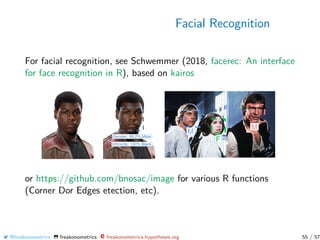
Facial Recognition
For facial recognition, see Schwemmer (2018, facerec: An interface
for face recognition in R), based on kairos
or https://github.com/bnosac/image for various R functions
(Corner Dor Edges etection, etc).
@freakonometrics freakonometrics freakonometrics.hypotheses.org 55 / 57
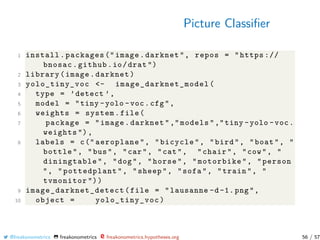
Picture Classifier
1 install.packages (" image.darknet", repos = "https ://
bnosac.github.io/drat ")
2 library(image.darknet)
3 yolo_tiny_voc <- image_darknet_model (
4 type = ’detect ’,
5 model = "tiny -yolo -voc.cfg",
6 weights = system.file(
7 package = "image.darknet "," models ","tiny -yolo -voc.
weights "),
8 labels = c(" aeroplane", "bicycle", "bird", "boat", "
bottle", "bus", "car", "cat", "chair", "cow", "
diningtable", "dog", "horse", "motorbike", "person
", "pottedplant", "sheep", "sofa", "train", "
tvmonitor "))
9 image_darknet_detect (file = "lausanne -d-1. png",
10 object = yolo_tiny_voc)
@freakonometrics freakonometrics freakonometrics.hypotheses.org 56 / 57
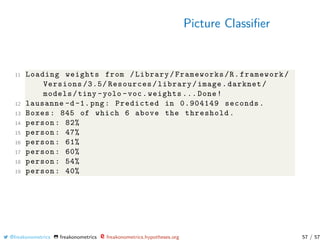
Picture Classifier
11 Loading weights from /Library/Frameworks/R.framework/
Versions /3.5/ Resources/library/image.darknet/
models/tiny -yolo -voc.weights ... Done!
12 lausanne -d-1. png: Predicted in 0.904149 seconds.
13 Boxes: 845 of which 6 above the threshold.
14 person: 82%
15 person: 47%
16 person: 61%
17 person: 60%
18 person: 54%
19 person: 40%
@freakonometrics freakonometrics freakonometrics.hypotheses.org 57 / 57

Lausanne 2019 #2

  • 1.
    Pictures Arthur Charpentier UQAM Actuarial SummerSchool 2019 @freakonometrics freakonometrics freakonometrics.hypotheses.org 1 / 57
  • 2.
    Statistics & MLToolbox : Neural Nets Very popular for pictures... Picture xi is • a n×n matrix in {0, 1}n2 for black & white • a n × n matrix in [0, 1]n2 for grey-scale • a 3 × n × n array in ([0, 1]3)n2 for color • a T ×3×n ×n tensor in (([0, 1]3)T )n2 for video y here is the label (“8", “9", “6", etc) Suppose we want to recognize a “6" on a picture m(x) = +1 if x is a “6" −1 otherwise @freakonometrics freakonometrics freakonometrics.hypotheses.org 2 / 57
  • 3.
    Statistics & MLToolbox : Neural Nets Consider some specifics pixels, and associate weights ω such that m(x) = sign   i,j ωi,jxi,j   where xi,j = +1 if pixel xi,j is black −1 if pixel xi,j is white for some weights ωi,j (that can be nega- tive...) @freakonometrics freakonometrics freakonometrics.hypotheses.org 3 / 57
  • 4.
    Statistics & MLToolbox : Neural Nets A deep network is a network with a lot of layers m(x) = sign i ωi mi (x) where mi ’s are outputs of previous neural nets. Those layers can capture shapes in some areas nonlinearities, cross-dependence, etc @freakonometrics freakonometrics freakonometrics.hypotheses.org 4 / 57
  • 5.
    Detection & Recognition canbe complicated... see Marr (1982, Vision) @freakonometrics freakonometrics freakonometrics.hypotheses.org 5 / 57
  • 6.
    Convolutional Network source: Hastieet al. (2009, The Elements of Statistical Learning) Neural Nets fails to recognize ’8’ when the digit is not centered translation, scale and (small) rotation invariances are needed @freakonometrics freakonometrics freakonometrics.hypotheses.org 6 / 57
  • 7.
    Rotation, Scaling, Mixing,etc See http://yann.lecun.com/exdb/lenet/ See also http://scs.ryerson.ca/∼aharley/vis/conv @freakonometrics freakonometrics freakonometrics.hypotheses.org 7 / 57
  • 8.
    Convolutional Network Break theimage into over- lapping image tiles and, feed each image tile into a small neural network with the same weights (and the same activa- tion function) 1. ConvNets exploit spatially local correlation: each neuron is locally- connected (to only a small region of the input volume) 2. Reduce the size of the array, using a pooling algorithm. (pooling step reduces the dimensionality of each feature) @freakonometrics freakonometrics freakonometrics.hypotheses.org 8 / 57
  • 9.
    Convolutional Network pooling: - makesthe input representations smaller and more manageable - reduces the number of weights and links in the network, therefore, controlling overfitting - makes the network invariant to small transformations, distortions and translations in the input image - helps us arrive at an almost scale invariant representation of our image (via yolo for objects detection) @freakonometrics freakonometrics freakonometrics.hypotheses.org 9 / 57
  • 10.
    Convolutional Network @freakonometrics freakonometricsfreakonometrics.hypotheses.org 10 / 57
  • 11.
    Convolutional Network Can beused to detect faces on a picture via LeCun (2016, Leçon inaugurale) @freakonometrics freakonometrics freakonometrics.hypotheses.org 11 / 57
  • 12.
    Convolutional Network and forobject detection (even on a video) via LeCun (2016, Leçon inaugurale) @freakonometrics freakonometrics freakonometrics.hypotheses.org 12 / 57
  • 13.
    Convolutional Network via LeCun(2016, Leçon inaugurale) @freakonometrics freakonometrics freakonometrics.hypotheses.org 13 / 57
  • 14.
    Convolutional Network In someapplication, need to find scale invariant transformations via LeCun (2016, Leçon inaugurale) @freakonometrics freakonometrics freakonometrics.hypotheses.org 14 / 57
  • 15.
    Recognition with NeuralNets Mid-2000s caltech101 dataset, with 101 categories, 30 pictures per category (training sample) 2012 ImageNet dataset, 1.2 million (training) pictures, 20,000 categories see Li Fei-Fei’s page OverFeat 2012 13.8% error, GoogLeNet 2014 6.6% (22 layers), ResNet 2015 3.6% (152 layers) see @sidereal’s post @freakonometrics freakonometrics freakonometrics.hypotheses.org 15 / 57
  • 16.
    From Pictures toVideos A picture is a w × h × 3 tensor A video is a w × h × 3 × t tensor One can use RNN recurrent neural nets (or LSTM) Can also be use to identify objects see https://towardsdatascience.com @freakonometrics freakonometrics freakonometrics.hypotheses.org 16 / 57
  • 17.
    Which Pictures? Satellite Fromhttps://unequalscenes.com/, Hout Bay, about 15km south of Cape Town, South Africa and Dar es Salaam, Tanzania. @freakonometrics freakonometrics freakonometrics.hypotheses.org 17 / 57
  • 18.
    Which Pictures? Satellite Fromhttps://nytimes.com/, Chennai (Madras) in India, 2018 and 2019 @freakonometrics freakonometrics freakonometrics.hypotheses.org 18 / 57
  • 19.
    Which Pictures? Satellite viahttps://geoweb.iau-idf.fr/ (1949 on the left, 2019 on the right) @freakonometrics freakonometrics freakonometrics.hypotheses.org 19 / 57
  • 20.
    Which Pictures? Satellite Possibleuse for crop insurance: - To assess crop share (relative proportions) in a large area (no georeference available of the fields) - To estimate yield of an specific crop/season in a large area (no georeference available of the fields) - To detect and to georeference fields with specific crops - To detect kind-of-crop info from specific fields Various sources can be used : - MODIS (Moderate Resolution Imaging Spectroradiometer) 250m × 250m, 2 images per day - LANDSAT, 15m × 15m, 1 image every 16 days (see also https://landsat.visibleearth.nasa.gov ) @freakonometrics freakonometrics freakonometrics.hypotheses.org 20 / 57
  • 21.
    Which Pictures? Satellite ModerateResolution Imaging Spectroradiometer (MODIS) on NASA’s Aqua satellite of the Camp Fire on November 12, 2018. [Photo: NASA Earth Observatory vs Nov. 8, 2018, by Landsat 8, shows short-wave infrared (red), which gives the full extent of the actively burning area of the Camp Fire @freakonometrics freakonometrics freakonometrics.hypotheses.org 21 / 57
  • 22.
    Which Pictures? Satellite Landsatpicture = 17,500px × 14,500, 950Mb Landsat 8 to cover China : 530 tiles, 23 per year ∼ 11Tb per year @freakonometrics freakonometrics freakonometrics.hypotheses.org 22 / 57
  • 23.
    Which Pictures? Satellite Satellitepictures are more than visible colors TIRS (Thermal Infrared Sensor) Practical problem : clouds (see https://forestthreats.org/ or https://harrisgeospatial.com/) @freakonometrics freakonometrics freakonometrics.hypotheses.org 23 / 57
  • 24.
    Which Pictures? Satellite Elowitz(2013, What is Imaging Spectroscopy (Hyperspectral Imaging)?) Infrareds used to produce (e.g.) some Normalized Difference Vegetation Index (NDVI) 3d picture : lat, long, index (ndvi) Practicals with Ewen Gallic on wildfires and natural disasters @freakonometrics freakonometrics freakonometrics.hypotheses.org 24 / 57
  • 25.
    Convolutional Network The lightblue grid is called the input feature map. A kernel (shaded area) of value    0 1 2 2 2 0 0 1 2    slides across the input feature map. (see http://deeplearning.net/) @freakonometrics freakonometrics freakonometrics.hypotheses.org 25 / 57
  • 26.
    Extracting Shapes &Contours See Sobel Operator, horizontal    +1 0 −1 +2 0 −2 +1 0 −1    vertical    +1 +2 +1 0 0 0 −1 −2 −1    @freakonometrics freakonometrics freakonometrics.hypotheses.org 26 / 57
  • 27.
    Extracting Shapes &Contours One can also compute gradients to extract contours @freakonometrics freakonometrics freakonometrics.hypotheses.org 27 / 57
  • 28.
    Picture Classifier use https://github.com/bnosac/imageto extract contours 1 install.packages (" image. LineSegmentDetector ", repos = "https :// bnosac.github.io/drat ") 2 library(image. LineSegmentDetector ) 3 library(imager) 4 img_path <- "../ grey -lausanne.png" 5 im <- load.image(img_path)[,,1,1] 6 linesegments <- image_line_segment_detector (im *255) 7 plot(linesegments) or 8 library(image. ContourDetector ) 9 contourlines <- image_contour_detector (im *255) 10 plot(contourlines) @freakonometrics freakonometrics freakonometrics.hypotheses.org 28 / 57
  • 29.
    Picture Classifier Classical {0,1, · · · , 9} handwritten digit recognition see tensorflow (Google) and keras. @freakonometrics freakonometrics freakonometrics.hypotheses.org 29 / 57
  • 30.
    Picture Classifier See https://www.tensorflow.org/install 1library(tensorflow) 2 install_tensorflow (method = "conda ") 3 library(keras) 4 install_keras(method = "conda ") 5 mnist <- dataset_mnist () 6 idx123 = which(mnist$train$y %in% c(1,2,3)) 7 V <- mnist$train$x[idx123 [1:800] , ,] 8 MV = NULL 9 for(i in 1:800) MV=cbind(MV ,as.vector(V[i,,])) 10 MV=t(MV) 11 df=data.frame(y=mnist$train$y[idx123 ][1:800] ,x=MV) 12 reg=glm((y==1)~.,data=df ,family=binomial) Here xi ∈ R784 (for a small greyscale picture). @freakonometrics freakonometrics freakonometrics.hypotheses.org 30 / 57
  • 31.
    Picture Classifier Still withthose handwritten digit pictures, from the mnist dataset. Here {(yi , xi )} with yi = “3” and xi ∈ [0, 1]28×28 One can define a multilinear principal component analysis see also Tucker decomposition, from Hitchcock (1927, The expression of a tensor or a polyadic as a sum of products) We can use those decompositions to derive a simple classifier. @freakonometrics freakonometrics freakonometrics.hypotheses.org 31 / 57
  • 32.
    Picture Classifier @freakonometrics freakonometricsfreakonometrics.hypotheses.org 32 / 57
  • 33.
    Picture Classifier To reducedimension use (classical) PCA 1 V <- (mnist$train$x [1:1000 , ,]) 2 MV <- NULL 3 for(i in 1:1000) MV <- cbind(MV ,as.vector(V[i,,])) 4 pca <- prcomp(t(MV)) or Multivariate PCA 5 library(rTensor) 6 T <- as.tensor(mnist$train$x [1:1000 , ,]) 7 tensor_svd <- hosvd(T) 8 tucker_decomp <- tucker(T, ranks = c(100, 3, 3)) 9 T_approx <- ttl(tucker_decomp$Z , tucker_decomp$U , 1:3) 10 pca <- T_approx@data or directly 11 pca <- mpca(T) @freakonometrics freakonometrics freakonometrics.hypotheses.org 33 / 57
  • 34.
    Picture Classifier with the(classical) PCA 1 library(factoextra) 2 res.ind <- get_pca_ind(pca) 3 PTS <- res.ind$coord 4 value <- mnist$train$y[idx123 ][1:1000] Consider a multinomial logistic regression, on the first k components 5 k <- 10 6 df <- data.frame(y=as.factor(value), x=PTS[,1:k]) 7 library(nnet) 8 reg <- multinom(y~.,data=df ,trace=FALSE) 9 df$pred <- predict(reg ,type =" probs ") @freakonometrics freakonometrics freakonometrics.hypotheses.org 34 / 57
  • 35.
    Picture Classifier Consider adataset with only three labels, yi ∈ {1, 2, 3} and the k principal components obtained by PCA, {x1, · · · , x784} → {˜x1, · · · , ˜xk} E.g. scatterplot {˜x1,i , ˜x2,i } with • when yi = 1, • yi = 2 and • yi = 3, Let mk denote the multinomial logistic regres- sion on ˜x1, · · · , ˜xk and visualize the misclassifica- tion rate But one can also use some neural network model, see Nielsen (2018, Neural Networks and Deep Learning) @freakonometrics freakonometrics freakonometrics.hypotheses.org 35 / 57
  • 36.
    Neural Nets Consider optimizationprob- lem min x∈X f (x) solved by gradient descent, xn+1 = xn − γn f (xn), n ≥ 0 with starting point x0 γn can be call learning rate Sometime the dimension of the dataset can be really big: we can’t pass all the data to the computer at once to compute f (x) we need to divide the data into smaller sizes and give it to our computer one by one @freakonometrics freakonometrics freakonometrics.hypotheses.org 36 / 57
  • 37.
    Neural Nets Batches The Batchsize is a hyperparameter that defines the num- ber of sub-samples we use to compute quantities (e.g. the gradient). Epoch One Epoch is when the dataset is passed forward and back- ward through the neural network (only once). We can divide the dataset of 2, 000 examples into batches of 400 then it will take 5 iterations to complete 1 epoch. The number of epochs is the hyperparameter that defines the number times that the learning algorithm will work through the entire training dataset. @freakonometrics freakonometrics freakonometrics.hypotheses.org 37 / 57
  • 38.
    Picture Classifier The algorithmis trained on tagged picture, i.e. (xi , yi ) where here yi is some class of fruits (banana, apple, kiwi, tomatoe, lime, cherry, pear, lychee, papaya, etc) The challenge is to provide a new picture (xn+1 and to see the prediction yn+1) See fruits-360/Training, e.g. the banana (118) @freakonometrics freakonometrics freakonometrics.hypotheses.org 38 / 57
  • 39.
    Picture Classifier 1 library(keras) 2library(lime) 3 library(magick) 4 model <- application_vgg16 (weights = "imagenet", include_top = TRUE) 5 test_image_files_path <- "/fruits -360/ Test" 6 img <- image_read(’https :// upload.wikimedia.org/ wikipedia/commons/thumb /8/8a/Banana -Single.jpg /272 px -Banana -Single.jpg ’) 7 img_path <- file.path(test_image_files_path , "Banana", ’banana.jpg ’) 8 image_write(img , img_path) 9 plot(as.raster(img)) 10 plot_superpixels (img_path , n_superpixels = 35, weight = 10) Our testing picture is from ://upload.wikimedia.org/ @freakonometrics freakonometrics freakonometrics.hypotheses.org 39 / 57
  • 40.
    Picture Classifier We usehere (pre-trained) VGG16 and VGG19 models for Keras, see Simonyan & Zisserman (2014, Very Deep Convolutional Networks for Large-Scale Image Recognition) 1 image_prep <- function(x) { 2 arrays <- lapply(x, function(path) { 3 img <- image_load(path , target_size = c(224 ,224)) 4 x <- image_to_array(img) 5 x <- array_reshape(x, c(1, dim(x))) 6 x <- imagenet_preprocess_input (x) 7 }) 8 do.call(abind ::abind , c(arrays , list(along = 1))) 9 } 10 res <- predict(model , image_prep(img_path)) To create our own model, see Chollet & Allaire (2018, Deep Learning with R) [github] @freakonometrics freakonometrics freakonometrics.hypotheses.org 40 / 57
  • 41.
    Picture Classifier 1 imagenet_decode_predictions(res) 2 [[1]] 3 class_name class_description score 4 1 n07753592 banana 0.9929747581 5 2 n03532672 hook 0.0013420789 6 3 n07747607 orange 0.0010816196 7 4 n07749582 lemon 0.0010625814 8 5 n07716906 spaghetti_squash 0.0009176208 with 99.29% chance, the wikipedia picture of a banana is a banana @freakonometrics freakonometrics freakonometrics.hypotheses.org 41 / 57
  • 42.
    Picture Classifier With thelime package - Local Interpretable Model-Agnostic Explanations we can also get some explaination of why 1 model_labels <- readRDS(system.file(’extdata ’, ’ imagenet_labels .rds ’, package = ’lime ’)) 2 explainer <- lime(img_path , as_classifier(model , model_labels), image_prep) 3 explanation <- explain(img_path , explainer , 4 n_labels = 2, n_features = 35, 5 n_superpixels = 35, weight = 10, 6 background = "white ") 7 plot_image_explanation (explanation) (see also the vignette or the kitten example) @freakonometrics freakonometrics freakonometrics.hypotheses.org 42 / 57
  • 43.
    Picture Classifier We canbuild a class activation map, http://gradcam.cloudcv.org see Selvaraju et al. (2016, Visual Explanations from Deep Networks via Gradient-based Localization) Compute the gradient of the score for class c, yc (before softmax), with respect to feature maps Ak of convolutional layer, ∂yc ∂Ak Define the importance weights as an average of gradients αc,k = 1 nx ny i j ∂yc ∂Ak i,j and define relu k αc,kAk On a 14 × 14 grid, we obtain the picture on the right @freakonometrics freakonometrics freakonometrics.hypotheses.org 43 / 57
  • 44.
    Picture Classifier 1 img_path<- "car -accident.png" 2 img <- image_load(img_path , 3 target_size = c(224 ,224)) %>% 4 image_to_array () %>% 5 array_reshape(dim = 6 c(1 ,224 ,224 ,3)) %>% 7 imagenet_preprocess_input () Training pictures are 224 × 224 × 3 tensors Convert to 224 × 224 × 3 size @freakonometrics freakonometrics freakonometrics.hypotheses.org 44 / 57
  • 45.
    Picture Classifier 7 model<- application_vgg16 (weights = "imagenet ") 8 preds <- model %>% predict(img) Using the pre-trained VGG16 network on imagenet dataset (55,3467,096 pictures) 9 imagenet_decode_predictions (preds) 10 class_name class_desc score 11 1 n03594945 jeep 0.336 12 2 n02814533 beach_wagon 0.197 13 3 n03100240 convertible 0.153 14 4 n03930630 pickup 0.062 15 5 n03770679 minivan 0.041 @freakonometrics freakonometrics freakonometrics.hypotheses.org 45 / 57
  • 46.
    Picture Classifier 2 img_path<- "house -fire.png" Using the pre-trained VGG16 network on imagenet dataset (55,3467,096 pictures) 2 imagenet_decode_predictions (preds) 3 class_name class_description score 4 1 n09472597 volcano 0.414 5 2 n09288635 geyser 0.320 6 3 n03773504 missile 0.104 7 4 n04310018 steam_locomotive 0.051 8 5 n04008634 projectile 0.045 @freakonometrics freakonometrics freakonometrics.hypotheses.org 46 / 57
  • 47.
    Picture Classifier 2 img_path<- "ski -fall.jpg" Using the pre-trained VGG16 network on imagenet dataset (55,3467,096 pictures) 2 imagenet_decode_predictions (preds) 3 class_name class_description score 4 1 n04228054 ski 9.971e-01 5 2 n09193705 alp 2.449e-03 6 3 n04252077 snowmobile 8.625e-05 7 4 n02860847 bobsled 5.331e-05 8 5 n03218198 dogsled 4.959e-05 @freakonometrics freakonometrics freakonometrics.hypotheses.org 47 / 57
  • 48.
    Picture Classifier Note that(xn+1 can be something that was not in the training dataset (here yellow zucchini) or some invented one (here a blue banana) see also pyimagesearch for food/no food classifier @freakonometrics freakonometrics freakonometrics.hypotheses.org 48 / 57
  • 49.
    Picture Classifier To trainour own neural networks, use Chollet & Allaire (2018, Deep Learning with R) [github]’s code (with keras) 1 channels <- 3 2 img_width <- 20 3 img_height <- 20 4 target_size <- c(img_width , img_height) 5 train_image_files_path <- "../ fruits -360/ Training /" 6 valid_image_files_path <- "../ fruits -360/ Validation /" 7 library(keras) 8 library(lime) 9 library(magick) 10 library(ggplot2) 11 train_samples <- train_image_array_gen$n 12 valid_samples <- valid_image_array_gen$n @freakonometrics freakonometrics freakonometrics.hypotheses.org 49 / 57
  • 50.
    Picture Classifier 1 train_data_gen= image_data_generator ( 2 rescale = 1/255 3 # rotation_range = 40, 4 # width_shift_range = 0.2, 5 # height_shift_range = 0.2, 6 # shear_range = 0.2, 7 # zoom_range = 0.2, 8 # horizontal_flip = TRUE 9 ) 10 batch_size <- 32 11 epochs <- 10 @freakonometrics freakonometrics freakonometrics.hypotheses.org 50 / 57
  • 51.
    Picture Classifier 1 train_image_array_gen<- flow_images_from_directory ( train_image_files_path , 2 train_data_gen , 3 target_size = target_size , 4 class_mode = "categorical", 5 classes = fruit_list) 6 valid_data_gen <- image_data_generator (rescale = 1/255) 7 valid_image_array_gen <- flow_images_from_directory ( valid_image_files_path , 8 valid_data_gen , 9 target_size = target_size , 10 class_mode = "categorical", 11 classes = fruit_list) @freakonometrics freakonometrics freakonometrics.hypotheses.org 51 / 57
  • 52.
    Picture Classifier 1 model<- keras_model_sequential () 2 # add layers 3 model %>% 4 layer_conv_2d(filter = 32, kernel_size = c(3,3), padding = "same", input_shape = c(img_width , img_height , channels)) %>% 5 layer_activation (" relu ") %>% 6 7 # Second hidden layer 8 layer_conv_2d(filter = 16, kernel_size = c(3,3), padding = "same ") %>% 9 layer_activation_leaky_relu (0.5) %>% 10 layer_batch_normalization () %>% 11 12 # Use max pooling 13 layer_max_pooling_2d (pool_size = c(2,2)) %>% 14 layer_dropout (0.25) %>% @freakonometrics freakonometrics freakonometrics.hypotheses.org 52 / 57
  • 53.
    Picture Classifier 15 #Flatten max filtered output into feature vector 16 # and feed into dense layer 17 layer_flatten () %>% 18 layer_dense (100) %>% 19 layer_activation (" relu ") %>% 20 layer_dropout (0.5) %>% 21 22 # Outputs from dense layer are projected onto output layer 23 layer_dense(output_n) %>% 24 layer_activation (" softmax ") 25 26 # compile 27 model %>% compile( 28 loss = " categorical_crossentropy ", 29 optimizer = optimizer_rmsprop (lr = 0.0001 , decay = 1 e-6), 30 metrics = "accuracy" 31 ) @freakonometrics freakonometrics freakonometrics.hypotheses.org 53 / 57
  • 54.
    Picture Classifier 1 hist<- model %>% fit_generator( 2 # training data 3 train_image_array_gen , 4 # epochs 5 steps_per_epoch = as.integer(train_samples / batch_size), 6 epochs = epochs , 7 # validation data 8 validation_data = valid_image_array_gen , 9 validation_steps = as.integer(valid_samples / batch_size), 10 # print progress 11 verbose = 2, 12 callbacks = list( 13 # save best model after every epoch 14 callback_model_checkpoint (" fruits_checkpoints .h5", save_best_only = TRUE), 15 # only needed for visualising with TensorBoard 16 callback_tensorboard (log_dir = "logs "))) @freakonometrics freakonometrics freakonometrics.hypotheses.org 54 / 57
  • 55.
    Facial Recognition For facialrecognition, see Schwemmer (2018, facerec: An interface for face recognition in R), based on kairos or https://github.com/bnosac/image for various R functions (Corner Dor Edges etection, etc). @freakonometrics freakonometrics freakonometrics.hypotheses.org 55 / 57
  • 56.
    Picture Classifier 1 install.packages(" image.darknet", repos = "https :// bnosac.github.io/drat ") 2 library(image.darknet) 3 yolo_tiny_voc <- image_darknet_model ( 4 type = ’detect ’, 5 model = "tiny -yolo -voc.cfg", 6 weights = system.file( 7 package = "image.darknet "," models ","tiny -yolo -voc. weights "), 8 labels = c(" aeroplane", "bicycle", "bird", "boat", " bottle", "bus", "car", "cat", "chair", "cow", " diningtable", "dog", "horse", "motorbike", "person ", "pottedplant", "sheep", "sofa", "train", " tvmonitor ")) 9 image_darknet_detect (file = "lausanne -d-1. png", 10 object = yolo_tiny_voc) @freakonometrics freakonometrics freakonometrics.hypotheses.org 56 / 57
  • 57.
    Picture Classifier 11 Loadingweights from /Library/Frameworks/R.framework/ Versions /3.5/ Resources/library/image.darknet/ models/tiny -yolo -voc.weights ... Done! 12 lausanne -d-1. png: Predicted in 0.904149 seconds. 13 Boxes: 845 of which 6 above the threshold. 14 person: 82% 15 person: 47% 16 person: 61% 17 person: 60% 18 person: 54% 19 person: 40% @freakonometrics freakonometrics freakonometrics.hypotheses.org 57 / 57