Data Tag 
A Mini Project Report 
Submitted in Partial Fulfilment for the Award of 
BACHELOR OF TECHNOLOGY 
IN 
COMPUTER SCIENCE & ENGINEERING 
By 
Akshay Pratap Singh (2011ECS01) 
Rishabh Shukla (2011ECS13) 
Sunny Kumar (2011ECS43) 
To 


SHRI MATA VAISHNO DEVI UNIVERSITY,J&K, INDIA 
DEC, 2014 
Acknowledgement 
 
The satisfaction that accompanies the successful completion of this project would be in complete                           
without the mention of the people who made it possible, without whose constant guidance and                             
encouragement would have made efforts go in vain. I consider myself privileged to express                           
gratitude and respect towards all those who guided us through the completion of this project. 
 
I convey thanks to my project guide Dr. Sunanda Gupta of Computer Science and Engineering                             
Department for providing encouragement, constant support and guidance which was of a great                         
help to complete this project successfully. 
 
Last but not the least, we wish to thank our parents for financing our studies in this college as                                     
well as for constantly encouraging us to learn engineering. Their personal sacrifice in providing                           
this opportunity to learn engineering is gratefully acknowledged. 


Abstract 
 
Data­Tag  is a Natural Language Processing based system which tags textual data and web 
pages in an intelligent way. Data­Tag solves the problem of ambiguity between similar words in 
a text and use a more semantic approach so as to classify data according to the context it is used 
in. 
 
It uses Python NLTK library to tokenize the text snippet and extract valuable information about 
the text using these tokens. It further employs Word Sense Disambiguation(WSD) algorithm to 
find the most probable context of input text using multiple glosses through Wikipedia API. 
 
In contrast to other Keyword based classification systems Data­Tag works more intelligently and 
extends the basic property of WSD to provide multiple classes to input data.  


List of Figures 
 
1. Introduction 
Figure 1. DFD Modelling of Problem……………………………………………2 
2. Function Oriented Design for procedural approach 
Figure 2. DFD of Application……………………………………………………8 
Figure 3. DFD of Process­2 of Application……………………………………...9 
Figure 4. DFD of Process­3 of Application……………………………………...9 
Figure 5. Activity Diagram of Request­Response……………………..…………10 
3.  GUI Design 
Figure 6. Screenshot of  Url Field Form………………………………...………..11 
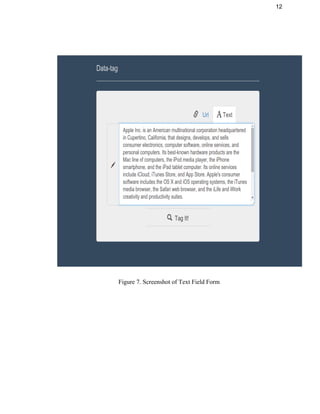
Figure 7. Screenshot of Text Field Form…………………………………..……..12 
Figure 8. Screenshot of Results ………………………………………………….13 
4. Coding 
Figure 9. Lesk Algorithm for Overlap Score……………………………………..14 
Figure 10. Fetch content from url…………………………………………………14 
5. Testing  
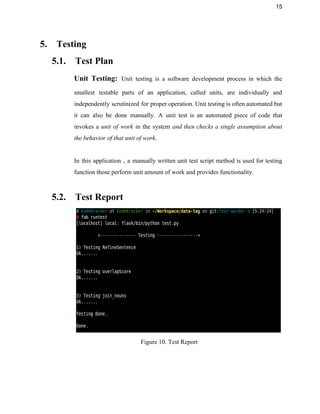
Figure 11. Test Report…………………………………………………………….15 


Table of Contents 
1. INTRODUCTION…………………………………………………………………….1 
1.1. Purpose………………………………………………………………………..1 
1.2. System Overview…………………………………………………………......1 
1.3. Problem Statement…………………………………………………………....1 
1.4. DFD Modelling of Problem…………………………………………………..2 
1.5. Goal & Vision………………………………………………………………...2 
2. REQUIREMENTS SPECIFICATIONS……………………………………………...4 
2.1. User Characteristics…………………………………………………………..4 
2.2. Functional Requirements……………………………………………………..4 
2.3. Dependencies.………………………………………………………………...5 
2.4. Performance Requirements…………………………………………………...6 
2.5. Hardware Requirements………………………………………………….…...6 
2.6. Constraints & Assumptions…………………………………………………...7 
3. DESIGN……………………………………………………………………………....8 
3.1. Function Oriented Design for procedural approach…………………………..8 
3.2. Database Design……………………………………………………………...10 
3.3. GUI Design for front­end…………………………………………………….11 
4. CODING……………………………………………………………………………..14 
5. TESTING…………………………………………………………………………….15 
5.1. Test Plan……………………………………………………………………...15 
5.2. Test Report…………………………………………………………………...15 
6. INSTALLATION INSTRUCTIONS………………………………………………...16 
7. END­USER INSTRUCTIONS……………………………………………………….17 
8. FUTURE WORK…………………………………………………………………….18 
9. SUMMARY………………………………………………………………………….19 
10. REFERENCE………………………………………………………………………...20 
 
1 
 
1. Introduction 
This section gives a scope description and overview of everything included in this Project                           
Report. Also, the purpose for this document is described and system overview along with                           
goal and vision are listed. 
 
1.1. Purpose 
The purpose of this document is to give a detailed description of Data­Tag Project.                           
It will illustrate the purpose and complete declaration for the development of                       
system. It will also explain system constraints, interface and interactions with                     
Wikipedia API. This document is primarily intended to anyone who wants to get                         
an overview of how Data­Tag works, its outcomes and possible usages in future. 
 
1.2. System Overview 
Data­Tag takes as input a plain text or a web url and tokenize it to filter out                                 
meaningful words from the input text. This process is done by employing NLP                         
techniques via NLTK library, which helps in fetching the noun terms out of the                           
input text and pass these to Wikipedia API. The contents of related pages are                           
fetched through Wikipedia API to be used as glosses for WSD algorithm. Finally                         
it outputs most probable tags/classes of input text along with their definitions. 
 
1.3. Problem Statement 
We encounter a lot of textual data or web pages during an odd day, and most of                                 
the time it is desirable to get a quick overview of what this text of web page is                                   
about. Data­tag solves this problem by semantically tagging the textual data or                       
web pages according the the context they are used in. It also provides a                           
mechanism to classify textual data or web pages more intelligently in contrast to                         
keyword based system. 
2 
 
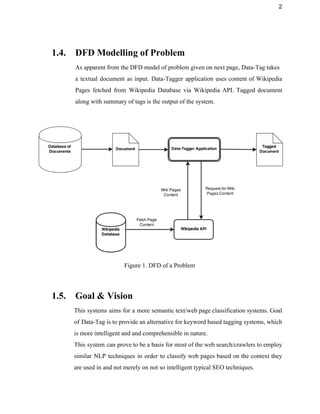
1.4. DFD Modelling of Problem 
As apparent from the DFD model of problem given on next page, Data­Tag takes  
a textual document as input. Data­Tagger application uses content of Wikipedia                     
Pages fetched from Wikipedia Database via Wikipedia API. Tagged document                   
along with summary of tags is the output of the system. 
 
 
Figure 1. DFD of a Problem 
 
1.5. Goal & Vision 
This systems aims for a more semantic text/web page classification systems. Goal                       
of Data­Tag is to provide an alternative for keyword based tagging systems, which                         
is more intelligent and and comprehensible in nature.  
This system can prove to be a basis for most of the web search/crawlers to employ                               
similar NLP techniques in order to classify web pages based on the context they                           
are used in and not merely on not so intelligent typical SEO techniques. 
3 
 
Data­Tag will further provide an user with a much more understandable                     
definitions of the classes or tags related to the input text, so that a user don’t need                                 
to go through the whole of the document to get an idea of the context. 


4 
 
2. Requirements Specification 
2.1. User Characteristics 
There are two types of users that interact with the system :  
● Users of the web application 
● Other Web Applications 
Each of these types of users has same use of the system that both these users want                                 
to tag a piece of text or a non­HTML(or plain text) content of web url but interact                                 
with the system in different modes. 
 
The web application users interact with this application through a web browser.                       
This web portal of this application presents a form for a user and form has two                               
fields : one for web­page url and other for text , so user have to at least fill one of                                       
the field . On submit the form , application takes input values , tag the data and                                 
show the results on same web portal. 
 
Other web applications are those applications like bots, third­party application ,                     
can also use this application through it web api. All requests should meet the                           
specifications of  application api.  
  
2.2. Functional Requirements  
2.2.1. User Class 1 ­ The User 
2.2.1.1. Functional Requirements 1.1 
Actor: User 
Input: Feed Text as Input 
Description: Given that user has access to the system through the internet. 
User can provide the text input directly to process and analyze the results. 
5 
Text input goes to process in the background and instant result will be 
returned. 
 
2.2.1.2.     Functional Requirements 1.2 
Actor: User 
Input: Feed URL as Input 
Description:  Given that user has access to the system through the internet. 
User can provide the URL (Universal resource locator)/ hypertext link (valid) 
input directly to process and analyze the results. Link/URL input goes to 
process in the background to extract text and processed text will be instantly 
result will be returned. 
 
2.3. Dependencies 
Data­tag application has a web portal for user interaction and a REST Web API                           
for frontend and backend interactions or third­party application interactions.There                 
are used very modern frameworks for developing its front­end and backend. 
● Angular JS : This is javascript framework used for developing front­end                     
of this application. 
● Flask: This is a python framework used for developing back­end of this                       
application. 
There are many third­party python libraries used in this application for performing                       
various tasks, the list is as follows: 
1. Flask 
2. Flask­cors 
3. NLTK 
4. Numpy 
5. Pattern 
6. GRequests 
6 
7. PyQuery 
8. Wikipedia 
9. Redis 
10. Urllib3 
11. Rq 
12. Redis­collections 
 
2.4. Performance Requirements 
Since the system use REST based server client architecture, and use the large                         
source information from distant server, it fetch data from internet. Internet                     
bandwidth is major performance parameter. As System uses wikipedia as source                     
of massive data, multiple request and response is needed to handle in quicktime                         
for instant result back to user. 
Large system queries is handled by the fast operating systems for both the mobile                           
and the web based process. Worker are used to provide faster HTTP Request                         
handling. 
 
2.5. Hardware Requirements 
To access a web portal of this application, its only need a PC/Laptop/Mobile with                           
an integrated and updated web browser. 
Desktop browser : Safari, Chrome, Firefox, Opera,  IE9+. 
Mobile browsers : Android, Chrome Mobile, iOS Safari. 
 
On the server side ,  a PC/Web Server which meets these specifications:­ 
1. Ubuntu Operating System 
2. At least 2 GB RAM and 150 GB Free Space 
3. Redis Server Installed 
4. Python Compiler Installed 
7 
 
2.6. Constraints & Assumptions 
Data­Tag only returns three tags per document/web url provided as an input, 
irrespective of the length of the input data. Reasons for this is that we came to 
found after excessive testing that Data­Tag may not provide as accurate results 
with larger number of tags. So we have fixed number of tags to be returned to a 
maximum of three tags. 
 
It also assumes that the input is meaningful data and not some random characters. 
Any word in input which is not found in a standard dictionary may result in 
inaccurate tags. 
 
For now, Data­Tag only supports “English” Language and will not work with any 
other languages. 


8 
3. Design 
3.1. Function Oriented Design for procedural approach 
 
 
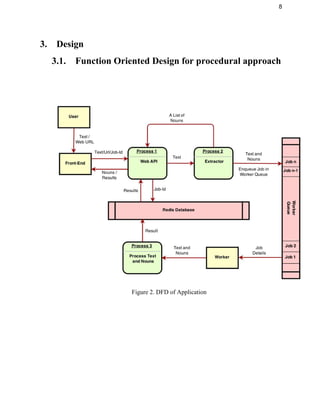
Figure 2. DFD of Application 
 
9 
 
 
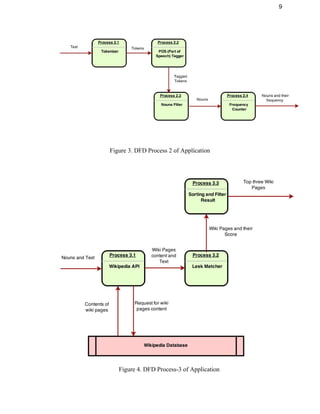
Figure 3. DFD Process 2 of Application 
 
 
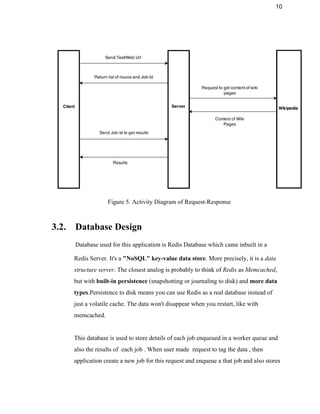
Figure 4. DFD Process­3 of Application 
10 
 
 
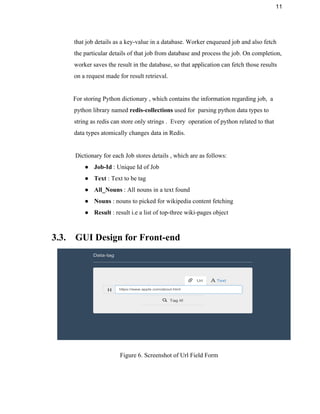
Figure 5. Activity Diagram of Request­Response 
 
3.2. Database Design 
Database used for this application is Redis Database which came inbuilt in a 
Redis Server. It's a "NoSQL" key­value data store. More precisely, it is a data 
structure server. The closest analog is probably to think of Redis as Memcached, 
but with built­in persistence (snapshotting or journaling to disk) and more data 
types.Persistence to disk means you can use Redis as a real database instead of 
just a volatile cache. The data won't disappear when you restart, like with 
memcached. 
 
This database is used to store details of each job enqueued in a worker queue and 
also the results of  each job . When user made  request to tag the data , then 
application create a new job for this request and enqueue a that job and also stores 
11 
that job details as a key­value in a database. Worker enqueued job and also fetch 
the particular details of that job from database and process the job. On completion, 
worker saves the result in the database, so that application can fetch those results 
on a request made for result retrieval. 
 
For storing Python dictionary , which contains the information regarding job,  a 
python library named redis­collections used for  parsing python data types to 
string as redis can store only strings .  Every  operation of python related to that 
data types atomically changes data in Redis. 
 
Dictionary for each Job stores details , which are as follows: 
● Job­Id : Unique Id of Job 
● Text : Text to be tag 
● All_Nouns : All nouns in a text found 
● Nouns : nouns to picked for wikipedia content fetching 
● Result : result i.e a list of top­three wiki­pages object   
 
3.3. GUI Design for Front­end 
 
Figure 6. Screenshot of Url Field Form  
12 
 
 
Figure 7. Screenshot of Text Field Form  
 
13 
 
Figure 8. Screenshot of Results  


14 
4. Coding
 
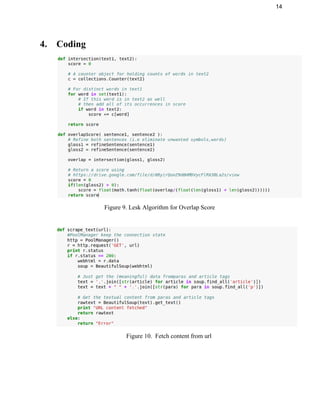
Figure 9. Lesk Algorithm for Overlap Score 
 
 
Figure 10.  Fetch content from url 
 
 
15 
5. Testing 
5.1. Test Plan 
Unit Testing: Unit testing is a software development process in which the                       
smallest testable parts of an application, called units, are individually and                     
independently scrutinized for proper operation. Unit testing is often automated but                     
it can also be done manually. A unit test is an automated piece of code that                               
invokes a unit of work in the system and then checks a single assumption about                             
the behavior of that unit of work. 
 
In this application , a manually written unit test script method is used for testing                             
function those perform unit amount of work and provides functionality.  
 
5.2. Test Report
 
Figure 10. Test Report 
 
16 
6. Installation Instructions 
Prerequisites to run Data­Tag on local machine consist of npm, python 2.7, git and 
redis. Although Data­tag is a web application, one can still run it locally using following 
instructions: 
 
a). Use git clone to clone this repo to your local machine: 
$ git clone https://github.com/rishy/data­tag.git 
 
b). Install all the dependencies using npm install: 
$ npm install 
 
c). Install all the bower packages: 
$ bower install 
 
d).  for first time, install a virtual environment in root directory using install.sh (or 
install.bat for Windows): 
$ chmod +x install.sh 
$ ./install.sh 
 
e).  First install Fabric to run below commands 
$ sudo pip install fabric 
 
f). To install all dependencies in requirements.txt: 
$ fab installDep 
 
g). To run the app : 
$ fab runapp 
 
h). Start redis server service from within the redis installation folder using: 
$ src/redis­server 
 
i). To run the worker : 
$ fab runworker 
 
App will run on http://127.0.0.1:5000/ 
 
17 
7. End­User Instructions 
Data­Tag provides two different options for an user to provide input: 
● Web URL 
● Raw Textual Data 
 
Both of these options are available through the tabs on the top of the input boxes, namely 
­  url and text.  “URL” tab accepts any valid url same goes with the “text” tab.  
After entering the appropriate data in any one of the input box, hit the “Tag It!” button. 
Since, there is a lot of data processing involved, once you click on the “Tag It!” button a 
loader will show tokenized words below the input boxes, which indicates that the data is 
being processed. 
 
Once, Data­Tag system gets done with processing and classifying data, an output will be 
shown below the input boxes in the form of summary of classes. There will also be a 
“Read More” button in every summary, which redirects the user to the specific Wikipedia 
page.  
 
A fixed number of three tags are returned by Data­Tag and the performance as well as 
efficiency depends on the length of input data. So, more input data will take more take 
and vice­versa. 
 
Avoid providing a very large input, which will generally take a considerable amount of 
time to process. You can still classify the data just by using a part of the textual 
document, preferably of less than 10000 words. 
 
As far as “url” input is concerned you can provide any url containing text. Data­tag only 
fetches text from the page so any other information like images, videos will be discarded 
completely. 
 
18 
8. Future Work 
Some of the possible amendments and improvements in this system are: 
● Adding a Web Crawler 
● Using Machine Learning techniques for Lexical Scoping 
● NLP Query Formulation based on input data 
 
A Web Crawler can be included with this project to automatically classify web pages. 
Instead of taking input manually a web crawler will simply pick web pages one by one 
and will tag them using the existing Data­Tag system. In this way we can get a semantic 
record of web pages from all around the internet. Although this amendment requires a 
really large database and processing power, but it can easily be fulfilled with adequate 
hardware. 
 
By employing Machine Learning techniques this system may further be enhanced for 
better results. Supervised learning is the most preferable approach for the same it’s easy 
to implement and train. Although a Supervised approach will need a large amount of 
training data, which we can hopefully get from Wikipedia to train the system. 
 
NLP Query Formulation may increase the importance of this system by ten­folds. By 
merging Web Crawler and NLP query formulation may provide us appropriate queries 
for each and every page. When a user asks for any of these queries mapped pages to those 
queries can be shown to user, resulting in a more intelligent text search over internet. 


19 
9. Summary 
Systems like Data­Tag are the future of semantic text over internet. It aims in dropping 
age­old keyword based classification systems and welcomes the advent of more 
Artificially Intelligent systems. It further provides a basic structure to develop larger 
systems utilizing the similar concepts to classify data all over  the internet and textual 
documents. By providing more meaningful information to user Data­Tag increases the 
overall user experience and satisfy users quest for smart textual and web search. 


20 
 
10. References 
● http://web.eecs.umich.edu/~mihalcea/papers/mihalcea.naacl07.pdf 
● http://www.semantic­web­journal.net/sites/default/files/swj170.pdf 
● http://en.wikipedia.org/wiki/Word­sense_disambiguation 
● http://www.nltk.org/ 
● https://github.com/rishy/data­tag 


Complete-Mini-Project-Report