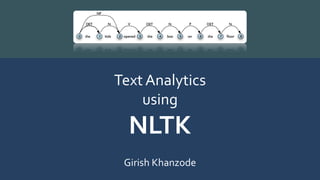
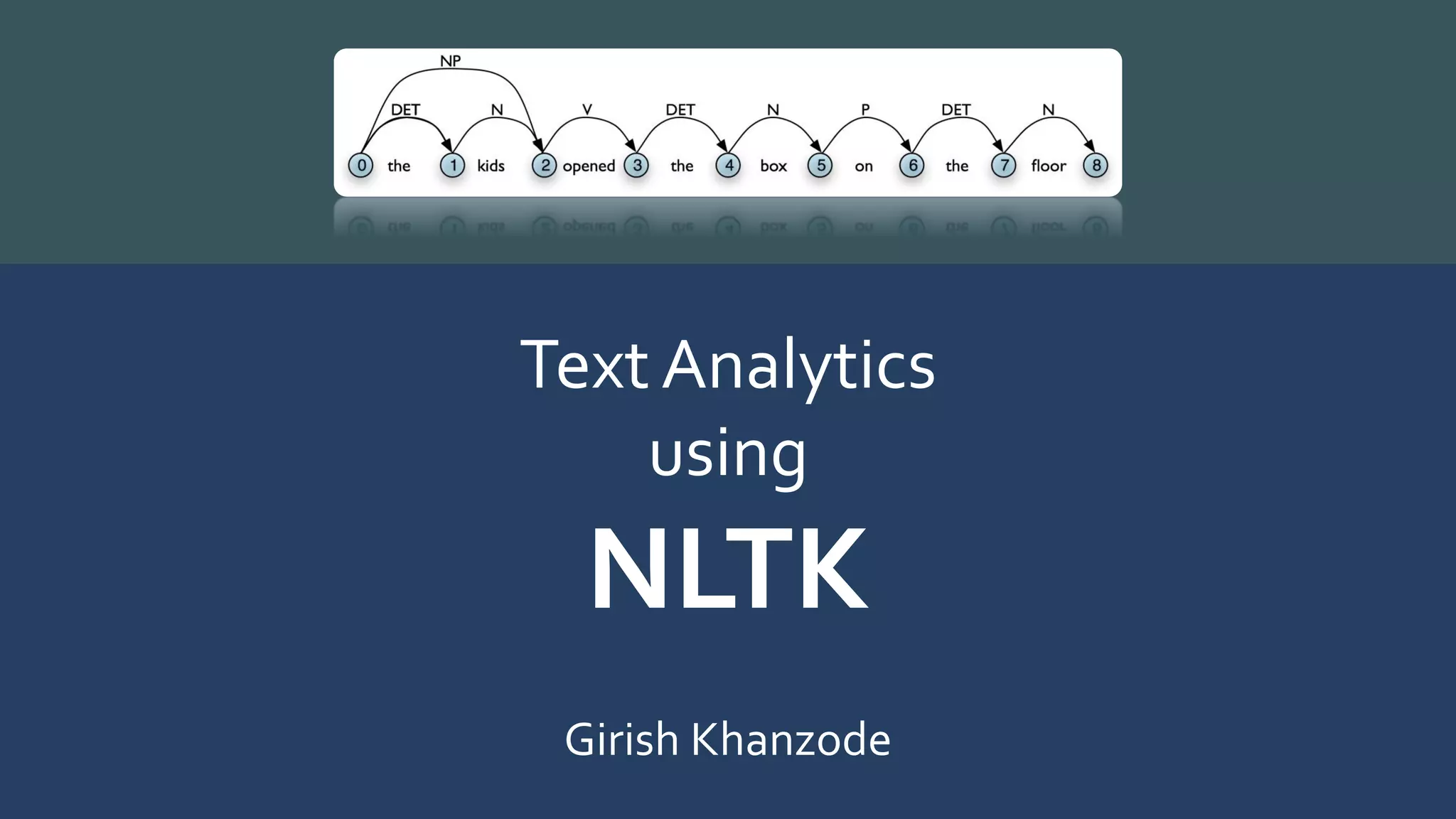
Text Analytics With
NLTK
Girish Khanzode
Contents
• Tokenization
• Corpuses
• Frequency Distribution
• Stylistics
• SentenceTokenization
• WordNet
• Stemming
• Lemmatization
• Part of SpeechTagging
• Tagging Methods
• UnigramTagging
• N-gramTagging
• Chunking – Shallow Parsing
• Entity Recognition
• SupervisedClassification
• DocumentClassification
• Hidden Markov Models - HMM
• References
NLTK
• A set of Python modules to carry out many common natural language
tasks.
• Basic classes to represent data for NLP
• Infrastructure to build NLP programs in Python
• Python interface to over 50 corpora and lexical resources
• Focus on Machine Learning with specific domain knowledge
• Free and Open Source
NLTK
• Numpy and Scipy under the hood
• Fast and Formal
• Standard interfaces for tokenization, part-of-speech tagging, syntactic parsing
and text classification
• Windows:
>>> import nltk
>>> nltk.download('all')
• Linux
$ pip install --upgrade nltk
NLTK -Top-Level Organization
• Organized as a flat hierarchy of packages and modules
• Each module provides the tools necessary to address a specific task
• Modules has two types of classes
– Data-oriented classes
• Used to represent information relevant to natural language processing.
– Task-oriented classes
• Encapsulate the resources and methods needed to perform a specific task.
Modules
• Token - classes for representing and processing individual elements of
text, such as words and sentences
• Probability - classes for representing and processing probabilistic
information
• Tree - classes for representing and processing hierarchical information
over text
• Cfg - classes for representing and processing context free grammars
Modules
• Tagger - tagging each word with a part-of-speech, a sense, etc
• Parser - building trees over text (includes chart, chunk and probabilistic
parsers)
• Classifier - classify text into categories (includes feature,
featureSelection, maxent, naivebayes)
• Draw - visualize NLP structures and processes
• Corpus - access (tagged) corpus data
Tokenization
• Simplest way to represent a text is with a single string
• Difficult to process text in this format
• Convenient to work with a list of tokens
• Task of converting a text from a single string to a list of tokens is known as
tokenization
• The most basic natural language processing technique
• Example -WordTokenization
Input : “Hey there, How are you all?”
Output : “Hey”, “there,”, “How”, “are”, “you”, “all?”
Tokens andTypes
• The term word can be used in two different ways
– To refer to an individual occurrence of a word
– To refer to an abstract vocabulary item
• For example, the sentence “my dog likes his dog” contains five occurrences of
words, but four vocabulary items
Tokens andTypes
• To avoid confusion use more precise terminology
– Word token - an occurrence of a word
– WordType - a vocabulary item
• Tokens constructed from their types using theToken constructor
• Token member functions - type and loc
Tokens andTypes
>>> from nltk.token import *
>>> my_word_type = 'dog‘
'dog’
>>> my_word_token =Token(my_word_type) ‘dog'@[?]
Text Locations
• Text location @ [s:e] specifies a region of a text
– s is the start index
– e is the end index
• Specifies the text beginning at s, and including everything up to (but not
including) the text at e
• Consistent with Python slice
Text Locations
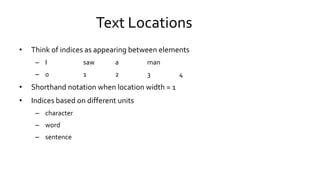
• Think of indices as appearing between elements
– I saw a man
– 0 1 2 3 4
• Shorthand notation when location width = 1
• Indices based on different units
– character
– word
– sentence
Text Locations
• Locations tagged with sources
– files, other text locations – the first word of the first sentence in the file
• Location member functions
– start
– end
– unit
– source
Text Corpus
• Large collection of text
• Concentrate on a topic or open domain
• May be raw text or annotated / categorized
Corpuses
• Gutenberg - selection of e-books from Project Gutenberg
• Webtext - forum discussions, reviews, movie script
• nps_chat - anonymized chats
• Brown - 1 million word corpus, categorized by genre
• Reuters - news corpus
• Inaugural - inaugural addresses of presidents
• Udhr - multilingual corpus
Accessing Corpora
• Corpora on disk - text files
• NLTK provides Python modules / functions / classes that allow for
accessing the corpora in a convenient way
• It is quite an effort to write functions that read in a corpus especially when
it comes with annotations
• The task of reading in a corpus is needed in many NLP projects
Accessing Corpora
• # tell Python we want to use the Gutenberg corpus
• from nltk.corpus import gutenberg
• # which files are in this corpus?
• print(gutenberg.fileids())
• >>> ['austen-emma.txt', 'austen-persuasion.txt', 'austen-sense.txt', 'bible-
kjv.txt', ...]
Accessing Corpora - RawText
• # get the raw text of a corpus = one string
• >>> emmaText = gutenberg.raw("austen-emma.txt")
• # print the first 289 characters of the text
• >>> emmaText = gutenberg.raw("austen-emma.txt")
• >>> emmaText[:289]
• '[Emma by Jane Austen 1816]nnVOLUME InnCHAPTER InnnEmmaWoodhouse, handsome, clever,
and rich, with a comfortable homenand happy disposition, seemed to unite some of the best
blessingsnof existence; and had lived nearly twenty-one years in the worldnwith very little to distress or
vex her.‘
Accessing Corpora -Words
• # get the words of a corpus as a list
• emmaWords = gutenberg.words("austen-emma.txt")
• # print the first 30 words of the text
• >>> print(emmaWords[:30])
• ['[', 'Emma', 'by', 'Jane', 'Austen', '1816', ']', 'VOLUME', 'I', 'CHAPTER', 'I', 'Emma',
'Woodhouse‘, 'handsome', ',', 'clever', ',', 'and', 'rich', ',', 'with', 'a', 'comfortable', 'home',
'and‘, 'happy', 'disposition', ',', 'seemed']
Accessing Corpora: Sentences
• # get the sentences of a corpus as a list of lists - one list of words per sentence
• >>> senseSents = gutenberg.sents("austen-sense.txt")
• # print out the first four sentences
• >>> print(senseSents[:4])
• [['[', 'Sense', 'and', 'Sensibility', 'by', 'Jane', 'Austen', '1811', ']'], ['CHAPTER', '1'], ['The',
'family', 'of', 'Dashwood', 'had', 'long‘, 'been', 'settled', 'in', 'Sussex', '.'], ['Their', 'estate',
'was', 'large', ',', 'and‘, 'their', 'residence', 'was', 'at', ...]]
Counting
• Use Inaugural Address text.
• >>> from nltk.book import text4
• Counting vocabulary: the length of a
text from start to fnish
• >>> len(text4)
• 145735
• How many distinct words?
• >>> len(set(text4)) #types
• 9754
• Richness of the text.
• >>> len(text4) / len(set(text4))
• 14.941049825712529
• >>> 100 * text4.count('democracy') /
len(text4)
• 0.03568120218204275
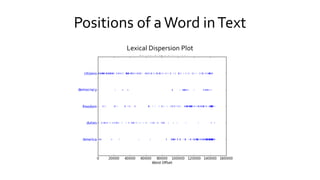
Positions of a Word inText
Lexical Dispersion Plot
List Elements Operations
• List comprehension
– >>> len(set([word.lower() for word in
text4 if len(word)>5]))
– 7339
– >>> [w.upper() for w in text4[0:5]]
– ['FELLOW', '-', 'CITIZENS', 'OF', 'THE']
• Loops and conditionals
• For word in text4[0:5]:
if len(word)<5 and word.endswith('e'):
print word, ' is short and ends with e‘
elif word.istitle():
print word, ' is a titlecase word‘
else:
print word, 'is just another word'
Brown Corpus
• First million-word electronic corpus of English
• Created at Brown University in 1961
• Text from 500 sources, categorized by genre
• >>> from nltk.corpus import brown
• >>> print(brown.categories())
• ['adventure', 'belles_lettres', 'editorial', 'fiction', 'government', 'hobbies', 'humor‘,
'learned', 'lore', 'mystery', 'news', 'religion‘, 'reviews', 'romance', 'science_fiction']
Brown Corpus – RetrieveWords by Category
• >>> from nltk.corpus import brown
• >>> news_words = brown.words(categories = "news")
• >>> print(news_words)
• ['The', 'Fulton', 'County', 'Grand', 'Jury', 'said', 'Friday', 'an', 'investigation',
'of', "Atlanta's“, 'recent', 'primary', 'election', 'produced', ...]
Brown Corpus – RetrieveWords by Category
• >>> adv_words = brown.words(categories = "adventure")
• >>> print(adv_words)
• ['Dan', 'Morgan', 'told', 'himself', 'he', 'would‘, 'forget', 'Ann', 'Turner', '.', ...]
• >>> reli_words = brown.words(categories = "religion")
• >>> print(reli_words)
• ['As', 'a', 'result', ',', 'although', 'we', 'still', 'make', 'use', 'of', 'this', 'distinction', ',',...]
Frequency Distribution
• Records how often each item occurs in a list of words
• Frequency distribution over words
• Basically a dictionary with some extra functionality
• init creates a frequency distribution from a list of words
Frequency Distribution
• >>>news_words = brown.words(categories = "news")
• >>>fdist = nltk.FreqDist(news_words)
• >>>print("shoe:", fdist["shoe"])
• >>>print("the: ", fdist["the"])
Frequency Distribution
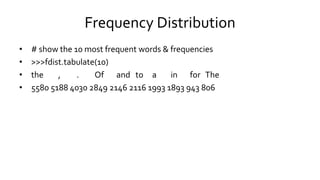
• # show the 10 most frequent words & frequencies
• >>>fdist.tabulate(10)
• the , . Of and to a in for The
• 5580 5188 4030 2849 2146 2116 1993 1893 943 806
Plot Frequency Distribution
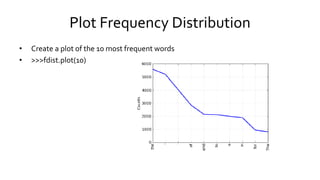
• Create a plot of the 10 most frequent words
• >>>fdist.plot(10)
Stylistics
• Systematic differences between genres
• Brown corpus with its categories is a convenient resource
• Is there a difference in how the modal verbs (can, could, may, might,
must, will) are used in the genres?
• Let us look at the frequency distribution
Stylistics
• from nltk import FreqDist
• # Define modals of interest
• >>>modals = ["may", "could", "will"]
• # Define genres of interest
• >>>genres = ["adventure", "news",
"government", "romance"]
• # count how often they occur in the genres
of interest
• >>>for g in genres:
• >>>words = brown.words(categories = g)
• >>>fdist = FreqDist([w.lower() for w in
words
• >>> if w.lower() in modals])
• >>>print g, fdist
Conditional Frequency Distributions
• >>>from nltk import ConditionalFreqDist
• >>>cfdist = ConditionalFreqDist()
• >>>for g in genres:
words = brown.words(categories = g)
for w in words
if w.lower() in modals:
cfdist[g].inc(w.lower())
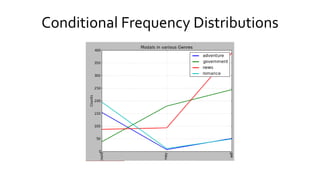
• >>> cfdist.tabulate()
could may will
Adventure 154 7 51
Government 38 179 244
News 87 93 389
Romance 195 11 49
• >>>cfdist.plot(title="Modals in various Genres")
Conditional Frequency Distributions
Processing RawText
• Assume you have a text file on your disk...
• # Read the text
• >>> path = "holmes.txt“
• >>> f = open(path)
• >>> rawText = f.read()
• >>> f.close()
• >>> print(rawText[:165])
• THE ADVENTURES OF SHERLOCK HOLMES
• By
• SIR ARTHUR CONAN DOYLE
I. A Scandal in Bohemia
II.The Red-headed League
SentenceTokenization
• # Split the text up into sentences
• >>> sents = nltk.sent_tokenize(raw)
• >>> print(sents[20:22])
• ['I had seen little of Holmes lately.', 'My marriage had drifted usrnaway from
each other.‘, ...]
WordTokenization
• >>># Tokenize the sentences using nltk
• >>>tokens = []
• >>>for sent in sents:
tokens += nltk.word_tokenize(sent)
• >>>print(tokens[300:350])
• [’such’, ’as’, ’his’, ’.’, ’And’, ’yet’, ’there’, ’was’, ’but’, ’one’, ’woman’, ’to’, ’him’, ’,’, ’and’, ’that’,
’woman’, ’was’, ’the’, ’late’, ’Irene’, ’Adler’, ’,’, ’of’, ’dubious’, ’and’, ’questionable’, ’memory’,
...]
Creating aText Object
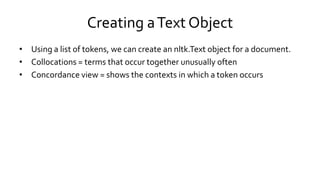
• Using a list of tokens, we can create an nltk.Text object for a document.
• Collocations = terms that occur together unusually often
• Concordance view = shows the contexts in which a token occurs
Creating aText Object
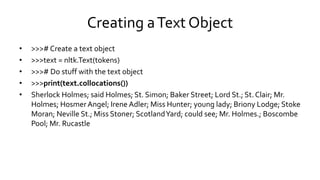
• >>># Create a text object
• >>>text = nltk.Text(tokens)
• >>># Do stuff with the text object
• >>>print(text.collocations())
• Sherlock Holmes; said Holmes; St. Simon; Baker Street; Lord St.; St. Clair; Mr.
Holmes; HosmerAngel; Irene Adler; Miss Hunter; young lady; Briony Lodge; Stoke
Moran; Neville St.; Miss Stoner; ScotlandYard; could see; Mr. Holmes.; Boscombe
Pool; Mr. Rucastle
ConcordanceView
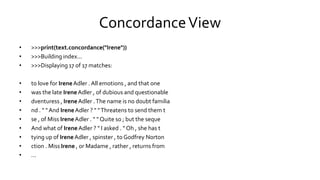
• >>>print(text.concordance("Irene"))
• >>>Building index...
• >>>Displaying 17 of 17 matches:
• to love for IreneAdler . All emotions , and that one
• was the late IreneAdler , of dubious and questionable
• dventuress , IreneAdler .The name is no doubt familia
• nd . " " And IreneAdler ? " "Threatens to send them t
• se , of Miss IreneAdler . " " Quite so ; but the seque
• And what of IreneAdler ? " I asked . " Oh , she has t
• tying up of IreneAdler , spinster , to Godfrey Norton
• ction . Miss Irene , or Madame , rather , returns from
• ...
Annotated Corpora
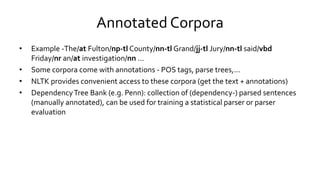
• Example -The/at Fulton/np-tl County/nn-tl Grand/jj-tl Jury/nn-tl said/vbd
Friday/nr an/at investigation/nn ...
• Some corpora come with annotations - POS tags, parse trees,...
• NLTK provides convenient access to these corpora (get the text + annotations)
• DependencyTree Bank (e.g. Penn): collection of (dependency-) parsed sentences
(manually annotated), can be used for training a statistical parser or parser
evaluation
WordNet
• Structured, semantically oriented English dictionary
• Synonyms, antonyms, hyponims, hypernims, depth of a synset, trees, entailments,
etc.
• >>> from nltk.corpus import wordnet as wn
• >>> wn.synsets('motorcar')
• [Synset('car.n.01')]
• >>> wn.synset('car.n.01').lemma_names
• ['car', 'auto', 'automobile', 'machine', 'motorcar']
WordNet
• >>> wn.synset('car.n.01').definition
• 'a motor vehicle with four wheels; usually propelled by an internal combustion engine'
• >>> for synset in wn.synsets('car')[1:3]:
• ... print synset.lemma_names
• ['car', 'railcar', 'railway_car', 'railroad_car'] ['car', 'gondola']
• >>> wn.synset('walk.v.01').entailments()
• #Walking involves stepping
• [Synset('step.v.01')]
Getting InputText - HTML
• >>> from urllib import urlopen
• >>> url = "http://www.bbc.co.uk/news/science-environment-21471908"
• >>> html = urlopen(url).read()
• html[:60]
• >>> raw = nltk.clean_html(html)
• '<!DOCTYPE html PUBLIC "-//W3C//DTD XHTML+RDFa 1.0//EN" "http'
• >>> tokens = nltk.word_tokenize(raw)
• >>> tokens[:15]
• ['BBC', 'News', '-', 'Exoplanet', 'Kepler', '37b', 'is', 'tiniest‘, 'yet', '-', 'smaller', 'than', 'Mercury', 'Accessibility',
'links‘]
Getting InputText - User
• >>> s = raw_input("Enter some text: ")
• Use your own files on disk
• >>> f = open('C:DataFilesUK_natl_2010_en_Lab.txt')
• >>> raw = f.read()
• >>> print raw[:100]
• #Foreword by Gordon Brown
• This General Election is fought as our troops are bravely fighting to def
Import Files as Corpus
• >>> from nltk.corpus import PlaintextCorpusReader
• >>> corpus_root = "C:/Data/Files/"
• >>> wordlists = PlaintextCorpusReader(corpus_root, '.*.txt')
• >>> wordlists.fileids()[:3]
• ['UK_natl_1987_en_Con.txt', 'UK_natl_1987_en_Lab.txt',
• 'UK_natl_1987_en_LibSDP.txt']
• >>> wordlists.words('UK_natl_2010_en_Lab.txt')
• ['#', 'Foreword', 'by', 'Gordon', 'Brown', '.', 'This', ...]
Stemming
• Strip off affixes
• >>>porter = nltk.PorterStemmer()
• >>>[porter.stem(t) for t in tokens]
• Porter stemmer lying - lie, women - women
• >>>lancaster = nltk.LancasterStemmer()
• >>>[lancaster.stem(t) for t in tokens]
• Lancaster stemmer lying - lying, women - wom
Lemmatization
• Removes affixes if in dictionary
• >>>wnl = nltk.WordNetLemmatizer()
• >>>[wnl.lemmatize(t) for t in tokens]
• lying - lying, women - woman
Write Output to File
• Save separated sentences text to a new file
• >>>output_file = open('C:DataFilesoutput.txt', 'w')
• >>>words = set(sents)
• >>>for word in sorted(words):
• >>> output_file.write(word + "n")
• To write non-text data, first convert it to string - str()
• Avoid filenames that contain space characters or that are identical except for
case distinctions
Part of SpeechTagging
• POSTagging - Process of classifying words into their parts of speech &
labelling them accordingly
– Words grouped into classes, such as nouns, verbs, adjectives, and adverbs
• Parts of speech are also known as word classes or lexical categories
• The collection of tags used for a particular task is known as a tagset
Part of SpeechTagging
• NLTK tags text automatically
– Predicting the behaviour of previously unseen words
– Analyzing word usage in corpora
– Text-to-speech systems
– Powerful searches
– Classification
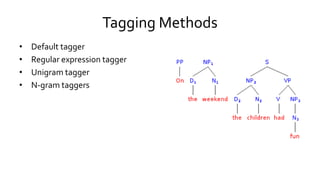
Tagging Methods
• Default tagger
• Regular expression tagger
• Unigram tagger
• N-gram taggers
Tagging Methods
• Can be combined using a technique known as backoff
– when a more specialized model (such as a bigram tagger) cannot assign a tag
in a given context, we backoff to a more general model (such as a unigram
tagger)
• Taggers can be trained and evaluated using tagged corpora
Tagging Examples
• Some corpora already tagged
• >>> nltk.corpus.brown.tagged_words()
• [('The', 'AT'), ('Fulton', 'NP-TL'), ...]
• A simple example
• >>> nltk.pos_tag(text)
• [('And', 'CC'), ('now', 'RB'), ('for', 'IN'), ('something', 'NN'), ('completely', 'RB'), ('different', 'JJ')]
– CC is coordinating conjunction; RB is adverb; IN is preposition; NN is noun; JJ is adjective
– Lots of others - foreign term, verb tenses, “wh” determiner etc
Tagging Examples
• An example with homonyms
• >>> text = nltk.word_tokenize("They refuse to permit us to obtain the
refuse permit")
• >>> nltk.pos_tag(text)
• [('They', 'PRP'), ('refuse', 'VBP'), ('to', 'TO'), ('permit‘, 'VB'), ('us', 'PRP'),
('to', 'TO'), ('obtain', 'VB'), ('the‘, 'DT'), ('refuse', 'NN'), ('permit', 'NN')]
UnigramTagging
• Unigram tagging - nltk.UnigramTagger()
– Assign the tag that is most likely for that particular token
– Train it specifying tagged sentence data as a parameter when we initialize the
tagger
– Separate training and testing data
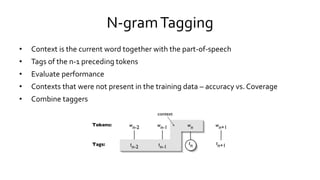
N-gramTagging
• Context is the current word together with the part-of-speech
• Tags of the n-1 preceding tokens
• Evaluate performance
• Contexts that were not present in the training data – accuracy vs. Coverage
• Combine taggers
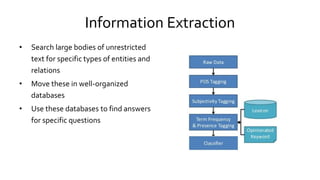
Information Extraction
• Search large bodies of unrestricted
text for specific types of entities and
relations
• Move these in well-organized
databases
• Use these databases to find answers
for specific questions
Information Extraction - Steps
• Segmenting, tokenizing, and part-of-speech tagging the text
• Search resulting data for specific types of entity
• Examine entities that are mentioned near one another in the text to
determine if specific relationships hold between those entities
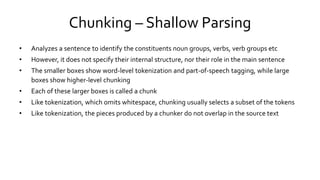
Chunking – Shallow Parsing
• Analyzes a sentence to identify the constituents noun groups, verbs, verb groups etc
• However, it does not specify their internal structure, nor their role in the main sentence
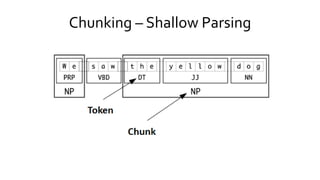
• The smaller boxes show word-level tokenization and part-of-speech tagging, while large
boxes show higher-level chunking
• Each of these larger boxes is called a chunk
• Like tokenization, which omits whitespace, chunking usually selects a subset of the tokens
• Like tokenization, the pieces produced by a chunker do not overlap in the source text
Chunking – Shallow Parsing
Entity Recognition
• Entity recognition performed using chunkers
– Segment multi-token sequences and label them with the appropriate entity type
– ORGANIZATION, PERSON, LOCATION, DATE,TIME, MONEY, and GPE (geo-political
entity)
• Constructing chunkers
– Use rule-based systems like RegexpParser class from NLTK
– Using machine learning techniques like ConsecutiveNPChunker
– POS tags are very important in this context.
Relation Extraction
• Rule-based systems - look for specific patterns in the text that connect
entities and the intervening words
• Machine-learning systems - attempt to learn patterns automatically from
a training corpus
ProcessingText
• Choose a particular class label for a given input
• Identify particular features of language data that are salient for classifying it
• Construct models of language that can be used to perform language processing
tasks automatically
• Learn about text/language from these models
• Machine learning techniques
– Decision trees
– Naive Bayes' classifiers
– Maximum entropy classifiers
Applications
• Determining the topic of an article or a book
• Deciding if an email is spam or not
• Determining who wrote a text
• Determining the meaning of a word in a particular context
• Open-class classification - set of labels is not defined in advance
• Multi-class classification - each instance may be assigned multiple labels
• Sequence classification - a list of inputs are jointly classified
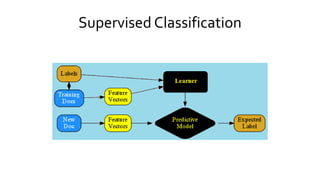
Supervised Classification
Example – Identify Gender by Name
• Relevant feature: last letter
• Create a feature set (a dictionary) that maps feature’s names to their values
– >>>def gender_features(word):
– >>>return {'last_letter': word[-1]}
• Import names, shuffle them
– >>>from nltk.corpus import names
– >>>import random
– >>>names = ([(name, 'male') for name in names.words('male.txt')] + [(name, 'female') for
name in names.words('female.txt')])
– >>>random.shuffle(names)
Example – Identify Gender by Name
• Divide list of features into training set and test set
– >>>featuresets = [(gender_features(n), g) for (n,g) in names]
– >>>from nltk.classify import apply_features
– >>>#Use apply if you're working with large corpora
– >>>train_set = apply_features(gender_features, names[500:])
– >>>test_set = apply_features(gender_features, names[:500])
• Use training set to train a naive Bayes classier
– >>>classifier = nltk.NaiveBayesClassifier.train(train_set)
Example – Identify Gender by Name
• Test the classier on unseen data
– >>> classifier.classify(gender_features('Neo'))
– >>>'male'
– >>> classifier.classify(gender_features('Trinity'))
– >>>'female‘
• >>> print nltk.classify.accuracy(classifier, test_set)
– >>>0.744
Example – Identify Gender by Name
• Examine the classier to see which feature is most effective at distinguishing
between classes
• >>> classifier.show_most_informative_features(5)
• Most Informative Features
• last_letter = 'a' female : male = 35.7 : 1.0
• last_letter = 'k' male : female = 31.7 : 1.0
• last_letter = 'f' male : female = 16.6 : 1.0
• last_letter = 'p' male : female = 11.9 : 1.0
• last_letter = 'v' male : female = 10.5 : 1.0
Example - Document Classification
• Use corpora where documents have been labelled with categories
– Build classifiers that will automatically tag new documents with appropriate
category labels
• Use the movie review corpus, which categorizes reviews as positive or
negative to construct a list of documents
• Define a feature extractor for documents - feature for each of the most
frequent 2000 words in the corpus
• Define a feature extractor that checks if words are present in a document
• Train a classier to label new movie reviews
Document Classification
• Compute accuracy on the test set
– >>> print nltk.classify.accuracy(classifier, test_set)
– >>> 0.79
• Evaluation issues: size of the test set depends on number of labels, their balance and the diversity of the test.
• Show most informative features
• >>> classifier.show_most_informative_features(5)
– Most Informative Features
– contains(outstanding) =True pos : neg = 11.2 : 1.0
– contains(mulan) =True pos : neg = 8.9 : 1.0
– contains(wonderfully) =True pos : neg = 8.5 : 1.0
– contains(seagal) =True neg : pos = 8.3 : 1.0
– contains(damon) =True pos : neg = 6.0 : 1.0
Context
• Contextual features often provide powerful clues for
classification
• Context-dependent feature extractor - pass in a complete
(untagged) sentence, along with the index of the target word
• Joint classier models - choose an appropriate labelling for a
collection of related inputs
Sequence Classification
• Jointly choose part-of-speech tags for all the words in a given
sentence
• Consecutive classification - find the most likely class label for
the first input, then to use that answer to help find the best
label for the next input, repeat
• Feature extraction function needs to take a history argument
- list of tags predicted so far
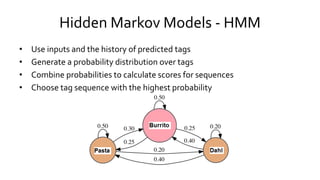
Hidden Markov Models - HMM
• Use inputs and the history of predicted tags
• Generate a probability distribution over tags
• Combine probabilities to calculate scores for sequences
• Choose tag sequence with the highest probability
More Advanced Models
• Maximum Entropy Markov Models
• Linear-ChainConditional Random Field Models
References
1. Indurkhya, Nitin and Fred Damerau (eds, 2010) Handbook of Natural Language Processing (Second
Edition)Chapman & Hall/CRC. 2010. (Indurkhya & Damerau, 2010) (Dale, Moisl, & Somers, 2000)
2. Jurafsky, Daniel and James Martin (2008) Speech and Language Processing (Second Edition). Prentice
Hall. (Jurafsky & Martin, 2008)
3. Mitkov, Ruslan (ed, 2003)The Oxford Handbook of Computational Linguistics.Oxford University Press.
(second edition expected in 2010). (Mitkov, 2002)
4. Bird, Steven; Klein, Ewan; Loper, Edward (2009). Natural Language Processing with Python. O'Reilly
Media Inc
5. Perkins, Jacob (2010). PythonText Processing with NLTK 2.0 Cookbook. Packt Publishing
6. Bird, Steven; Klein, Ewan; Loper, Edward; Baldridge, Jason (2008) Proceedings of theThirdWorkshop
on Issues inTeaching Computational Linguistics,ACL
ThankYou
Check Out My LinkedIn Profile at
https://in.linkedin.com/in/girishkhanzode

NLTK

  • 1.
  • 2.
    Contents • Tokenization • Corpuses •Frequency Distribution • Stylistics • SentenceTokenization • WordNet • Stemming • Lemmatization • Part of SpeechTagging • Tagging Methods • UnigramTagging • N-gramTagging • Chunking – Shallow Parsing • Entity Recognition • SupervisedClassification • DocumentClassification • Hidden Markov Models - HMM • References
  • 3.
    NLTK • A setof Python modules to carry out many common natural language tasks. • Basic classes to represent data for NLP • Infrastructure to build NLP programs in Python • Python interface to over 50 corpora and lexical resources • Focus on Machine Learning with specific domain knowledge • Free and Open Source
  • 4.
    NLTK • Numpy andScipy under the hood • Fast and Formal • Standard interfaces for tokenization, part-of-speech tagging, syntactic parsing and text classification • Windows: >>> import nltk >>> nltk.download('all') • Linux $ pip install --upgrade nltk
  • 5.
    NLTK -Top-Level Organization •Organized as a flat hierarchy of packages and modules • Each module provides the tools necessary to address a specific task • Modules has two types of classes – Data-oriented classes • Used to represent information relevant to natural language processing. – Task-oriented classes • Encapsulate the resources and methods needed to perform a specific task.
  • 6.
    Modules • Token -classes for representing and processing individual elements of text, such as words and sentences • Probability - classes for representing and processing probabilistic information • Tree - classes for representing and processing hierarchical information over text • Cfg - classes for representing and processing context free grammars
  • 7.
    Modules • Tagger -tagging each word with a part-of-speech, a sense, etc • Parser - building trees over text (includes chart, chunk and probabilistic parsers) • Classifier - classify text into categories (includes feature, featureSelection, maxent, naivebayes) • Draw - visualize NLP structures and processes • Corpus - access (tagged) corpus data
  • 8.
    Tokenization • Simplest wayto represent a text is with a single string • Difficult to process text in this format • Convenient to work with a list of tokens • Task of converting a text from a single string to a list of tokens is known as tokenization • The most basic natural language processing technique • Example -WordTokenization Input : “Hey there, How are you all?” Output : “Hey”, “there,”, “How”, “are”, “you”, “all?”
  • 9.
    Tokens andTypes • Theterm word can be used in two different ways – To refer to an individual occurrence of a word – To refer to an abstract vocabulary item • For example, the sentence “my dog likes his dog” contains five occurrences of words, but four vocabulary items
  • 10.
    Tokens andTypes • Toavoid confusion use more precise terminology – Word token - an occurrence of a word – WordType - a vocabulary item • Tokens constructed from their types using theToken constructor • Token member functions - type and loc
  • 11.
    Tokens andTypes >>> fromnltk.token import * >>> my_word_type = 'dog‘ 'dog’ >>> my_word_token =Token(my_word_type) ‘dog'@[?]
  • 12.
    Text Locations • Textlocation @ [s:e] specifies a region of a text – s is the start index – e is the end index • Specifies the text beginning at s, and including everything up to (but not including) the text at e • Consistent with Python slice
  • 13.
    Text Locations • Thinkof indices as appearing between elements – I saw a man – 0 1 2 3 4 • Shorthand notation when location width = 1 • Indices based on different units – character – word – sentence
  • 14.
    Text Locations • Locationstagged with sources – files, other text locations – the first word of the first sentence in the file • Location member functions – start – end – unit – source
  • 15.
    Text Corpus • Largecollection of text • Concentrate on a topic or open domain • May be raw text or annotated / categorized
  • 16.
    Corpuses • Gutenberg -selection of e-books from Project Gutenberg • Webtext - forum discussions, reviews, movie script • nps_chat - anonymized chats • Brown - 1 million word corpus, categorized by genre • Reuters - news corpus • Inaugural - inaugural addresses of presidents • Udhr - multilingual corpus
  • 17.
    Accessing Corpora • Corporaon disk - text files • NLTK provides Python modules / functions / classes that allow for accessing the corpora in a convenient way • It is quite an effort to write functions that read in a corpus especially when it comes with annotations • The task of reading in a corpus is needed in many NLP projects
  • 18.
    Accessing Corpora • #tell Python we want to use the Gutenberg corpus • from nltk.corpus import gutenberg • # which files are in this corpus? • print(gutenberg.fileids()) • >>> ['austen-emma.txt', 'austen-persuasion.txt', 'austen-sense.txt', 'bible- kjv.txt', ...]
  • 19.
    Accessing Corpora -RawText • # get the raw text of a corpus = one string • >>> emmaText = gutenberg.raw("austen-emma.txt") • # print the first 289 characters of the text • >>> emmaText = gutenberg.raw("austen-emma.txt") • >>> emmaText[:289] • '[Emma by Jane Austen 1816]nnVOLUME InnCHAPTER InnnEmmaWoodhouse, handsome, clever, and rich, with a comfortable homenand happy disposition, seemed to unite some of the best blessingsnof existence; and had lived nearly twenty-one years in the worldnwith very little to distress or vex her.‘
  • 20.
    Accessing Corpora -Words •# get the words of a corpus as a list • emmaWords = gutenberg.words("austen-emma.txt") • # print the first 30 words of the text • >>> print(emmaWords[:30]) • ['[', 'Emma', 'by', 'Jane', 'Austen', '1816', ']', 'VOLUME', 'I', 'CHAPTER', 'I', 'Emma', 'Woodhouse‘, 'handsome', ',', 'clever', ',', 'and', 'rich', ',', 'with', 'a', 'comfortable', 'home', 'and‘, 'happy', 'disposition', ',', 'seemed']
  • 21.
    Accessing Corpora: Sentences •# get the sentences of a corpus as a list of lists - one list of words per sentence • >>> senseSents = gutenberg.sents("austen-sense.txt") • # print out the first four sentences • >>> print(senseSents[:4]) • [['[', 'Sense', 'and', 'Sensibility', 'by', 'Jane', 'Austen', '1811', ']'], ['CHAPTER', '1'], ['The', 'family', 'of', 'Dashwood', 'had', 'long‘, 'been', 'settled', 'in', 'Sussex', '.'], ['Their', 'estate', 'was', 'large', ',', 'and‘, 'their', 'residence', 'was', 'at', ...]]
  • 22.
    Counting • Use InauguralAddress text. • >>> from nltk.book import text4 • Counting vocabulary: the length of a text from start to fnish • >>> len(text4) • 145735 • How many distinct words? • >>> len(set(text4)) #types • 9754 • Richness of the text. • >>> len(text4) / len(set(text4)) • 14.941049825712529 • >>> 100 * text4.count('democracy') / len(text4) • 0.03568120218204275
  • 23.
    Positions of aWord inText Lexical Dispersion Plot
  • 24.
    List Elements Operations •List comprehension – >>> len(set([word.lower() for word in text4 if len(word)>5])) – 7339 – >>> [w.upper() for w in text4[0:5]] – ['FELLOW', '-', 'CITIZENS', 'OF', 'THE'] • Loops and conditionals • For word in text4[0:5]: if len(word)<5 and word.endswith('e'): print word, ' is short and ends with e‘ elif word.istitle(): print word, ' is a titlecase word‘ else: print word, 'is just another word'
  • 25.
    Brown Corpus • Firstmillion-word electronic corpus of English • Created at Brown University in 1961 • Text from 500 sources, categorized by genre • >>> from nltk.corpus import brown • >>> print(brown.categories()) • ['adventure', 'belles_lettres', 'editorial', 'fiction', 'government', 'hobbies', 'humor‘, 'learned', 'lore', 'mystery', 'news', 'religion‘, 'reviews', 'romance', 'science_fiction']
  • 26.
    Brown Corpus –RetrieveWords by Category • >>> from nltk.corpus import brown • >>> news_words = brown.words(categories = "news") • >>> print(news_words) • ['The', 'Fulton', 'County', 'Grand', 'Jury', 'said', 'Friday', 'an', 'investigation', 'of', "Atlanta's“, 'recent', 'primary', 'election', 'produced', ...]
  • 27.
    Brown Corpus –RetrieveWords by Category • >>> adv_words = brown.words(categories = "adventure") • >>> print(adv_words) • ['Dan', 'Morgan', 'told', 'himself', 'he', 'would‘, 'forget', 'Ann', 'Turner', '.', ...] • >>> reli_words = brown.words(categories = "religion") • >>> print(reli_words) • ['As', 'a', 'result', ',', 'although', 'we', 'still', 'make', 'use', 'of', 'this', 'distinction', ',',...]
  • 28.
    Frequency Distribution • Recordshow often each item occurs in a list of words • Frequency distribution over words • Basically a dictionary with some extra functionality • init creates a frequency distribution from a list of words
  • 29.
    Frequency Distribution • >>>news_words= brown.words(categories = "news") • >>>fdist = nltk.FreqDist(news_words) • >>>print("shoe:", fdist["shoe"]) • >>>print("the: ", fdist["the"])
  • 30.
    Frequency Distribution • #show the 10 most frequent words & frequencies • >>>fdist.tabulate(10) • the , . Of and to a in for The • 5580 5188 4030 2849 2146 2116 1993 1893 943 806
  • 31.
    Plot Frequency Distribution •Create a plot of the 10 most frequent words • >>>fdist.plot(10)
  • 32.
    Stylistics • Systematic differencesbetween genres • Brown corpus with its categories is a convenient resource • Is there a difference in how the modal verbs (can, could, may, might, must, will) are used in the genres? • Let us look at the frequency distribution
  • 33.
    Stylistics • from nltkimport FreqDist • # Define modals of interest • >>>modals = ["may", "could", "will"] • # Define genres of interest • >>>genres = ["adventure", "news", "government", "romance"] • # count how often they occur in the genres of interest • >>>for g in genres: • >>>words = brown.words(categories = g) • >>>fdist = FreqDist([w.lower() for w in words • >>> if w.lower() in modals]) • >>>print g, fdist
  • 34.
    Conditional Frequency Distributions •>>>from nltk import ConditionalFreqDist • >>>cfdist = ConditionalFreqDist() • >>>for g in genres: words = brown.words(categories = g) for w in words if w.lower() in modals: cfdist[g].inc(w.lower()) • >>> cfdist.tabulate() could may will Adventure 154 7 51 Government 38 179 244 News 87 93 389 Romance 195 11 49 • >>>cfdist.plot(title="Modals in various Genres")
  • 35.
  • 36.
    Processing RawText • Assumeyou have a text file on your disk... • # Read the text • >>> path = "holmes.txt“ • >>> f = open(path) • >>> rawText = f.read() • >>> f.close() • >>> print(rawText[:165]) • THE ADVENTURES OF SHERLOCK HOLMES • By • SIR ARTHUR CONAN DOYLE I. A Scandal in Bohemia II.The Red-headed League
  • 37.
    SentenceTokenization • # Splitthe text up into sentences • >>> sents = nltk.sent_tokenize(raw) • >>> print(sents[20:22]) • ['I had seen little of Holmes lately.', 'My marriage had drifted usrnaway from each other.‘, ...]
  • 38.
    WordTokenization • >>># Tokenizethe sentences using nltk • >>>tokens = [] • >>>for sent in sents: tokens += nltk.word_tokenize(sent) • >>>print(tokens[300:350]) • [’such’, ’as’, ’his’, ’.’, ’And’, ’yet’, ’there’, ’was’, ’but’, ’one’, ’woman’, ’to’, ’him’, ’,’, ’and’, ’that’, ’woman’, ’was’, ’the’, ’late’, ’Irene’, ’Adler’, ’,’, ’of’, ’dubious’, ’and’, ’questionable’, ’memory’, ...]
  • 39.
    Creating aText Object •Using a list of tokens, we can create an nltk.Text object for a document. • Collocations = terms that occur together unusually often • Concordance view = shows the contexts in which a token occurs
  • 40.
    Creating aText Object •>>># Create a text object • >>>text = nltk.Text(tokens) • >>># Do stuff with the text object • >>>print(text.collocations()) • Sherlock Holmes; said Holmes; St. Simon; Baker Street; Lord St.; St. Clair; Mr. Holmes; HosmerAngel; Irene Adler; Miss Hunter; young lady; Briony Lodge; Stoke Moran; Neville St.; Miss Stoner; ScotlandYard; could see; Mr. Holmes.; Boscombe Pool; Mr. Rucastle
  • 41.
    ConcordanceView • >>>print(text.concordance("Irene")) • >>>Buildingindex... • >>>Displaying 17 of 17 matches: • to love for IreneAdler . All emotions , and that one • was the late IreneAdler , of dubious and questionable • dventuress , IreneAdler .The name is no doubt familia • nd . " " And IreneAdler ? " "Threatens to send them t • se , of Miss IreneAdler . " " Quite so ; but the seque • And what of IreneAdler ? " I asked . " Oh , she has t • tying up of IreneAdler , spinster , to Godfrey Norton • ction . Miss Irene , or Madame , rather , returns from • ...
  • 42.
    Annotated Corpora • Example-The/at Fulton/np-tl County/nn-tl Grand/jj-tl Jury/nn-tl said/vbd Friday/nr an/at investigation/nn ... • Some corpora come with annotations - POS tags, parse trees,... • NLTK provides convenient access to these corpora (get the text + annotations) • DependencyTree Bank (e.g. Penn): collection of (dependency-) parsed sentences (manually annotated), can be used for training a statistical parser or parser evaluation
  • 43.
    WordNet • Structured, semanticallyoriented English dictionary • Synonyms, antonyms, hyponims, hypernims, depth of a synset, trees, entailments, etc. • >>> from nltk.corpus import wordnet as wn • >>> wn.synsets('motorcar') • [Synset('car.n.01')] • >>> wn.synset('car.n.01').lemma_names • ['car', 'auto', 'automobile', 'machine', 'motorcar']
  • 44.
    WordNet • >>> wn.synset('car.n.01').definition •'a motor vehicle with four wheels; usually propelled by an internal combustion engine' • >>> for synset in wn.synsets('car')[1:3]: • ... print synset.lemma_names • ['car', 'railcar', 'railway_car', 'railroad_car'] ['car', 'gondola'] • >>> wn.synset('walk.v.01').entailments() • #Walking involves stepping • [Synset('step.v.01')]
  • 45.
    Getting InputText -HTML • >>> from urllib import urlopen • >>> url = "http://www.bbc.co.uk/news/science-environment-21471908" • >>> html = urlopen(url).read() • html[:60] • >>> raw = nltk.clean_html(html) • '<!DOCTYPE html PUBLIC "-//W3C//DTD XHTML+RDFa 1.0//EN" "http' • >>> tokens = nltk.word_tokenize(raw) • >>> tokens[:15] • ['BBC', 'News', '-', 'Exoplanet', 'Kepler', '37b', 'is', 'tiniest‘, 'yet', '-', 'smaller', 'than', 'Mercury', 'Accessibility', 'links‘]
  • 46.
    Getting InputText -User • >>> s = raw_input("Enter some text: ") • Use your own files on disk • >>> f = open('C:DataFilesUK_natl_2010_en_Lab.txt') • >>> raw = f.read() • >>> print raw[:100] • #Foreword by Gordon Brown • This General Election is fought as our troops are bravely fighting to def
  • 47.
    Import Files asCorpus • >>> from nltk.corpus import PlaintextCorpusReader • >>> corpus_root = "C:/Data/Files/" • >>> wordlists = PlaintextCorpusReader(corpus_root, '.*.txt') • >>> wordlists.fileids()[:3] • ['UK_natl_1987_en_Con.txt', 'UK_natl_1987_en_Lab.txt', • 'UK_natl_1987_en_LibSDP.txt'] • >>> wordlists.words('UK_natl_2010_en_Lab.txt') • ['#', 'Foreword', 'by', 'Gordon', 'Brown', '.', 'This', ...]
  • 48.
    Stemming • Strip offaffixes • >>>porter = nltk.PorterStemmer() • >>>[porter.stem(t) for t in tokens] • Porter stemmer lying - lie, women - women • >>>lancaster = nltk.LancasterStemmer() • >>>[lancaster.stem(t) for t in tokens] • Lancaster stemmer lying - lying, women - wom
  • 49.
    Lemmatization • Removes affixesif in dictionary • >>>wnl = nltk.WordNetLemmatizer() • >>>[wnl.lemmatize(t) for t in tokens] • lying - lying, women - woman
  • 50.
    Write Output toFile • Save separated sentences text to a new file • >>>output_file = open('C:DataFilesoutput.txt', 'w') • >>>words = set(sents) • >>>for word in sorted(words): • >>> output_file.write(word + "n") • To write non-text data, first convert it to string - str() • Avoid filenames that contain space characters or that are identical except for case distinctions
  • 51.
    Part of SpeechTagging •POSTagging - Process of classifying words into their parts of speech & labelling them accordingly – Words grouped into classes, such as nouns, verbs, adjectives, and adverbs • Parts of speech are also known as word classes or lexical categories • The collection of tags used for a particular task is known as a tagset
  • 52.
    Part of SpeechTagging •NLTK tags text automatically – Predicting the behaviour of previously unseen words – Analyzing word usage in corpora – Text-to-speech systems – Powerful searches – Classification
  • 53.
    Tagging Methods • Defaulttagger • Regular expression tagger • Unigram tagger • N-gram taggers
  • 54.
    Tagging Methods • Canbe combined using a technique known as backoff – when a more specialized model (such as a bigram tagger) cannot assign a tag in a given context, we backoff to a more general model (such as a unigram tagger) • Taggers can be trained and evaluated using tagged corpora
  • 55.
    Tagging Examples • Somecorpora already tagged • >>> nltk.corpus.brown.tagged_words() • [('The', 'AT'), ('Fulton', 'NP-TL'), ...] • A simple example • >>> nltk.pos_tag(text) • [('And', 'CC'), ('now', 'RB'), ('for', 'IN'), ('something', 'NN'), ('completely', 'RB'), ('different', 'JJ')] – CC is coordinating conjunction; RB is adverb; IN is preposition; NN is noun; JJ is adjective – Lots of others - foreign term, verb tenses, “wh” determiner etc
  • 56.
    Tagging Examples • Anexample with homonyms • >>> text = nltk.word_tokenize("They refuse to permit us to obtain the refuse permit") • >>> nltk.pos_tag(text) • [('They', 'PRP'), ('refuse', 'VBP'), ('to', 'TO'), ('permit‘, 'VB'), ('us', 'PRP'), ('to', 'TO'), ('obtain', 'VB'), ('the‘, 'DT'), ('refuse', 'NN'), ('permit', 'NN')]
  • 57.
    UnigramTagging • Unigram tagging- nltk.UnigramTagger() – Assign the tag that is most likely for that particular token – Train it specifying tagged sentence data as a parameter when we initialize the tagger – Separate training and testing data
  • 58.
    N-gramTagging • Context isthe current word together with the part-of-speech • Tags of the n-1 preceding tokens • Evaluate performance • Contexts that were not present in the training data – accuracy vs. Coverage • Combine taggers
  • 59.
    Information Extraction • Searchlarge bodies of unrestricted text for specific types of entities and relations • Move these in well-organized databases • Use these databases to find answers for specific questions
  • 60.
    Information Extraction -Steps • Segmenting, tokenizing, and part-of-speech tagging the text • Search resulting data for specific types of entity • Examine entities that are mentioned near one another in the text to determine if specific relationships hold between those entities
  • 61.
    Chunking – ShallowParsing • Analyzes a sentence to identify the constituents noun groups, verbs, verb groups etc • However, it does not specify their internal structure, nor their role in the main sentence • The smaller boxes show word-level tokenization and part-of-speech tagging, while large boxes show higher-level chunking • Each of these larger boxes is called a chunk • Like tokenization, which omits whitespace, chunking usually selects a subset of the tokens • Like tokenization, the pieces produced by a chunker do not overlap in the source text
  • 62.
  • 63.
    Entity Recognition • Entityrecognition performed using chunkers – Segment multi-token sequences and label them with the appropriate entity type – ORGANIZATION, PERSON, LOCATION, DATE,TIME, MONEY, and GPE (geo-political entity) • Constructing chunkers – Use rule-based systems like RegexpParser class from NLTK – Using machine learning techniques like ConsecutiveNPChunker – POS tags are very important in this context.
  • 64.
    Relation Extraction • Rule-basedsystems - look for specific patterns in the text that connect entities and the intervening words • Machine-learning systems - attempt to learn patterns automatically from a training corpus
  • 65.
    ProcessingText • Choose aparticular class label for a given input • Identify particular features of language data that are salient for classifying it • Construct models of language that can be used to perform language processing tasks automatically • Learn about text/language from these models • Machine learning techniques – Decision trees – Naive Bayes' classifiers – Maximum entropy classifiers
  • 66.
    Applications • Determining thetopic of an article or a book • Deciding if an email is spam or not • Determining who wrote a text • Determining the meaning of a word in a particular context • Open-class classification - set of labels is not defined in advance • Multi-class classification - each instance may be assigned multiple labels • Sequence classification - a list of inputs are jointly classified
  • 67.
  • 68.
    Example – IdentifyGender by Name • Relevant feature: last letter • Create a feature set (a dictionary) that maps feature’s names to their values – >>>def gender_features(word): – >>>return {'last_letter': word[-1]} • Import names, shuffle them – >>>from nltk.corpus import names – >>>import random – >>>names = ([(name, 'male') for name in names.words('male.txt')] + [(name, 'female') for name in names.words('female.txt')]) – >>>random.shuffle(names)
  • 69.
    Example – IdentifyGender by Name • Divide list of features into training set and test set – >>>featuresets = [(gender_features(n), g) for (n,g) in names] – >>>from nltk.classify import apply_features – >>>#Use apply if you're working with large corpora – >>>train_set = apply_features(gender_features, names[500:]) – >>>test_set = apply_features(gender_features, names[:500]) • Use training set to train a naive Bayes classier – >>>classifier = nltk.NaiveBayesClassifier.train(train_set)
  • 70.
    Example – IdentifyGender by Name • Test the classier on unseen data – >>> classifier.classify(gender_features('Neo')) – >>>'male' – >>> classifier.classify(gender_features('Trinity')) – >>>'female‘ • >>> print nltk.classify.accuracy(classifier, test_set) – >>>0.744
  • 71.
    Example – IdentifyGender by Name • Examine the classier to see which feature is most effective at distinguishing between classes • >>> classifier.show_most_informative_features(5) • Most Informative Features • last_letter = 'a' female : male = 35.7 : 1.0 • last_letter = 'k' male : female = 31.7 : 1.0 • last_letter = 'f' male : female = 16.6 : 1.0 • last_letter = 'p' male : female = 11.9 : 1.0 • last_letter = 'v' male : female = 10.5 : 1.0
  • 72.
    Example - DocumentClassification • Use corpora where documents have been labelled with categories – Build classifiers that will automatically tag new documents with appropriate category labels • Use the movie review corpus, which categorizes reviews as positive or negative to construct a list of documents • Define a feature extractor for documents - feature for each of the most frequent 2000 words in the corpus • Define a feature extractor that checks if words are present in a document • Train a classier to label new movie reviews
  • 73.
    Document Classification • Computeaccuracy on the test set – >>> print nltk.classify.accuracy(classifier, test_set) – >>> 0.79 • Evaluation issues: size of the test set depends on number of labels, their balance and the diversity of the test. • Show most informative features • >>> classifier.show_most_informative_features(5) – Most Informative Features – contains(outstanding) =True pos : neg = 11.2 : 1.0 – contains(mulan) =True pos : neg = 8.9 : 1.0 – contains(wonderfully) =True pos : neg = 8.5 : 1.0 – contains(seagal) =True neg : pos = 8.3 : 1.0 – contains(damon) =True pos : neg = 6.0 : 1.0
  • 74.
    Context • Contextual featuresoften provide powerful clues for classification • Context-dependent feature extractor - pass in a complete (untagged) sentence, along with the index of the target word • Joint classier models - choose an appropriate labelling for a collection of related inputs
  • 75.
    Sequence Classification • Jointlychoose part-of-speech tags for all the words in a given sentence • Consecutive classification - find the most likely class label for the first input, then to use that answer to help find the best label for the next input, repeat • Feature extraction function needs to take a history argument - list of tags predicted so far
  • 76.
    Hidden Markov Models- HMM • Use inputs and the history of predicted tags • Generate a probability distribution over tags • Combine probabilities to calculate scores for sequences • Choose tag sequence with the highest probability
  • 77.
    More Advanced Models •Maximum Entropy Markov Models • Linear-ChainConditional Random Field Models
  • 78.
    References 1. Indurkhya, Nitinand Fred Damerau (eds, 2010) Handbook of Natural Language Processing (Second Edition)Chapman & Hall/CRC. 2010. (Indurkhya & Damerau, 2010) (Dale, Moisl, & Somers, 2000) 2. Jurafsky, Daniel and James Martin (2008) Speech and Language Processing (Second Edition). Prentice Hall. (Jurafsky & Martin, 2008) 3. Mitkov, Ruslan (ed, 2003)The Oxford Handbook of Computational Linguistics.Oxford University Press. (second edition expected in 2010). (Mitkov, 2002) 4. Bird, Steven; Klein, Ewan; Loper, Edward (2009). Natural Language Processing with Python. O'Reilly Media Inc 5. Perkins, Jacob (2010). PythonText Processing with NLTK 2.0 Cookbook. Packt Publishing 6. Bird, Steven; Klein, Ewan; Loper, Edward; Baldridge, Jason (2008) Proceedings of theThirdWorkshop on Issues inTeaching Computational Linguistics,ACL
  • 79.
    ThankYou Check Out MyLinkedIn Profile at https://in.linkedin.com/in/girishkhanzode