PRACTICAL DEMONSTRATIONS
            OF
DIGITAL FORENSIC TOOLS
INSTRUCTOR’S PROFILE
Adeoje Adetunji Emmanuel

Certified Ethical Hacker (CEH)
EC-Council Security Analyst(ECSA)
Computer Hacking Forensic Investigator(CHFI)
AccessData Certified Examiner(ACE)
Certified Information System Auditor(CISA)
Encase specialist
Licensed Penetration Tester(LPT)


                                                2
agenda
 Introduction
 The Forensic Investigation
 Objective of Digital Forensics Analysis
 Roles of Digital Forensic Analysts in IR
 Forensic readiness and Business continuity
 Computer forensic process
 Computer forensics tools
 Demos
Introduction
 Data breaches, hacking attacks, viruses, and insider threats are some of
  the security issues many companies face on a daily basis. Besides
  employing preventive measures, such as the use of firewalls and
  intrusion detection devices to prevent data breaches and thwart
  external attacks, many organizations around the world have been using
  computer forensics to identify instances of computer misuse and illegal
  intrusion.
 The use of computer forensic techniques also has flourished in the
  internal audit profession.
 However, many internal auditors are unaware of the advantages that
  computer forensics can bring to audit investigations.
 Learning how to acquire, analyze, and report data through the use of
  computer forensics can help auditors make the most of this
  investigative technique, as well as recover previously deleted
  documents that can provide the "smoking gun" needed to determine if
  a fraudulent activity took place.
5
6
THE FORENSIC INVESTIGATION
 Computer forensics is the application of analytical techniques on digital media
  after a computer security incident has occurred.
 Its goal is to identify exactly what happened on a digital system and who was
  responsible through a structured, investigative approach.
 Forensic investigations cover all areas of computer misuse, including fraud,
  Internet and e-mail abuse, entry to pornographic Web sites, and hacking, as
  well as accidental deletions or alterations of data.
 During the forensic investigation, evidence may be obtained in a variety of
  ways, including affidavits, search warrants, depositions, and expert testimony.
  Regardless of the means used to obtain data, examination of a computer or
  other device must be done thoroughly, carefully, and without changing
  anything. This ensures that the integrity of the original data and the evidence's
  validity are maintained.
 If an internal auditor suspects fraud may have occurred, he or she should fill
  out an incident detection report form or similar document. The document
  needs to specify the date and time of the suspected fraud, who reported the
  incident, the nature of the incident, and the system(s) and application(s)
  involved.
 Note: It is important for companies to have an established, clear process for
  dealing with these kinds of incidents. This kind of pre-planning can help
  ensure that the proper channels are followed when an incident occurs.
 Forensic investigations consist of three phases: acquiring the evidence,
  analyzing results, and reporting results. Below is a description of each.
Acquiring the Evidence
 The process of securing or acquiring evidence starts with
  previewing the contents of a computer's hard drive or other
  media.

 To acquire the electronic data, including deleted
  information, the storage device must be mirrored or
  duplicated exactly bit by bit.
 Once the storage device is secured, a second device may be
  needed as a working copy if the original storage device was
  not seized or secured.

 This allows the examiner access to an unaltered copy of the
  electronic data.
Imaging
 An image is an exact replica of the computer's hard drive or other
    media, and should include any slack space.
    The image is then investigated, rather than the original, to avoid
    altering the original data, which would make any evidence gathered
    inadmissible in court.
    Imaging is a vital step in a computer forensic investigation and is
    accepted as the best method for capturing computer evidence that may
    be presented in a court of law.
   Having captured an exact image of the data, the next step is to process
    it.
   All data must be processed, including deleted or partially overwritten
    files, information hidden outside normal storage areas, and data in
    virtual memory and slack space.
   The most common method used by forensic examiners to capture this
    data is by using a write-blocking device.
   This device prevents the forensic examiner's machine from writing or
    altering the data on the suspect drive. Windows operating systems are
    notorious for this problem.
Understanding Bit-stream Copies


                                  10
 Typically, the suspect drive is removed from the machine if possible and
  plugged directly into the write-blocking device. Once this has occurred, an
  examiner can make what is called a "bit-stream" image of the drive.
 This is an exact bit-for-bit copy of the drive's contents, including deleted space,
  file slack, and logical files.
 Another method of capturing this data is using a Linux live CD or a boot disk,
  which allows the investigator to view the files on the drive, including deleted
  space and unallocated clusters, without altering the drive's contents. The
  examiner can then copy the files onto an external hard drive and view them.
 Hidden data often contains the most vital evidence to prove or disprove a case.
  In some cases, a file extraction may be appropriate. In other situations, a data
  index may be created to support powerful search tools.
 After auditors have a complete image of the drive, they can start collecting the
  evidence.
 Most forensic software includes ready-made scripts for a variety of operating
  systems that automate certain functions such as encrypted registry parser, file
  finder, and file mounter.
 Because different programs may work better for different tasks, auditors should
  ensure organizations are using the right product based on their data analysis
  needs.
Slack space
 The data between the end of the logical file to the end of the cluster
  containing the data is called slack space. Slack space will usually
  contain data from files that used this space before, making it a rich
  depository of evidence.

 Because of its history the portion of the slack space from the end of the
  logical file to the end of the sector (not the cluster) was called RAM
  slack or sector slack

 The remainder of the slack, from the end of the last sector containing the
  logical file until the end of the cluster, is called file slack.

 The entire slack space, comprising both RAM or sector slack and file
  slack
Computer forensics focuses on three categories of data:

 Active Data: These are the current files on the
  computer, still visible in directories and available to
  applications.
 One important evidentiary point about data on a
  hard drive is that no matter what it may represent,
  whether simple text or convoluted spreadsheets, it
  exists only as infinitesimal magnetic flux reversals
  representing ones and zeroes which must be
  processed by software to be intelligible.


                                                            13
 Latent Data: Latent data (also called “ambient data”) are
  deleted files and other data, including memory “dumps” that
  have “lodged in the digital cracks” but can still be retrieved.

 Latent data also includes swap files, temporary files, printer
  spool files, metadata and shadow data.
 Latent data are generally inaccessible absent the use of
  specialized tools and techniques. This data resides on the
  media, e.g., the hard drive, in, e.g., slack space and other areas
  marked available for data storage but not yet overwritten by
  other data.
 The recovery of latent data is the art most often associated with
  computer forensics, but the identification, extraction and
  management of active data is no less demanding of a forensic
  expert’s skill.
                                                                       14
 Archival Data: This is data that’s been transferred or
  backed up to peripheral media, like tapes, CDs, ZIP disks,
  floppy disks, network servers or the Internet. Archival
  data can be staggeringly voluminous, particularly in a large
  organization employing frequent, regular back up
  procedures.
 It is critically important to recognize that an archival
  record of a source media never reflects all of the data that
  can be identified and extracted from the source media
  because such back ups don’t carry forward latent data.
 Accordingly, an opponent’s offer to furnish copies of back
  up tapes is, while valuable, no substitute for a forensic
  examination of a true bit-by-bit copy of the source disk
  drive.
                                                                 15
Disk imaging using


 FTK Imager
 Encase
 FTK Imager Lite


                     16
Six File systems that FTK Imager can Read


                                            17
Four types of Evidences


                          18
Formats that FTK Imager can read


                                   19
20
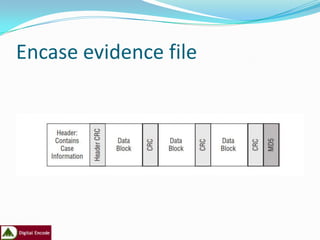
Encase evidence file
22
Data on the Computer
 In files
 In log files               Lost when machine is powered off
 Browser history
 Windows prefetch area
 Slack space                        Lost if you wait too long
 Open network connections
 Virtual memory
 Physical memory
 Network traces
                                                           23
Understanding Bit-stream Copies
 Bit-by-bit copy of the original storage medium
 Exact copy of the original disk
 Different from a simple backup copy
   Backup software only copy known files
   Backup software cannot copy deleted files or e-mail
    messages, or recover file fragments


                                                          24
Data in Unexpected Places
 Anti-virus alerts, real-time anti-virus scans
 License enforcement / application metering
 [anything]Management Software
    Patch management
    Software management
    Configuration management
    Asset management


                                                  25
Analyzing the Results
 The second phase, analyzing the results, takes place after all the
    evidence is acquired and imaged properly.
   Because every case is different, auditors need to be fully trained when
    conducting a data analysis, or they should recommend a trained
    forensic examiner performs the evaluation if they lack the professional
    training to do so.
   To analyze the evidence, auditors should use the working copy of
    retrieved, deleted, electronic data only, including files and folders.
    Auditors also need to maintain a chain of custody when handling the
    evidence.
    To maintain a digital chain of custody, all images should be hashed —
    the process of creating a small digital fingerprint of the data.
   During the data analysis stage, software also is used to inspect the raw
    data and organize it into an understandable report.
   As a result, the auditor must be able to tell the computer what to look
    for by using text-string search terms that will identify data pertaining
    to the specific incident under investigation.s
Reporting Results
    The final phase of the forensic examination is creating the report and reporting the
    evidence.
    Final reports of the investigation should include a list of all the evidence gathered, a copy
    of printed documents listed as appendices, and an executive summary.
    In certain cases, (e.g., to obtain a search warrant or make a criminal charge), auditors may
    need to create interim reports. These reports are updated as new information is gathered
    and until the investigation is completed.
    Report findings need to be ready to be used in a court of law. For instance, reports should
    clearly explain what made the company or auditor suspicious of the hard drive:
    how the hard drive was imaged
    how the data was handled prior to the analysis
    where within the hard drive the evidence was found
    and what the evidence means.
    Internal auditors who conduct the forensic examination should expect to be called to
    provide expert testimony during the court case and help the organization review the
    opposing counsel's evidence.
ADDITIONAL STEPS AND TECHNIQUES


   Before and during the forensic investigation, internal auditors can take additional steps to ensure evidence is court-
    ready.
   Prior to the forensic examination, the auditor should physically secure the system in question and take pictures of the
    room, the area surrounding the system, and the system itself.
   In addition, the auditor needs to secure the evidence onsite or in a laboratory to ensure a proper chain of custody is
    followed and digital evidence is secured effectively. The auditor should also document all system details and any
    connections to the system, such as network cables and 802.11x connections.
   The following actions should be avoided at all cost prior to collecting the evidence:
 Modifying the time and date stamps of the system(s) containing the evidence before duplication takes
    place.
   Executing nontrusted binaries by double-clicking or running any executable files that are on the
    computer (e.g., evidence.exe could be a wiping program that, when run, can destroy all the evidence on
    the drive).
   Terminating the rogue process. This pertains to processes on the computer that are displayed when
    users pressCtrl+Alt+Delete. In hacking cases, it's common for people to press Ctrl+Alt+Delete and kill
    any processes they are unsure about. This may have adverse effects, such as wiping the drive or log files
    and notifying the attacker that the process has been discovered.
   Updating the system before the forensic investigation takes place.
   Not recording executed commands.
   Installing software on the system.
Offline Analysis
 An offline analysis is when the investigation takes
 place on the imaged copy.
 When preparing the evidence, auditors need to know
 how to power down the system correctly.
 Some systems must be shut down properly, while
 others can be turned off by pulling the plug
Comparison of systems that can be turned off through the shut-down method
or pull-the-plug method
Why Live Forensics?
 Big disks
     Disk capacity keeps increasing (Oct’06: 500Gb for ~$158) faster than
      processors
     Terabyte systems are big and common
     Searching (or indexing) takes time
     Mirroring takes time
   Minimal downtime (mission critical sys)
   Harder to seize systems (even with court order)
   Provide context for static analysis
   Low-profile examination
   Long data lifetimes
   Some data is only in RAM

                                                                         32
Live Analysis
 While collecting the evidence, a live or offline analysis can be
 performed as part of the gathering process.
 A live analysis takes place when the forensic investigation is conducted
 on the live system (i.e., the system is not powered down).
 Due to the volatile nature of digital media, auditors need to document
 all the steps taken while collecting the evidence during a live analysis.
 Besides refraining from installing software on the system, the auditor
 should not update the system with any security patches or hot fixes
 prior to imaging the drive.
 If the computer has any active windows open, pictures should be taken
 of the monitor as part of the examination's documentation, as well as
 the area by the system's clock to determine whether there are
 encrypted containers and, if so, whether they are open.
 Internal auditors may encounter problems during any live analysis.
 Some of these problems include:
   Destruction or alteration of digital evidence by the auditor. Because computer files only get
    overwritten when data needs to take its place on the hard drive, clicking on files or folders on a
    computer will result in information being written to the drive, potentially overwriting valuable
    evidence. During a live analysis, this is unavoidable. To capture potentially overwritten data, the
    auditor should write every action performed on the system so that the forensic examiner can rule out
    that activity.
   Logic bombs and slag code. This refers to a piece of code or application that does something based
    on a condition. For example, wiping software commonly erases the drive on startup or shutdown.
    Therefore, the auditor can trigger a logic bomb or slag code simply by clicking on Start>Shutdown.
    The best way to avoid this situation is to unplug the machine from the wall. This will prevent software
    code from running, because the machine will have no electricity to run. If the investigation involves a
    laptop, after unplugging the machine, the investigator can shutdown the laptop by pressing the power
    button and holding it down for approximately five to 10 seconds. This will cut all power to the
    machine and force it to shutdown.
   Trojan binaries and root kits. Trojans and root kits are installed by the attacker. When operational,
    they send alerts to the hacker after a specific action takes place. Some Trojans even allow the attacker
    to view the computer screen in real time. Properly shutting down the machine, will prevent the
    hacker from seeing what the forensic investigator is doing. At a minimum, the computer's Internet
    connection must be disabled so that information is not sent to the attacker.
   No access to slack space, pagefile/hibernation files, Windows NT file system transaction logs,
    and print spoolers. Sometimes, these files may contain just the right evidence needed to prove a
    case. For instance, in cases involving the use of forged checks, printed files could have all the evidence
    needed. However, if the investigator is unable to access these files, the evidence could be lost as the
    investigation moves forward and files are imaged.
   Once the data is gathered during the live analysis, the system must be imaged. Depending on the type
    of operating system, the auditor may need to shut down the system properly without damaging the
    evidence, while still allowing the system to boot up.
Information Available
 Running processes
 Open files
 Network connections
 Memory (physical / virtual dumps)
 Regular disk files


                                      35
Information Available (2)
 Images of entire disk
   Live disk imaging
     (a.k.a. shooting a moving target)

 Deleted files
   Live file carving
 Unencrypted document fragments
 Encryption keys for whole-disk encryption
  schemes
 Copies of volatile-only malware (for disassembly
  and investigation)
                                                     36
Running Processes
 Windows
     Open files
     Open network connections
     Registry activity
     Open DLLs
     …
 Unix
     Open files
     Open network connections
     Access to corresponding EXE, even if deleted
     Command line that invoked application
     Environment variables
     …

                                                     37
Memory
 Process memory
   Finer-grained than dumping entire RAM
   Easier to make sense of virtual address space for a
    process than physical memory
   More likely to find contiguous application structures
   Can yield passwords, document fragments, unencrypted
    documents
 Kernel memory
   Search for “hidden” processes
   Evaluate health of kernel
 String searches
   Most “brute force” technique


                                                          39
C:VolatoolsBasic-1.1.1>python volatools ident -f d:MEMDUMP.1GB


          Image Name: d:MEMDUMP.1GB
          Image Type: XP SP2
          VM Type: nopae
          DTB: 0x39000
          Datetime: Thu Mar 22 18:07:31 2007


                                                             40
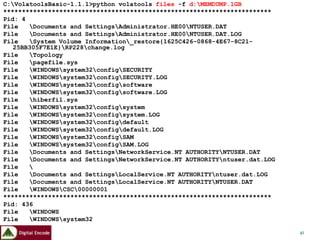
C:VolatoolsBasic-1.1.1>python volatools files -f d:MEMDUMP.1GB
************************************************************************
Pid: 4
File   Documents and SettingsAdministrator.HE00NTUSER.DAT
File   Documents and SettingsAdministrator.HE00NTUSER.DAT.LOG
File   System Volume Information_restore{1625C426-0868-4E67-8C21-
   25BB305F7E1E}RP228change.log
File   Topology
File   pagefile.sys
File   WINDOWSsystem32configSECURITY
File   WINDOWSsystem32configSECURITY.LOG
File   WINDOWSsystem32configsoftware
File   WINDOWSsystem32configsoftware.LOG
File   hiberfil.sys
File   WINDOWSsystem32configsystem
File   WINDOWSsystem32configsystem.LOG
File   WINDOWSsystem32configdefault
File   WINDOWSsystem32configdefault.LOG
File   WINDOWSsystem32configSAM
File   WINDOWSsystem32configSAM.LOG
File   Documents and SettingsNetworkService.NT AUTHORITYNTUSER.DAT
File   Documents and SettingsNetworkService.NT AUTHORITYntuser.dat.LOG
File   
File   Documents and SettingsLocalService.NT AUTHORITYntuser.dat.LOG
File   Documents and SettingsLocalService.NT AUTHORITYNTUSER.DAT
File   WINDOWSCSC00000001
************************************************************************
Pid: 436
File   WINDOWS
File   WINDOWSsystem32
…
…                                                                           41
C:VolatoolsBasic-1.1.1>python volatools pslist -f d:MEMDUMP.1GB

Name                Pid    PPid   Thds   Hnds   Time
System              4      0      65     262    Thu Jan   01   00:00:00   1970
smss.exe            436    4      3      21     Thu Mar   15   08:04:12   2007
csrss.exe           492    436    20     421    Thu Mar   15   08:04:13   2007
winlogon.exe        516    436    22     626    Thu Mar   15   08:04:14   2007
services.exe        560    516    17     366    Thu Mar   15   08:04:14   2007
lsass.exe           572    516    19     405    Thu Mar   15   08:04:15   2007
svchost.exe         752    560    21     214    Thu Mar   15   08:04:15   2007
svchost.exe         812    560    9      264    Thu Mar   15   08:04:16   2007
svchost.exe         876    560    72     1582   Thu Mar   15   08:04:16   2007
svchost.exe         924    560    6      95     Thu Mar   15   08:04:16   2007
svchost.exe         976    560    7      137    Thu Mar   15   08:04:16   2007
spoolsv.exe         1176   560    14     159    Thu Mar   15   08:04:17   2007
MDM.EXE             1372   560    4      85     Thu Mar   15   08:04:25   2007
ntrtscan.exe        1416   560    13     65     Thu Mar   15   08:04:25   2007
tmlisten.exe        1548   560    14     179    Thu Mar   15   08:04:28   2007
OfcPfwSvc.exe       1636   560    9      145    Thu Mar   15   08:04:29   2007
alg.exe             2028   560    6      103    Thu Mar   15   08:04:32   2007
XV69C2.EXE          336    1416   1      84     Thu Mar   15   08:04:34   2007
AcroRd32.exe        2452   848    0      -1     Wed Mar   21   03:53:27   2007
explorer.exe        840    3844   16     410    Thu Mar   22   23:05:51   2007
jusched.exe         2608   840    2      36     Thu Mar   22   23:05:54   2007
PccNTMon.exe        2184   840    4      67     Thu Mar   22   23:05:54   2007
ctfmon.exe          3084   840    1      70     Thu Mar   22   23:05:54   2007
reader_sl.exe       1240   840    2      35     Thu Mar   22   23:05:55   2007
cmd.exe             368    840    1      30     Thu Mar   22   23:07:01   2007
dumpmem.exe         2132   368    1      17     Thu Mar   22   23:07:30   2007
                                                                                 42
C:VolatoolsBasic-1.1.1>python volatools sockets -f d:memdump.bluelu

Pid    Port   Proto   Create Time
1828   500    17      Wed Mar 28 02:22:36   2007
4      445    6       Wed Mar 28 02:22:20   2007
736    135    6       Wed Mar 28 02:22:25   2007
468    1900   17      Wed Mar 28 02:22:58   2007
196    1031   6       Wed Mar 28 02:22:54   2007
1936   1025   6       Wed Mar 28 02:22:35   2007
4      139    6       Wed Mar 28 02:22:20   2007
1828   0      255     Wed Mar 28 02:22:36   2007
1112   123    17      Wed Mar 28 02:22:39   2007
1804   1029   17      Wed Mar 28 02:22:37   2007
384    1028   6       Wed Mar 28 02:22:36   2007
384    1032   6       Wed Mar 28 02:22:56   2007
4      137    17      Wed Mar 28 02:22:20   2007
1936   1026   6       Wed Mar 28 02:22:35   2007
316    1030   6       Wed Mar 28 02:22:44   2007
1164   3793   6       Wed Mar 28 02:22:28   2007
468    1900   17      Wed Mar 28 02:22:58   2007
1828   4500   17      Wed Mar 28 02:22:36   2007
4      138    17      Wed Mar 28 02:22:20   2007
196    1037   6       Wed Mar 28 02:23:03   2007
1936   1027   6       Wed Mar 28 02:22:35   2007
4      445    17      Wed Mar 28 02:22:20   2007
1112   123    17      Wed Mar 28 02:22:39   2007
                                                                        43
Live-Response Methodologies

    There are three basic methodologies for performing live response on a Windows system: local ,
    remote and hybrid.
    Local Response Methodology
Performing live response locally means you are sitting at the console of the system, entering commands
at the keyboard, and saving information locally, either directly to the hard drive or to a removable
(thumb drive, USB-connected external drive) or network resource (network share) that appears as a
local resource.
    The simplest way to implement the local methodology is with a batch file.
    An example of a simple batch file that you can use during live response looks like this:
    tlist.exe –c > %1tlist-c.log
    tlist.exe –t > %1tlist-t.log
    tlist.exe –s > %1tlist-s.log
    tcpvcon.exe –can > %1tcpvcon-can.log
    netstat.exe –ano > %1netstat-ano.log
    There you go; three utilities and five simple commands. Save this file as local.bat and include it on the
    CD, along with copies of the associated tools.


                                                                                                            44
Remote Response Methodology


The remote response methodology generally consists of a series of commands executed against a
system from across the network. This methodology is very useful in situations with many systems,
because the process of logging into the system and running commands is easy to
Automate
Implementing our local methodology batch file for the remote methodology is fairly trivial:
psexec.exe %1 –u %2 –p %3 -c tlist.exe –c > tlist-c.log
psexec.exe %1 –u %2 –p %3 -c tlist.exe –t > tlist-t.log
psexec.exe %1 –u %2 –p %3 -c tlist.exe –s > tlist-s.log
psexec.exe %1 –u %2 –p %3 -c tcpvcon -can > tcpvcon-can.log
psexec.exe %1 –u %2 –p %3 c:windowssystem32netstat.exe –ano > %1netstat-ano.log

This batch file (remote.bat) sits on the responder’s system and is launched as follows:
C:forensicscase007>remote.bat 192.168.0.7 Administrator password
Once the batch file has completed, the responder has the output of the commands in five files, ready for
    analysis, on her system.


                                                                                                           45
The Hybrid Approach (a.k.a. Using the FSP)


This methodology is most often used in situations where the responder cannot log in to the systems
remotely but wants to collect all information from a number of systems and store that data in a central
location. The responder (or an assistant) will go to the system with a CD or thumb drive (ideally, one
with a write-protect switch that is enabled), access the system, and run the tools to collect information.
As the tools are executed, each one will send its output over the network to the central “forensic
server.” In this way, no remote logins are executed, trusted tools are run from a nonmodifiable source,
and very little is written to the hard drive of the victim system. With the right approach and planning,
the responder can minimize his interaction with the system, reducing the number of choices he
needs to make with regard to input commands and arguments as well as reducing the chance for
mistakes.


                                                                                                             46
FSPC and FRUC
 FSPC       is the server component, which resides on your forensic workstation. This
 system will be where all of the data you collect is stored and managed, and then
 eventually analyzed.
 FSPC [-d case dir] [-n case name] [-p port] [-i investigator]
 [-l logfile] [-c] [-v] [-h]

 -d case dir....Case directory (default: cases)
 -n case name...Name of the current case
 -i invest......Investigator's name
 -p port........Port to listen on (default: 7070)
 -l logfile.....Case logfile (default: case.log)
 -v.............Verbose output (more info, good for monitoring
 activity)
 -c.............Close FSP after CLOSELOG command sent (best used
 when collecting data from only one system)
 -h.............Help (print this information)
 Ex: C:>fspc -d cases -n testcase -i "H. Carvey"
 C:>fspc -n newcase -p 80


                                                                                        47
FRUC is the client component, used to collect data from "victim" system. Download the
zipped archive, and extract all of the files (2 EXE files and several DLLs) into a directory,
add your third party tools, update your INI file (the default is "fruc.ini") appropriately,
and then burn everything to a CD (or copy it to a thumb drive). Then you're ready.
Launch the FRUC with the "-h" switch and you'll see...
FRUC v 1.2 [-s server IP] [-p port] [-f ini file] [-h]
First Responder Utility (CLI) v.1.2, data collection utility
of the Forensics Server Project
-s system......IP address of Forensics Server
-p port........Port to connect to on the Forensics Server
-f file........Ini file to use (use other options to override ini file configuration settings)
-v.............Verbose output (more info, good for monitoring activity)
-h.............Help (print this information)
Ex: C:>fruc -s -p -f


                                                                                                 48
Using netcat
For our purposes, we won’t go into an exhaustive description of netcat; we’ll use it to
   transmit information from one system to another. First, we need to set up a “listener” on
   our forensic server, and we do that with the following command line:
D:forensics>nc –L –p 80 > case007.txt

tlist.exe –c | nc %1 %2 –w 5
tlist.exe –t | nc %1 %2 –w 5
tlist.exe –s | nc %1 %2 –w 5
tcpvcon -can | nc %1 %2 –w 5
netstat.exe –ano | nc %1 %2 –w 5

Save this file as hybrid.bat, and then launch it from the command line, like so (D: is still the
   CD-ROM drive):
D:>remote.bat 192.168.1.10 80

Once we run this batch file, we’ll have all our data safely off the victim system and on our
  forensic server for safekeeping and analysis.


                                                                                                49
Network Forensics


                    50
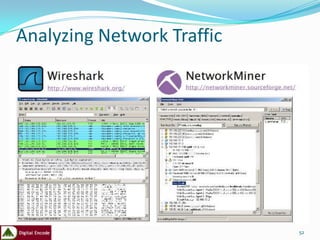
Network Miner
 Network Miner is a network forensic analysis tool that was developed in order to
facilitate the task of performing network forensic investigations as well as conducting
incident response.
 Network Miner is designed to collect data about hosts on a network rather than to
collect data regarding the traffic on the network.
 It has a graphical user interface where the main view is host centric (information
grouped per host) rather than packet centric (information showed as a list of
packets/frames).
 One of the most appreciated functions in NetworkMiner is the ability to easily
   extract files from captured network traffic in protocols such as HTTP, FTP, TFTP
   and SMB.
 NetworkMiner actually reassembles files to disk on the fly as it parses a PCAP file.
A lot of other useful information like user credentials, transmitted parameters,
operating systems, hostnames, server banners etcetera can also be extracted from
network traffic with NetworkMiner.
 All of this is of course performed fully passive, so that no traffic is emitted to the
network while performing the network forensic analysis.

                                                                                           51
Analyzing Network Traffic


                            52
53
Forensic softwares
 Dump tools                    Permanent deletion of files
 • Ds2dump                     • PD Wipe
• Choas reader                 File integrity checkers
 Slack space & data recovery   • Hash Keeper
   tools                       Disk imaging tools
 • DriveSpy                     • Image
• Ontrack                      • SnapBack DataArrest
 Hard disk write protection    • IXimager
   tools                        Partition managers
 • Pdblock                     • Part
• Write-blocker                • Explore2fs
• NoWrite
• DriveDock

                                                             54
Forensic softwares contd
Linux/UNIX tools          Multipurpose tools
 • Ltools                  • ByteBack
• Mtools                  • Maresware
• TCT                     • BIA Protect Tools
• TCTUTILs                • LC-Technology Software
Password recovery tool    • WinHex specialist editor
• @stake                  • ProDiscover DFT
Internet History Viewer    Toolkits
ASRData                   • NTI-Tools
Ftimes                    • DataLifter
Oxygen phone manager      • R-Tools
                                                       55
Data Recovery Tools

These tools may be used to recover information from
  many sources including PDAs, cameras, and disk
  drives.
e.g
Device Seizure
ByteBack


                                                      56
Permanent Deletion of Files

Drive wiping is a crucial component of all digital forensic
  examinations. Any drive that is not thoroughly wiped
  has to be considered suspect. The following tools aid
  in this goal.
e.g
 PDWipe,
 R-wipe
 Darik’s Boot and Nuke


                                                          57
File Integrity Checker

These tools help you to prove that the file you copied
 into evidence has not been altered subsequently.
 They make possible a quick and reliable diagnosis
 of a system image for the purpose of determining
 if any changes have occurred.
e.g
Filemon,
Hash keeper


                                                    58
Disk Imaging Tools

These tools will create a bit-image copy of a drive or
  other media.
e.g.
 Snapback DatArrest,
 SafeBack 3.0
 Encase
 FTK
 Prodiscover


                                                         59
Partition Managers
Helps to create partitions on a Drive
e.g
Partimage
Magic partition


                                        60
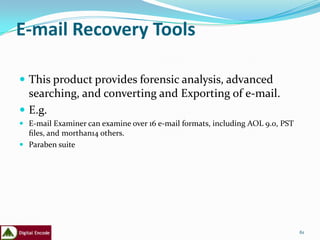
E-mail Recovery Tools

 This product provides forensic analysis, advanced
  searching, and converting and Exporting of e-mail.
 E.g.
 E-mail Examiner can examine over 16 e-mail formats, including AOL 9.0, PST
  files, and morthan14 others.
 Paraben suite


                                                                               61
Password Recovery Tools

A password cracker hashes all the words in a dictionary file and compares
  every result with the password hash. If a match is found, the password
  is the dictionary word. The following are tools that may be used to file
  poorly configured passwords.
 e.g.
 @Stake, Decryption Collection Enterprise,
 AIM Password Decoder,
 MS Access Database Password Decoder,
 Paraben suite
 Elcomsoft suite


Talk about GPU tools( Hashcat, Ighashgpu etc)

                                                                            62
NetAnalysis

This product allows for the analysis of a Web browser’s history data. It is
commonly used by law enforcement in child pornography cases. The
forensic examination and analysis of user activity on the Internet can be
the pivotal evidence in any case.
e.g.
Cookie viewer


                                                                              63
Adobe Reader
These tools are used to decrypt pdf files so that they can
 be easily edited.

e.g.
 Nitro
 Elcomsoft suite
 Paraben suite


                                                             64
Stealth Suite

Users without a forensic background can use the Stealth
 Suite to assess activity on a computer hard disk. These
 tools can help identify whether a targeted computer
 system was used to access inappropriate information.


                                                           65
Computer Incident Response Suite

This suite of tools is often used in corporate and
government investigations and security risk reviews.
They are optimized for MS-DOS, which is the lowest
cost forensic platform for MS-DOS and Windows
processing. Many of the tools also have Windows
version.
e.g.
Helix
CAINE

                                                   66
Oxygen Phone Manager


Oxygen Phone Manager II for Nokia phones provides a
 simple and convenient way to control mobile phones
 from a PC.


                                                      67
SIM Card Seizure

SIM Card Seizure can be used to recover deleted Short
 Message Service (SMS) messages and perform
 comprehensive analysis of SIM card data.


                                                        68
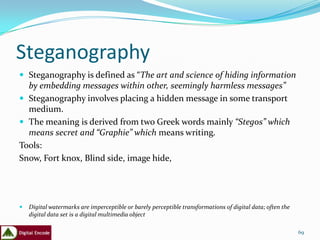
Steganography
 Steganography is defined as “The art and science of hiding information
  by embedding messages within other, seemingly harmless messages”
 Steganography involves placing a hidden message in some transport
  medium.
 The meaning is derived from two Greek words mainly “Stegos” which
  means secret and “Graphie” which means writing.
Tools:
Snow, Fort knox, Blind side, image hide,


   Digital watermarks are imperceptible or barely perceptible transformations of digital data; often the
    digital data set is a digital multimedia object

                                                                                                            69
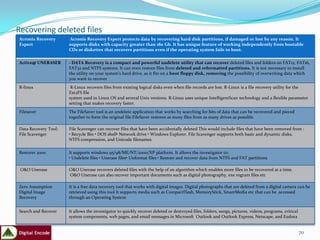
Recovering deleted files
Acronis Recovery       Acronis Recovery Expert protects data by recovering hard disk partitions, if damaged or lost by any reason. It
Expert                supports disks with capacity greater than 180 Gb. It has unique feature of working independently from bootable
                      CDs or diskettes that recovers partitions even if the operating system fails to boot.

Active@ UNERASER      - DATA Recovery is a compact and powerful undelete utility that can recover deleted files and folders on FAT12, FAT16,
                      FAT32 and NTFS systems. It can even restore files from deleted and reformatted partitions. It is not necessary to install
                      the utility on your system's hard drive, as it fits on a boot floppy disk, removing the possibility of overwriting data which
                      you want to recover
R-linux                R-Linux recovers files from existing logical disks even when file records are lost. R-Linux is a file recovery utility for the
                      Ext2FS file
                      system used in Linux OS and several Unix versions. R-Linux uses unique IntelligentScan technology and a flexible parameter
                      setting that makes recovery faster.
Filesaver             The FileSaver tool is an undelete application that works by searching for bits of data that can be recovered and pieced
                      together to form the original file.FileSaver restores as many files from as many drives as possible.

Data Recovery Tool:   File Scavenger can recover files that have been accidentally deleted This would include files that have been removed from :
File Scavenger        • Recycle Bin • DOS shell• Network drive • Windows Explorer. File Scavenger supports both basic and dynamic disks,
                      NTFS compression, and Unicode filenames

Restorer 2000         It supports windows 95/98/ME/NT/2000/XP platform. It allows the investigator to:
                      • Undelete files • Unerase files• Unformat files • Restore and recover data from NTFS and FAT partitions

 O&O Unerase          O&O Unerase recovers deleted files with the help of an algorithm which enables more files to be recovered at a time.
                      O&O Unerase can also recover important documents such as digital photography, exe rogram files etc

Zero Assumption       It is a free data recovery tool that works with digital images. Digital photographs that are deleted from a digital camera can be
Digital Image         retrieved using this tool It supports media such as CompactFlash, MemoryStick, SmartMedia etc that can be accessed
Recovery              through an Operating System


Search and Recover    It allows the investigator to quickly recover deleted or destroyed files, folders, songs, pictures, videos, programs, critical
                      system components, web pages, and email messages in Microsoft Outlook and Outlook Express, Netscape, and Eudora


                                                                                                                                                       70
Overview of forensic Hardwares
Hardware Device      Description

NoWrite              NoWrite prevents data from being written to the
                     hard disk. It supports hard disk drives with high capacities. It is compatible with all kinds of devices including USB or
                     FireWire boxes, adapters, and cables belonging to IDE. It supports communication between common IDE interfaces.
FireWire             FireWire DriveDock is a forensic instrument designed to load hard drives on computer systems. It comprises of a 3.5-inch
DriveDock            hard drive that is used along with a single device to give complete FireWire desktop storage. It is a compact device of about 4
                     cubic inches that would control everything in a 3.5-inch hard drive.
LockDown             Lockdown by Paraben is an advanced Firewire or USB to IDE write-blocker that combines swiftness and portability to allow
                     IDE media to be acquired quickly and safely in Windows based systems.
Write Protect Card   The Write Protect Card Reader transfers data to a computer system from digital cameras, digital camcorders, PDAs, MP3
Reader               players and digital voice recorders. It can read multiple types of flash memory while blocking any writes to it. It is a small
                     palm-size package with a simple USB 2.0/1.1 connection and requires no external power.
Drive Lock IDE       The DriveLock IDE Hard Drive Write Protection is designed to completely prevent write commands from being accidentally
                     sent to hard disk drives connected through the IDE or PATA hard drive interfaces. This write protect device also blocks
                     Serial ATA hard drives using the SATA option. It is designed to block write commands sent to the hard drive while
                     previewed or duplicated.
Serial-ATA           The DriveLock Serial-ATA device is a hardware write
DriveLock Kit        protect device designed to prevent data writes to SATA, IDE and PATA hard disk drives. The tool is connected to a
                     computer’s PATA interface in order to block write commands sent to the hard drive while being previewed or duplicated.
Wipe MASSter         Wipe MASSter is a commercial drive wiper.

ImageMASSter         Designed exclusively for Forensic data acquisition, the
Solo-3 IT            ImageMASSter Solo-III Forensics data imaging tool is a light weight, portable hand-held device that can acquire data to one
                     or two evidence drives in high speed, exceeding 3GB/Min.

                                                                                                                                                     71
WHAT'S NEXT?

 A forensic investigation can be conducted on any device that stores electronic data, such
  as a computer hard drive, smart card, or palm pilot. Internal auditors can use computer
  evidence in a variety of crimes where incriminating documents can be found, including
  cases involving financial fraud, embezzlement, or data theft. A key point to remember
  during any forensic examination is that protection of the evidence is critical.
  Furthermore, the results of a forensic examination can be rewarding. Collecting evidence
  can allow organizations to respond to any problems immediately and authoritatively and
  to maintain the company's professional image.
 Auditors who wish to learn more about computer forensics can visit the Computer
  Forensics, Cyber Crime, and Steganography Resources Web site, www.forensics.nl/.
  Besides finding information on computer forensics, auditors can search online for free
  forensic tools. A couple of good Web sites include:
 http://users.erols.com/gmgarner/forensics/: This Web site offers freeware forensic tools
  for Microsoft Windows platforms.
 http://ftimes.sourceforge.net/FTimes/index.shtml: The site takes visitors to the FTimes
  system base-lining and evidence collection tool.
 www.securityfocus.com/tools/525: The Security Focus Web page provides a link to AFind,
  a tool that lists a file's last access time without changing it.
 www.weirdkid.com/products/emailchemy/: This site provides a link to Emailchemy, a
  mail-format viewer program.
 http://ircr.tripod.com/: This site has a link to a Windows forensic tool that enables users
  to create an incident response collection report.
Live Forensics: Selected Web Sites

 www.invisiblethings.org
 http://www.vidstrom.net/
 http://www.usenix.org/events/sec05/tech/full_papers/chow/chow.pdf (14th
  Usenix Security)
 http://www.security-assessment.com/Presentations/Auscert_2006_-
  _Defeating_Live_Windows_Forensics_DB_v1.8.ppt
 http://md.hudora.de/presentations/firewire/2005-firewire-cansecwest.pdf
 http://forensic.seccure.net/
 http://www.knoppix.net
 http://www.gcn.com/print/25_22/41502-1.html (“Special Report, ‘Live’ forensics
  is the future for law enforcement”)
 http://news.com.com/2100-7349_3-5092781.html (“U.K. teen acquitted with
  Trojan defense”, Oct. 17, 2003)
 http://www.newsmax.com/archives/articles/2003/8/12/204345.shtml (“The
  Trojan Horse Defense in Child Pornography”, Aug. 13, 2003)


                                                                               73
Tools! Tools! Tools!
 http://www.forensicswiki.org/wiki/Tools
 http://www.mccrackenassociates.com/links/sectools.h
    tm
   http://www.sourceforge.net/projects/windowsir/files/
   http://www.cftt.nist.gov/
   http://www.ntsecurity.nu/toolbox/promiscdetect/
   http://www.mandiant.com/products/free_software


                                                           74
PRACTICAL DEMOS


                  75

Latest presentation

  • 1.
    PRACTICAL DEMONSTRATIONS OF DIGITAL FORENSIC TOOLS
  • 2.
    INSTRUCTOR’S PROFILE Adeoje AdetunjiEmmanuel Certified Ethical Hacker (CEH) EC-Council Security Analyst(ECSA) Computer Hacking Forensic Investigator(CHFI) AccessData Certified Examiner(ACE) Certified Information System Auditor(CISA) Encase specialist Licensed Penetration Tester(LPT) 2
  • 3.
    agenda  Introduction  TheForensic Investigation  Objective of Digital Forensics Analysis  Roles of Digital Forensic Analysts in IR  Forensic readiness and Business continuity  Computer forensic process  Computer forensics tools  Demos
  • 4.
    Introduction  Data breaches,hacking attacks, viruses, and insider threats are some of the security issues many companies face on a daily basis. Besides employing preventive measures, such as the use of firewalls and intrusion detection devices to prevent data breaches and thwart external attacks, many organizations around the world have been using computer forensics to identify instances of computer misuse and illegal intrusion.  The use of computer forensic techniques also has flourished in the internal audit profession.  However, many internal auditors are unaware of the advantages that computer forensics can bring to audit investigations.  Learning how to acquire, analyze, and report data through the use of computer forensics can help auditors make the most of this investigative technique, as well as recover previously deleted documents that can provide the "smoking gun" needed to determine if a fraudulent activity took place.
  • 5.
  • 6.
  • 7.
    THE FORENSIC INVESTIGATION Computer forensics is the application of analytical techniques on digital media after a computer security incident has occurred.  Its goal is to identify exactly what happened on a digital system and who was responsible through a structured, investigative approach.  Forensic investigations cover all areas of computer misuse, including fraud, Internet and e-mail abuse, entry to pornographic Web sites, and hacking, as well as accidental deletions or alterations of data.  During the forensic investigation, evidence may be obtained in a variety of ways, including affidavits, search warrants, depositions, and expert testimony. Regardless of the means used to obtain data, examination of a computer or other device must be done thoroughly, carefully, and without changing anything. This ensures that the integrity of the original data and the evidence's validity are maintained.  If an internal auditor suspects fraud may have occurred, he or she should fill out an incident detection report form or similar document. The document needs to specify the date and time of the suspected fraud, who reported the incident, the nature of the incident, and the system(s) and application(s) involved.  Note: It is important for companies to have an established, clear process for dealing with these kinds of incidents. This kind of pre-planning can help ensure that the proper channels are followed when an incident occurs.  Forensic investigations consist of three phases: acquiring the evidence, analyzing results, and reporting results. Below is a description of each.
  • 8.
    Acquiring the Evidence The process of securing or acquiring evidence starts with previewing the contents of a computer's hard drive or other media.  To acquire the electronic data, including deleted information, the storage device must be mirrored or duplicated exactly bit by bit.  Once the storage device is secured, a second device may be needed as a working copy if the original storage device was not seized or secured.  This allows the examiner access to an unaltered copy of the electronic data.
  • 9.
    Imaging  An imageis an exact replica of the computer's hard drive or other media, and should include any slack space.  The image is then investigated, rather than the original, to avoid altering the original data, which would make any evidence gathered inadmissible in court.  Imaging is a vital step in a computer forensic investigation and is accepted as the best method for capturing computer evidence that may be presented in a court of law.  Having captured an exact image of the data, the next step is to process it.  All data must be processed, including deleted or partially overwritten files, information hidden outside normal storage areas, and data in virtual memory and slack space.  The most common method used by forensic examiners to capture this data is by using a write-blocking device.  This device prevents the forensic examiner's machine from writing or altering the data on the suspect drive. Windows operating systems are notorious for this problem.
  • 10.
  • 11.
     Typically, thesuspect drive is removed from the machine if possible and plugged directly into the write-blocking device. Once this has occurred, an examiner can make what is called a "bit-stream" image of the drive.  This is an exact bit-for-bit copy of the drive's contents, including deleted space, file slack, and logical files.  Another method of capturing this data is using a Linux live CD or a boot disk, which allows the investigator to view the files on the drive, including deleted space and unallocated clusters, without altering the drive's contents. The examiner can then copy the files onto an external hard drive and view them.  Hidden data often contains the most vital evidence to prove or disprove a case. In some cases, a file extraction may be appropriate. In other situations, a data index may be created to support powerful search tools.  After auditors have a complete image of the drive, they can start collecting the evidence.  Most forensic software includes ready-made scripts for a variety of operating systems that automate certain functions such as encrypted registry parser, file finder, and file mounter.  Because different programs may work better for different tasks, auditors should ensure organizations are using the right product based on their data analysis needs.
  • 12.
    Slack space  Thedata between the end of the logical file to the end of the cluster containing the data is called slack space. Slack space will usually contain data from files that used this space before, making it a rich depository of evidence.  Because of its history the portion of the slack space from the end of the logical file to the end of the sector (not the cluster) was called RAM slack or sector slack  The remainder of the slack, from the end of the last sector containing the logical file until the end of the cluster, is called file slack.  The entire slack space, comprising both RAM or sector slack and file slack
  • 13.
    Computer forensics focuseson three categories of data:  Active Data: These are the current files on the computer, still visible in directories and available to applications.  One important evidentiary point about data on a hard drive is that no matter what it may represent, whether simple text or convoluted spreadsheets, it exists only as infinitesimal magnetic flux reversals representing ones and zeroes which must be processed by software to be intelligible. 13
  • 14.
     Latent Data:Latent data (also called “ambient data”) are deleted files and other data, including memory “dumps” that have “lodged in the digital cracks” but can still be retrieved.  Latent data also includes swap files, temporary files, printer spool files, metadata and shadow data.  Latent data are generally inaccessible absent the use of specialized tools and techniques. This data resides on the media, e.g., the hard drive, in, e.g., slack space and other areas marked available for data storage but not yet overwritten by other data.  The recovery of latent data is the art most often associated with computer forensics, but the identification, extraction and management of active data is no less demanding of a forensic expert’s skill. 14
  • 15.
     Archival Data:This is data that’s been transferred or backed up to peripheral media, like tapes, CDs, ZIP disks, floppy disks, network servers or the Internet. Archival data can be staggeringly voluminous, particularly in a large organization employing frequent, regular back up procedures.  It is critically important to recognize that an archival record of a source media never reflects all of the data that can be identified and extracted from the source media because such back ups don’t carry forward latent data.  Accordingly, an opponent’s offer to furnish copies of back up tapes is, while valuable, no substitute for a forensic examination of a true bit-by-bit copy of the source disk drive. 15
  • 16.
    Disk imaging using FTK Imager  Encase  FTK Imager Lite 16
  • 17.
    Six File systemsthat FTK Imager can Read 17
  • 18.
    Four types ofEvidences 18
  • 19.
    Formats that FTKImager can read 19
  • 20.
  • 21.
  • 22.
  • 23.
    Data on theComputer  In files  In log files Lost when machine is powered off  Browser history  Windows prefetch area  Slack space Lost if you wait too long  Open network connections  Virtual memory  Physical memory  Network traces 23
  • 24.
    Understanding Bit-stream Copies Bit-by-bit copy of the original storage medium  Exact copy of the original disk  Different from a simple backup copy  Backup software only copy known files  Backup software cannot copy deleted files or e-mail messages, or recover file fragments 24
  • 25.
    Data in UnexpectedPlaces  Anti-virus alerts, real-time anti-virus scans  License enforcement / application metering  [anything]Management Software  Patch management  Software management  Configuration management  Asset management 25
  • 26.
    Analyzing the Results The second phase, analyzing the results, takes place after all the evidence is acquired and imaged properly.  Because every case is different, auditors need to be fully trained when conducting a data analysis, or they should recommend a trained forensic examiner performs the evaluation if they lack the professional training to do so.  To analyze the evidence, auditors should use the working copy of retrieved, deleted, electronic data only, including files and folders. Auditors also need to maintain a chain of custody when handling the evidence.  To maintain a digital chain of custody, all images should be hashed — the process of creating a small digital fingerprint of the data.  During the data analysis stage, software also is used to inspect the raw data and organize it into an understandable report.  As a result, the auditor must be able to tell the computer what to look for by using text-string search terms that will identify data pertaining to the specific incident under investigation.s
  • 28.
    Reporting Results The final phase of the forensic examination is creating the report and reporting the evidence. Final reports of the investigation should include a list of all the evidence gathered, a copy of printed documents listed as appendices, and an executive summary. In certain cases, (e.g., to obtain a search warrant or make a criminal charge), auditors may need to create interim reports. These reports are updated as new information is gathered and until the investigation is completed. Report findings need to be ready to be used in a court of law. For instance, reports should clearly explain what made the company or auditor suspicious of the hard drive:  how the hard drive was imaged  how the data was handled prior to the analysis  where within the hard drive the evidence was found  and what the evidence means. Internal auditors who conduct the forensic examination should expect to be called to provide expert testimony during the court case and help the organization review the opposing counsel's evidence.
  • 29.
    ADDITIONAL STEPS ANDTECHNIQUES  Before and during the forensic investigation, internal auditors can take additional steps to ensure evidence is court- ready.  Prior to the forensic examination, the auditor should physically secure the system in question and take pictures of the room, the area surrounding the system, and the system itself.  In addition, the auditor needs to secure the evidence onsite or in a laboratory to ensure a proper chain of custody is followed and digital evidence is secured effectively. The auditor should also document all system details and any connections to the system, such as network cables and 802.11x connections.  The following actions should be avoided at all cost prior to collecting the evidence:  Modifying the time and date stamps of the system(s) containing the evidence before duplication takes place.  Executing nontrusted binaries by double-clicking or running any executable files that are on the computer (e.g., evidence.exe could be a wiping program that, when run, can destroy all the evidence on the drive).  Terminating the rogue process. This pertains to processes on the computer that are displayed when users pressCtrl+Alt+Delete. In hacking cases, it's common for people to press Ctrl+Alt+Delete and kill any processes they are unsure about. This may have adverse effects, such as wiping the drive or log files and notifying the attacker that the process has been discovered.  Updating the system before the forensic investigation takes place.  Not recording executed commands.  Installing software on the system.
  • 30.
    Offline Analysis Anoffline analysis is when the investigation takes place on the imaged copy. When preparing the evidence, auditors need to know how to power down the system correctly. Some systems must be shut down properly, while others can be turned off by pulling the plug
  • 31.
    Comparison of systemsthat can be turned off through the shut-down method or pull-the-plug method
  • 32.
    Why Live Forensics? Big disks  Disk capacity keeps increasing (Oct’06: 500Gb for ~$158) faster than processors  Terabyte systems are big and common  Searching (or indexing) takes time  Mirroring takes time  Minimal downtime (mission critical sys)  Harder to seize systems (even with court order)  Provide context for static analysis  Low-profile examination  Long data lifetimes  Some data is only in RAM 32
  • 33.
    Live Analysis Whilecollecting the evidence, a live or offline analysis can be performed as part of the gathering process. A live analysis takes place when the forensic investigation is conducted on the live system (i.e., the system is not powered down). Due to the volatile nature of digital media, auditors need to document all the steps taken while collecting the evidence during a live analysis. Besides refraining from installing software on the system, the auditor should not update the system with any security patches or hot fixes prior to imaging the drive. If the computer has any active windows open, pictures should be taken of the monitor as part of the examination's documentation, as well as the area by the system's clock to determine whether there are encrypted containers and, if so, whether they are open. Internal auditors may encounter problems during any live analysis. Some of these problems include:
  • 34.
    Destruction or alteration of digital evidence by the auditor. Because computer files only get overwritten when data needs to take its place on the hard drive, clicking on files or folders on a computer will result in information being written to the drive, potentially overwriting valuable evidence. During a live analysis, this is unavoidable. To capture potentially overwritten data, the auditor should write every action performed on the system so that the forensic examiner can rule out that activity.  Logic bombs and slag code. This refers to a piece of code or application that does something based on a condition. For example, wiping software commonly erases the drive on startup or shutdown. Therefore, the auditor can trigger a logic bomb or slag code simply by clicking on Start>Shutdown. The best way to avoid this situation is to unplug the machine from the wall. This will prevent software code from running, because the machine will have no electricity to run. If the investigation involves a laptop, after unplugging the machine, the investigator can shutdown the laptop by pressing the power button and holding it down for approximately five to 10 seconds. This will cut all power to the machine and force it to shutdown.  Trojan binaries and root kits. Trojans and root kits are installed by the attacker. When operational, they send alerts to the hacker after a specific action takes place. Some Trojans even allow the attacker to view the computer screen in real time. Properly shutting down the machine, will prevent the hacker from seeing what the forensic investigator is doing. At a minimum, the computer's Internet connection must be disabled so that information is not sent to the attacker.  No access to slack space, pagefile/hibernation files, Windows NT file system transaction logs, and print spoolers. Sometimes, these files may contain just the right evidence needed to prove a case. For instance, in cases involving the use of forged checks, printed files could have all the evidence needed. However, if the investigator is unable to access these files, the evidence could be lost as the investigation moves forward and files are imaged.  Once the data is gathered during the live analysis, the system must be imaged. Depending on the type of operating system, the auditor may need to shut down the system properly without damaging the evidence, while still allowing the system to boot up.
  • 35.
    Information Available  Runningprocesses  Open files  Network connections  Memory (physical / virtual dumps)  Regular disk files 35
  • 36.
    Information Available (2) Images of entire disk  Live disk imaging  (a.k.a. shooting a moving target)  Deleted files  Live file carving  Unencrypted document fragments  Encryption keys for whole-disk encryption schemes  Copies of volatile-only malware (for disassembly and investigation) 36
  • 37.
    Running Processes  Windows  Open files  Open network connections  Registry activity  Open DLLs  …  Unix  Open files  Open network connections  Access to corresponding EXE, even if deleted  Command line that invoked application  Environment variables  … 37
  • 38.
    Memory  Process memory  Finer-grained than dumping entire RAM  Easier to make sense of virtual address space for a process than physical memory  More likely to find contiguous application structures  Can yield passwords, document fragments, unencrypted documents  Kernel memory  Search for “hidden” processes  Evaluate health of kernel  String searches  Most “brute force” technique 39
  • 39.
    C:VolatoolsBasic-1.1.1>python volatools ident-f d:MEMDUMP.1GB Image Name: d:MEMDUMP.1GB Image Type: XP SP2 VM Type: nopae DTB: 0x39000 Datetime: Thu Mar 22 18:07:31 2007 40
  • 40.
    C:VolatoolsBasic-1.1.1>python volatools files-f d:MEMDUMP.1GB ************************************************************************ Pid: 4 File Documents and SettingsAdministrator.HE00NTUSER.DAT File Documents and SettingsAdministrator.HE00NTUSER.DAT.LOG File System Volume Information_restore{1625C426-0868-4E67-8C21- 25BB305F7E1E}RP228change.log File Topology File pagefile.sys File WINDOWSsystem32configSECURITY File WINDOWSsystem32configSECURITY.LOG File WINDOWSsystem32configsoftware File WINDOWSsystem32configsoftware.LOG File hiberfil.sys File WINDOWSsystem32configsystem File WINDOWSsystem32configsystem.LOG File WINDOWSsystem32configdefault File WINDOWSsystem32configdefault.LOG File WINDOWSsystem32configSAM File WINDOWSsystem32configSAM.LOG File Documents and SettingsNetworkService.NT AUTHORITYNTUSER.DAT File Documents and SettingsNetworkService.NT AUTHORITYntuser.dat.LOG File File Documents and SettingsLocalService.NT AUTHORITYntuser.dat.LOG File Documents and SettingsLocalService.NT AUTHORITYNTUSER.DAT File WINDOWSCSC00000001 ************************************************************************ Pid: 436 File WINDOWS File WINDOWSsystem32 … … 41
  • 41.
    C:VolatoolsBasic-1.1.1>python volatools pslist-f d:MEMDUMP.1GB Name Pid PPid Thds Hnds Time System 4 0 65 262 Thu Jan 01 00:00:00 1970 smss.exe 436 4 3 21 Thu Mar 15 08:04:12 2007 csrss.exe 492 436 20 421 Thu Mar 15 08:04:13 2007 winlogon.exe 516 436 22 626 Thu Mar 15 08:04:14 2007 services.exe 560 516 17 366 Thu Mar 15 08:04:14 2007 lsass.exe 572 516 19 405 Thu Mar 15 08:04:15 2007 svchost.exe 752 560 21 214 Thu Mar 15 08:04:15 2007 svchost.exe 812 560 9 264 Thu Mar 15 08:04:16 2007 svchost.exe 876 560 72 1582 Thu Mar 15 08:04:16 2007 svchost.exe 924 560 6 95 Thu Mar 15 08:04:16 2007 svchost.exe 976 560 7 137 Thu Mar 15 08:04:16 2007 spoolsv.exe 1176 560 14 159 Thu Mar 15 08:04:17 2007 MDM.EXE 1372 560 4 85 Thu Mar 15 08:04:25 2007 ntrtscan.exe 1416 560 13 65 Thu Mar 15 08:04:25 2007 tmlisten.exe 1548 560 14 179 Thu Mar 15 08:04:28 2007 OfcPfwSvc.exe 1636 560 9 145 Thu Mar 15 08:04:29 2007 alg.exe 2028 560 6 103 Thu Mar 15 08:04:32 2007 XV69C2.EXE 336 1416 1 84 Thu Mar 15 08:04:34 2007 AcroRd32.exe 2452 848 0 -1 Wed Mar 21 03:53:27 2007 explorer.exe 840 3844 16 410 Thu Mar 22 23:05:51 2007 jusched.exe 2608 840 2 36 Thu Mar 22 23:05:54 2007 PccNTMon.exe 2184 840 4 67 Thu Mar 22 23:05:54 2007 ctfmon.exe 3084 840 1 70 Thu Mar 22 23:05:54 2007 reader_sl.exe 1240 840 2 35 Thu Mar 22 23:05:55 2007 cmd.exe 368 840 1 30 Thu Mar 22 23:07:01 2007 dumpmem.exe 2132 368 1 17 Thu Mar 22 23:07:30 2007 42
  • 42.
    C:VolatoolsBasic-1.1.1>python volatools sockets-f d:memdump.bluelu Pid Port Proto Create Time 1828 500 17 Wed Mar 28 02:22:36 2007 4 445 6 Wed Mar 28 02:22:20 2007 736 135 6 Wed Mar 28 02:22:25 2007 468 1900 17 Wed Mar 28 02:22:58 2007 196 1031 6 Wed Mar 28 02:22:54 2007 1936 1025 6 Wed Mar 28 02:22:35 2007 4 139 6 Wed Mar 28 02:22:20 2007 1828 0 255 Wed Mar 28 02:22:36 2007 1112 123 17 Wed Mar 28 02:22:39 2007 1804 1029 17 Wed Mar 28 02:22:37 2007 384 1028 6 Wed Mar 28 02:22:36 2007 384 1032 6 Wed Mar 28 02:22:56 2007 4 137 17 Wed Mar 28 02:22:20 2007 1936 1026 6 Wed Mar 28 02:22:35 2007 316 1030 6 Wed Mar 28 02:22:44 2007 1164 3793 6 Wed Mar 28 02:22:28 2007 468 1900 17 Wed Mar 28 02:22:58 2007 1828 4500 17 Wed Mar 28 02:22:36 2007 4 138 17 Wed Mar 28 02:22:20 2007 196 1037 6 Wed Mar 28 02:23:03 2007 1936 1027 6 Wed Mar 28 02:22:35 2007 4 445 17 Wed Mar 28 02:22:20 2007 1112 123 17 Wed Mar 28 02:22:39 2007 43
  • 43.
    Live-Response Methodologies There are three basic methodologies for performing live response on a Windows system: local , remote and hybrid. Local Response Methodology Performing live response locally means you are sitting at the console of the system, entering commands at the keyboard, and saving information locally, either directly to the hard drive or to a removable (thumb drive, USB-connected external drive) or network resource (network share) that appears as a local resource. The simplest way to implement the local methodology is with a batch file. An example of a simple batch file that you can use during live response looks like this: tlist.exe –c > %1tlist-c.log tlist.exe –t > %1tlist-t.log tlist.exe –s > %1tlist-s.log tcpvcon.exe –can > %1tcpvcon-can.log netstat.exe –ano > %1netstat-ano.log There you go; three utilities and five simple commands. Save this file as local.bat and include it on the CD, along with copies of the associated tools. 44
  • 44.
    Remote Response Methodology RemoteResponse Methodology The remote response methodology generally consists of a series of commands executed against a system from across the network. This methodology is very useful in situations with many systems, because the process of logging into the system and running commands is easy to Automate Implementing our local methodology batch file for the remote methodology is fairly trivial: psexec.exe %1 –u %2 –p %3 -c tlist.exe –c > tlist-c.log psexec.exe %1 –u %2 –p %3 -c tlist.exe –t > tlist-t.log psexec.exe %1 –u %2 –p %3 -c tlist.exe –s > tlist-s.log psexec.exe %1 –u %2 –p %3 -c tcpvcon -can > tcpvcon-can.log psexec.exe %1 –u %2 –p %3 c:windowssystem32netstat.exe –ano > %1netstat-ano.log This batch file (remote.bat) sits on the responder’s system and is launched as follows: C:forensicscase007>remote.bat 192.168.0.7 Administrator password Once the batch file has completed, the responder has the output of the commands in five files, ready for analysis, on her system. 45
  • 45.
    The Hybrid Approach(a.k.a. Using the FSP) The Hybrid Approach (a.k.a. Using the FSP) This methodology is most often used in situations where the responder cannot log in to the systems remotely but wants to collect all information from a number of systems and store that data in a central location. The responder (or an assistant) will go to the system with a CD or thumb drive (ideally, one with a write-protect switch that is enabled), access the system, and run the tools to collect information. As the tools are executed, each one will send its output over the network to the central “forensic server.” In this way, no remote logins are executed, trusted tools are run from a nonmodifiable source, and very little is written to the hard drive of the victim system. With the right approach and planning, the responder can minimize his interaction with the system, reducing the number of choices he needs to make with regard to input commands and arguments as well as reducing the chance for mistakes. 46
  • 46.
    FSPC and FRUC FSPC is the server component, which resides on your forensic workstation. This system will be where all of the data you collect is stored and managed, and then eventually analyzed. FSPC [-d case dir] [-n case name] [-p port] [-i investigator] [-l logfile] [-c] [-v] [-h] -d case dir....Case directory (default: cases) -n case name...Name of the current case -i invest......Investigator's name -p port........Port to listen on (default: 7070) -l logfile.....Case logfile (default: case.log) -v.............Verbose output (more info, good for monitoring activity) -c.............Close FSP after CLOSELOG command sent (best used when collecting data from only one system) -h.............Help (print this information) Ex: C:>fspc -d cases -n testcase -i "H. Carvey" C:>fspc -n newcase -p 80 47
  • 47.
    FRUC is theclient component, used to collect data from "victim" system. Download the zipped archive, and extract all of the files (2 EXE files and several DLLs) into a directory, add your third party tools, update your INI file (the default is "fruc.ini") appropriately, and then burn everything to a CD (or copy it to a thumb drive). Then you're ready. Launch the FRUC with the "-h" switch and you'll see... FRUC v 1.2 [-s server IP] [-p port] [-f ini file] [-h] First Responder Utility (CLI) v.1.2, data collection utility of the Forensics Server Project -s system......IP address of Forensics Server -p port........Port to connect to on the Forensics Server -f file........Ini file to use (use other options to override ini file configuration settings) -v.............Verbose output (more info, good for monitoring activity) -h.............Help (print this information) Ex: C:>fruc -s -p -f 48
  • 48.
    Using netcat For ourpurposes, we won’t go into an exhaustive description of netcat; we’ll use it to transmit information from one system to another. First, we need to set up a “listener” on our forensic server, and we do that with the following command line: D:forensics>nc –L –p 80 > case007.txt tlist.exe –c | nc %1 %2 –w 5 tlist.exe –t | nc %1 %2 –w 5 tlist.exe –s | nc %1 %2 –w 5 tcpvcon -can | nc %1 %2 –w 5 netstat.exe –ano | nc %1 %2 –w 5 Save this file as hybrid.bat, and then launch it from the command line, like so (D: is still the CD-ROM drive): D:>remote.bat 192.168.1.10 80 Once we run this batch file, we’ll have all our data safely off the victim system and on our forensic server for safekeeping and analysis. 49
  • 49.
  • 50.
    Network Miner  NetworkMiner is a network forensic analysis tool that was developed in order to facilitate the task of performing network forensic investigations as well as conducting incident response.  Network Miner is designed to collect data about hosts on a network rather than to collect data regarding the traffic on the network.  It has a graphical user interface where the main view is host centric (information grouped per host) rather than packet centric (information showed as a list of packets/frames).  One of the most appreciated functions in NetworkMiner is the ability to easily extract files from captured network traffic in protocols such as HTTP, FTP, TFTP and SMB.  NetworkMiner actually reassembles files to disk on the fly as it parses a PCAP file. A lot of other useful information like user credentials, transmitted parameters, operating systems, hostnames, server banners etcetera can also be extracted from network traffic with NetworkMiner.  All of this is of course performed fully passive, so that no traffic is emitted to the network while performing the network forensic analysis. 51
  • 51.
  • 52.
  • 53.
    Forensic softwares Dumptools Permanent deletion of files • Ds2dump • PD Wipe • Choas reader File integrity checkers Slack space & data recovery • Hash Keeper tools Disk imaging tools • DriveSpy • Image • Ontrack • SnapBack DataArrest Hard disk write protection • IXimager tools Partition managers • Pdblock • Part • Write-blocker • Explore2fs • NoWrite • DriveDock 54
  • 54.
    Forensic softwares contd Linux/UNIXtools Multipurpose tools • Ltools • ByteBack • Mtools • Maresware • TCT • BIA Protect Tools • TCTUTILs • LC-Technology Software Password recovery tool • WinHex specialist editor • @stake • ProDiscover DFT Internet History Viewer Toolkits ASRData • NTI-Tools Ftimes • DataLifter Oxygen phone manager • R-Tools 55
  • 55.
    Data Recovery Tools Thesetools may be used to recover information from many sources including PDAs, cameras, and disk drives. e.g Device Seizure ByteBack 56
  • 56.
    Permanent Deletion ofFiles Drive wiping is a crucial component of all digital forensic examinations. Any drive that is not thoroughly wiped has to be considered suspect. The following tools aid in this goal. e.g  PDWipe,  R-wipe  Darik’s Boot and Nuke 57
  • 57.
    File Integrity Checker Thesetools help you to prove that the file you copied into evidence has not been altered subsequently. They make possible a quick and reliable diagnosis of a system image for the purpose of determining if any changes have occurred. e.g Filemon, Hash keeper 58
  • 58.
    Disk Imaging Tools Thesetools will create a bit-image copy of a drive or other media. e.g.  Snapback DatArrest,  SafeBack 3.0  Encase  FTK  Prodiscover 59
  • 59.
    Partition Managers Helps tocreate partitions on a Drive e.g Partimage Magic partition 60
  • 60.
    E-mail Recovery Tools This product provides forensic analysis, advanced searching, and converting and Exporting of e-mail.  E.g.  E-mail Examiner can examine over 16 e-mail formats, including AOL 9.0, PST files, and morthan14 others.  Paraben suite 61
  • 61.
    Password Recovery Tools Apassword cracker hashes all the words in a dictionary file and compares every result with the password hash. If a match is found, the password is the dictionary word. The following are tools that may be used to file poorly configured passwords.  e.g.  @Stake, Decryption Collection Enterprise,  AIM Password Decoder,  MS Access Database Password Decoder,  Paraben suite  Elcomsoft suite Talk about GPU tools( Hashcat, Ighashgpu etc) 62
  • 62.
    NetAnalysis This product allowsfor the analysis of a Web browser’s history data. It is commonly used by law enforcement in child pornography cases. The forensic examination and analysis of user activity on the Internet can be the pivotal evidence in any case. e.g. Cookie viewer 63
  • 63.
    Adobe Reader These toolsare used to decrypt pdf files so that they can be easily edited. e.g.  Nitro  Elcomsoft suite  Paraben suite 64
  • 64.
    Stealth Suite Users withouta forensic background can use the Stealth Suite to assess activity on a computer hard disk. These tools can help identify whether a targeted computer system was used to access inappropriate information. 65
  • 65.
    Computer Incident ResponseSuite This suite of tools is often used in corporate and government investigations and security risk reviews. They are optimized for MS-DOS, which is the lowest cost forensic platform for MS-DOS and Windows processing. Many of the tools also have Windows version. e.g. Helix CAINE 66
  • 66.
    Oxygen Phone Manager OxygenPhone Manager II for Nokia phones provides a simple and convenient way to control mobile phones from a PC. 67
  • 67.
    SIM Card Seizure SIMCard Seizure can be used to recover deleted Short Message Service (SMS) messages and perform comprehensive analysis of SIM card data. 68
  • 68.
    Steganography  Steganography isdefined as “The art and science of hiding information by embedding messages within other, seemingly harmless messages”  Steganography involves placing a hidden message in some transport medium.  The meaning is derived from two Greek words mainly “Stegos” which means secret and “Graphie” which means writing. Tools: Snow, Fort knox, Blind side, image hide,  Digital watermarks are imperceptible or barely perceptible transformations of digital data; often the digital data set is a digital multimedia object 69
  • 69.
    Recovering deleted files AcronisRecovery Acronis Recovery Expert protects data by recovering hard disk partitions, if damaged or lost by any reason. It Expert supports disks with capacity greater than 180 Gb. It has unique feature of working independently from bootable CDs or diskettes that recovers partitions even if the operating system fails to boot. Active@ UNERASER - DATA Recovery is a compact and powerful undelete utility that can recover deleted files and folders on FAT12, FAT16, FAT32 and NTFS systems. It can even restore files from deleted and reformatted partitions. It is not necessary to install the utility on your system's hard drive, as it fits on a boot floppy disk, removing the possibility of overwriting data which you want to recover R-linux R-Linux recovers files from existing logical disks even when file records are lost. R-Linux is a file recovery utility for the Ext2FS file system used in Linux OS and several Unix versions. R-Linux uses unique IntelligentScan technology and a flexible parameter setting that makes recovery faster. Filesaver The FileSaver tool is an undelete application that works by searching for bits of data that can be recovered and pieced together to form the original file.FileSaver restores as many files from as many drives as possible. Data Recovery Tool: File Scavenger can recover files that have been accidentally deleted This would include files that have been removed from : File Scavenger • Recycle Bin • DOS shell• Network drive • Windows Explorer. File Scavenger supports both basic and dynamic disks, NTFS compression, and Unicode filenames Restorer 2000 It supports windows 95/98/ME/NT/2000/XP platform. It allows the investigator to: • Undelete files • Unerase files• Unformat files • Restore and recover data from NTFS and FAT partitions O&O Unerase O&O Unerase recovers deleted files with the help of an algorithm which enables more files to be recovered at a time. O&O Unerase can also recover important documents such as digital photography, exe rogram files etc Zero Assumption It is a free data recovery tool that works with digital images. Digital photographs that are deleted from a digital camera can be Digital Image retrieved using this tool It supports media such as CompactFlash, MemoryStick, SmartMedia etc that can be accessed Recovery through an Operating System Search and Recover It allows the investigator to quickly recover deleted or destroyed files, folders, songs, pictures, videos, programs, critical system components, web pages, and email messages in Microsoft Outlook and Outlook Express, Netscape, and Eudora 70
  • 70.
    Overview of forensicHardwares Hardware Device Description NoWrite NoWrite prevents data from being written to the hard disk. It supports hard disk drives with high capacities. It is compatible with all kinds of devices including USB or FireWire boxes, adapters, and cables belonging to IDE. It supports communication between common IDE interfaces. FireWire FireWire DriveDock is a forensic instrument designed to load hard drives on computer systems. It comprises of a 3.5-inch DriveDock hard drive that is used along with a single device to give complete FireWire desktop storage. It is a compact device of about 4 cubic inches that would control everything in a 3.5-inch hard drive. LockDown Lockdown by Paraben is an advanced Firewire or USB to IDE write-blocker that combines swiftness and portability to allow IDE media to be acquired quickly and safely in Windows based systems. Write Protect Card The Write Protect Card Reader transfers data to a computer system from digital cameras, digital camcorders, PDAs, MP3 Reader players and digital voice recorders. It can read multiple types of flash memory while blocking any writes to it. It is a small palm-size package with a simple USB 2.0/1.1 connection and requires no external power. Drive Lock IDE The DriveLock IDE Hard Drive Write Protection is designed to completely prevent write commands from being accidentally sent to hard disk drives connected through the IDE or PATA hard drive interfaces. This write protect device also blocks Serial ATA hard drives using the SATA option. It is designed to block write commands sent to the hard drive while previewed or duplicated. Serial-ATA The DriveLock Serial-ATA device is a hardware write DriveLock Kit protect device designed to prevent data writes to SATA, IDE and PATA hard disk drives. The tool is connected to a computer’s PATA interface in order to block write commands sent to the hard drive while being previewed or duplicated. Wipe MASSter Wipe MASSter is a commercial drive wiper. ImageMASSter Designed exclusively for Forensic data acquisition, the Solo-3 IT ImageMASSter Solo-III Forensics data imaging tool is a light weight, portable hand-held device that can acquire data to one or two evidence drives in high speed, exceeding 3GB/Min. 71
  • 71.
    WHAT'S NEXT?  Aforensic investigation can be conducted on any device that stores electronic data, such as a computer hard drive, smart card, or palm pilot. Internal auditors can use computer evidence in a variety of crimes where incriminating documents can be found, including cases involving financial fraud, embezzlement, or data theft. A key point to remember during any forensic examination is that protection of the evidence is critical. Furthermore, the results of a forensic examination can be rewarding. Collecting evidence can allow organizations to respond to any problems immediately and authoritatively and to maintain the company's professional image.  Auditors who wish to learn more about computer forensics can visit the Computer Forensics, Cyber Crime, and Steganography Resources Web site, www.forensics.nl/. Besides finding information on computer forensics, auditors can search online for free forensic tools. A couple of good Web sites include:  http://users.erols.com/gmgarner/forensics/: This Web site offers freeware forensic tools for Microsoft Windows platforms.  http://ftimes.sourceforge.net/FTimes/index.shtml: The site takes visitors to the FTimes system base-lining and evidence collection tool.  www.securityfocus.com/tools/525: The Security Focus Web page provides a link to AFind, a tool that lists a file's last access time without changing it.  www.weirdkid.com/products/emailchemy/: This site provides a link to Emailchemy, a mail-format viewer program.  http://ircr.tripod.com/: This site has a link to a Windows forensic tool that enables users to create an incident response collection report.
  • 72.
    Live Forensics: SelectedWeb Sites  www.invisiblethings.org  http://www.vidstrom.net/  http://www.usenix.org/events/sec05/tech/full_papers/chow/chow.pdf (14th Usenix Security)  http://www.security-assessment.com/Presentations/Auscert_2006_- _Defeating_Live_Windows_Forensics_DB_v1.8.ppt  http://md.hudora.de/presentations/firewire/2005-firewire-cansecwest.pdf  http://forensic.seccure.net/  http://www.knoppix.net  http://www.gcn.com/print/25_22/41502-1.html (“Special Report, ‘Live’ forensics is the future for law enforcement”)  http://news.com.com/2100-7349_3-5092781.html (“U.K. teen acquitted with Trojan defense”, Oct. 17, 2003)  http://www.newsmax.com/archives/articles/2003/8/12/204345.shtml (“The Trojan Horse Defense in Child Pornography”, Aug. 13, 2003) 73
  • 73.
    Tools! Tools! Tools! http://www.forensicswiki.org/wiki/Tools  http://www.mccrackenassociates.com/links/sectools.h tm  http://www.sourceforge.net/projects/windowsir/files/  http://www.cftt.nist.gov/  http://www.ntsecurity.nu/toolbox/promiscdetect/  http://www.mandiant.com/products/free_software 74
  • 74.