LASER THERAPY 
BHARAT MEDICAL SYSTEMS 
CHENNAI, INDIA 
(DIGI LASER – Pro Demonstration)
LASER THERAPY:- 
 LASER Therapy Acronym is LIGHT AMPLIFICATION 
STIMULATED EMISSION of RADIATION Therapy. 
 Laser therapy treatment helps reduce pain and inflammation and 
enhances tissue healing – both in hard and soft tissues , including 
muscles , ligaments , and even bones. 
 It increases oxygenation of tissues and allows injured or damaged 
cells to absorb photons of light , which speeds healing . 
 Laser therapy can be helpful for acute injuries, such as strains , 
sprains , shoulder injuries
Low-level laser therapy (LLLT) is a pain-free, non-invasive, 
affordable tool used by physical therapists 
throughout the healing process that is becoming more 
prevalent in PT practices nationwide. 
Low-level cold lasers are absorbed into the skin to 
increase cellular activity in tissues, which can bring 
healing to injured areas.
 Laser is a Monochromatic coherent beam produces “speckles” 
emission of high power density which can cause a local heating 
of inhomogeneous tissues. 
 Laser Therapy works on the principle of inducing a biological 
response through energy transfer, in that the photonic energy 
delivered in to the tissue by the laser modulate the biological 
processes within the tissue. So it is called 
PHOTOBIOMODULATION.
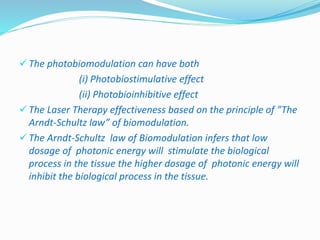
 The photobiomodulation can have both 
(i) Photobiostimulative effect 
(ii) Photobioinhibitive effect 
 The Laser Therapy effectiveness based on the principle of ”The 
Arndt-Schultz law” of biomodulation. 
 The Arndt-Schultz law of Biomodulation infers that low 
dosage of photonic energy will stimulate the biological 
process in the tissue the higher dosage of photonic energy will 
inhibit the biological process in the tissue.
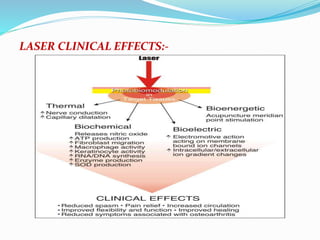
CLINICAL EFFECTS OF LASER THERAPY:-
LASER CLINICAL EFFECTS:-
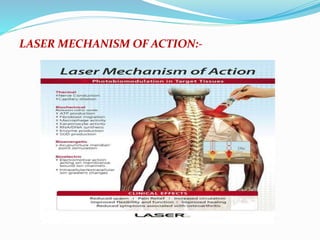
LASER MECHANISM OF ACTION:-
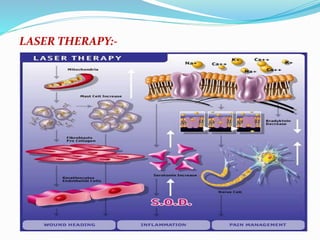
LASER THERAPY:-
To get good and effectiveness result of the laser therapy. 
The following parameters are very important 
1.Dosage of photonic energy 
2.Duration of the Treatment 
3.Angle of Laser beam penetration. 
4.Wavelenght of the probe 
To achieve and to get good effectiveness from the laser 
therapy following parameters:-
1. variable frequency from 200 Hz to 10,000 Hz to vary the power. 
2. Variable power from 2 mw to 100 mw to vary the energy. 
Energy=watt x time. 
3.Variable pulse ratio 10%,20% up to 100% to vary the energy. 
4.Variable treatment time 
5.Variable treatment area in square centimeter 
6.Automatic calculation of power 
7.Automatic calculation of energy 
8.Automatic calculation of energy density/ cm2 
9.Sensor for IR Laser check. Because IR beam is invisible. 
Energy= Power (mw) X Time(mts) 
(According to the area of the pain applied energy will be varying so get 
decidable energy we have to vary the power so that we can select low 
dosages of energy as per Arndt-Schultz law of Bio modulation).
 The apparatus should have a two different wavelength of the 
probe 
1.RED probe – visible RED Laser probe 650nm and 100mw power 
for superficial tissue penetration 
2.Infrared IR Probe- Invisible Red Laser probe 950nm and 100 mw 
power for deep tissue penetration. 
 The tip of the probe should be covered with plastic cling film, in 
order to reduce the likelihood of cross contamination 0r infection. 
 Laser therapy can followed by Cryotherapy to increase the depth 
of penetration or heat therapies and various creams and lotions 
can be applied after laser therapy. 
ENERGY SELECTION:- 
 In general superficial/acute pain 1 to 5 J/cm2 within 6 to 8 min. 
 Deep/chronic pain 8 to 12J/cm2 within 6 to 8 min. 
 If pain area is wider then multiply the energy.
we will have the demonstration of the laser therapy 
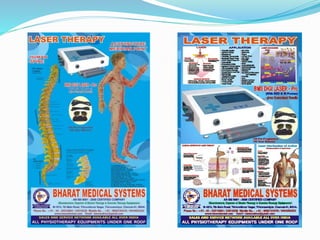
MODEL: DIGI LASER- Pro 
Manufactured by BHARAT MEDICAL SYSTEMS 
Chennai
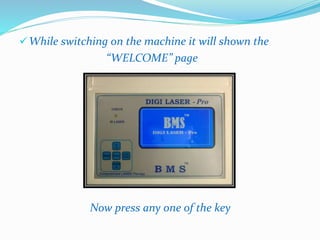
While switching on the machine it will shown the 
“WELCOME” page 
Now press any one of the key
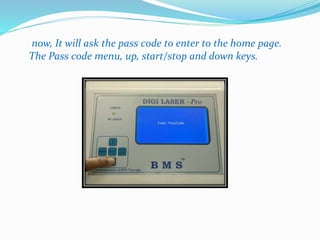
now, It will ask the pass code to enter to the home page. 
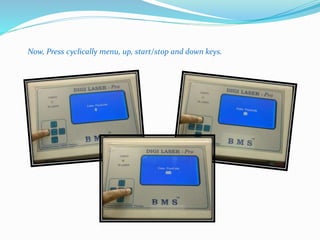
The Pass code menu, up, start/stop and down keys.
Now, Press cyclically menu, up, start/stop and down keys.
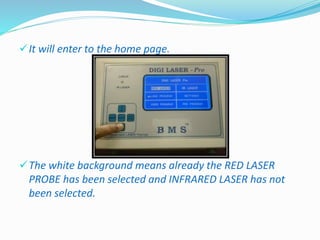
It will enter to the home page. 
The white background means already the RED LASER 
PROBE has been selected and INFRARED LASER has not 
been selected.
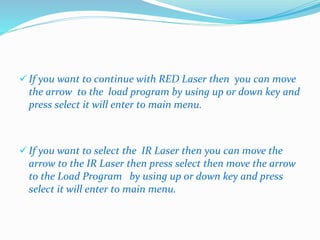
 If you want to continue with RED Laser then you can move 
the arrow to the load program by using up or down key and 
press select it will enter to main menu. 
 If you want to select the IR Laser then you can move the 
arrow to the IR Laser then press select then move the arrow 
to the Load Program by using up or down key and press 
select it will enter to main menu.
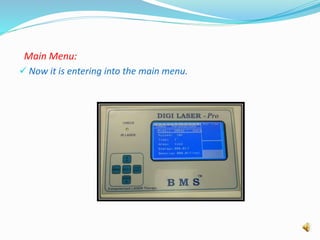
Main Menu: 
 Now it is entering into the main menu.
 Now move the cursor to time place by using down key and press select 
key and press up key to increase up to decided time(6 to 8 min). After 
selecting the decided time press select key. 
 Now, by using up key move the cursor to frequency place, press select 
key and press up key increase the frequency up to 5000Hz for 
superficial/acute pain. Increase the frequency up to 10,000Hz for 
deep/chronic pain. When your increasing the frequency(right side of the 
frequency), corresponding power, energy and energy density will be 
calculated and displaying by the machine automatically. 
 When your increasing the pulsed% energy and energy density will be 
calculated and displaying by the machine automatically. 
 By adjusting any one or two parameters (Frequency, pulsed%) you will 
be getting decided energy with in the decided time. 
 By adjusting the area we will be getting corresponding energy density 
per cm².
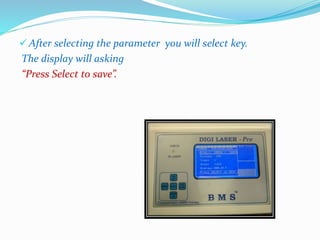
 After selecting the parameter you will select key. 
The display will asking 
“Press Select to save”.
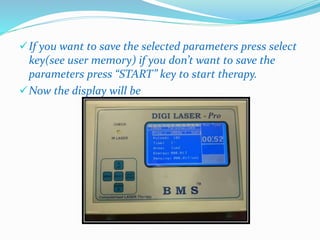
If you want to save the selected parameters press select 
key(see user memory) if you don’t want to save the 
parameters press “START” key to start therapy. 
Now the display will be
In right side of the display Run Time will be displaying 
in “ZOOMED” number. 
The timer will be coming down every minutes and when 
its reads “00” the output will cut off.
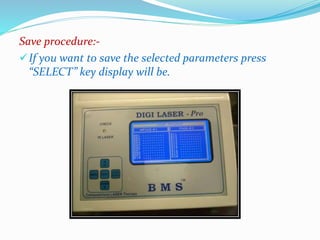
Save procedure:- 
If you want to save the selected parameters press 
“SELECT” key display will be.
By default the select bar will be in page No:1 if all are 
engaged with patient name or Disease name then move 
to page No:02, 03 up to find the empty memory (1 to 10 
pages) by using up and down key. If you find “EMPTY” 
memory in any page press “SELECT” key the select bar 
will be moving to 1st memory of the page. Now, move 
the select bar to the required memory by using up and 
down key and press select. now you can write the first 
letter of the patient name by using up and down key 
when you are pressing up key the 1st letter will be 
changing to F,G,H,I,J,……..Z,A,B,…. If you are pressing 
down key letter will be changing to,D,C,B,A,Z,Y,……,B,A,
After selecting the 1st letter then press start key. Now 
the cursor is move to the 2nd letter follow the same 
procedure to select the required letter, likewise you can 
type the five letters and used stored the data in the 
patient name "start” key is used to move the cursor 
towards forward direction and “MENU” key is used to 
move the cursor in reverse direction. 
After writing the patient name “select” now the data 
stored in the particular memory (page no. 2 and 
Sl.No:18) in the particular patient name 
(ARUNKUMAR) and therapy also start likewise 100 
patient name or disease name can be stored.
When the patient come for next treatment you can go 
to the memory select the name “ARUNKUMAR”. 
And press “START” key then display will be displaying 
all the parameters with “PRESS SELECT TO SAVE ” in 
the bottom of the display, no need of saving this data 
once again. now, press “START” key once again to start 
therapy. 
The timer will be coming down every minutes and when 
its reads “00” the output will cut off.
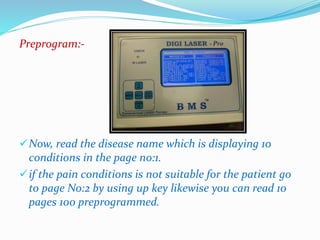
Preprogram:- 
Now, read the disease name which is displaying 10 
conditions in the page no:1. 
if the pain conditions is not suitable for the patient go 
to page No:2 by using up key likewise you can read 10 
pages 100 preprogrammed.
If you find the suitable pain condition in the display by 
using up and down key move the select bar to the 
required condition press select key. 
Now, in preprogrammed mode stored parameters are 
not satisfied you can change the parameters by using 
select, up and down key. 
In preprogrammed mode the stored parameters are 
satisfied then press ”START” key, no need of saving the 
data because it is already stored, so press once again 
“START” to start therapy. 
The timer will be coming down every minutes and when 
its reads”00” the output will cutoff.
The above same procedure to follow in the 
preprogrammed. 
When you are selecting the preprogrammed, no need of 
saving the data in user memory because it is 
permanently saved in preprogrammed. 
When you are selecting the parameters(data) by your 
own, if you want to treat the same patient in future, 
you can save the data's in the user memory(100 patient 
can be stored).
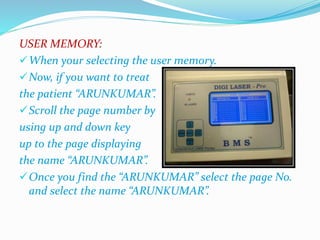
USER MEMORY: 
When your selecting the user memory. 
Now, if you want to treat 
the patient “ARUNKUMAR”. 
Scroll the page number by 
using up and down key 
up to the page displaying 
the name “ARUNKUMAR”. 
Once you find the “ARUNKUMAR” select the page No. 
and select the name “ARUNKUMAR”.
Now, if you want to save the new data's in the same user 
memory you can save otherwise, no, need to save the data 
because already data’s are stored in the user memory. 
 Then press “START” key the display will be displaying the 
“PRESS SELECT TO SAVE ” in bottom of the display. 
 Now, press “START” key to start therapy. 
 The timer will be coming down every minutes and when its 
reads “00” the output will cut off. 
 If any particular patient treatment course is over you can 
overwrite the new data, new patient name, and store in the 
same memory, now old name and data will be erased and 
new data's and new name will be stored in the memory, 
EPROM, (Erasable programmable read only memory ).
AREA OF TREATMENT:- (POINTED) 
If pain area (Treatment area) is pointed i.e. 1 cm² . as 
per the Arndt-Schultz law. 
And after examination of the patient select the energy 
with in 1 to 5 J with in the decided treatment time 6 to 
8 mts keep the area in 1cm² because the area is pointed. 
Now, you can notice energy and energy density will be 
same unit.
WIDER AREA: 
Example:- Approximately treatment area is 4cm² .If 
you are decide 3J per cm2. So, total energy will be 
4x3=12 Jules for 4cm² 
So, total energy is required 12J to treatment the area of 
4cm² . 
And keep the area in 4cm² .So, total energy, energy 
density/cm2 will be calculated and displaying by the 
machine automatically.
Manual scanning:- 
 For wider area treatment apply the jelly/oil/cream/ lotion 
on the tip of the probe to maximize irradiance at the target 
tissue and move the probe in contact with patient body 
perpendicular(90˚angle) to the tissue in clockwise direction 
in uniform speed at the pain area. 
Cluster probe:- 
Multi diode cluster probes may not be effectiveness because 
it contain multiple wavelengths of the diodes (each diode 
will not be same wavelength) which can lead to a 
degradation of the effectiveness of laser therapy. 
(Karu,1998) 
 So manual scanning method is advisable and suitable for 
the wider area application.
Open wounds treatment:- 
When treating the open wounds the probe should 
be held slightly away from the tissue surface, 
whilst still maintaining a 90˚ angle. when you treat 
next patient please clean the tip of the probe.
APPLICATIONS:- 
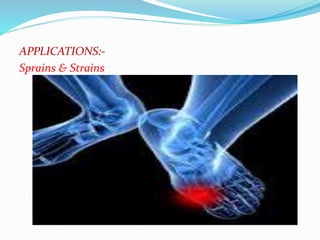
Sprains & Strains
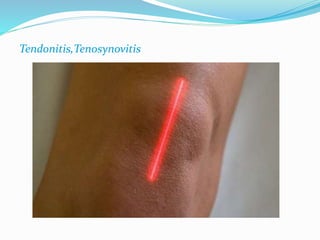
Tendonitis,Tenosynovitis
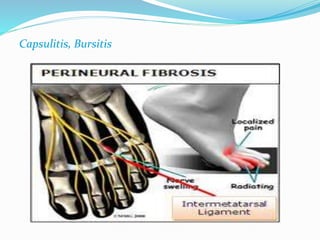
Capsulitis, Bursitis
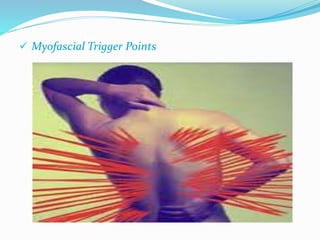
 Myofascial Trigger Points
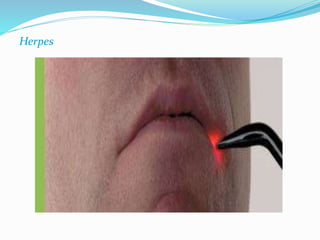
Herpes
 Wound healing , 
 Pain Management 
 Cosmetic regeneration, 
 Soft tissue injury treatment 
 Skin Treatment 
 Diabetic wound healing 
 Dental, 
 Hair fall control 
 Pressure sores in bed-ridden patients 
 Leg Ulcer, 
 Acne,
 Superficial AP stimulation and tonification, 
 Acute and chronic pain 
 Non union, 
 Small bone, 
 Burns, 
 Carpal Tunnel, 
 Plantar fasciitis, 
 Frozen shoulder, 
 Brachial neuralgia, 
 Osteoarthritis , 
 Rheumatoid ARTHRITIS, 
 Ligament and TENDON Injuries,
Haematomas 
 Ahshi Points & Deep APs 
 Chrondomalacial patella 
 Post Herpetic Neuralgia 
 Brachial Neuralgia 
Apthous Ulcers 
 Dermatitis 
Acute Epididymitis 
 Otorhinolaryngology 
 Obstetrics 
 Diabetic Foot Ulcer 
 Sports Injuries
CONCLUSION:- 
BMS DIGI –pro design as per the procedure and 
international standard.
Laser Therapy Power Point

Laser Therapy Power Point

  • 1.
    LASER THERAPY BHARATMEDICAL SYSTEMS CHENNAI, INDIA (DIGI LASER – Pro Demonstration)
  • 2.
    LASER THERAPY:- LASER Therapy Acronym is LIGHT AMPLIFICATION STIMULATED EMISSION of RADIATION Therapy.  Laser therapy treatment helps reduce pain and inflammation and enhances tissue healing – both in hard and soft tissues , including muscles , ligaments , and even bones.  It increases oxygenation of tissues and allows injured or damaged cells to absorb photons of light , which speeds healing .  Laser therapy can be helpful for acute injuries, such as strains , sprains , shoulder injuries
  • 3.
    Low-level laser therapy(LLLT) is a pain-free, non-invasive, affordable tool used by physical therapists throughout the healing process that is becoming more prevalent in PT practices nationwide. Low-level cold lasers are absorbed into the skin to increase cellular activity in tissues, which can bring healing to injured areas.
  • 4.
     Laser isa Monochromatic coherent beam produces “speckles” emission of high power density which can cause a local heating of inhomogeneous tissues.  Laser Therapy works on the principle of inducing a biological response through energy transfer, in that the photonic energy delivered in to the tissue by the laser modulate the biological processes within the tissue. So it is called PHOTOBIOMODULATION.
  • 5.
     The photobiomodulationcan have both (i) Photobiostimulative effect (ii) Photobioinhibitive effect  The Laser Therapy effectiveness based on the principle of ”The Arndt-Schultz law” of biomodulation.  The Arndt-Schultz law of Biomodulation infers that low dosage of photonic energy will stimulate the biological process in the tissue the higher dosage of photonic energy will inhibit the biological process in the tissue.
  • 6.
    CLINICAL EFFECTS OFLASER THERAPY:-
  • 7.
  • 8.
  • 9.
  • 10.
    To get goodand effectiveness result of the laser therapy. The following parameters are very important 1.Dosage of photonic energy 2.Duration of the Treatment 3.Angle of Laser beam penetration. 4.Wavelenght of the probe To achieve and to get good effectiveness from the laser therapy following parameters:-
  • 11.
    1. variable frequencyfrom 200 Hz to 10,000 Hz to vary the power. 2. Variable power from 2 mw to 100 mw to vary the energy. Energy=watt x time. 3.Variable pulse ratio 10%,20% up to 100% to vary the energy. 4.Variable treatment time 5.Variable treatment area in square centimeter 6.Automatic calculation of power 7.Automatic calculation of energy 8.Automatic calculation of energy density/ cm2 9.Sensor for IR Laser check. Because IR beam is invisible. Energy= Power (mw) X Time(mts) (According to the area of the pain applied energy will be varying so get decidable energy we have to vary the power so that we can select low dosages of energy as per Arndt-Schultz law of Bio modulation).
  • 12.
     The apparatusshould have a two different wavelength of the probe 1.RED probe – visible RED Laser probe 650nm and 100mw power for superficial tissue penetration 2.Infrared IR Probe- Invisible Red Laser probe 950nm and 100 mw power for deep tissue penetration.  The tip of the probe should be covered with plastic cling film, in order to reduce the likelihood of cross contamination 0r infection.  Laser therapy can followed by Cryotherapy to increase the depth of penetration or heat therapies and various creams and lotions can be applied after laser therapy. ENERGY SELECTION:-  In general superficial/acute pain 1 to 5 J/cm2 within 6 to 8 min.  Deep/chronic pain 8 to 12J/cm2 within 6 to 8 min.  If pain area is wider then multiply the energy.
  • 13.
    we will havethe demonstration of the laser therapy MODEL: DIGI LASER- Pro Manufactured by BHARAT MEDICAL SYSTEMS Chennai
  • 14.
    While switching onthe machine it will shown the “WELCOME” page Now press any one of the key
  • 15.
    now, It willask the pass code to enter to the home page. The Pass code menu, up, start/stop and down keys.
  • 16.
    Now, Press cyclicallymenu, up, start/stop and down keys.
  • 17.
    It will enterto the home page. The white background means already the RED LASER PROBE has been selected and INFRARED LASER has not been selected.
  • 18.
     If youwant to continue with RED Laser then you can move the arrow to the load program by using up or down key and press select it will enter to main menu.  If you want to select the IR Laser then you can move the arrow to the IR Laser then press select then move the arrow to the Load Program by using up or down key and press select it will enter to main menu.
  • 19.
    Main Menu: Now it is entering into the main menu.
  • 20.
     Now movethe cursor to time place by using down key and press select key and press up key to increase up to decided time(6 to 8 min). After selecting the decided time press select key.  Now, by using up key move the cursor to frequency place, press select key and press up key increase the frequency up to 5000Hz for superficial/acute pain. Increase the frequency up to 10,000Hz for deep/chronic pain. When your increasing the frequency(right side of the frequency), corresponding power, energy and energy density will be calculated and displaying by the machine automatically.  When your increasing the pulsed% energy and energy density will be calculated and displaying by the machine automatically.  By adjusting any one or two parameters (Frequency, pulsed%) you will be getting decided energy with in the decided time.  By adjusting the area we will be getting corresponding energy density per cm².
  • 21.
     After selectingthe parameter you will select key. The display will asking “Press Select to save”.
  • 22.
    If you wantto save the selected parameters press select key(see user memory) if you don’t want to save the parameters press “START” key to start therapy. Now the display will be
  • 23.
    In right sideof the display Run Time will be displaying in “ZOOMED” number. The timer will be coming down every minutes and when its reads “00” the output will cut off.
  • 24.
    Save procedure:- Ifyou want to save the selected parameters press “SELECT” key display will be.
  • 25.
    By default theselect bar will be in page No:1 if all are engaged with patient name or Disease name then move to page No:02, 03 up to find the empty memory (1 to 10 pages) by using up and down key. If you find “EMPTY” memory in any page press “SELECT” key the select bar will be moving to 1st memory of the page. Now, move the select bar to the required memory by using up and down key and press select. now you can write the first letter of the patient name by using up and down key when you are pressing up key the 1st letter will be changing to F,G,H,I,J,……..Z,A,B,…. If you are pressing down key letter will be changing to,D,C,B,A,Z,Y,……,B,A,
  • 26.
    After selecting the1st letter then press start key. Now the cursor is move to the 2nd letter follow the same procedure to select the required letter, likewise you can type the five letters and used stored the data in the patient name "start” key is used to move the cursor towards forward direction and “MENU” key is used to move the cursor in reverse direction. After writing the patient name “select” now the data stored in the particular memory (page no. 2 and Sl.No:18) in the particular patient name (ARUNKUMAR) and therapy also start likewise 100 patient name or disease name can be stored.
  • 27.
    When the patientcome for next treatment you can go to the memory select the name “ARUNKUMAR”. And press “START” key then display will be displaying all the parameters with “PRESS SELECT TO SAVE ” in the bottom of the display, no need of saving this data once again. now, press “START” key once again to start therapy. The timer will be coming down every minutes and when its reads “00” the output will cut off.
  • 28.
    Preprogram:- Now, readthe disease name which is displaying 10 conditions in the page no:1. if the pain conditions is not suitable for the patient go to page No:2 by using up key likewise you can read 10 pages 100 preprogrammed.
  • 29.
    If you findthe suitable pain condition in the display by using up and down key move the select bar to the required condition press select key. Now, in preprogrammed mode stored parameters are not satisfied you can change the parameters by using select, up and down key. In preprogrammed mode the stored parameters are satisfied then press ”START” key, no need of saving the data because it is already stored, so press once again “START” to start therapy. The timer will be coming down every minutes and when its reads”00” the output will cutoff.
  • 30.
    The above sameprocedure to follow in the preprogrammed. When you are selecting the preprogrammed, no need of saving the data in user memory because it is permanently saved in preprogrammed. When you are selecting the parameters(data) by your own, if you want to treat the same patient in future, you can save the data's in the user memory(100 patient can be stored).
  • 31.
    USER MEMORY: Whenyour selecting the user memory. Now, if you want to treat the patient “ARUNKUMAR”. Scroll the page number by using up and down key up to the page displaying the name “ARUNKUMAR”. Once you find the “ARUNKUMAR” select the page No. and select the name “ARUNKUMAR”.
  • 32.
    Now, if youwant to save the new data's in the same user memory you can save otherwise, no, need to save the data because already data’s are stored in the user memory.  Then press “START” key the display will be displaying the “PRESS SELECT TO SAVE ” in bottom of the display.  Now, press “START” key to start therapy.  The timer will be coming down every minutes and when its reads “00” the output will cut off.  If any particular patient treatment course is over you can overwrite the new data, new patient name, and store in the same memory, now old name and data will be erased and new data's and new name will be stored in the memory, EPROM, (Erasable programmable read only memory ).
  • 33.
    AREA OF TREATMENT:-(POINTED) If pain area (Treatment area) is pointed i.e. 1 cm² . as per the Arndt-Schultz law. And after examination of the patient select the energy with in 1 to 5 J with in the decided treatment time 6 to 8 mts keep the area in 1cm² because the area is pointed. Now, you can notice energy and energy density will be same unit.
  • 34.
    WIDER AREA: Example:-Approximately treatment area is 4cm² .If you are decide 3J per cm2. So, total energy will be 4x3=12 Jules for 4cm² So, total energy is required 12J to treatment the area of 4cm² . And keep the area in 4cm² .So, total energy, energy density/cm2 will be calculated and displaying by the machine automatically.
  • 35.
    Manual scanning:- For wider area treatment apply the jelly/oil/cream/ lotion on the tip of the probe to maximize irradiance at the target tissue and move the probe in contact with patient body perpendicular(90˚angle) to the tissue in clockwise direction in uniform speed at the pain area. Cluster probe:- Multi diode cluster probes may not be effectiveness because it contain multiple wavelengths of the diodes (each diode will not be same wavelength) which can lead to a degradation of the effectiveness of laser therapy. (Karu,1998)  So manual scanning method is advisable and suitable for the wider area application.
  • 36.
    Open wounds treatment:- When treating the open wounds the probe should be held slightly away from the tissue surface, whilst still maintaining a 90˚ angle. when you treat next patient please clean the tip of the probe.
  • 37.
  • 38.
  • 39.
  • 40.
  • 41.
  • 42.
     Wound healing,  Pain Management  Cosmetic regeneration,  Soft tissue injury treatment  Skin Treatment  Diabetic wound healing  Dental,  Hair fall control  Pressure sores in bed-ridden patients  Leg Ulcer,  Acne,
  • 43.
     Superficial APstimulation and tonification,  Acute and chronic pain  Non union,  Small bone,  Burns,  Carpal Tunnel,  Plantar fasciitis,  Frozen shoulder,  Brachial neuralgia,  Osteoarthritis ,  Rheumatoid ARTHRITIS,  Ligament and TENDON Injuries,
  • 44.
    Haematomas  AhshiPoints & Deep APs  Chrondomalacial patella  Post Herpetic Neuralgia  Brachial Neuralgia Apthous Ulcers  Dermatitis Acute Epididymitis  Otorhinolaryngology  Obstetrics  Diabetic Foot Ulcer  Sports Injuries
  • 45.
    CONCLUSION:- BMS DIGI–pro design as per the procedure and international standard.