Windows Basics

ELEC 101 - Lab 1
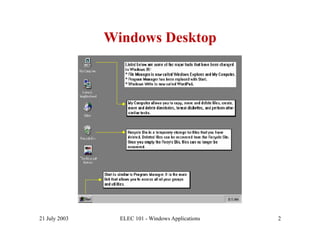
Windows Desktop


21 July 2003     ELEC 101 - Windows Applications   2
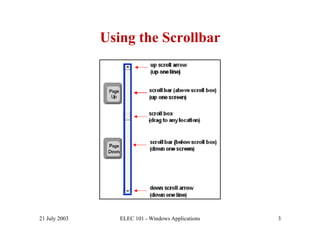
Using the Scrollbar


21 July 2003      ELEC 101 - Windows Applications   3
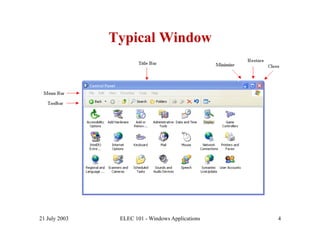
Typical Window


21 July 2003    ELEC 101 - Windows Applications   4
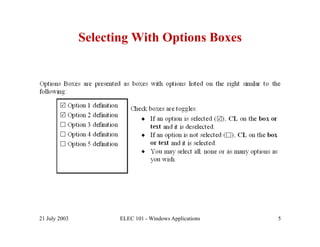
Selecting With Options Boxes


21 July 2003          ELEC 101 - Windows Applications   5
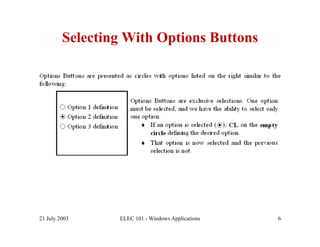
Selecting With Options Buttons


21 July 2003     ELEC 101 - Windows Applications   6
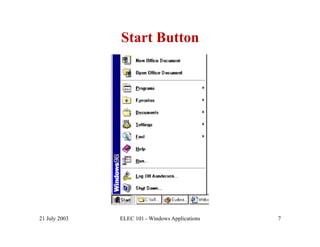
Start Button


21 July 2003   ELEC 101 - Windows Applications   7
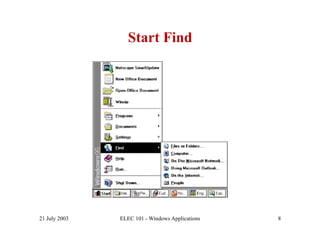
Start Find


21 July 2003   ELEC 101 - Windows Applications   8
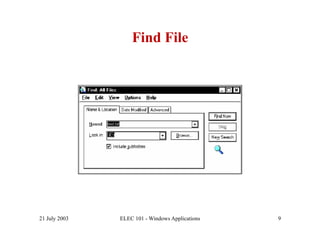
Find File


21 July 2003   ELEC 101 - Windows Applications   9
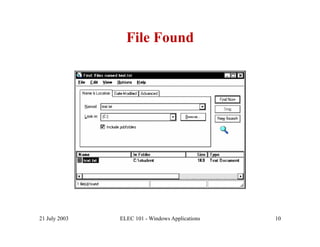
File Found


21 July 2003   ELEC 101 - Windows Applications   10
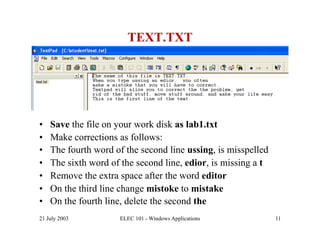
TEXT.TXT


•    Save the file on your work disk as lab1.txt
•    Make corrections as follows:
•    The fourth word of the second line ussing, is misspelled
•    The sixth word of the second line, edior, is missing a t
•    Remove the extra space after the word editor
•    On the third line change mistoke to mistake
•    On the fourth line, delete the second the
21 July 2003          ELEC 101 - Windows Applications           11
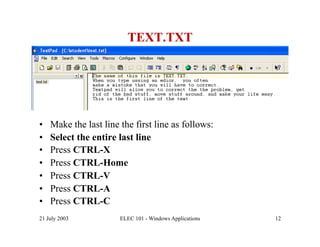
TEXT.TXT


•    Make the last line the first line as follows:
•    Select the entire last line
•    Press CTRL-X
•    Press CTRL-Home
•    Press CTRL-V
•    Press CTRL-A
•    Press CTRL-C
21 July 2003            ELEC 101 - Windows Applications   12
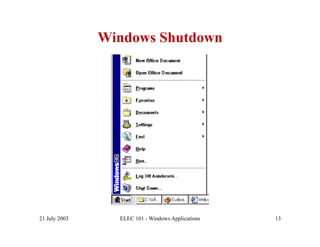
Windows Shutdown


21 July 2003     ELEC 101 - Windows Applications   13
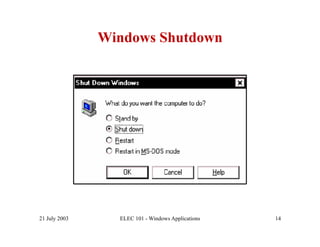
Windows Shutdown


21 July 2003     ELEC 101 - Windows Applications   14

lab01

  • 1.
  • 2.
    Windows Desktop 21 July2003 ELEC 101 - Windows Applications 2
  • 3.
    Using the Scrollbar 21July 2003 ELEC 101 - Windows Applications 3
  • 4.
    Typical Window 21 July2003 ELEC 101 - Windows Applications 4
  • 5.
    Selecting With OptionsBoxes 21 July 2003 ELEC 101 - Windows Applications 5
  • 6.
    Selecting With OptionsButtons 21 July 2003 ELEC 101 - Windows Applications 6
  • 7.
    Start Button 21 July2003 ELEC 101 - Windows Applications 7
  • 8.
    Start Find 21 July2003 ELEC 101 - Windows Applications 8
  • 9.
    Find File 21 July2003 ELEC 101 - Windows Applications 9
  • 10.
    File Found 21 July2003 ELEC 101 - Windows Applications 10
  • 11.
    TEXT.TXT •  Save the file on your work disk as lab1.txt •  Make corrections as follows: •  The fourth word of the second line ussing, is misspelled •  The sixth word of the second line, edior, is missing a t •  Remove the extra space after the word editor •  On the third line change mistoke to mistake •  On the fourth line, delete the second the 21 July 2003 ELEC 101 - Windows Applications 11
  • 12.
    TEXT.TXT •  Make the last line the first line as follows: •  Select the entire last line •  Press CTRL-X •  Press CTRL-Home •  Press CTRL-V •  Press CTRL-A •  Press CTRL-C 21 July 2003 ELEC 101 - Windows Applications 12
  • 13.
    Windows Shutdown 21 July2003 ELEC 101 - Windows Applications 13
  • 14.
    Windows Shutdown 21 July2003 ELEC 101 - Windows Applications 14