©2018 VMware, Inc.
Introduzione a Kubernetes e
Cloud Native workloads
Fabio Rapposelli
Staff Engineer, Cloud Native R&D
whoami
Fabio Rapposelli
Staff Engineer 2 @ VMware R&D
Open Source contributor
(Kubernetes, Docker, Vagrant)
https://github.com/frapposelli
Agenda
3©2018 VMware, Inc.
Application Transformation: «Build» vs. «Buy»
Right tools for the job
IaaS, CaaS and PaaS
Intro to Kubernetes
©2018 VMware, Inc. 4
Gartner
75% of
Applications will be
«Built», not
«Bought» by 2020.
Code Analysis Testing
Commit Code
Changes
Staging Production
Zero Downtime
Upgrades
AUTOMATED
PIPELINE
SPEED
Releasing smaller things
more often will reduce
complexity and improve
time-to-market
QUALITY
We embed testing early in the
lifecycle to surface problems
sooner, avoiding last minute
issues and helping us be more
responsive to change
AGILITY
Let’s push updates on a
regular basis without
ANY downtime to improve
customer experience and
shorten time-to-market
AUTOMATION
Let’s integrate tools and
automate processes from
testing, to builds &
deployment
CI/CD CI/CD CI/CD CI/CD CI/CD
SOFTWARE DEVELOPMENT LIFECYCLE
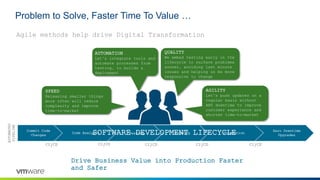
Agile methods help drive Digital Transformation
Problem to Solve, Faster Time To Value …
Drive Business Value into Production Faster
and Safer
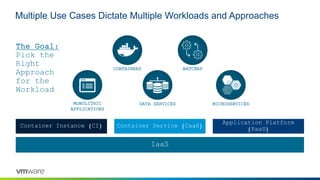
Multiple Use Cases Dictate Multiple Workloads and Approaches
Container Instance (CI) Container Service (CaaS)
Application Platform
(PaaS)
IaaS
CONTAINERS BATCHES
DATA SERVICES MICROSERVICESMONOLITHIC
APPLICATIONS
The Goal:
Pick the
Right
Approach
for the
Workload
IaaS
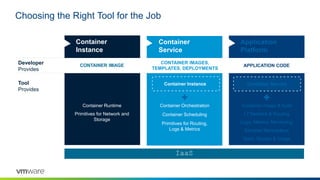
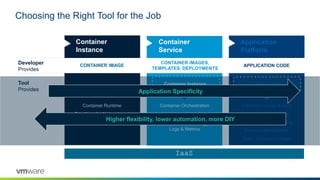
Choosing the Right Tool for the Job
Developer
Provides
Tool
Provides
Container
Service
Container Orchestration
Container Scheduling
Primitives for Routing,
Logs & Metrics
CONTAINER IMAGES,
TEMPLATES, DEPLOYMENTS
Application
Platform
APPLICATION CODE
Container Service
Container Image & build
L7 Network & Routing
Logs, Metrics, Monitoring
Services Marketplace
Team, Quotas & Usage
Container
Instance
CONTAINER IMAGE
Container Runtime
Primitives for Network and
Storage
Container Instance
IaaS
Choosing the Right Tool for the Job
Developer
Provides
Tool
Provides
Container
Service
Container Orchestration
Container Scheduling
Primitives for Routing,
Logs & Metrics
CONTAINER IMAGES,
TEMPLATES, DEPLOYMENTS
Application
Platform
APPLICATION CODE
Container Service
Container Image & build
L7 Network & Routing
Logs, Metrics, Monitoring
Services Marketplace
Team, Quotas & Usage
Container
Instance
CONTAINER IMAGE
Container Runtime
Primitives for Network and
Storage
Container Instance
Application Specificity
Higher flexibility, lower automation, more DIY
IaaS
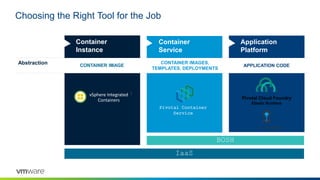
Choosing the Right Tool for the Job
Abstraction
Container
Service
CONTAINER IMAGES,
TEMPLATES, DEPLOYMENTS
Application
Platform
APPLICATION CODE
Container
Instance
CONTAINER IMAGE
Pivotal Container
Service
Pivotal Cloud Foundry
Elastic Runtime
BOSH
vSphere Integrated
Containers
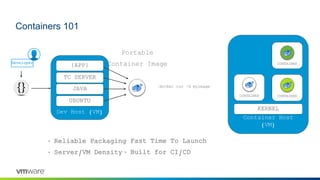
Containers 101
Container Host
(VM)
Developer
Dev Host (VM)
UBUNTU
JAVA
TC SERVER
{APP}
KERNEL
CONTAINERCONTAINER
Portable
Container Image
`docker run –d myimage`
CONTAINER
• Reliable Packaging
• Server/VM Density
• Fast Time To Launch
• Built for CI/CD
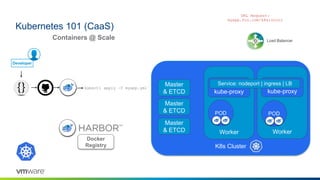
Kubernetes 101 (CaaS)
K8s Cluster
Worker
`kubectl apply –f myapp.yml`
Worker
kube-proxy
Master
& ETCD kube-proxy
Service: nodeport | ingress | LB
POD POD
Load Balancer
URL Request:
myapp.foo.com/k8siscool
Docker
Registry
Developer
Containers @ Scale
Master
& ETCD
Master
& ETCD
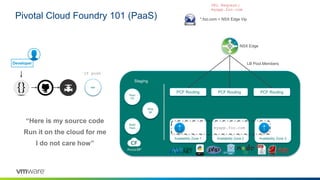
Pivotal Cloud Foundry 101 (PaaS)
war
Availability Zone 1 Availability Zone 2 Availability Zone 3
Staging
Root
FS
Build
Pack
war
`cf push`
Drop
let
A
I
A
I
myapp.foo.com
*.foo.com = NSX Edge Vip
NSX Edge
PCF Routing PCF Routing PCF Routing
LB Pool Members
“Here is my source code
Run it on the cloud for me
I do not care how”
URL Request:
myapp.foo.com
Developer
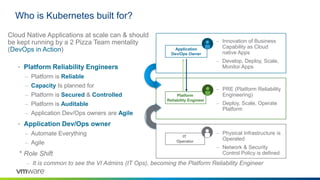
Who is Kubernetes built for?
IT
Operator
– PRE (Platform Reliability
Engineering)
– Deploy, Scale, Operate
Platform
– Innovation of Business
Capability as Cloud
native Apps
– Develop, Deploy, Scale,
Monitor Apps
– Physical Infrastructure is
Operated
– Network & Security
Control Policy is defined
• Platform Reliability Engineers
– Platform is Reliable
– Capacity Is planned for
– Platform is Secured & Controlled
– Platform is Auditable
– Application Dev/Ops owners are Agile
• Application Dev/Ops owner
– Automate Everything
– Agile
* Role Shift
– It is common to see the VI Admins (IT Ops), becoming the Platform Reliability Engineer
Cloud Native Applications at scale can & should
be kept running by a 2 Pizza Team mentality
(DevOps in Action) Application
Dev/Ops Owner
Platform
Reliability Engineer
What is Kubernetes?
[1] http://kubernetes.io/docs/whatisk8s/ [0] http://static.googleusercontent.com/media/research.google.com/de//pubs/archive/43438.pd
• Kubernetes: Kubernetes or K8s in short is the ancient Greek word for Helmsmen
• K8s roots: Kubernetes was championed by Google and is now backed by major
enterprise IT vendors and users (including VMware)
• Borg: Google’s internal task scheduling system Borg served as the blueprint for
Kubernetes, but the code base is different [1]
Kubernetes Roots
• Mission statement: Kubernetes is an open-source platform for automating
deployment, scaling, and operations of application containers across clusters of
hosts, providing container-centric infrastructure.
• Capabilities:
• Deploy your applications quickly and predictably
• Scale your applications on the fly
• Seamlessly roll out new features
• Optimize use of your hardware by using only the resources you need
• Role: K8s sits in the Container as a Service (CaaS) or Container orchestration layer
What Kubernetes is [0]
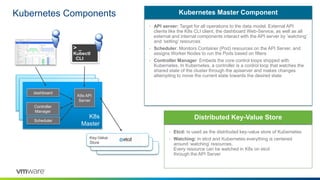
Kubernetes Components
• API server: Target for all operations to the data model. External API
clients like the K8s CLI client, the dashboard Web-Service, as well as all
external and internal components interact with the API server by ’watching’
and ‘setting’ resources
• Scheduler: Monitors Container (Pod) resources on the API Server, and
assigns Worker Nodes to run the Pods based on filters
• Controller Manager: Embeds the core control loops shipped with
Kubernetes. In Kubernetes, a controller is a control loop that watches the
shared state of the cluster through the apiserver and makes changes
attempting to move the current state towards the desired state
Kubernetes Master Component
• Etcd: Is used as the distributed key-value store of Kubernetes
• Watching: In etcd and Kubernetes everything is centered
around ‘watching’ resources.
Every resource can be watched in K8s on etcd
through the API Server
Distributed Key-Value Store
K8s master
K8s master
K8s
Master
Controller
Manager
K8s API
Server
> _
Kubectl
CLI
Key-Value
Store
dashboard
Scheduler
Kubernetes Components
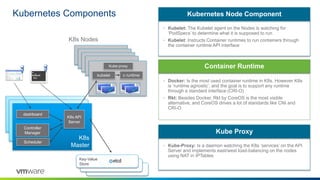
• Kubelet: The Kubelet agent on the Nodes is watching for
‘PodSpecs’ to determine what it is supposed to run
• Kubelet: Instructs Container runtimes to run containers through
the container runtime API interface
Kubernetes Node Component
• Docker: Is the most used container runtime in K8s. However K8s
is ‘runtime agnostic’, and the goal is to support any runtime
through a standard interface (CRI-O)
• Rkt: Besides Docker, Rkt by CoreOS is the most visible
alternative, and CoreOS drives a lot of standards like CNI and
CRI-O
Container Runtime
K8s master
K8s master
K8s
Master
Controller
Manager
K8s API
Server
Key-Value
Store
dashboard
Scheduler
K8s node
K8s node
K8s node
K8s node
K8s Nodes
kubelet c runtime
Kube-proxy
> _
Kubectl
CLI
• Kube-Proxy: Is a daemon watching the K8s ‘services’ on the API
Server and implements east/west load-balancing on the nodes
using NAT in IPTables
Kube Proxy
Kubernetes Pod
Pod
pause container
(‘owns’ the IP stack)
10.24.0.0/16
10.24.0.2
nginx
tcp/80
mgmt
tcp/22
logging
udp/514
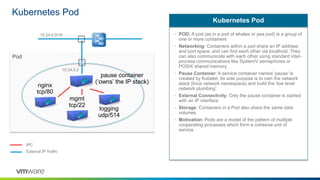
• POD: A pod (as in a pod of whales or pea pod) is a group of
one or more containers
• Networking: Containers within a pod share an IP address
and port space, and can find each other via localhost. They
can also communicate with each other using standard inter-
process communications like SystemV semaphores or
POSIX shared memory
• Pause Container: A service container named ‘pause’ is
created by Kubelet. Its sole purpose is to own the network
stack (linux network namespace) and build the ‘low level
network plumbing’
• External Connectivity: Only the pause container is started
with an IP interface
• Storage: Containers in a Pod also share the same data
volumes
• Motivation: Pods are a model of the pattern of multiple
cooperating processes which form a cohesive unit of
service
Kubernetes Pod
IPC
External IP Traffic
K8s
Master
Kubernetes Replication Controller (rc) and Replica Set (rs)
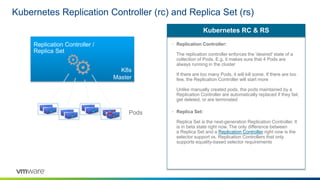
• Replication Controller:
The replication controller enforces the 'desired' state of a
collection of Pods. E.g. it makes sure that 4 Pods are
always running in the cluster
If there are too many Pods, it will kill some. If there are too
few, the Replication Controller will start more
Unlike manually created pods, the pods maintained by a
Replication Controller are automatically replaced if they fail,
get deleted, or are terminated
• Replica Set:
Replica Set is the next-generation Replication Controller. It
is in beta state right now. The only difference between
a Replica Set and a Replication Controller right now is the
selector support vs. Replication Controllers that only
supports equality-based selector requirements
Kubernetes RC & RS
Replication Controller /
Replica Set
Pods
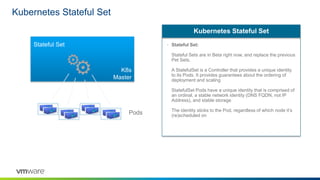
Kubernetes Stateful Set
• Stateful Set:
Stateful Sets are in Beta right now, and replace the previous
Pet Sets.
A StatefulSet is a Controller that provides a unique identity
to its Pods. It provides guarantees about the ordering of
deployment and scaling
StatefulSet Pods have a unique identity that is comprised of
an ordinal, a stable network identity (DNS FQDN, not IP
Address), and stable storage
The identity sticks to the Pod, regardless of which node it’s
(re)scheduled on
Kubernetes Stateful Set
K8s
Master
Stateful Set
Pods
K8s
Node
InfraPod
K8s
Node
InfraPod
K8s
Node
InfraPod
K8s
Node
InfraPod
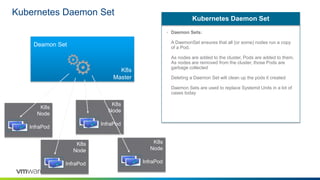
Kubernetes Daemon Set
• Daemon Sets:
A DaemonSet ensures that all (or some) nodes run a copy
of a Pod.
As nodes are added to the cluster, Pods are added to them.
As nodes are removed from the cluster, those Pods are
garbage collected
Deleting a Daemon Set will clean up the pods it created
Daemon Sets are used to replace Systemd Units in a lot of
cases today
Kubernetes Daemon Set
K8s
Master
Deamon Set
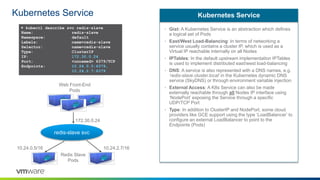
Kubernetes Service
▶ kubectl describe svc redis-slave
Name: redis-slave
Namespace: default
Labels: name=redis-slave
Selector: name=redis-slave
Type: ClusterIP
IP: 172.30.0.24
Port: <unnamed> 6379/TCP
Endpoints: 10.24.0.5:6379,
10.24.2.7:6379
Redis Slave
Pods
redis-slave svc
10.24.0.5/16 10.24.2.7/16
172.30.0.24
• Gist: A Kubernetes Service is an abstraction which defines
a logical set of Pods
• East/West Load-Balancing: In terms of networking a
service usually contains a cluster IP, which is used as a
Virtual IP reachable internally on all Nodes
• IPTables: In the default upstream implementation IPTables
is used to implement distributed east/west load-balancing
• DNS: A service is also represented with a DNS names, e.g.
’redis-slave.cluster.local’ in the Kubernetes dynamic DNS
service (SkyDNS) or through environment variable injection
• External Access: A K8s Service can also be made
externally reachable through all Nodes IP interface using
‘NodePort’ exposing the Service through a specific
UDP/TCP Port
• Type: In addition to ClusterIP and NodePort, some cloud
providers like GCE support using the type ‘LoadBalancer’ to
configure an external LoadBalancer to point to the
Endpoints (Pods)
Kubernetes Service
Web Front-End
Pods
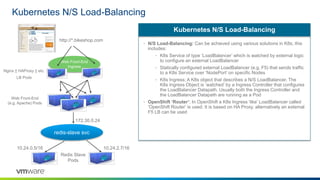
Kubernetes N/S Load-Balancing
• N/S Load-Balancing: Can be achieved using various solutions in K8s, this
includes:
• K8s Service of type ‘LoadBalancer’ which is watched by external logic
to configure an external LoadBalancer
• Statically configured external LoadBalancer (e.g. F5) that sends traffic
to a K8s Service over ‘NodePort’ on specific Nodes
• K8s Ingress; A K8s object that describes a N/S LoadBalancer. The
K8s Ingress Object is ’watched’ by a Ingress Controller that configures
the LoadBalancer Datapath. Usually both the Ingress Controller and
the LoadBalancer Datapath are running as a Pod
• OpenShift ‘Router’: In OpenShift a K8s Ingress ‘like’ LoadBalancer called
‘OpenShift Router’ is used. It is based on HA Proxy, alternatively an external
F5 LB can be used
Kubernetes N/S Load-Balancing
Redis Slave
Pods
redis-slave svc
10.24.0.5/16 10.24.2.7/16
172.30.0.24
Web Front-End
(e.g. Apache) Pods
Web Front-End
Ingress
Nginx || HAProxy || etc.
LB Pods
http://*.bikeshop.com
23©2018 VMware, Inc.

01 - VMUGIT - Lecce 2018 - Fabio Rapposelli, VMware

  • 1.
    ©2018 VMware, Inc. Introduzionea Kubernetes e Cloud Native workloads Fabio Rapposelli Staff Engineer, Cloud Native R&D
  • 2.
    whoami Fabio Rapposelli Staff Engineer2 @ VMware R&D Open Source contributor (Kubernetes, Docker, Vagrant) https://github.com/frapposelli
  • 3.
    Agenda 3©2018 VMware, Inc. ApplicationTransformation: «Build» vs. «Buy» Right tools for the job IaaS, CaaS and PaaS Intro to Kubernetes
  • 4.
    ©2018 VMware, Inc.4 Gartner 75% of Applications will be «Built», not «Bought» by 2020.
  • 5.
    Code Analysis Testing CommitCode Changes Staging Production Zero Downtime Upgrades AUTOMATED PIPELINE SPEED Releasing smaller things more often will reduce complexity and improve time-to-market QUALITY We embed testing early in the lifecycle to surface problems sooner, avoiding last minute issues and helping us be more responsive to change AGILITY Let’s push updates on a regular basis without ANY downtime to improve customer experience and shorten time-to-market AUTOMATION Let’s integrate tools and automate processes from testing, to builds & deployment CI/CD CI/CD CI/CD CI/CD CI/CD SOFTWARE DEVELOPMENT LIFECYCLE Agile methods help drive Digital Transformation Problem to Solve, Faster Time To Value … Drive Business Value into Production Faster and Safer
  • 6.
    Multiple Use CasesDictate Multiple Workloads and Approaches Container Instance (CI) Container Service (CaaS) Application Platform (PaaS) IaaS CONTAINERS BATCHES DATA SERVICES MICROSERVICESMONOLITHIC APPLICATIONS The Goal: Pick the Right Approach for the Workload
  • 7.
    IaaS Choosing the RightTool for the Job Developer Provides Tool Provides Container Service Container Orchestration Container Scheduling Primitives for Routing, Logs & Metrics CONTAINER IMAGES, TEMPLATES, DEPLOYMENTS Application Platform APPLICATION CODE Container Service Container Image & build L7 Network & Routing Logs, Metrics, Monitoring Services Marketplace Team, Quotas & Usage Container Instance CONTAINER IMAGE Container Runtime Primitives for Network and Storage Container Instance
  • 8.
    IaaS Choosing the RightTool for the Job Developer Provides Tool Provides Container Service Container Orchestration Container Scheduling Primitives for Routing, Logs & Metrics CONTAINER IMAGES, TEMPLATES, DEPLOYMENTS Application Platform APPLICATION CODE Container Service Container Image & build L7 Network & Routing Logs, Metrics, Monitoring Services Marketplace Team, Quotas & Usage Container Instance CONTAINER IMAGE Container Runtime Primitives for Network and Storage Container Instance Application Specificity Higher flexibility, lower automation, more DIY
  • 9.
    IaaS Choosing the RightTool for the Job Abstraction Container Service CONTAINER IMAGES, TEMPLATES, DEPLOYMENTS Application Platform APPLICATION CODE Container Instance CONTAINER IMAGE Pivotal Container Service Pivotal Cloud Foundry Elastic Runtime BOSH vSphere Integrated Containers
  • 10.
    Containers 101 Container Host (VM) Developer DevHost (VM) UBUNTU JAVA TC SERVER {APP} KERNEL CONTAINERCONTAINER Portable Container Image `docker run –d myimage` CONTAINER • Reliable Packaging • Server/VM Density • Fast Time To Launch • Built for CI/CD
  • 11.
    Kubernetes 101 (CaaS) K8sCluster Worker `kubectl apply –f myapp.yml` Worker kube-proxy Master & ETCD kube-proxy Service: nodeport | ingress | LB POD POD Load Balancer URL Request: myapp.foo.com/k8siscool Docker Registry Developer Containers @ Scale Master & ETCD Master & ETCD
  • 12.
    Pivotal Cloud Foundry101 (PaaS) war Availability Zone 1 Availability Zone 2 Availability Zone 3 Staging Root FS Build Pack war `cf push` Drop let A I A I myapp.foo.com *.foo.com = NSX Edge Vip NSX Edge PCF Routing PCF Routing PCF Routing LB Pool Members “Here is my source code Run it on the cloud for me I do not care how” URL Request: myapp.foo.com Developer
  • 13.
    Who is Kubernetesbuilt for? IT Operator – PRE (Platform Reliability Engineering) – Deploy, Scale, Operate Platform – Innovation of Business Capability as Cloud native Apps – Develop, Deploy, Scale, Monitor Apps – Physical Infrastructure is Operated – Network & Security Control Policy is defined • Platform Reliability Engineers – Platform is Reliable – Capacity Is planned for – Platform is Secured & Controlled – Platform is Auditable – Application Dev/Ops owners are Agile • Application Dev/Ops owner – Automate Everything – Agile * Role Shift – It is common to see the VI Admins (IT Ops), becoming the Platform Reliability Engineer Cloud Native Applications at scale can & should be kept running by a 2 Pizza Team mentality (DevOps in Action) Application Dev/Ops Owner Platform Reliability Engineer
  • 14.
    What is Kubernetes? [1]http://kubernetes.io/docs/whatisk8s/ [0] http://static.googleusercontent.com/media/research.google.com/de//pubs/archive/43438.pd • Kubernetes: Kubernetes or K8s in short is the ancient Greek word for Helmsmen • K8s roots: Kubernetes was championed by Google and is now backed by major enterprise IT vendors and users (including VMware) • Borg: Google’s internal task scheduling system Borg served as the blueprint for Kubernetes, but the code base is different [1] Kubernetes Roots • Mission statement: Kubernetes is an open-source platform for automating deployment, scaling, and operations of application containers across clusters of hosts, providing container-centric infrastructure. • Capabilities: • Deploy your applications quickly and predictably • Scale your applications on the fly • Seamlessly roll out new features • Optimize use of your hardware by using only the resources you need • Role: K8s sits in the Container as a Service (CaaS) or Container orchestration layer What Kubernetes is [0]
  • 15.
    Kubernetes Components • APIserver: Target for all operations to the data model. External API clients like the K8s CLI client, the dashboard Web-Service, as well as all external and internal components interact with the API server by ’watching’ and ‘setting’ resources • Scheduler: Monitors Container (Pod) resources on the API Server, and assigns Worker Nodes to run the Pods based on filters • Controller Manager: Embeds the core control loops shipped with Kubernetes. In Kubernetes, a controller is a control loop that watches the shared state of the cluster through the apiserver and makes changes attempting to move the current state towards the desired state Kubernetes Master Component • Etcd: Is used as the distributed key-value store of Kubernetes • Watching: In etcd and Kubernetes everything is centered around ‘watching’ resources. Every resource can be watched in K8s on etcd through the API Server Distributed Key-Value Store K8s master K8s master K8s Master Controller Manager K8s API Server > _ Kubectl CLI Key-Value Store dashboard Scheduler
  • 16.
    Kubernetes Components • Kubelet:The Kubelet agent on the Nodes is watching for ‘PodSpecs’ to determine what it is supposed to run • Kubelet: Instructs Container runtimes to run containers through the container runtime API interface Kubernetes Node Component • Docker: Is the most used container runtime in K8s. However K8s is ‘runtime agnostic’, and the goal is to support any runtime through a standard interface (CRI-O) • Rkt: Besides Docker, Rkt by CoreOS is the most visible alternative, and CoreOS drives a lot of standards like CNI and CRI-O Container Runtime K8s master K8s master K8s Master Controller Manager K8s API Server Key-Value Store dashboard Scheduler K8s node K8s node K8s node K8s node K8s Nodes kubelet c runtime Kube-proxy > _ Kubectl CLI • Kube-Proxy: Is a daemon watching the K8s ‘services’ on the API Server and implements east/west load-balancing on the nodes using NAT in IPTables Kube Proxy
  • 17.
    Kubernetes Pod Pod pause container (‘owns’the IP stack) 10.24.0.0/16 10.24.0.2 nginx tcp/80 mgmt tcp/22 logging udp/514 • POD: A pod (as in a pod of whales or pea pod) is a group of one or more containers • Networking: Containers within a pod share an IP address and port space, and can find each other via localhost. They can also communicate with each other using standard inter- process communications like SystemV semaphores or POSIX shared memory • Pause Container: A service container named ‘pause’ is created by Kubelet. Its sole purpose is to own the network stack (linux network namespace) and build the ‘low level network plumbing’ • External Connectivity: Only the pause container is started with an IP interface • Storage: Containers in a Pod also share the same data volumes • Motivation: Pods are a model of the pattern of multiple cooperating processes which form a cohesive unit of service Kubernetes Pod IPC External IP Traffic
  • 18.
    K8s Master Kubernetes Replication Controller(rc) and Replica Set (rs) • Replication Controller: The replication controller enforces the 'desired' state of a collection of Pods. E.g. it makes sure that 4 Pods are always running in the cluster If there are too many Pods, it will kill some. If there are too few, the Replication Controller will start more Unlike manually created pods, the pods maintained by a Replication Controller are automatically replaced if they fail, get deleted, or are terminated • Replica Set: Replica Set is the next-generation Replication Controller. It is in beta state right now. The only difference between a Replica Set and a Replication Controller right now is the selector support vs. Replication Controllers that only supports equality-based selector requirements Kubernetes RC & RS Replication Controller / Replica Set Pods
  • 19.
    Kubernetes Stateful Set •Stateful Set: Stateful Sets are in Beta right now, and replace the previous Pet Sets. A StatefulSet is a Controller that provides a unique identity to its Pods. It provides guarantees about the ordering of deployment and scaling StatefulSet Pods have a unique identity that is comprised of an ordinal, a stable network identity (DNS FQDN, not IP Address), and stable storage The identity sticks to the Pod, regardless of which node it’s (re)scheduled on Kubernetes Stateful Set K8s Master Stateful Set Pods
  • 20.
    K8s Node InfraPod K8s Node InfraPod K8s Node InfraPod K8s Node InfraPod Kubernetes Daemon Set •Daemon Sets: A DaemonSet ensures that all (or some) nodes run a copy of a Pod. As nodes are added to the cluster, Pods are added to them. As nodes are removed from the cluster, those Pods are garbage collected Deleting a Daemon Set will clean up the pods it created Daemon Sets are used to replace Systemd Units in a lot of cases today Kubernetes Daemon Set K8s Master Deamon Set
  • 21.
    Kubernetes Service ▶ kubectldescribe svc redis-slave Name: redis-slave Namespace: default Labels: name=redis-slave Selector: name=redis-slave Type: ClusterIP IP: 172.30.0.24 Port: <unnamed> 6379/TCP Endpoints: 10.24.0.5:6379, 10.24.2.7:6379 Redis Slave Pods redis-slave svc 10.24.0.5/16 10.24.2.7/16 172.30.0.24 • Gist: A Kubernetes Service is an abstraction which defines a logical set of Pods • East/West Load-Balancing: In terms of networking a service usually contains a cluster IP, which is used as a Virtual IP reachable internally on all Nodes • IPTables: In the default upstream implementation IPTables is used to implement distributed east/west load-balancing • DNS: A service is also represented with a DNS names, e.g. ’redis-slave.cluster.local’ in the Kubernetes dynamic DNS service (SkyDNS) or through environment variable injection • External Access: A K8s Service can also be made externally reachable through all Nodes IP interface using ‘NodePort’ exposing the Service through a specific UDP/TCP Port • Type: In addition to ClusterIP and NodePort, some cloud providers like GCE support using the type ‘LoadBalancer’ to configure an external LoadBalancer to point to the Endpoints (Pods) Kubernetes Service Web Front-End Pods
  • 22.
    Kubernetes N/S Load-Balancing •N/S Load-Balancing: Can be achieved using various solutions in K8s, this includes: • K8s Service of type ‘LoadBalancer’ which is watched by external logic to configure an external LoadBalancer • Statically configured external LoadBalancer (e.g. F5) that sends traffic to a K8s Service over ‘NodePort’ on specific Nodes • K8s Ingress; A K8s object that describes a N/S LoadBalancer. The K8s Ingress Object is ’watched’ by a Ingress Controller that configures the LoadBalancer Datapath. Usually both the Ingress Controller and the LoadBalancer Datapath are running as a Pod • OpenShift ‘Router’: In OpenShift a K8s Ingress ‘like’ LoadBalancer called ‘OpenShift Router’ is used. It is based on HA Proxy, alternatively an external F5 LB can be used Kubernetes N/S Load-Balancing Redis Slave Pods redis-slave svc 10.24.0.5/16 10.24.2.7/16 172.30.0.24 Web Front-End (e.g. Apache) Pods Web Front-End Ingress Nginx || HAProxy || etc. LB Pods http://*.bikeshop.com
  • 23.

Editor's Notes

  • #6 Adopting Agile processes is a key driver to help a business digitally transform. Software truly is eating the world. The key for these business is changing not only the way apps are coded, for example cloud native/12 factor) but also the processes by which they are built and operationalized Speed: Compose apps as micro services to allow more scalable and rapid development. Work for smaller releases to reduce sprints Automation: Automate everything. It reduces risk and increases speed Quality: Test Driven coding, tests should be part of the pipeline, if a fault is found, tests go back into the pipeline. Agility: Release often, design apps and pipelines to allow for frequent pushes.
  • #7  By making the first task on any software effort “delivery” - deploy the code somewhere, even if it doesn’t do anything. And then keep doing that every time you change anything…
  • #11 Walk Thru of a Container 101 Describe benefits of containers and establish common understanding for K8s discussion.
  • #12 With announcements today about PKS lets look a little at how K8S is different from PCF From the Developer point of view: I check my code in just like if I were pushing to PCF But in addition to application artifacts, the pipeline is going to build an image for me … In this visual we have a K8S cluster already running docker as the backend container engine, so our CI/CD pipeline will build a docker image for us and post it to a registry, in this case VMware Harbor Afterwhich, the pipeline will instantiate a K8S deployment to run our docker image based application as a set of pods in a replica set in case a worker note goes offline. The developer can than create a ‘service’ that gives worker nodes (or any external node) running the kube-proxy service the ability to route to where those pods are and access the apps/microservices running in them. Ingress routing from external is similar to that of CF with an external DNS map being required to forward requests to 1 or more worker nodes running kube-proxy One of the key differences is that Kubernetes isn’t opinionated on how the container image should be built, this give more flex to the developers but in some cases can make things more difficult for operators as we’ll see later on in the presentation Agility is why developers want it 
  • #13 Lets walk thru what makes PCF so Powerful …. From the Developer point of view: I write my code {} I check it into a repository A CI/CD pipeline then builds & tests my code, then outputs an ‘artifact’. In this visual, we will use a java app, so it’s a war. The pipeline then ‘pushes’ the artifact to PCF to stage From here its all up to the platform …. Staging occurs, where an image called a ‘droplet’ is built by combining a (1) a read only root filesystem , (2) a buildpack that is a tarball that contains the exec components like tc server for example to run a java app, (3) and the app artifact After staging, the app can now be run. For example if we say that we want 2 instances of the application, PCF will launch 2 containers using the same droplet image we just compiled and schedule them across CF Availability Zones. This gives us the ability to keep our app up if an AZ were to go offline. PCF also creates a route map for our application so when a request is forwarded to it, the request can be routed to the correct containers. PCF calls these containers Application Instances or AIs Developers also benefit from a rich set of buildpacks in the platform support many application dev frameworks. Even .net apps with Windows Container hosts are supported by PCF. Agility is why developers want it 
  • #14 In the ‘New Stack” required for an agile world , the Developer and the Operator need to act as 1, or at least a 1 pizza team (or 2 pizza if they are hungry). Sort of like the acronym Devops  This means that just like the Developer needs everything API Driven & self service from the platform, the Platform Operator also needs everything API driven & self service from his infrastructure. The Devops team cant lob stuff over the fence, they own it!!!!