
Technology Integration Created by:  Janice Abernethy February 2007
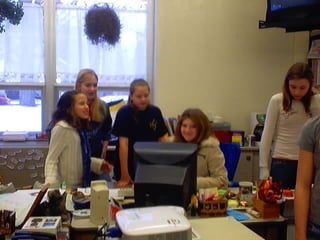
My name is Janice Abernethy, and this is my fifth grade class at East Elementary in Greenville, Pennsylvania.  Please join me in a tour of my technologically infused classroom! You may click through the presentation or use the index on the next page to navigate to topics of interest.
Students using technology Collaboration Project Digital Photography WebQuests Mrs. A’s Cyber School Science Fair Stock Market Challenge 24 Family Involvement Podcasting Classroom Website PRESENTATION INDEX
Our Classroom Website Click on the hippo to explore the site yourself: or continue with the slideshow for highlights from our website.
These links are used in our daily quest for knowledge.  The following slides are a sampling of these webpage contents. Website Links
Students use this research web page to research topics being learned about in class.  Each link takes the student to a webpage with safe links for research.
This is a popular page with the students.  They may view pictures of previous classrooms and share their own field trip experience with family and friends.
Students use this page for research and to share our pets with their families.  Each pet has its own page with research links.
Students can download their projects at home to share with family and friends.
This page includes links to interactive games to practice skills. The games may be played on the SmartBoard or on individual computers at school or home. Back to Index
The Science Fair From choosing their project to the end product, students incorporate technology with science in innovative ways. Our webpage: used for Science Fair Research
View pictures of projects created by students using technology.


Back to Index
Parent Communication Parent communication and involvement is essential to student success.  View some of the ways technology makes this possible. Our website is our biggest link between home and school
Sites of interest to parents on the website. and many more…
Online lesson plans provide parents with the day to day activities going on in the classroom.
Parents use Edline to access students’ grade, lesson plans, and links to websites of interest. Back to Index
Challenge 24 Students come to school early to play this fun math game. View the next slide to see how we have incorporated technology into our Challenge 24 Club.
A card is scanned, then projected on the screen.  Students use EggSpert to push a button.  The first to “ring in” gives the solution and gets the points. How It Works Back to Index
Stock Market Club Students in the Stock Market Club participate in two contests. The Herald Stock Market Contest and Stocksquest See how students use technology to play the Stock Market Games
The Herald Stock Market Contest Students trade twice a week using stock quotes in the Sharon Herald.  They track their stock prices in an excel file, using laptop computers. They are competing against students from other schools in the area.
Stocksquest Stocksquest is an online trading game. Students have their own accounts, and they are part of a class contest.  I provide each student with a billion dollars, and they can check their class rank at any time. Students use Yahoo Finance to research their stocks. Back to Index
Students use this sturdy digital camera to take pictures for use in projects.  They can even take the camera home to take pictures of their pets to share with the class. Back to Index Digital Photography
Students collaborated with a third grade class in New Jersey in an effort to learn the differences between urban and rural areas. Collaboration
Daily emails, pen pal letters, and various cross curricular activities were incorporated in this project.
Students from Newark toured their town and shared the experience with our students through digital pictures.
Our students toured Greenville and shared their digital pictures.
I made a trip to New Jersey to meet our partners, and the entire project was presented at a conference.  We won first place for our interdisciplinary collaboration. Back to Index
Podcasting Our latest technological venture includes student- created podcasts.
Link to iTunes to download our podcast or go to our website to play our podcasts directly on your computer. Back to Index
Students use WebQuests in their quest for knowledge.  WebQuests Our website has a variety of collected WebQuests in all the topics we are studying in 5 th  Grade.
WebQuests include downloadable worksheets, directions, and Rubrics Back to Index I have also created some of my own WebQuests using Dreamweaver.
This is an online course I created for students using Moodle.  It can be accessed from school and home and it is fully functional. Mrs. A's Cyber School Back to Index
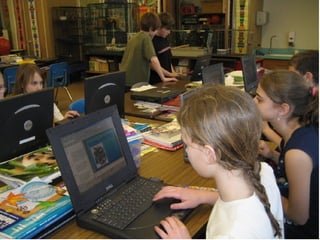
Students Using Technology


Thank you for watching the show! Back to Index

Keystone

  • 1.
    Technology Integration Createdby: Janice Abernethy February 2007
  • 2.
    My name isJanice Abernethy, and this is my fifth grade class at East Elementary in Greenville, Pennsylvania. Please join me in a tour of my technologically infused classroom! You may click through the presentation or use the index on the next page to navigate to topics of interest.
  • 3.
    Students using technologyCollaboration Project Digital Photography WebQuests Mrs. A’s Cyber School Science Fair Stock Market Challenge 24 Family Involvement Podcasting Classroom Website PRESENTATION INDEX
  • 4.
    Our Classroom WebsiteClick on the hippo to explore the site yourself: or continue with the slideshow for highlights from our website.
  • 5.
    These links areused in our daily quest for knowledge. The following slides are a sampling of these webpage contents. Website Links
  • 6.
    Students use thisresearch web page to research topics being learned about in class. Each link takes the student to a webpage with safe links for research.
  • 7.
    This is apopular page with the students. They may view pictures of previous classrooms and share their own field trip experience with family and friends.
  • 8.
    Students use thispage for research and to share our pets with their families. Each pet has its own page with research links.
  • 9.
    Students can downloadtheir projects at home to share with family and friends.
  • 10.
    This page includeslinks to interactive games to practice skills. The games may be played on the SmartBoard or on individual computers at school or home. Back to Index
  • 11.
    The Science FairFrom choosing their project to the end product, students incorporate technology with science in innovative ways. Our webpage: used for Science Fair Research
  • 12.
    View pictures ofprojects created by students using technology.
  • 13.
  • 14.
  • 15.
  • 16.
  • 17.
  • 18.
  • 19.
  • 20.
    Parent Communication Parentcommunication and involvement is essential to student success. View some of the ways technology makes this possible. Our website is our biggest link between home and school
  • 21.
    Sites of interestto parents on the website. and many more…
  • 22.
    Online lesson plansprovide parents with the day to day activities going on in the classroom.
  • 23.
    Parents use Edlineto access students’ grade, lesson plans, and links to websites of interest. Back to Index
  • 24.
    Challenge 24 Studentscome to school early to play this fun math game. View the next slide to see how we have incorporated technology into our Challenge 24 Club.
  • 25.
    A card isscanned, then projected on the screen. Students use EggSpert to push a button. The first to “ring in” gives the solution and gets the points. How It Works Back to Index
  • 26.
    Stock Market ClubStudents in the Stock Market Club participate in two contests. The Herald Stock Market Contest and Stocksquest See how students use technology to play the Stock Market Games
  • 27.
    The Herald StockMarket Contest Students trade twice a week using stock quotes in the Sharon Herald. They track their stock prices in an excel file, using laptop computers. They are competing against students from other schools in the area.
  • 28.
    Stocksquest Stocksquest isan online trading game. Students have their own accounts, and they are part of a class contest. I provide each student with a billion dollars, and they can check their class rank at any time. Students use Yahoo Finance to research their stocks. Back to Index
  • 29.
    Students use thissturdy digital camera to take pictures for use in projects. They can even take the camera home to take pictures of their pets to share with the class. Back to Index Digital Photography
  • 30.
    Students collaborated witha third grade class in New Jersey in an effort to learn the differences between urban and rural areas. Collaboration
  • 31.
    Daily emails, penpal letters, and various cross curricular activities were incorporated in this project.
  • 32.
    Students from Newarktoured their town and shared the experience with our students through digital pictures.
  • 33.
    Our students touredGreenville and shared their digital pictures.
  • 34.
    I made atrip to New Jersey to meet our partners, and the entire project was presented at a conference. We won first place for our interdisciplinary collaboration. Back to Index
  • 35.
    Podcasting Our latesttechnological venture includes student- created podcasts.
  • 36.
    Link to iTunesto download our podcast or go to our website to play our podcasts directly on your computer. Back to Index
  • 37.
    Students use WebQuestsin their quest for knowledge. WebQuests Our website has a variety of collected WebQuests in all the topics we are studying in 5 th Grade.
  • 38.
    WebQuests include downloadableworksheets, directions, and Rubrics Back to Index I have also created some of my own WebQuests using Dreamweaver.
  • 39.
    This is anonline course I created for students using Moodle. It can be accessed from school and home and it is fully functional. Mrs. A's Cyber School Back to Index
  • 40.
  • 41.
  • 42.
  • 43.
  • 44.
  • 45.
  • 46.
    Thank you forwatching the show! Back to Index