101
Presented by: Aparna Pillai
 What is Kafka
 What problem does Kafka solve
 How does Kafka work
 What are the benefits of Kafka
 Conclusion
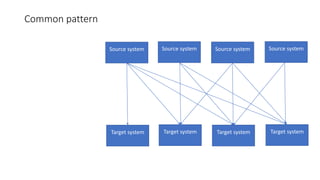
Common pattern
Source system Source system Source system Source system
Target system Target system Target system Target system
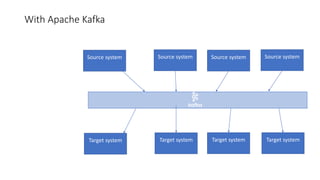
With Apache Kafka
Source system Source system Source system Source system
Target system Target system Target system Target system
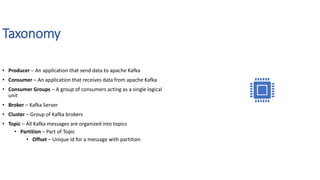
Taxonomy
• Producer – An application that send data to apache Kafka
• Consumer – An application that receives data from apache Kafka
• Consumer Groups – A group of consumers acting as a single logical
unit
• Broker – Kafka Server
• Cluster – Group of Kafka brokers
• Topic – All Kafka messages are organized into topics
• Partition – Part of Topic
• Offset – Unique id for a message with partition
Kafka Broker & Topic
Brokers
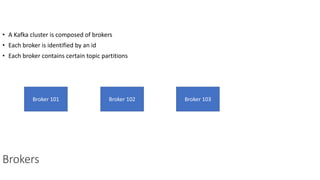
• A Kafka cluster is composed of brokers
• Each broker is identified by an id
• Each broker contains certain topic partitions
Broker 101 Broker 102 Broker 103
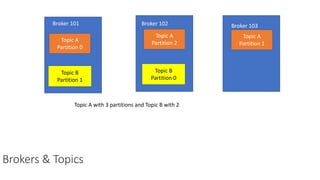
Brokers & Topics
Topic A
Partition 0
Topic A
Partition 2
Topic A
Partition 1
Topic B
Partition 1
Topic B
Partition 0
Broker 101 Broker 102 Broker 103
Topic A with 3 partitions and Topic B with 2
Topic replication factor
Topic A
Partition 0
Topic A
Partition 1
Topic A
Partition 1
Broker 101 Broker 102 Broker 103
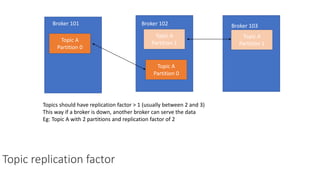
Topics should have replication factor > 1 (usually between 2 and 3)
This way if a broker is down, another broker can serve the data
Eg: Topic A with 2 partitions and replication factor of 2
Topic A
Partition 0
Topic replication factor
Topic A
Partition 0
Topic A
Partition 1
Topic A
Partition 1
Broker 101 Broker 102 Broker 103
Topic A
Partition 0
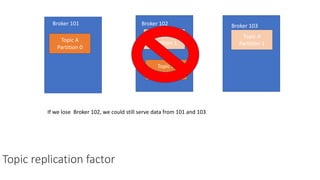
If we lose Broker 102, we could still serve data from 101 and 103
Leader for a partition
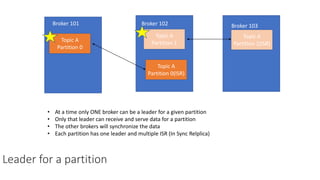
• At a time only ONE broker can be a leader for a given partition
• Only that leader can receive and serve data for a partition
• The other brokers will synchronize the data
• Each partition has one leader and multiple ISR (In Sync Relplica)
Topic A
Partition 0
Topic A
Partition 1
Topic A
Partition 1(ISR)
Broker 101 Broker 102 Broker 103
Topic A
Partition 0(ISR)
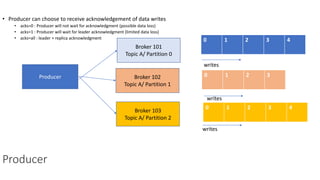
• Producer can choose to receive acknowledgement of data writes
• acks=0 : Producer will not wait for acknowledgment (possible data loss)
• acks=1 : Producer will wait for leader acknowledgment (limited data loss)
• acks=all : leader + replica acknowledgment
Producer
Producer
Broker 101
Topic A/ Partition 0
0 1 2 3 4
0 1 2 3
0 1 2 3 4
Broker 102
Topic A/ Partition 1
Broker 103
Topic A/ Partition 2
writes
writes
writes
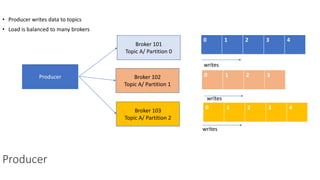
• Producer writes data to topics
• Load is balanced to many brokers
Producer
Producer
Broker 101
Topic A/ Partition 0
0 1 2 3 4
0 1 2 3
0 1 2 3 4
Broker 102
Topic A/ Partition 1
Broker 103
Topic A/ Partition 2
writes
writes
writes
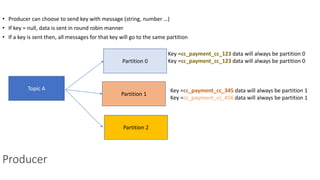
• Producer can choose to send key with message (string, number …)
• If key = null, data is sent in round robin manner
• If a key is sent then, all messages for that key will go to the same partition
Producer
Topic A
Partition 0
Partition 1
Partition 2
Key =cc_payment_cc_123 data will always be partition 0
Key =cc_payment_cc_345 data will always be partition 1
Key =cc_payment_cc_456 data will always be partition 1
• Producer writes data to topics
• Load is balanced to many brokers
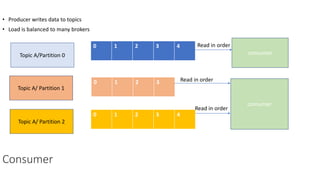
Consumer
Topic A/Partition 0
0 1 2 3 4
0 1 2 3
0 1 2 3 4
Topic A/ Partition 1
Topic A/ Partition 2
consumer
consumer
Read in order
Read in order
Read in order
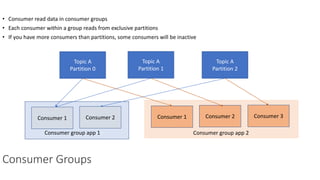
• Consumer read data in consumer groups
• Each consumer within a group reads from exclusive partitions
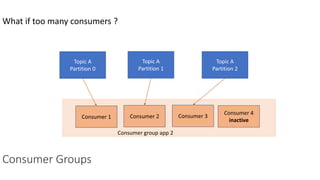
• If you have more consumers than partitions, some consumers will be inactive
Consumer Groups
Topic A
Partition 0
Topic A
Partition 1
Topic A
Partition 2
Consumer 1 Consumer 2 Consumer 1 Consumer 2 Consumer 3
Consumer group app 1 Consumer group app 2
What if too many consumers ?
Consumer Groups
Topic A
Partition 0
Topic A
Partition 1
Topic A
Partition 2
Consumer 1 Consumer 2 Consumer 3
Consumer group app 2
Consumer 4
inactive
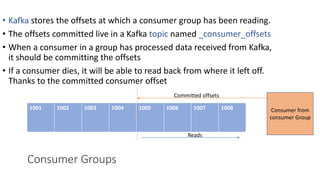
• Kafka stores the offsets at which a consumer group has been reading.
• The offsets committed live in a Kafka topic named _consumer_offsets
• When a consumer in a group has processed data received from Kafka,
it should be committing the offsets
• If a consumer dies, it will be able to read back from where it left off.
Thanks to the committed consumer offset
1001 1002 1003 1004 1005 1006 1007 1008
Consumer Groups
Consumer from
consumer Group
Committed offsets
Reads
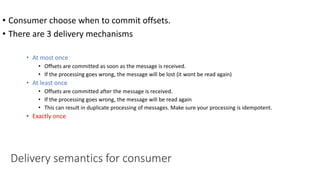
• Consumer choose when to commit offsets.
• There are 3 delivery mechanisms
• At most once
• Offsets are committed as soon as the message is received.
• If the processing goes wrong, the message will be lost (it wont be read again)
• At least once
• Offsets are committed after the message is received.
• If the processing goes wrong, the message will be read again
• This can result in duplicate processing of messages. Make sure your processing is idempotent.
• Exactly once
Delivery semantics for consumer
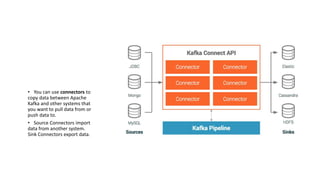
• You can use connectors to
copy data between Apache
Kafka and other systems that
you want to pull data from or
push data to.
• Source Connectors import
data from another system.
Sink Connectors export data.
Kafka Connectors
Streaming SQL
for Apache
Kafka
• Confluent KSQL is the streaming SQL
engine that enables real-time data
processing against Apache Kafka®. It
provides an easy-to-use, yet powerful
interactive SQL interface for stream
processing on Kafka, without the need
to write code in a programming
language such as Java or Python. KSQL
is scalable, elastic, fault-tolerant, and it
supports a wide range of streaming
operations, including data filtering,
transformations, aggregations, joins,
windowing, and sessionization.

Kafka101

  • 1.
  • 2.
     What isKafka  What problem does Kafka solve  How does Kafka work  What are the benefits of Kafka  Conclusion
  • 3.
    Common pattern Source systemSource system Source system Source system Target system Target system Target system Target system
  • 4.
    With Apache Kafka Sourcesystem Source system Source system Source system Target system Target system Target system Target system
  • 5.
    Taxonomy • Producer –An application that send data to apache Kafka • Consumer – An application that receives data from apache Kafka • Consumer Groups – A group of consumers acting as a single logical unit • Broker – Kafka Server • Cluster – Group of Kafka brokers • Topic – All Kafka messages are organized into topics • Partition – Part of Topic • Offset – Unique id for a message with partition
  • 7.
  • 8.
    Brokers • A Kafkacluster is composed of brokers • Each broker is identified by an id • Each broker contains certain topic partitions Broker 101 Broker 102 Broker 103
  • 9.
    Brokers & Topics TopicA Partition 0 Topic A Partition 2 Topic A Partition 1 Topic B Partition 1 Topic B Partition 0 Broker 101 Broker 102 Broker 103 Topic A with 3 partitions and Topic B with 2
  • 10.
    Topic replication factor TopicA Partition 0 Topic A Partition 1 Topic A Partition 1 Broker 101 Broker 102 Broker 103 Topics should have replication factor > 1 (usually between 2 and 3) This way if a broker is down, another broker can serve the data Eg: Topic A with 2 partitions and replication factor of 2 Topic A Partition 0
  • 11.
    Topic replication factor TopicA Partition 0 Topic A Partition 1 Topic A Partition 1 Broker 101 Broker 102 Broker 103 Topic A Partition 0 If we lose Broker 102, we could still serve data from 101 and 103
  • 12.
    Leader for apartition • At a time only ONE broker can be a leader for a given partition • Only that leader can receive and serve data for a partition • The other brokers will synchronize the data • Each partition has one leader and multiple ISR (In Sync Relplica) Topic A Partition 0 Topic A Partition 1 Topic A Partition 1(ISR) Broker 101 Broker 102 Broker 103 Topic A Partition 0(ISR)
  • 13.
    • Producer canchoose to receive acknowledgement of data writes • acks=0 : Producer will not wait for acknowledgment (possible data loss) • acks=1 : Producer will wait for leader acknowledgment (limited data loss) • acks=all : leader + replica acknowledgment Producer Producer Broker 101 Topic A/ Partition 0 0 1 2 3 4 0 1 2 3 0 1 2 3 4 Broker 102 Topic A/ Partition 1 Broker 103 Topic A/ Partition 2 writes writes writes
  • 14.
    • Producer writesdata to topics • Load is balanced to many brokers Producer Producer Broker 101 Topic A/ Partition 0 0 1 2 3 4 0 1 2 3 0 1 2 3 4 Broker 102 Topic A/ Partition 1 Broker 103 Topic A/ Partition 2 writes writes writes
  • 15.
    • Producer canchoose to send key with message (string, number …) • If key = null, data is sent in round robin manner • If a key is sent then, all messages for that key will go to the same partition Producer Topic A Partition 0 Partition 1 Partition 2 Key =cc_payment_cc_123 data will always be partition 0 Key =cc_payment_cc_123 data will always be partition 0 Key =cc_payment_cc_345 data will always be partition 1 Key =cc_payment_cc_456 data will always be partition 1
  • 16.
    • Producer writesdata to topics • Load is balanced to many brokers Consumer Topic A/Partition 0 0 1 2 3 4 0 1 2 3 0 1 2 3 4 Topic A/ Partition 1 Topic A/ Partition 2 consumer consumer Read in order Read in order Read in order
  • 17.
    • Consumer readdata in consumer groups • Each consumer within a group reads from exclusive partitions • If you have more consumers than partitions, some consumers will be inactive Consumer Groups Topic A Partition 0 Topic A Partition 1 Topic A Partition 2 Consumer 1 Consumer 2 Consumer 1 Consumer 2 Consumer 3 Consumer group app 1 Consumer group app 2
  • 18.
    What if toomany consumers ? Consumer Groups Topic A Partition 0 Topic A Partition 1 Topic A Partition 2 Consumer 1 Consumer 2 Consumer 3 Consumer group app 2 Consumer 4 inactive
  • 19.
    • Kafka storesthe offsets at which a consumer group has been reading. • The offsets committed live in a Kafka topic named _consumer_offsets • When a consumer in a group has processed data received from Kafka, it should be committing the offsets • If a consumer dies, it will be able to read back from where it left off. Thanks to the committed consumer offset 1001 1002 1003 1004 1005 1006 1007 1008 Consumer Groups Consumer from consumer Group Committed offsets Reads
  • 20.
    • Consumer choosewhen to commit offsets. • There are 3 delivery mechanisms • At most once • Offsets are committed as soon as the message is received. • If the processing goes wrong, the message will be lost (it wont be read again) • At least once • Offsets are committed after the message is received. • If the processing goes wrong, the message will be read again • This can result in duplicate processing of messages. Make sure your processing is idempotent. • Exactly once Delivery semantics for consumer
  • 21.
    • You canuse connectors to copy data between Apache Kafka and other systems that you want to pull data from or push data to. • Source Connectors import data from another system. Sink Connectors export data. Kafka Connectors
  • 22.
    Streaming SQL for Apache Kafka •Confluent KSQL is the streaming SQL engine that enables real-time data processing against Apache Kafka®. It provides an easy-to-use, yet powerful interactive SQL interface for stream processing on Kafka, without the need to write code in a programming language such as Java or Python. KSQL is scalable, elastic, fault-tolerant, and it supports a wide range of streaming operations, including data filtering, transformations, aggregations, joins, windowing, and sessionization.

Editor's Notes

  • #3 The Trusted Committer (TC) role is one of the key roles in an InnerSource community. Think of TCs as the people in a community that you trust with important technical decisions and with mentoring contributors in order to get their contribution over the finish line. The TC role is both a demanding and a rewarding role to fulfill. It goes far beyond being an opinionated gatekeeper and it is instrumental for the success of any InnerSource community.  Generally speaking, the TC role is defined by its responsibilities, rather than by its privileges. On a very high level, TCs represent the interests of both their InnerSource community and the products the community is building. They are concerned with the health of both the community and the product. So as a TC, you'll have both tech oriented and community oriented responsibilities. We'll explore both of these dimensions in the following sections.  Before we go into the details of what a TC actually does, let's spend some time contrasting the TC role to other roles in InnerSource on a high level of abstraction and explain why we think the name is both apt and important. Let's start with the Contributor role. A Contributor - as the name implies - makes contributions to an InnerSource community. These contributions could be code or non-code artifacts, such as bug-reports, feature-requests or documentation.  Contributors might or might not be part of the community. They might be sent by another team to develop a feature that team might need. This is why we sometimes also refer to Contributors as Guests or being part of a _Guest Team. TheContributor_ is responsible for "fitting in" and for conforming to the community's expectations and processes. The Trusted Committer is always a member of the InnerSource community, which also sometimes referred to as the Host Team. In this analogy, the TC is responsible for both building the house and setting the house rules, to make sure their guests are comfortable and can work together effectively. Compared to contributors, TCs have earned the responsibility to push code closer to production and are generally allowed to perform tasks that have a higher level of risk associated with them. The Product Owner (PO) is the third role in InnerSource. Similar to agile processes, the PO is responsible for defining and prioritizing requirements and stories for the community to implement. The PO interacts often with the TC, e.g. in making sure that a requested or contributed feature actually belongs to the product. Especially in smaller, grass-roots type InnerSource communities, the TC usually also acts as a PO. Please check out our Product Owner Learning Path segment for more detailed information.
  • #4 This is a common data integration requirement in any large enterprise. Here you have source systems and target systems and they want to exchange data with one another. Target systems could be another API, database or utility. There are 16 integrations possible here and that means managing URIs connection details and other configs specific to each target system. It means that all the apps in the source systems must be aware of all the APIs in the target systems that they need to call. It also means that the target systems must be available at the time the source system makes the call. This causes two major problems. Over a period of time this becomes highly unmaintainable. The load on the target systems keep increasing and more source systems get added. Source systems need to implement ways of dealing with failed calls to the target systems
  • #5 Kafka provides solutions to both of our problems. This could be solved by decoupling source systems and target systems. Kafka is a highly scalable and fault tolerant enterprise messaging system. It could be used as : 1 Enterprise messaging system 2 Stream processing 3 Import or export bulk data from databases to other systems
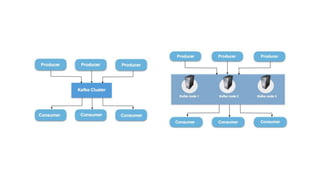
  • #7  A Kafka cluster consists of one or more servers (Kafka brokers), which are running Kafka. Producers are processes that publish data (push messages) into Kafka topics within the broker. A consumer of topics pulls messages off a Kafka topic.
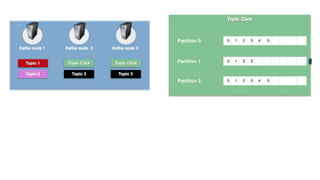
  • #8 All Kafka messages are organized into topics. Producer applications write data to topics and consumer applications read from topics. Messages published to the cluster will stay in the cluster until a configurable retention period has passed by. Kafka retains all messages for a set amount of time. Kafka topics are divided into a number of partitions, which contains messages in an unchangeable sequence. Each message in a partition is assigned and identified by its unique offset. A topic can also have multiple partition logs like the click-topic has in the image to the right. This allows for multiple consumers to read from a topic in parallel. In Kafka, replication is implemented at the partition level. Details to be followed
  • #20 this is a note