When One Data
Center Is Not Enough
Building Large-scale Stream Infrastructures Across
Multiple Data Centers
with Apache Kafka
Gwen Shapira
There’s a book on that!
Actually… a chapter
Outline
Kafka overview
Common multi data center patterns
Future stuff
What is Kafka?
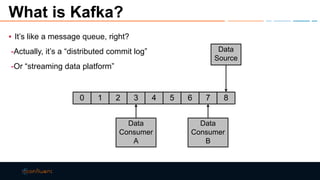
▪ It’s like a message queue, right?
-Actually, it’s a “distributed commit log”
-Or “streaming data platform”
0 1 2 3 4 5 6 7 8
Data
Source
Data
Consumer
A
Data
Consumer
B
Topics and Partitions
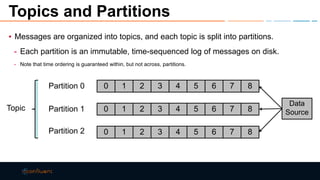
▪ Messages are organized into topics, and each topic is split into partitions.
- Each partition is an immutable, time-sequenced log of messages on disk.
- Note that time ordering is guaranteed within, but not across, partitions.
0 1 2 3 4 5 6 7 8
0 1 2 3 4 5 6 7 8
0 1 2 3 4 5 6 7 8
Partition 0
Partition 1
Partition 2
Data
Source
Topic
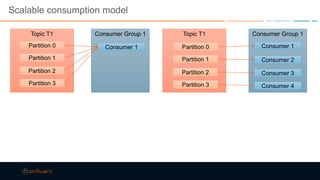
Scalable consumption model
Topic T1
Partition 0
Partition 1
Partition 2
Partition 3
Consumer Group 1
Consumer 1
Topic T1
Partition 0
Partition 1
Partition 2
Partition 3
Consumer Group 1
Consumer 1
Consumer 2
Consumer 3
Consumer 4
Kafka usage
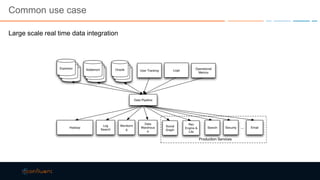
Common use case
Large scale real time data integration
Other use cases
Scaling databases
Messaging
Stream processing
…
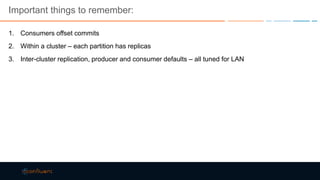
Important things to remember:
1. Consumers offset commits
2. Within a cluster – each partition has replicas
3. Inter-cluster replication, producer and consumer defaults – all tuned for LAN
Why multiple data centers (DC)
Offload work from main cluster
Disaster recovery
Geo-localization
• Saving cross-DC bandwidth
• Better performance by being closer to users
• Some activity is just local
• Security / regulations
Cloud
Special case: Producers with network issues
Why is this difficult?
1. It isn’t, really – you consume data from one cluster and produce to another
2. Network between two data centers can get tricky
3. Consumers have state (offsets) – syncing this between clusters get tough
• And leads to some counter intuitive results
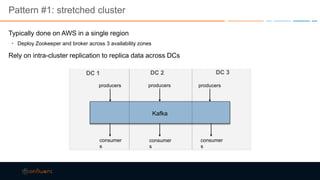
Pattern #1: stretched cluster
Typically done on AWS in a single region
• Deploy Zookeeper and broker across 3 availability zones
Rely on intra-cluster replication to replica data across DCs
Kafka
producers
consumer
s
DC 1 DC 3DC 2
producersproducers
consumer
s
consumer
s
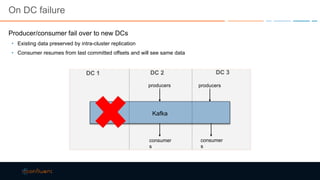
On DC failure
Producer/consumer fail over to new DCs
• Existing data preserved by intra-cluster replication
• Consumer resumes from last committed offsets and will see same data
Kafka
producers
consumer
s
DC 1 DC 3DC 2
producers
consumer
s
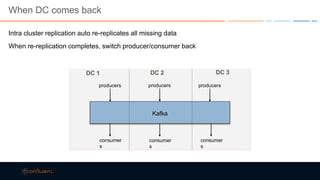
When DC comes back
Intra cluster replication auto re-replicates all missing data
When re-replication completes, switch producer/consumer back
Kafka
producers
consumer
s
DC 1 DC 3DC 2
producersproducers
consumer
s
consumer
s
Be careful with replica assignment
Don’t want all replicas in same AZ
Rack-aware support in 0.10.0
• Configure brokers in same AZ with same broker.rack
Manual assignment pre 0.10.0
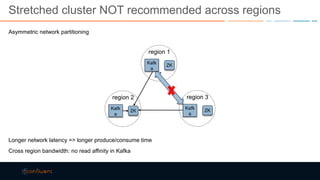
Stretched cluster NOT recommended across regions
Asymmetric network partitioning
Longer network latency => longer produce/consume time
Cross region bandwidth: no read affinity in Kafka
region 1
Kafk
a
ZK
region 2
Kafk
a
ZK
region 3
Kafk
a
ZK
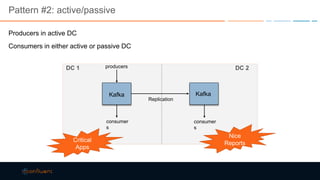
Pattern #2: active/passive
Producers in active DC
Consumers in either active or passive DC
Kafka
producers
consumer
s
DC 1
Replication
DC 2
Kafka
consumer
s
Critical
Apps
Nice
Reports
Cross Datacenter Replication
Consumer & Producer: read from a source cluster and write to a target cluster
Per-key ordering preserved
Asynchronous: target always slightly behind
Offsets not preserved
• Source and target may not have same # partitions
• Retries for failed writes
Options:
• Confluent Multi-Datacenter Replication
• MirrorMaker
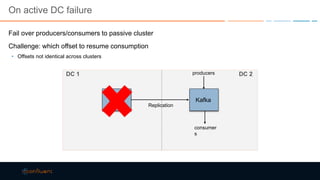
On active DC failure
Fail over producers/consumers to passive cluster
Challenge: which offset to resume consumption
• Offsets not identical across clusters
Kafka
producers
consumer
s
DC 1
Replication
DC 2
Kafka
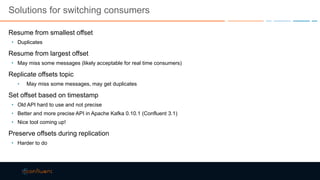
Solutions for switching consumers
Resume from smallest offset
• Duplicates
Resume from largest offset
• May miss some messages (likely acceptable for real time consumers)
Replicate offsets topic
• May miss some messages, may get duplicates
Set offset based on timestamp
• Old API hard to use and not precise
• Better and more precise API in Apache Kafka 0.10.1 (Confluent 3.1)
• Nice tool coming up!
Preserve offsets during replication
• Harder to do
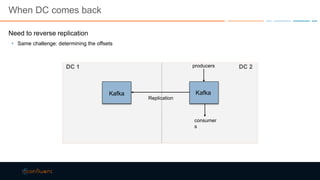
When DC comes back
Need to reverse replication
• Same challenge: determining the offsets
Kafka
producers
consumer
s
DC 1
Replication
DC 2
Kafka
Limitations
Reconfiguration of replication after failover
Resources in passive DC under utilized
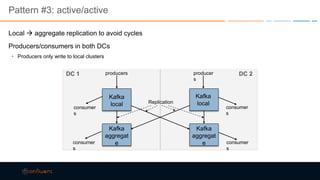
Pattern #3: active/active
Local  aggregate replication to avoid cycles
Producers/consumers in both DCs
• Producers only write to local clusters
Kafka
local
Kafka
aggregat
e
Kafka
aggregat
e
producers producer
s
consumer
s
consumer
s
Replication
Kafka
local
DC 1 DC 2
consumer
s
consumer
s
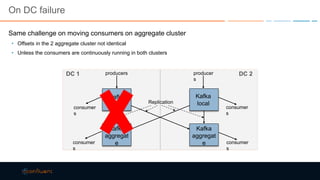
On DC failure
Same challenge on moving consumers on aggregate cluster
• Offsets in the 2 aggregate cluster not identical
• Unless the consumers are continuously running in both clusters
Kafka
local
Kafka
aggregat
e
Kafka
aggregat
e
producers producer
s
consumer
s
consumer
s
Replication
Kafka
local
DC 1 DC 2
consumer
s
consumer
s
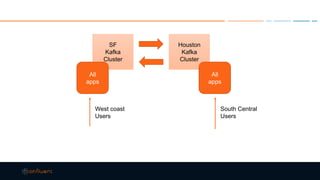
SF
Kafka
Cluster
Houston
Kafka
Cluster
All
apps
All
apps
West coast
Users
South Central
Users
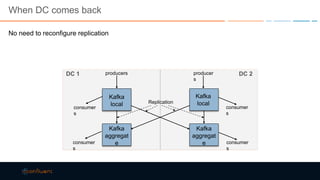
When DC comes back
No need to reconfigure replication
Kafka
local
Kafka
aggregat
e
Kafka
aggregat
e
producers producer
s
consumer
s
consumer
s
Replication
Kafka
local
DC 1 DC 2
consumer
s
consumer
s
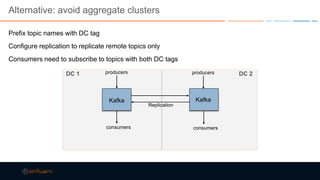
Alternative: avoid aggregate clusters
Prefix topic names with DC tag
Configure replication to replicate remote topics only
Consumers need to subscribe to topics with both DC tags
Kafka
producers
consumers
DC 1
Replication
DC 2
Kafka
producers
consumers
Beyond 2 DCs
More DCs  better resource utilization
• With 2 DCs, each DC needs to provision 100% traffic
• With 3 DCs, each DC only needs to provision 50% traffic
Setting up replication with many DCs can be daunting
• Only set up aggregate clusters in 2-3
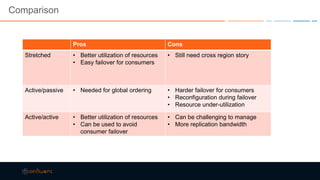
Comparison
Pros Cons
Stretched • Better utilization of resources
• Easy failover for consumers
• Still need cross region story
Active/passive • Needed for global ordering • Harder failover for consumers
• Reconfiguration during failover
• Resource under-utilization
Active/active • Better utilization of resources
• Can be used to avoid
consumer failover
• Can be challenging to manage
• More replication bandwidth
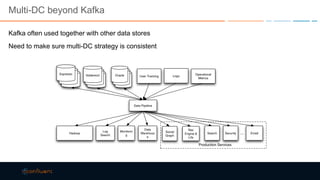
Multi-DC beyond Kafka
Kafka often used together with other data stores
Need to make sure multi-DC strategy is consistent
Example application
Consumer reads from Kafka and computes 1-min count
Counts need to be stored in DB and available in every DC
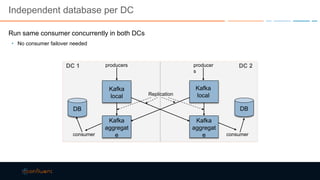
Independent database per DC
Run same consumer concurrently in both DCs
• No consumer failover needed
Kafka
local
Kafka
aggregat
e
Kafka
aggregat
e
producers producer
s
consumer consumer
Replication
Kafka
local
DC 1 DC 2
DB DB
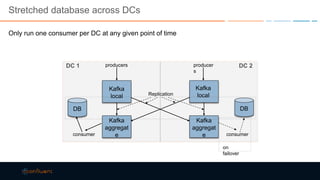
Stretched database across DCs
Only run one consumer per DC at any given point of time
Kafka
local
Kafka
aggregat
e
Kafka
aggregat
e
producers producer
s
consumer consumer
Replication
Kafka
local
DC 1 DC 2
DB DB
on
failover
Practical tips
• Consume remote, produce local
• Unless you need encrypted data on the wire
• Monitor!
• Burrow for replication lag
• Confluent Control Center for end-to-end
• JMX metrics for rates and “busy-ness”
• Tune!
• Producer / Consumer tuning
• Number of consumers, producers
• TCP tuning for WAN
• Don’t forget to replicate configuration
• Separate critical topics from nice-to-have topics
Future work
Offset reset tool
Offset preservation
“Remote Replicas”
2-DC stretch cluster
Other cool Kafka future:
• Exactly Once
• Transactions
• Headers
THANK YOU!
Gwen Shapira| gwen@confluent.io | @gwenshap
Kafka Training with Confluent University
• Kafka Developer and Operations Courses
• Visit www.confluent.io/training
Want more Kafka?
• Download Confluent Platform Enterprise at http://www.confluent.io/product
• Apache Kafka 0.10.2 upgrade documentation at http://docs.confluent.io/3.2.0/upgrade.html
• Kafka Summit recordings now available at http://kafka-summit.org/schedule/
Discount code: kafstrata
Special Strata Attendee discount code = 25% off
www.kafka-summit.org
Kafka Summit New York: May 8
Kafka Summit San Francisco: August 28
Presented by

Multi-Datacenter Kafka - Strata San Jose 2017

  • 1.
    When One Data CenterIs Not Enough Building Large-scale Stream Infrastructures Across Multiple Data Centers with Apache Kafka Gwen Shapira
  • 2.
    There’s a bookon that! Actually… a chapter
  • 3.
    Outline Kafka overview Common multidata center patterns Future stuff
  • 4.
    What is Kafka? ▪It’s like a message queue, right? -Actually, it’s a “distributed commit log” -Or “streaming data platform” 0 1 2 3 4 5 6 7 8 Data Source Data Consumer A Data Consumer B
  • 5.
    Topics and Partitions ▪Messages are organized into topics, and each topic is split into partitions. - Each partition is an immutable, time-sequenced log of messages on disk. - Note that time ordering is guaranteed within, but not across, partitions. 0 1 2 3 4 5 6 7 8 0 1 2 3 4 5 6 7 8 0 1 2 3 4 5 6 7 8 Partition 0 Partition 1 Partition 2 Data Source Topic
  • 6.
    Scalable consumption model TopicT1 Partition 0 Partition 1 Partition 2 Partition 3 Consumer Group 1 Consumer 1 Topic T1 Partition 0 Partition 1 Partition 2 Partition 3 Consumer Group 1 Consumer 1 Consumer 2 Consumer 3 Consumer 4
  • 7.
  • 8.
    Common use case Largescale real time data integration
  • 9.
    Other use cases Scalingdatabases Messaging Stream processing …
  • 10.
    Important things toremember: 1. Consumers offset commits 2. Within a cluster – each partition has replicas 3. Inter-cluster replication, producer and consumer defaults – all tuned for LAN
  • 11.
    Why multiple datacenters (DC) Offload work from main cluster Disaster recovery Geo-localization • Saving cross-DC bandwidth • Better performance by being closer to users • Some activity is just local • Security / regulations Cloud Special case: Producers with network issues
  • 12.
    Why is thisdifficult? 1. It isn’t, really – you consume data from one cluster and produce to another 2. Network between two data centers can get tricky 3. Consumers have state (offsets) – syncing this between clusters get tough • And leads to some counter intuitive results
  • 13.
    Pattern #1: stretchedcluster Typically done on AWS in a single region • Deploy Zookeeper and broker across 3 availability zones Rely on intra-cluster replication to replica data across DCs Kafka producers consumer s DC 1 DC 3DC 2 producersproducers consumer s consumer s
  • 14.
    On DC failure Producer/consumerfail over to new DCs • Existing data preserved by intra-cluster replication • Consumer resumes from last committed offsets and will see same data Kafka producers consumer s DC 1 DC 3DC 2 producers consumer s
  • 15.
    When DC comesback Intra cluster replication auto re-replicates all missing data When re-replication completes, switch producer/consumer back Kafka producers consumer s DC 1 DC 3DC 2 producersproducers consumer s consumer s
  • 16.
    Be careful withreplica assignment Don’t want all replicas in same AZ Rack-aware support in 0.10.0 • Configure brokers in same AZ with same broker.rack Manual assignment pre 0.10.0
  • 17.
    Stretched cluster NOTrecommended across regions Asymmetric network partitioning Longer network latency => longer produce/consume time Cross region bandwidth: no read affinity in Kafka region 1 Kafk a ZK region 2 Kafk a ZK region 3 Kafk a ZK
  • 18.
    Pattern #2: active/passive Producersin active DC Consumers in either active or passive DC Kafka producers consumer s DC 1 Replication DC 2 Kafka consumer s Critical Apps Nice Reports
  • 19.
    Cross Datacenter Replication Consumer& Producer: read from a source cluster and write to a target cluster Per-key ordering preserved Asynchronous: target always slightly behind Offsets not preserved • Source and target may not have same # partitions • Retries for failed writes Options: • Confluent Multi-Datacenter Replication • MirrorMaker
  • 20.
    On active DCfailure Fail over producers/consumers to passive cluster Challenge: which offset to resume consumption • Offsets not identical across clusters Kafka producers consumer s DC 1 Replication DC 2 Kafka
  • 21.
    Solutions for switchingconsumers Resume from smallest offset • Duplicates Resume from largest offset • May miss some messages (likely acceptable for real time consumers) Replicate offsets topic • May miss some messages, may get duplicates Set offset based on timestamp • Old API hard to use and not precise • Better and more precise API in Apache Kafka 0.10.1 (Confluent 3.1) • Nice tool coming up! Preserve offsets during replication • Harder to do
  • 22.
    When DC comesback Need to reverse replication • Same challenge: determining the offsets Kafka producers consumer s DC 1 Replication DC 2 Kafka
  • 23.
    Limitations Reconfiguration of replicationafter failover Resources in passive DC under utilized
  • 24.
    Pattern #3: active/active Local aggregate replication to avoid cycles Producers/consumers in both DCs • Producers only write to local clusters Kafka local Kafka aggregat e Kafka aggregat e producers producer s consumer s consumer s Replication Kafka local DC 1 DC 2 consumer s consumer s
  • 25.
    On DC failure Samechallenge on moving consumers on aggregate cluster • Offsets in the 2 aggregate cluster not identical • Unless the consumers are continuously running in both clusters Kafka local Kafka aggregat e Kafka aggregat e producers producer s consumer s consumer s Replication Kafka local DC 1 DC 2 consumer s consumer s
  • 26.
  • 27.
    When DC comesback No need to reconfigure replication Kafka local Kafka aggregat e Kafka aggregat e producers producer s consumer s consumer s Replication Kafka local DC 1 DC 2 consumer s consumer s
  • 28.
    Alternative: avoid aggregateclusters Prefix topic names with DC tag Configure replication to replicate remote topics only Consumers need to subscribe to topics with both DC tags Kafka producers consumers DC 1 Replication DC 2 Kafka producers consumers
  • 30.
    Beyond 2 DCs MoreDCs  better resource utilization • With 2 DCs, each DC needs to provision 100% traffic • With 3 DCs, each DC only needs to provision 50% traffic Setting up replication with many DCs can be daunting • Only set up aggregate clusters in 2-3
  • 31.
    Comparison Pros Cons Stretched •Better utilization of resources • Easy failover for consumers • Still need cross region story Active/passive • Needed for global ordering • Harder failover for consumers • Reconfiguration during failover • Resource under-utilization Active/active • Better utilization of resources • Can be used to avoid consumer failover • Can be challenging to manage • More replication bandwidth
  • 32.
    Multi-DC beyond Kafka Kafkaoften used together with other data stores Need to make sure multi-DC strategy is consistent
  • 33.
    Example application Consumer readsfrom Kafka and computes 1-min count Counts need to be stored in DB and available in every DC
  • 34.
    Independent database perDC Run same consumer concurrently in both DCs • No consumer failover needed Kafka local Kafka aggregat e Kafka aggregat e producers producer s consumer consumer Replication Kafka local DC 1 DC 2 DB DB
  • 35.
    Stretched database acrossDCs Only run one consumer per DC at any given point of time Kafka local Kafka aggregat e Kafka aggregat e producers producer s consumer consumer Replication Kafka local DC 1 DC 2 DB DB on failover
  • 36.
    Practical tips • Consumeremote, produce local • Unless you need encrypted data on the wire • Monitor! • Burrow for replication lag • Confluent Control Center for end-to-end • JMX metrics for rates and “busy-ness” • Tune! • Producer / Consumer tuning • Number of consumers, producers • TCP tuning for WAN • Don’t forget to replicate configuration • Separate critical topics from nice-to-have topics
  • 37.
    Future work Offset resettool Offset preservation “Remote Replicas” 2-DC stretch cluster Other cool Kafka future: • Exactly Once • Transactions • Headers
  • 38.
    THANK YOU! Gwen Shapira|gwen@confluent.io | @gwenshap Kafka Training with Confluent University • Kafka Developer and Operations Courses • Visit www.confluent.io/training Want more Kafka? • Download Confluent Platform Enterprise at http://www.confluent.io/product • Apache Kafka 0.10.2 upgrade documentation at http://docs.confluent.io/3.2.0/upgrade.html • Kafka Summit recordings now available at http://kafka-summit.org/schedule/
  • 39.
    Discount code: kafstrata SpecialStrata Attendee discount code = 25% off www.kafka-summit.org Kafka Summit New York: May 8 Kafka Summit San Francisco: August 28 Presented by

Editor's Notes

  • #5 We earlier described Kafka as a pub-sub system, so it’s tempting to compare it to a message queue system, but the semantics are actually different from a traditional messaging service – it’s more accurate to call it a distributed commit log. Kafka was created by LinkedIn to address scalability and integration challenges they had with traditional systems. Kafka is highly scalable, fault-tolerant, high throughput, low latency, and very flexible.
  • #6 Note that each partition is just a log on disk – an immutable, time-ordered sequence of messages. This goes back to why we classify this layer as “storage”. Messages are “committed” once written to all partitions.
  • #18 Zookeeper used to detect failures. Communication between 1 & 3 gets disconnected. All brokers can be registered in the ZK instance in region 2. They all appear alive. Can assign leaders in all 3 regions. If we assign a leader into region 1, we then won’t be able to replicate from the leader in region 1 to region 3, which will block data from becoming accessible to consumers. Assymetric between how we detect failures and the actual network state.
  • #29 Disjoint set of topics Consumers need to adjust their subscription. Can impact all applications.
  • #31 With 2, need 100% of traffic supported in both to support the failure case of losing 1 DC. With 3, each DC only needs to handle extra traffic from 1. As you add more, get an N^2 pipeline, becomes daunting. Don’t need to do aggregation in all N. Generally ok to choose just 2 or 3 DCs to do aggregation. Reduces overhead.
  • #33 Need to think holistically. Need to make sure all data stores use a consistent strategy.
  • #35 Run independent consumers with independent databases. Easy for consumers because failures doesn’t require any coordination. But are paying full 2x costs for storage in your DB and computation.
  • #36 With a stretched database, you need to run only one consumer at a time, so on failover you need to coordinate the consumers, moving from one DC to the other.