SignalR for Asp.Net Developers
By Sarvesh Kushwaha
What’s SignalR
• Asp .NET Library which provide real time communication(duplex client server
persistent channel) to web applications
• It abstract the network layer for bidirectional real time communication
• It require client and server side handshaking(Code) to communicate
• It opts best transport network technology (Web Sockets, Server Sent Events,
Forever Frame, Long polling, Ajax Polling)
• It provide rich API for diff Clients server communication(Specific Broadcast (To
group, To Selected, To all), Connected and disconnected events)
• SignalR provides client libraries for .NET, JavaScript, Silverlight, Windows
Phone, Windows RT and even iOS and Android through Xamarin.
• Its open source GITHUB (https://github.com/SignalR/SignalR )
Where SignalR used
• Everywhere you need real time communication(Bidirectional
Channel)
• Examples
• Chat Application
• Notification with refresh (Like Facebook, twitter)
• Email updates
• Live scores
• Online documentation
• Live auction
• Progress Bar (Say no to fake progress bar)
Existing Technologies
• Web Sockets
• Server Sent Events
• Forever Frame
• Long polling
• Ajax Polling/Periodic Polling
How SignalR works
Image Source : Microsoft
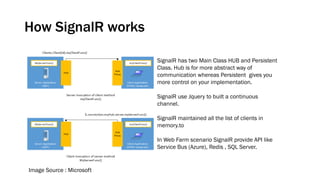
SignalR has two Main Class HUB and Persistent
Class. Hub is for more abstract way of
communication whereas Persistent gives you
more control on your implementation.
SignalR use Jquery to built a continuous
channel.
SignalR maintained all the list of clients in
memory.to
In Web Farm scenario SignalR provide API like
Service Bus (Azure), Redis , SQL Server.
SignalR Architecture
Image Source : Microsoft
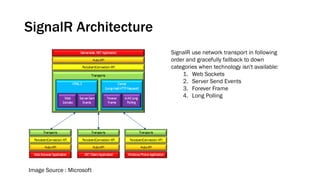
SignalR use network transport in following
order and gracefully fallback to down
categories when technology isn't available:
1. Web Sockets
2. Server Send Events
3. Forever Frame
4. Long Polling
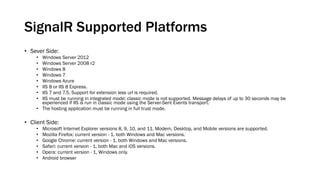
SignalR Supported Platforms
• Sever Side:
• Windows Server 2012
• Windows Server 2008 r2
• Windows 8
• Windows 7
• Windows Azure
• IIS 8 or IIS 8 Express.
• IIS 7 and 7.5. Support for extension less url is required.
• IIS must be running in integrated mode; classic mode is not supported. Message delays of up to 30 seconds may be
experienced if IIS is run in classic mode using the Server-Sent Events transport.
• The hosting application must be running in full trust mode.
• Client Side:
• Microsoft Internet Explorer versions 8, 9, 10, and 11. Modern, Desktop, and Mobile versions are supported.
• Mozilla Firefox: current version - 1, both Windows and Mac versions.
• Google Chrome: current version - 1, both Windows and Mac versions.
• Safari: current version - 1, both Mac and iOS versions.
• Opera: current version - 1, Windows only.
• Android browser
How to use SignalR
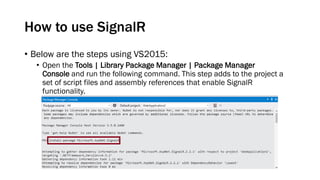
• Below are the steps using VS2015:
• Open the Tools | Library Package Manager | Package Manager
Console and run the following command. This step adds to the project a
set of script files and assembly references that enable SignalR
functionality.
How to use SignalR
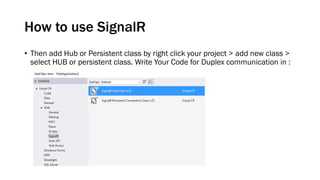
• Then add Hub or Persistent class by right click your project > add new class >
select HUB or persistent class. Write Your Code for Duplex communication in :
How to use SignalR
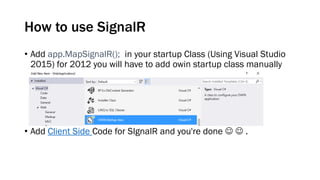
• Add app.MapSignalR(); in your startup Class (Using Visual Studio
2015) for 2012 you will have to add owin startup class manually
• Add Client Side Code for SIgnalR and you're done   .
Sarvesh Kushwaha | | | | | |

SignalR

  • 1.
    SignalR for Asp.NetDevelopers By Sarvesh Kushwaha
  • 2.
    What’s SignalR • Asp.NET Library which provide real time communication(duplex client server persistent channel) to web applications • It abstract the network layer for bidirectional real time communication • It require client and server side handshaking(Code) to communicate • It opts best transport network technology (Web Sockets, Server Sent Events, Forever Frame, Long polling, Ajax Polling) • It provide rich API for diff Clients server communication(Specific Broadcast (To group, To Selected, To all), Connected and disconnected events) • SignalR provides client libraries for .NET, JavaScript, Silverlight, Windows Phone, Windows RT and even iOS and Android through Xamarin. • Its open source GITHUB (https://github.com/SignalR/SignalR )
  • 3.
    Where SignalR used •Everywhere you need real time communication(Bidirectional Channel) • Examples • Chat Application • Notification with refresh (Like Facebook, twitter) • Email updates • Live scores • Online documentation • Live auction • Progress Bar (Say no to fake progress bar)
  • 4.
    Existing Technologies • WebSockets • Server Sent Events • Forever Frame • Long polling • Ajax Polling/Periodic Polling
  • 5.
    How SignalR works ImageSource : Microsoft SignalR has two Main Class HUB and Persistent Class. Hub is for more abstract way of communication whereas Persistent gives you more control on your implementation. SignalR use Jquery to built a continuous channel. SignalR maintained all the list of clients in memory.to In Web Farm scenario SignalR provide API like Service Bus (Azure), Redis , SQL Server.
  • 6.
    SignalR Architecture Image Source: Microsoft SignalR use network transport in following order and gracefully fallback to down categories when technology isn't available: 1. Web Sockets 2. Server Send Events 3. Forever Frame 4. Long Polling
  • 7.
    SignalR Supported Platforms •Sever Side: • Windows Server 2012 • Windows Server 2008 r2 • Windows 8 • Windows 7 • Windows Azure • IIS 8 or IIS 8 Express. • IIS 7 and 7.5. Support for extension less url is required. • IIS must be running in integrated mode; classic mode is not supported. Message delays of up to 30 seconds may be experienced if IIS is run in classic mode using the Server-Sent Events transport. • The hosting application must be running in full trust mode. • Client Side: • Microsoft Internet Explorer versions 8, 9, 10, and 11. Modern, Desktop, and Mobile versions are supported. • Mozilla Firefox: current version - 1, both Windows and Mac versions. • Google Chrome: current version - 1, both Windows and Mac versions. • Safari: current version - 1, both Mac and iOS versions. • Opera: current version - 1, Windows only. • Android browser
  • 8.
    How to useSignalR • Below are the steps using VS2015: • Open the Tools | Library Package Manager | Package Manager Console and run the following command. This step adds to the project a set of script files and assembly references that enable SignalR functionality.
  • 9.
    How to useSignalR • Then add Hub or Persistent class by right click your project > add new class > select HUB or persistent class. Write Your Code for Duplex communication in :
  • 10.
    How to useSignalR • Add app.MapSignalR(); in your startup Class (Using Visual Studio 2015) for 2012 you will have to add owin startup class manually • Add Client Side Code for SIgnalR and you're done   .
  • 11.