SignalR
Jason 2015/08/07
SignalR
● ASP.NET SignalR is a library for ASP.NET developers that simplifies the
process of adding real-time web functionality to applications.
● Real-time web functionality is the ability to have server code push content to
connected clients instantly as it becomes available, rather than having the
server wait for a client to request new data.
● Any time a user refreshes a web page to see new data, or the page
implements long polling to retrieve new data, it is a candidate for using
SignalR
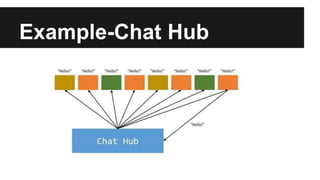
Example-Chat Hub
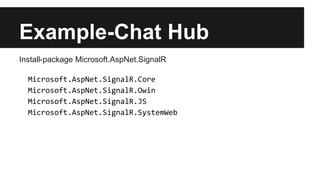
Example-Chat Hub
Install-package Microsoft.AspNet.SignalR
Microsoft.AspNet.SignalR.Core
Microsoft.AspNet.SignalR.Owin
Microsoft.AspNet.SignalR.JS
Microsoft.AspNet.SignalR.SystemWeb
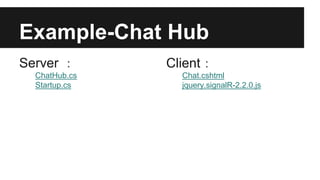
Example-Chat Hub
Server :
ChatHub.cs
Startup.cs
Client:
Chat.cshtml
jquery.signalR-2.2.0.js
How to specify query string parameters
public class ChatHub : Hub
{
public override Task OnConnected()
{
var version = Context.QueryString['version'];
if (version != '1.0')
{
Clients.Caller.notifyWrongVersion();
}
return base.OnConnected();
}
}
Set a query string value before calling the start method (with the
generated proxy)
$.connection.hub.qs = { 'version' : '1.0' };
Set a query string value before calling the start method (without the
generated proxy)
var connection = $.hubConnection();
connection.qs = { 'version' : '1.0' };
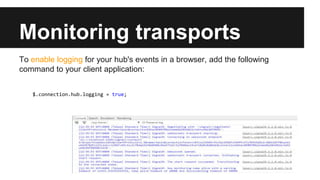
Monitoring transports
To enable logging for your hub's events in a browser, add the following
command to your client application:
$.connection.hub.logging = true;
Reference
SignalR
http://www.asp.net/signalr/overview/getting-started/introduction-to-
signalr
Startup.cs
using Owin;
using Microsoft.Owin;
[assembly: OwinStartup(typeof(SignalRChat.Startup))]
namespace SignalRChat
{
public class Startup
{
public void Configuration(IAppBuilder app)
{
app.MapSignalR();
}
}
}
Back
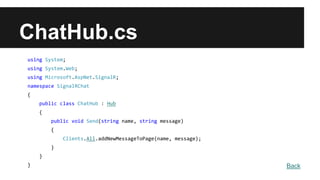
using System;
using System.Web;
using Microsoft.AspNet.SignalR;
namespace SignalRChat
{
public class ChatHub : Hub
{
public void Send(string name, string message)
{
Clients.All.addNewMessageToPage(name, message);
}
}
}
ChatHub.cs
Back
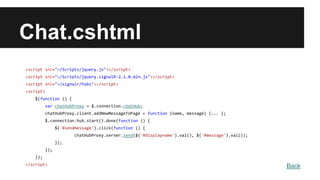
Chat.cshtml
<script src="~/Scripts/jquery.js"></script>
<script src="~/Scripts/jquery.signalR-2.1.0.min.js"></script>
<script src="~/signalr/hubs"></script>
<script>
$(function () {
var chatHubProxy = $.connection.chatHub;
chatHubProxy.client.addNewMessageToPage = function (name, message) {... };
$.connection.hub.start().done(function () {
$('#sendmessage').click(function () {
chatHubProxy.server.send($('#displayname').val(), $('#message').val());
});
});
});
</script> Back
Note.1
Note: In JavaScript the reference to the server class and its members is in
camel case. The code sample references the C# ChatHub class in
JavaScript as chatHub.
If you want to reference the ChatHub class in jQuery with conventional
Pascal casing as you would in C#
[HubName("ChatHub")]
public class ChatHub : Hub
Back
Note.2
Note: By default, JavaScript clients refer to Hub methods by using a
camel-cased version of the method name.
If you want to specify a different name for clients to use, add the
HubMethodName attribute
[HubMethodName("Send")]
public void Send(string name, string message)
Back
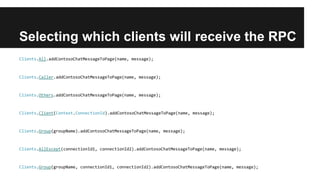
Selecting which clients will receive the RPC
Clients.All.addContosoChatMessageToPage(name, message);
Clients.Caller.addContosoChatMessageToPage(name, message);
Clients.Others.addContosoChatMessageToPage(name, message);
Clients.Client(Context.ConnectionId).addContosoChatMessageToPage(name, message);
Clients.Group(groupName).addContosoChatMessageToPage(name, message);
Clients.AllExcept(connectionId1, connectionId2).addContosoChatMessageToPage(name, message);
Clients.Group(groupName, connectionId1, connectionId2).addContosoChatMessageToPage(name, message);
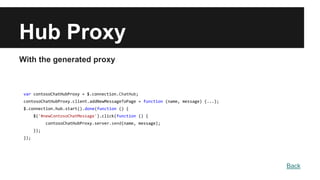
Hub Proxy
With the generated proxy
var contosoChatHubProxy = $.connection.ChatHub;
contosoChatHubProxy.client.addNewMessageToPage = function (name, message) {...};
$.connection.hub.start().done(function () {
$('#newContosoChatMessage').click(function () {
contosoChatHubProxy.server.send(name, message);
});
});
Back
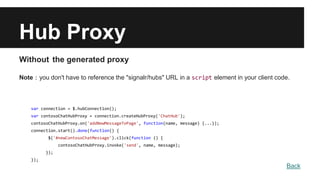
Hub Proxy
Without the generated proxy
Note:you don't have to reference the "signalr/hubs" URL in a script element in your client code.
var connection = $.hubConnection();
var contosoChatHubProxy = connection.createHubProxy('ChatHub');
contosoChatHubProxy.on('addNewMessageToPage', function(name, message) {...});
connection.start().done(function() {
$('#newContosoChatMessage').click(function () {
contosoChatHubProxy.invoke('send', name, message);
});
});
Back

SignalR

  • 1.
  • 2.
    SignalR ● ASP.NET SignalRis a library for ASP.NET developers that simplifies the process of adding real-time web functionality to applications. ● Real-time web functionality is the ability to have server code push content to connected clients instantly as it becomes available, rather than having the server wait for a client to request new data. ● Any time a user refreshes a web page to see new data, or the page implements long polling to retrieve new data, it is a candidate for using SignalR
  • 4.
  • 5.
  • 6.
  • 7.
    How to specifyquery string parameters public class ChatHub : Hub { public override Task OnConnected() { var version = Context.QueryString['version']; if (version != '1.0') { Clients.Caller.notifyWrongVersion(); } return base.OnConnected(); } } Set a query string value before calling the start method (with the generated proxy) $.connection.hub.qs = { 'version' : '1.0' }; Set a query string value before calling the start method (without the generated proxy) var connection = $.hubConnection(); connection.qs = { 'version' : '1.0' };
  • 8.
    Monitoring transports To enablelogging for your hub's events in a browser, add the following command to your client application: $.connection.hub.logging = true;
  • 9.
  • 10.
    Startup.cs using Owin; using Microsoft.Owin; [assembly:OwinStartup(typeof(SignalRChat.Startup))] namespace SignalRChat { public class Startup { public void Configuration(IAppBuilder app) { app.MapSignalR(); } } } Back
  • 11.
    using System; using System.Web; usingMicrosoft.AspNet.SignalR; namespace SignalRChat { public class ChatHub : Hub { public void Send(string name, string message) { Clients.All.addNewMessageToPage(name, message); } } } ChatHub.cs Back
  • 12.
    Chat.cshtml <script src="~/Scripts/jquery.js"></script> <script src="~/Scripts/jquery.signalR-2.1.0.min.js"></script> <scriptsrc="~/signalr/hubs"></script> <script> $(function () { var chatHubProxy = $.connection.chatHub; chatHubProxy.client.addNewMessageToPage = function (name, message) {... }; $.connection.hub.start().done(function () { $('#sendmessage').click(function () { chatHubProxy.server.send($('#displayname').val(), $('#message').val()); }); }); }); </script> Back
  • 13.
    Note.1 Note: In JavaScriptthe reference to the server class and its members is in camel case. The code sample references the C# ChatHub class in JavaScript as chatHub. If you want to reference the ChatHub class in jQuery with conventional Pascal casing as you would in C# [HubName("ChatHub")] public class ChatHub : Hub Back
  • 14.
    Note.2 Note: By default,JavaScript clients refer to Hub methods by using a camel-cased version of the method name. If you want to specify a different name for clients to use, add the HubMethodName attribute [HubMethodName("Send")] public void Send(string name, string message) Back
  • 15.
    Selecting which clientswill receive the RPC Clients.All.addContosoChatMessageToPage(name, message); Clients.Caller.addContosoChatMessageToPage(name, message); Clients.Others.addContosoChatMessageToPage(name, message); Clients.Client(Context.ConnectionId).addContosoChatMessageToPage(name, message); Clients.Group(groupName).addContosoChatMessageToPage(name, message); Clients.AllExcept(connectionId1, connectionId2).addContosoChatMessageToPage(name, message); Clients.Group(groupName, connectionId1, connectionId2).addContosoChatMessageToPage(name, message);
  • 16.
    Hub Proxy With thegenerated proxy var contosoChatHubProxy = $.connection.ChatHub; contosoChatHubProxy.client.addNewMessageToPage = function (name, message) {...}; $.connection.hub.start().done(function () { $('#newContosoChatMessage').click(function () { contosoChatHubProxy.server.send(name, message); }); }); Back
  • 17.
    Hub Proxy Without thegenerated proxy Note:you don't have to reference the "signalr/hubs" URL in a script element in your client code. var connection = $.hubConnection(); var contosoChatHubProxy = connection.createHubProxy('ChatHub'); contosoChatHubProxy.on('addNewMessageToPage', function(name, message) {...}); connection.start().done(function() { $('#newContosoChatMessage').click(function () { contosoChatHubProxy.invoke('send', name, message); }); }); Back

Editor's Notes

  • #11  // Any connection or hub wire up and configuration should go here
  • #16 http://www.asp.net/signalr/overview/guide-to-the-api/hubs-api-guide-server#selectingclients