JIRA Customization
Rajesh Prajapati
rajeshkprajapati@gmail.com

JIRA Customization

Rajesh Prajapati
rajeshkprajapati@gmail.com
Agenda: JIRA Customization
•
•
•
•

Why there is interest in something like JIRA
What can JIRA do to help?
Some important features of JIRA
Inside JIRA

JIRA Customization

Rajesh Prajapati
rajeshkprajapati@gmail.com
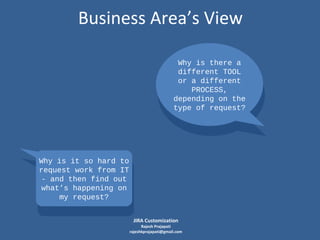
Business Area’s View
Why is there a
different TOOL
Why is there a
or a different
different TOOL
or PROCESS,
a different
depending on the
PROCESS,
type of request?
depending on the
type of request?

Why is it so hard to
request it so from IT
Why is work hard to
- and then find out
request work from IT
what’s then find out
- and happening on
my happening
what’s request? on
my request?
JIRA Customization

Rajesh Prajapati
rajeshkprajapati@gmail.com
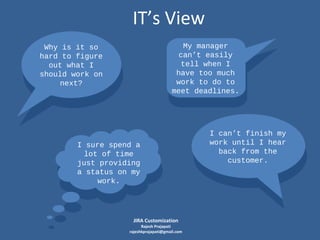
IT’s View
My manager
can’t easily
tell when I
have too much
work to do to
meet deadlines.

Why is it so
hard to figure
out what I
should work on
next?

I sure spend a
lot of time
just providing
a status on my
work.

JIRA Customization

Rajesh Prajapati
rajeshkprajapati@gmail.com

I can’t finish my
work until I hear
back from the
customer.
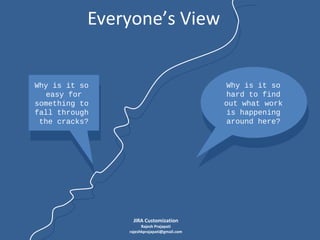
Everyone’s View

Why is it so
hard to find
out what work
is happening
around here?

Why is it so
easy for
something to
fall through
the cracks?

JIRA Customization

Rajesh Prajapati
rajeshkprajapati@gmail.com
What can JIRA do to help?

JIRA Customization

Rajesh Prajapati
rajeshkprajapati@gmail.com
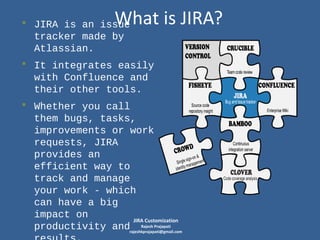
What is JIRA?

• JIRA is an issue
tracker made by
Atlassian.

• It integrates easily
with Confluence and
their other tools.

• Whether you call
them bugs, tasks,
improvements or work
requests, JIRA
provides an
efficient way to
track and manage
your work - which
can have a big
impact on
JIRA Customization
Rajesh Prajapati
productivity andrajeshkprajapati@gmail.com
Some Important Features of JIRA
 Authentication
 Dashboards
 Workflows
 Project Administration
 Issue Searching
 Issue Linking

 Attachments and
Screenshots
 Time Tracking
 Ticklers and Notifications
 Reports
… and more!

JIRA Customization

Rajesh Prajapati
rajeshkprajapati@gmail.com
Authentication
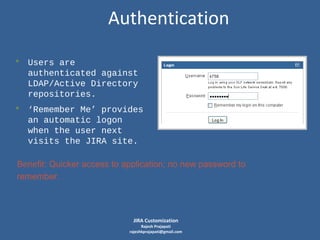
• Users are
authenticated against
LDAP/Active Directory
repositories.

• ‘Remember Me’ provides
an automatic logon
when the user next
visits the JIRA site.
Benefit: Quicker access to application; no new password to
remember.

JIRA Customization

Rajesh Prajapati
rajeshkprajapati@gmail.com
Dashboards
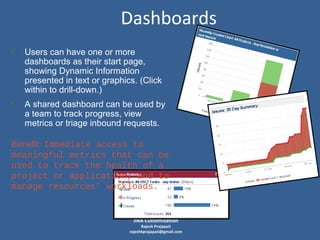
• Users can have one or more

dashboards as their start page,
showing Dynamic Information
presented in text or graphics. (Click
within to drill-down.)

• A shared dashboard can be used by
a team to track progress, view
metrics or triage inbound requests.

Benefit: Immediate access to
meaningful metrics that can be
used to track the health of a
project or application, and to
manage resources’ workloads.

JIRA Customization

Rajesh Prajapati
rajeshkprajapati@gmail.com
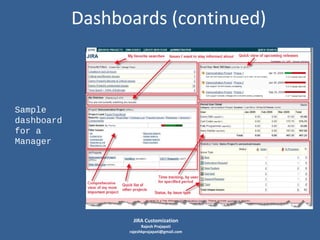
Dashboards (continued)

Sample
dashboard
for a
Manager

JIRA Customization

Rajesh Prajapati
rajeshkprajapati@gmail.com
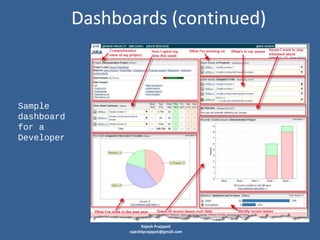
Dashboards (continued)

Sample
dashboard
for a
Developer

JIRA Customization

Rajesh Prajapati
rajeshkprajapati@gmail.com
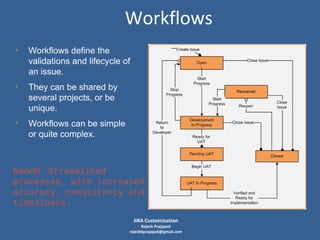
Workflows
• Workflows define the
validations and lifecycle of
an issue.

• They can be shared by
several projects, or be
unique.

• Workflows can be simple
or quite complex.

Benefit: Streamlined
processes, with increased
accuracy, consistency and
timeliness.
JIRA Customization

Rajesh Prajapati
rajeshkprajapati@gmail.com
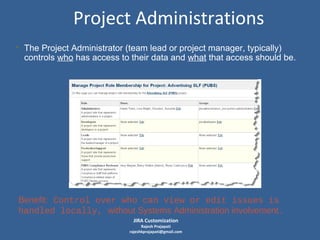
Project Administrations
• The Project Administrator (team lead or project manager, typically)
controls who has access to their data and what that access should be.

Benefit: Control over who can view or edit issues is
handled locally, without Systems Administration involvement.
JIRA Customization

Rajesh Prajapati
rajeshkprajapati@gmail.com
Issue Searching
• Filters allows you to find the issues in which you’re interested.
• You can search for issues based on every built-in or custom field.
• Filters can also be:
- Saved for reuse
- Shared with others
- Subscribed to (so it runs and emails you results on a scheduled
-

basis)
Used within a Dashboard gadget
Filter results can be exported to Word, Excel, PDF and XML or
rendered as a chart.

Benefit: Better transparency. Everyone can see what is
being worked on and what progress is being made.
JIRA Customization

Rajesh Prajapati
rajeshkprajapati@gmail.com
Issue Linking
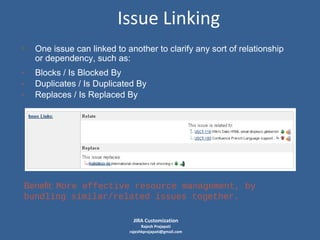
• One issue can linked to another to clarify any sort of relationship
or dependency, such as:

-

Blocks / Is Blocked By
Duplicates / Is Duplicated By
Replaces / Is Replaced By

Benefit: More effective resource management, by
bundling similar/related issues together.
JIRA Customization

Rajesh Prajapati
rajeshkprajapati@gmail.com
Attachments and Screeshots
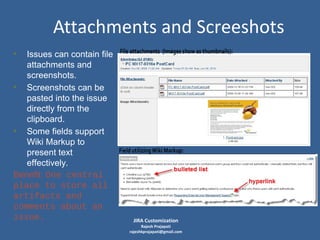
• Issues can contain file
attachments and
screenshots.
• Screenshots can be
pasted into the issue
directly from the
clipboard.
• Some fields support
Wiki Markup to
present text
effectively.
Benefit: One central
place to store all
artifacts and
comments about an
issue.

JIRA Customization

Rajesh Prajapati
rajeshkprajapati@gmail.com
Time Tracking
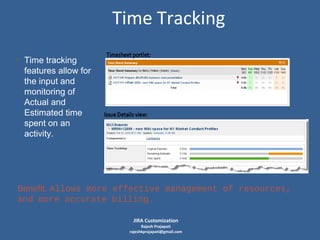
• Time tracking
features allow for
the input and
monitoring of
Actual and
Estimated time
spent on an
activity.

Benefit: Allows more effective management of resources,
and more accurate billing.
JIRA Customization

Rajesh Prajapati
rajeshkprajapati@gmail.com
Ticklers and Notifications
• Email notifications can be configured so everyone on your team is
aware of the right things, like changes to any issue created by
you or assigned to you.
• Specified “watchers” can be added to individual issues to ensure
the right people stay in the loop.
• Ticklers can be defined, to ensure actions occur automatically
when needed, such as:
- Close any issues that been inactive 90 days or more.
- Send a reminder email if the customer hasn’t responded to a
request for information within 10 days.
Benefit: Less manual effort required to keep others
informed and follow-up.
JIRA Customization

Rajesh Prajapati
rajeshkprajapati@gmail.com
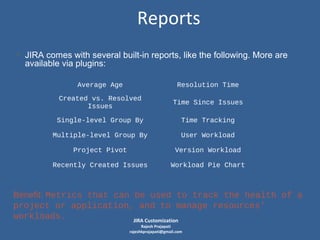
Reports
• JIRA comes with several built-in reports, like the following. More are
available via plugins:
Average Age

Resolution Time

Created vs. Resolved
Issues

Time Since Issues

Single-level Group By

Time Tracking

Multiple-level Group By

User Workload

Project Pivot

Version Workload

Recently Created Issues

Workload Pie Chart

Benefit: Metrics that can be used to track the health of a
project or application, and to manage resources’
workloads.
JIRA Customization
Rajesh Prajapati
rajeshkprajapati@gmail.com
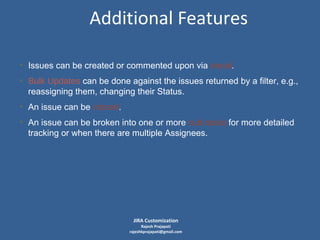
Additional Features
• Issues can be created or commented upon via email.
• Bulk Updates can be done against the issues returned by a filter, e.g.,
reassigning them, changing their Status.
• An issue can be cloned.
• An issue can be broken into one or more sub-tasks for more detailed
tracking or when there are multiple Assignees.

JIRA Customization

Rajesh Prajapati
rajeshkprajapati@gmail.com
Inside JIRA
 Architecture
 What is an Issue?

 What is a Workflow?
 Data-entry screens

JIRA Customization

Rajesh Prajapati
rajeshkprajapati@gmail.com
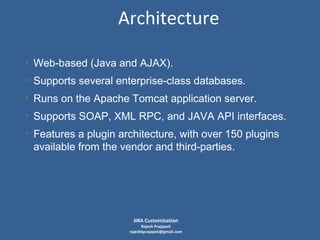
Architecture
• Web-based (Java and AJAX).
• Supports several enterprise-class databases.
• Runs on the Apache Tomcat application server.
• Supports SOAP, XML RPC, and JAVA API interfaces.
• Features a plugin architecture, with over 150 plugins
available from the vendor and third-parties.

JIRA Customization

Rajesh Prajapati
rajeshkprajapati@gmail.com
What is an Issue?
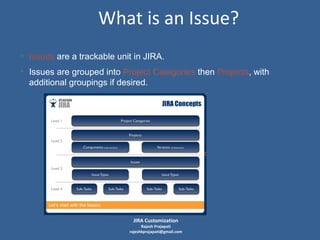
• Issues are a trackable unit in JIRA.
• Issues are grouped into Project Categories then Projects, with
additional groupings if desired.

JIRA Customization

Rajesh Prajapati
rajeshkprajapati@gmail.com
What is an Issue? (continued)
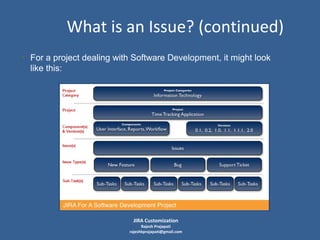
• For a project dealing with Software Development, it might look
like this:

JIRA Customization

Rajesh Prajapati
rajeshkprajapati@gmail.com
What is an Issue? (continued)
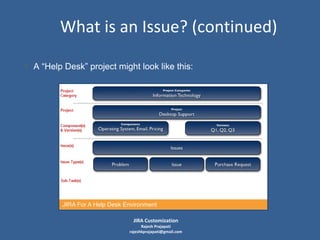
• A “Help Desk” project might look like this:

JIRA Customization

Rajesh Prajapati
rajeshkprajapati@gmail.com
What is a Workflow?
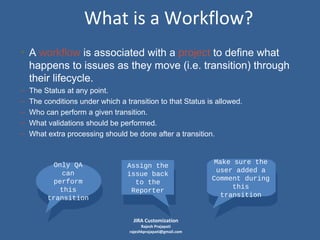
• A workflow is associated with a project to define what
happens to issues as they move (i.e. transition) through
their lifecycle.
–
–
–
–
–

The Status at any point.
The conditions under which a transition to that Status is allowed.
Who can perform a given transition.
What validations should be performed.
What extra processing should be done after a transition.

Only QA
can
perform
this
transition

Assign the
issue back
to the
Reporter

JIRA Customization

Rajesh Prajapati
rajeshkprajapati@gmail.com

Make sure the
user added a
Comment during
this
transition
Data-entry Screens
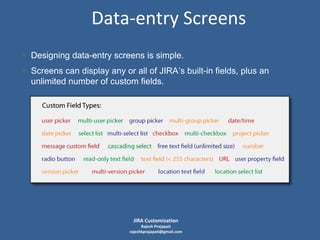
• Designing data-entry screens is simple.
• Screens can display any or all of JIRA’s built-in fields, plus an
unlimited number of custom fields.

JIRA Customization

Rajesh Prajapati
rajeshkprajapati@gmail.com
Conclusion
• JIRA offers organizations the ability to
streamline and automate the tracking of
virtually anything that needs to be tracked.
• It can be customized to support your
particular requirements, thereby providing
the potential for greatly improving your
organization’s:


Productivity



Effectiveness




Communication
Metrics
JIRA Customization

Rajesh Prajapati
rajeshkprajapati@gmail.com

Jira customization

  • 1.
    JIRA Customization Rajesh Prajapati rajeshkprajapati@gmail.com JIRACustomization Rajesh Prajapati rajeshkprajapati@gmail.com
  • 2.
    Agenda: JIRA Customization • • • • Whythere is interest in something like JIRA What can JIRA do to help? Some important features of JIRA Inside JIRA JIRA Customization Rajesh Prajapati rajeshkprajapati@gmail.com
  • 3.
    Business Area’s View Whyis there a different TOOL Why is there a or a different different TOOL or PROCESS, a different depending on the PROCESS, type of request? depending on the type of request? Why is it so hard to request it so from IT Why is work hard to - and then find out request work from IT what’s then find out - and happening on my happening what’s request? on my request? JIRA Customization Rajesh Prajapati rajeshkprajapati@gmail.com
  • 4.
    IT’s View My manager can’teasily tell when I have too much work to do to meet deadlines. Why is it so hard to figure out what I should work on next? I sure spend a lot of time just providing a status on my work. JIRA Customization Rajesh Prajapati rajeshkprajapati@gmail.com I can’t finish my work until I hear back from the customer.
  • 5.
    Everyone’s View Why isit so hard to find out what work is happening around here? Why is it so easy for something to fall through the cracks? JIRA Customization Rajesh Prajapati rajeshkprajapati@gmail.com
  • 6.
    What can JIRAdo to help? JIRA Customization Rajesh Prajapati rajeshkprajapati@gmail.com
  • 7.
    What is JIRA? •JIRA is an issue tracker made by Atlassian. • It integrates easily with Confluence and their other tools. • Whether you call them bugs, tasks, improvements or work requests, JIRA provides an efficient way to track and manage your work - which can have a big impact on JIRA Customization Rajesh Prajapati productivity andrajeshkprajapati@gmail.com
  • 8.
    Some Important Featuresof JIRA  Authentication  Dashboards  Workflows  Project Administration  Issue Searching  Issue Linking  Attachments and Screenshots  Time Tracking  Ticklers and Notifications  Reports … and more! JIRA Customization Rajesh Prajapati rajeshkprajapati@gmail.com
  • 9.
    Authentication • Users are authenticatedagainst LDAP/Active Directory repositories. • ‘Remember Me’ provides an automatic logon when the user next visits the JIRA site. Benefit: Quicker access to application; no new password to remember. JIRA Customization Rajesh Prajapati rajeshkprajapati@gmail.com
  • 10.
    Dashboards • Users canhave one or more dashboards as their start page, showing Dynamic Information presented in text or graphics. (Click within to drill-down.) • A shared dashboard can be used by a team to track progress, view metrics or triage inbound requests. Benefit: Immediate access to meaningful metrics that can be used to track the health of a project or application, and to manage resources’ workloads. JIRA Customization Rajesh Prajapati rajeshkprajapati@gmail.com
  • 11.
    Dashboards (continued) Sample dashboard for a Manager JIRACustomization Rajesh Prajapati rajeshkprajapati@gmail.com
  • 12.
    Dashboards (continued) Sample dashboard for a Developer JIRACustomization Rajesh Prajapati rajeshkprajapati@gmail.com
  • 13.
    Workflows • Workflows definethe validations and lifecycle of an issue. • They can be shared by several projects, or be unique. • Workflows can be simple or quite complex. Benefit: Streamlined processes, with increased accuracy, consistency and timeliness. JIRA Customization Rajesh Prajapati rajeshkprajapati@gmail.com
  • 14.
    Project Administrations • TheProject Administrator (team lead or project manager, typically) controls who has access to their data and what that access should be. Benefit: Control over who can view or edit issues is handled locally, without Systems Administration involvement. JIRA Customization Rajesh Prajapati rajeshkprajapati@gmail.com
  • 15.
    Issue Searching • Filtersallows you to find the issues in which you’re interested. • You can search for issues based on every built-in or custom field. • Filters can also be: - Saved for reuse - Shared with others - Subscribed to (so it runs and emails you results on a scheduled - basis) Used within a Dashboard gadget Filter results can be exported to Word, Excel, PDF and XML or rendered as a chart. Benefit: Better transparency. Everyone can see what is being worked on and what progress is being made. JIRA Customization Rajesh Prajapati rajeshkprajapati@gmail.com
  • 16.
    Issue Linking • Oneissue can linked to another to clarify any sort of relationship or dependency, such as: - Blocks / Is Blocked By Duplicates / Is Duplicated By Replaces / Is Replaced By Benefit: More effective resource management, by bundling similar/related issues together. JIRA Customization Rajesh Prajapati rajeshkprajapati@gmail.com
  • 17.
    Attachments and Screeshots •Issues can contain file attachments and screenshots. • Screenshots can be pasted into the issue directly from the clipboard. • Some fields support Wiki Markup to present text effectively. Benefit: One central place to store all artifacts and comments about an issue. JIRA Customization Rajesh Prajapati rajeshkprajapati@gmail.com
  • 18.
    Time Tracking • Timetracking features allow for the input and monitoring of Actual and Estimated time spent on an activity. Benefit: Allows more effective management of resources, and more accurate billing. JIRA Customization Rajesh Prajapati rajeshkprajapati@gmail.com
  • 19.
    Ticklers and Notifications •Email notifications can be configured so everyone on your team is aware of the right things, like changes to any issue created by you or assigned to you. • Specified “watchers” can be added to individual issues to ensure the right people stay in the loop. • Ticklers can be defined, to ensure actions occur automatically when needed, such as: - Close any issues that been inactive 90 days or more. - Send a reminder email if the customer hasn’t responded to a request for information within 10 days. Benefit: Less manual effort required to keep others informed and follow-up. JIRA Customization Rajesh Prajapati rajeshkprajapati@gmail.com
  • 20.
    Reports • JIRA comeswith several built-in reports, like the following. More are available via plugins: Average Age Resolution Time Created vs. Resolved Issues Time Since Issues Single-level Group By Time Tracking Multiple-level Group By User Workload Project Pivot Version Workload Recently Created Issues Workload Pie Chart Benefit: Metrics that can be used to track the health of a project or application, and to manage resources’ workloads. JIRA Customization Rajesh Prajapati rajeshkprajapati@gmail.com
  • 21.
    Additional Features • Issuescan be created or commented upon via email. • Bulk Updates can be done against the issues returned by a filter, e.g., reassigning them, changing their Status. • An issue can be cloned. • An issue can be broken into one or more sub-tasks for more detailed tracking or when there are multiple Assignees. JIRA Customization Rajesh Prajapati rajeshkprajapati@gmail.com
  • 22.
    Inside JIRA  Architecture What is an Issue?  What is a Workflow?  Data-entry screens JIRA Customization Rajesh Prajapati rajeshkprajapati@gmail.com
  • 23.
    Architecture • Web-based (Javaand AJAX). • Supports several enterprise-class databases. • Runs on the Apache Tomcat application server. • Supports SOAP, XML RPC, and JAVA API interfaces. • Features a plugin architecture, with over 150 plugins available from the vendor and third-parties. JIRA Customization Rajesh Prajapati rajeshkprajapati@gmail.com
  • 24.
    What is anIssue? • Issues are a trackable unit in JIRA. • Issues are grouped into Project Categories then Projects, with additional groupings if desired. JIRA Customization Rajesh Prajapati rajeshkprajapati@gmail.com
  • 25.
    What is anIssue? (continued) • For a project dealing with Software Development, it might look like this: JIRA Customization Rajesh Prajapati rajeshkprajapati@gmail.com
  • 26.
    What is anIssue? (continued) • A “Help Desk” project might look like this: JIRA Customization Rajesh Prajapati rajeshkprajapati@gmail.com
  • 27.
    What is aWorkflow? • A workflow is associated with a project to define what happens to issues as they move (i.e. transition) through their lifecycle. – – – – – The Status at any point. The conditions under which a transition to that Status is allowed. Who can perform a given transition. What validations should be performed. What extra processing should be done after a transition. Only QA can perform this transition Assign the issue back to the Reporter JIRA Customization Rajesh Prajapati rajeshkprajapati@gmail.com Make sure the user added a Comment during this transition
  • 28.
    Data-entry Screens • Designingdata-entry screens is simple. • Screens can display any or all of JIRA’s built-in fields, plus an unlimited number of custom fields. JIRA Customization Rajesh Prajapati rajeshkprajapati@gmail.com
  • 29.
    Conclusion • JIRA offersorganizations the ability to streamline and automate the tracking of virtually anything that needs to be tracked. • It can be customized to support your particular requirements, thereby providing the potential for greatly improving your organization’s:  Productivity  Effectiveness   Communication Metrics JIRA Customization Rajesh Prajapati rajeshkprajapati@gmail.com

Editor's Notes

  • #4 BugZero Service Desk ticket Lotus Notes DB Email to an individual or mailing list Need to request access to tool, learn how to use it to create a ticket. Don’t know how to find out status of a request (effective querying)
  • #5 No “one place” to find out work in queue, thus no way to easily work according to holistic view of priorities and deadlines Reporting on progress is done manually (and often verbally), taking time away from work to be done. Can’t always reassign ticket back to requestor (not part of typical new user setup) when waiting on customer response, so queue is misleading
  • #6 Difficult to report on “aging” or otherwise bubble up to the top those items you’re interested in or want to clean up. Ad-hoc process, thus often neglected
  • #8 Just announced, now integrated with Google Apps in the Google Apps Marketplace.
  • #10 Unlike Confluence where users have to be made members of a particular AD group, in JIRA we just preloaded 4000+ users (U.S., Ireland, Bermuda). Employees hired in those locations before mid-December can access JIRA right now. Can be integrated with Crowd, but we haven’t done so at this time.
  • #11 JIRA is the first Atlassian product to act as an OpenSocial gadget container and hosting server, allowing it to use others’ gadgets (Gmail, iGoogle, etc.) and vice-versa.
  • #13 Icons for PRIORITY Icons for STATUS
  • #17 Resolved issue appears as struckthrough text Icon concisely shows Priority and Status
  • #19 JIRA’s time tracking can be augmented with third-party tools to expand reporting or data-collection capability. Worklog Assistant is one.
  • #22 Set up mailbox or on local fileystem to receive the emails. Using a scheduled service, JIRA scans periodically and creates issues/comments from the emails it finds. If it sees a reference to an existing issue  comment on existing issue Otherwise  new issue Issue Creation: Subject becomes Summary Body becomes Issue Description Attachments to email become attachments on email. Comment Creation: Body becomes Comment Attachments to email become attachments on email.
  • #24 SOAP and XML-RPC interfaces used for remote access to JIRA. (SOAP is more complete API) SOAP is backed by Apache Axis, an open-source Java web services framework. Plugins: Agile methodology for sprint planning, burndown charts, etc. Extend workflows Extend time tracking and billing capability Custom fields Gadgets Reports
  • #25 Categories: Projects Workgroups
  • #29 Built-in fields: Issue Type Status Priority Assignee Reporter Affects version Fix version Each project can customize built-in/custom fields: visibility values in select lists description/help text