JIRA – An Introduction
-Arpit Jindal
-arpit.jindal@utdallas.edu
Topics for today
 Introduction to JIRA and its features
 Demonstration of usage of JIRA
 JIRA for Scrum
 Comparing JIRA with other version
control tools
 Q & A
Basic questions
 What is JIRA? In simple terms: “JIRA is
an issue tracker”
 Is it web based? Yes
 Is it open source? Yes
 Is it a licensed product? Yes
 Whose product is JIRA?
www.atlassian.com
Features (from the creators of
JIRA)
 Because you've got issues
 JIRA lets you prioritise, assign, track, report and
audit your 'issues,' whatever they may be — from
software bugs and help-desk tickets to project tasks
and change requests.
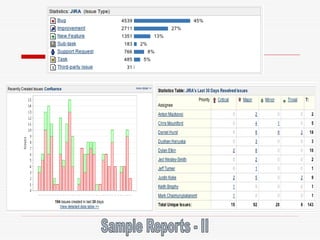
 Reporting and statistics
 Customisable reporting allows you to monitor the
progress of your issues with detailed graphs and
charts.
 Workflow your way
 Map your business process with a custom workflow.
 An extensible platform
 Integrate JIRA into your systems with our open API
and 100+ free plugins.
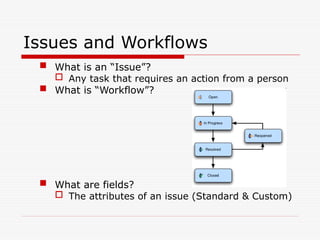
Issues and Workflows
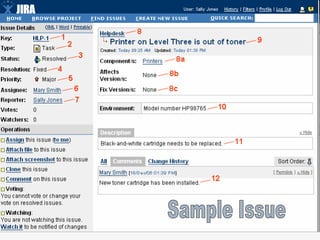
 What is an “Issue”?
 Any task that requires an action from a person
 What is “Workflow”?
 What are fields?
 The attributes of an issue (Standard & Custom)
Issue
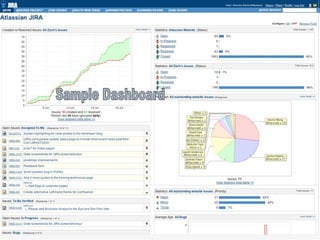
Dashboard
JIRA for Scrum
User Stories and Sprint Items
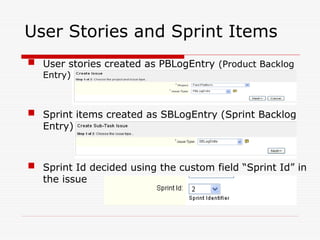
 User stories created as PBLogEntry (Product Backlog
Entry)
 Sprint items created as SBLogEntry (Sprint Backlog
Entry)
 Sprint Id decided using the custom field “Sprint Id” in
the issue
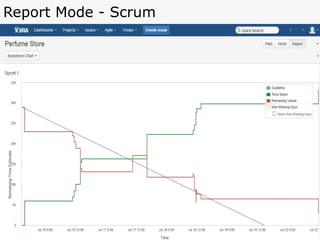
Burn-down Charts
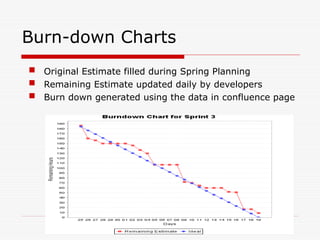
 Original Estimate filled during Spring Planning
 Remaining Estimate updated daily by developers
 Burn down generated using the data in confluence page
Plan Mode - Scrum
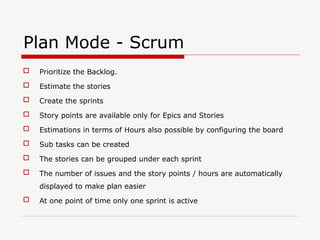
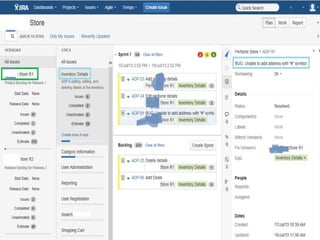
 Prioritize the Backlog.
 Estimate the stories
 Create the sprints
 Story points are available only for Epics and Stories
 Estimations in terms of Hours also possible by configuring the board
 Sub tasks can be created
 The stories can be grouped under each sprint
 The number of issues and the story points / hours are automatically
displayed to make plan easier
 At one point of time only one sprint is active
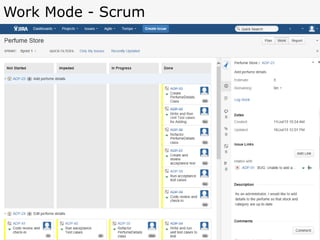
Work Mode - Scrum
Report Mode - Scrum
JIRA for Software Testing and
to file Bugs
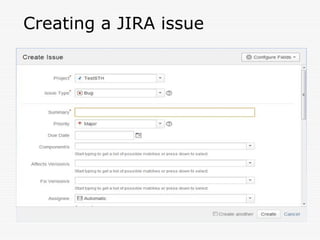
Creating a JIRA issue
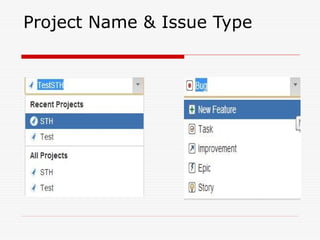
Project Name & Issue Type
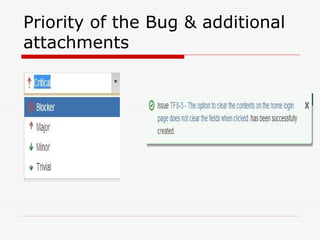
Priority of the Bug & additional
attachments
Comparison of JIRA
Top 5 Reasons GitHub Users GO JIRA
 Agile at Scale
Scrum and Kanban improve project success and deliver value iteratively. JIRA and JIRA Agile scale
Agile across your organization. JIRA also integrates with GitHub to link issues to commits.
 Industry Leading Workflow Engine
Don't let your issue tracking software dictate your process. With JIRA's workflow engine you can
easily build the process that fits your team.
 Powerful Searching and Reporting
Use JIRA's Query Language (JQL) with simple autocomplete to build advanced queries. Create a
personalized view of JIRA and share dashboards to track project status, create custom reports,
and monitor team progress with wallboards.
 Deployment Options
Simple Windows and Linux installers are available for an OnPremise solution, or you can get started
hassle-free with JIRA OnDemand. Easily switch between OnPremise or OnDemand as your
organization evolves.
 Integrate with Everything
Get more from JIRA with flexible REST and Java APIs – plus over 600 plugins and add-ons in the
Atlassian Marketplace– to connect with the applications and tools you use every day.
Pricing
 Atlassian provides JIRA for free to open
source projects meeting certain criteria,
and to organizations that are non-profit,
non-government, non-academic, non-
commercial, non-political, and secular.
For academic and commercial customers,
the full source code is available under a
developer source license
Resources
 Homepage:
http://www.atlassian.com/software/jira/
 Documentation:
http://www.atlassian.com/software/jira/
docs/
 Customers:
http://www.atlassian.com/software/jira/
customers.jsp

JIRA ArpitJinda material and notes presentation

  • 1.
    JIRA – AnIntroduction -Arpit Jindal -arpit.jindal@utdallas.edu
  • 2.
    Topics for today Introduction to JIRA and its features  Demonstration of usage of JIRA  JIRA for Scrum  Comparing JIRA with other version control tools  Q & A
  • 3.
    Basic questions  Whatis JIRA? In simple terms: “JIRA is an issue tracker”  Is it web based? Yes  Is it open source? Yes  Is it a licensed product? Yes  Whose product is JIRA? www.atlassian.com
  • 4.
    Features (from thecreators of JIRA)  Because you've got issues  JIRA lets you prioritise, assign, track, report and audit your 'issues,' whatever they may be — from software bugs and help-desk tickets to project tasks and change requests.  Reporting and statistics  Customisable reporting allows you to monitor the progress of your issues with detailed graphs and charts.  Workflow your way  Map your business process with a custom workflow.  An extensible platform  Integrate JIRA into your systems with our open API and 100+ free plugins.
  • 5.
    Issues and Workflows What is an “Issue”?  Any task that requires an action from a person  What is “Workflow”?  What are fields?  The attributes of an issue (Standard & Custom)
  • 6.
  • 8.
  • 9.
  • 10.
    User Stories andSprint Items  User stories created as PBLogEntry (Product Backlog Entry)  Sprint items created as SBLogEntry (Sprint Backlog Entry)  Sprint Id decided using the custom field “Sprint Id” in the issue
  • 11.
    Burn-down Charts  OriginalEstimate filled during Spring Planning  Remaining Estimate updated daily by developers  Burn down generated using the data in confluence page
  • 12.
    Plan Mode -Scrum  Prioritize the Backlog.  Estimate the stories  Create the sprints  Story points are available only for Epics and Stories  Estimations in terms of Hours also possible by configuring the board  Sub tasks can be created  The stories can be grouped under each sprint  The number of issues and the story points / hours are automatically displayed to make plan easier  At one point of time only one sprint is active
  • 14.
  • 15.
  • 16.
    JIRA for SoftwareTesting and to file Bugs
  • 17.
  • 18.
    Project Name &Issue Type
  • 19.
    Priority of theBug & additional attachments
  • 20.
    Comparison of JIRA Top5 Reasons GitHub Users GO JIRA  Agile at Scale Scrum and Kanban improve project success and deliver value iteratively. JIRA and JIRA Agile scale Agile across your organization. JIRA also integrates with GitHub to link issues to commits.  Industry Leading Workflow Engine Don't let your issue tracking software dictate your process. With JIRA's workflow engine you can easily build the process that fits your team.  Powerful Searching and Reporting Use JIRA's Query Language (JQL) with simple autocomplete to build advanced queries. Create a personalized view of JIRA and share dashboards to track project status, create custom reports, and monitor team progress with wallboards.  Deployment Options Simple Windows and Linux installers are available for an OnPremise solution, or you can get started hassle-free with JIRA OnDemand. Easily switch between OnPremise or OnDemand as your organization evolves.  Integrate with Everything Get more from JIRA with flexible REST and Java APIs – plus over 600 plugins and add-ons in the Atlassian Marketplace– to connect with the applications and tools you use every day.
  • 21.
    Pricing  Atlassian providesJIRA for free to open source projects meeting certain criteria, and to organizations that are non-profit, non-government, non-academic, non- commercial, non-political, and secular. For academic and commercial customers, the full source code is available under a developer source license
  • 22.

Editor's Notes

  • #18 Project: Every issue belongs to a project. You can choose the same by clicking on the drop down and choosing the project that you want this issue to belong to