JIRA AGILE
WORKSHOP
13-AUGUST-2015
Agenda
 Overview of Agile
 Overview of Scrum
 Overview of Jira
 JIRA Agile concepts
 JIRA Features
 Workflows
 Users:Group/Roles
 Jira Tools-Reports,Boards,Dashboard,timesheet
 Confluence tips
 QnA
What is Agile?
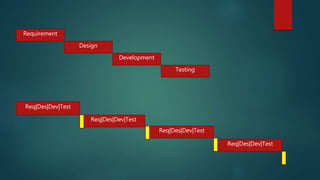
 Alternative to Traditional Software development methodology.(waterfall,
V-Model, Prototype…)
 It promotes adaptive planning, early delivery, continuous improvement
and encourages change.
 It Values, Individual and interaction over process and tool, working
software over comprehensive docs, customer collaboration over contract
negotiations, responding to change over following plan.
 Its helps in managing risk by using incremental & iterative work
deliveries .
Requirement
Design
Development
Testing
Req|Des|Dev|Test
Req|Des|Dev|Test
Req|Des|Dev|Test
Req|Des|Dev|Test
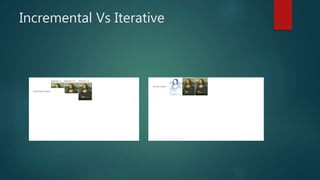
Incremental Vs Iterative
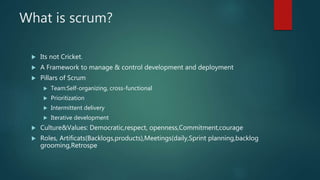
What is scrum?
 Its not Cricket.
 A Framework to manage & control development and deployment
 Pillars of Scrum
 Team:Self-organizing, cross-functional
 Prioritization
 Intermittent delivery
 Iterative development
 Culture&Values: Democratic,respect, openness,Commitment,courage
 Roles, Artificats(Backlogs,products),Meetings(daily,Sprint planning,backlog
grooming,Retrospe
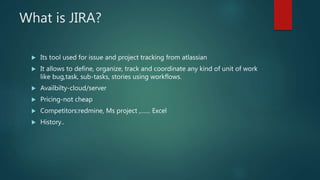
What is JIRA?
 Its tool used for issue and project tracking from atlassian
 It allows to define, organize, track and coordinate any kind of unit of work
like bug,task, sub-tasks, stories using workflows.
 Availbilty-cloud/server
 Pricing-not cheap
 Competitors:redmine, Ms project ,…… Excel
 History..
JIRA Concepts
 Issues
 Projects
 Tasks
 Subtasks
 Stories
 Epics
JIRA Features
 ISSUE creations
 Mandatory/optional field
 Screens
 Notifications
 Search/Filters
 Logging
 commenting
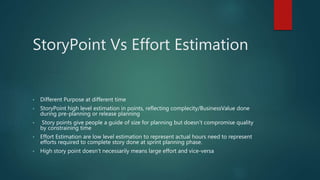
StoryPoint Vs Effort Estimation
• Different Purpose at different time
• StoryPoint high level estimation in points, reflecting complecity/BusinessValue done
during pre-planning or release planning
• Story points give people a guide of size for planning but doesn't compromise quality
by constraining time
• Effort Estimation are low level estimation to represent actual hours need to represent
efforts required to complete story done at sprint planning phase.
• High story point doesn’t necessarily means large effort and vice-versa
WORK FLOWS
 Transitions
 States
 Validation
 Conditions
 Post Conditions
 Customizations
User Management
 Users
 Groups
 Roles
 Default group
JIRA TOOLS
 Reports
 BOARDS
 DASHBOARD
Time Reporting
 It’s all about time
 Our most valuable asset
 Why
 Tempo-timesheet
Questions???

Agile presentation

  • 1.
  • 2.
    Agenda  Overview ofAgile  Overview of Scrum  Overview of Jira  JIRA Agile concepts  JIRA Features  Workflows  Users:Group/Roles  Jira Tools-Reports,Boards,Dashboard,timesheet  Confluence tips  QnA
  • 3.
    What is Agile? Alternative to Traditional Software development methodology.(waterfall, V-Model, Prototype…)  It promotes adaptive planning, early delivery, continuous improvement and encourages change.  It Values, Individual and interaction over process and tool, working software over comprehensive docs, customer collaboration over contract negotiations, responding to change over following plan.  Its helps in managing risk by using incremental & iterative work deliveries .
  • 4.
  • 5.
  • 6.
    What is scrum? Its not Cricket.  A Framework to manage & control development and deployment  Pillars of Scrum  Team:Self-organizing, cross-functional  Prioritization  Intermittent delivery  Iterative development  Culture&Values: Democratic,respect, openness,Commitment,courage  Roles, Artificats(Backlogs,products),Meetings(daily,Sprint planning,backlog grooming,Retrospe
  • 7.
    What is JIRA? Its tool used for issue and project tracking from atlassian  It allows to define, organize, track and coordinate any kind of unit of work like bug,task, sub-tasks, stories using workflows.  Availbilty-cloud/server  Pricing-not cheap  Competitors:redmine, Ms project ,…… Excel  History..
  • 8.
    JIRA Concepts  Issues Projects  Tasks  Subtasks  Stories  Epics
  • 9.
    JIRA Features  ISSUEcreations  Mandatory/optional field  Screens  Notifications  Search/Filters  Logging  commenting
  • 10.
    StoryPoint Vs EffortEstimation • Different Purpose at different time • StoryPoint high level estimation in points, reflecting complecity/BusinessValue done during pre-planning or release planning • Story points give people a guide of size for planning but doesn't compromise quality by constraining time • Effort Estimation are low level estimation to represent actual hours need to represent efforts required to complete story done at sprint planning phase. • High story point doesn’t necessarily means large effort and vice-versa
  • 11.
    WORK FLOWS  Transitions States  Validation  Conditions  Post Conditions  Customizations
  • 12.
    User Management  Users Groups  Roles  Default group
  • 13.
    JIRA TOOLS  Reports BOARDS  DASHBOARD
  • 14.
    Time Reporting  It’sall about time  Our most valuable asset  Why  Tempo-timesheet
  • 15.

Editor's Notes

  • #3 Durations, Price(1000$per person), expected to give training. Ask questions anytime related.
  • #4 Dictionary meanin: to move fast/quick. Response to change is quick Without encouraging change software we deliver could be misfit for end users requirement.
  • #7 scrum:emphasizes team collaboration prioritize the requirements, change requirement. empowers the Team to commitment Allows team to retrospect on the performance and improve upon it. work done is iterative and timeboxes Emphasizes on feedback. PO: Responsible for what to build. Represent customer, inspect and accept results, prioritize backlog and maintain it SCM: Shield team from external factors, Faciliator-meetings, PO/Team interactions, make work visible. Team: Responsible for how to build. Define definition of done. Create Sprint backlog(3-9) Meeting:standup: 15min/day, Sprint Planning(2h/week), Sprint review( what 1h/week), Retro( how, 1h/week) Other agile model, Kanban, TDD, XP,
  • #8 Agile offers a new way of thinking about software development. But Its fundamental units is still a TASK. And these tasks need to be organised , allocated, scheduled, tracked . That where jira comes to help. Organisation is heavely invested. A Mature product used by many industries. Prominent Users: Twitter, Audi, NASA…..
  • #9 Project Collection of issues. (name, Lead, Key) Issues are used to keep track of things like bugs, tasks, story. By resolving issues project moves towards completion.
  • #10 Fields are attributes of issues eg type, summary Screen are organized groups of Fields that are displayed when some operation is performed on it.
  • #11 The essence of estimating in points is that it is based on relative sizing.  My 10 hours task could be your 5 hours task but we both would agree that creating a normal user registration page is smaller task as compared to creating a shopping cart module, so this approach reduces variability in estimates.
  • #12 Every issue goes through certain steps before its closed-(no more work to be done) . Steps like In progress, In review, Fixed.. Such Set of Steps in issue life cycle is know as workflow. By Default every Jira instance contains JIRA workflow. Which can not be edited. So either create from scratch or copy the existing one and modify it. Conditions are the restrictions on who and under what circumestances. Eg person with particular only can perform. If conditions not met then person will not see the transition button. Validator: Before transition is performed, checks if input for transition fill specified criteria( eg. A field must be filled) Post conditions: actions to carry automatically after transition.(eg assigned to user)
  • #13 Users need special permissions to perform certain actions within JIRA, such as browse projects, create issues. Administrators can provide individuals or groups of users with permissions, and these permissions can vary by project. The three project roles that JIRA contains by default are Administrators, Developers, and Users. Administrators: people who administer a project Developers: people who work on issues in a project Users: people who log issues in a project By Default Global Permission is “JIRA USER” and is assigned to default group “jira-users” and this group has permission to browse all projects. So to restrict a group of users to only one project by modifying global permissions and project roles. 1). remove him from default group,(“”jira-users”) 2.) Add him to required group (say myGroup) and 3.) Add permission “JIRA USER” to the group “myGroup”. 4). Further Ensure the for the required project, Under Project roles, this group “myGroup” is assigned to role “users” or “developer”
  • #14 Board:board contains three columns, – 'To Do', – ‘In Progress' and – 'Done'.
  • #15 It is all about selling your professional expertise, the time of your most valuable asset at your company. It is about reporting time, posting time, paying for time, reviewing time, billing time, and getting paid for your time Why? to be profitable, to provide a nice place to work, to provide a nice family environment, and to help out clients with their problems. Purpose is to calculate the cost incurred on a project, re-allocation of tasks, work-load analyses, schedule the trainings and vacations. A painless and accurate way to report time. Business will be able to identify key changes required to improve the workforce productivity and efficiently plan and allocate work according to live and historical information. Reducing operational costs will increase margins, allowing you to be more competitive..