© 2015 cPrime Inc., All Rights Reserved
JIRA Fundamentals Course
PEOPLE | PROCESSES | TECHNOLOGY
Objectives
2!
• By the end of this course, you should be able to!
• Learn what JIRA is and how it is structured!
• Understand what Issue Types are available!
• Learn how to create, edit, and transition an issue!
JIRA Terms
• JIRA has it’s own terminology that we’ll discuss and
define as we move through the course!
• JIRA terms have been capitalized!
3!
What is JIRA
• JIRA is!
• A virtual work planning and delivery tool!
• Customizable for your company and project needs!
• Provides transparency and real-time reporting!
4!
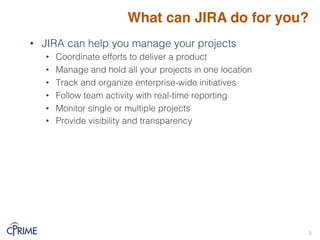
What can JIRA do for you?
• JIRA can help you manage your projects!
• Coordinate efforts to deliver a product!
• Manage and hold all your projects in one location!
• Track and organize enterprise-wide initiatives!
• Follow team activity with real-time reporting!
• Monitor single or multiple projects!
• Provide visibility and transparency!
!
5!
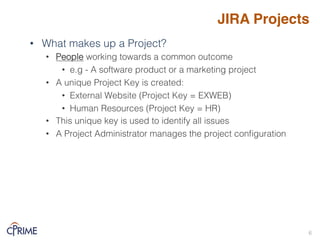
JIRA Projects
• What makes up a Project?!
• People working towards a common outcome!
• e.g - A software product or a marketing project!
• A unique Project Key is created:!
• External Website (Project Key = EXWEB)!
• Human Resources (Project Key = HR)!
• This unique key is used to identify all issues!
• A Project Administrator manages the project configuration!
6!
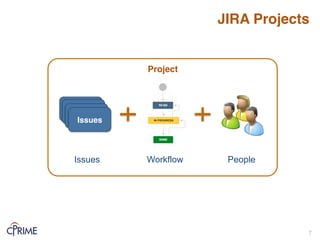
JIRA Projects
7!
Issues
Issues
Issues
Issues
Issues Workflow People
Project
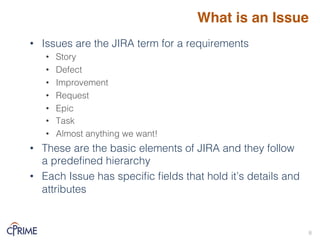
What is an Issue
• Issues are the JIRA term for a requirements!
• Story!
• Defect!
• Improvement!
• Request!
• Epic!
• Task!
• Almost anything we want!!
• These are the basic elements of JIRA and they follow
a predefined hierarchy!
• Each Issue has specific fields that hold it’s details and
attributes!
!
8!
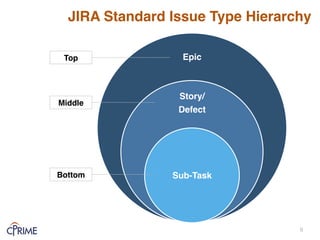
JIRA Standard Issue Type Hierarchy
Epic
Story/
Defect
Sub-Task
Top
Middle
Bottom
9!
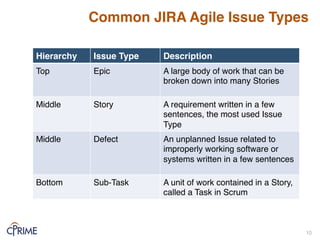
Common JIRA Agile Issue Types
!
!
!
!
!
!
!
!
Many other Issues types are available and can be
configured to suit your needs!
Hierarchy Issue Type Description
Top Epic A large body of work that can be
broken down into many Stories
Middle Story A requirement written in a few
sentences, the most used Issue
Type
Middle Defect An unplanned Issue related to
improperly working software or
systems written in a few sentences
Bottom Sub-Task A unit of work contained in a Story,
called a Task in Scrum
10!
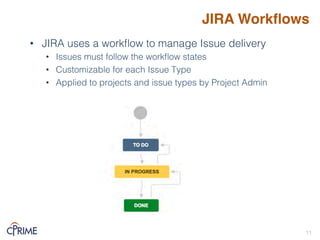
JIRA Workflows
• JIRA uses a workflow to manage Issue delivery!
• Issues must follow the workflow states!
• Customizable for each Issue Type!
• Applied to projects and issue types by Project Admin!
11!
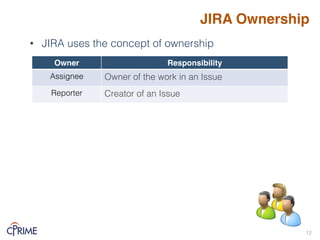
JIRA Ownership
• JIRA uses the concept of ownership!
!
12!
Owner Responsibility
Assignee! Owner of the work in an Issue!
Reporter! Creator of an Issue!
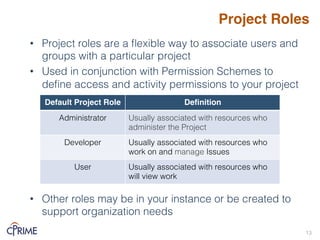
Project Roles
• Project roles are a flexible way to associate users and
groups with a particular project!
• Used in conjunction with Permission Schemes to
define access and activity permissions to your project!
• Other roles may be in your instance or be created to
support organization needs!
13!
Default Project Role Definition
Administrator! Usually associated with resources who
administer the Project!
Developer! Usually associated with resources who
work on and manage Issues!
User! Usually associated with resources who
will view work !
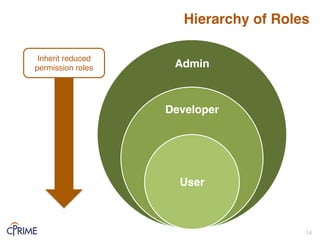
Hierarchy of Roles
14!
Admin
Developer
User
Inherit reduced
permission roles
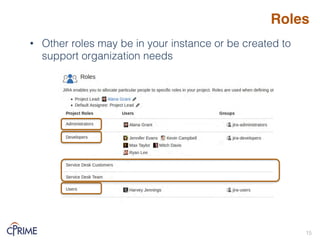
Roles
• Other roles may be in your instance or be created to
support organization needs!
15!
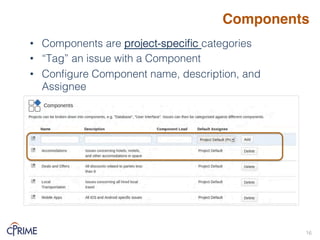
Components
• Components are project-specific categories!
• “Tag” an issue with a Component!
• Configure Component name, description, and
Assignee!
16!
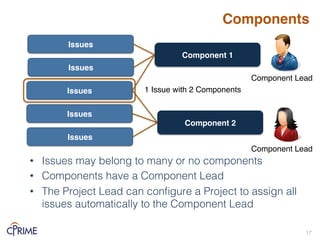
Components
• Issues may belong to many or no components!
• Components have a Component Lead!
• The Project Lead can configure a Project to assign all
issues automatically to the Component Lead!
17!
Issues
Issues
Issues
Issues
Component 1
Issues
Component 2
1 Issue with 2 Components
Component Lead
Component Lead
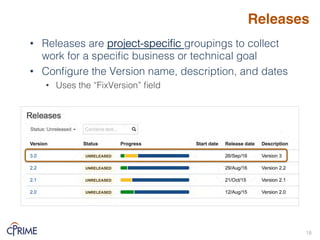
Releases
• Releases are project-specific groupings to collect
work for a specific business or technical goal!
• Configure the Version name, description, and dates!
• Uses the “FixVersion” field!
18!
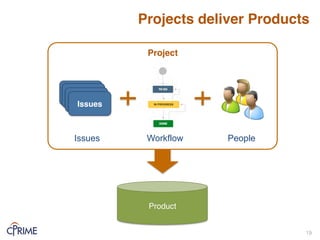
Projects deliver Products
19!
Issues
Issues
Issues
Issues
Issues Workflow People
Project
Product
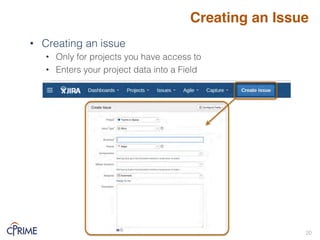
Creating an Issue
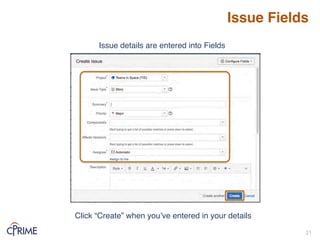
• Creating an issue!
• Only for projects you have access to!
• Enters your project data into a Field!
20!
Issue Fields
21!
Click “Create” when you’ve entered in your details
Issue details are entered into Fields
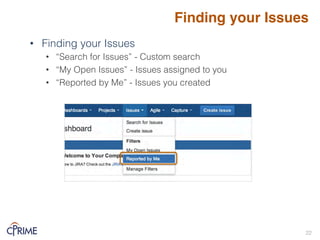
• Finding your Issues!
• “Search for Issues” - Custom search!
• “My Open Issues” - Issues assigned to you!
• “Reported by Me” - Issues you created!
!
!
Finding your Issues
22!
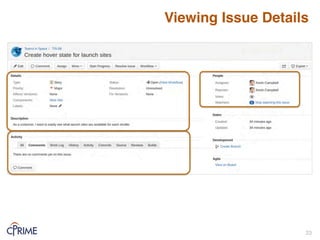
Viewing Issue Details
23!
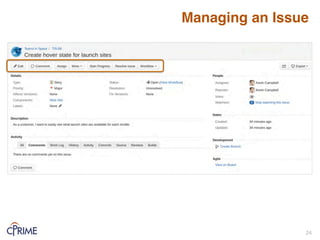
Managing an Issue
24!
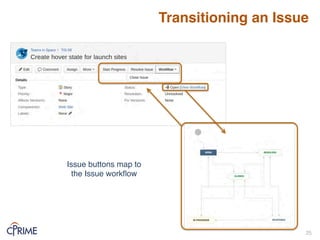
Transitioning an Issue
25!
Issue buttons map to
the Issue workflow
• @ Mentions!
• Add any User to a comment or description field!
• Notified of their mention in the Issue!
• Format: @ [User name]!
• Keyboard Shortcuts!
• Helpful to quickly and easily make changes to your Issue!
• Many available – hit ‘?’ key to show all available shortcuts!
• Common shortcuts!
• ‘e’ – edit screen!
• ‘a’ – assign an issue!
• ‘m’ – comment on an issue!
!
Managing an Issue
26!
Summary: JIRA Overview & Basics
• JIRA project, requirement, and role hierarchies exist to
support delivery of work !
• Issues are your project requirements and they can be
customized to suit your project!
• Typical issues are Agile related: Epics, Stories,
Defects, Sub-Tasks!
• Based on your permissions, you can create and edit
issues!
• Issues can be moved through workflow states!
27!
Demo
• Basic Navigation!
• Creating and viewing an Issue!
• Viewing a workflow!
• Transitioning an Issue!
28!
Online Resources
Resource Location
JIRA User’s Guide!
https://confluence.atlassian.com/display/JIRA/JIRA+User's
+Guide
29!
!
!
!
Thank you!
30!

JIRA Fundamentals Course.pdf

  • 1.
    © 2015 cPrimeInc., All Rights Reserved JIRA Fundamentals Course PEOPLE | PROCESSES | TECHNOLOGY
  • 2.
    Objectives 2! • By theend of this course, you should be able to! • Learn what JIRA is and how it is structured! • Understand what Issue Types are available! • Learn how to create, edit, and transition an issue!
  • 3.
    JIRA Terms • JIRAhas it’s own terminology that we’ll discuss and define as we move through the course! • JIRA terms have been capitalized! 3!
  • 4.
    What is JIRA •JIRA is! • A virtual work planning and delivery tool! • Customizable for your company and project needs! • Provides transparency and real-time reporting! 4!
  • 5.
    What can JIRAdo for you? • JIRA can help you manage your projects! • Coordinate efforts to deliver a product! • Manage and hold all your projects in one location! • Track and organize enterprise-wide initiatives! • Follow team activity with real-time reporting! • Monitor single or multiple projects! • Provide visibility and transparency! ! 5!
  • 6.
    JIRA Projects • Whatmakes up a Project?! • People working towards a common outcome! • e.g - A software product or a marketing project! • A unique Project Key is created:! • External Website (Project Key = EXWEB)! • Human Resources (Project Key = HR)! • This unique key is used to identify all issues! • A Project Administrator manages the project configuration! 6!
  • 7.
  • 8.
    What is anIssue • Issues are the JIRA term for a requirements! • Story! • Defect! • Improvement! • Request! • Epic! • Task! • Almost anything we want!! • These are the basic elements of JIRA and they follow a predefined hierarchy! • Each Issue has specific fields that hold it’s details and attributes! ! 8!
  • 9.
    JIRA Standard IssueType Hierarchy Epic Story/ Defect Sub-Task Top Middle Bottom 9!
  • 10.
    Common JIRA AgileIssue Types ! ! ! ! ! ! ! ! Many other Issues types are available and can be configured to suit your needs! Hierarchy Issue Type Description Top Epic A large body of work that can be broken down into many Stories Middle Story A requirement written in a few sentences, the most used Issue Type Middle Defect An unplanned Issue related to improperly working software or systems written in a few sentences Bottom Sub-Task A unit of work contained in a Story, called a Task in Scrum 10!
  • 11.
    JIRA Workflows • JIRAuses a workflow to manage Issue delivery! • Issues must follow the workflow states! • Customizable for each Issue Type! • Applied to projects and issue types by Project Admin! 11!
  • 12.
    JIRA Ownership • JIRAuses the concept of ownership! ! 12! Owner Responsibility Assignee! Owner of the work in an Issue! Reporter! Creator of an Issue!
  • 13.
    Project Roles • Projectroles are a flexible way to associate users and groups with a particular project! • Used in conjunction with Permission Schemes to define access and activity permissions to your project! • Other roles may be in your instance or be created to support organization needs! 13! Default Project Role Definition Administrator! Usually associated with resources who administer the Project! Developer! Usually associated with resources who work on and manage Issues! User! Usually associated with resources who will view work !
  • 14.
  • 15.
    Roles • Other rolesmay be in your instance or be created to support organization needs! 15!
  • 16.
    Components • Components areproject-specific categories! • “Tag” an issue with a Component! • Configure Component name, description, and Assignee! 16!
  • 17.
    Components • Issues maybelong to many or no components! • Components have a Component Lead! • The Project Lead can configure a Project to assign all issues automatically to the Component Lead! 17! Issues Issues Issues Issues Component 1 Issues Component 2 1 Issue with 2 Components Component Lead Component Lead
  • 18.
    Releases • Releases areproject-specific groupings to collect work for a specific business or technical goal! • Configure the Version name, description, and dates! • Uses the “FixVersion” field! 18!
  • 19.
  • 20.
    Creating an Issue •Creating an issue! • Only for projects you have access to! • Enters your project data into a Field! 20!
  • 21.
    Issue Fields 21! Click “Create”when you’ve entered in your details Issue details are entered into Fields
  • 22.
    • Finding yourIssues! • “Search for Issues” - Custom search! • “My Open Issues” - Issues assigned to you! • “Reported by Me” - Issues you created! ! ! Finding your Issues 22!
  • 23.
  • 24.
  • 25.
    Transitioning an Issue 25! Issuebuttons map to the Issue workflow
  • 26.
    • @ Mentions! •Add any User to a comment or description field! • Notified of their mention in the Issue! • Format: @ [User name]! • Keyboard Shortcuts! • Helpful to quickly and easily make changes to your Issue! • Many available – hit ‘?’ key to show all available shortcuts! • Common shortcuts! • ‘e’ – edit screen! • ‘a’ – assign an issue! • ‘m’ – comment on an issue! ! Managing an Issue 26!
  • 27.
    Summary: JIRA Overview& Basics • JIRA project, requirement, and role hierarchies exist to support delivery of work ! • Issues are your project requirements and they can be customized to suit your project! • Typical issues are Agile related: Epics, Stories, Defects, Sub-Tasks! • Based on your permissions, you can create and edit issues! • Issues can be moved through workflow states! 27!
  • 28.
    Demo • Basic Navigation! •Creating and viewing an Issue! • Viewing a workflow! • Transitioning an Issue! 28!
  • 29.
    Online Resources Resource Location JIRAUser’s Guide! https://confluence.atlassian.com/display/JIRA/JIRA+User's +Guide 29!
  • 30.