JIRA
Group Members:
• Rozi Khan (29202)
• Ahmed Ullah (29410)
• Najib Ur Rehman (29991)
What is JIRA
• JIRA is a tool developed by Australian Company
Atlassian.
• The word JIRA is derived from Japanese word
“Gojira”, which means Godzilla.
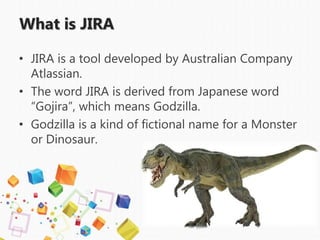
• Godzilla is a kind of fictional name for a Monster
or Dinosaur.
What JIRA is used for?
• Bug Tracking
• Issue Tracking
• Project Management
The basic use of this tool is to track issues,
and bugs related to your software and
mobile apps. It is also used for project
management. The JIRA dashboard consists
of many useful functions and features which
make handling of issues easy.
Bug Tracking
• Bug tracking is a process used by quality
assurance personnel and programmers to keep
track of software problems and resolutions. A
bug tracking system is normally put in place to
store information about reported bugs.
Issue Tracking
• Issue tracking or as some like to call it bug tracking is the
process of tracking and documenting any issues or bug
that relate to a project or product. Although this process
will usually take place during the development stage of a
product, issue tracking is an ongoing process and as new
issues and bugs arise they may also be documented.
• Issue tracking is more of a general term and refers to the
process of tracking issues that relate to any type of
project. Bug tracking on the other hand tends to refer to
the process of tracking issues and "bugs" within
software.
Project Management
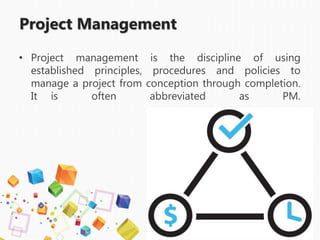
• Project management is the discipline of using
established principles, procedures and policies to
manage a project from conception through completion.
It is often abbreviated as PM.
Basic concepts in JIRA
• Project
• Issue
• Workflow
What is JIRA Project?
• A JIRA project is a collection of issues, and is defined
according to your organization's requirements. For
example, a JIRA project could be:
• a software development project
• a marketing campaign
• a helpdesk system
• a leave request management system
• a website enhancement request system
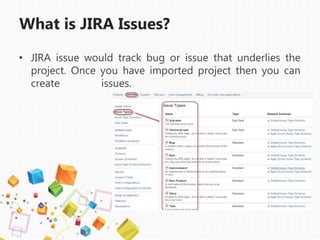
What is JIRA Issues?
• JIRA issue would track bug or issue that underlies the
project. Once you have imported project then you can
create issues.
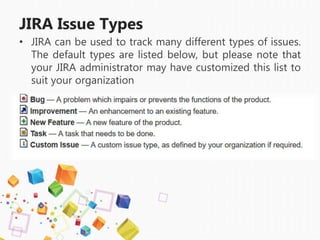
JIRA Issue Types
• JIRA can be used to track many different types of issues.
The default types are listed below, but please note that
your JIRA administrator may have customized this list to
suit your organization
Issue Priority
• An issue's priority indicates its relative importance. The
default priorities are listed below; note that both the
priorities and their meanings can be customized by your
JIRA administrator to suit your organization.
Highest — Highest priority. This problem will block progress.
High — Indicates that this issue is causing a problem and requires
urgent attention.
Medium — Indicates that this issue has a significant impact.
Low — Indicates that this issue has a relatively minor impact.
Lowest — Lowest priority.
JIRA Workflow
• A JIRA workflow is a set
of statuses and transitions that an issue moves
through during its lifecycle and typically
represents processes within your organization.
There are default built-in workflows that cannot
be edited; however, you can copy and use
these workflows to create your own.
JIRA Workflow
Workflow
While workflow in JIRA comprises of Statuses, assignee,
resolution, conditions, validators, post-function's and properties
Statuses: It represents the positions of the issues within a
workflow.
Transitions: Transitions are the bridges between statuses, the way
a particular issue moves from one status to another
Assignee: The assignee dictates the responsible party for any given
issue and determines how the task would be executed
Resolution: It explains why an issue transitions from an open status
to a closed one
Conditions: Conditions control who can perform a transition
Validators: It can ensure that the transition can happen given the
state of the issue
Properties: JIRA recognizes some properties on transitions
Workflow
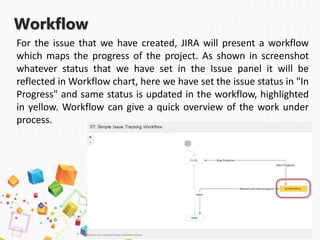
For the issue that we have created, JIRA will present a workflow
which maps the progress of the project. As shown in screenshot
whatever status that we have set in the Issue panel it will be
reflected in Workflow chart, here we have set the issue status in "In
Progress" and same status is updated in the workflow, highlighted
in yellow. Workflow can give a quick overview of the work under
process.
Companies that use JIRA
LiveRamp, AppNexus, Cloudflare, Intuit, LinkedIn, Twitter, eBay,
Splunk, WeWork, Criteo, App Annie, DocuSign, Snapdeal,
SteelHouse, IBM, Google, Accenture, Yahoo, Intel, T-Mobile,
Zendesk, Capital One, New Relic, Box, Sony, Uber, Autodesk,
HubSpot, Chegg, Yelp, Okta, AOL, BuzzFeed, and many others.

Introduction to JIRA

  • 1.
    JIRA Group Members: • RoziKhan (29202) • Ahmed Ullah (29410) • Najib Ur Rehman (29991)
  • 2.
    What is JIRA •JIRA is a tool developed by Australian Company Atlassian. • The word JIRA is derived from Japanese word “Gojira”, which means Godzilla. • Godzilla is a kind of fictional name for a Monster or Dinosaur.
  • 3.
    What JIRA isused for? • Bug Tracking • Issue Tracking • Project Management The basic use of this tool is to track issues, and bugs related to your software and mobile apps. It is also used for project management. The JIRA dashboard consists of many useful functions and features which make handling of issues easy.
  • 4.
    Bug Tracking • Bugtracking is a process used by quality assurance personnel and programmers to keep track of software problems and resolutions. A bug tracking system is normally put in place to store information about reported bugs.
  • 5.
    Issue Tracking • Issuetracking or as some like to call it bug tracking is the process of tracking and documenting any issues or bug that relate to a project or product. Although this process will usually take place during the development stage of a product, issue tracking is an ongoing process and as new issues and bugs arise they may also be documented. • Issue tracking is more of a general term and refers to the process of tracking issues that relate to any type of project. Bug tracking on the other hand tends to refer to the process of tracking issues and "bugs" within software.
  • 6.
    Project Management • Projectmanagement is the discipline of using established principles, procedures and policies to manage a project from conception through completion. It is often abbreviated as PM.
  • 8.
    Basic concepts inJIRA • Project • Issue • Workflow
  • 9.
    What is JIRAProject? • A JIRA project is a collection of issues, and is defined according to your organization's requirements. For example, a JIRA project could be: • a software development project • a marketing campaign • a helpdesk system • a leave request management system • a website enhancement request system
  • 10.
    What is JIRAIssues? • JIRA issue would track bug or issue that underlies the project. Once you have imported project then you can create issues.
  • 11.
    JIRA Issue Types •JIRA can be used to track many different types of issues. The default types are listed below, but please note that your JIRA administrator may have customized this list to suit your organization
  • 12.
    Issue Priority • Anissue's priority indicates its relative importance. The default priorities are listed below; note that both the priorities and their meanings can be customized by your JIRA administrator to suit your organization. Highest — Highest priority. This problem will block progress. High — Indicates that this issue is causing a problem and requires urgent attention. Medium — Indicates that this issue has a significant impact. Low — Indicates that this issue has a relatively minor impact. Lowest — Lowest priority.
  • 13.
    JIRA Workflow • AJIRA workflow is a set of statuses and transitions that an issue moves through during its lifecycle and typically represents processes within your organization. There are default built-in workflows that cannot be edited; however, you can copy and use these workflows to create your own.
  • 14.
  • 15.
    Workflow While workflow inJIRA comprises of Statuses, assignee, resolution, conditions, validators, post-function's and properties Statuses: It represents the positions of the issues within a workflow. Transitions: Transitions are the bridges between statuses, the way a particular issue moves from one status to another Assignee: The assignee dictates the responsible party for any given issue and determines how the task would be executed Resolution: It explains why an issue transitions from an open status to a closed one Conditions: Conditions control who can perform a transition Validators: It can ensure that the transition can happen given the state of the issue Properties: JIRA recognizes some properties on transitions
  • 16.
    Workflow For the issuethat we have created, JIRA will present a workflow which maps the progress of the project. As shown in screenshot whatever status that we have set in the Issue panel it will be reflected in Workflow chart, here we have set the issue status in "In Progress" and same status is updated in the workflow, highlighted in yellow. Workflow can give a quick overview of the work under process.
  • 17.
    Companies that useJIRA LiveRamp, AppNexus, Cloudflare, Intuit, LinkedIn, Twitter, eBay, Splunk, WeWork, Criteo, App Annie, DocuSign, Snapdeal, SteelHouse, IBM, Google, Accenture, Yahoo, Intel, T-Mobile, Zendesk, Capital One, New Relic, Box, Sony, Uber, Autodesk, HubSpot, Chegg, Yelp, Okta, AOL, BuzzFeed, and many others.