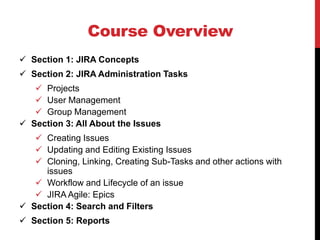
The document details a Jira learning course available on Udemy, offering a 50% discount coupon. It covers basic concepts of Jira, including projects, issues, components, and workflows, along with structured course sections for administration tasks, issue management, and reporting. Instructions for both cloud and local installation of Jira are provided, emphasizing a quick start and user guidance.

JIRA Install Instructions
•Cloud
• No download and install required
• Free trial version
• Get started in 5 min
• Link and instructions to get started here
• Local Install
• Local install also available
• Provides full control
• Instructions here
What is aProject?
• A JIRA Project is a collection of issues
• Every issue belongs to a Project
• Each project is identified by a Name and Key
• Project Key is appended to each issue associated with the
project
• Example:
• Name of Project: Social Media Site
• Project Key: SM
• Issue: SM_24 Add a new friend
6.
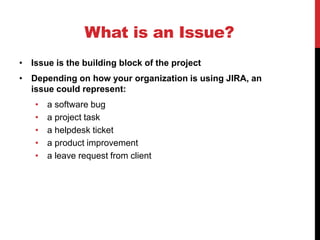
What is anIssue?
• Issue is the building block of the project
• Depending on how your organization is using JIRA, an
issue could represent:
• a software bug
• a project task
• a helpdesk ticket
• a product improvement
• a leave request from client
7.
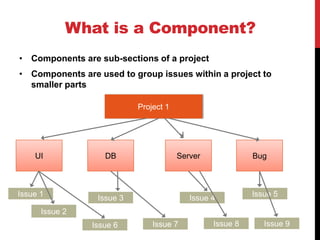
What is aComponent?
• Components are sub-sections of a project
• Components are used to group issues within a project to
smaller parts
Project 1
UI DB Server Bug
Issue 1
Issue 2
Issue 4Issue 3
Issue 5
Issue 7 Issue 8Issue 6 Issue 9
8.
What is aWorkflow?
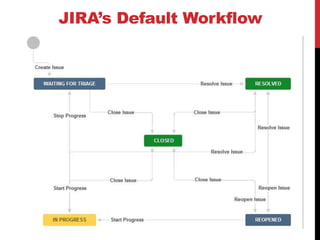
• A JIRA workflow is the set of statuses and transitions that
an issue goes through during its lifecycle.
• Workflows typically represent business processes.
• JIRA comes with default workflow and it can be
customized to fit your organization
9.
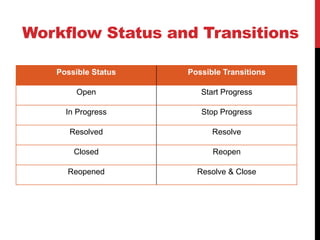
Workflow Status andTransitions
Possible Status Possible Transitions
Open Start Progress
In Progress Stop Progress
Resolved Resolve
Closed Reopen
Reopened Resolve & Close