Jenkins Pipelines
Steffen Gebert (@StGebert)
DevOps Meetup Frankfurt, 20.10.2016
About Me
Researcher / PhD Student
(Software-based Networks)
2011 - 2016
Core Team Member
2010 - 2013
Server Admin Team Member
since 2011
2
Co-Organizer DevOps Meetup Würzburg
since last week
Continuous Delivery
4
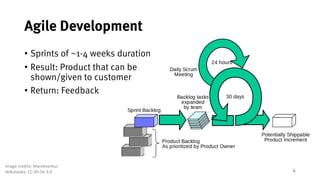
Agile Development
• Sprints of ~1-4 weeks duration
• Result: Product that can be
shown/given to customer
• Return: Feedback
Image	credits:	Marekventur,
Wikimedia, CC-BY-SA-3.0
5
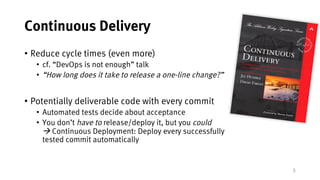
Continuous Delivery
• Reduce cycle times (even more)
• cf. “DevOps is not enough” talk
• “How long does it take to release a one-line change?”
• Potentially deliverable code with every commit
• Automated tests decide about acceptance
• You don’t have to release/deploy it, but you could
à Continuous Deployment: Deploy every successfully
tested commit automatically
6
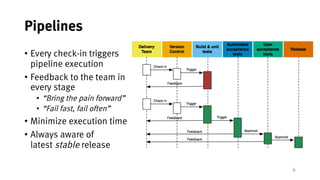
Pipelines
• Every check-in triggers
pipeline execution
• Feedback to the team in
every stage
• “Bring the pain forward”
• “Fail fast, fail often”
• Minimize execution time
• Always aware of
latest stable release
CI & CD Tools
8
CI/CD Tools
• On-premise
• Jenkins
• Thoughtworks Go
• Gitlab CI
• SaaS
• TravisCI
• CircleCI
• AppVeyor
• Codeship
• Visual Studio Team Services
9
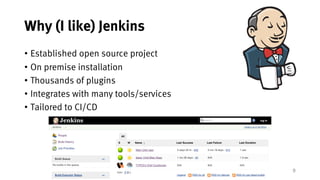
Why (I like) Jenkins
• Established open source project
• On premise installation
• Thousands of plugins
• Integrates with many tools/services
• Tailored to CI/CD
10
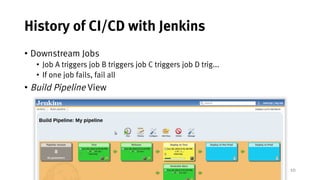
History of CI/CD with Jenkins
• Downstream Jobs
• Job A triggers job B triggers job C triggers job D trig...
• If one job fails, fail all
• Build Pipeline View
But that’s awkward
… and what I want instead
12
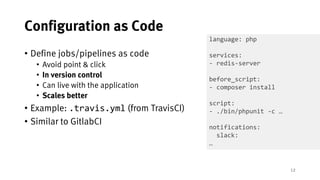
Configuration as Code
• Define jobs/pipelines as code
• Avoid point & click
• In version control
• Can live with the application
• Scales better
• Example: .travis.yml (from TravisCI)
• Similar to GitlabCI
language: php
services:
- redis-server
before_script:
- composer install
script:
- ./bin/phpunit -c …
notifications:
slack:
…
13
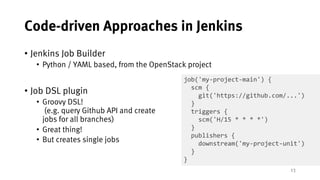
Code-driven Approaches in Jenkins
• Jenkins Job Builder
• Python / YAML based, from the OpenStack project
• Job DSL plugin
• Groovy DSL!
(e.g. query Github API and create
jobs for all branches)
• Great thing!
• But creates single jobs
job('my-project-main') {
scm {
git('https://github.com/...')
}
triggers {
scm('H/15 * * * *')
}
publishers {
downstream('my-project-unit')
}
}
Jenkins Pipeline Plugins
15
Jenkins Pipeline Plugins
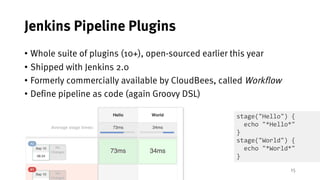
• Whole suite of plugins (10+), open-sourced earlier this year
• Shipped with Jenkins 2.0
• Formerly commercially available by CloudBees, called Workflow
• Define pipeline as code (again Groovy DSL)
stage("Hello") {
echo "*Hello*"
}
stage("World") {
echo "*World*"
}
16
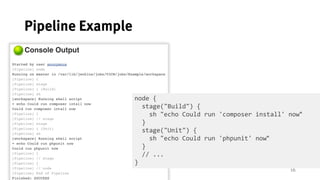
Pipeline Example
node {
stage("Build") {
sh "echo Could run 'composer install' now"
}
stage("Unit") {
sh "echo Could run 'phpunit' now"
}
// ...
}
17
Pipeline Execution
• node step allocates executor slot (“heavyweight executor”)
• As other Jenkins jobs
• Filter node by labels (i.e. node('php7'), node('master'))
• Required for heavy lifting
• Avoid many sequential allocations (slows down pipeline progress)
• Code outside of node
• Flyweight executor
• Running on master, "for free”
• Pipeline execution survives Jenkins restarts (CPS)
18
Pipeline DSL Steps
• Shellout
• *nix systems: sh
• sh("make"), sh("rm -rf /")
• Windows systems: bat
• bat("C:Program Files...")
• SCM
• checkout("https://github.com/..git")
• File handling
• readFile("my.config")
• writeFile(file: "README.md", text: "Hello World")
• fileExists
19
Pipeline DSL Steps (2)
• Build another job:
• Will not go further into detail J
build("jobname")
build("jobname", wait: false, propagate: false)
Build(job: 'jobname', parameters: [
[$class: 'StringParameterValue', name: 'target', value: target]
[$class: 'ListSubversionTagsParameterValue', name: 'release', tag: release],
[$class: 'BooleanParameterValue', name: 'update_composer', value:
update_composer.to_boolean()])
20
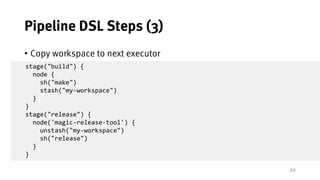
Pipeline DSL Steps (3)
• Copy workspace to next executor
• Will not go further into detail J
stage("build") {
node {
sh("make")
stash("my-workspace")
}
}
stage("release") {
node('magic-release-tool') {
unstash("my-workspace")
sh("release")
}
}
21
Pipeline DSL Steps (4)
• Specify custom environment variables
• Use variables provided by Jenkins
• Global Groovy variables
withEnv(['MYTOOL_HOME=/usr/local/mytool']) {
sh '$MYTOOL_HOME/bin/start‘
}
env.FOO = "bar"
sh 'echo $BAR'
sh 'echo $BUILD_NUMBER > version.txt'
currentBuild.result = 'FAILED'
22
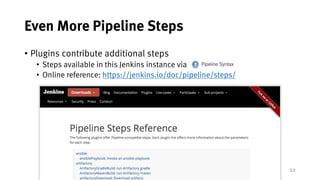
Even More Pipeline Steps
• Plugins contribute additional steps
• Steps available in this Jenkins instance via
• Online reference: https://jenkins.io/doc/pipeline/steps/
23
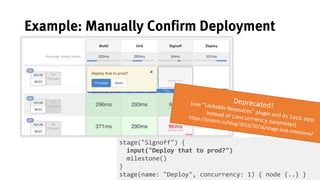
Example: Manually Confirm Deployment
stage("Signoff") {
input("Deploy that to prod?")
milestone()
}
stage(name: "Deploy", concurrency: 1) { node {..} }
24
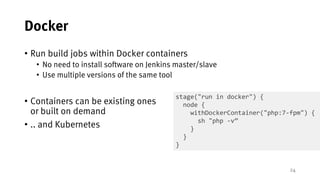
Docker
• Run build jobs within Docker containers
• No need to install software on Jenkins master/slave
• Use multiple versions of the same tool
• Containers can be existing ones
or built on demand
• .. and Kubernetes
stage("run in docker") {
node {
withDockerContainer("php:7-fpm") {
sh "php -v”
}
}
}
25
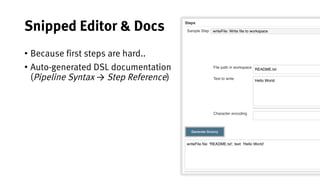
Snipped Editor & Docs
• Because first steps are hard..
• Auto-generated DSL documentation
(Pipeline Syntax → Step Reference)
Where to put that config?
27
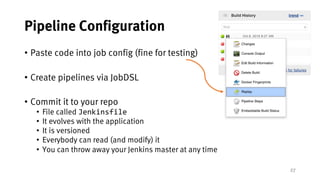
Pipeline Configuration
• Paste code into job config (fine for testing)
• Create pipelines via JobDSL
• Commit it to your repo
• File called Jenkinsfile
• It evolves with the application
• It is versioned
• Everybody can read (and modify) it
• You can throw away your Jenkins master at any time
28
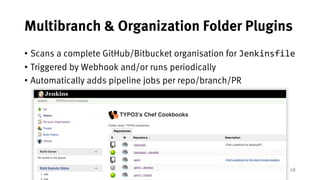
Multibranch & Organization Folder Plugins
• Scans a complete GitHub/Bitbucket organisation for Jenkinsfile
• Triggered by Webhook and/or runs periodically
• Automatically adds pipeline jobs per repo/branch/PR
29
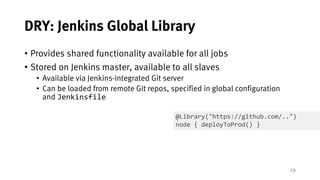
DRY: Jenkins Global Library
• Provides shared functionality available for all jobs
• Stored on Jenkins master, available to all slaves
• Available via Jenkins-integrated Git server
• Can be loaded from remote Git repos, specified in global configuration
and Jenkinsfile
@Library("https://github.com/..")
node { deployToProd() }
Jenkins Pipelines for
Chef Cookbooks
Real-World Example
31
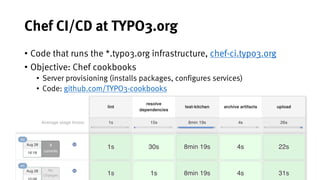
Chef CI/CD at TYPO3.org
• Code that runs the *.typo3.org infrastructure, chef-ci.typo3.org
• Objective: Chef cookbooks
• Server provisioning (installs packages, configures services)
• Code: github.com/TYPO3-cookbooks
32
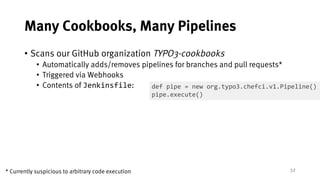
Many Cookbooks, Many Pipelines
• Scans our GitHub organization TYPO3-cookbooks
• Automatically adds/removes pipelines for branches and pull requests*
• Triggered via Webhooks
• Contents of Jenkinsfile: def pipe = new org.typo3.chefci.v1.Pipeline()
pipe.execute()
* Currently suspicious to arbitrary code execution
33
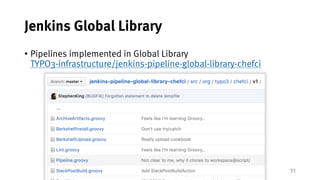
Jenkins Global Library
• Pipelines implemented in Global Library
TYPO3-infrastructure/jenkins-pipeline-global-library-chefci
34
Parallelize Integration Tests
• Run Test-Kitchen (integration test for Chef cookbooks)
• Run all instances in parallel (by Jenkins)
$ kitchen status
Instance Driver Provisioner [..] Last Action
default-debian-78 Docker ChefZero <Not Created>
default-debian-82 Docker ChefZero <Not Created>
physical-debian-78 Docker ChefZero <Not Created>
physical-debian-82 Docker ChefZero <Not Created>
production-debian-78 Docker ChefZero <Not Created>
production-debian-82 Docker ChefZero <Not Created>
35
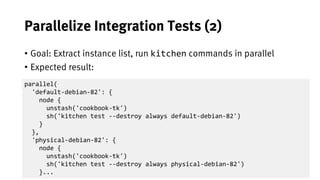
Parallelize Integration Tests (2)
• Goal: Extract instance list, run kitchen commands in parallel
• Expected result:
parallel(
'default-debian-82': {
node {
unstash('cookbook-tk')
sh('kitchen test --destroy always default-debian-82')
}
},
'physical-debian-82': {
node {
unstash('cookbook-tk')
sh('kitchen test --destroy always physical-debian-82')
}...
36
Parallelize Integration Tests (3)
• Grab list of instance names
def ArrayList<String> getInstances(){
def instanceNames = []
node {
def lines = sh(script: 'kitchen status', returnStdout: true).split('n')
for (int i = 1; i < lines.size(); i++) {
instanceNames << lines[i].tokenize(' ')[0]
}
}
return instanceNames
}
* Closures don’t always work well within Pipeline code (cf. @NonCPS)
37
Parallelize Integration Tests (4)
def Closure getNodeForInstance(String instanceName) {
return {
// this node (one per instance) is later executed in parallel
node {
// restore workspace
unstash('cookbook-tk')
sh('kitchen test --destroy always ' + instanceName)
}}}
for (int i = 0; i < instanceNames.size(); i++) {
def instanceName = instanceNames.get(i)
plNodes[instanceName] = this.getNodeForInstance(instanceName)
}
parallel plNodes
38
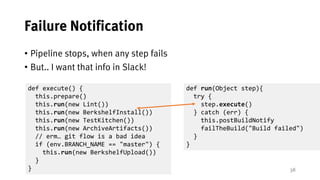
Failure Notification
• Pipeline stops, when any step fails
• But.. I want that info in Slack!
def run(Object step){
try {
step.execute()
} catch (err) {
this.postBuildNotify
failTheBuild("Build failed")
}
}
def execute() {
this.prepare()
this.run(new Lint())
this.run(new BerkshelfInstall())
this.run(new TestKitchen())
this.run(new ArchiveArtifacts())
// erm… git flow is a bad idea
if (env.BRANCH_NAME == "master") {
this.run(new BerkshelfUpload())
}
}
Blue Ocean & Other News
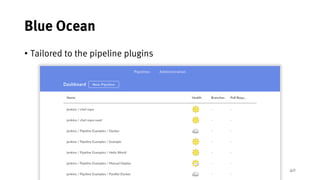
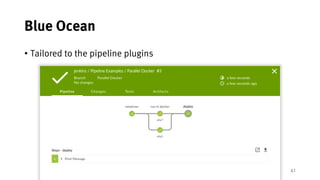
A new Jenkins UI
40
Blue Ocean
• Tailored to the pipeline plugins
41
Blue Ocean
• Tailored to the pipeline plugins
42
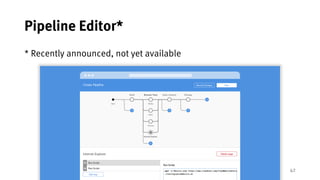
Pipeline Editor*
* Recently announced, not yet available
43
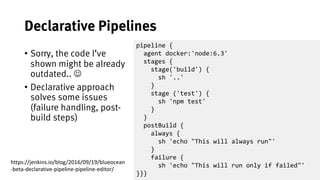
Declarative Pipelines
• Sorry, the code I’ve
shown might be already
outdated.. J
• Declarative approach
solves some issues
(failure handling, post-
build steps)
pipeline {
agent docker:'node:6.3'
stages {
stage('build') {
sh '..'
}
stage ('test') {
sh 'npm test'
}
}
postBuild {
always {
sh 'echo "This will always run"'
}
failure {
sh 'echo "This will run only if failed"'
}}}
https://jenkins.io/blog/2016/09/19/blueocean
-beta-declarative-pipeline-pipeline-editor/
44
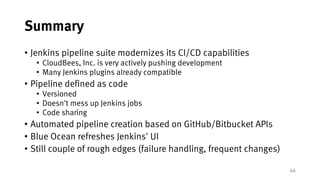
Summary
• Jenkins pipeline suite modernizes its CI/CD capabilities
• CloudBees, Inc. is very actively pushing development
• Many Jenkins plugins already compatible
• Pipeline defined as code
• Versioned
• Doesn't mess up Jenkins jobs
• Code sharing
• Automated pipeline creation based on GitHub/Bitbucket APIs
• Blue Ocean refreshes Jenkins' UI
• Still couple of rough edges (failure handling, frequent changes)
45
Further Reading
• Pipeline Tutorial:
https://github.com/jenkinsci/pipeline-plugin/blob/master/TUTORIAL.md
• Getting started with pipelines:
https://jenkins.io/pipeline/getting-started-pipelines/
• Jenkins World 2016 Wrap Up - Pipelines:
https://jenkins.io/blog/2016/09/24/jenkins-world-2016-wrap-up-pipeline/
• Step documentation:
https://jenkins.io/doc/pipeline/steps/
• Pipeline global library:
https://github.com/jenkinsci/workflow-cps-global-lib-plugin/blob/master/README.md
• Docker in Jenkins pipelines:
https://jenkins.io/blog/2016/08/08/docker-pipeline-environments/
• Notifications (Mail, Slack, etc.):
https://jenkins.io/blog/2016/07/18/pipline-notifications/
• Parallel execution:
https://jenkins.io/blog/2016/06/16/parallel-test-executor-plugin/
• Extending pipeline DSL:
https://jenkins.io/blog/2016/04/21/dsl-plugins/
• Controlling the Flow with Stage, Lock, and Milestone:
https://jenkins.io/blog/2016/10/16/stage-lock-milestone/
• TYPO3's Chef CI:
https://chef-ci.typo3.org
46

Jenkins Pipelines

  • 1.
    Jenkins Pipelines Steffen Gebert(@StGebert) DevOps Meetup Frankfurt, 20.10.2016
  • 2.
    About Me Researcher /PhD Student (Software-based Networks) 2011 - 2016 Core Team Member 2010 - 2013 Server Admin Team Member since 2011 2 Co-Organizer DevOps Meetup Würzburg since last week
  • 3.
  • 4.
    4 Agile Development • Sprintsof ~1-4 weeks duration • Result: Product that can be shown/given to customer • Return: Feedback Image credits: Marekventur, Wikimedia, CC-BY-SA-3.0
  • 5.
    5 Continuous Delivery • Reducecycle times (even more) • cf. “DevOps is not enough” talk • “How long does it take to release a one-line change?” • Potentially deliverable code with every commit • Automated tests decide about acceptance • You don’t have to release/deploy it, but you could à Continuous Deployment: Deploy every successfully tested commit automatically
  • 6.
    6 Pipelines • Every check-intriggers pipeline execution • Feedback to the team in every stage • “Bring the pain forward” • “Fail fast, fail often” • Minimize execution time • Always aware of latest stable release
  • 7.
    CI & CDTools
  • 8.
    8 CI/CD Tools • On-premise •Jenkins • Thoughtworks Go • Gitlab CI • SaaS • TravisCI • CircleCI • AppVeyor • Codeship • Visual Studio Team Services
  • 9.
    9 Why (I like)Jenkins • Established open source project • On premise installation • Thousands of plugins • Integrates with many tools/services • Tailored to CI/CD
  • 10.
    10 History of CI/CDwith Jenkins • Downstream Jobs • Job A triggers job B triggers job C triggers job D trig... • If one job fails, fail all • Build Pipeline View
  • 11.
    But that’s awkward …and what I want instead
  • 12.
    12 Configuration as Code •Define jobs/pipelines as code • Avoid point & click • In version control • Can live with the application • Scales better • Example: .travis.yml (from TravisCI) • Similar to GitlabCI language: php services: - redis-server before_script: - composer install script: - ./bin/phpunit -c … notifications: slack: …
  • 13.
    13 Code-driven Approaches inJenkins • Jenkins Job Builder • Python / YAML based, from the OpenStack project • Job DSL plugin • Groovy DSL! (e.g. query Github API and create jobs for all branches) • Great thing! • But creates single jobs job('my-project-main') { scm { git('https://github.com/...') } triggers { scm('H/15 * * * *') } publishers { downstream('my-project-unit') } }
  • 14.
  • 15.
    15 Jenkins Pipeline Plugins •Whole suite of plugins (10+), open-sourced earlier this year • Shipped with Jenkins 2.0 • Formerly commercially available by CloudBees, called Workflow • Define pipeline as code (again Groovy DSL) stage("Hello") { echo "*Hello*" } stage("World") { echo "*World*" }
  • 16.
    16 Pipeline Example node { stage("Build"){ sh "echo Could run 'composer install' now" } stage("Unit") { sh "echo Could run 'phpunit' now" } // ... }
  • 17.
    17 Pipeline Execution • nodestep allocates executor slot (“heavyweight executor”) • As other Jenkins jobs • Filter node by labels (i.e. node('php7'), node('master')) • Required for heavy lifting • Avoid many sequential allocations (slows down pipeline progress) • Code outside of node • Flyweight executor • Running on master, "for free” • Pipeline execution survives Jenkins restarts (CPS)
  • 18.
    18 Pipeline DSL Steps •Shellout • *nix systems: sh • sh("make"), sh("rm -rf /") • Windows systems: bat • bat("C:Program Files...") • SCM • checkout("https://github.com/..git") • File handling • readFile("my.config") • writeFile(file: "README.md", text: "Hello World") • fileExists
  • 19.
    19 Pipeline DSL Steps(2) • Build another job: • Will not go further into detail J build("jobname") build("jobname", wait: false, propagate: false) Build(job: 'jobname', parameters: [ [$class: 'StringParameterValue', name: 'target', value: target] [$class: 'ListSubversionTagsParameterValue', name: 'release', tag: release], [$class: 'BooleanParameterValue', name: 'update_composer', value: update_composer.to_boolean()])
  • 20.
    20 Pipeline DSL Steps(3) • Copy workspace to next executor • Will not go further into detail J stage("build") { node { sh("make") stash("my-workspace") } } stage("release") { node('magic-release-tool') { unstash("my-workspace") sh("release") } }
  • 21.
    21 Pipeline DSL Steps(4) • Specify custom environment variables • Use variables provided by Jenkins • Global Groovy variables withEnv(['MYTOOL_HOME=/usr/local/mytool']) { sh '$MYTOOL_HOME/bin/start‘ } env.FOO = "bar" sh 'echo $BAR' sh 'echo $BUILD_NUMBER > version.txt' currentBuild.result = 'FAILED'
  • 22.
    22 Even More PipelineSteps • Plugins contribute additional steps • Steps available in this Jenkins instance via • Online reference: https://jenkins.io/doc/pipeline/steps/
  • 23.
    23 Example: Manually ConfirmDeployment stage("Signoff") { input("Deploy that to prod?") milestone() } stage(name: "Deploy", concurrency: 1) { node {..} }
  • 24.
    24 Docker • Run buildjobs within Docker containers • No need to install software on Jenkins master/slave • Use multiple versions of the same tool • Containers can be existing ones or built on demand • .. and Kubernetes stage("run in docker") { node { withDockerContainer("php:7-fpm") { sh "php -v” } } }
  • 25.
    25 Snipped Editor &Docs • Because first steps are hard.. • Auto-generated DSL documentation (Pipeline Syntax → Step Reference)
  • 26.
    Where to putthat config?
  • 27.
    27 Pipeline Configuration • Pastecode into job config (fine for testing) • Create pipelines via JobDSL • Commit it to your repo • File called Jenkinsfile • It evolves with the application • It is versioned • Everybody can read (and modify) it • You can throw away your Jenkins master at any time
  • 28.
    28 Multibranch & OrganizationFolder Plugins • Scans a complete GitHub/Bitbucket organisation for Jenkinsfile • Triggered by Webhook and/or runs periodically • Automatically adds pipeline jobs per repo/branch/PR
  • 29.
    29 DRY: Jenkins GlobalLibrary • Provides shared functionality available for all jobs • Stored on Jenkins master, available to all slaves • Available via Jenkins-integrated Git server • Can be loaded from remote Git repos, specified in global configuration and Jenkinsfile @Library("https://github.com/..") node { deployToProd() }
  • 30.
    Jenkins Pipelines for ChefCookbooks Real-World Example
  • 31.
    31 Chef CI/CD atTYPO3.org • Code that runs the *.typo3.org infrastructure, chef-ci.typo3.org • Objective: Chef cookbooks • Server provisioning (installs packages, configures services) • Code: github.com/TYPO3-cookbooks
  • 32.
    32 Many Cookbooks, ManyPipelines • Scans our GitHub organization TYPO3-cookbooks • Automatically adds/removes pipelines for branches and pull requests* • Triggered via Webhooks • Contents of Jenkinsfile: def pipe = new org.typo3.chefci.v1.Pipeline() pipe.execute() * Currently suspicious to arbitrary code execution
  • 33.
    33 Jenkins Global Library •Pipelines implemented in Global Library TYPO3-infrastructure/jenkins-pipeline-global-library-chefci
  • 34.
    34 Parallelize Integration Tests •Run Test-Kitchen (integration test for Chef cookbooks) • Run all instances in parallel (by Jenkins) $ kitchen status Instance Driver Provisioner [..] Last Action default-debian-78 Docker ChefZero <Not Created> default-debian-82 Docker ChefZero <Not Created> physical-debian-78 Docker ChefZero <Not Created> physical-debian-82 Docker ChefZero <Not Created> production-debian-78 Docker ChefZero <Not Created> production-debian-82 Docker ChefZero <Not Created>
  • 35.
    35 Parallelize Integration Tests(2) • Goal: Extract instance list, run kitchen commands in parallel • Expected result: parallel( 'default-debian-82': { node { unstash('cookbook-tk') sh('kitchen test --destroy always default-debian-82') } }, 'physical-debian-82': { node { unstash('cookbook-tk') sh('kitchen test --destroy always physical-debian-82') }...
  • 36.
    36 Parallelize Integration Tests(3) • Grab list of instance names def ArrayList<String> getInstances(){ def instanceNames = [] node { def lines = sh(script: 'kitchen status', returnStdout: true).split('n') for (int i = 1; i < lines.size(); i++) { instanceNames << lines[i].tokenize(' ')[0] } } return instanceNames } * Closures don’t always work well within Pipeline code (cf. @NonCPS)
  • 37.
    37 Parallelize Integration Tests(4) def Closure getNodeForInstance(String instanceName) { return { // this node (one per instance) is later executed in parallel node { // restore workspace unstash('cookbook-tk') sh('kitchen test --destroy always ' + instanceName) }}} for (int i = 0; i < instanceNames.size(); i++) { def instanceName = instanceNames.get(i) plNodes[instanceName] = this.getNodeForInstance(instanceName) } parallel plNodes
  • 38.
    38 Failure Notification • Pipelinestops, when any step fails • But.. I want that info in Slack! def run(Object step){ try { step.execute() } catch (err) { this.postBuildNotify failTheBuild("Build failed") } } def execute() { this.prepare() this.run(new Lint()) this.run(new BerkshelfInstall()) this.run(new TestKitchen()) this.run(new ArchiveArtifacts()) // erm… git flow is a bad idea if (env.BRANCH_NAME == "master") { this.run(new BerkshelfUpload()) } }
  • 39.
    Blue Ocean &Other News A new Jenkins UI
  • 40.
    40 Blue Ocean • Tailoredto the pipeline plugins
  • 41.
    41 Blue Ocean • Tailoredto the pipeline plugins
  • 42.
    42 Pipeline Editor* * Recentlyannounced, not yet available
  • 43.
    43 Declarative Pipelines • Sorry,the code I’ve shown might be already outdated.. J • Declarative approach solves some issues (failure handling, post- build steps) pipeline { agent docker:'node:6.3' stages { stage('build') { sh '..' } stage ('test') { sh 'npm test' } } postBuild { always { sh 'echo "This will always run"' } failure { sh 'echo "This will run only if failed"' }}} https://jenkins.io/blog/2016/09/19/blueocean -beta-declarative-pipeline-pipeline-editor/
  • 44.
    44 Summary • Jenkins pipelinesuite modernizes its CI/CD capabilities • CloudBees, Inc. is very actively pushing development • Many Jenkins plugins already compatible • Pipeline defined as code • Versioned • Doesn't mess up Jenkins jobs • Code sharing • Automated pipeline creation based on GitHub/Bitbucket APIs • Blue Ocean refreshes Jenkins' UI • Still couple of rough edges (failure handling, frequent changes)
  • 45.
    45 Further Reading • PipelineTutorial: https://github.com/jenkinsci/pipeline-plugin/blob/master/TUTORIAL.md • Getting started with pipelines: https://jenkins.io/pipeline/getting-started-pipelines/ • Jenkins World 2016 Wrap Up - Pipelines: https://jenkins.io/blog/2016/09/24/jenkins-world-2016-wrap-up-pipeline/ • Step documentation: https://jenkins.io/doc/pipeline/steps/ • Pipeline global library: https://github.com/jenkinsci/workflow-cps-global-lib-plugin/blob/master/README.md • Docker in Jenkins pipelines: https://jenkins.io/blog/2016/08/08/docker-pipeline-environments/ • Notifications (Mail, Slack, etc.): https://jenkins.io/blog/2016/07/18/pipline-notifications/ • Parallel execution: https://jenkins.io/blog/2016/06/16/parallel-test-executor-plugin/ • Extending pipeline DSL: https://jenkins.io/blog/2016/04/21/dsl-plugins/ • Controlling the Flow with Stage, Lock, and Milestone: https://jenkins.io/blog/2016/10/16/stage-lock-milestone/ • TYPO3's Chef CI: https://chef-ci.typo3.org
  • 46.