The next generation of
CI/CD pipelines
Alex Landa
Head of DevOps and BigData technologies at Trainologic
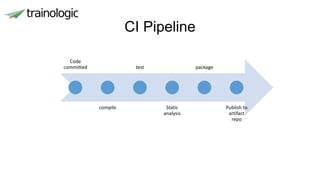
CI Pipeline
Code
committed
compile
test
Static
analysis
package
Publish to
artifact
repo
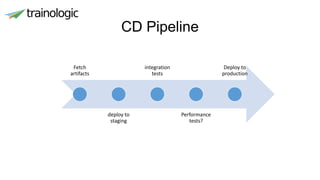
CD Pipeline
Fetch
artifacts
deploy to
staging
integration
tests
Performance
tests?
Deploy to
production
Why are we having this talk?
• Because ”Micro Services” and “Cloud”
• We need to build and deploy
• More services
• Faster
• Flexible
• Reliable
• Reproduceable
• To more environments
• And awesome 
Jenkins – the swiss knife of CI
• If you didn’t hear about Jenkins..
• Flexible Job runner adapted for CI/CD purposes
• Job is a runnable task controlled by Jenkins
• Executed on a Jenkins nodes
• Has its own “workspace”
• Jenkins provides plugins for almost anything
No Manual Jobs ever again
• Traditionally Jenkins jobs were created in the UI by the CM
• Customization per job were manual as well
• But what if you have more than 20 services?
• How do you manage these different configurations?
• Who manages them?
• How does a developer know what Jenkins is executing?
Jenkins Pipeline
• Suite of plugin that introduces continues delivery pipelines to
Jenkins
• The pipeline is describe in Jenkinsfile using groovy DSL.
• It is kept as part of the project repository
• Changes are versioned
• Developers have access to the build
• Different branches may have different builds
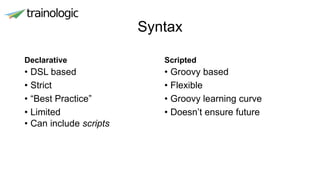
Syntax
Declarative
• DSL based
• Strict
• “Best Practice”
• Limited
• Can include scripts
Scripted
• Groovy based
• Flexible
• Groovy learning curve
• Doesn’t ensure future
Jenkins Demo
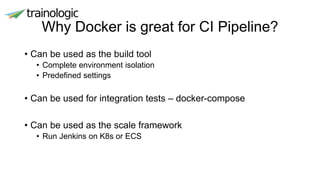
Why Docker is great for CI Pipeline?
• Can be used as the build tool
• Complete environment isolation
• Predefined settings
• Can be used for integration tests – docker-compose
• Can be used as the scale framework
• Run Jenkins on K8s or ECS
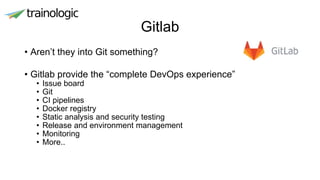
Gitlab
• Aren’t they into Git something?
• Gitlab provide the “complete DevOps experience”
• Issue board
• Git
• CI pipelines
• Docker registry
• Static analysis and security testing
• Release and environment management
• Monitoring
• More..
Gitlab pipelines
• Built-in support for Docker
• Jobs are defined in “.gitlab-ci.yml”
• Stages – specify the lifecycle of the build
• Useful for multistage pipelines
• Jobs – execution step, run in separate from each other
• Every job to a stage, if not specified belongs to the build stage
• Runner – run the jobs, can be a VM, a VPS, a docker container
or even a k8s cluster
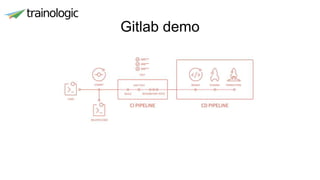
Gitlab demo
Summary
• Define your CI in code – no matter which CI tool you use
• Use Docker for the CI process as much as possible
• Jenkins is great
• Gitlab is also great and provides a complete solution

Next generation pipelines

  • 1.
    The next generationof CI/CD pipelines Alex Landa Head of DevOps and BigData technologies at Trainologic
  • 2.
  • 3.
  • 4.
    Why are wehaving this talk? • Because ”Micro Services” and “Cloud” • We need to build and deploy • More services • Faster • Flexible • Reliable • Reproduceable • To more environments • And awesome 
  • 5.
    Jenkins – theswiss knife of CI • If you didn’t hear about Jenkins.. • Flexible Job runner adapted for CI/CD purposes • Job is a runnable task controlled by Jenkins • Executed on a Jenkins nodes • Has its own “workspace” • Jenkins provides plugins for almost anything
  • 6.
    No Manual Jobsever again • Traditionally Jenkins jobs were created in the UI by the CM • Customization per job were manual as well • But what if you have more than 20 services? • How do you manage these different configurations? • Who manages them? • How does a developer know what Jenkins is executing?
  • 7.
    Jenkins Pipeline • Suiteof plugin that introduces continues delivery pipelines to Jenkins • The pipeline is describe in Jenkinsfile using groovy DSL. • It is kept as part of the project repository • Changes are versioned • Developers have access to the build • Different branches may have different builds
  • 8.
    Syntax Declarative • DSL based •Strict • “Best Practice” • Limited • Can include scripts Scripted • Groovy based • Flexible • Groovy learning curve • Doesn’t ensure future
  • 9.
  • 10.
    Why Docker isgreat for CI Pipeline? • Can be used as the build tool • Complete environment isolation • Predefined settings • Can be used for integration tests – docker-compose • Can be used as the scale framework • Run Jenkins on K8s or ECS
  • 11.
    Gitlab • Aren’t theyinto Git something? • Gitlab provide the “complete DevOps experience” • Issue board • Git • CI pipelines • Docker registry • Static analysis and security testing • Release and environment management • Monitoring • More..
  • 12.
    Gitlab pipelines • Built-insupport for Docker • Jobs are defined in “.gitlab-ci.yml” • Stages – specify the lifecycle of the build • Useful for multistage pipelines • Jobs – execution step, run in separate from each other • Every job to a stage, if not specified belongs to the build stage • Runner – run the jobs, can be a VM, a VPS, a docker container or even a k8s cluster
  • 13.
  • 14.
    Summary • Define yourCI in code – no matter which CI tool you use • Use Docker for the CI process as much as possible • Jenkins is great • Gitlab is also great and provides a complete solution