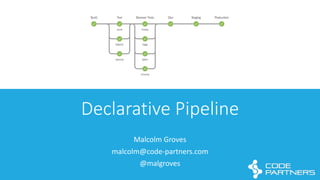
Declarative	
  Pipeline
Malcolm	
  Groves
malcolm@code-­‐partners.com
@malgroves
Training,	
  Consulting	
  and	
  Services	
  across	
  
the	
  whole	
  Development	
  and	
  Deployment	
  
lifecycle.
What’s	
  Pipeline?
Pipeline
• Pipeline	
  as	
  Code
• Versioned	
  with	
  rest	
  of	
  application	
  source
• Pipelines	
  can	
  be	
  restarted!	
  Yay!	
  
• Initially	
  specified	
  in	
  Groovy-­‐based	
  language	
  :	
  Scripted	
  Pipelines
• Very	
  flexible,	
  it’s	
  code!
• Shared	
  Objects	
  
Sounds	
  Awesome.	
  What’s	
  the	
  
problem?
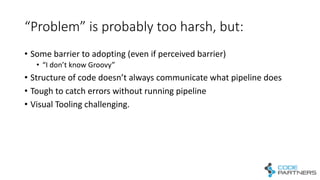
“Problem”	
  is	
  probably	
  too	
  harsh,	
  but:
• Some	
  barrier	
  to	
  adopting	
  (even	
  if	
  perceived	
  barrier)
• “I	
  don’t	
  know	
  Groovy”
• Structure	
  of	
  code	
  doesn’t	
  always	
  communicate	
  what	
  pipeline	
  does
• Tough	
  to	
  catch	
  errors	
  without	
  running	
  pipeline
• Visual	
  Tooling	
  challenging.
What’s	
  Declarative	
  Pipeline?
Declarative	
  Pipeline
• Alternative	
  to	
  Scripted	
  Pipeline
• More	
  approachable,	
  no	
  need	
  to	
  know	
  any	
  Groovy
• More	
  readable
• Structure	
  communicates	
  what	
  is	
  happening
• Visual,	
  two-­‐way	
  Editor	
  
• Still	
  Jenkinsfile-­‐based
Hello	
  World	
  of	
  Declarative
Pipelines
Declarative	
  Pipeline	
  Sections
Basic	
  Structure pipeline  {
agent  any    
environment  {
Foo  =  'Bar’
Fred  =  'Flintstone’
}
stages  {        
stage('Build')  {
steps  {
bat  'echo  %Foo%’
}
}
}
}
• Whole	
  file	
  wrapped	
  in	
  a	
  pipeline	
  
section
• stages specifies	
  what	
  will	
  run	
  
• 1	
  or	
  more	
  stage	
  directives
• Each	
  stage	
  contains	
  1	
  or	
  more	
  
steps
agent pipeline  {    
agent  any    
environment  {
Foo  =  'Bar’
Fred  =  'Flintstone’
}
stages  {        
stage('Build')  {
steps  {
bat  'echo  %Foo%’
}
}
}
}
• agent	
  specifies	
  where	
  pipeline	
  
will	
  be	
  run:
• any,	
  none,	
  label,	
  docker,	
  dockerfile
• Can	
  specify	
  per	
  stage	
  as	
  well
agent
pipeline  {
agent  none
stages  {
stage('Example  Build')  {
agent  {docker 'maven:3-­‐alpine'}
steps  {
echo  'Hello,  Maven’
sh 'mvn -­‐-­‐version'                        
}
}
stage('Example  Test')  {
agent  {docker 'openjdk:8-­‐jre'}
steps  {
echo  'Hello,  JDK'                                
sh 'java  -­‐version'
}
}        
}
}
• Example	
  of	
  per-­‐stage	
  agent	
  
directive
• Needs	
  pipeline-­‐level	
  agent	
  
directive	
  to	
  be	
  none
Stages pipeline  {
agent  any
stages  {
stage('Example  Build')  {
steps  {
echo  'Hello  World’
}
}
stage('Example  Deploy')  {
when  {branch  'production'}
echo  'Deploying’
}
}
}
• “When”	
  directive	
  allows	
  
conditional	
  execution	
  of	
  stages
• Conditions:
• branch	
  – match	
  to	
  branch	
  name
• environment	
  – match	
  to	
  
environment	
  variables
• expression	
  – Groovy	
  expression	
  
evaluates	
  to	
  true	
  
Steps
pipeline  {
agent  any
stages  {
stage(’Test')  {
steps  {
archive  ‘*/target/**/*’
junit‘*/target/reports/*.xml’
}
}
}
}
• The	
  actual	
  work	
  to	
  be	
  performed	
  
inside	
  this	
  stage
• Individual	
  Steps	
  can	
  be:
• Any	
  pipeline	
  build	
  step.
Steps
pipeline  {
agent  any
stages  {
stage(’Audits')  {
steps  {
parallel(
“code  analysis”:  {
bat:  ‘echo  do  stuff’
},
“security  scan”:  {
bat:  ‘echo  do  stuff’
},
)
}
}
}
}
• The	
  actual	
  work	
  to	
  be	
  performed	
  
inside	
  this	
  stage
• Individual	
  Steps	
  can	
  be:
• Any	
  pipeline	
  build	
  step.
• parallel
Steps
pipeline  {
agent  any
stages  {
stage(’Audits')  {
steps  {
echo  'Hello  World’
script  {
def browsers  =  ['chrome',  'firefox']
for  (int i =  0;  i <  browsers.size();  ++i)  {
echo  "Testing  the  ${browsers[i]}  browser"    
}
}
}
}
}
}
• The	
  actual	
  work	
  to	
  be	
  performed	
  
inside	
  this	
  stage
• Individual	
  Steps	
  can	
  be:
• Any	
  pipeline	
  build	
  step.
• Parallel
• Script
Environment
pipeline  {
agent  any
environment  {
CC  =  'clang’
}
stages  {
stage('Example')  {
environment  {
MY_KEY  =  credentials('my-­‐secret-­‐text')
}
steps  {
sh 'printenv’
}
}
}
}
• Name	
  =	
  value	
  pairs	
  that	
  will	
  be	
  
defined	
  as	
  environment	
  
variables
• Variables	
  are	
  scoped:
• to	
  whole	
  pipeline,	
  or
• to	
  just	
  an	
  individual	
  stage	
  if	
  
defined	
  at	
  stage	
  level
• Helper	
  function	
  to	
  access	
  
Credentials	
  defined	
  in	
  Jenkins
Post
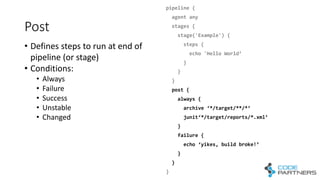
pipeline  {
agent  any
stages  {
stage('Example')  {
steps  {
echo  'Hello  World’
}
}
}        
post  {
always  {
archive  ‘*/target/**/*’
junit‘*/target/reports/*.xml’
}
failure  {
echo  ‘yikes,  build  broke!’
}
}
}
• Defines	
  steps	
  to	
  run	
  at	
  end	
  of	
  
pipeline	
  (or	
  stage)
• Conditions:
• Always
• Failure
• Success
• Unstable
• Changed
A	
  few	
  other	
  sections
• Options
• Options	
  for	
  whole	
  pipeline,	
  eg.	
  Timeout,	
  skipDefaultCheckout,	
  etc
• Tools
• Install	
  pre-­‐defined	
  tools
• Triggers
• alternative	
  triggers	
  for	
  pipeline,	
  eg.	
  Schedule,	
  poll,	
  etc
• Parameters	
  
• Define	
  parameters	
  that	
  will	
  be	
  prompted	
  for	
  at	
  run	
  time
https://jenkins.io/doc/book/pipeline/syntax/
Declarative	
  Pipelines	
  are	
  for	
  
making	
  most	
  things	
  easier.
For	
  corner-­‐cases,	
  you	
  have	
  Scripted	
  Pipelines
The	
  Dev	
  workflow	
  I’ve	
  shown	
  is	
  a	
  
bit	
  cumbersome
Let’s	
  fix	
  that
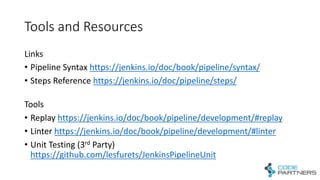
Tools	
  and	
  Resources
Links
• Pipeline	
  Syntax	
  https://jenkins.io/doc/book/pipeline/syntax/
• Steps	
  Reference	
  https://jenkins.io/doc/pipeline/steps/
Tools
• Replay	
  https://jenkins.io/doc/book/pipeline/development/#replay
• Linter	
  https://jenkins.io/doc/book/pipeline/development/#linter
• Unit	
  Testing	
  (3rd Party)	
  
https://github.com/lesfurets/JenkinsPipelineUnit
Questions?
Thank	
  You
malcolm@code-­‐partners.com
@malgroves

Jenkins Declarative Pipelines 101

  • 1.
  • 2.
    Training,  Consulting  and  Services  across   the  whole  Development  and  Deployment   lifecycle.
  • 3.
  • 4.
    Pipeline • Pipeline  as  Code • Versioned  with  rest  of  application  source • Pipelines  can  be  restarted!  Yay!   • Initially  specified  in  Groovy-­‐based  language  :  Scripted  Pipelines • Very  flexible,  it’s  code! • Shared  Objects  
  • 5.
  • 6.
    “Problem”  is  probably  too  harsh,  but: • Some  barrier  to  adopting  (even  if  perceived  barrier) • “I  don’t  know  Groovy” • Structure  of  code  doesn’t  always  communicate  what  pipeline  does • Tough  to  catch  errors  without  running  pipeline • Visual  Tooling  challenging.
  • 7.
  • 8.
    Declarative  Pipeline • Alternative  to  Scripted  Pipeline • More  approachable,  no  need  to  know  any  Groovy • More  readable • Structure  communicates  what  is  happening • Visual,  two-­‐way  Editor   • Still  Jenkinsfile-­‐based
  • 9.
    Hello  World  of  Declarative Pipelines
  • 10.
  • 11.
    Basic  Structure pipeline { agent  any     environment  { Foo  =  'Bar’ Fred  =  'Flintstone’ } stages  {         stage('Build')  { steps  { bat  'echo  %Foo%’ } } } } • Whole  file  wrapped  in  a  pipeline   section • stages specifies  what  will  run   • 1  or  more  stage  directives • Each  stage  contains  1  or  more   steps
  • 12.
    agent pipeline  {    agent  any     environment  { Foo  =  'Bar’ Fred  =  'Flintstone’ } stages  {         stage('Build')  { steps  { bat  'echo  %Foo%’ } } } } • agent  specifies  where  pipeline   will  be  run: • any,  none,  label,  docker,  dockerfile • Can  specify  per  stage  as  well
  • 13.
    agent pipeline  { agent  none stages { stage('Example  Build')  { agent  {docker 'maven:3-­‐alpine'} steps  { echo  'Hello,  Maven’ sh 'mvn -­‐-­‐version'                         } } stage('Example  Test')  { agent  {docker 'openjdk:8-­‐jre'} steps  { echo  'Hello,  JDK'                                 sh 'java  -­‐version' } }         } } • Example  of  per-­‐stage  agent   directive • Needs  pipeline-­‐level  agent   directive  to  be  none
  • 14.
    Stages pipeline  { agent any stages  { stage('Example  Build')  { steps  { echo  'Hello  World’ } } stage('Example  Deploy')  { when  {branch  'production'} echo  'Deploying’ } } } • “When”  directive  allows   conditional  execution  of  stages • Conditions: • branch  – match  to  branch  name • environment  – match  to   environment  variables • expression  – Groovy  expression   evaluates  to  true  
  • 15.
    Steps pipeline  { agent  any stages { stage(’Test')  { steps  { archive  ‘*/target/**/*’ junit‘*/target/reports/*.xml’ } } } } • The  actual  work  to  be  performed   inside  this  stage • Individual  Steps  can  be: • Any  pipeline  build  step.
  • 16.
    Steps pipeline  { agent  any stages { stage(’Audits')  { steps  { parallel( “code  analysis”:  { bat:  ‘echo  do  stuff’ }, “security  scan”:  { bat:  ‘echo  do  stuff’ }, ) } } } } • The  actual  work  to  be  performed   inside  this  stage • Individual  Steps  can  be: • Any  pipeline  build  step. • parallel
  • 17.
    Steps pipeline  { agent  any stages { stage(’Audits')  { steps  { echo  'Hello  World’ script  { def browsers  =  ['chrome',  'firefox'] for  (int i =  0;  i <  browsers.size();  ++i)  { echo  "Testing  the  ${browsers[i]}  browser"     } } } } } } • The  actual  work  to  be  performed   inside  this  stage • Individual  Steps  can  be: • Any  pipeline  build  step. • Parallel • Script
  • 18.
    Environment pipeline  { agent  any environment { CC  =  'clang’ } stages  { stage('Example')  { environment  { MY_KEY  =  credentials('my-­‐secret-­‐text') } steps  { sh 'printenv’ } } } } • Name  =  value  pairs  that  will  be   defined  as  environment   variables • Variables  are  scoped: • to  whole  pipeline,  or • to  just  an  individual  stage  if   defined  at  stage  level • Helper  function  to  access   Credentials  defined  in  Jenkins
  • 19.
    Post pipeline  { agent  any stages { stage('Example')  { steps  { echo  'Hello  World’ } } }         post  { always  { archive  ‘*/target/**/*’ junit‘*/target/reports/*.xml’ } failure  { echo  ‘yikes,  build  broke!’ } } } • Defines  steps  to  run  at  end  of   pipeline  (or  stage) • Conditions: • Always • Failure • Success • Unstable • Changed
  • 20.
    A  few  other  sections • Options • Options  for  whole  pipeline,  eg.  Timeout,  skipDefaultCheckout,  etc • Tools • Install  pre-­‐defined  tools • Triggers • alternative  triggers  for  pipeline,  eg.  Schedule,  poll,  etc • Parameters   • Define  parameters  that  will  be  prompted  for  at  run  time https://jenkins.io/doc/book/pipeline/syntax/
  • 21.
    Declarative  Pipelines  are  for   making  most  things  easier. For  corner-­‐cases,  you  have  Scripted  Pipelines
  • 22.
    The  Dev  workflow  I’ve  shown  is  a   bit  cumbersome Let’s  fix  that
  • 23.
    Tools  and  Resources Links •Pipeline  Syntax  https://jenkins.io/doc/book/pipeline/syntax/ • Steps  Reference  https://jenkins.io/doc/pipeline/steps/ Tools • Replay  https://jenkins.io/doc/book/pipeline/development/#replay • Linter  https://jenkins.io/doc/book/pipeline/development/#linter • Unit  Testing  (3rd Party)   https://github.com/lesfurets/JenkinsPipelineUnit
  • 24.
  • 25.