Akhil Vijayan
Software Consultant
Knoldus Software LLP
Pipeline based deployments
on Jenkins
Agenda
 What is Jenkins
 Free Style Project
 Jenkins Pipeline
 Pipeline Flow
 Creating a Jenkins Pipeline
 Jenkinsfile
 Pipeline Syntax
 Demo
Aim
● To understand Jenkins Pipeline
● How to create a Jenkinsfile
● And perform CICD
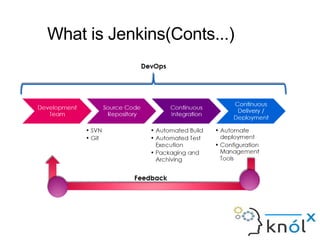
What is Jenkins(Conts...)
What is Jenkins
●
Jenkins is a Continuous Integration (CI) server or tool which is written
in java. It provides Continuous Integration services for software
development, which can be started via command line or web
application server. And also, Jenkins is free software to download
and install.
●
Advantage
1) Its an open source tool with great community support.
2) Easy to install and It has a simple configuration through a web-based
GUI, which speeds up the Job.
Free Style Project
What if I want to
●
Wait for user input
●
Run some steps in parallel
●
Put a condition for a step to execute
Jenkins Pipeline
●
Jenkins Pipeline (or simply "Pipeline" with a capital "P") is a suite of
plugins which supports implementing and integrating continuous
delivery pipelines into Jenkins.
●
Pipeline provides an extensible set of tools for modeling simple-to-
complex delivery pipelines "as code" via the Pipeline Domain
Specific Language (DSL) syntax.
●
Typically, the definition of a Jenkins Pipeline is written into a text file
(called a Jenkinsfile) which is pushed into a project’s source control
repository.
●
The script is written in Groovy.
Pipeline Flow
Creating a Jenkins Pipeline
presto A
A basic Pipeline can be created in either of the following ways:
● By entering a script directly in the Jenkins web UI.
● By creating a Jenkinsfile which can be checked into a project’s source control repository.
Jenkinsfile
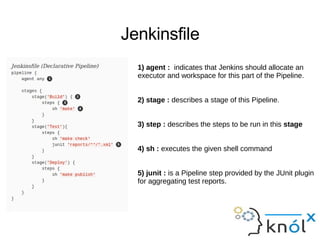
1) agent : indicates that Jenkins should allocate an
executor and workspace for this part of the Pipeline.
2) stage : describes a stage of this Pipeline.
3) step : describes the steps to be run in this stage
4) sh : executes the given shell command
5) junit : is a Pipeline step provided by the JUnit plugin
for aggregating test reports.
Pipeline Syntax
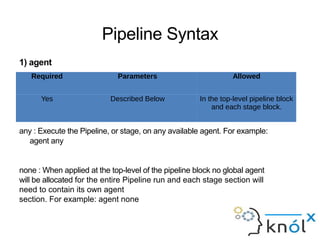
1) agent
Parameters
any : Execute the Pipeline, or stage, on any available agent. For example:
agent any
none : When applied at the top-level of the pipeline block no global agent
will be allocated for the entire Pipeline run and each stage section will
need to contain its own agent
section. For example: agent none
Required Parameters Allowed
Yes Described Below In the top-level pipeline block
and each stage block.
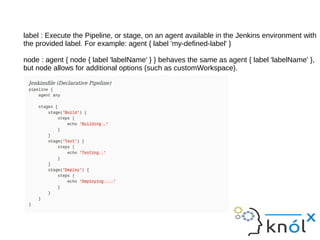
label : Execute the Pipeline, or stage, on an agent available in the Jenkins environment with
the provided label. For example: agent { label 'my-defined-label' }
node : agent { node { label 'labelName' } } behaves the same as agent { label 'labelName' },
but node allows for additional options (such as customWorkspace).
2) post
Required Parameters Allowed
No None In the top-level pipeline block
and each stage block.
Conditions
always : Run regardless of the completion status of the Pipeline run.
changed : Only run if the current Pipeline run has a different status from the previously
completed Pipeline.
failure : Only run if the current Pipeline has a "failed" status, typically denoted in the
web UI with a red indication.
success : Only run if the current Pipeline has a "success" status, typically denoted in the
web UI with a blue or green indication.
unstable : Only run if the current Pipeline has an "unstable" status, usually caused
by test failures, code violations, etc. Typically denoted in the web UI with a yellow indication.
aborted : Only run if the current Pipeline has an "aborted" status, usually due to the
Pipeline being manually aborted. Typically denoted in the web UI with a gray indication.
3) stages
Required Parameters Allowed
Yes None Only once, inside the pipeline
block.
4) stage
Required Parameters Allowed
At least one One mandatory parameter, a string
for the name of the stage.
Inside the stages section.
5) steps
Required Parameters Allowed
Yes None Inside each stage block.
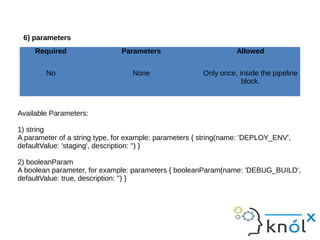
6) parameters
Available Parameters:
1) string
A parameter of a string type, for example: parameters { string(name: 'DEPLOY_ENV',
defaultValue: 'staging', description: '') }
2) booleanParam
A boolean parameter, for example: parameters { booleanParam(name: 'DEBUG_BUILD',
defaultValue: true, description: '') }
Required Parameters Allowed
No None Only once, inside the pipeline
block.
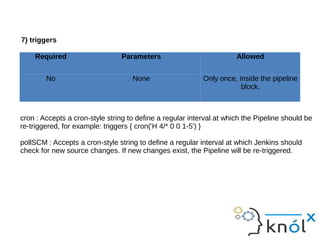
7) triggers
cron : Accepts a cron-style string to define a regular interval at which the Pipeline should be
re-triggered, for example: triggers { cron('H 4/* 0 0 1-5') }
pollSCM : Accepts a cron-style string to define a regular interval at which Jenkins should
check for new source changes. If new changes exist, the Pipeline will be re-triggered.
Required Parameters Allowed
No None Only once, inside the pipeline
block.
8) tools
Supported Tools
maven
jdk
gradle
Required Parameters Allowed
No None Inside the pipeline block or a
stage block.
9) parallel
10) Flow Controls
Demo
References
● https://jenkins.io/doc/book/pipeline/
● cloudbees
● https://jenkins.io/solutions/pipeline/
Thank You

Pipeline based deployments on Jenkins

  • 1.
    Akhil Vijayan Software Consultant KnoldusSoftware LLP Pipeline based deployments on Jenkins
  • 2.
    Agenda  What isJenkins  Free Style Project  Jenkins Pipeline  Pipeline Flow  Creating a Jenkins Pipeline  Jenkinsfile  Pipeline Syntax  Demo
  • 3.
    Aim ● To understandJenkins Pipeline ● How to create a Jenkinsfile ● And perform CICD
  • 4.
  • 5.
    What is Jenkins ● Jenkinsis a Continuous Integration (CI) server or tool which is written in java. It provides Continuous Integration services for software development, which can be started via command line or web application server. And also, Jenkins is free software to download and install. ● Advantage 1) Its an open source tool with great community support. 2) Easy to install and It has a simple configuration through a web-based GUI, which speeds up the Job.
  • 6.
  • 7.
    What if Iwant to ● Wait for user input ● Run some steps in parallel ● Put a condition for a step to execute
  • 8.
    Jenkins Pipeline ● Jenkins Pipeline(or simply "Pipeline" with a capital "P") is a suite of plugins which supports implementing and integrating continuous delivery pipelines into Jenkins. ● Pipeline provides an extensible set of tools for modeling simple-to- complex delivery pipelines "as code" via the Pipeline Domain Specific Language (DSL) syntax. ● Typically, the definition of a Jenkins Pipeline is written into a text file (called a Jenkinsfile) which is pushed into a project’s source control repository. ● The script is written in Groovy.
  • 9.
  • 10.
    Creating a JenkinsPipeline presto A A basic Pipeline can be created in either of the following ways: ● By entering a script directly in the Jenkins web UI. ● By creating a Jenkinsfile which can be checked into a project’s source control repository.
  • 11.
    Jenkinsfile 1) agent :indicates that Jenkins should allocate an executor and workspace for this part of the Pipeline. 2) stage : describes a stage of this Pipeline. 3) step : describes the steps to be run in this stage 4) sh : executes the given shell command 5) junit : is a Pipeline step provided by the JUnit plugin for aggregating test reports.
  • 12.
    Pipeline Syntax 1) agent Parameters any: Execute the Pipeline, or stage, on any available agent. For example: agent any none : When applied at the top-level of the pipeline block no global agent will be allocated for the entire Pipeline run and each stage section will need to contain its own agent section. For example: agent none Required Parameters Allowed Yes Described Below In the top-level pipeline block and each stage block.
  • 13.
    label : Executethe Pipeline, or stage, on an agent available in the Jenkins environment with the provided label. For example: agent { label 'my-defined-label' } node : agent { node { label 'labelName' } } behaves the same as agent { label 'labelName' }, but node allows for additional options (such as customWorkspace).
  • 14.
    2) post Required ParametersAllowed No None In the top-level pipeline block and each stage block. Conditions always : Run regardless of the completion status of the Pipeline run. changed : Only run if the current Pipeline run has a different status from the previously completed Pipeline. failure : Only run if the current Pipeline has a "failed" status, typically denoted in the web UI with a red indication.
  • 15.
    success : Onlyrun if the current Pipeline has a "success" status, typically denoted in the web UI with a blue or green indication. unstable : Only run if the current Pipeline has an "unstable" status, usually caused by test failures, code violations, etc. Typically denoted in the web UI with a yellow indication. aborted : Only run if the current Pipeline has an "aborted" status, usually due to the Pipeline being manually aborted. Typically denoted in the web UI with a gray indication.
  • 16.
    3) stages Required ParametersAllowed Yes None Only once, inside the pipeline block.
  • 17.
    4) stage Required ParametersAllowed At least one One mandatory parameter, a string for the name of the stage. Inside the stages section.
  • 18.
    5) steps Required ParametersAllowed Yes None Inside each stage block.
  • 19.
    6) parameters Available Parameters: 1)string A parameter of a string type, for example: parameters { string(name: 'DEPLOY_ENV', defaultValue: 'staging', description: '') } 2) booleanParam A boolean parameter, for example: parameters { booleanParam(name: 'DEBUG_BUILD', defaultValue: true, description: '') } Required Parameters Allowed No None Only once, inside the pipeline block.
  • 21.
    7) triggers cron :Accepts a cron-style string to define a regular interval at which the Pipeline should be re-triggered, for example: triggers { cron('H 4/* 0 0 1-5') } pollSCM : Accepts a cron-style string to define a regular interval at which Jenkins should check for new source changes. If new changes exist, the Pipeline will be re-triggered. Required Parameters Allowed No None Only once, inside the pipeline block.
  • 23.
    8) tools Supported Tools maven jdk gradle RequiredParameters Allowed No None Inside the pipeline block or a stage block.
  • 25.
  • 26.
  • 27.
  • 28.
  • 29.