1
© 2018 Brent Laster@BrentCLaster
1
Jenkins 2 – Coding Continuous Delivery
Pipelines
Brent Laster
2
© 2018 Brent Laster@BrentCLaster
2
@BrentCLaster
About me
 Senior Manager, R&D
 Global trainer – training (Git, Jenkins, Gradle,
Gerriit, Continuous Pipelines)
 Author -
 NFJS magazine – series on Gerrit
 Professional Git book
 Jenkins 2 – Up and Running book
 Continuous Integration vs. Continuous Delivery vs.
Continuous Deployment mini-book on Safari
 https://www.linkedin.com/in/brentlaster
 @BrentCLaster
3
© 2018 Brent Laster@BrentCLaster
3
@BrentCLaster
Books
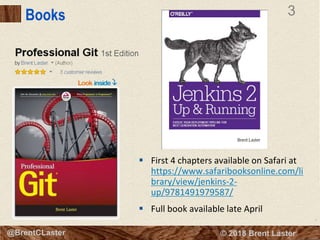
 First 4 chapters available on Safari at
https://www.safaribooksonline.com/li
brary/view/jenkins-2-
up/9781491979587/
 Full book available late April
4
© 2018 Brent Laster@BrentCLaster
4
@BrentCLaster
Continuous Delivery Pipeline
 “… an automated implementation of your
application’s build, deploy, test, and release
process.
 Every change made to configuration, source
code, environment or data triggers a new
instance of the pipeline.
 Change motivates production of binaries and
then a series of tests are done to prove it is
releasable.
 Levels of testing provide successive levels of
confidence.
5
© 2018 Brent Laster@BrentCLaster
5
@BrentCLaster
Continuous Pipelines
Practice
 Theme is automation of software production
process
 Combines 3 core practices/disciplines
 Continuous Integration
 Continuous Delivery
 Continuous Deployment (if desired)
 Includes Configuration Management
6
© 2018 Brent Laster@BrentCLaster
6
@BrentCLaster
Continuous Pipelines
Practice
 Theme is automation of software production
process
 Combines 3 core practices/disciplines
 Continuous Integration
 Continuous Delivery
 Continuous Deployment (if desired)
 Includes Configuration Managementhttps://www.safaribooksonline.com/library/view/continuous-integration-vs/9781492028918/
7
© 2018 Brent Laster@BrentCLaster
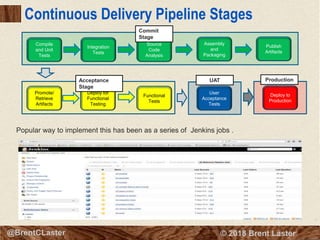
Continuous Delivery Pipeline Stages
Compile
and Unit
Tests
Integration
Tests
Source
Code
Analysis
Assembly
and
Packaging
Publish
Artifacts
User
Acceptance
Tests
Functional
Tests
Deploy for
Functional
Testing
Promote/
Retrieve
Artifacts
Deploy to
Production
Commit
Stage
Acceptance
Stage
UAT Production
Popular way to implement this has been as a series of Jenkins jobs .
8
© 2018 Brent Laster@BrentCLaster
8
@BrentCLaster
About Jenkins – What is it?
 Open-source framework for defining, running, and monitoring
jobs/projects
 Jobs/projects execute processes – such as builds, tests, etc.
 Allows “global” configuration of available tools, servers, etc. and
“local” configuration within jobs to execute processes using those
tools
 Frequently used to define a sequence of processes to construct a
deployment pipeline
 Created by Kohsuke Kawaguchi
 Formerly known as Hudson
 Over 1000 plug-ins that provide functionality
 https://jenkins.io
 Enterprise version supported by Cloudbees
 Free community version supported by users and Cloudbees
9
© 2018 Brent Laster@BrentCLaster
9
@BrentCLaster
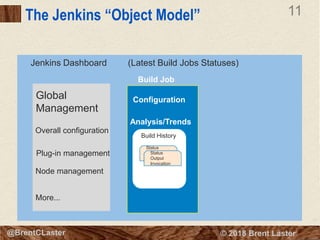
The Jenkins “Object Model”
Jenkins Dashboard
10
© 2018 Brent Laster@BrentCLaster
10
@BrentCLaster
The Jenkins “Object Model”
Jenkins Dashboard
Global
Management
(Latest Build Jobs Statuses)
11
© 2018 Brent Laster@BrentCLaster
11
@BrentCLaster
The Jenkins “Object Model”
Jenkins Dashboard
Global
Management
Overall configuration
Plug-in management
Node management
More...
Build Job
Configuration
Analysis/Trends
Build History
Status
Output
Invocation
Status
Output
Invocation
(Latest Build Jobs Statuses)
12
© 2018 Brent Laster@BrentCLaster
12
@BrentCLaster
The Jenkins “Object Model”
Jenkins Dashboard
Global
Management
Overall configuration
Plug-in management
Node management
More...
Build Job
Configuration
Analysis/Trends
Build History
Status
Output
Invocation
Status
Output
Invocation
(Latest Build Jobs Statuses)
13
© 2018 Brent Laster@BrentCLaster
13
@BrentCLaster
The Jenkins “Object Model”
Jenkins Dashboard
Global
Management
Overall configuration
Plug-in management
Node management
More...
Build Job
Configuration
Analysis/Trends
Build History
Status
Output
Invocation
Status
Output
Invocation
(Latest Build Jobs Statuses)
Build Job
Configuration
Analysis/Trends
Build History
14
© 2018 Brent Laster@BrentCLaster
14
@BrentCLaster
The Jenkins “Object Model”
Jenkins Dashboard
Global
Management
Overall configuration
Plug-in management
Node management
More...
Build Job
Configuration
Analysis/Trends
Build History
Status
Output
Invocation
Status
Output
Invocation
(Latest Build Jobs Statuses)
Build Job
Configuration
Analysis/Trends
Build History
15
© 2018 Brent Laster@BrentCLaster
15
@BrentCLaster
Jenkins Structure
 Basic Jenkins Hierarchy is:
 Dashboard
» Individual project
» Individual build results for a project
 Each one may have subsections
 Examples:
» build project may have configure and trend information
» build results have status and console output
 Supporting pieces
 Jenkins global configuration (Manage Jenkins)
 Additional functionality added via plugins
 Most functionality has global configuration and local (job-level) steps that can be
executed
 Define globally, select locally
 May be multiple instances (different versions)
 Then, for individual jobs (projects), you select the instance/version of thing you
want from ones globally defined
16
© 2018 Brent Laster@BrentCLaster
16
@BrentCLaster
Example: Integration with Git (Plugin)
 Install plugin (via Manage Jenkins->Manage Plugins)
17
© 2018 Brent Laster@BrentCLaster
17
@BrentCLaster
Example: Integration with Git (Job)
Global Config (Manage Jenkins)
Run (job output page and console log)
11
Use Locally (Job)
18
© 2018 Brent Laster@BrentCLaster
18
@BrentCLaster
Example: Integration with Git (Job)
Global Config (Manage Jenkins)
Run (job output page and console log)
 Jobs run on Jenkins Nodes
11
Use Locally (Job)
19
© 2018 Brent Laster@BrentCLaster
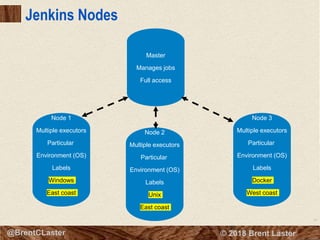
Jenkins Nodes
12
Master
Manages jobs
Full access
Node 1
Multiple executors
Particular
Environment (OS)
Labels
Windows
East coast
Node 2
Multiple executors
Particular
Environment (OS)
Labels
Unix
East coast
Node 3
Multiple executors
Particular
Environment (OS)
Labels
Docker
West coast
20
© 2018 Brent Laster@BrentCLaster
20
@BrentCLaster
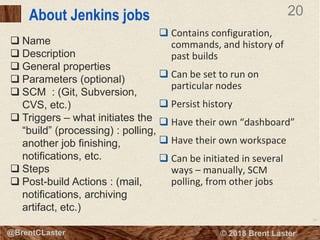
About Jenkins jobs
 Contains configuration,
commands, and history of
past builds
 Can be set to run on
particular nodes
 Persist history
 Have their own “dashboard”
 Have their own workspace
 Can be initiated in several
ways – manually, SCM
polling, from other jobs
 Name
 Description
 General properties
 Parameters (optional)
 SCM : (Git, Subversion,
CVS, etc.)
 Triggers – what initiates the
“build” (processing) : polling,
another job finishing,
notifications, etc.
 Steps
 Post-build Actions : (mail,
notifications, archiving
artifact, etc.)
21
© 2018 Brent Laster@BrentCLaster
21
@BrentCLaster
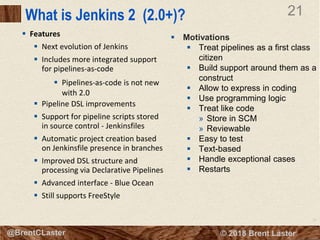
What is Jenkins 2 (2.0+)?
 Features
 Next evolution of Jenkins
 Includes more integrated support
for pipelines-as-code
 Pipelines-as-code is not new
with 2.0
 Pipeline DSL improvements
 Support for pipeline scripts stored
in source control - Jenkinsfiles
 Automatic project creation based
on Jenkinsfile presence in branches
 Improved DSL structure and
processing via Declarative Pipelines
 Advanced interface - Blue Ocean
 Still supports FreeStyle
 Motivations
 Treat pipelines as a first class
citizen
 Build support around them as a
construct
 Allow to express in coding
 Use programming logic
 Treat like code
» Store in SCM
» Reviewable
 Easy to test
 Text-based
 Handle exceptional cases
 Restarts
22
© 2018 Brent Laster@BrentCLaster
22
@BrentCLaster
Types of Projects
Pipeline-based projects can be written in Jenkins DSL
instead of configuring everything through web forms.
23
© 2018 Brent Laster@BrentCLaster
23
@BrentCLaster
Jenkins Domain Specific Language (DSL)
 Groovy-based
 Allows for orchestrating process
steps
 Can be written and stored as
pipeline script in job itself or as
an external Jenkinsfile stored in
the repository
24
© 2018 Brent Laster@BrentCLaster
24
@BrentCLaster
Jenkins Domain Specific Language (DSL)
 Groovy-based
 Allows for orchestrating process
steps
 Can be written and stored as
pipeline script in job itself or as
an external Jenkinsfile stored in
the repository
25
© 2018 Brent Laster@BrentCLaster
25
@BrentCLaster
Automatic DSL - Snippet Generator
 Facilitates generating Groovy code for typical actions
 Select the operation
 Fill in the arguments/parameters
 Push the button
 Copy and paste
26
© 2018 Brent Laster@BrentCLaster
26
@BrentCLaster
Automatic DSL - Snippet Generator
 Facilitates generating Groovy code for typical actions
 Select the operation
 Fill in the arguments/parameters
 Push the button
 Copy and paste
27
© 2018 Brent Laster@BrentCLaster
27
@BrentCLaster
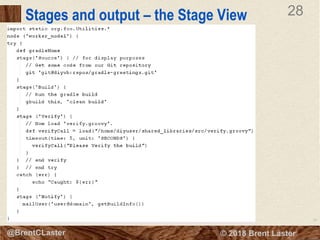
Scripted Pipelines – Nodes and Stages
 Nodes
 Tells which system (agent) to run code on
 Code between {} forms program to run
 A particular agent can be specified in node(agent)
 Creates an associated workspace and schedules
code steps to run in build queue
 specific node
 Stages
 Aggregates build steps
into sections
 Stages are inside of a
node block
 Stages take a name
(usually corresponding to
the function)
28
© 2018 Brent Laster@BrentCLaster
28
@BrentCLaster
Stages and output – the Stage View
29
© 2018 Brent Laster@BrentCLaster
29
@BrentCLaster
Stages and output – the Stage View
30
© 2018 Brent Laster@BrentCLaster
30
@BrentCLaster
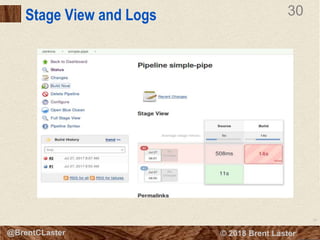
Stage View and Logs
31
© 2018 Brent Laster@BrentCLaster
31
@BrentCLaster
Stage View and Logs
32
© 2018 Brent Laster@BrentCLaster
32
@BrentCLaster
Stage View and Logs
33
© 2018 Brent Laster@BrentCLaster
33
@BrentCLaster
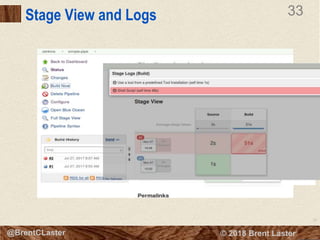
Stage View and Logs
34
© 2018 Brent Laster@BrentCLaster
34
@BrentCLaster
Stage View and Logs
35
© 2018 Brent Laster@BrentCLaster
35
@BrentCLaster
Global Configuration for Pipelines
36
© 2018 Brent Laster@BrentCLaster
36
@BrentCLaster
Global Tools and Pipeline
 Tools defined in
global
configuration
 DSL keyword ‘tool’
 In pipeline script
 def variable for
tool location
 assign variable to
“tool <toolname>”
from global
configuration
 Use variable in
place of location in
script
37
© 2018 Brent Laster@BrentCLaster
37
@BrentCLaster
The Jenkinsfile
 Pipeline script stored in SCM
 Can develop in the job and then
transfer to Jenkinsfile
 Granularity is per branch, per
project
 Not required for Jenkins to build
 Best practice to add “#!groovy” at
the top
 Used as marker for Jenkins to
identify branches (including
creation and deletion) in
multibranch and organization
projects
38
© 2018 Brent Laster@BrentCLaster
38
@BrentCLaster
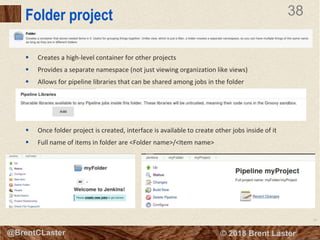
Folder project
 Creates a high-level container for other projects
 Provides a separate namespace (not just viewing organization like views)
 Allows for pipeline libraries that can be shared among jobs in the folder
 Once folder project is created, interface is available to create other jobs inside of it
 Full name of items in folder are <Folder name>/<Item name>
39
© 2018 Brent Laster@BrentCLaster
39
@BrentCLaster
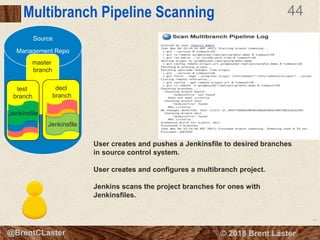
Multibranch Pipeline
 Creates pipeline projects in Jenkins to correspond to branches in an SCM repository
 Marker for whether a branch should have a corresponding job is presence of a Jenkinsfile in
branch
 Configure sources just like any other job - but don’t specify branches - (except to include or
exclude if needed)
 Can also include Shared Pipeline Libraries just for this set
40
© 2018 Brent Laster@BrentCLaster
40
@BrentCLaster
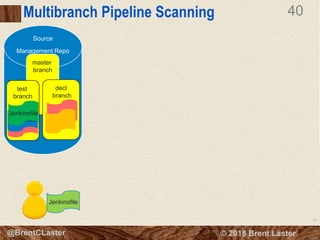
Multibranch Pipeline Scanning
Source
Management Repo
master
branch
decl
branch
test
branch
Jenkinsfile
Jenkinsfile
Jenkinsfile
41
© 2018 Brent Laster@BrentCLaster
41
@BrentCLaster
Multibranch Pipeline Scanning
Source
Management Repo
User creates and pushes a Jenkinsfile to desired branches
in source control system.
User creates and configures a multibranch project.
master
branch
decl
branch
test
branch
Jenkinsfile
Jenkinsfile
Jenkinsfile
42
© 2018 Brent Laster@BrentCLaster
42
@BrentCLaster
Multibranch Pipeline Scanning
Source
Management Repo
User creates and pushes a Jenkinsfile to desired branches
in source control system.
User creates and configures a multibranch project.
Jenkins scans the project branches for ones with
Jenkinsfiles.
master
branch
decl
branch
test
branch
Jenkinsfile
Jenkinsfile
Jenkinsfile
43
© 2018 Brent Laster@BrentCLaster
43
@BrentCLaster
Multibranch Pipeline Scanning
Source
Management Repo
User creates and pushes a Jenkinsfile to desired branches
in source control system.
User creates and configures a multibranch project.
Jenkins scans the project branches for ones with
Jenkinsfiles.
master
branch
decl
branch
test
branch
Jenkinsfile
Jenkinsfile
Jenkinsfile
44
© 2018 Brent Laster@BrentCLaster
44
@BrentCLaster
Multibranch Pipeline Scanning
Source
Management Repo
User creates and pushes a Jenkinsfile to desired branches
in source control system.
User creates and configures a multibranch project.
Jenkins scans the project branches for ones with
Jenkinsfiles.
master
branch
decl
branch
test
branch
Jenkinsfile
Jenkinsfile
Jenkinsfile
45
© 2018 Brent Laster@BrentCLaster
45
@BrentCLaster
Multibranch Pipeline Scanning
Source
Management Repo
User creates and pushes a Jenkinsfile to desired branches
in source control system.
User creates and configures a multibranch project.
Jenkins scans the project branches for ones with
Jenkinsfiles.
master
branch
decl
branch
test
branch
Jenkinsfile
Jenkinsfile
Jenkinsfile
46
© 2018 Brent Laster@BrentCLaster
46
@BrentCLaster
Multibranch Pipeline Scanning
Source
Management Repo
User creates and pushes a Jenkinsfile to desired branches
in source control system.
User creates and configures a multibranch project.
Jenkins scans the project branches for ones with
Jenkinsfiles.
Jenkins creates new jobs for each branch having a
Jenkinsfile and executes the jobs
master
branch
decl
branch
test
branch
Jenkinsfile
Jenkinsfile
Jenkinsfile
47
© 2018 Brent Laster@BrentCLaster
47
@BrentCLaster
Multibranch Pipeline Scanning
Source
Management Repo
User creates and pushes a Jenkinsfile to desired branches
in source control system.
User creates and configures a multibranch project.
Jenkins scans the project branches for ones with
Jenkinsfiles.
Jenkins creates new jobs for each branch having a
Jenkinsfile and executes the jobs
master
branch
decl
branch
test
branch
Jenkinsfile
Jenkinsfile
Jenkinsfile
48
© 2018 Brent Laster@BrentCLaster
48
@BrentCLaster
Multibranch Pipeline Scanning
Source
Management Repo
User creates and pushes a Jenkinsfile to desired branches
in source control system.
User creates and configures a multibranch project.
Jenkins scans the project branches for ones with
Jenkinsfiles.
Jenkins creates new jobs for each branch having a
Jenkinsfile and executes the jobs
master
branch
decl
branch
test
branch
Jenkinsfile
Jenkinsfile
Jenkinsfile
49
© 2018 Brent Laster@BrentCLaster
49
@BrentCLaster
Github Organization Project
 Automatically detects
repositories in organization
 Creates multibranch projects
for each repository
 Monitors activity in
projects/branches with
Jenkinsfile
 Automatically sets up
“organization webhook” on
Github and react to webhook
posting back to Jenkins
system
 Supports shared pipeline
libraries for projects in
organization
50
© 2018 Brent Laster@BrentCLaster
50
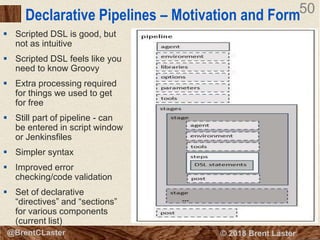
Declarative Pipelines – Motivation and Form
 Scripted DSL is good, but
not as intuitive
 Scripted DSL feels like you
need to know Groovy
 Extra processing required
for things we used to get
for free
 Still part of pipeline - can
be entered in script window
or Jenkinsfiles
 Simpler syntax
 Improved error
checking/code validation
 Set of declarative
“directives” and “sections”
for various components
(current list)
51
© 2018 Brent Laster@BrentCLaster
51
@BrentCLaster
Scripted vs. Declarative Syntax
#!groovy
pipeline {
agent{ label 'worker_node1'}
libraries {
lib('Utilities@1.5')
}
stages {
stage('Source') {
steps {
cleanWs()
checkout scm
stash name: 'test-sources', includes: 'build.gradle,src/test/'
}
}
stage('Build') {
// Run the gradle build
steps {
gbuild2 'clean build -x test'
}
}
} // end stages
post {
always {
echo "Build stage complete"
}
failure{
echo "Build failed"
mail body: 'build failed', subject: 'Build failed!', to: '<your email address>'
}
success {
echo "Build succeeded"
mail body: 'build succeeded', subject: 'Build Succeeded', to: '<your email address>'
}
}
} // end pipeline
#!groovy
@Library('Utilities@1.5')_
node ('worker_node1') {
try {
stage('Source') {
// always run with a new workspace
cleanupWs()
checkout scm
stash name: 'test-sources', includes: 'build.gradle,src/test/'
}
stage('Build') {
// Run the gradle build
gbuild2 'clean build -x test'
}
}
catch (err) {
echo "Caught: ${err}"
}
stage ('Notify') {
// mailUser('<your email address>', "Finished")
}
}
52
© 2018 Brent Laster@BrentCLaster
52
@BrentCLaster
FreeStyle vs. Scripted vs Declarative
 Example: post processing – such as always sending mail
53
© 2018 Brent Laster@BrentCLaster
53
@BrentCLaster
FreeStyle vs. Scripted vs Declarative
 Example: post processing – such as always sending mail
54
© 2018 Brent Laster@BrentCLaster
54
@BrentCLaster
FreeStyle vs. Scripted vs Declarative
 Example: post processing – such as always sending mail
55
© 2018 Brent Laster@BrentCLaster
55
@BrentCLaster
FreeStyle vs. Scripted vs Declarative
 Example: post processing – such as always sending mail
56
© 2018 Brent Laster@BrentCLaster
56
@BrentCLaster
Blue Ocean
 New Jenkins interface
 Support for graphically representing pipelines
 Based on stages definitions
 Full functionality requires declarative pipeline
 Shows processing, success, failure of stages
 Can view logs segmented by steps
 Can be invoked by left menu item or http:<jenkins url>/blue
 Visual pipeline creator/editor – allows for creating pipeline
around existing code base
57
© 2018 Brent Laster@BrentCLaster
57
@BrentCLaster
Pipelines page
 List all pipelines and health, etc.
 Like Jenkins dashboard page
 Can drill in from here
 Also can select favorites
58
© 2018 Brent Laster@BrentCLaster
58
@BrentCLaster
Run in progress
 Green checks indicate successfully completed stages
 Partially filled/outlined circles represent stages in progress
 Empty circles represent stages waiting to be done
59
© 2018 Brent Laster@BrentCLaster
59
@BrentCLaster
Failed Build Step
 Individual steps marked as failed
 Logs accessible
 Note “Re-run” button
60
© 2018 Brent Laster@BrentCLaster
60
@BrentCLaster
New Pipeline
• Allows you to create a new pipeline around existing code base
• Easy for existing multibranch pipelines
• May require authorization
61
© 2018 Brent Laster@BrentCLaster
61
@BrentCLaster
Jenkins 2 and Docker
 4 ways of running Docker via Jenkins
 Configured as a “cloud” (via Docker plugin)
» Global configuration points Jenkins to a Docker image that works
as a node
» Jenkins can start/stop containers based on the image
automatically as needed to do work (dynamically start up nodes)
 Use global variable “docker” (via Docker pipeline plugin)
» Point to an image – invoke “inside” method
» Get image (if not already there), spins it up, provides access to
workspace), performs tasks, and gets rid of it
 As “agent” for declarative pipelines
» Can be pointed to input file (Dockerfile) and automatically “build”
a docker image to run on
 Directly vs shell call
» Uses “sh” shell call to run docker executable
62
© 2018 Brent Laster@BrentCLaster
62
@BrentCLaster
Jenkins 2.0 and Docker – Inside example
63
© 2018 Brent Laster@BrentCLaster
63
@BrentCLaster
Jenkins 2.0 and Docker – Inside example
64
© 2018 Brent Laster@BrentCLaster
64
@BrentCLaster
Jenkins 2.0 and Docker – Inside example
65
© 2018 Brent Laster@BrentCLaster
65
@BrentCLaster
Jenkins 2.0 and Docker – Inside example
66
© 2018 Brent Laster@BrentCLaster
66
That’s all - thanks!

Jenkins2 - Coding Continuous Delivery Pipelines

  • 1.
    1 © 2018 BrentLaster@BrentCLaster 1 Jenkins 2 – Coding Continuous Delivery Pipelines Brent Laster
  • 2.
    2 © 2018 BrentLaster@BrentCLaster 2 @BrentCLaster About me  Senior Manager, R&D  Global trainer – training (Git, Jenkins, Gradle, Gerriit, Continuous Pipelines)  Author -  NFJS magazine – series on Gerrit  Professional Git book  Jenkins 2 – Up and Running book  Continuous Integration vs. Continuous Delivery vs. Continuous Deployment mini-book on Safari  https://www.linkedin.com/in/brentlaster  @BrentCLaster
  • 3.
    3 © 2018 BrentLaster@BrentCLaster 3 @BrentCLaster Books  First 4 chapters available on Safari at https://www.safaribooksonline.com/li brary/view/jenkins-2- up/9781491979587/  Full book available late April
  • 4.
    4 © 2018 BrentLaster@BrentCLaster 4 @BrentCLaster Continuous Delivery Pipeline  “… an automated implementation of your application’s build, deploy, test, and release process.  Every change made to configuration, source code, environment or data triggers a new instance of the pipeline.  Change motivates production of binaries and then a series of tests are done to prove it is releasable.  Levels of testing provide successive levels of confidence.
  • 5.
    5 © 2018 BrentLaster@BrentCLaster 5 @BrentCLaster Continuous Pipelines Practice  Theme is automation of software production process  Combines 3 core practices/disciplines  Continuous Integration  Continuous Delivery  Continuous Deployment (if desired)  Includes Configuration Management
  • 6.
    6 © 2018 BrentLaster@BrentCLaster 6 @BrentCLaster Continuous Pipelines Practice  Theme is automation of software production process  Combines 3 core practices/disciplines  Continuous Integration  Continuous Delivery  Continuous Deployment (if desired)  Includes Configuration Managementhttps://www.safaribooksonline.com/library/view/continuous-integration-vs/9781492028918/
  • 7.
    7 © 2018 BrentLaster@BrentCLaster Continuous Delivery Pipeline Stages Compile and Unit Tests Integration Tests Source Code Analysis Assembly and Packaging Publish Artifacts User Acceptance Tests Functional Tests Deploy for Functional Testing Promote/ Retrieve Artifacts Deploy to Production Commit Stage Acceptance Stage UAT Production Popular way to implement this has been as a series of Jenkins jobs .
  • 8.
    8 © 2018 BrentLaster@BrentCLaster 8 @BrentCLaster About Jenkins – What is it?  Open-source framework for defining, running, and monitoring jobs/projects  Jobs/projects execute processes – such as builds, tests, etc.  Allows “global” configuration of available tools, servers, etc. and “local” configuration within jobs to execute processes using those tools  Frequently used to define a sequence of processes to construct a deployment pipeline  Created by Kohsuke Kawaguchi  Formerly known as Hudson  Over 1000 plug-ins that provide functionality  https://jenkins.io  Enterprise version supported by Cloudbees  Free community version supported by users and Cloudbees
  • 9.
    9 © 2018 BrentLaster@BrentCLaster 9 @BrentCLaster The Jenkins “Object Model” Jenkins Dashboard
  • 10.
    10 © 2018 BrentLaster@BrentCLaster 10 @BrentCLaster The Jenkins “Object Model” Jenkins Dashboard Global Management (Latest Build Jobs Statuses)
  • 11.
    11 © 2018 BrentLaster@BrentCLaster 11 @BrentCLaster The Jenkins “Object Model” Jenkins Dashboard Global Management Overall configuration Plug-in management Node management More... Build Job Configuration Analysis/Trends Build History Status Output Invocation Status Output Invocation (Latest Build Jobs Statuses)
  • 12.
    12 © 2018 BrentLaster@BrentCLaster 12 @BrentCLaster The Jenkins “Object Model” Jenkins Dashboard Global Management Overall configuration Plug-in management Node management More... Build Job Configuration Analysis/Trends Build History Status Output Invocation Status Output Invocation (Latest Build Jobs Statuses)
  • 13.
    13 © 2018 BrentLaster@BrentCLaster 13 @BrentCLaster The Jenkins “Object Model” Jenkins Dashboard Global Management Overall configuration Plug-in management Node management More... Build Job Configuration Analysis/Trends Build History Status Output Invocation Status Output Invocation (Latest Build Jobs Statuses) Build Job Configuration Analysis/Trends Build History
  • 14.
    14 © 2018 BrentLaster@BrentCLaster 14 @BrentCLaster The Jenkins “Object Model” Jenkins Dashboard Global Management Overall configuration Plug-in management Node management More... Build Job Configuration Analysis/Trends Build History Status Output Invocation Status Output Invocation (Latest Build Jobs Statuses) Build Job Configuration Analysis/Trends Build History
  • 15.
    15 © 2018 BrentLaster@BrentCLaster 15 @BrentCLaster Jenkins Structure  Basic Jenkins Hierarchy is:  Dashboard » Individual project » Individual build results for a project  Each one may have subsections  Examples: » build project may have configure and trend information » build results have status and console output  Supporting pieces  Jenkins global configuration (Manage Jenkins)  Additional functionality added via plugins  Most functionality has global configuration and local (job-level) steps that can be executed  Define globally, select locally  May be multiple instances (different versions)  Then, for individual jobs (projects), you select the instance/version of thing you want from ones globally defined
  • 16.
    16 © 2018 BrentLaster@BrentCLaster 16 @BrentCLaster Example: Integration with Git (Plugin)  Install plugin (via Manage Jenkins->Manage Plugins)
  • 17.
    17 © 2018 BrentLaster@BrentCLaster 17 @BrentCLaster Example: Integration with Git (Job) Global Config (Manage Jenkins) Run (job output page and console log) 11 Use Locally (Job)
  • 18.
    18 © 2018 BrentLaster@BrentCLaster 18 @BrentCLaster Example: Integration with Git (Job) Global Config (Manage Jenkins) Run (job output page and console log)  Jobs run on Jenkins Nodes 11 Use Locally (Job)
  • 19.
    19 © 2018 BrentLaster@BrentCLaster Jenkins Nodes 12 Master Manages jobs Full access Node 1 Multiple executors Particular Environment (OS) Labels Windows East coast Node 2 Multiple executors Particular Environment (OS) Labels Unix East coast Node 3 Multiple executors Particular Environment (OS) Labels Docker West coast
  • 20.
    20 © 2018 BrentLaster@BrentCLaster 20 @BrentCLaster About Jenkins jobs  Contains configuration, commands, and history of past builds  Can be set to run on particular nodes  Persist history  Have their own “dashboard”  Have their own workspace  Can be initiated in several ways – manually, SCM polling, from other jobs  Name  Description  General properties  Parameters (optional)  SCM : (Git, Subversion, CVS, etc.)  Triggers – what initiates the “build” (processing) : polling, another job finishing, notifications, etc.  Steps  Post-build Actions : (mail, notifications, archiving artifact, etc.)
  • 21.
    21 © 2018 BrentLaster@BrentCLaster 21 @BrentCLaster What is Jenkins 2 (2.0+)?  Features  Next evolution of Jenkins  Includes more integrated support for pipelines-as-code  Pipelines-as-code is not new with 2.0  Pipeline DSL improvements  Support for pipeline scripts stored in source control - Jenkinsfiles  Automatic project creation based on Jenkinsfile presence in branches  Improved DSL structure and processing via Declarative Pipelines  Advanced interface - Blue Ocean  Still supports FreeStyle  Motivations  Treat pipelines as a first class citizen  Build support around them as a construct  Allow to express in coding  Use programming logic  Treat like code » Store in SCM » Reviewable  Easy to test  Text-based  Handle exceptional cases  Restarts
  • 22.
    22 © 2018 BrentLaster@BrentCLaster 22 @BrentCLaster Types of Projects Pipeline-based projects can be written in Jenkins DSL instead of configuring everything through web forms.
  • 23.
    23 © 2018 BrentLaster@BrentCLaster 23 @BrentCLaster Jenkins Domain Specific Language (DSL)  Groovy-based  Allows for orchestrating process steps  Can be written and stored as pipeline script in job itself or as an external Jenkinsfile stored in the repository
  • 24.
    24 © 2018 BrentLaster@BrentCLaster 24 @BrentCLaster Jenkins Domain Specific Language (DSL)  Groovy-based  Allows for orchestrating process steps  Can be written and stored as pipeline script in job itself or as an external Jenkinsfile stored in the repository
  • 25.
    25 © 2018 BrentLaster@BrentCLaster 25 @BrentCLaster Automatic DSL - Snippet Generator  Facilitates generating Groovy code for typical actions  Select the operation  Fill in the arguments/parameters  Push the button  Copy and paste
  • 26.
    26 © 2018 BrentLaster@BrentCLaster 26 @BrentCLaster Automatic DSL - Snippet Generator  Facilitates generating Groovy code for typical actions  Select the operation  Fill in the arguments/parameters  Push the button  Copy and paste
  • 27.
    27 © 2018 BrentLaster@BrentCLaster 27 @BrentCLaster Scripted Pipelines – Nodes and Stages  Nodes  Tells which system (agent) to run code on  Code between {} forms program to run  A particular agent can be specified in node(agent)  Creates an associated workspace and schedules code steps to run in build queue  specific node  Stages  Aggregates build steps into sections  Stages are inside of a node block  Stages take a name (usually corresponding to the function)
  • 28.
    28 © 2018 BrentLaster@BrentCLaster 28 @BrentCLaster Stages and output – the Stage View
  • 29.
    29 © 2018 BrentLaster@BrentCLaster 29 @BrentCLaster Stages and output – the Stage View
  • 30.
    30 © 2018 BrentLaster@BrentCLaster 30 @BrentCLaster Stage View and Logs
  • 31.
    31 © 2018 BrentLaster@BrentCLaster 31 @BrentCLaster Stage View and Logs
  • 32.
    32 © 2018 BrentLaster@BrentCLaster 32 @BrentCLaster Stage View and Logs
  • 33.
    33 © 2018 BrentLaster@BrentCLaster 33 @BrentCLaster Stage View and Logs
  • 34.
    34 © 2018 BrentLaster@BrentCLaster 34 @BrentCLaster Stage View and Logs
  • 35.
    35 © 2018 BrentLaster@BrentCLaster 35 @BrentCLaster Global Configuration for Pipelines
  • 36.
    36 © 2018 BrentLaster@BrentCLaster 36 @BrentCLaster Global Tools and Pipeline  Tools defined in global configuration  DSL keyword ‘tool’  In pipeline script  def variable for tool location  assign variable to “tool <toolname>” from global configuration  Use variable in place of location in script
  • 37.
    37 © 2018 BrentLaster@BrentCLaster 37 @BrentCLaster The Jenkinsfile  Pipeline script stored in SCM  Can develop in the job and then transfer to Jenkinsfile  Granularity is per branch, per project  Not required for Jenkins to build  Best practice to add “#!groovy” at the top  Used as marker for Jenkins to identify branches (including creation and deletion) in multibranch and organization projects
  • 38.
    38 © 2018 BrentLaster@BrentCLaster 38 @BrentCLaster Folder project  Creates a high-level container for other projects  Provides a separate namespace (not just viewing organization like views)  Allows for pipeline libraries that can be shared among jobs in the folder  Once folder project is created, interface is available to create other jobs inside of it  Full name of items in folder are <Folder name>/<Item name>
  • 39.
    39 © 2018 BrentLaster@BrentCLaster 39 @BrentCLaster Multibranch Pipeline  Creates pipeline projects in Jenkins to correspond to branches in an SCM repository  Marker for whether a branch should have a corresponding job is presence of a Jenkinsfile in branch  Configure sources just like any other job - but don’t specify branches - (except to include or exclude if needed)  Can also include Shared Pipeline Libraries just for this set
  • 40.
    40 © 2018 BrentLaster@BrentCLaster 40 @BrentCLaster Multibranch Pipeline Scanning Source Management Repo master branch decl branch test branch Jenkinsfile Jenkinsfile Jenkinsfile
  • 41.
    41 © 2018 BrentLaster@BrentCLaster 41 @BrentCLaster Multibranch Pipeline Scanning Source Management Repo User creates and pushes a Jenkinsfile to desired branches in source control system. User creates and configures a multibranch project. master branch decl branch test branch Jenkinsfile Jenkinsfile Jenkinsfile
  • 42.
    42 © 2018 BrentLaster@BrentCLaster 42 @BrentCLaster Multibranch Pipeline Scanning Source Management Repo User creates and pushes a Jenkinsfile to desired branches in source control system. User creates and configures a multibranch project. Jenkins scans the project branches for ones with Jenkinsfiles. master branch decl branch test branch Jenkinsfile Jenkinsfile Jenkinsfile
  • 43.
    43 © 2018 BrentLaster@BrentCLaster 43 @BrentCLaster Multibranch Pipeline Scanning Source Management Repo User creates and pushes a Jenkinsfile to desired branches in source control system. User creates and configures a multibranch project. Jenkins scans the project branches for ones with Jenkinsfiles. master branch decl branch test branch Jenkinsfile Jenkinsfile Jenkinsfile
  • 44.
    44 © 2018 BrentLaster@BrentCLaster 44 @BrentCLaster Multibranch Pipeline Scanning Source Management Repo User creates and pushes a Jenkinsfile to desired branches in source control system. User creates and configures a multibranch project. Jenkins scans the project branches for ones with Jenkinsfiles. master branch decl branch test branch Jenkinsfile Jenkinsfile Jenkinsfile
  • 45.
    45 © 2018 BrentLaster@BrentCLaster 45 @BrentCLaster Multibranch Pipeline Scanning Source Management Repo User creates and pushes a Jenkinsfile to desired branches in source control system. User creates and configures a multibranch project. Jenkins scans the project branches for ones with Jenkinsfiles. master branch decl branch test branch Jenkinsfile Jenkinsfile Jenkinsfile
  • 46.
    46 © 2018 BrentLaster@BrentCLaster 46 @BrentCLaster Multibranch Pipeline Scanning Source Management Repo User creates and pushes a Jenkinsfile to desired branches in source control system. User creates and configures a multibranch project. Jenkins scans the project branches for ones with Jenkinsfiles. Jenkins creates new jobs for each branch having a Jenkinsfile and executes the jobs master branch decl branch test branch Jenkinsfile Jenkinsfile Jenkinsfile
  • 47.
    47 © 2018 BrentLaster@BrentCLaster 47 @BrentCLaster Multibranch Pipeline Scanning Source Management Repo User creates and pushes a Jenkinsfile to desired branches in source control system. User creates and configures a multibranch project. Jenkins scans the project branches for ones with Jenkinsfiles. Jenkins creates new jobs for each branch having a Jenkinsfile and executes the jobs master branch decl branch test branch Jenkinsfile Jenkinsfile Jenkinsfile
  • 48.
    48 © 2018 BrentLaster@BrentCLaster 48 @BrentCLaster Multibranch Pipeline Scanning Source Management Repo User creates and pushes a Jenkinsfile to desired branches in source control system. User creates and configures a multibranch project. Jenkins scans the project branches for ones with Jenkinsfiles. Jenkins creates new jobs for each branch having a Jenkinsfile and executes the jobs master branch decl branch test branch Jenkinsfile Jenkinsfile Jenkinsfile
  • 49.
    49 © 2018 BrentLaster@BrentCLaster 49 @BrentCLaster Github Organization Project  Automatically detects repositories in organization  Creates multibranch projects for each repository  Monitors activity in projects/branches with Jenkinsfile  Automatically sets up “organization webhook” on Github and react to webhook posting back to Jenkins system  Supports shared pipeline libraries for projects in organization
  • 50.
    50 © 2018 BrentLaster@BrentCLaster 50 Declarative Pipelines – Motivation and Form  Scripted DSL is good, but not as intuitive  Scripted DSL feels like you need to know Groovy  Extra processing required for things we used to get for free  Still part of pipeline - can be entered in script window or Jenkinsfiles  Simpler syntax  Improved error checking/code validation  Set of declarative “directives” and “sections” for various components (current list)
  • 51.
    51 © 2018 BrentLaster@BrentCLaster 51 @BrentCLaster Scripted vs. Declarative Syntax #!groovy pipeline { agent{ label 'worker_node1'} libraries { lib('Utilities@1.5') } stages { stage('Source') { steps { cleanWs() checkout scm stash name: 'test-sources', includes: 'build.gradle,src/test/' } } stage('Build') { // Run the gradle build steps { gbuild2 'clean build -x test' } } } // end stages post { always { echo "Build stage complete" } failure{ echo "Build failed" mail body: 'build failed', subject: 'Build failed!', to: '<your email address>' } success { echo "Build succeeded" mail body: 'build succeeded', subject: 'Build Succeeded', to: '<your email address>' } } } // end pipeline #!groovy @Library('Utilities@1.5')_ node ('worker_node1') { try { stage('Source') { // always run with a new workspace cleanupWs() checkout scm stash name: 'test-sources', includes: 'build.gradle,src/test/' } stage('Build') { // Run the gradle build gbuild2 'clean build -x test' } } catch (err) { echo "Caught: ${err}" } stage ('Notify') { // mailUser('<your email address>', "Finished") } }
  • 52.
    52 © 2018 BrentLaster@BrentCLaster 52 @BrentCLaster FreeStyle vs. Scripted vs Declarative  Example: post processing – such as always sending mail
  • 53.
    53 © 2018 BrentLaster@BrentCLaster 53 @BrentCLaster FreeStyle vs. Scripted vs Declarative  Example: post processing – such as always sending mail
  • 54.
    54 © 2018 BrentLaster@BrentCLaster 54 @BrentCLaster FreeStyle vs. Scripted vs Declarative  Example: post processing – such as always sending mail
  • 55.
    55 © 2018 BrentLaster@BrentCLaster 55 @BrentCLaster FreeStyle vs. Scripted vs Declarative  Example: post processing – such as always sending mail
  • 56.
    56 © 2018 BrentLaster@BrentCLaster 56 @BrentCLaster Blue Ocean  New Jenkins interface  Support for graphically representing pipelines  Based on stages definitions  Full functionality requires declarative pipeline  Shows processing, success, failure of stages  Can view logs segmented by steps  Can be invoked by left menu item or http:<jenkins url>/blue  Visual pipeline creator/editor – allows for creating pipeline around existing code base
  • 57.
    57 © 2018 BrentLaster@BrentCLaster 57 @BrentCLaster Pipelines page  List all pipelines and health, etc.  Like Jenkins dashboard page  Can drill in from here  Also can select favorites
  • 58.
    58 © 2018 BrentLaster@BrentCLaster 58 @BrentCLaster Run in progress  Green checks indicate successfully completed stages  Partially filled/outlined circles represent stages in progress  Empty circles represent stages waiting to be done
  • 59.
    59 © 2018 BrentLaster@BrentCLaster 59 @BrentCLaster Failed Build Step  Individual steps marked as failed  Logs accessible  Note “Re-run” button
  • 60.
    60 © 2018 BrentLaster@BrentCLaster 60 @BrentCLaster New Pipeline • Allows you to create a new pipeline around existing code base • Easy for existing multibranch pipelines • May require authorization
  • 61.
    61 © 2018 BrentLaster@BrentCLaster 61 @BrentCLaster Jenkins 2 and Docker  4 ways of running Docker via Jenkins  Configured as a “cloud” (via Docker plugin) » Global configuration points Jenkins to a Docker image that works as a node » Jenkins can start/stop containers based on the image automatically as needed to do work (dynamically start up nodes)  Use global variable “docker” (via Docker pipeline plugin) » Point to an image – invoke “inside” method » Get image (if not already there), spins it up, provides access to workspace), performs tasks, and gets rid of it  As “agent” for declarative pipelines » Can be pointed to input file (Dockerfile) and automatically “build” a docker image to run on  Directly vs shell call » Uses “sh” shell call to run docker executable
  • 62.
    62 © 2018 BrentLaster@BrentCLaster 62 @BrentCLaster Jenkins 2.0 and Docker – Inside example
  • 63.
    63 © 2018 BrentLaster@BrentCLaster 63 @BrentCLaster Jenkins 2.0 and Docker – Inside example
  • 64.
    64 © 2018 BrentLaster@BrentCLaster 64 @BrentCLaster Jenkins 2.0 and Docker – Inside example
  • 65.
    65 © 2018 BrentLaster@BrentCLaster 65 @BrentCLaster Jenkins 2.0 and Docker – Inside example
  • 66.
    66 © 2018 BrentLaster@BrentCLaster 66 That’s all - thanks!