JDBC and Data Access Objects
Goals Understand Data Access Pattern roles Data Access Object (DAO) Business Logic Business Object Data Transfer Object (DTO) Understand how Business Objects relate to Data Transfer Objects (DTOs) Introduce SQL as a way of implementing DAOs Introduce JDBC as a way of interfacing with a SQL database
Objectives Data Access Object Pattern Relational Databases Basic SQL Commands JDBC Introduction Example SQL/JDBC DAO Implementation
Data Access Object (DAO) Pattern
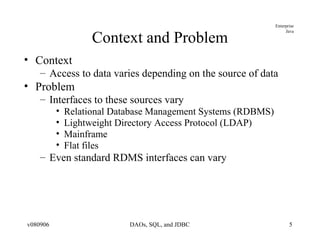
Context and Problem Context Access to data varies depending on the source of data Problem Interfaces to these sources vary Relational Database Management Systems (RDBMS) Lightweight Directory Access Protocol (LDAP) Mainframe Flat files Even standard RDMS interfaces can vary
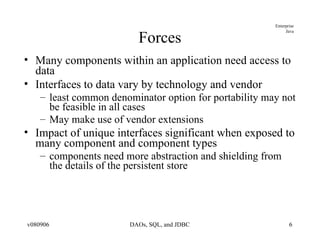
Forces Many components within an application need access to data Interfaces to data vary by technology and vendor least common denominator option for portability may not be feasible in all cases May make use of vendor extensions Impact of unique interfaces significant when exposed to many component and component types components need more abstraction and shielding from the details of the persistent store
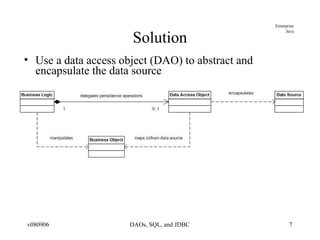
Solution Use a data access object (DAO) to abstract and encapsulate the data source
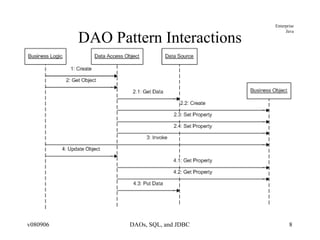
DAO Pattern Interactions
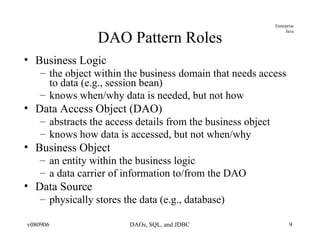
DAO Pattern Roles Business Logic the object within the business domain that needs access to data (e.g., session bean) knows when/why data is needed, but not how Data Access Object (DAO) abstracts the access details from the business object knows how data is accessed, but not when/why Business Object an entity within the business logic a data carrier of information to/from the DAO Data Source physically stores the data (e.g., database)
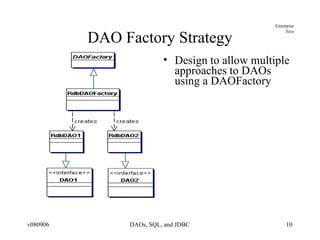
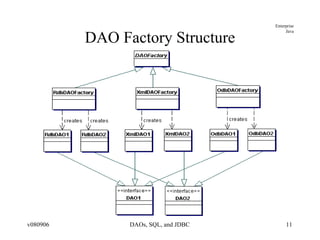
DAO Factory Strategy Design to allow multiple approaches to DAOs using a DAOFactory
DAO Factory Structure
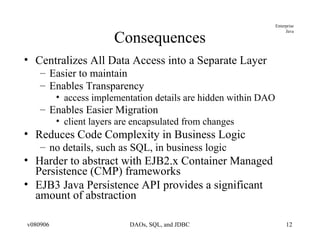
Consequences Centralizes All Data Access into a Separate Layer Easier to maintain Enables Transparency access implementation details are hidden within DAO Enables Easier Migration client layers are encapsulated from changes Reduces Code Complexity in Business Logic no details, such as SQL, in business logic Harder to abstract with EJB2.x Container Managed Persistence (CMP) frameworks EJB3 Java Persistence API provides a significant amount of abstraction
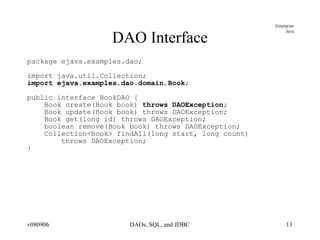
DAO Interface package ejava.examples.dao; import java.util.Collection; import ejava.examples.dao.domain.Book ; public interface BookDAO { Book create(Book book)  throws DAOException ; Book update(Book book) throws DAOException; Book get(long id) throws DAOException; boolean remove(Book book) throws DAOException; Collection<Book> findAll(long start, long count)  throws DAOException; }
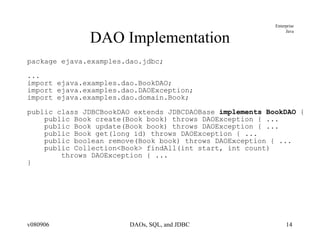
DAO Implementation package ejava.examples.dao.jdbc; ... import ejava.examples.dao.BookDAO; import ejava.examples.dao.DAOException; import ejava.examples.dao.domain.Book; public class JDBCBookDAO extends JDBCDAOBase  implements BookDAO  { public Book create(Book book) throws DAOException { ... public Book update(Book book) throws DAOException { ... public Book get(long id) throws DAOException { ... public boolean remove(Book book) throws DAOException { ... public Collection<Book> findAll(int start, int count)  throws DAOException { ... }
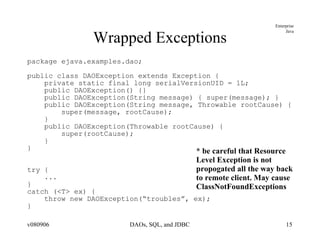
Wrapped Exceptions package ejava.examples.dao; public class DAOException extends Exception { private static final long serialVersionUID = 1L; public DAOException() {} public DAOException(String message) { super(message); } public DAOException(String message, Throwable rootCause) { super(message, rootCause); } public DAOException(Throwable rootCause) { super(rootCause); } } try { ... } catch (<T> ex) { throw new DAOException(“troubles”, ex); } * be careful that Resource Level Exception is not  propogated all the way back to remote client. May cause ClassNotFoundExceptions
Relating Business Objects to  Data Transfer Objects (DTOs)
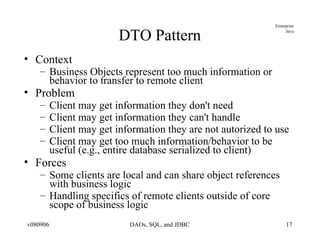
DTO Pattern Context Business Objects represent too much information or behavior to transfer to remote client Problem Client may get information they don't need Client may get information they can't handle Client may get information they are not autorized to use Client may get too much information/behavior to be useful (e.g., entire database serialized to client) Forces Some clients are local and can share object references with business logic Handling specifics of remote clients outside of core scope of business logic
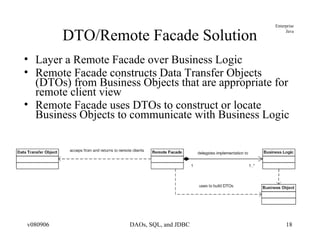
DTO/Remote Facade Solution Layer a Remote Facade over Business Logic Remote Facade constructs Data Transfer Objects (DTOs) from Business Objects that are appropriate for remote client view Remote Facade uses DTOs to construct or locate Business Objects to communicate with Business Logic
DTO Pattern Roles Data Transfer Object represent a subset of the state of the application at a point in time not dependent on Business Objects or server-side technologies doing so would require sending Business Objects to client XML and Web services provide the “ultimate isolation” in DTO implementation Remote Facade uses Business Logic to perform core business logic layered on to of Business Logic to translate between Business Objects and DTOs Business Logic continues to perform core duties as described in DAO Pattern
DTO Pattern Consequences Clients only get what they need Clients only get what they understand Clients only get what they are authorized to use Remote and Local interfaces to services are different makes it harder to provide location transparency Lightweight Business Objects can be used as DTOs Remote Facade must make sure they are “pruned” of excess related items before transferring to client Remote Facade must make sure they are “cleaned” of DAO persistence classes before transferring to client
Relational Databases and SQL
Relational Database and SQL Review Relational databases based upon mathematical set theory (Codd 1970) Controversial in the mid-80’s but now the standard for corporate data repositories Theoretical operations to manipulate and relate information in tables
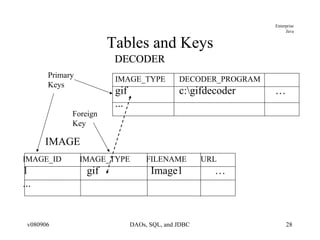
Relational Databases Based on tables where a row represents an instance of data and columns represent a specific attribute Keys uniquely identify a row in a table Rows in different tables are associated via a key
SQL Structured Query Language Standard language (mostly true to theoretical set operations) to manipulate relational data SQL-86 first published SQL-89, 92, 1999, 2003 various revisions SQL-2006 latest release most later activity centered around XML
Common SQL Operations Creating tables and indexes Constraints; keys, NOT NULL Inserting and Updating Data Selecting Data Views Removing Data
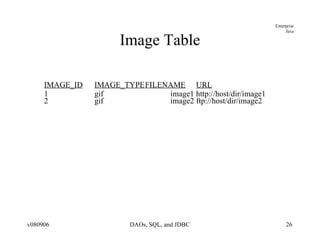
Image Table IMAGE_ID IMAGE_TYPE FILENAME URL 1 gif image1 http://host/dir/image1 2 gif image2 ftp://host/dir/image2
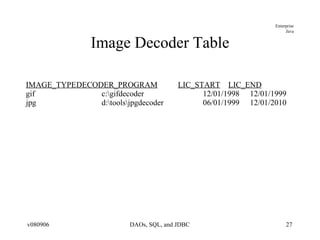
Image Decoder Table IMAGE_TYPE DECODER_PROGRAM LIC_START LIC_END gif c:\gifdecoder 12/01/1998 12/01/1999 jpg d:\tools\jpgdecoder 06/01/1999 12/01/2010
Tables and Keys Primary Keys Foreign Key DECODER DECODER IMAGE IMAGE_ID  IMAGE_TYPE  FILENAME  URL 1 gif Image1 … ... IMAGE_TYPE DECODER_PROGRAM gif c:\gifdecoder … ...
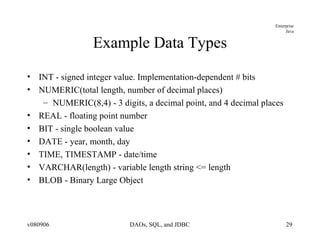
Example Data Types INT - signed integer value. Implementation-dependent # bits NUMERIC(total length, number of decimal places) NUMERIC(8,4) - 3 digits, a decimal point, and 4 decimal places REAL - floating point number BIT - single boolean value DATE - year, month, day TIME, TIMESTAMP - date/time  VARCHAR(length) - variable length string <= length BLOB - Binary Large Object
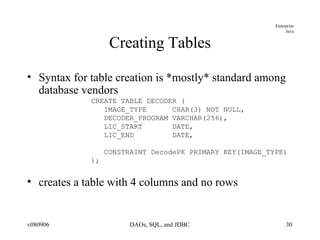
Creating Tables Syntax for table creation is *mostly* standard among database vendors CREATE TABLE DECODER ( IMAGE_TYPE  CHAR(3) NOT NULL, DECODER_PROGRAM VARCHAR(256), LIC_START  DATE, LIC_END  DATE, CONSTRAINT DecodePK PRIMARY KEY(IMAGE_TYPE) ); creates a table with 4 columns and no rows
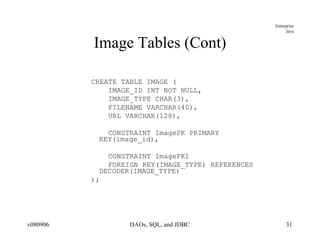
Image Tables (Cont) CREATE TABLE IMAGE ( IMAGE_ID INT NOT NULL, IMAGE_TYPE CHAR(3), FILENAME VARCHAR(40), URL VARCHAR(128), CONSTRAINT ImagePK PRIMARY KEY(image_id), CONSTRAINT ImageFK1 FOREIGN KEY(IMAGE_TYPE) REFERENCES DECODER(IMAGE_TYPE) );
Adding constraints Database can help maintain data integrity Can be specified with column definition or at the end of ‘create table’ NOT NULL Primary Keys Foreign Keys Check Conditions
NULLs Special condition that indicates an absence of a value Some columns may be required to have a value decoder_program VARCHAR(128) NOT NULL
Primary Keys Primary Key uniquely identifies a row Only 1 Primary Key allowed per table Can not be NULL (absence of a value) image_id INT PRIMARY_KEY OR constraint (IMAGE_KEY) PRIMARY KEY(image_id)
Foreign Keys Refers to a PRIMARY KEY in another table Used to relate tables together Foreign key (image_type) REFERENCES Image_Decoder(image_type) ON DELETE CASCADE – delete dependent row when row in master table is deleted
CHECK Constraint Expression that must be true for all table rows Grade NUMBER CHECK (Grade BETWEEN 0 and 100)
Dropping Tables Removes data and deletes table definition DROP TABLE DECODER
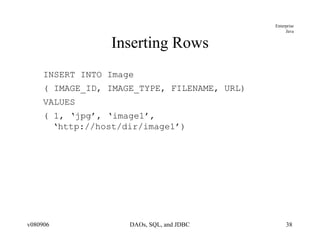
Inserting Rows INSERT INTO Image ( IMAGE_ID, IMAGE_TYPE, FILENAME, URL) VALUES ( 1, ‘jpg’, ‘image1’, ‘http://host/dir/image1’)
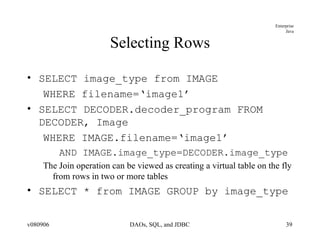
Selecting Rows SELECT image_type from IMAGE WHERE filename=‘image1’ SELECT DECODER.decoder_program FROM DECODER, Image WHERE IMAGE.filename=‘image1’ AND IMAGE.image_type=DECODER.image_type The Join operation can be viewed as creating a virtual table on the fly from rows in two or more tables SELECT * from IMAGE GROUP by image_type
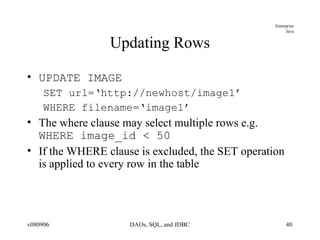
Updating Rows UPDATE IMAGE SET url=‘http://newhost/image1’ WHERE filename=‘image1’ The where clause may select multiple rows e.g.  WHERE image_id < 50 If the WHERE clause is excluded, the SET operation is applied to every row in the table
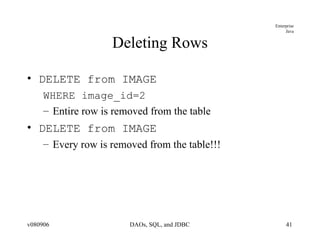
Deleting Rows DELETE from IMAGE WHERE image_id=2 Entire row is removed from the table DELETE from IMAGE Every row is removed from the table!!!
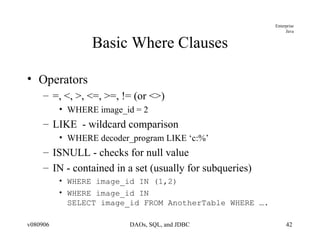
Basic Where Clauses Operators =, <, >, <=, >=, != (or <>) WHERE image_id = 2 LIKE  - wildcard comparison WHERE decoder_program LIKE ‘c:%’ ISNULL - checks for null value IN - contained in a set (usually for subqueries) WHERE image_id IN (1,2) WHERE image_id IN SELECT image_id FROM AnotherTable WHERE ….
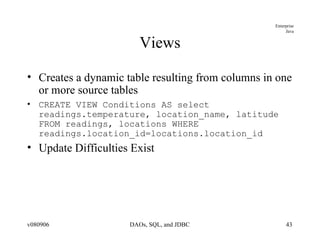
Views Creates a dynamic table resulting from columns in one or more source tables CREATE VIEW Conditions AS select readings.temperature, location_name, latitude FROM readings, locations WHERE readings.location_id=locations.location_id Update Difficulties Exist
SQL Data Types Numeric Temporal Character Locator-Based Data Types Arrays, CLOBS, and BLOBs
Numeric Data Types SQL defines many different numeric types Numeric types are classified as either exact or approximate
Exact Numeric Data Types Precision (P) = Number of significant digits Scale (S) = Number of decimal places INTEGER, SMALLINT DECIMAL(P,S), NUMERIC(P,S) DECIMAL can be represented with a greater than requested Precision java.math.BigDecimal
Approximate Numeric Data Types Mantissa and exponent representation Value = mantissa * 10 to the exponent FLOAT(P), REAL, DOUBLE PRECISION
Temporal Data Types DATE – Day, Month, and Year TIME – Hour, Minute, Seconds TIMESTAMP – Date + Time + Nanoseconds Wide variance between vendor implementations
Character Data Types Printable characters enclosed in single quotes Fixed length CHARACTER(n) and CHAR(n) Fixed length string of characters Maps to java.lang.String; padded if necessary Varying character arrays (VARCHAR(n)) 1..N characters Maps to java.lang.String.  NOTE: Use VARCHAR2(n) in Oracle
Locator-Based data types For data values that may be too large to always materialize on the client Reference to data on server; hence locator Arrays Actually violate 1NF which disallows repeating data in a single table Create type email_va as varray(3) of VARCHAR2(25) BLOBs – large amounts of binary data CLOBs – large amounts of character data
SQL Summary SQL is a non-procedural language for manipulating sets. De-facto standard for enterprise data repositories Different paradigm than procedural/object-oriented languages like Java
Java Database Connectivity (JDBC)
JDBC Drivers Type 1 - JDBC-ODBC bridge  provides JDBC API access via ODBC drivers requires some binary code be loaded on client machine Type 2 native-API partly Java technology-enabled driver converts JDBC calls into calls on the client API for DBMS requires some binary code be loaded on client machine Type 3 net-protocol fully Java technology-enabled driver translates JDBC API calls into DBMS-independent net protocol  Type 4 native-protocol fully Java technology-enabled driver converts JDBC technology calls into the network protocol used by DBMSs directly
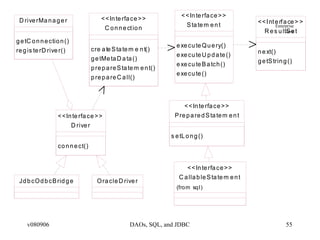
Key JDBC Classes/Interfaces DriverManager starting point for client to get dedicated connections to server Driver provides database-specific implementation for interfaces Connection represents an open conversation with the server Statement used to expres SQL statements to database ResultSet used to return SQL results from database SQLException used to report errors or warning executing SQL
 
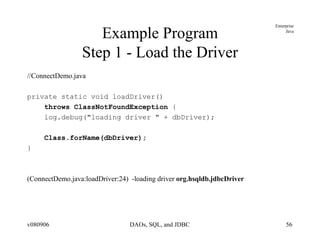
Example Program Step 1 - Load the Driver //ConnectDemo.java private static void loadDriver()  throws ClassNotFoundException  { log.debug(&quot;loading driver &quot; + dbDriver); Class.forName(dbDriver); } (ConnectDemo.java:loadDriver:24)  -loading driver  org.hsqldb.jdbcDriver
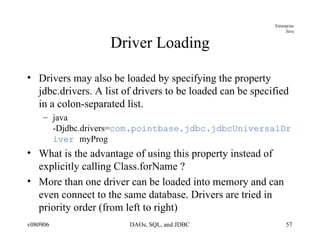
Driver Loading Drivers may also be loaded by specifying the property jdbc.drivers. A list of drivers to be loaded can be specified in a colon-separated list. java -Djdbc.drivers= com.pointbase.jdbc.jdbcUniversalDriver  myProg What is the advantage of using this property instead of explicitly calling Class.forName ? More than one driver can be loaded into memory and can even connect to the same database. Drivers are tried in priority order (from left to right)
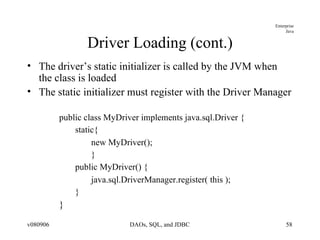
Driver Loading (cont.) The driver’s static initializer is called by the JVM when the class is loaded The static initializer must register with the Driver Manager public class MyDriver implements java.sql.Driver { static{ new MyDriver(); } public MyDriver() { java.sql.DriverManager.register( this );  } }
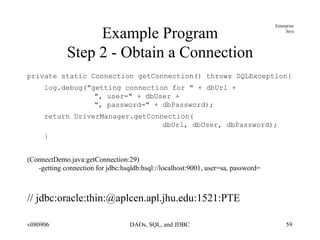
Example Program Step 2 - Obtain a Connection private static Connection getConnection() throws SQLException{ log.debug(&quot;getting connection for &quot; + dbUrl +    &quot;, user=&quot; + dbUser +    &quot;, password=&quot; + dbPassword); return DriverManager.getConnection(   dbUrl, dbUser, dbPassword); } (ConnectDemo.java:getConnection:29)  -getting connection for jdbc:hsqldb:hsql://localhost:9001, user=sa, password= // jdbc:oracle:thin:@aplcen.apl.jhu.edu:1521:PTE
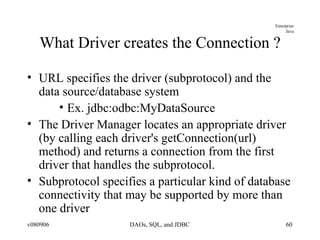
What Driver creates the Connection ? URL specifies the driver (subprotocol) and the data source/database system Ex. jdbc:odbc:MyDataSource The Driver Manager locates an appropriate driver (by calling each driver's getConnection(url) method) and returns a connection from the first driver that handles the subprotocol.  Subprotocol specifies a particular kind of database connectivity that may be supported by more than one driver
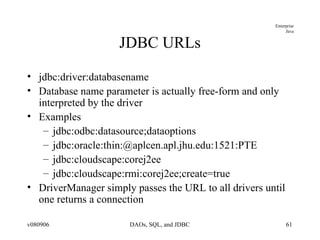
JDBC URLs jdbc:driver:databasename Database name parameter is actually free-form and only interpreted by the driver Examples jdbc:odbc:datasource;dataoptions jdbc:oracle:thin:@aplcen.apl.jhu.edu:1521:PTE jdbc:cloudscape:corej2ee jdbc:cloudscape:rmi:corej2ee;create=true DriverManager simply passes the URL to all drivers until one returns a connection
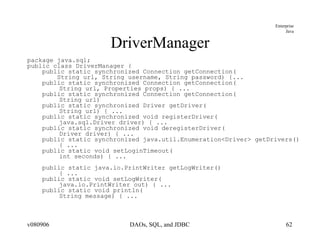
DriverManager package java.sql; public class DriverManager { public static synchronized Connection getConnection( String url, String username, String password) {... public static synchronized Connection getConnection( String url, Properties props) { ... public static synchronized Connection getConnection( String url)  public static synchronized Driver getDriver( String url) { ...  public static synchronized void registerDriver( java.sql.Driver driver) { ... public static synchronized void deregisterDriver( Driver driver) { ... public static synchronized java.util.Enumeration<Driver> getDrivers()  { ... public static void setLoginTimeout( int seconds) { ... public static java.io.PrintWriter getLogWriter()  { ... public static void setLogWriter( java.io.PrintWriter out) { ... public static void println( String message) { ...
Driver package java.sql; public interface Driver { Connection connect(String url, java.util.Properties info) throws SQLException; boolean acceptsURL(String url)  throws SQLException; DriverPropertyInfo[] getPropertyInfo( String url, java.util.Properties info) throws SQLException; int getMinorVersion(); boolean jdbcCompliant(); }
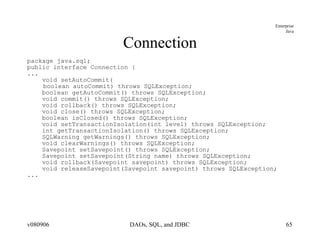
Connection package java.sql; public interface Connection { Statement createStatement() throws SQLException; PreparedStatement prepareStatement( String sql)throws SQLException; CallableStatement prepareCall( String sql) throws SQLException; PreparedStatement prepareStatement(String sql, int resultSetType,  int resultSetConcurrency)throws SQLException; CallableStatement prepareCall( String sql, int resultSetType, int resultSetConcurrency)  throws SQLException; Statement createStatement( int resultSetType, int resultSetConcurrency,  int resultSetHoldability) throws SQLException; PreparedStatement prepareStatement(String sql, int resultSetType,  int resultSetConcurrency, int resultSetHoldability) throws SQLException; CallableStatement prepareCall(String sql, int resultSetType,  int resultSetConcurrency,  int resultSetHoldability) throws SQLException; PreparedStatement prepareStatement( String sql, int autoGeneratedKeys) throws SQLException; PreparedStatement prepareStatement( String sql, int columnIndexes[]) throws SQLException; PreparedStatement prepareStatement( String sql, String columnNames[])throws SQLException; ...
Connection package java.sql; public interface Connection { ... void setAutoCommit( boolean autoCommit) throws SQLException; boolean getAutoCommit() throws SQLException; void commit() throws SQLException; void rollback() throws SQLException; void close() throws SQLException; boolean isClosed() throws SQLException; void setTransactionIsolation(int level) throws SQLException; int getTransactionIsolation() throws SQLException; SQLWarning getWarnings() throws SQLException; void clearWarnings() throws SQLException; Savepoint setSavepoint() throws SQLException; Savepoint setSavepoint(String name) throws SQLException; void rollback(Savepoint savepoint) throws SQLException; void releaseSavepoint(Savepoint savepoint) throws SQLException; ...
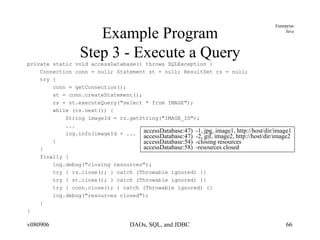
Example Program Step 3 - Execute a Query private static void accessDatabase() throws SQLException { Connection conn = null; Statement st = null; ResultSet rs = null; try { conn = getConnection(); st = conn.createStatement(); rs = st.executeQuery(&quot;select * from IMAGE&quot;); while (rs.next()) { String imageId = rs.getString(&quot;IMAGE_ID&quot;); ... log.info(imageId + ... } } finally { log.debug(&quot;closing resources&quot;); try { rs.close(); } catch (Throwable ignored) {} try { st.close(); } catch (Throwable ignored) {} try { conn.close(); } catch (Throwable ignored) {} log.debug(&quot;resources closed&quot;); } } accessDatabase:47)  -1, jpg, image1, http://host/dir/image1 accessDatabase:47)  -2, gif, image2, http://host/dir/image2 accessDatabase:54)  -closing resources accessDatabase:58)  -resources closed
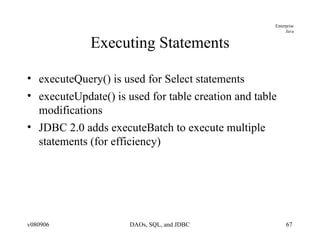
Executing Statements executeQuery() is used for Select statements executeUpdate() is used for table creation and table modifications JDBC 2.0 adds executeBatch to execute multiple statements (for efficiency)
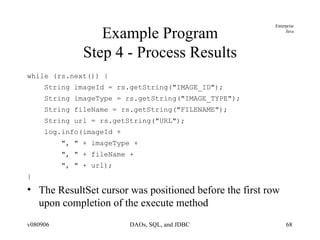
Example Program Step 4 - Process Results while (rs.next()) { String imageId = rs.getString(&quot;IMAGE_ID&quot;); String imageType = rs.getString(&quot;IMAGE_TYPE&quot;); String fileName = rs.getString(&quot;FILENAME&quot;); String url = rs.getString(&quot;URL&quot;); log.info(imageId +  &quot;, &quot; + imageType +  &quot;, &quot; + fileName + &quot;, &quot; + url); } The ResultSet cursor was positioned before the first row upon completion of the execute method
Example Program Step 5 - Release Resources rs.close(); st.close(); con.close();
Statement Represents a basic SQL statement Created from a connection Use executeQuery for queries Result rs=st.executeQuery(“SELECT * FROM Image”); Use executeUpdate for SQL statements that don’t return results DDL commands for creating, dropping tables Update/Delete Returns the number of rows affected
Statement (Cont) Use execute() if you don’t know the type of request being submitted e.g. the user is typing it in Returns true if a result set is available Call getResultSet() to retrieve the results Only one result set is associated with a statement at a time i.e A statement represents one SQL statement at a time
Statement (Cont) An SQL statement may return multiple result sets or update counts getMoreResults() : boolean getUpdateCount() : int This condition is rare and are normally the result of a stored procedure or database-specific functionality
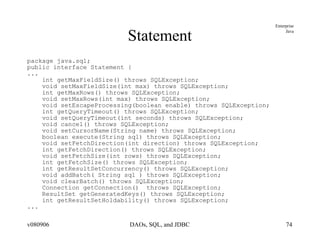
Statement package java.sql; public interface Statement { ... ResultSet executeQuery(String sql) throws SQLException; int executeUpdate(String sql) throws SQLException; SQLWarning getWarnings() throws SQLException; void clearWarnings() throws SQLException; boolean execute(String sql) throws SQLException; ResultSet getResultSet() throws SQLException;  int getUpdateCount() throws SQLException;  boolean getMoreResults() throws SQLException;  int getResultSetType()  throws SQLException; void addBatch( String sql ) throws SQLException; void clearBatch() throws SQLException; int[] executeBatch() throws SQLException; boolean getMoreResults(int current) throws SQLException; ResultSet getGeneratedKeys() throws SQLException; int executeUpdate(String sql, int autoGeneratedKeys) throws SQLException; int executeUpdate(String sql, int columnIndexes[]) throws SQLException; int executeUpdate(String sql, String columnNames[]) throws SQLException; boolean execute(String sql, int autoGeneratedKeys) throws SQLException; boolean execute(String sql, int columnIndexes[]) throws SQLException; boolean execute(String sql, String columnNames[]) throws SQLException; ...
Statement package java.sql; public interface Statement { ... int getMaxFieldSize() throws SQLException; void setMaxFieldSize(int max) throws SQLException; int getMaxRows() throws SQLException; void setMaxRows(int max) throws SQLException; void setEscapeProcessing(boolean enable) throws SQLException; int getQueryTimeout() throws SQLException; void setQueryTimeout(int seconds) throws SQLException; void cancel() throws SQLException; void setCursorName(String name) throws SQLException; boolean execute(String sql) throws SQLException; void setFetchDirection(int direction) throws SQLException; int getFetchDirection() throws SQLException; void setFetchSize(int rows) throws SQLException; int getFetchSize() throws SQLException; int getResultSetConcurrency() throws SQLException; void addBatch( String sql ) throws SQLException; void clearBatch() throws SQLException; Connection getConnection()  throws SQLException; ResultSet getGeneratedKeys() throws SQLException; int getResultSetHoldability() throws SQLException; ...
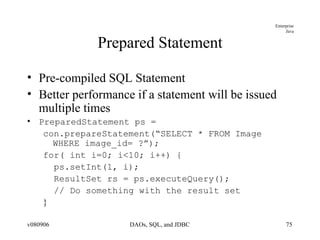
Prepared Statement Pre-compiled SQL Statement Better performance if a statement will be issued multiple times PreparedStatement ps = con.prepareStatement(“SELECT * FROM Image WHERE image_id= ?”); for( int i=0; i<10; i++) { ps.setInt(1, i); ResultSet rs = ps.executeQuery(); // Do something with the result set }
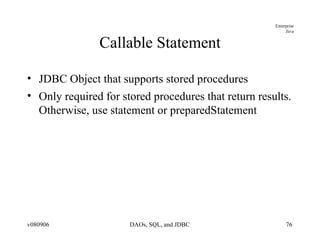
Callable Statement JDBC Object that supports stored procedures Only required for stored procedures that return results. Otherwise, use statement or preparedStatement
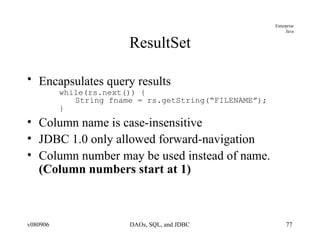
ResultSet Encapsulates query results   while(rs.next()) { String fname = rs.getString(“FILENAME”); } Column name is case-insensitive JDBC 1.0 only allowed forward-navigation Column number may be used instead of name.  (Column numbers start at 1)
Transactions Grouping of statements into one logical unit of work Each statement must succeed or the transaction is rolled back Steps start transaction execute statements commit or rollback the transaction
JDBC Transaction API Responsibility of the Connection Object By default, each operation is a transaction setAutoCommit(true) To perform multiple statements in a transaction: con.setAutoCommit(false); // execute statements con.commit();
Isolation Levels When are changes to the database visible to the rest of the system? Isolation Modes: TRANSACTION_NONE Transactions are either disabled or not supported TRANSACTION_READ_UNCOMMITTED Dirty reads Other transactions can see the results of uncommitted other transactions If the other transaction rolls back, other applications can be left with incorrect data TRANSACTION_READ_COMMITTED TRANSACTION_REPEATABLE_READ Once an application performs a read, it will always get those results when it reads that row Even if another transaction modifies the row Reader must commit() before the new value can be read TRANSACTION_SERIALIZABLE Features of Transaction repeatable read Also, does not see rows inserted by another transaction
Transaction Methods conn.setTransactionIsolation() Database metadata identifies transaction level support of database Each transaction requires their own Connection object
Savepoints Introduced in JDBC 3.0 Allows partial rollback or commit of a transaction
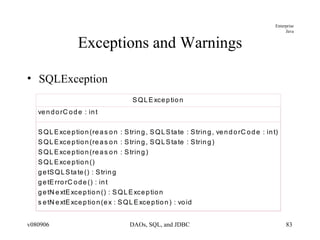
Exceptions and Warnings SQLException
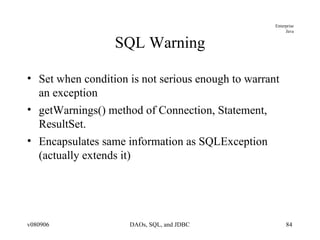
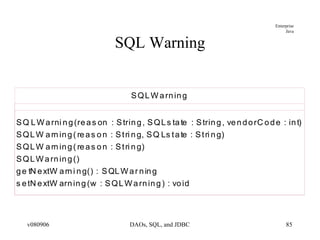
SQL Warning Set when condition is not serious enough to warrant an exception getWarnings() method of Connection, Statement, ResultSet. Encapsulates same information as SQLException (actually extends it)
SQL Warning
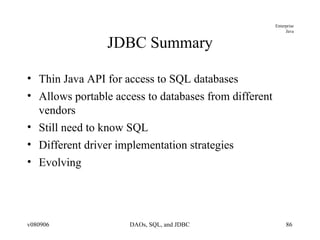
JDBC Summary Thin Java API for access to SQL databases Allows portable access to databases from different vendors Still need to know SQL Different driver implementation strategies Evolving
JDBC/SQL-based DAO Example
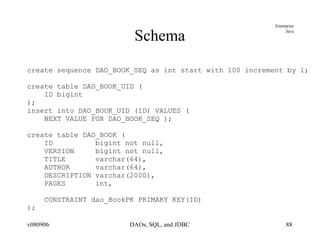
Schema create sequence DAO_BOOK_SEQ as int start with 100 increment by 1; create table DAO_BOOK_UID ( ID bigint ); insert into DAO_BOOK_UID (ID) VALUES ( NEXT VALUE FOR DAO_BOOK_SEQ ); create table DAO_BOOK ( ID  bigint not null, VERSION  bigint not null, TITLE  varchar(64), AUTHOR  varchar(64), DESCRIPTION varchar(2000), PAGES  int, CONSTRAINT dao_BookPK PRIMARY KEY(ID) );
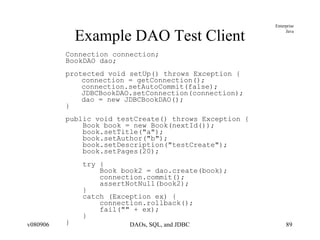
Example DAO Test Client Connection connection; BookDAO dao; protected void setUp() throws Exception { connection = getConnection(); connection.setAutoCommit(false); JDBCBookDAO.setConnection(connection); dao = new JDBCBookDAO(); } public void testCreate() throws Exception { Book book = new Book(nextId()); book.setTitle(&quot;a&quot;); book.setAuthor(&quot;b&quot;); book.setDescription(&quot;testCreate&quot;); book.setPages(20); try { Book book2 = dao.create(book); connection.commit(); assertNotNull(book2); } catch (Exception ex) { connection.rollback(); fail(&quot;&quot; + ex); } }
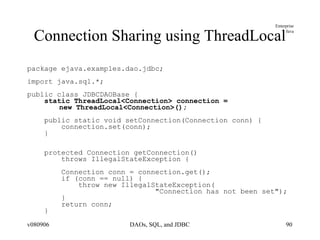
Connection Sharing using ThreadLocal package ejava.examples.dao.jdbc; import java.sql.*; public class JDBCDAOBase { static ThreadLocal<Connection> connection =  new ThreadLocal<Connection>(); public static void setConnection(Connection conn) { connection.set(conn); } protected Connection getConnection()  throws IllegalStateException { Connection conn = connection.get(); if (conn == null) { throw new IllegalStateException( &quot;Connection has not been set&quot;); } return conn; }
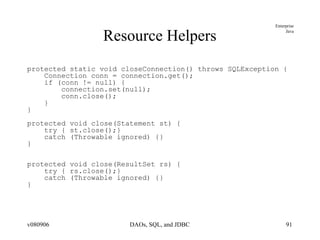
Resource Helpers protected static void closeConnection() throws SQLException { Connection conn = connection.get(); if (conn != null) { connection.set(null); conn.close(); } } protected void close(Statement st) { try { st.close();} catch (Throwable ignored) {} } protected void close(ResultSet rs) { try { rs.close();} catch (Throwable ignored) {} }
Inserting Object  (and calling a private setter) public Book create(Book book) throws DAOException { long id = (book.getId() == 0) ? getNextId() : book.getId(); PreparedStatement st = null; try { st = getConnection().prepareStatement( &quot;INSERT INTO &quot; + TABLE_NAME + &quot; &quot; + &quot;(ID, VERSION, TITLE, AUTHOR, DESCRIPTION, PAGES) &quot; + &quot;VALUES(?, ?, ?, ?, ?, ?)&quot;); st.setLong(1, id); st.setLong(2, 0); st.setString(3, book.getTitle()); st.setString(4, book.getAuthor()); st.setString(5, book.getDescription()); st.setInt(6, book.getPages()); if (st.executeUpdate() != 1) { throw new DAOException(&quot;unable to insert Book&quot;);  } book.setVersion(0); if (book.getId()==0) { //use reflection to get private setId method of Book class Method setId = Book.class.getDeclaredMethod( &quot;setId&quot;, new Class[] { int.class }); setId.setAccessible(true); setId.invoke(book, new Object[] { id }); } return book; } catch (Exception ex) { throw new DAOException(ex); } finally { close(st); } }
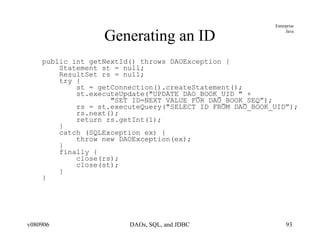
Generating an ID public int getNextId() throws DAOException { Statement st = null; ResultSet rs = null; try { st = getConnection().createStatement(); st.executeUpdate(&quot;UPDATE DAO_BOOK_UID &quot; + &quot;SET ID=NEXT VALUE FOR DAO_BOOK_SEQ”);  rs = st.executeQuery(&quot;SELECT ID FROM DAO_BOOK_UID”); rs.next(); return rs.getInt(1);  } catch (SQLException ex) { throw new DAOException(ex); } finally { close(rs); close(st); } }
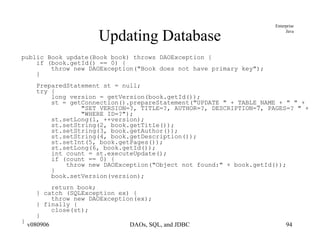
Updating Database public Book update(Book book) throws DAOException { if (book.getId() == 0) { throw new DAOException(&quot;Book does not have primary key&quot;); } PreparedStatement st = null; try { long version = getVersion(book.getId()); st = getConnection().prepareStatement(&quot;UPDATE &quot; + TABLE_NAME + &quot; &quot; + &quot;SET VERSION=?, TITLE=?, AUTHOR=?, DESCRIPTION=?, PAGES=? &quot; + &quot;WHERE ID=?&quot;); st.setLong(1, ++version); st.setString(2, book.getTitle()); st.setString(3, book.getAuthor()); st.setString(4, book.getDescription()); st.setInt(5, book.getPages()); st.setLong(6, book.getId()); int count = st.executeUpdate(); if (count == 0) { throw new DAOException(&quot;Object not found:&quot; + book.getId()); } book.setVersion(version); return book; } catch (SQLException ex) { throw new DAOException(ex);  } finally { close(st); } }
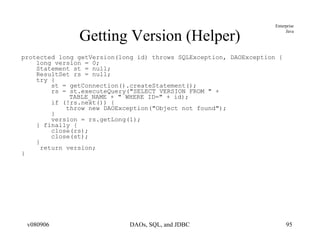
Getting Version (Helper) protected long getVersion(long id) throws SQLException, DAOException { long version = 0; Statement st = null; ResultSet rs = null; try { st = getConnection().createStatement(); rs = st.executeQuery(&quot;SELECT VERSION FROM &quot; +  TABLE_NAME + &quot; WHERE ID=&quot; + id); if (!rs.next()) { throw new DAOException(&quot;Object not found&quot;); } version = rs.getLong(1); } finally { close(rs); close(st); } return version; }
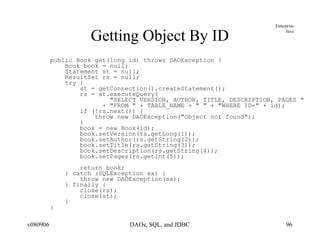
Getting Object By ID public Book get(long id) throws DAOException { Book book = null; Statement st = null; ResultSet rs = null; try { st = getConnection().createStatement(); rs = st.executeQuery( &quot;SELECT VERSION, AUTHOR, TITLE, DESCRIPTION, PAGES &quot; + &quot;FROM &quot; + TABLE_NAME + &quot; &quot; + &quot;WHERE ID=&quot; + id); if (!rs.next()) { throw new DAOException(&quot;Object not found&quot;); } book = new Book(id); book.setVersion(rs.getLong(1)); book.setAuthor(rs.getString(2)); book.setTitle(rs.getString(3)); book.setDescription(rs.getString(4)); book.setPages(rs.getInt(5)); return book; } catch (SQLException ex) { throw new DAOException(ex); } finally { close(rs); close(st); } }
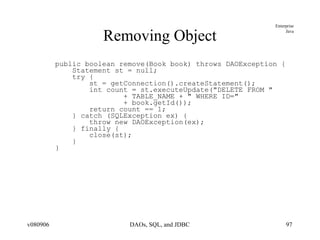
Removing Object public boolean remove(Book book) throws DAOException { Statement st = null; try { st = getConnection().createStatement(); int count = st.executeUpdate(&quot;DELETE FROM &quot; + TABLE_NAME + &quot; WHERE ID=&quot; + book.getId()); return count == 1; } catch (SQLException ex) { throw new DAOException(ex); } finally { close(st); } }
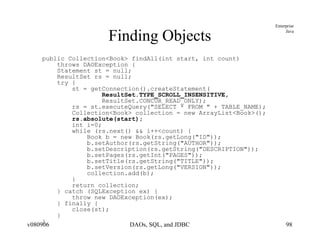
Finding Objects public Collection<Book> findAll(int start, int count)  throws DAOException { Statement st = null; ResultSet rs = null; try { st = getConnection().createStatement( ResultSet.TYPE_SCROLL_INSENSITIVE, ResultSet.CONCUR_READ_ONLY); rs = st.executeQuery(&quot;SELECT * FROM &quot; + TABLE_NAME); Collection<Book> collection = new ArrayList<Book>(); rs.absolute(start); int i=0; while (rs.next() && i++<count) { Book b = new Book(rs.getLong(&quot;ID&quot;)); b.setAuthor(rs.getString(&quot;AUTHOR&quot;)); b.setDescription(rs.getString(&quot;DESCRIPTION&quot;)); b.setPages(rs.getInt(&quot;PAGES&quot;)); b.setTitle(rs.getString(&quot;TITLE&quot;)); b.setVersion(rs.getLong(&quot;VERSION&quot;)); collection.add(b); }  return collection; } catch (SQLException ex) { throw new DAOException(ex);  } finally { close(st); } }
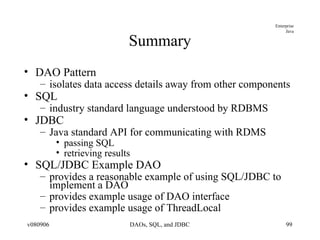
Summary DAO Pattern isolates data access details away from other components SQL industry standard language understood by RDBMS JDBC Java standard API for communicating with RDMS passing SQL retrieving results SQL/JDBC Example DAO provides a reasonable example of using SQL/JDBC to implement a DAO provides example usage of DAO interface provides example usage of ThreadLocal
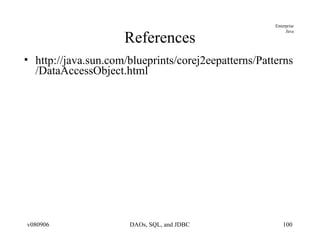
References http://java.sun.com/blueprints/corej2eepatterns/Patterns/DataAccessObject.html

Jdbc Dao it-slideshares.blogspot.com

  • 1.
    JDBC and DataAccess Objects
  • 2.
    Goals Understand DataAccess Pattern roles Data Access Object (DAO) Business Logic Business Object Data Transfer Object (DTO) Understand how Business Objects relate to Data Transfer Objects (DTOs) Introduce SQL as a way of implementing DAOs Introduce JDBC as a way of interfacing with a SQL database
  • 3.
    Objectives Data AccessObject Pattern Relational Databases Basic SQL Commands JDBC Introduction Example SQL/JDBC DAO Implementation
  • 4.
    Data Access Object(DAO) Pattern
  • 5.
    Context and ProblemContext Access to data varies depending on the source of data Problem Interfaces to these sources vary Relational Database Management Systems (RDBMS) Lightweight Directory Access Protocol (LDAP) Mainframe Flat files Even standard RDMS interfaces can vary
  • 6.
    Forces Many componentswithin an application need access to data Interfaces to data vary by technology and vendor least common denominator option for portability may not be feasible in all cases May make use of vendor extensions Impact of unique interfaces significant when exposed to many component and component types components need more abstraction and shielding from the details of the persistent store
  • 7.
    Solution Use adata access object (DAO) to abstract and encapsulate the data source
  • 8.
  • 9.
    DAO Pattern RolesBusiness Logic the object within the business domain that needs access to data (e.g., session bean) knows when/why data is needed, but not how Data Access Object (DAO) abstracts the access details from the business object knows how data is accessed, but not when/why Business Object an entity within the business logic a data carrier of information to/from the DAO Data Source physically stores the data (e.g., database)
  • 10.
    DAO Factory StrategyDesign to allow multiple approaches to DAOs using a DAOFactory
  • 11.
  • 12.
    Consequences Centralizes AllData Access into a Separate Layer Easier to maintain Enables Transparency access implementation details are hidden within DAO Enables Easier Migration client layers are encapsulated from changes Reduces Code Complexity in Business Logic no details, such as SQL, in business logic Harder to abstract with EJB2.x Container Managed Persistence (CMP) frameworks EJB3 Java Persistence API provides a significant amount of abstraction
  • 13.
    DAO Interface packageejava.examples.dao; import java.util.Collection; import ejava.examples.dao.domain.Book ; public interface BookDAO { Book create(Book book) throws DAOException ; Book update(Book book) throws DAOException; Book get(long id) throws DAOException; boolean remove(Book book) throws DAOException; Collection<Book> findAll(long start, long count) throws DAOException; }
  • 14.
    DAO Implementation packageejava.examples.dao.jdbc; ... import ejava.examples.dao.BookDAO; import ejava.examples.dao.DAOException; import ejava.examples.dao.domain.Book; public class JDBCBookDAO extends JDBCDAOBase implements BookDAO { public Book create(Book book) throws DAOException { ... public Book update(Book book) throws DAOException { ... public Book get(long id) throws DAOException { ... public boolean remove(Book book) throws DAOException { ... public Collection<Book> findAll(int start, int count) throws DAOException { ... }
  • 15.
    Wrapped Exceptions packageejava.examples.dao; public class DAOException extends Exception { private static final long serialVersionUID = 1L; public DAOException() {} public DAOException(String message) { super(message); } public DAOException(String message, Throwable rootCause) { super(message, rootCause); } public DAOException(Throwable rootCause) { super(rootCause); } } try { ... } catch (<T> ex) { throw new DAOException(“troubles”, ex); } * be careful that Resource Level Exception is not propogated all the way back to remote client. May cause ClassNotFoundExceptions
  • 16.
    Relating Business Objectsto Data Transfer Objects (DTOs)
  • 17.
    DTO Pattern ContextBusiness Objects represent too much information or behavior to transfer to remote client Problem Client may get information they don't need Client may get information they can't handle Client may get information they are not autorized to use Client may get too much information/behavior to be useful (e.g., entire database serialized to client) Forces Some clients are local and can share object references with business logic Handling specifics of remote clients outside of core scope of business logic
  • 18.
    DTO/Remote Facade SolutionLayer a Remote Facade over Business Logic Remote Facade constructs Data Transfer Objects (DTOs) from Business Objects that are appropriate for remote client view Remote Facade uses DTOs to construct or locate Business Objects to communicate with Business Logic
  • 19.
    DTO Pattern RolesData Transfer Object represent a subset of the state of the application at a point in time not dependent on Business Objects or server-side technologies doing so would require sending Business Objects to client XML and Web services provide the “ultimate isolation” in DTO implementation Remote Facade uses Business Logic to perform core business logic layered on to of Business Logic to translate between Business Objects and DTOs Business Logic continues to perform core duties as described in DAO Pattern
  • 20.
    DTO Pattern ConsequencesClients only get what they need Clients only get what they understand Clients only get what they are authorized to use Remote and Local interfaces to services are different makes it harder to provide location transparency Lightweight Business Objects can be used as DTOs Remote Facade must make sure they are “pruned” of excess related items before transferring to client Remote Facade must make sure they are “cleaned” of DAO persistence classes before transferring to client
  • 21.
  • 22.
    Relational Database andSQL Review Relational databases based upon mathematical set theory (Codd 1970) Controversial in the mid-80’s but now the standard for corporate data repositories Theoretical operations to manipulate and relate information in tables
  • 23.
    Relational Databases Basedon tables where a row represents an instance of data and columns represent a specific attribute Keys uniquely identify a row in a table Rows in different tables are associated via a key
  • 24.
    SQL Structured QueryLanguage Standard language (mostly true to theoretical set operations) to manipulate relational data SQL-86 first published SQL-89, 92, 1999, 2003 various revisions SQL-2006 latest release most later activity centered around XML
  • 25.
    Common SQL OperationsCreating tables and indexes Constraints; keys, NOT NULL Inserting and Updating Data Selecting Data Views Removing Data
  • 26.
    Image Table IMAGE_IDIMAGE_TYPE FILENAME URL 1 gif image1 http://host/dir/image1 2 gif image2 ftp://host/dir/image2
  • 27.
    Image Decoder TableIMAGE_TYPE DECODER_PROGRAM LIC_START LIC_END gif c:\gifdecoder 12/01/1998 12/01/1999 jpg d:\tools\jpgdecoder 06/01/1999 12/01/2010
  • 28.
    Tables and KeysPrimary Keys Foreign Key DECODER DECODER IMAGE IMAGE_ID IMAGE_TYPE FILENAME URL 1 gif Image1 … ... IMAGE_TYPE DECODER_PROGRAM gif c:\gifdecoder … ...
  • 29.
    Example Data TypesINT - signed integer value. Implementation-dependent # bits NUMERIC(total length, number of decimal places) NUMERIC(8,4) - 3 digits, a decimal point, and 4 decimal places REAL - floating point number BIT - single boolean value DATE - year, month, day TIME, TIMESTAMP - date/time VARCHAR(length) - variable length string <= length BLOB - Binary Large Object
  • 30.
    Creating Tables Syntaxfor table creation is *mostly* standard among database vendors CREATE TABLE DECODER ( IMAGE_TYPE CHAR(3) NOT NULL, DECODER_PROGRAM VARCHAR(256), LIC_START DATE, LIC_END DATE, CONSTRAINT DecodePK PRIMARY KEY(IMAGE_TYPE) ); creates a table with 4 columns and no rows
  • 31.
    Image Tables (Cont)CREATE TABLE IMAGE ( IMAGE_ID INT NOT NULL, IMAGE_TYPE CHAR(3), FILENAME VARCHAR(40), URL VARCHAR(128), CONSTRAINT ImagePK PRIMARY KEY(image_id), CONSTRAINT ImageFK1 FOREIGN KEY(IMAGE_TYPE) REFERENCES DECODER(IMAGE_TYPE) );
  • 32.
    Adding constraints Databasecan help maintain data integrity Can be specified with column definition or at the end of ‘create table’ NOT NULL Primary Keys Foreign Keys Check Conditions
  • 33.
    NULLs Special conditionthat indicates an absence of a value Some columns may be required to have a value decoder_program VARCHAR(128) NOT NULL
  • 34.
    Primary Keys PrimaryKey uniquely identifies a row Only 1 Primary Key allowed per table Can not be NULL (absence of a value) image_id INT PRIMARY_KEY OR constraint (IMAGE_KEY) PRIMARY KEY(image_id)
  • 35.
    Foreign Keys Refersto a PRIMARY KEY in another table Used to relate tables together Foreign key (image_type) REFERENCES Image_Decoder(image_type) ON DELETE CASCADE – delete dependent row when row in master table is deleted
  • 36.
    CHECK Constraint Expressionthat must be true for all table rows Grade NUMBER CHECK (Grade BETWEEN 0 and 100)
  • 37.
    Dropping Tables Removesdata and deletes table definition DROP TABLE DECODER
  • 38.
    Inserting Rows INSERTINTO Image ( IMAGE_ID, IMAGE_TYPE, FILENAME, URL) VALUES ( 1, ‘jpg’, ‘image1’, ‘http://host/dir/image1’)
  • 39.
    Selecting Rows SELECTimage_type from IMAGE WHERE filename=‘image1’ SELECT DECODER.decoder_program FROM DECODER, Image WHERE IMAGE.filename=‘image1’ AND IMAGE.image_type=DECODER.image_type The Join operation can be viewed as creating a virtual table on the fly from rows in two or more tables SELECT * from IMAGE GROUP by image_type
  • 40.
    Updating Rows UPDATEIMAGE SET url=‘http://newhost/image1’ WHERE filename=‘image1’ The where clause may select multiple rows e.g. WHERE image_id < 50 If the WHERE clause is excluded, the SET operation is applied to every row in the table
  • 41.
    Deleting Rows DELETEfrom IMAGE WHERE image_id=2 Entire row is removed from the table DELETE from IMAGE Every row is removed from the table!!!
  • 42.
    Basic Where ClausesOperators =, <, >, <=, >=, != (or <>) WHERE image_id = 2 LIKE - wildcard comparison WHERE decoder_program LIKE ‘c:%’ ISNULL - checks for null value IN - contained in a set (usually for subqueries) WHERE image_id IN (1,2) WHERE image_id IN SELECT image_id FROM AnotherTable WHERE ….
  • 43.
    Views Creates adynamic table resulting from columns in one or more source tables CREATE VIEW Conditions AS select readings.temperature, location_name, latitude FROM readings, locations WHERE readings.location_id=locations.location_id Update Difficulties Exist
  • 44.
    SQL Data TypesNumeric Temporal Character Locator-Based Data Types Arrays, CLOBS, and BLOBs
  • 45.
    Numeric Data TypesSQL defines many different numeric types Numeric types are classified as either exact or approximate
  • 46.
    Exact Numeric DataTypes Precision (P) = Number of significant digits Scale (S) = Number of decimal places INTEGER, SMALLINT DECIMAL(P,S), NUMERIC(P,S) DECIMAL can be represented with a greater than requested Precision java.math.BigDecimal
  • 47.
    Approximate Numeric DataTypes Mantissa and exponent representation Value = mantissa * 10 to the exponent FLOAT(P), REAL, DOUBLE PRECISION
  • 48.
    Temporal Data TypesDATE – Day, Month, and Year TIME – Hour, Minute, Seconds TIMESTAMP – Date + Time + Nanoseconds Wide variance between vendor implementations
  • 49.
    Character Data TypesPrintable characters enclosed in single quotes Fixed length CHARACTER(n) and CHAR(n) Fixed length string of characters Maps to java.lang.String; padded if necessary Varying character arrays (VARCHAR(n)) 1..N characters Maps to java.lang.String. NOTE: Use VARCHAR2(n) in Oracle
  • 50.
    Locator-Based data typesFor data values that may be too large to always materialize on the client Reference to data on server; hence locator Arrays Actually violate 1NF which disallows repeating data in a single table Create type email_va as varray(3) of VARCHAR2(25) BLOBs – large amounts of binary data CLOBs – large amounts of character data
  • 51.
    SQL Summary SQLis a non-procedural language for manipulating sets. De-facto standard for enterprise data repositories Different paradigm than procedural/object-oriented languages like Java
  • 52.
  • 53.
    JDBC Drivers Type1 - JDBC-ODBC bridge provides JDBC API access via ODBC drivers requires some binary code be loaded on client machine Type 2 native-API partly Java technology-enabled driver converts JDBC calls into calls on the client API for DBMS requires some binary code be loaded on client machine Type 3 net-protocol fully Java technology-enabled driver translates JDBC API calls into DBMS-independent net protocol Type 4 native-protocol fully Java technology-enabled driver converts JDBC technology calls into the network protocol used by DBMSs directly
  • 54.
    Key JDBC Classes/InterfacesDriverManager starting point for client to get dedicated connections to server Driver provides database-specific implementation for interfaces Connection represents an open conversation with the server Statement used to expres SQL statements to database ResultSet used to return SQL results from database SQLException used to report errors or warning executing SQL
  • 55.
  • 56.
    Example Program Step1 - Load the Driver //ConnectDemo.java private static void loadDriver() throws ClassNotFoundException { log.debug(&quot;loading driver &quot; + dbDriver); Class.forName(dbDriver); } (ConnectDemo.java:loadDriver:24) -loading driver org.hsqldb.jdbcDriver
  • 57.
    Driver Loading Driversmay also be loaded by specifying the property jdbc.drivers. A list of drivers to be loaded can be specified in a colon-separated list. java -Djdbc.drivers= com.pointbase.jdbc.jdbcUniversalDriver myProg What is the advantage of using this property instead of explicitly calling Class.forName ? More than one driver can be loaded into memory and can even connect to the same database. Drivers are tried in priority order (from left to right)
  • 58.
    Driver Loading (cont.)The driver’s static initializer is called by the JVM when the class is loaded The static initializer must register with the Driver Manager public class MyDriver implements java.sql.Driver { static{ new MyDriver(); } public MyDriver() { java.sql.DriverManager.register( this ); } }
  • 59.
    Example Program Step2 - Obtain a Connection private static Connection getConnection() throws SQLException{ log.debug(&quot;getting connection for &quot; + dbUrl + &quot;, user=&quot; + dbUser + &quot;, password=&quot; + dbPassword); return DriverManager.getConnection( dbUrl, dbUser, dbPassword); } (ConnectDemo.java:getConnection:29) -getting connection for jdbc:hsqldb:hsql://localhost:9001, user=sa, password= // jdbc:oracle:thin:@aplcen.apl.jhu.edu:1521:PTE
  • 60.
    What Driver createsthe Connection ? URL specifies the driver (subprotocol) and the data source/database system Ex. jdbc:odbc:MyDataSource The Driver Manager locates an appropriate driver (by calling each driver's getConnection(url) method) and returns a connection from the first driver that handles the subprotocol. Subprotocol specifies a particular kind of database connectivity that may be supported by more than one driver
  • 61.
    JDBC URLs jdbc:driver:databasenameDatabase name parameter is actually free-form and only interpreted by the driver Examples jdbc:odbc:datasource;dataoptions jdbc:oracle:thin:@aplcen.apl.jhu.edu:1521:PTE jdbc:cloudscape:corej2ee jdbc:cloudscape:rmi:corej2ee;create=true DriverManager simply passes the URL to all drivers until one returns a connection
  • 62.
    DriverManager package java.sql;public class DriverManager { public static synchronized Connection getConnection( String url, String username, String password) {... public static synchronized Connection getConnection( String url, Properties props) { ... public static synchronized Connection getConnection( String url) public static synchronized Driver getDriver( String url) { ... public static synchronized void registerDriver( java.sql.Driver driver) { ... public static synchronized void deregisterDriver( Driver driver) { ... public static synchronized java.util.Enumeration<Driver> getDrivers() { ... public static void setLoginTimeout( int seconds) { ... public static java.io.PrintWriter getLogWriter() { ... public static void setLogWriter( java.io.PrintWriter out) { ... public static void println( String message) { ...
  • 63.
    Driver package java.sql;public interface Driver { Connection connect(String url, java.util.Properties info) throws SQLException; boolean acceptsURL(String url) throws SQLException; DriverPropertyInfo[] getPropertyInfo( String url, java.util.Properties info) throws SQLException; int getMinorVersion(); boolean jdbcCompliant(); }
  • 64.
    Connection package java.sql;public interface Connection { Statement createStatement() throws SQLException; PreparedStatement prepareStatement( String sql)throws SQLException; CallableStatement prepareCall( String sql) throws SQLException; PreparedStatement prepareStatement(String sql, int resultSetType, int resultSetConcurrency)throws SQLException; CallableStatement prepareCall( String sql, int resultSetType, int resultSetConcurrency) throws SQLException; Statement createStatement( int resultSetType, int resultSetConcurrency, int resultSetHoldability) throws SQLException; PreparedStatement prepareStatement(String sql, int resultSetType, int resultSetConcurrency, int resultSetHoldability) throws SQLException; CallableStatement prepareCall(String sql, int resultSetType, int resultSetConcurrency, int resultSetHoldability) throws SQLException; PreparedStatement prepareStatement( String sql, int autoGeneratedKeys) throws SQLException; PreparedStatement prepareStatement( String sql, int columnIndexes[]) throws SQLException; PreparedStatement prepareStatement( String sql, String columnNames[])throws SQLException; ...
  • 65.
    Connection package java.sql;public interface Connection { ... void setAutoCommit( boolean autoCommit) throws SQLException; boolean getAutoCommit() throws SQLException; void commit() throws SQLException; void rollback() throws SQLException; void close() throws SQLException; boolean isClosed() throws SQLException; void setTransactionIsolation(int level) throws SQLException; int getTransactionIsolation() throws SQLException; SQLWarning getWarnings() throws SQLException; void clearWarnings() throws SQLException; Savepoint setSavepoint() throws SQLException; Savepoint setSavepoint(String name) throws SQLException; void rollback(Savepoint savepoint) throws SQLException; void releaseSavepoint(Savepoint savepoint) throws SQLException; ...
  • 66.
    Example Program Step3 - Execute a Query private static void accessDatabase() throws SQLException { Connection conn = null; Statement st = null; ResultSet rs = null; try { conn = getConnection(); st = conn.createStatement(); rs = st.executeQuery(&quot;select * from IMAGE&quot;); while (rs.next()) { String imageId = rs.getString(&quot;IMAGE_ID&quot;); ... log.info(imageId + ... } } finally { log.debug(&quot;closing resources&quot;); try { rs.close(); } catch (Throwable ignored) {} try { st.close(); } catch (Throwable ignored) {} try { conn.close(); } catch (Throwable ignored) {} log.debug(&quot;resources closed&quot;); } } accessDatabase:47) -1, jpg, image1, http://host/dir/image1 accessDatabase:47) -2, gif, image2, http://host/dir/image2 accessDatabase:54) -closing resources accessDatabase:58) -resources closed
  • 67.
    Executing Statements executeQuery()is used for Select statements executeUpdate() is used for table creation and table modifications JDBC 2.0 adds executeBatch to execute multiple statements (for efficiency)
  • 68.
    Example Program Step4 - Process Results while (rs.next()) { String imageId = rs.getString(&quot;IMAGE_ID&quot;); String imageType = rs.getString(&quot;IMAGE_TYPE&quot;); String fileName = rs.getString(&quot;FILENAME&quot;); String url = rs.getString(&quot;URL&quot;); log.info(imageId + &quot;, &quot; + imageType + &quot;, &quot; + fileName + &quot;, &quot; + url); } The ResultSet cursor was positioned before the first row upon completion of the execute method
  • 69.
    Example Program Step5 - Release Resources rs.close(); st.close(); con.close();
  • 70.
    Statement Represents abasic SQL statement Created from a connection Use executeQuery for queries Result rs=st.executeQuery(“SELECT * FROM Image”); Use executeUpdate for SQL statements that don’t return results DDL commands for creating, dropping tables Update/Delete Returns the number of rows affected
  • 71.
    Statement (Cont) Useexecute() if you don’t know the type of request being submitted e.g. the user is typing it in Returns true if a result set is available Call getResultSet() to retrieve the results Only one result set is associated with a statement at a time i.e A statement represents one SQL statement at a time
  • 72.
    Statement (Cont) AnSQL statement may return multiple result sets or update counts getMoreResults() : boolean getUpdateCount() : int This condition is rare and are normally the result of a stored procedure or database-specific functionality
  • 73.
    Statement package java.sql;public interface Statement { ... ResultSet executeQuery(String sql) throws SQLException; int executeUpdate(String sql) throws SQLException; SQLWarning getWarnings() throws SQLException; void clearWarnings() throws SQLException; boolean execute(String sql) throws SQLException; ResultSet getResultSet() throws SQLException; int getUpdateCount() throws SQLException; boolean getMoreResults() throws SQLException; int getResultSetType() throws SQLException; void addBatch( String sql ) throws SQLException; void clearBatch() throws SQLException; int[] executeBatch() throws SQLException; boolean getMoreResults(int current) throws SQLException; ResultSet getGeneratedKeys() throws SQLException; int executeUpdate(String sql, int autoGeneratedKeys) throws SQLException; int executeUpdate(String sql, int columnIndexes[]) throws SQLException; int executeUpdate(String sql, String columnNames[]) throws SQLException; boolean execute(String sql, int autoGeneratedKeys) throws SQLException; boolean execute(String sql, int columnIndexes[]) throws SQLException; boolean execute(String sql, String columnNames[]) throws SQLException; ...
  • 74.
    Statement package java.sql;public interface Statement { ... int getMaxFieldSize() throws SQLException; void setMaxFieldSize(int max) throws SQLException; int getMaxRows() throws SQLException; void setMaxRows(int max) throws SQLException; void setEscapeProcessing(boolean enable) throws SQLException; int getQueryTimeout() throws SQLException; void setQueryTimeout(int seconds) throws SQLException; void cancel() throws SQLException; void setCursorName(String name) throws SQLException; boolean execute(String sql) throws SQLException; void setFetchDirection(int direction) throws SQLException; int getFetchDirection() throws SQLException; void setFetchSize(int rows) throws SQLException; int getFetchSize() throws SQLException; int getResultSetConcurrency() throws SQLException; void addBatch( String sql ) throws SQLException; void clearBatch() throws SQLException; Connection getConnection() throws SQLException; ResultSet getGeneratedKeys() throws SQLException; int getResultSetHoldability() throws SQLException; ...
  • 75.
    Prepared Statement Pre-compiledSQL Statement Better performance if a statement will be issued multiple times PreparedStatement ps = con.prepareStatement(“SELECT * FROM Image WHERE image_id= ?”); for( int i=0; i<10; i++) { ps.setInt(1, i); ResultSet rs = ps.executeQuery(); // Do something with the result set }
  • 76.
    Callable Statement JDBCObject that supports stored procedures Only required for stored procedures that return results. Otherwise, use statement or preparedStatement
  • 77.
    ResultSet Encapsulates queryresults while(rs.next()) { String fname = rs.getString(“FILENAME”); } Column name is case-insensitive JDBC 1.0 only allowed forward-navigation Column number may be used instead of name. (Column numbers start at 1)
  • 78.
    Transactions Grouping ofstatements into one logical unit of work Each statement must succeed or the transaction is rolled back Steps start transaction execute statements commit or rollback the transaction
  • 79.
    JDBC Transaction APIResponsibility of the Connection Object By default, each operation is a transaction setAutoCommit(true) To perform multiple statements in a transaction: con.setAutoCommit(false); // execute statements con.commit();
  • 80.
    Isolation Levels Whenare changes to the database visible to the rest of the system? Isolation Modes: TRANSACTION_NONE Transactions are either disabled or not supported TRANSACTION_READ_UNCOMMITTED Dirty reads Other transactions can see the results of uncommitted other transactions If the other transaction rolls back, other applications can be left with incorrect data TRANSACTION_READ_COMMITTED TRANSACTION_REPEATABLE_READ Once an application performs a read, it will always get those results when it reads that row Even if another transaction modifies the row Reader must commit() before the new value can be read TRANSACTION_SERIALIZABLE Features of Transaction repeatable read Also, does not see rows inserted by another transaction
  • 81.
    Transaction Methods conn.setTransactionIsolation()Database metadata identifies transaction level support of database Each transaction requires their own Connection object
  • 82.
    Savepoints Introduced inJDBC 3.0 Allows partial rollback or commit of a transaction
  • 83.
  • 84.
    SQL Warning Setwhen condition is not serious enough to warrant an exception getWarnings() method of Connection, Statement, ResultSet. Encapsulates same information as SQLException (actually extends it)
  • 85.
  • 86.
    JDBC Summary ThinJava API for access to SQL databases Allows portable access to databases from different vendors Still need to know SQL Different driver implementation strategies Evolving
  • 87.
  • 88.
    Schema create sequenceDAO_BOOK_SEQ as int start with 100 increment by 1; create table DAO_BOOK_UID ( ID bigint ); insert into DAO_BOOK_UID (ID) VALUES ( NEXT VALUE FOR DAO_BOOK_SEQ ); create table DAO_BOOK ( ID bigint not null, VERSION bigint not null, TITLE varchar(64), AUTHOR varchar(64), DESCRIPTION varchar(2000), PAGES int, CONSTRAINT dao_BookPK PRIMARY KEY(ID) );
  • 89.
    Example DAO TestClient Connection connection; BookDAO dao; protected void setUp() throws Exception { connection = getConnection(); connection.setAutoCommit(false); JDBCBookDAO.setConnection(connection); dao = new JDBCBookDAO(); } public void testCreate() throws Exception { Book book = new Book(nextId()); book.setTitle(&quot;a&quot;); book.setAuthor(&quot;b&quot;); book.setDescription(&quot;testCreate&quot;); book.setPages(20); try { Book book2 = dao.create(book); connection.commit(); assertNotNull(book2); } catch (Exception ex) { connection.rollback(); fail(&quot;&quot; + ex); } }
  • 90.
    Connection Sharing usingThreadLocal package ejava.examples.dao.jdbc; import java.sql.*; public class JDBCDAOBase { static ThreadLocal<Connection> connection = new ThreadLocal<Connection>(); public static void setConnection(Connection conn) { connection.set(conn); } protected Connection getConnection() throws IllegalStateException { Connection conn = connection.get(); if (conn == null) { throw new IllegalStateException( &quot;Connection has not been set&quot;); } return conn; }
  • 91.
    Resource Helpers protectedstatic void closeConnection() throws SQLException { Connection conn = connection.get(); if (conn != null) { connection.set(null); conn.close(); } } protected void close(Statement st) { try { st.close();} catch (Throwable ignored) {} } protected void close(ResultSet rs) { try { rs.close();} catch (Throwable ignored) {} }
  • 92.
    Inserting Object (and calling a private setter) public Book create(Book book) throws DAOException { long id = (book.getId() == 0) ? getNextId() : book.getId(); PreparedStatement st = null; try { st = getConnection().prepareStatement( &quot;INSERT INTO &quot; + TABLE_NAME + &quot; &quot; + &quot;(ID, VERSION, TITLE, AUTHOR, DESCRIPTION, PAGES) &quot; + &quot;VALUES(?, ?, ?, ?, ?, ?)&quot;); st.setLong(1, id); st.setLong(2, 0); st.setString(3, book.getTitle()); st.setString(4, book.getAuthor()); st.setString(5, book.getDescription()); st.setInt(6, book.getPages()); if (st.executeUpdate() != 1) { throw new DAOException(&quot;unable to insert Book&quot;); } book.setVersion(0); if (book.getId()==0) { //use reflection to get private setId method of Book class Method setId = Book.class.getDeclaredMethod( &quot;setId&quot;, new Class[] { int.class }); setId.setAccessible(true); setId.invoke(book, new Object[] { id }); } return book; } catch (Exception ex) { throw new DAOException(ex); } finally { close(st); } }
  • 93.
    Generating an IDpublic int getNextId() throws DAOException { Statement st = null; ResultSet rs = null; try { st = getConnection().createStatement(); st.executeUpdate(&quot;UPDATE DAO_BOOK_UID &quot; + &quot;SET ID=NEXT VALUE FOR DAO_BOOK_SEQ”); rs = st.executeQuery(&quot;SELECT ID FROM DAO_BOOK_UID”); rs.next(); return rs.getInt(1); } catch (SQLException ex) { throw new DAOException(ex); } finally { close(rs); close(st); } }
  • 94.
    Updating Database publicBook update(Book book) throws DAOException { if (book.getId() == 0) { throw new DAOException(&quot;Book does not have primary key&quot;); } PreparedStatement st = null; try { long version = getVersion(book.getId()); st = getConnection().prepareStatement(&quot;UPDATE &quot; + TABLE_NAME + &quot; &quot; + &quot;SET VERSION=?, TITLE=?, AUTHOR=?, DESCRIPTION=?, PAGES=? &quot; + &quot;WHERE ID=?&quot;); st.setLong(1, ++version); st.setString(2, book.getTitle()); st.setString(3, book.getAuthor()); st.setString(4, book.getDescription()); st.setInt(5, book.getPages()); st.setLong(6, book.getId()); int count = st.executeUpdate(); if (count == 0) { throw new DAOException(&quot;Object not found:&quot; + book.getId()); } book.setVersion(version); return book; } catch (SQLException ex) { throw new DAOException(ex); } finally { close(st); } }
  • 95.
    Getting Version (Helper)protected long getVersion(long id) throws SQLException, DAOException { long version = 0; Statement st = null; ResultSet rs = null; try { st = getConnection().createStatement(); rs = st.executeQuery(&quot;SELECT VERSION FROM &quot; + TABLE_NAME + &quot; WHERE ID=&quot; + id); if (!rs.next()) { throw new DAOException(&quot;Object not found&quot;); } version = rs.getLong(1); } finally { close(rs); close(st); } return version; }
  • 96.
    Getting Object ByID public Book get(long id) throws DAOException { Book book = null; Statement st = null; ResultSet rs = null; try { st = getConnection().createStatement(); rs = st.executeQuery( &quot;SELECT VERSION, AUTHOR, TITLE, DESCRIPTION, PAGES &quot; + &quot;FROM &quot; + TABLE_NAME + &quot; &quot; + &quot;WHERE ID=&quot; + id); if (!rs.next()) { throw new DAOException(&quot;Object not found&quot;); } book = new Book(id); book.setVersion(rs.getLong(1)); book.setAuthor(rs.getString(2)); book.setTitle(rs.getString(3)); book.setDescription(rs.getString(4)); book.setPages(rs.getInt(5)); return book; } catch (SQLException ex) { throw new DAOException(ex); } finally { close(rs); close(st); } }
  • 97.
    Removing Object publicboolean remove(Book book) throws DAOException { Statement st = null; try { st = getConnection().createStatement(); int count = st.executeUpdate(&quot;DELETE FROM &quot; + TABLE_NAME + &quot; WHERE ID=&quot; + book.getId()); return count == 1; } catch (SQLException ex) { throw new DAOException(ex); } finally { close(st); } }
  • 98.
    Finding Objects publicCollection<Book> findAll(int start, int count) throws DAOException { Statement st = null; ResultSet rs = null; try { st = getConnection().createStatement( ResultSet.TYPE_SCROLL_INSENSITIVE, ResultSet.CONCUR_READ_ONLY); rs = st.executeQuery(&quot;SELECT * FROM &quot; + TABLE_NAME); Collection<Book> collection = new ArrayList<Book>(); rs.absolute(start); int i=0; while (rs.next() && i++<count) { Book b = new Book(rs.getLong(&quot;ID&quot;)); b.setAuthor(rs.getString(&quot;AUTHOR&quot;)); b.setDescription(rs.getString(&quot;DESCRIPTION&quot;)); b.setPages(rs.getInt(&quot;PAGES&quot;)); b.setTitle(rs.getString(&quot;TITLE&quot;)); b.setVersion(rs.getLong(&quot;VERSION&quot;)); collection.add(b); } return collection; } catch (SQLException ex) { throw new DAOException(ex); } finally { close(st); } }
  • 99.
    Summary DAO Patternisolates data access details away from other components SQL industry standard language understood by RDBMS JDBC Java standard API for communicating with RDMS passing SQL retrieving results SQL/JDBC Example DAO provides a reasonable example of using SQL/JDBC to implement a DAO provides example usage of DAO interface provides example usage of ThreadLocal
  • 100.