BY
CM.UVASHREE
MSC-CS
DEPARTMENT OF CS&IT
NADAR SARASWATHI COLLEGE OF
ARTS AND SCIENCE
.
What is soap?
SOAP is an acronym for Simple Object
Access Protocol.
It is an XML-based messaging protocol
for exchanging information among
computers.
SOAP is an application of the XML
specification,
SOAP is platform independent.
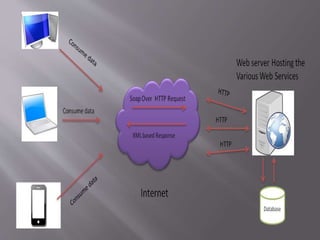
SOAP is a protocol or in other words is
a definition of how web services talk to
each other or talk to client applications
that invoke them.
Why soap?
It is important for web applications to be
able to communicate over the Internet.
The best way to communicate between
applications is over HTTP, because HTTP is
supported by all Internet browsers and
servers. SOAP was created to accomplish
this.
SOAP provides a way to communicate
between applications running on different
operating systems, with different
technologies and programming languages.
A SOAP message is an ordinary XML document
containing the following elements −
•Envelope − Defines the start and the end of the
message. It is a mandatory element.
•Header − Contains any optional attributes of the
message used in processing the message, either at an
intermediary point or at the ultimate end-point. It is an
optional element.
•Body − Contains the XML data comprising the
message being sent. It is a mandatory element.
•Fault − An optional Fault element that provides
information about errors that occur while processing
the message.
Soap Building Blocks
Here are some important syntax rules:
A SOAP message MUST be encoded
using XML
A SOAP message MUST use the SOAP
Envelope namespace
A SOAP message must NOT contain a
DTD reference
A SOAP message must NOT contain
XML Processing Instructions
Syntax Rules
Skeleton SOAP Message
<?xml version="1.0"?>
<soap:Envelope
xmlns:soap="http://www.w3.org/2003/05/soap-
envelope/"
soap:encodingStyle="http://www.w3.org/2003/05/soap-
encoding">
<soap:Header>
...
</soap:Header>
<soap:Body>
...
<soap:Fault>
...
</soap:Fault>
</soap:Body>
</soap:Envelope>
Skeleton SOAP Message
SOAP -Envelop
 The SOAP envelope solves the problem of knowing
when you are done receiving a message and are
ready to process it.
 The SOAP envelope is therefore basically a
packaging mechanism.
<?xml version = "1.0"?>
<SOAP-ENV:Envelope
xmlns:SOAP-ENV = "http://www.w3.org/2001/12/soap-envelope"
SOAP-ENV:encodingStyle = " http://www.w3.org/2001/12/soap-
encoding">
...
Message information goes here
...
</SOAP-ENV:Envelope>
SOAP Header
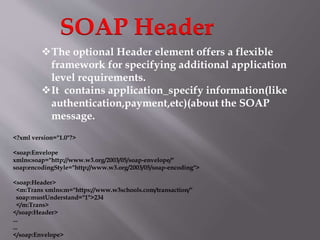
The optional Header element offers a flexible
framework for specifying additional application
level requirements.
It contains application_specify information(like
authentication,payment,etc)(about the SOAP
message.
<?xml version="1.0"?>
<soap:Envelope
xmlns:soap="http://www.w3.org/2003/05/soap-envelope/"
soap:encodingStyle="http://www.w3.org/2003/05/soap-encoding">
<soap:Header>
<m:Trans xmlns:m="https://www.w3schools.com/transaction/"
soap:mustUnderstand="1">234
</m:Trans>
</soap:Header>
...
...
</soap:Envelope>
SOAP-Body
The required SOAP Body element contains the actual SOAP
message intended for the ultimate endpoint of the message.
Immediate child elements of the SOAP Body element may be
namespace-qualified.
<?xml version="1.0"?>
<soap:Envelope
xmlns:soap="http://www.w3.org/2003/05/soap-envelope/"
soap:encodingStyle="http://www.w3.org/2003/05/soap-
encoding">
<soap:Body>
<m:GetPrice xmlns:m="https://www.w3schools.com/prices">
<m:Item>Apples</m:Item>
</m:GetPrice>
</soap:Body>
</soap:Envelope>
The optional SOAP Fault element is used to
indicate error messages.
The SOAP Fault element holds errors and status
information for a SOAP message.
If a Fault element is present, it must appear as a
child element of the Body element. A Fault element
can only appear once in a SOAP message.
The SOAP Fault element has the following sub
elements
SOAP Fault Element
Sub Element Description
<faultcode> A code for identifying the fault
<faultstring> A human readable explanation of the fault
<faultactor> Information about who caused the fault to
happen
<detail> Holds application specific error information
related to the Body element
GET: The HTTP GET method is used to read (or
retrieve) a representation of a resource. In the
safe path, GET returns a representation in XML
or JSON and an HTTP response code of 200
(OK). In an error case, it most often returns a 404
(NOT FOUND) or 400 (BAD REQUEST).
POST: The POST verb is most-often utilized
to create new resources. In particular, it’s used to
create subordinate resources. That is, subordinate
to some other (e.g. parent) resource. On successful
creation, return HTTP status 201, returning a
Location header with a link to the newly-created
resource with the 201 HTTP status.
PUT: It is used for updating the capabilities. However,
PUT can also be used to create a resource in the case where
the resource ID is chosen by the client instead of by the
server. In other words, if the PUT is to a URI that contains
the value of a non-existent resource ID. On successful
update, return 200 (or 204 if not returning any content in
the body) from a PUT. If using PUT for create, return
HTTP status 201 on successful creation. PUT is not safe
operation but it’s idempotent.
DELETE: It is used to delete a resource identified by
a URI. On successful deletion, return HTTP status 200
(OK) along with a response body.
Advantages of REST
•Resource-based. A primary benefit of using REST,
from both a client and server perspective, is that REST
interactions are based on constructs which are familiar
to anyone accustomed to using HTTP. Employing a
resource-based approach, REST defines how
developers interact with web services.
Communication: REST-based interactions
communicate their status through numerical
HTTP status codes. REST APIs use these HTTP
status codes to detect errors and ease the API
monitoring process. They include the following:
•404 error indicates that a requested resource wasn't
found;
•401 status response code is triggered by an
unauthorized request;
•200 status response code indicates that a request was
successful; and
•500 error signals an unrecoverable application fault on
the server.
Language-independent:When creating RESTful APIs
or web services, developers can employ any
language that uses HTTP to make web-based
requests. This capability makes it easy for
programmers to choose the technologies they
prefer to work with and that best suit their
needs.
Disadvantage of rest
Architecture. Developers working with REST frequently
encounter limitations due to its architecture design. These
include multiplexing multiple requests over a single TCP
connection, having different resource requests for each
resource file, server request uploads, and long HTTP
request headers, which cause delays in webpage loading.
Stateless application: since HTTP does not store state-
based information between request-response cycles, the
client must perform state management tasks. This makes
it difficult for programmers to implement server updates
without the use of client-side polling or other types of
webhooks that send data and executable commands from
one app to another.
What is JSON?
JSON or JavaScript Object Notation is a lightweight text-based
open standard designed for human-readable data interchange.
Conventions used by JSON are known to programmers, which
include C, C++, Java, Python, Perl, etc.
•JSON stands for JavaScript Object Notation.
•The format was specified by Douglas Crockford.
•It was designed for human-readable data interchange.
•It has been extended from the JavaScript scripting language.
•The filename extension is .json.
•JSON Internet Media type is application/json.
•The Uniform Type Identifier is public.json.
•It is used while writing JavaScript based
applications that includes browser extensions
and websites.
•JSON format is used for serializing and
transmitting structured data over network
connection.
•It is primarily used to transmit data between a
server and web applications.
•Web services and APIs use JSON format to
provide public data.
•It can be used with modern programming
languages.
USES OF JSON
•Simplicity
•Openness
•Self-Describing
•Internationalization
•Extensibility
•Interoperability
Features of JSON
.JSON is easy to read and write.
It is a lightweight text-based interchange
format.
JSON is language independent.
Characteristics of JSON
Data is in name/value pairs
Data is separated by commas
Curly braces hold objects
Square brackets hold arrays
JSON Syntax Rules
This example defines an employees object: an
array of 3 employee records (objects):
{
"employees":[
{"firstName":"John", "lastName":"Doe"},
{"firstName":"Anna", "lastName":"Smith"},
{"firstName":"Peter", "lastName":"Jones"}
]
}
jSON Example
JSON supports the following two data
structures −
•Collection of name/value pairs − This Data
Structure is supported by different
programming languages.
•Ordered list of values − It includes array, list,
vector or sequence etc.
CONT…
Sr.N
o.
Type & Description
1 Number
double- precision floating-point format in JavaScript
2 String
double-quoted Unicode with backslash escaping
3 Boolean
true or false
4 Array
an ordered sequence of values
5 Value
it can be a string, a number, true or false, null etc
6 Object
an unordered collection of key:value pairs
7 Whitespace
can be used between any pair of tokens
8 null
empty
JSON format supports the following data
types
{
“name”:”ram”
“gender”:”male”
“age”:25,
“is married”:false,
“marks”:[95,78,35,88,85],
“average”:74.0,
“hobbies”:null,
“address”:{
“street”:”cherry road”,
“city”:”salem”,
“pincode”:636007
}
}
Here are some common applications of JSON:
o Helps you to transfer data from a server
o Sample JSON file format helps in transmit and serialize all types
of structured data.
o Allows you to perform asynchronous data calls without the need
to do a page refresh
o Helps you to transmit data between a server and web
applications.
o It is widely used for JavaScript-based application, which includes
browser extension and websites.
o You can transmit data between the server and web application
using JSON.
o We can use JSON with modern programming languages.
o It is used for writing JavaScript-based applications that include
browser add-ons.
o Web services and Restful APIs use the JSON format to get public
data.
Application of JSON
It is JavaScript Object Notation It is Extensible markup language
It is based on JavaScript language. It is derived from SGML.
It is a way of representing objects.
It is a markup language and uses tag
structure to represent data items.
It does not provides any support for
namespaces.
It supports namespaces.
It supports array. It doesn’t supports array.
Its files are very easy to read as
compared to XML.
Its documents are comparatively
difficult to read and interpret.
It doesn’t use end tag. It has start and end tags.
It is less secured. It is more secured than JSON.
It doesn’t supports comments. It supports comments.
It supports only UTF-8 encoding. It supports various encoding.
XML
JSON
web programming

web programming

  • 1.
    BY CM.UVASHREE MSC-CS DEPARTMENT OF CS&IT NADARSARASWATHI COLLEGE OF ARTS AND SCIENCE
  • 3.
    . What is soap? SOAPis an acronym for Simple Object Access Protocol. It is an XML-based messaging protocol for exchanging information among computers. SOAP is an application of the XML specification, SOAP is platform independent. SOAP is a protocol or in other words is a definition of how web services talk to each other or talk to client applications that invoke them.
  • 5.
    Why soap? It isimportant for web applications to be able to communicate over the Internet. The best way to communicate between applications is over HTTP, because HTTP is supported by all Internet browsers and servers. SOAP was created to accomplish this. SOAP provides a way to communicate between applications running on different operating systems, with different technologies and programming languages.
  • 6.
    A SOAP messageis an ordinary XML document containing the following elements − •Envelope − Defines the start and the end of the message. It is a mandatory element. •Header − Contains any optional attributes of the message used in processing the message, either at an intermediary point or at the ultimate end-point. It is an optional element. •Body − Contains the XML data comprising the message being sent. It is a mandatory element. •Fault − An optional Fault element that provides information about errors that occur while processing the message. Soap Building Blocks
  • 8.
    Here are someimportant syntax rules: A SOAP message MUST be encoded using XML A SOAP message MUST use the SOAP Envelope namespace A SOAP message must NOT contain a DTD reference A SOAP message must NOT contain XML Processing Instructions Syntax Rules
  • 9.
    Skeleton SOAP Message <?xmlversion="1.0"?> <soap:Envelope xmlns:soap="http://www.w3.org/2003/05/soap- envelope/" soap:encodingStyle="http://www.w3.org/2003/05/soap- encoding"> <soap:Header> ... </soap:Header> <soap:Body> ... <soap:Fault> ... </soap:Fault> </soap:Body> </soap:Envelope> Skeleton SOAP Message
  • 10.
    SOAP -Envelop  TheSOAP envelope solves the problem of knowing when you are done receiving a message and are ready to process it.  The SOAP envelope is therefore basically a packaging mechanism. <?xml version = "1.0"?> <SOAP-ENV:Envelope xmlns:SOAP-ENV = "http://www.w3.org/2001/12/soap-envelope" SOAP-ENV:encodingStyle = " http://www.w3.org/2001/12/soap- encoding"> ... Message information goes here ... </SOAP-ENV:Envelope>
  • 11.
    SOAP Header The optionalHeader element offers a flexible framework for specifying additional application level requirements. It contains application_specify information(like authentication,payment,etc)(about the SOAP message. <?xml version="1.0"?> <soap:Envelope xmlns:soap="http://www.w3.org/2003/05/soap-envelope/" soap:encodingStyle="http://www.w3.org/2003/05/soap-encoding"> <soap:Header> <m:Trans xmlns:m="https://www.w3schools.com/transaction/" soap:mustUnderstand="1">234 </m:Trans> </soap:Header> ... ... </soap:Envelope>
  • 12.
    SOAP-Body The required SOAPBody element contains the actual SOAP message intended for the ultimate endpoint of the message. Immediate child elements of the SOAP Body element may be namespace-qualified. <?xml version="1.0"?> <soap:Envelope xmlns:soap="http://www.w3.org/2003/05/soap-envelope/" soap:encodingStyle="http://www.w3.org/2003/05/soap- encoding"> <soap:Body> <m:GetPrice xmlns:m="https://www.w3schools.com/prices"> <m:Item>Apples</m:Item> </m:GetPrice> </soap:Body> </soap:Envelope>
  • 13.
    The optional SOAPFault element is used to indicate error messages. The SOAP Fault element holds errors and status information for a SOAP message. If a Fault element is present, it must appear as a child element of the Body element. A Fault element can only appear once in a SOAP message. The SOAP Fault element has the following sub elements SOAP Fault Element
  • 14.
    Sub Element Description <faultcode>A code for identifying the fault <faultstring> A human readable explanation of the fault <faultactor> Information about who caused the fault to happen <detail> Holds application specific error information related to the Body element
  • 18.
    GET: The HTTPGET method is used to read (or retrieve) a representation of a resource. In the safe path, GET returns a representation in XML or JSON and an HTTP response code of 200 (OK). In an error case, it most often returns a 404 (NOT FOUND) or 400 (BAD REQUEST). POST: The POST verb is most-often utilized to create new resources. In particular, it’s used to create subordinate resources. That is, subordinate to some other (e.g. parent) resource. On successful creation, return HTTP status 201, returning a Location header with a link to the newly-created resource with the 201 HTTP status.
  • 19.
    PUT: It isused for updating the capabilities. However, PUT can also be used to create a resource in the case where the resource ID is chosen by the client instead of by the server. In other words, if the PUT is to a URI that contains the value of a non-existent resource ID. On successful update, return 200 (or 204 if not returning any content in the body) from a PUT. If using PUT for create, return HTTP status 201 on successful creation. PUT is not safe operation but it’s idempotent. DELETE: It is used to delete a resource identified by a URI. On successful deletion, return HTTP status 200 (OK) along with a response body.
  • 20.
    Advantages of REST •Resource-based.A primary benefit of using REST, from both a client and server perspective, is that REST interactions are based on constructs which are familiar to anyone accustomed to using HTTP. Employing a resource-based approach, REST defines how developers interact with web services. Communication: REST-based interactions communicate their status through numerical HTTP status codes. REST APIs use these HTTP status codes to detect errors and ease the API monitoring process. They include the following:
  • 21.
    •404 error indicatesthat a requested resource wasn't found; •401 status response code is triggered by an unauthorized request; •200 status response code indicates that a request was successful; and •500 error signals an unrecoverable application fault on the server. Language-independent:When creating RESTful APIs or web services, developers can employ any language that uses HTTP to make web-based requests. This capability makes it easy for programmers to choose the technologies they prefer to work with and that best suit their needs.
  • 22.
    Disadvantage of rest Architecture.Developers working with REST frequently encounter limitations due to its architecture design. These include multiplexing multiple requests over a single TCP connection, having different resource requests for each resource file, server request uploads, and long HTTP request headers, which cause delays in webpage loading. Stateless application: since HTTP does not store state- based information between request-response cycles, the client must perform state management tasks. This makes it difficult for programmers to implement server updates without the use of client-side polling or other types of webhooks that send data and executable commands from one app to another.
  • 23.
    What is JSON? JSONor JavaScript Object Notation is a lightweight text-based open standard designed for human-readable data interchange. Conventions used by JSON are known to programmers, which include C, C++, Java, Python, Perl, etc. •JSON stands for JavaScript Object Notation. •The format was specified by Douglas Crockford. •It was designed for human-readable data interchange. •It has been extended from the JavaScript scripting language. •The filename extension is .json. •JSON Internet Media type is application/json. •The Uniform Type Identifier is public.json.
  • 24.
    •It is usedwhile writing JavaScript based applications that includes browser extensions and websites. •JSON format is used for serializing and transmitting structured data over network connection. •It is primarily used to transmit data between a server and web applications. •Web services and APIs use JSON format to provide public data. •It can be used with modern programming languages. USES OF JSON
  • 25.
  • 26.
    .JSON is easyto read and write. It is a lightweight text-based interchange format. JSON is language independent. Characteristics of JSON Data is in name/value pairs Data is separated by commas Curly braces hold objects Square brackets hold arrays JSON Syntax Rules
  • 27.
    This example definesan employees object: an array of 3 employee records (objects): { "employees":[ {"firstName":"John", "lastName":"Doe"}, {"firstName":"Anna", "lastName":"Smith"}, {"firstName":"Peter", "lastName":"Jones"} ] } jSON Example
  • 28.
    JSON supports thefollowing two data structures − •Collection of name/value pairs − This Data Structure is supported by different programming languages. •Ordered list of values − It includes array, list, vector or sequence etc. CONT…
  • 29.
    Sr.N o. Type & Description 1Number double- precision floating-point format in JavaScript 2 String double-quoted Unicode with backslash escaping 3 Boolean true or false 4 Array an ordered sequence of values 5 Value it can be a string, a number, true or false, null etc 6 Object an unordered collection of key:value pairs 7 Whitespace can be used between any pair of tokens 8 null empty JSON format supports the following data types
  • 30.
  • 31.
    Here are somecommon applications of JSON: o Helps you to transfer data from a server o Sample JSON file format helps in transmit and serialize all types of structured data. o Allows you to perform asynchronous data calls without the need to do a page refresh o Helps you to transmit data between a server and web applications. o It is widely used for JavaScript-based application, which includes browser extension and websites. o You can transmit data between the server and web application using JSON. o We can use JSON with modern programming languages. o It is used for writing JavaScript-based applications that include browser add-ons. o Web services and Restful APIs use the JSON format to get public data. Application of JSON
  • 32.
    It is JavaScriptObject Notation It is Extensible markup language It is based on JavaScript language. It is derived from SGML. It is a way of representing objects. It is a markup language and uses tag structure to represent data items. It does not provides any support for namespaces. It supports namespaces. It supports array. It doesn’t supports array. Its files are very easy to read as compared to XML. Its documents are comparatively difficult to read and interpret. It doesn’t use end tag. It has start and end tags. It is less secured. It is more secured than JSON. It doesn’t supports comments. It supports comments. It supports only UTF-8 encoding. It supports various encoding. XML JSON