SECURING THE
JVM
@nicolas_frankel #jvm #security
2
 Developer
 Software Architect
 Solution Architect
 Whatever the customer
asks of me
REFLECTION API
@nicolas_frankel #jvm #security
4
Part of the JRE
• java.lang.reflect
USED BY A LOT OF
LANGUAGES/FRAMEWORKS
@nicolas_frankel #jvm #security
5
Dynamic languages
• Groovy
JPA frameworks
• Hibernate
• Others
Spring
Etc.
BUT EVERYTHING IS POSSIBLE
@nicolas_frankel #jvm #security
7
Make networks calls
Compile code on the fly
Execute code
Etc.
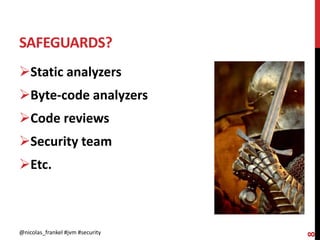
SAFEGUARDS?
@nicolas_frankel #jvm #security
8
Static analyzers
Byte-code analyzers
Code reviews
Security team
Etc.
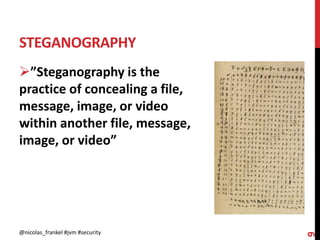
STEGANOGRAPHY
@nicolas_frankel #jvm #security
9
”Steganography is the
practice of concealing a file,
message, image, or video
within another file, message,
image, or video”
@nicolas_frankel #jvm #security
10
A SIMPLE PROCESS
@nicolas_frankel #jvm #security
11
1. Publish a new library to central
• With hidden
steganographic/compile/run features
2. Add the library to your POM
3. Add an image with embedded
code
4. Call the library
• Pretend to read the image
5. Enjoy
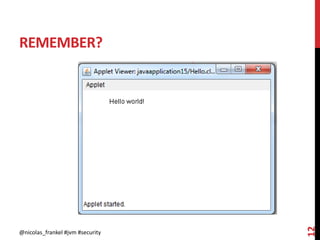
REMEMBER?
@nicolas_frankel #jvm #security
12
APPLETS
@nicolas_frankel #jvm #security
13
Meant to run on the client
machine
• Forbidden to do “dangerous”
stuff
• Run in a sandbox
AVAILABLE MODES
@nicolas_frankel #jvm #security
14
Standard mode
• a.k.a. “God Mode”
Sandbox mode
• Through a SecurityManager
ACTIVATING THE SECURITY MANAGER
@nicolas_frankel #jvm #security
15
On the command line
• java -Djava.security.manager …
Via the API
• System.setSecurityManager()
PERMISSIONS CONFIGURATION
@nicolas_frankel #jvm #security
16
Java 9
• conf/security/java.security
•  conf/security/java.policy
Java 8
• jre/lib/security/java.security
•  jre/lib/security/java.policy
ALTERNATIVE POLICY FILE
@nicolas_frankel #jvm #security
17
Setting the policy file
• -Djava.security.policy==my.policy
Adding additional permissions
• -Djava.security.policy=my.policy
PRINCIPLE OF LEAST PRIVILEGE
@nicolas_frankel #jvm #security
18
“Requires that in a
particular abstraction layer of
a computing environment,
every module must be able to
access only the information
and resources that are
necessary for its legitimate
purpose”
DEFAULT PERMISSIONS
@nicolas_frankel #jvm #security
19
Listen on ports
Read some System
properties
PERMISSIONS ARE ENFORCED IN THE
JDK!
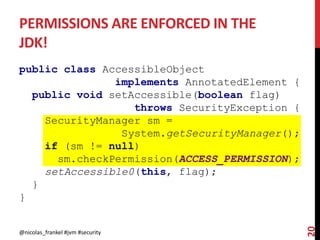
public class AccessibleObject
implements AnnotatedElement {
public void setAccessible(boolean flag)
throws SecurityException {
SecurityManager sm =
System.getSecurityManager();
if (sm != null)
sm.checkPermission(ACCESS_PERMISSION);
setAccessible0(this, flag);
}
}
@nicolas_frankel #jvm #security
20
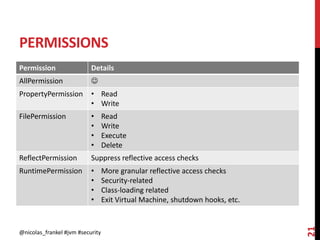
PERMISSIONS
Permission Details
AllPermission 
PropertyPermission • Read
• Write
FilePermission • Read
• Write
• Execute
• Delete
ReflectPermission Suppress reflective access checks
RuntimePermission • More granular reflective access checks
• Security-related
• Class-loading related
• Exit Virtual Machine, shutdown hooks, etc.
@nicolas_frankel #jvm #security
21
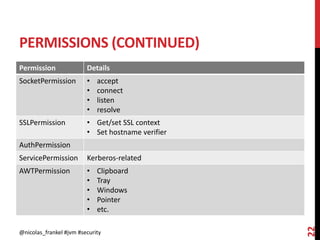
PERMISSIONS (CONTINUED)
Permission Details
SocketPermission • accept
• connect
• listen
• resolve
SSLPermission • Get/set SSL context
• Set hostname verifier
AuthPermission
ServicePermission Kerberos-related
AWTPermission • Clipboard
• Tray
• Windows
• Pointer
• etc.
@nicolas_frankel #jvm #security
22
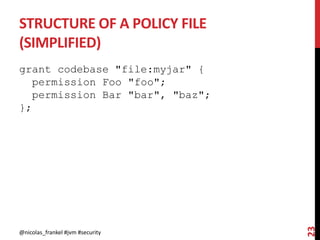
STRUCTURE OF A POLICY FILE
(SIMPLIFIED)
grant codebase "file:myjar" {
permission Foo "foo";
permission Bar "bar", "baz";
};
@nicolas_frankel #jvm #security
23
@nicolas_frankel #jvm #security
24
@nicolas_frankel #jvm #security
25
Q&A
@nicolas_frankel #jvm #security
26
http://blog.frankel.ch/
@nicolas_frankel
https://blog.frankel.ch/jv
m-security/1/

Javantura - Securing the JVM