<Insert Picture Here>


Java Server Faces 2.0
Arun Gupta, JavaEE & GlassFish Guy
blogs.oracle.com/arungupta, @arungupta
The following is intended to outline our general product
direction. It is intended for information purposes only,
and may not be incorporated into any contract. It is
not a commitment to deliver any material, code, or
functionality, and should not be relied upon in making
purchasing decisions.
The development, release, and timing of any features
or functionality described for Oracle’s products remains
at the sole discretion of Oracle.


                                                           2
Java Server Faces 2.0

• JSR 314
• Focus
  –   Ease-of-development
  –   New features
  –   Runtime Performance & Scalability
  –   Adoption


                                          3
JSF2 – Ease of development

• Real-world view description technology
  – Facelets
• Custom component with little/no Java coding
• “faces-config.xml” / “web.xml” optional
  – Annotations
• No JSP tag handler for components
• Improved developer experience by reporting project stage
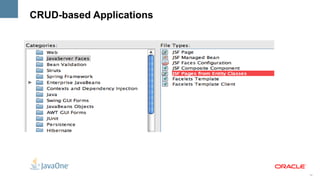
• Make it easy to create CRUD-based apps


                                                             4
Facelets
• Designed for JSF from beginning
• XHTML + CSS
  – Document validation
• Better error handling, including line numbers
• Library prefixes as namespaces
• EL directly in page:
  – #{bean.propertyname}
• Templating made easy
  – ui:composition, ui:define, ui:insert
  – ui:include, ui:repeat

                                                  5
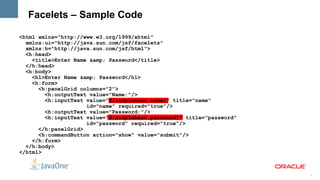
Facelets – Sample Code

<html xmlns="http://www.w3.org/1999/xhtml"
  xmlns:ui="http://java.sun.com/jsf/facelets"
  xmlns:h="http://java.sun.com/jsf/html">
  <h:head>
    <title>Enter Name &amp; Password</title>
  </h:head>
  <h:body>
    <h1>Enter Name &amp; Password</h1>
    <h:form>
      <h:panelGrid columns="2">
        <h:outputText value="Name:"/>
        <h:inputText value="#{simplebean.name}" title="name"
                     id="name" required="true"/>
        <h:outputText value="Password:"/>
        <h:inputText value="#{simplebean.password}" title="password"
                     id="password" required="true"/>
      </h:panelGrid>
      <h:commandButton action="show" value="submit"/>
    </h:form>
  </h:body>
</html>


                                                                       6
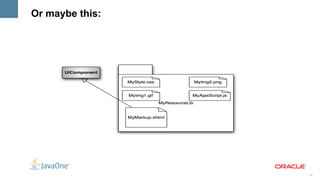
Composite Components

• Enable True Abstraction
  – Create a true, reusable, component from an arbitrary region of a
    page
  – Built by composing other components
• “Using” and “Defining” page
• Full support for using attached objects in the using page
  – Action methods
  – Validators, etc


                                                                       7
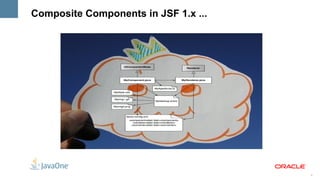
Composite Components in JSF 1.x ...


                                      8
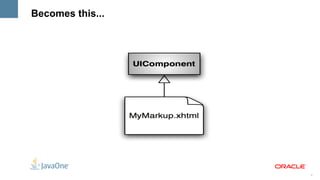
Becomes this...


                  9
Or maybe this:


                 10
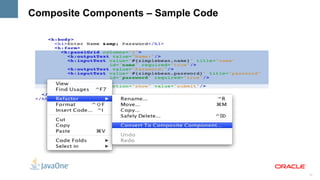
Composite Components – Sample Code


                                     11
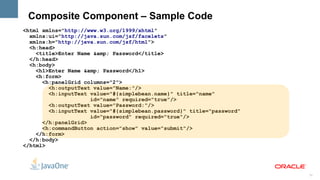
Composite Component – Sample Code
<html xmlns="http://www.w3.org/1999/xhtml"
  xmlns:ui="http://java.sun.com/jsf/facelets"
  xmlns:h="http://java.sun.com/jsf/html">
  <h:head>
    <title>Enter Name &amp; Password</title>
  </h:head>
  <h:body>
    <h1>Enter Name &amp; Password</h1>
    <h:form>
      <h:panelGrid columns="2">
        <h:outputText value="Name:"/>
        <h:inputText value="#{simplebean.name}" title="name"
                     id="name" required="true"/>
        <h:outputText value="Password:"/>
        <h:inputText value="#{simplebean.password}" title="password"
                     id="password" required="true"/>
      </h:panelGrid>
      <h:commandButton action="show" value="submit"/>
    </h:form>
  </h:body>
</html>


                                                                       12
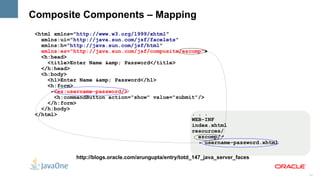
Composite Components – Mapping
 <html xmlns="http://www.w3.org/1999/xhtml"
   xmlns:ui="http://java.sun.com/jsf/facelets"
   xmlns:h="http://java.sun.com/jsf/html"
   xmlns:ez="http://java.sun.com/jsf/composite/ezcomp">
   <h:head>
     <title>Enter Name &amp; Password</title>
   </h:head>
   <h:body>
     <h1>Enter Name &amp; Password</h1>
     <h:form>
       <ez:username-password/>
       <h:commandButton action="show" value="submit"/>
     </h:form>
   </h:body>
 </html>                                          . . .
                                                  WEB-INF
                                                  index.xhtml
                                                  resources/
                                                    ezcomp/
                                                       username-password.xhtml

              http://blogs.oracle.com/arungupta/entry/totd_147_java_server_faces


                                                                                   13
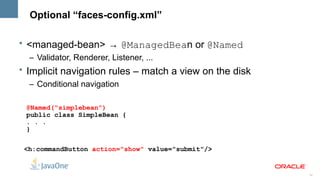
Optional “faces-config.xml”

• <managed-bean> → @ManagedBean or @Named
  – Validator, Renderer, Listener, ...
• Implicit navigation rules – match a view on the disk
  – Conditional navigation

 @Named(“simplebean”)
 public class SimpleBean {
 . . .
 }

 <h:commandButton action="show" value="submit"/>


                                                         14
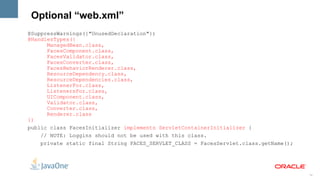
Optional “web.xml”
@SuppressWarnings({"UnusedDeclaration"})
@HandlesTypes({
      ManagedBean.class,
      FacesComponent.class,
      FacesValidator.class,
      FacesConverter.class,
      FacesBehaviorRenderer.class,
      ResourceDependency.class,
      ResourceDependencies.class,
      ListenerFor.class,
      ListenersFor.class,
      UIComponent.class,
      Validator.class,
      Converter.class,
      Renderer.class
})
public class FacesInitializer implements ServletContainerInitializer {
    // NOTE: Loggins should not be used with this class.
    private static final String FACES_SERVLET_CLASS = FacesServlet.class.getName();


                                                                                      15
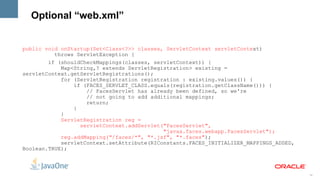
Optional “web.xml”


public void onStartup(Set<Class<?>> classes, ServletContext servletContext)
          throws ServletException {
        if (shouldCheckMappings(classes, servletContext)) {
            Map<String,? extends ServletRegistration> existing =
servletContext.getServletRegistrations();
            for (ServletRegistration registration : existing.values()) {
                if (FACES_SERVLET_CLASS.equals(registration.getClassName())) {
                    // FacesServlet has already been defined, so we're
                    // not going to add additional mappings;
                    return;
                }
            }
            ServletRegistration reg =
                  servletContext.addServlet("FacesServlet",
                                            "javax.faces.webapp.FacesServlet");
            reg.addMapping("/faces/*", "*.jsf", "*.faces");
            servletContext.setAttribute(RIConstants.FACES_INITIALIZER_MAPPINGS_ADDED,
Boolean.TRUE);


                                                                                        16
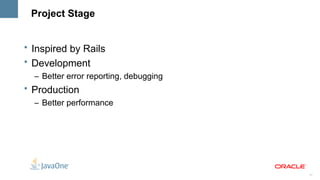
Project Stage


• Inspired by Rails
• Development
  – Better error reporting, debugging
• Production
  – Better performance


                                        17
CRUD-based Applications


                          18
JSF2 – New features

• Integrated Ajax
     – Partial tree traversal
•   HTTP GET support
•   Form-level validation
•   Bundling/delivering static resources with a component
•   System Events


                                                            19
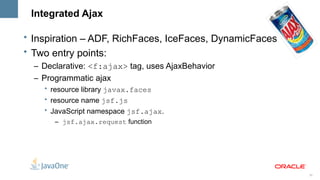
Integrated Ajax

• Inspiration – ADF, RichFaces, IceFaces, DynamicFaces
• Two entry points:
  – Declarative: <f:ajax> tag, uses AjaxBehavior
  – Programmatic ajax
    • resource library javax.faces
    • resource name jsf.js
    • JavaScript namespace jsf.ajax.
       – jsf.ajax.request function


                                                         20
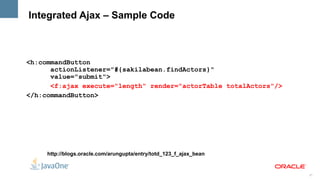
Integrated Ajax – Sample Code


<h:commandButton
      actionListener="#{sakilabean.findActors}"
      value="submit">
      <f:ajax execute="length" render="actorTable totalActors"/>
</h:commandButton>


     http://blogs.oracle.com/arungupta/entry/totd_123_f_ajax_bean


                                                                    21
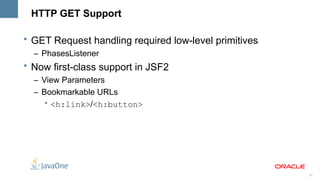
HTTP GET Support

• GET Request handling required low-level primitives
  – PhasesListener
• Now first-class support in JSF2
  – View Parameters
  – Bookmarkable URLs
     • <h:link>/<h:button>


                                                       22
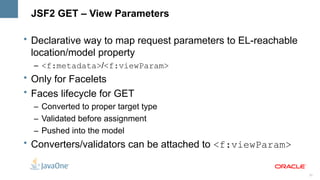
JSF2 GET – View Parameters

• Declarative way to map request parameters to EL-reachable
  location/model property
  – <f:metadata>/<f:viewParam>
• Only for Facelets
• Faces lifecycle for GET
  – Converted to proper target type
  – Validated before assignment
  – Pushed into the model
• Converters/validators can be attached to <f:viewParam>


                                                              23
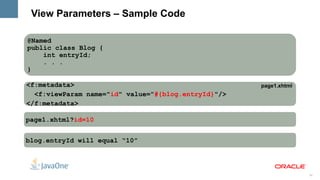
View Parameters – Sample Code

@Named
public class Blog {
    int entryId;
    . . .
}

<f:metadata>                                         page1.xhtml
  <f:viewParam name="id" value="#{blog.entryId}"/>
</f:metadata>

page1.xhtml?id=10


blog.entryId will equal “10”


                                                                   24
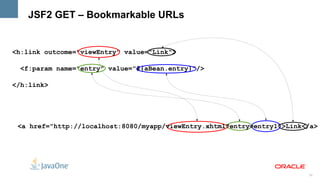
JSF2 GET – Bookmarkable URLs


<h:link outcome="viewEntry" value="Link">

 <f:param name="entry" value="#{aBean.entry}"/>

</h:link>


 <a href="http://localhost:8080/myapp/viewEntry.xhtml?entry=entry1">Link</a>


                                                                         25
Validation

• Integration with JSR 303: Bean Validation
  – @NotEmpty String name;
  – Default validator: javax.faces.Bean – automatically applied to all input
    fields
• Use cases
  – Ordering constraints using Validation Groups
    • Basic/Cheap constraints before complex/costly ones
  – Partial data validation: wizard-style form
• Error messages are translated to FacesMessages


                                                                          26
Validation – Sample Code

<h:inputText value="#{address.zip}">
  <f:validateBean validationGroups="myGroup"/>
</h:inputText>


<h:input id="zip" value="#{address.zip}">
    <f:validateRequired />
</h:input>
<h:input id="zip" value="#{address.zip}" required=”true”/>


<h:input id="zip" value="#{address.zip}">
  <f:validateRegex pattern="/^d{5}([-]d{4})?$/" />
</h:input>


                                                             27
Resources

• Standard way to serve image, JavaScripts, CSS, …
  – /resources or /META-INF/resources
  – No need for separate Servlet or Filter
  – Logically related to components, treat them that way
• @ResourceDependency or @ResourceDependencies on
  custom components
  – @ResourceDependency(library=”corporate”,
    name=”colorAndMedia.css”)


                                                           28
Resource EL – Sample Code

• Syntax
  – #{resource['<resource>']}
  – #{resource['<library>:<resource>']}
• Examples of use
  – <a href="#{resource['header.jpg']}"/>
  – <h:graphicImage value="#{resource['corp:header.jpg']}"/>


                                                               29
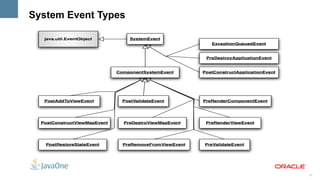
System Events

• Inspired by Solaris Dtrace, Linux strace, etc.
• Publish/Subscribe event bus for things that happen during the
  JSF Lifecycle
• Adds to event listening abilities
  – FacesEvent → FacesListener (existing)
  – PhaseEvent → PhaseListener (existing)
  – SystemEvent → SystemEventListener (new)
• Mainly targeted at page/component/framework authors


                                                                  30
System Event Types


                     31
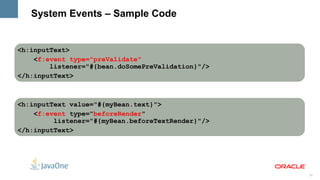
System Events – Sample Code


<h:inputText>
    <f:event type="preValidate"
        listener="#{bean.doSomePreValidation}"/>
</h:inputText>


<h:inputText value="#{myBean.text}">
    <f:event type="beforeRender"
         listener="#{myBean.beforeTextRender}"/>
</h:inputText>


                                                   32
JSF2 – Runtime Performance & Scalability

• Behavior
• Partial State Saving


                                           33
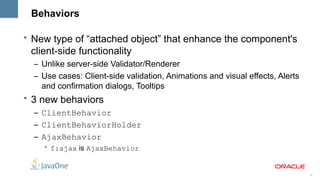
Behaviors

• New type of “attached object” that enhance the component's
  client-side functionality
  – Unlike server-side Validator/Renderer
  – Use cases: Client-side validation, Animations and visual effects, Alerts
    and confirmation dialogs, Tooltips
• 3 new behaviors
  – ClientBehavior
  – ClientBehaviorHolder
  – AjaxBehavior
    • f:ajax is AjaxBehavior


                                                                               34
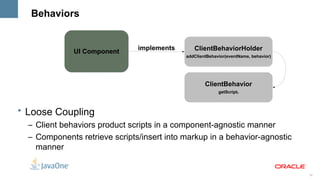
Behaviors


                               implements      ClientBehaviorHolder
              UI Component
                                            addClientBehavior(eventName, behavior)


                                                    ClientBehavior
                                                          getScript()


• Loose Coupling
  – Client behaviors product scripts in a component-agnostic manner
  – Components retrieve scripts/insert into markup in a behavior-agnostic
    manner


                                                                                     35
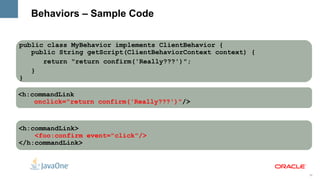
Behaviors – Sample Code


public class MyBehavior implements ClientBehavior {
   public String getScript(ClientBehaviorContext context) {
      return "return confirm('Really???')";
   }
}

<h:commandLink
    onclick="return confirm('Really???')"/>


<h:commandLink>
    <foo:confirm event="click"/>
</h:commandLink>


                                                              36
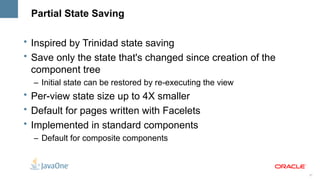
Partial State Saving

• Inspired by Trinidad state saving
• Save only the state that's changed since creation of the
  component tree
  – Initial state can be restored by re-executing the view
• Per-view state size up to 4X smaller
• Default for pages written with Facelets
• Implemented in standard components
  – Default for composite components


                                                             37
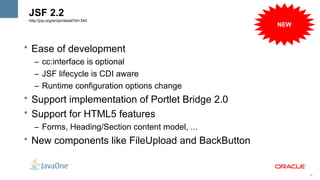
JSF 2.2
 http://jcp.org/en/jsr/detail?id=344
                                                  NEW


• Ease of development
    – cc:interface is optional
    – JSF lifecycle is CDI aware
    – Runtime configuration options change
• Support implementation of Portlet Bridge 2.0
• Support for HTML5 features
    – Forms, Heading/Section content model, ...
• New components like FileUpload and BackButton


                                                        38
References


•   oracle.com/javaee
•   glassfish.org
•   oracle.com/goto/glassfish
•   blogs.oracle.com/theaquarium
•   youtube.com/GlassFishVideos
•   Follow @glassfish


                                   39
<Insert Picture Here>


Java Server Faces 2.0
Arun Gupta, JavaEE & GlassFish Guy
blogs.oracle.com/arungupta, @arungupta

JavaServer Faces 2.0 - JavaOne India 2011

  • 1.
    <Insert Picture Here> JavaServer Faces 2.0 Arun Gupta, JavaEE & GlassFish Guy blogs.oracle.com/arungupta, @arungupta
  • 2.
    The following isintended to outline our general product direction. It is intended for information purposes only, and may not be incorporated into any contract. It is not a commitment to deliver any material, code, or functionality, and should not be relied upon in making purchasing decisions. The development, release, and timing of any features or functionality described for Oracle’s products remains at the sole discretion of Oracle. 2
  • 3.
    Java Server Faces2.0 • JSR 314 • Focus – Ease-of-development – New features – Runtime Performance & Scalability – Adoption 3
  • 4.
    JSF2 – Easeof development • Real-world view description technology – Facelets • Custom component with little/no Java coding • “faces-config.xml” / “web.xml” optional – Annotations • No JSP tag handler for components • Improved developer experience by reporting project stage • Make it easy to create CRUD-based apps 4
  • 5.
    Facelets • Designed forJSF from beginning • XHTML + CSS – Document validation • Better error handling, including line numbers • Library prefixes as namespaces • EL directly in page: – #{bean.propertyname} • Templating made easy – ui:composition, ui:define, ui:insert – ui:include, ui:repeat 5
  • 6.
    Facelets – SampleCode <html xmlns="http://www.w3.org/1999/xhtml" xmlns:ui="http://java.sun.com/jsf/facelets" xmlns:h="http://java.sun.com/jsf/html"> <h:head> <title>Enter Name &amp; Password</title> </h:head> <h:body> <h1>Enter Name &amp; Password</h1> <h:form> <h:panelGrid columns="2"> <h:outputText value="Name:"/> <h:inputText value="#{simplebean.name}" title="name" id="name" required="true"/> <h:outputText value="Password:"/> <h:inputText value="#{simplebean.password}" title="password" id="password" required="true"/> </h:panelGrid> <h:commandButton action="show" value="submit"/> </h:form> </h:body> </html> 6
  • 7.
    Composite Components • EnableTrue Abstraction – Create a true, reusable, component from an arbitrary region of a page – Built by composing other components • “Using” and “Defining” page • Full support for using attached objects in the using page – Action methods – Validators, etc 7
  • 8.
  • 9.
  • 10.
  • 11.
  • 12.
    Composite Component –Sample Code <html xmlns="http://www.w3.org/1999/xhtml" xmlns:ui="http://java.sun.com/jsf/facelets" xmlns:h="http://java.sun.com/jsf/html"> <h:head> <title>Enter Name &amp; Password</title> </h:head> <h:body> <h1>Enter Name &amp; Password</h1> <h:form> <h:panelGrid columns="2"> <h:outputText value="Name:"/> <h:inputText value="#{simplebean.name}" title="name" id="name" required="true"/> <h:outputText value="Password:"/> <h:inputText value="#{simplebean.password}" title="password" id="password" required="true"/> </h:panelGrid> <h:commandButton action="show" value="submit"/> </h:form> </h:body> </html> 12
  • 13.
    Composite Components –Mapping <html xmlns="http://www.w3.org/1999/xhtml" xmlns:ui="http://java.sun.com/jsf/facelets" xmlns:h="http://java.sun.com/jsf/html" xmlns:ez="http://java.sun.com/jsf/composite/ezcomp"> <h:head> <title>Enter Name &amp; Password</title> </h:head> <h:body> <h1>Enter Name &amp; Password</h1> <h:form> <ez:username-password/> <h:commandButton action="show" value="submit"/> </h:form> </h:body> </html> . . . WEB-INF index.xhtml resources/ ezcomp/ username-password.xhtml http://blogs.oracle.com/arungupta/entry/totd_147_java_server_faces 13
  • 14.
    Optional “faces-config.xml” • <managed-bean>→ @ManagedBean or @Named – Validator, Renderer, Listener, ... • Implicit navigation rules – match a view on the disk – Conditional navigation @Named(“simplebean”) public class SimpleBean { . . . } <h:commandButton action="show" value="submit"/> 14
  • 15.
    Optional “web.xml” @SuppressWarnings({"UnusedDeclaration"}) @HandlesTypes({ ManagedBean.class, FacesComponent.class, FacesValidator.class, FacesConverter.class, FacesBehaviorRenderer.class, ResourceDependency.class, ResourceDependencies.class, ListenerFor.class, ListenersFor.class, UIComponent.class, Validator.class, Converter.class, Renderer.class }) public class FacesInitializer implements ServletContainerInitializer { // NOTE: Loggins should not be used with this class. private static final String FACES_SERVLET_CLASS = FacesServlet.class.getName(); 15
  • 16.
    Optional “web.xml” public voidonStartup(Set<Class<?>> classes, ServletContext servletContext) throws ServletException { if (shouldCheckMappings(classes, servletContext)) { Map<String,? extends ServletRegistration> existing = servletContext.getServletRegistrations(); for (ServletRegistration registration : existing.values()) { if (FACES_SERVLET_CLASS.equals(registration.getClassName())) { // FacesServlet has already been defined, so we're // not going to add additional mappings; return; } } ServletRegistration reg = servletContext.addServlet("FacesServlet", "javax.faces.webapp.FacesServlet"); reg.addMapping("/faces/*", "*.jsf", "*.faces"); servletContext.setAttribute(RIConstants.FACES_INITIALIZER_MAPPINGS_ADDED, Boolean.TRUE); 16
  • 17.
    Project Stage • Inspiredby Rails • Development – Better error reporting, debugging • Production – Better performance 17
  • 18.
  • 19.
    JSF2 – Newfeatures • Integrated Ajax – Partial tree traversal • HTTP GET support • Form-level validation • Bundling/delivering static resources with a component • System Events 19
  • 20.
    Integrated Ajax • Inspiration– ADF, RichFaces, IceFaces, DynamicFaces • Two entry points: – Declarative: <f:ajax> tag, uses AjaxBehavior – Programmatic ajax • resource library javax.faces • resource name jsf.js • JavaScript namespace jsf.ajax. – jsf.ajax.request function 20
  • 21.
    Integrated Ajax –Sample Code <h:commandButton actionListener="#{sakilabean.findActors}" value="submit"> <f:ajax execute="length" render="actorTable totalActors"/> </h:commandButton> http://blogs.oracle.com/arungupta/entry/totd_123_f_ajax_bean 21
  • 22.
    HTTP GET Support •GET Request handling required low-level primitives – PhasesListener • Now first-class support in JSF2 – View Parameters – Bookmarkable URLs • <h:link>/<h:button> 22
  • 23.
    JSF2 GET –View Parameters • Declarative way to map request parameters to EL-reachable location/model property – <f:metadata>/<f:viewParam> • Only for Facelets • Faces lifecycle for GET – Converted to proper target type – Validated before assignment – Pushed into the model • Converters/validators can be attached to <f:viewParam> 23
  • 24.
    View Parameters –Sample Code @Named public class Blog { int entryId; . . . } <f:metadata> page1.xhtml <f:viewParam name="id" value="#{blog.entryId}"/> </f:metadata> page1.xhtml?id=10 blog.entryId will equal “10” 24
  • 25.
    JSF2 GET –Bookmarkable URLs <h:link outcome="viewEntry" value="Link"> <f:param name="entry" value="#{aBean.entry}"/> </h:link> <a href="http://localhost:8080/myapp/viewEntry.xhtml?entry=entry1">Link</a> 25
  • 26.
    Validation • Integration withJSR 303: Bean Validation – @NotEmpty String name; – Default validator: javax.faces.Bean – automatically applied to all input fields • Use cases – Ordering constraints using Validation Groups • Basic/Cheap constraints before complex/costly ones – Partial data validation: wizard-style form • Error messages are translated to FacesMessages 26
  • 27.
    Validation – SampleCode <h:inputText value="#{address.zip}"> <f:validateBean validationGroups="myGroup"/> </h:inputText> <h:input id="zip" value="#{address.zip}"> <f:validateRequired /> </h:input> <h:input id="zip" value="#{address.zip}" required=”true”/> <h:input id="zip" value="#{address.zip}"> <f:validateRegex pattern="/^d{5}([-]d{4})?$/" /> </h:input> 27
  • 28.
    Resources • Standard wayto serve image, JavaScripts, CSS, … – /resources or /META-INF/resources – No need for separate Servlet or Filter – Logically related to components, treat them that way • @ResourceDependency or @ResourceDependencies on custom components – @ResourceDependency(library=”corporate”, name=”colorAndMedia.css”) 28
  • 29.
    Resource EL –Sample Code • Syntax – #{resource['<resource>']} – #{resource['<library>:<resource>']} • Examples of use – <a href="#{resource['header.jpg']}"/> – <h:graphicImage value="#{resource['corp:header.jpg']}"/> 29
  • 30.
    System Events • Inspiredby Solaris Dtrace, Linux strace, etc. • Publish/Subscribe event bus for things that happen during the JSF Lifecycle • Adds to event listening abilities – FacesEvent → FacesListener (existing) – PhaseEvent → PhaseListener (existing) – SystemEvent → SystemEventListener (new) • Mainly targeted at page/component/framework authors 30
  • 31.
  • 32.
    System Events –Sample Code <h:inputText> <f:event type="preValidate" listener="#{bean.doSomePreValidation}"/> </h:inputText> <h:inputText value="#{myBean.text}"> <f:event type="beforeRender" listener="#{myBean.beforeTextRender}"/> </h:inputText> 32
  • 33.
    JSF2 – RuntimePerformance & Scalability • Behavior • Partial State Saving 33
  • 34.
    Behaviors • New typeof “attached object” that enhance the component's client-side functionality – Unlike server-side Validator/Renderer – Use cases: Client-side validation, Animations and visual effects, Alerts and confirmation dialogs, Tooltips • 3 new behaviors – ClientBehavior – ClientBehaviorHolder – AjaxBehavior • f:ajax is AjaxBehavior 34
  • 35.
    Behaviors implements ClientBehaviorHolder UI Component addClientBehavior(eventName, behavior) ClientBehavior getScript() • Loose Coupling – Client behaviors product scripts in a component-agnostic manner – Components retrieve scripts/insert into markup in a behavior-agnostic manner 35
  • 36.
    Behaviors – SampleCode public class MyBehavior implements ClientBehavior { public String getScript(ClientBehaviorContext context) { return "return confirm('Really???')"; } } <h:commandLink onclick="return confirm('Really???')"/> <h:commandLink> <foo:confirm event="click"/> </h:commandLink> 36
  • 37.
    Partial State Saving •Inspired by Trinidad state saving • Save only the state that's changed since creation of the component tree – Initial state can be restored by re-executing the view • Per-view state size up to 4X smaller • Default for pages written with Facelets • Implemented in standard components – Default for composite components 37
  • 38.
    JSF 2.2 http://jcp.org/en/jsr/detail?id=344 NEW • Ease of development – cc:interface is optional – JSF lifecycle is CDI aware – Runtime configuration options change • Support implementation of Portlet Bridge 2.0 • Support for HTML5 features – Forms, Heading/Section content model, ... • New components like FileUpload and BackButton 38
  • 39.
    References • oracle.com/javaee • glassfish.org • oracle.com/goto/glassfish • blogs.oracle.com/theaquarium • youtube.com/GlassFishVideos • Follow @glassfish 39
  • 40.
    <Insert Picture Here> JavaServer Faces 2.0 Arun Gupta, JavaEE & GlassFish Guy blogs.oracle.com/arungupta, @arungupta