Java Server Faces
JSF
Done by: Esraa M Yaseen
Submitted to:
Eng. Abdelnasser
Abdelhadi
MVC
Because it provides a flexible
solution to these problems by
decoupling the
Model, View, and Controller
components of an
application while providing a
uniform interface between
them.
MVC …
Web application framework
A web application framework (WAF) is a software
framework that is designed to support the
development of dynamic websites, web
applications, web services and web resources. The
framework aims to alleviate the overhead
associated with common activities performed
in web development. For example, many
frameworks provide libraries
for database access, templating frameworks
and session management, and they often
promote code reuse. For a comparison of concrete
web application frameworks
Make a decision!
If:
 You wish to provide different representations of the same application
data (for example, a table versus a graph).
 You wish to provide different looks and feels (perhaps for different
operating systems) for your user interface without affecting the rest of
your application.
 User-driven events must immediately update application data or other
user interface components, while changes to application data must be
reflected immediately in user interface components.
 You wish to reuse one or more user interface components indepen-
dently of application data.
Then … Use JSF 
JSF Main features
JSF has the following main features:
 JSF is based on the Model-View-Controller concept
 JSF has a stateful UI component model, e.g. each
component is aware of its data
 JSF separates the functionality of a component from the
display of the component.
The renderer is responsible of displaying the component for
a certain client. This renderer can get exchanged. The
standard renderer for JSF components is the HTML renderer.
 JSF support listeners on UI components
 JSF support data validation, data binding and data
conversion between the UI and the model
The greatest advantage that JavaServer
Faces technology has over Struts is its
flexible, extensible UI component
model, which includes:
 A standard component API for specifying the state and
behavior of a wide range of components, including simple
components, such as input fields, and more complex
components, such as scrollable data tables. Developers
can also create their own components based on these
APIs, and many third parties have already done so and
have made their component libraries publicly available.
 A separate rendering model that defines how to render the
components in various ways. For example, a component
used for selecting an item from a list can be rendered as a
menu or a set of radio buttons.
 An event and listener model that defines how to handle
events generated by activating a component, such as
what to do when a user clicks a button.
 Conversion and validation models for converting and
validating component data.
Prerequisites to use JSF
To use JSF you need:
 JSF Implementation (in the form of the JSF
jars)
 The JSTL tags library
 A Java runtime environment
 A web-container to use JSF in (for example
Tomcat)
Requirements
Installation
 Eclipse
For JSP development you need the Eclipse WTP
and an installed Tomcat.
 JSF library
A JSF library is required. We will later use Eclipse
to download and install the Apache MyFaces
JSF implementation during project creation.
 JSLT library
The Genius of JSF
1* A component model allows you to reuse components that come
from a third party without
having to learn a new component model (the model is standard).
2* components fit into a part/whole hierarchy and can be composed
into more complex components.
The component-based model is beneficial to the handling of the user
action.
3* A user action, such as a button click, flows through a well-defined
process from the button click to the business logic that performs the
requested process.
JSF provides well-defined points for your code to plug into the flow and
be executed.
4* The component-based model also allows developers to focus on
providing great features instead of trying to focus on two or three
different models for building Web-based user interfaces. It also allows
the promise of reusable off-the-shelf components in the future.
JSF configuration files
Overview
JSF is based on the following configuration files:
 web.xml - General web application configuration file
 faces-config.xml - Contains the configuration of the JSF application.
 web.xml
*JSF requires the central configuration list web.xml in the directory WEB-INF
of the application. This is similar to other web-applications which are
based on servlets.
*You must specify in web.xml that a "FacesServlet" is responsible for
handling JSF applications. "FacesServlet" is the central controller for the
JSF application. "FacesServlet" receives all requests for the JSF application
and initializes the JSF components before the JSP is displayed.
 faces-config.xml
"faces-config.xml" allows to configure the application, managed
beans, convertors, validators, and navigation.
What typical JSF application
consists of?
 A typical JSF application consists of the
following parts:
 JavaBeans components for managing
application state and behavior.
 Event-driven development (via listeners as in
traditional GUI development).
 Pages that represent MVC-style views; pages
reference view roots via the JSF component
tree.
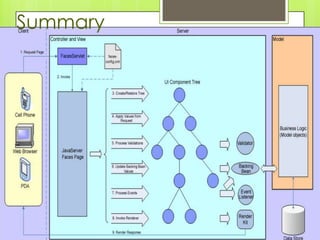
Controller
The JSF controller consists primarily of a Front
Controller servlet called FacesServlet, one or
more configuration files, and a set of action
handlers
The FacesServlet is responsible for receiving
incoming requests from Web clients and
then performing a logical set of steps for
preparing and dispatching a response.
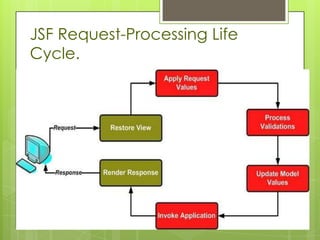
JSF Request-Processing Life
Cycle.
Example
Notes
The first thing you’ll notice here i:
 Our action handler here is simply a method in a
JavaBean that has no parameters and returns a
String. We chose to
place this method in our LoginBean.
 In more complex applications, action handlers
may be organized differently.
 A JSF action handler returns a logical result
(success or failure in this case),
 while a Struts Action uses the logical result to
actually return what page should be forwarded to
next.
Example .. configuration file
 As part of the request-processing life cycle, the
next component tree (or JSP
 page in this example) will be determined by the
logical result returned by this
 action handler. As with Struts, JSF allows you to
define a configuration file.
 Among other things, this configuration file
provides a mechanism for defining
 user interface workflow. An example of what the
workflow for our example
 might look like is provided next...
configuration file
Model
 This distinction between the View and
Model layers of a Web application.
becomes more difficult in JSF.
 must resist the temptation to let JSF
component data objects influence your
real Model (business objects)
 Failing to do so often results in high
coupling between the View and Model
layers
What is Managed Bean?
 JavaBean objects managed by a JSF
implementation are called managed
beans. A managed bean describes how
a bean is created and managed.
Declaring a Model object as a
managed bean
Once declared in this manner, each managed bean and its declared
properties can be referenced and bound to user interface components
View
 As you have probably figured out by now, the
View layer in JSF consists primarily of the
component tree. One benefit of JSF is that
individual components or the whole
component tree can be rendered differently
to support multiple client user interface types.
In most cases, you will be dealing with a
markup language such as HTML that is used in
a JSP. Depending on the client device type,
components could render themselves in the
markup language appropriate for that device.
View …
 What is view object?
 A view object is a model object used
specifically in the presentation tier. It
contains the data that must display in the
view layer and the logic to validate user
input, handle events, and interact with
the business-logic tier. The backing bean
is the view object in a JSF-based
application. Backing bean and view
object are interchangeable terms.
In this
case, we
can bind
the input
fields to
properties
on our
LoginBean
JavaBean.
Note
 You could have made use of
Converters, Validators, and even custom
Renderers as part of the user interface. In
fact, a Converter and Validator component
would be useful even in this simple example.
These components are very useful for
delegating and reusing common user
interface tasks. In the interest of simplicity, we
decided not to use these special JSF
components in our little
login example.
Composite Components
 The primary component is usually a
form, frame, or page. Within these root
components, other components are
arranged hierarchically to achieve the
desired interface.
Composite Components
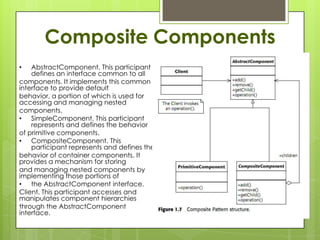
• AbstractComponent. This participant
defines an interface common to all
components. It implements this common
interface to provide default
behavior, a portion of which is used for
accessing and managing nested
components.
• SimpleComponent. This participant
represents and defines the behavior
of primitive components.
• CompositeComponent. This
participant represents and defines the
behavior of container components. It
provides a mechanism for storing
and managing nested components by
implementing those portions of
• the AbstractComponent interface.
Client. This participant accesses and
manipulates component hierarchies
through the AbstractComponent
interface.
Composite Components
 When a Client performs an
operation on a component, a
uniform response is provided
regardless of the underlying
structure. If the component is
a SimpleComponent, the
operation is performed
directly. Otherwise, we have a
CompositeComponent that asks
each nested component to
perform the requested
operation. The
CompositeComponent may
perform additional operations
before responding to the Client.
In either case, these interactions
are hidden beneath a common
interface.
JSF Events
JSF provides two kinds of events:
 A Value Changed event
(javax.faces.event.ValueChangeEvent) is useful for
observing node or changing the text in a text field).
 An Action event (javax.faces.event.ActionEvent ) is
useful for observing the activation of a user inter-face
component that is a descendent of UICommand
(this includes buttons and
hyperlinks).
 Both of these event types ultimately descend from a
common
ancestor in JSF (javax.faces.event.FacesEvent).
JSF Events
There are essentially two steps to capturing events in JSF.
 The first step is to implement the appropriate listener interface on
the component you wish to receive an event. When implementing
the ValueChangeListener interface, you’ll need to add a
processValueChanged(...) method where you will implement the
code that responds to the event. Similarly, when implementing
the ActionListener interface, you’ll need to add a processAction(...)
method. When an event is dispatched to your listener
component, these methods will be called by the JSF implementation.
 The second step to capturing an event in JSF is to register your
newly created listener.
Examples of JSF event handling
<h:inputText id=”userId”
value=”#{login.userId}”>
<f:valueChangeListener
type=”logindemo.UserLoginChanged” />
</h:inputText><h:commandButton id=”login”
commandName=”login”>
<f:actionListener
type=”logindemo.LoginActionListener” />
</h:commandButton>
You may be wondering if it is possible
to combine some aspects of Struts
with JSF ?
component framework with existing Struts-
based applications. The creators of Struts
have created an integration library called
Struts-Faces that is available on the Struts
project Web site that does just that.
Summary
References
 John Wiley and Sons - Mastering Java Server Faces
 http://www.vogella.com/articles/JavaServerFaces/articl
e.html
 http://www.developersbook.com/jsf/interview-
questions/jsf-interview-questions-faqs.php
 http://help.eclipse.org/galileo/index.jsp?topic=/org.ecli
pse.jst.jsf.doc.user/html/tasks/create_jsf_app.html
 http://myfaces.apache.org/jsfintro.html
 http://www.mkyong.com/jsf2/jsf-2-0-hello-world-
example/
 http://www.coderanch.com/t/212078/JSF/java/JSF

Jsf

  • 1.
    Java Server Faces JSF Doneby: Esraa M Yaseen Submitted to: Eng. Abdelnasser Abdelhadi
  • 2.
    MVC Because it providesa flexible solution to these problems by decoupling the Model, View, and Controller components of an application while providing a uniform interface between them.
  • 3.
  • 4.
    Web application framework Aweb application framework (WAF) is a software framework that is designed to support the development of dynamic websites, web applications, web services and web resources. The framework aims to alleviate the overhead associated with common activities performed in web development. For example, many frameworks provide libraries for database access, templating frameworks and session management, and they often promote code reuse. For a comparison of concrete web application frameworks
  • 5.
    Make a decision! If: You wish to provide different representations of the same application data (for example, a table versus a graph).  You wish to provide different looks and feels (perhaps for different operating systems) for your user interface without affecting the rest of your application.  User-driven events must immediately update application data or other user interface components, while changes to application data must be reflected immediately in user interface components.  You wish to reuse one or more user interface components indepen- dently of application data. Then … Use JSF 
  • 6.
    JSF Main features JSFhas the following main features:  JSF is based on the Model-View-Controller concept  JSF has a stateful UI component model, e.g. each component is aware of its data  JSF separates the functionality of a component from the display of the component. The renderer is responsible of displaying the component for a certain client. This renderer can get exchanged. The standard renderer for JSF components is the HTML renderer.  JSF support listeners on UI components  JSF support data validation, data binding and data conversion between the UI and the model
  • 7.
    The greatest advantagethat JavaServer Faces technology has over Struts is its flexible, extensible UI component model, which includes:  A standard component API for specifying the state and behavior of a wide range of components, including simple components, such as input fields, and more complex components, such as scrollable data tables. Developers can also create their own components based on these APIs, and many third parties have already done so and have made their component libraries publicly available.  A separate rendering model that defines how to render the components in various ways. For example, a component used for selecting an item from a list can be rendered as a menu or a set of radio buttons.  An event and listener model that defines how to handle events generated by activating a component, such as what to do when a user clicks a button.  Conversion and validation models for converting and validating component data.
  • 8.
    Prerequisites to useJSF To use JSF you need:  JSF Implementation (in the form of the JSF jars)  The JSTL tags library  A Java runtime environment  A web-container to use JSF in (for example Tomcat)
  • 9.
    Requirements Installation  Eclipse For JSPdevelopment you need the Eclipse WTP and an installed Tomcat.  JSF library A JSF library is required. We will later use Eclipse to download and install the Apache MyFaces JSF implementation during project creation.  JSLT library
  • 10.
    The Genius ofJSF 1* A component model allows you to reuse components that come from a third party without having to learn a new component model (the model is standard). 2* components fit into a part/whole hierarchy and can be composed into more complex components. The component-based model is beneficial to the handling of the user action. 3* A user action, such as a button click, flows through a well-defined process from the button click to the business logic that performs the requested process. JSF provides well-defined points for your code to plug into the flow and be executed. 4* The component-based model also allows developers to focus on providing great features instead of trying to focus on two or three different models for building Web-based user interfaces. It also allows the promise of reusable off-the-shelf components in the future.
  • 11.
    JSF configuration files Overview JSFis based on the following configuration files:  web.xml - General web application configuration file  faces-config.xml - Contains the configuration of the JSF application.  web.xml *JSF requires the central configuration list web.xml in the directory WEB-INF of the application. This is similar to other web-applications which are based on servlets. *You must specify in web.xml that a "FacesServlet" is responsible for handling JSF applications. "FacesServlet" is the central controller for the JSF application. "FacesServlet" receives all requests for the JSF application and initializes the JSF components before the JSP is displayed.  faces-config.xml "faces-config.xml" allows to configure the application, managed beans, convertors, validators, and navigation.
  • 12.
    What typical JSFapplication consists of?  A typical JSF application consists of the following parts:  JavaBeans components for managing application state and behavior.  Event-driven development (via listeners as in traditional GUI development).  Pages that represent MVC-style views; pages reference view roots via the JSF component tree.
  • 14.
    Controller The JSF controllerconsists primarily of a Front Controller servlet called FacesServlet, one or more configuration files, and a set of action handlers The FacesServlet is responsible for receiving incoming requests from Web clients and then performing a logical set of steps for preparing and dispatching a response.
  • 15.
  • 16.
  • 18.
    Notes The first thingyou’ll notice here i:  Our action handler here is simply a method in a JavaBean that has no parameters and returns a String. We chose to place this method in our LoginBean.  In more complex applications, action handlers may be organized differently.  A JSF action handler returns a logical result (success or failure in this case),  while a Struts Action uses the logical result to actually return what page should be forwarded to next.
  • 19.
    Example .. configurationfile  As part of the request-processing life cycle, the next component tree (or JSP  page in this example) will be determined by the logical result returned by this  action handler. As with Struts, JSF allows you to define a configuration file.  Among other things, this configuration file provides a mechanism for defining  user interface workflow. An example of what the workflow for our example  might look like is provided next...
  • 20.
  • 21.
    Model  This distinctionbetween the View and Model layers of a Web application. becomes more difficult in JSF.  must resist the temptation to let JSF component data objects influence your real Model (business objects)  Failing to do so often results in high coupling between the View and Model layers
  • 22.
    What is ManagedBean?  JavaBean objects managed by a JSF implementation are called managed beans. A managed bean describes how a bean is created and managed.
  • 23.
    Declaring a Modelobject as a managed bean Once declared in this manner, each managed bean and its declared properties can be referenced and bound to user interface components
  • 24.
    View  As youhave probably figured out by now, the View layer in JSF consists primarily of the component tree. One benefit of JSF is that individual components or the whole component tree can be rendered differently to support multiple client user interface types. In most cases, you will be dealing with a markup language such as HTML that is used in a JSP. Depending on the client device type, components could render themselves in the markup language appropriate for that device.
  • 25.
    View …  Whatis view object?  A view object is a model object used specifically in the presentation tier. It contains the data that must display in the view layer and the logic to validate user input, handle events, and interact with the business-logic tier. The backing bean is the view object in a JSF-based application. Backing bean and view object are interchangeable terms.
  • 26.
    In this case, we canbind the input fields to properties on our LoginBean JavaBean.
  • 27.
    Note  You couldhave made use of Converters, Validators, and even custom Renderers as part of the user interface. In fact, a Converter and Validator component would be useful even in this simple example. These components are very useful for delegating and reusing common user interface tasks. In the interest of simplicity, we decided not to use these special JSF components in our little login example.
  • 28.
    Composite Components  Theprimary component is usually a form, frame, or page. Within these root components, other components are arranged hierarchically to achieve the desired interface.
  • 29.
    Composite Components • AbstractComponent.This participant defines an interface common to all components. It implements this common interface to provide default behavior, a portion of which is used for accessing and managing nested components. • SimpleComponent. This participant represents and defines the behavior of primitive components. • CompositeComponent. This participant represents and defines the behavior of container components. It provides a mechanism for storing and managing nested components by implementing those portions of • the AbstractComponent interface. Client. This participant accesses and manipulates component hierarchies through the AbstractComponent interface.
  • 30.
    Composite Components  Whena Client performs an operation on a component, a uniform response is provided regardless of the underlying structure. If the component is a SimpleComponent, the operation is performed directly. Otherwise, we have a CompositeComponent that asks each nested component to perform the requested operation. The CompositeComponent may perform additional operations before responding to the Client. In either case, these interactions are hidden beneath a common interface.
  • 32.
    JSF Events JSF providestwo kinds of events:  A Value Changed event (javax.faces.event.ValueChangeEvent) is useful for observing node or changing the text in a text field).  An Action event (javax.faces.event.ActionEvent ) is useful for observing the activation of a user inter-face component that is a descendent of UICommand (this includes buttons and hyperlinks).  Both of these event types ultimately descend from a common ancestor in JSF (javax.faces.event.FacesEvent).
  • 33.
    JSF Events There areessentially two steps to capturing events in JSF.  The first step is to implement the appropriate listener interface on the component you wish to receive an event. When implementing the ValueChangeListener interface, you’ll need to add a processValueChanged(...) method where you will implement the code that responds to the event. Similarly, when implementing the ActionListener interface, you’ll need to add a processAction(...) method. When an event is dispatched to your listener component, these methods will be called by the JSF implementation.  The second step to capturing an event in JSF is to register your newly created listener.
  • 34.
    Examples of JSFevent handling <h:inputText id=”userId” value=”#{login.userId}”> <f:valueChangeListener type=”logindemo.UserLoginChanged” /> </h:inputText><h:commandButton id=”login” commandName=”login”> <f:actionListener type=”logindemo.LoginActionListener” /> </h:commandButton>
  • 35.
    You may bewondering if it is possible to combine some aspects of Struts with JSF ? component framework with existing Struts- based applications. The creators of Struts have created an integration library called Struts-Faces that is available on the Struts project Web site that does just that.
  • 36.
  • 37.
    References  John Wileyand Sons - Mastering Java Server Faces  http://www.vogella.com/articles/JavaServerFaces/articl e.html  http://www.developersbook.com/jsf/interview- questions/jsf-interview-questions-faqs.php  http://help.eclipse.org/galileo/index.jsp?topic=/org.ecli pse.jst.jsf.doc.user/html/tasks/create_jsf_app.html  http://myfaces.apache.org/jsfintro.html  http://www.mkyong.com/jsf2/jsf-2-0-hello-world- example/  http://www.coderanch.com/t/212078/JSF/java/JSF