INTEGRATION OF
BACKBONE.JS
WITH SPRING 3.1
Agenda
 New Features and Enhancements in
  Spring 3.1
 What is Backbone.js and why I should
  use it
 Spring 3.1 and Backbone.js
  integration by example
NEW FEATURES AND
ENHANCEMENTS IN
SPRING 3.1
New Features and
Enhancements
 Cache Abstraction
 Bean Definition Profiles
 Environment Abstraction
 PropertySource Abstraction
 Java based-configuration
 Support for Hibernate 4.x
 c: namespace for constructor injection
 Support for injection against non-
  standard JavaBeans setters
New Features and
Enhancements
 Support for Servlet 3.0 code-based
  configuration
 Support for Servlet 3.0
  MultipartResolver
 JPA EntityManagerFactory
  bootstraping without persistence.xml
 New HandlerMethod-based Support
  Classes For Annotated Controller
  Processing
 "consumes" and "produces" conditions
  in @RequestMapping
New Features and
Enhancements
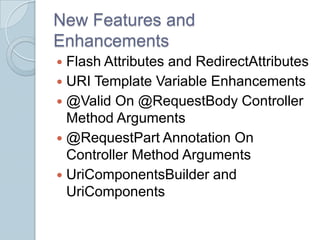
 Flash Attributes and RedirectAttributes
 URI Template Variable Enhancements
 @Valid On @RequestBody Controller
  Method Arguments
 @RequestPart Annotation On
  Controller Method Arguments
 UriComponentsBuilder and
  UriComponents
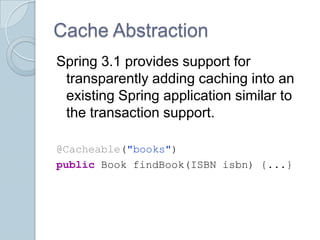
Cache Abstraction
Spring 3.1 provides support for
 transparently adding caching into an
 existing Spring application similar to
 the transaction support.

@Cacheable("books")
public Book findBook(ISBN isbn) {...}
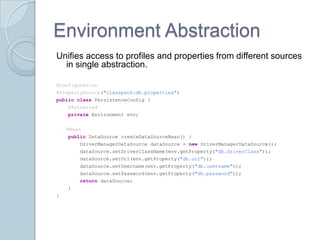
Environment Abstraction
Unifies access to profiles and properties from different sources
  in single abstraction.

@Configuration
@PropertySource("classpath:db.properties")
public class PersistenceConfig {
    @Autowired
    private Environment env;


    @Bean
    public DataSource createDataSourceBean() {
        DriverManagerDataSource dataSource = new DriverManagerDataSource();
        dataSource.setDriverClassName(env.getProperty("db.driverClass"));
        dataSource.setUrl(env.getProperty("db.url"));
        dataSource.setUsername(env.getProperty("db.username"));
        dataSource.setPassword(env.getProperty("db.password"));
        return dataSource;
    }
}
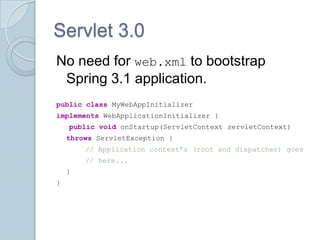
Servlet 3.0
No need for web.xml to bootstrap
 Spring 3.1 application.
public class MyWebAppInitializer
implements WebApplicationInitializer {
    public void onStartup(ServletContext servletContext)
    throws ServletException {
        // Application context’s (root and dispatcher) goes
        // here...
    }
}
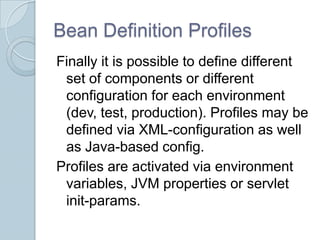
Bean Definition Profiles
Finally it is possible to define different
 set of components or different
 configuration for each environment
 (dev, test, production). Profiles may be
 defined via XML-configuration as well
 as Java-based config.
Profiles are activated via environment
 variables, JVM properties or servlet
 init-params.
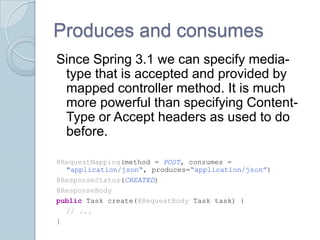
Produces and consumes
Since Spring 3.1 we can specify media-
 type that is accepted and provided by
 mapped controller method. It is much
 more powerful than specifying Content-
 Type or Accept headers as used to do
 before.

@RequestMapping(method = POST, consumes =
  "application/json“, produces=“application/json”)
@ResponseStatus(CREATED)
@ResponseBody
public Task create(@RequestBody Task task) {
  // ...
}
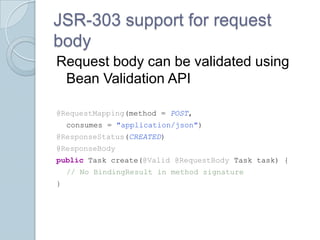
JSR-303 support for request
body
Request body can be validated using
 Bean Validation API

@RequestMapping(method = POST,
    consumes = "application/json")
@ResponseStatus(CREATED)
@ResponseBody
public Task create(@Valid @RequestBody Task task) {
    // No BindingResult in method signature
}
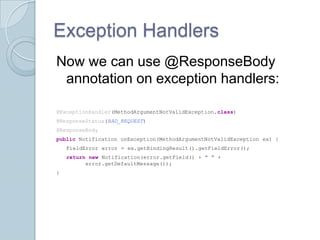
Exception Handlers
Now we can use @ResponseBody
 annotation on exception handlers:

@ExceptionHandler(MethodArgumentNotValidException.class)
@ResponseStatus(BAD_REQUEST)
@ResponseBody
public Notification onException(MethodArgumentNotValidException ex) {
    FieldError error = ex.getBindingResult().getFieldError();
    return new Notification(error.getField() + " " +
          error.getDefaultMessage());
}
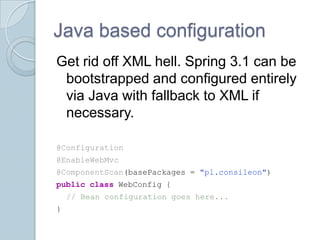
Java based configuration
Get rid off XML hell. Spring 3.1 can be
 bootstrapped and configured entirely
 via Java with fallback to XML if
 necessary.

@Configuration
@EnableWebMvc
@ComponentScan(basePackages = "pl.consileon")
public class WebConfig {
    // Bean configuration goes here...
}
BACKBONE.JS
What is this sorcery?
   Backbone.js gives structure to web
    applications by providing models with
    key-value binding and custom events,
    collections with a rich API of
    enumerable functions, views with
    declarative event handling, and
    connects it all to your existing API over
    a RESTful JSON interface.
So why do I need
Backbone.js?
 You’re building application with lots of
  JavaScript providing great user
  experience.
 You’re frontend is bunch of jQuery
  selectors and callbacks trying to keep
  in sync your UI and backend?
 You’re convinced that backend
  shouldn’t care of rendering UI.
How Backbone.js works?
   The data is represented by Model(s)
    and Collection(s), which are backed
    by server application.
    ◦ Models and Collections communicate with
      backend API via REST interface with data
      formatted in Json
 UI is represented by View(s).
 Router maps URL’s to appropriate
  views.
Most important
 Views do not render anything by
  examining the Models attributes.
  Models and Collections notify
  appropriate Views about changes
  causing appropriate page fragments to
  re-render itself.
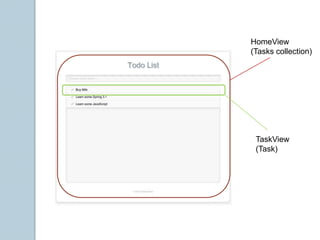
 Each View represents logical part of a
  page and is backed by the Model or
  Collection.
HomeView
(Tasks collection)


 TaskView
 (Task)
The ‘el’ magic
 Each view is bound to some DOM
  element accessible via ‘el’ attribute.
 The el attribute automatically narrows
  the DOM that is searched via selectors
    ◦ Whenever attempt to access DOM element
      via selector, the element is searched in DOM
      fragment scoped by ‘el’ not in whole page so
      there is no need for adding additional
      attributes uniquely identifying the element.
   The ‘el’ attribute can be created from
    JavaScript templating library or bound to
    existing DOM element.
How to test it?
 http://pivotal.github.com/jasmine/
 http://sinonjs.org/
 http://searls.github.com/jasmine-
  maven-plugin/
https://github.com/consileonpl/spring-3.1-backbone.js-
todo-list

DEMO
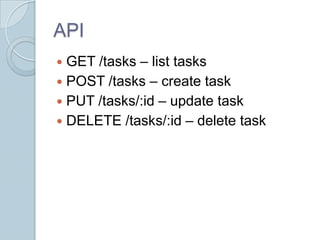
API
 GET /tasks – list tasks
 POST /tasks – create task
 PUT /tasks/:id – update task
 DELETE /tasks/:id – delete task
Q&A

Integration of Backbone.js with Spring 3.1

  • 1.
  • 2.
    Agenda  New Featuresand Enhancements in Spring 3.1  What is Backbone.js and why I should use it  Spring 3.1 and Backbone.js integration by example
  • 3.
  • 4.
    New Features and Enhancements Cache Abstraction  Bean Definition Profiles  Environment Abstraction  PropertySource Abstraction  Java based-configuration  Support for Hibernate 4.x  c: namespace for constructor injection  Support for injection against non- standard JavaBeans setters
  • 5.
    New Features and Enhancements Support for Servlet 3.0 code-based configuration  Support for Servlet 3.0 MultipartResolver  JPA EntityManagerFactory bootstraping without persistence.xml  New HandlerMethod-based Support Classes For Annotated Controller Processing  "consumes" and "produces" conditions in @RequestMapping
  • 6.
    New Features and Enhancements Flash Attributes and RedirectAttributes  URI Template Variable Enhancements  @Valid On @RequestBody Controller Method Arguments  @RequestPart Annotation On Controller Method Arguments  UriComponentsBuilder and UriComponents
  • 7.
    Cache Abstraction Spring 3.1provides support for transparently adding caching into an existing Spring application similar to the transaction support. @Cacheable("books") public Book findBook(ISBN isbn) {...}
  • 8.
    Environment Abstraction Unifies accessto profiles and properties from different sources in single abstraction. @Configuration @PropertySource("classpath:db.properties") public class PersistenceConfig { @Autowired private Environment env; @Bean public DataSource createDataSourceBean() { DriverManagerDataSource dataSource = new DriverManagerDataSource(); dataSource.setDriverClassName(env.getProperty("db.driverClass")); dataSource.setUrl(env.getProperty("db.url")); dataSource.setUsername(env.getProperty("db.username")); dataSource.setPassword(env.getProperty("db.password")); return dataSource; } }
  • 9.
    Servlet 3.0 No needfor web.xml to bootstrap Spring 3.1 application. public class MyWebAppInitializer implements WebApplicationInitializer { public void onStartup(ServletContext servletContext) throws ServletException { // Application context’s (root and dispatcher) goes // here... } }
  • 10.
    Bean Definition Profiles Finallyit is possible to define different set of components or different configuration for each environment (dev, test, production). Profiles may be defined via XML-configuration as well as Java-based config. Profiles are activated via environment variables, JVM properties or servlet init-params.
  • 11.
    Produces and consumes SinceSpring 3.1 we can specify media- type that is accepted and provided by mapped controller method. It is much more powerful than specifying Content- Type or Accept headers as used to do before. @RequestMapping(method = POST, consumes = "application/json“, produces=“application/json”) @ResponseStatus(CREATED) @ResponseBody public Task create(@RequestBody Task task) { // ... }
  • 12.
    JSR-303 support forrequest body Request body can be validated using Bean Validation API @RequestMapping(method = POST, consumes = "application/json") @ResponseStatus(CREATED) @ResponseBody public Task create(@Valid @RequestBody Task task) { // No BindingResult in method signature }
  • 13.
    Exception Handlers Now wecan use @ResponseBody annotation on exception handlers: @ExceptionHandler(MethodArgumentNotValidException.class) @ResponseStatus(BAD_REQUEST) @ResponseBody public Notification onException(MethodArgumentNotValidException ex) { FieldError error = ex.getBindingResult().getFieldError(); return new Notification(error.getField() + " " + error.getDefaultMessage()); }
  • 14.
    Java based configuration Getrid off XML hell. Spring 3.1 can be bootstrapped and configured entirely via Java with fallback to XML if necessary. @Configuration @EnableWebMvc @ComponentScan(basePackages = "pl.consileon") public class WebConfig { // Bean configuration goes here... }
  • 15.
  • 16.
    What is thissorcery?  Backbone.js gives structure to web applications by providing models with key-value binding and custom events, collections with a rich API of enumerable functions, views with declarative event handling, and connects it all to your existing API over a RESTful JSON interface.
  • 17.
    So why doI need Backbone.js?  You’re building application with lots of JavaScript providing great user experience.  You’re frontend is bunch of jQuery selectors and callbacks trying to keep in sync your UI and backend?  You’re convinced that backend shouldn’t care of rendering UI.
  • 18.
    How Backbone.js works?  The data is represented by Model(s) and Collection(s), which are backed by server application. ◦ Models and Collections communicate with backend API via REST interface with data formatted in Json  UI is represented by View(s).  Router maps URL’s to appropriate views.
  • 19.
    Most important  Viewsdo not render anything by examining the Models attributes. Models and Collections notify appropriate Views about changes causing appropriate page fragments to re-render itself.  Each View represents logical part of a page and is backed by the Model or Collection.
  • 20.
  • 21.
    The ‘el’ magic Each view is bound to some DOM element accessible via ‘el’ attribute.  The el attribute automatically narrows the DOM that is searched via selectors ◦ Whenever attempt to access DOM element via selector, the element is searched in DOM fragment scoped by ‘el’ not in whole page so there is no need for adding additional attributes uniquely identifying the element.  The ‘el’ attribute can be created from JavaScript templating library or bound to existing DOM element.
  • 22.
    How to testit?  http://pivotal.github.com/jasmine/  http://sinonjs.org/  http://searls.github.com/jasmine- maven-plugin/
  • 23.
  • 24.
    API  GET /tasks– list tasks  POST /tasks – create task  PUT /tasks/:id – update task  DELETE /tasks/:id – delete task
  • 25.