e-Commerce Systems
Zainab KHALLOUF, Ph.D.
Lecture 5: JavaServer Faces (JSF) : Introduction and Overview
Lecture References
The Java EE 7 Tutorial.
http://docs.oracle.com/javaee/7/tutorial/doc/javaeetutorial7.pdf
The figure in slide 4 is from: Mastering JavaServer Faces, by Bill Dudney, Jonathan
Lehr, Bill Willis, and LeRoy Mattingly.
JSF 2.0 lecture notes by Dr. Beatrice Amrhein, available from:
http://sws.bfh.ch/~amrhein/
E-Commerce Systems 2
JavaServer Faces (JSF) : Introduction
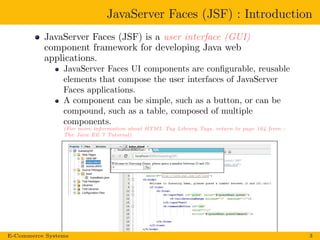
JavaServer Faces (JSF) is a user interface (GUI)
component framework for developing Java web
applications.
JavaServer Faces UI components are configurable, reusable
elements that compose the user interfaces of JavaServer
Faces applications.
A component can be simple, such as a button, or can be
compound, such as a table, composed of multiple
components.
(For more information about HTML Tag Library Tags, return to page 164 from :
The Java EE 7 Tutorial).
E-Commerce Systems 3
JavaServer Faces (JSF) : Introduction (cont’)
JSF works in the web tier from the server-side.
JSF is the ”official” presentation technology in Java EE7
standard.
JavaServer Faces technology APIs are layered directly on
top of the Servlet API.
E-Commerce Systems 4
JavaServer Faces (JSF) : Introduction (cont’)
JSF is a MVC (Model-View-Controller) framework. MVC
is a design pattern that divides the application into three
interoperable components:
Model: Classes that represent the business data and any
business logic that govern access to and modification of the
data.
View: Pages that your application uses to dynamically
generate HTML responses. The view renders the contents
of a model. A view also forwards user inputs to a controller.
Controller: Classes that handle incoming browser requests,
and it defines application behavior. It selects views for
presentation. It interprets user inputs and maps them into
actions to be performed by the model. A controller selects
the next view to display based on the user interactions and
the outcome of the model operations.
E-Commerce Systems 5
JavaServer Faces (JSF) : Introduction (cont’)
JSF is a MVC framework.
Controller: The JSF controller consists primarily of a
servlet called FacesServlet.
View: Represented by a set of web pages composed of a tree
of UI components.
Model:
Model objects referenced by the backing beans.
The backing beans can include some controller functions
like page selection.
E-Commerce Systems 6
What Is a JavaServer Faces Application?
A typical JavaServer Faces application includes the following
parts:
1 A set of web pages, JSF uses JavaServer Pages (JSP) or
Facelets (recommended) for its presentation technology.
JavaServer Pages (JSP) technology does not support all the
new features available in JSF in the Java EE 7 platform.
2 A set of backing beans (managed beans), which are
JavaBeans components that define properties and functions
for components on a page.
3 A web deployment descriptor (web.xml) file.
4 Optionally, one or more application configuration resource
files, such as a faces-config.xml file, which can be used to
define user-defined navigation rules and configure beans
and other custom objects, such as custom components.
5 Optionally, a set of custom objects, which can include
custom components, validators, converters, or listeners,
created by the application developer.
E-Commerce Systems 7
What Is Facelets?
The term Facelets refers to the view declaration language
for JavaServer Faces.
Facelets views are created as XHTML pages.
JSF EL expression use #{. . . }, while JSP EL expressions
use the ${. . . } syntax.
Return to page 130 from:
The Java EE 7 Tutorial.
http://docs.oracle.com/javaee/7/tutorial/doc/javaeetutorial7.pdf
E-Commerce Systems 8
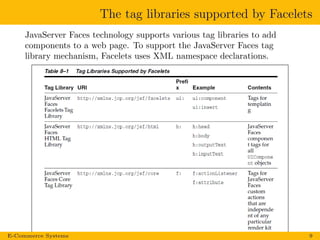
The tag libraries supported by Facelets
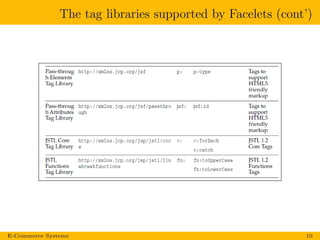
JavaServer Faces technology supports various tag libraries to add
components to a web page. To support the JavaServer Faces tag
library mechanism, Facelets uses XML namespace declarations.
E-Commerce Systems 9
The tag libraries supported by Facelets (cont’)
E-Commerce Systems 10
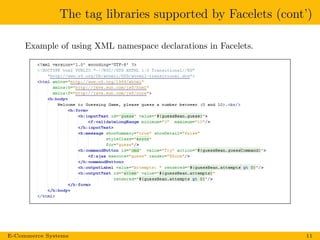
The tag libraries supported by Facelets (cont’)
Example of using XML namespace declarations in Facelets.
E-Commerce Systems 11
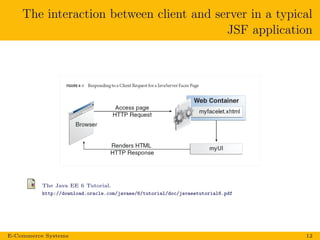
The interaction between client and server in a typical
JSF application
The Java EE 6 Tutorial.
http://download.oracle.com/javaee/6/tutorial/doc/javaeetutorial6.pdf
E-Commerce Systems 12
JavaServer Faces (JSF) : Introduction (cont’)
To use JSF you need:
JSF Implementation (in the form of the JSF jars).
The JavaServer Pages Standard Tag Library (JSTL) tags
library.
A Java runtime environment.
A web-container to use JSF in (for example Tomcat).
E-Commerce Systems 13
Some existing JSF Implementations
Sun implementation (Mojarra) (open source) used in
many ASs.
JBoss RichFaces (open source).
Primefaces, (open source).
Apache MyFaces, (open source).
E-Commerce Systems 14
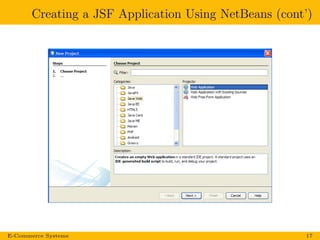
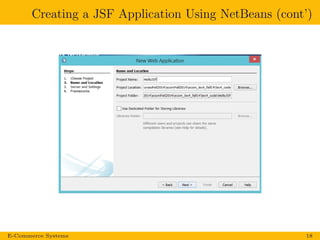
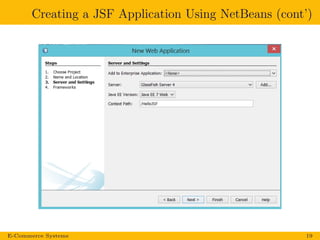
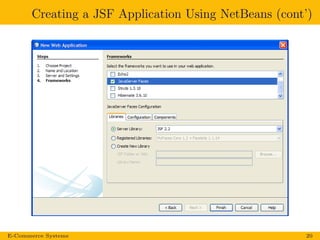
Creating a JSF Application Using NetBeans IDE
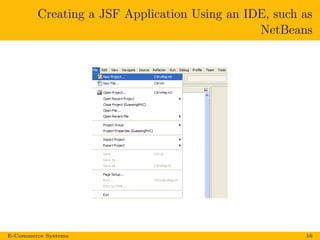
Creating a JSF Application Using an IDE, such as
NetBeans
E-Commerce Systems 16
Creating a JSF Application Using NetBeans (cont’)
E-Commerce Systems 17
Creating a JSF Application Using NetBeans (cont’)
E-Commerce Systems 18
Creating a JSF Application Using NetBeans (cont’)
E-Commerce Systems 19
Creating a JSF Application Using NetBeans (cont’)
E-Commerce Systems 20
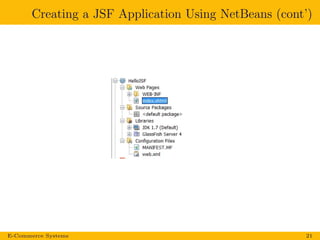
Creating a JSF Application Using NetBeans (cont’)
E-Commerce Systems 21
Examples
Hello World in JSF!
Creating a Simple JavaServer Faces Application
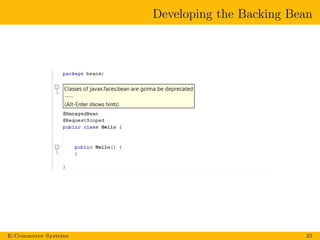
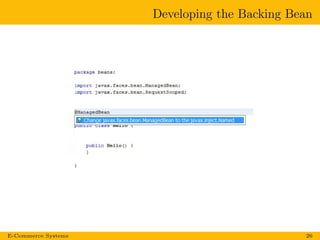
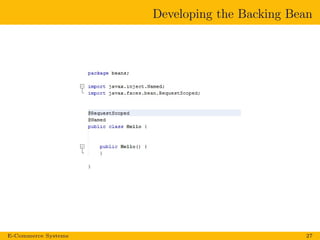
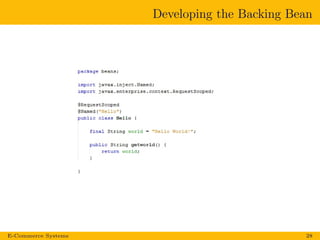
1 Developing backing beans.
2 Adding managed bean annotations (declaration).
3 Creating web pages using Facelets or JSP tags.
4 Mapping the FacesServlet instance.
E-Commerce Systems 24
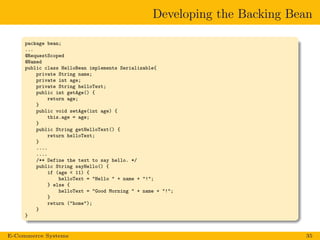
Developing the Backing Bean
E-Commerce Systems 25
Developing the Backing Bean
E-Commerce Systems 26
Developing the Backing Bean
E-Commerce Systems 27
Developing the Backing Bean
E-Commerce Systems 28
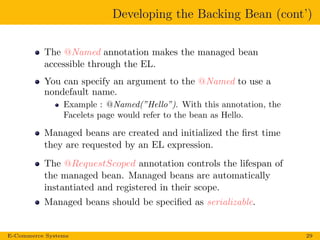
Developing the Backing Bean (cont’)
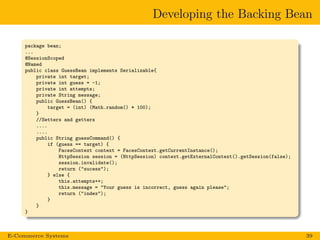
The @Named annotation makes the managed bean
accessible through the EL.
You can specify an argument to the @Named to use a
nondefault name.
Example : @Named(”Hello”). With this annotation, the
Facelets page would refer to the bean as Hello.
Managed beans are created and initialized the first time
they are requested by an EL expression.
The @RequestScoped annotation controls the lifespan of
the managed bean. Managed beans are automatically
instantiated and registered in their scope.
Managed beans should be specified as serializable.
E-Commerce Systems 29
Creating the Web Page
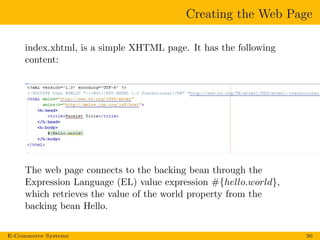
index.xhtml, is a simple XHTML page. It has the following
content:
The web page connects to the backing bean through the
Expression Language (EL) value expression #{hello.world},
which retrieves the value of the world property from the
backing bean Hello.
E-Commerce Systems 30
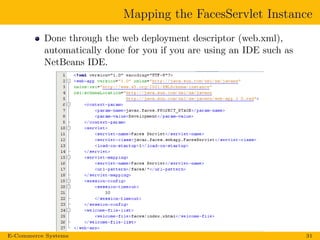
Mapping the FacesServlet Instance
Done through the web deployment descriptor (web.xml),
automatically done for you if you are using an IDE such as
NetBeans IDE.
E-Commerce Systems 31
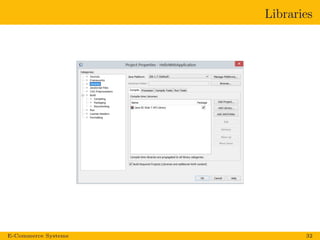
Libraries
E-Commerce Systems 32
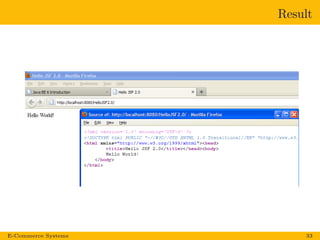
Result
E-Commerce Systems 33
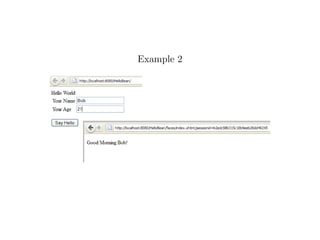
Example 2
Developing the Backing Bean
package bean;
...
@RequestScoped
@Named
public class HelloBean implements Serializable{
private String name;
private int age;
private String helloText;
public int getAge() {
return age;
}
public void setAge(int age) {
this.age = age;
}
public String getHelloText() {
return helloText;
}
....
....
/** Define the text to say hello. */
public String sayHello() {
if (age < 11) {
helloText = "Hello " + name + "!";
} else {
helloText = "Good Morning " + name + "!";
}
return ("home");
}
}
E-Commerce Systems 35
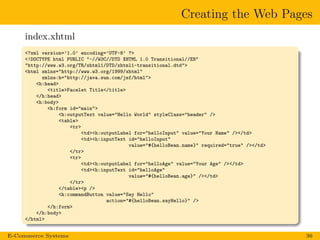
Creating the Web Pages
index.xhtml
<?xml version=’1.0’ encoding=’UTF-8’ ?>
<!DOCTYPE html PUBLIC "-//W3C//DTD XHTML 1.0 Transitional//EN"
"http://www.w3.org/TR/xhtml1/DTD/xhtml1-transitional.dtd">
<html xmlns="http://www.w3.org/1999/xhtml"
xmlns:h="http://java.sun.com/jsf/html">
<h:head>
<title>Facelet Title</title>
</h:head>
<h:body>
<h:form id="main">
<h:outputText value="Hello World" styleClass="header" />
<table>
<tr>
<td><h:outputLabel for="helloInput" value="Your Name" /></td>
<td><h:inputText id="helloInput"
value="#{helloBean.name}" required="true" /></td>
</tr>
<tr>
<td><h:outputLabel for="helloAge" value="Your Age" /></td>
<td><h:inputText id="helloAge"
value="#{helloBean.age}" /></td>
</tr>
</table><p />
<h:commandButton value="Say Hello"
action="#{helloBean.sayHello}" />
</h:form>
</h:body>
</html>
E-Commerce Systems 36
Creating the Web Pages (cont’)
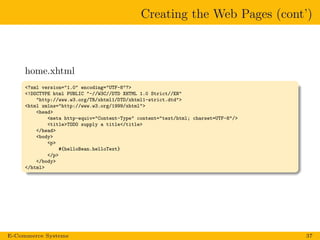
home.xhtml
<?xml version="1.0" encoding="UTF-8"?>
<!DOCTYPE html PUBLIC "-//W3C//DTD XHTML 1.0 Strict//EN"
"http://www.w3.org/TR/xhtml1/DTD/xhtml1-strict.dtd">
<html xmlns="http://www.w3.org/1999/xhtml">
<head>
<meta http-equiv="Content-Type" content="text/html; charset=UTF-8"/>
<title>TODO supply a title</title>
</head>
<body>
<p>
#{helloBean.helloText}
</p>
</body>
</html>
E-Commerce Systems 37
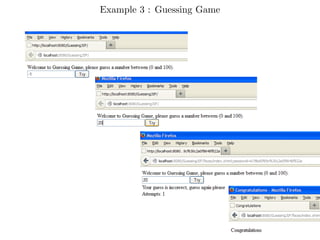
Example 3 : Guessing Game
Developing the Backing Bean
package bean;
...
@SessionScoped
@Named
public class GuessBean implements Serializable{
private int target;
private int guess = -1;
private int attempts;
private String message;
public GuessBean() {
target = (int) (Math.random() * 100);
}
//Setters and getters
....
....
public String guessCommand() {
if (guess == target) {
FacesContext context = FacesContext.getCurrentInstance();
HttpSession session = (HttpSession) context.getExternalContext().getSession(false);
session.invalidate();
return ("sucess");
} else {
this.attempts++;
this.message = "Your guess is incorrect, guess again please";
return ("index");
}
}
}
E-Commerce Systems 39
Creating the Web Pages
index.xhtml
...
<h:form>
<h:inputText id="guess" value="#{guessBean.guess}">
<f:validateLongRange minimum="0" maximum="100"/>
</h:inputText>
<h:message showSummary="true" showDetail="false"
styleClass="error"
for="guess"/>
<h:commandButton id="cmd" value="Try" action="#{guessBean.guessCommand}"/>
<br/>
<h:outputText id="msg" value="#{guessBean.message}"
rendered="#{guessBean.attempts gt 0}"/>
<br/>
<h:outputText id="attem" value="Attempts: #{guessBean.attempts}"
rendered="#{guessBean.attempts gt 0}"/>
</h:form>
...
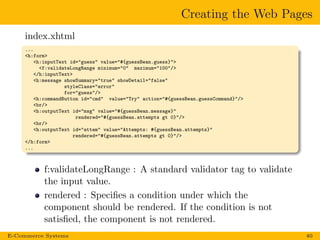
f:validateLongRange : A standard validator tag to validate
the input value.
rendered : Specifies a condition under which the
component should be rendered. If the condition is not
satisfied, the component is not rendered.
E-Commerce Systems 40
Creating the Web Pages (cont’)
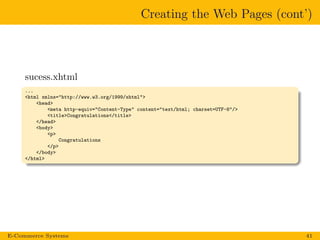
sucess.xhtml
...
<html xmlns="http://www.w3.org/1999/xhtml">
<head>
<meta http-equiv="Content-Type" content="text/html; charset=UTF-8"/>
<title>Congratulations</title>
</head>
<body>
<p>
Congratulations
</p>
</body>
</html>
E-Commerce Systems 41
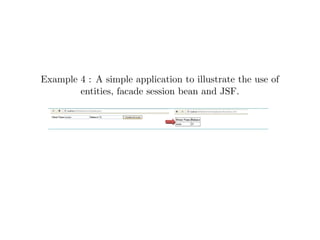
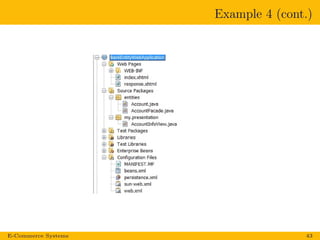
Example 4 : A simple application to illustrate the use of
entities, facade session bean and JSF.
Example 4 (cont.)
E-Commerce Systems 43
Example 4 (cont.)
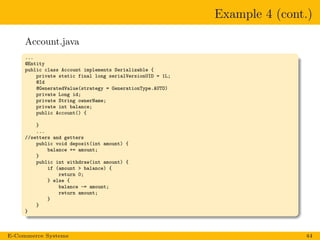
Account.java
...
@Entity
public class Account implements Serializable {
private static final long serialVersionUID = 1L;
@Id
@GeneratedValue(strategy = GenerationType.AUTO)
private Long id;
private String ownerName;
private int balance;
public Account() {
}
...
//setters and getters
public void deposit(int amount) {
balance += amount;
}
public int withdraw(int amount) {
if (amount > balance) {
return 0;
} else {
balance -= amount;
return amount;
}
}
}
E-Commerce Systems 44
Example 4 (cont.)
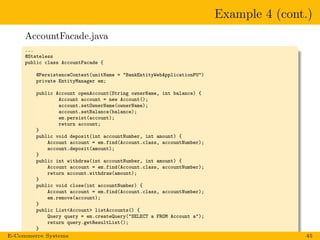
AccountFacade.java
...
@Stateless
public class AccountFacade {
@PersistenceContext(unitName = "BankEntityWebApplicationPU")
private EntityManager em;
public Account openAccount(String ownerName, int balance) {
Account account = new Account();
account.setOwnerName(ownerName);
account.setBalance(balance);
em.persist(account);
return account;
}
public void deposit(int accountNumber, int amount) {
Account account = em.find(Account.class, accountNumber);
account.deposit(amount);
}
public int withdraw(int accountNumber, int amount) {
Account account = em.find(Account.class, accountNumber);
return account.withdraw(amount);
}
public void close(int accountNumber) {
Account account = em.find(Account.class, accountNumber);
em.remove(account);
}
public List<Account> listAccounts() {
Query query = em.createQuery("SELECT a FROM Account a");
return query.getResultList();
}
}E-Commerce Systems 45
Example 4 (cont.)
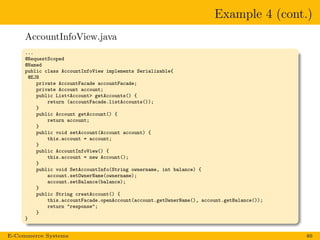
AccountInfoView.java
...
@RequestScoped
@Named
public class AccountInfoView implements Serializable{
@EJB
private AccountFacade accountFacade;
private Account account;
public List<Account> getAccounts() {
return (accountFacade.listAccounts());
}
public Account getAccount() {
return account;
}
public void setAccount(Account account) {
this.account = account;
}
public AccountInfoView() {
this.account = new Account();
}
public void SetAccountInfo(String ownername, int balance) {
account.setOwnerName(ownername);
account.setBalance(balance);
}
public String creatAccount() {
this.accountFacade.openAccount(account.getOwnerName(), account.getBalance());
return "response";
}
}
E-Commerce Systems 46
Example 4 (cont.)
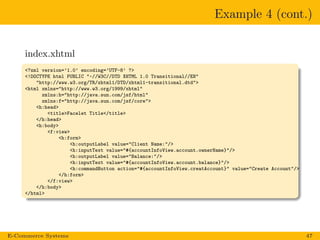
index.xhtml
<?xml version=’1.0’ encoding=’UTF-8’ ?>
<!DOCTYPE html PUBLIC "-//W3C//DTD XHTML 1.0 Transitional//EN"
"http://www.w3.org/TR/xhtml1/DTD/xhtml1-transitional.dtd">
<html xmlns="http://www.w3.org/1999/xhtml"
xmlns:h="http://java.sun.com/jsf/html"
xmlns:f="http://java.sun.com/jsf/core">
<h:head>
<title>Facelet Title</title>
</h:head>
<h:body>
<f:view>
<h:form>
<h:outputLabel value="Client Name:"/>
<h:inputText value="#{accountInfoView.account.ownerName}"/>
<h:outputLabel value="Balance:"/>
<h:inputText value="#{accountInfoView.account.balance}"/>
<h:commandButton action="#{accountInfoView.creatAccount}" value="Create Account"/>
</h:form>
</f:view>
</h:body>
</html>
E-Commerce Systems 47
Example 4 (cont.)
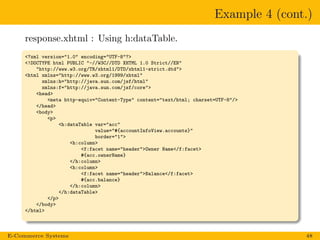
response.xhtml : Using h:dataTable.
<?xml version="1.0" encoding="UTF-8"?>
<!DOCTYPE html PUBLIC "-//W3C//DTD XHTML 1.0 Strict//EN"
"http://www.w3.org/TR/xhtml1/DTD/xhtml1-strict.dtd">
<html xmlns="http://www.w3.org/1999/xhtml"
xmlns:h="http://java.sun.com/jsf/html"
xmlns:f="http://java.sun.com/jsf/core">
<head>
<meta http-equiv="Content-Type" content="text/html; charset=UTF-8"/>
</head>
<body>
<p>
<h:dataTable var="acc"
value="#{accountInfoView.accounts}"
border="1">
<h:column>
<f:facet name="header">Owner Name</f:facet>
#{acc.ownerName}
</h:column>
<h:column>
<f:facet name="header">Balance</f:facet>
#{acc.balance}
</h:column>
</h:dataTable>
</p>
</body>
</html>
E-Commerce Systems 48
Example 4 (cont.)
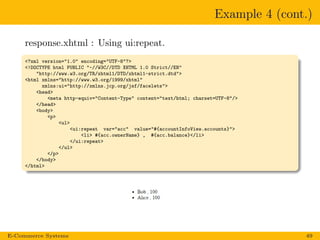
response.xhtml : Using ui:repeat.
<?xml version="1.0" encoding="UTF-8"?>
<!DOCTYPE html PUBLIC "-//W3C//DTD XHTML 1.0 Strict//EN"
"http://www.w3.org/TR/xhtml1/DTD/xhtml1-strict.dtd">
<html xmlns="http://www.w3.org/1999/xhtml"
xmlns:ui="http://xmlns.jcp.org/jsf/facelets">
<head>
<meta http-equiv="Content-Type" content="text/html; charset=UTF-8"/>
</head>
<body>
<p>
<ul>
<ui:repeat var="acc" value="#{accountInfoView.accounts}">
<li> #{acc.ownerName} , #{acc.balance}</li>
</ui:repeat>
</ul>
</p>
</body>
</html>
E-Commerce Systems 49
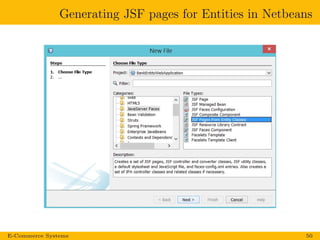
Generating JSF pages for Entities in Netbeans
E-Commerce Systems 50
Templating
Templating
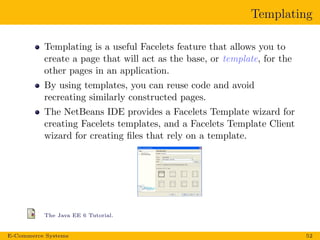
Templating is a useful Facelets feature that allows you to
create a page that will act as the base, or template, for the
other pages in an application.
By using templates, you can reuse code and avoid
recreating similarly constructed pages.
The NetBeans IDE provides a Facelets Template wizard for
creating Facelets templates, and a Facelets Template Client
wizard for creating files that rely on a template.
The Java EE 6 Tutorial.
E-Commerce Systems 52
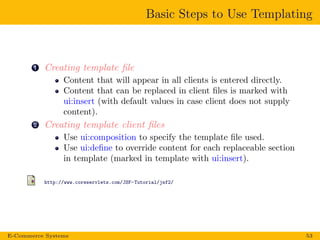
Basic Steps to Use Templating
1 Creating template file
Content that will appear in all clients is entered directly.
Content that can be replaced in client files is marked with
ui:insert (with default values in case client does not supply
content).
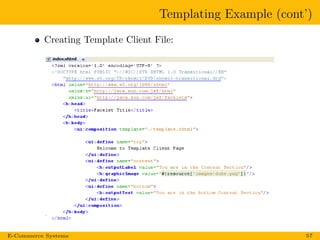
2 Creating template client files
Use ui:composition to specify the template file used.
Use ui:define to override content for each replaceable section
in template (marked in template with ui:insert).
http://www.coreservlets.com/JSF-Tutorial/jsf2/
E-Commerce Systems 53
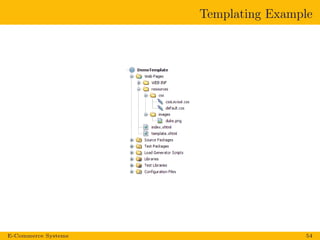
Templating Example
E-Commerce Systems 54
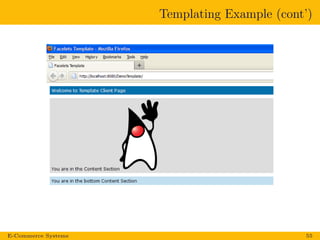
Templating Example (cont’)
E-Commerce Systems 55
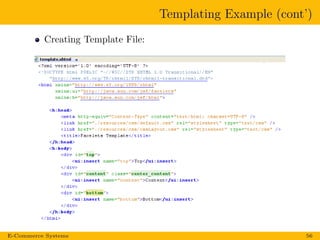
Templating Example (cont’)
Creating Template File:
E-Commerce Systems 56
Templating Example (cont’)
Creating Template Client File:
E-Commerce Systems 57
HTML5 Friendly Markup
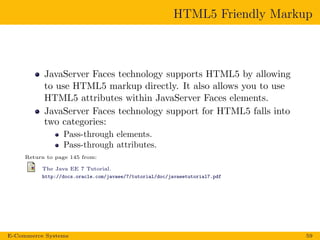
JavaServer Faces technology supports HTML5 by allowing
to use HTML5 markup directly. It also allows you to use
HTML5 attributes within JavaServer Faces elements.
JavaServer Faces technology support for HTML5 falls into
two categories:
Pass-through elements.
Pass-through attributes.
Return to page 145 from:
The Java EE 7 Tutorial.
http://docs.oracle.com/javaee/7/tutorial/doc/javaeetutorial7.pdf
E-Commerce Systems 59
HTML5 Friendly Markup: Pass-through elements
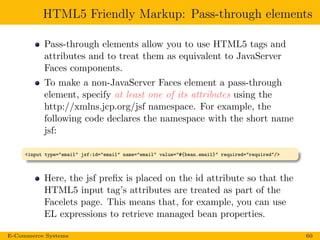
Pass-through elements allow you to use HTML5 tags and
attributes and to treat them as equivalent to JavaServer
Faces components.
To make a non-JavaServer Faces element a pass-through
element, specify at least one of its attributes using the
http://xmlns.jcp.org/jsf namespace. For example, the
following code declares the namespace with the short name
jsf:
<input type="email" jsf:id="email" name="email" value="#{bean.email}" required="required"/>
Here, the jsf prefix is placed on the id attribute so that the
HTML5 input tag’s attributes are treated as part of the
Facelets page. This means that, for example, you can use
EL expressions to retrieve managed bean properties.
E-Commerce Systems 60
HTML5 Friendly Markup: Using Pass-through
Attributes
They allow you to pass non-JavaServer Faces attributes.
There are several ways to specify pass-through attributes,
in his lecture we will focus on one method:
Use the JavaServer Faces namespace:
xmlns:p=”http://xmlns.jcp.org/jsf/passthrough, to prefix
the attribute names within a JavaServer Faces component.
Example : The following code passes the type, min, max,
required, and title attributes through to the JSF input
component:
<html ... xmlns:p="http://xmlns.jcp.org/jsf/passthrough"
...
<h:inputText id="nights" p:type="number" value="#{bean.nights}"
p:min="1" p:max="30"
p:required="required"
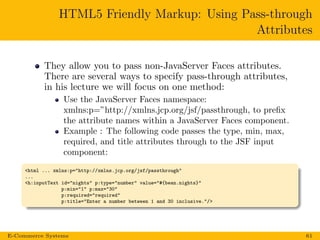
p:title="Enter a number between 1 and 30 inclusive."/>
E-Commerce Systems 61
HTML5 Friendly Markup: The reservation Example
Application
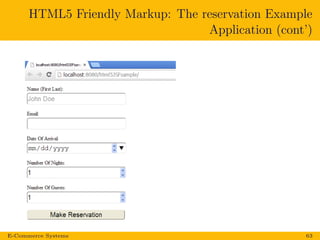
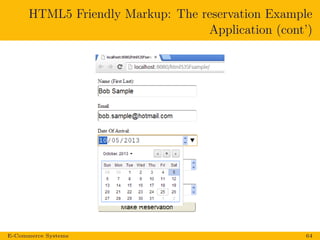
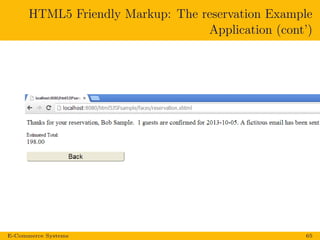
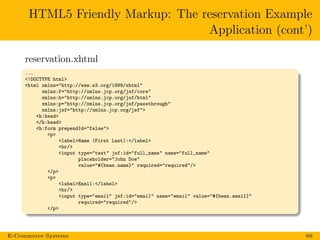
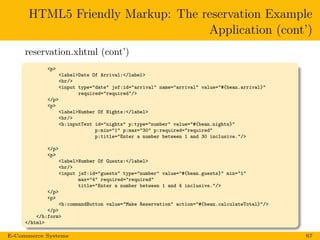
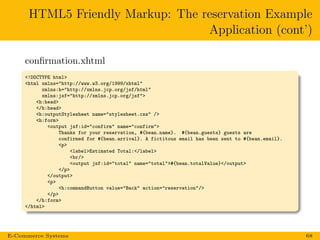
The reservation example application simulates purchasing
tickets. It consists of two Facelets pages, reservation.xhtml and
confirmation.xhtml, and a backing bean, Bean.java. The pages
use both pass-through attributes and pass-through elements.
The Java EE 7 Tutorial.
http://docs.oracle.com/javaee/7/tutorial/doc/javaeetutorial7.pdf
E-Commerce Systems 62
HTML5 Friendly Markup: The reservation Example
Application (cont’)
E-Commerce Systems 63
HTML5 Friendly Markup: The reservation Example
Application (cont’)
E-Commerce Systems 64
HTML5 Friendly Markup: The reservation Example
Application (cont’)
E-Commerce Systems 65
HTML5 Friendly Markup: The reservation Example
Application (cont’)
reservation.xhtml
...
<!DOCTYPE html>
<html xmlns="http://www.w3.org/1999/xhtml"
xmlns:f="http://xmlns.jcp.org/jsf/core"
xmlns:h="http://xmlns.jcp.org/jsf/html"
xmlns:p="http://xmlns.jcp.org/jsf/passthrough"
xmlns:jsf="http://xmlns.jcp.org/jsf">
<h:head>
</h:head>
<h:form prependId="false">
<p>
<label>Name (First Last):</label>
<br/>
<input type="text" jsf:id="full_name" name="full_name"
placeholder="John Doe"
value="#{bean.name}" required="required"/>
</p>
<p>
<label>Email:</label>
<br/>
<input type="email" jsf:id="email" name="email" value="#{bean.email}"
required="required"/>
</p>
E-Commerce Systems 66
HTML5 Friendly Markup: The reservation Example
Application (cont’)
reservation.xhtml (cont’)
<p>
<label>Date Of Arrival:</label>
<br/>
<input type="date" jsf:id="arrival" name="arrival" value="#{bean.arrival}"
required="required"/>
</p>
<p>
<label>Number Of Nights:</label>
<br/>
<h:inputText id="nights" p:type="number" value="#{bean.nights}"
p:min="1" p:max="30" p:required="required"
p:title="Enter a number between 1 and 30 inclusive."/>
</p>
<p>
<label>Number Of Guests:</label>
<br/>
<input jsf:id="guests" type="number" value="#{bean.guests}" min="1"
max="4" required="required"
title="Enter a number between 1 and 4 inclusive."/>
</p>
<p>
<h:commandButton value="Make Reservation" action="#{bean.calculateTotal}"/>
</p>
</h:form>
</html>
E-Commerce Systems 67
HTML5 Friendly Markup: The reservation Example
Application (cont’)
confirmation.xhtml
<!DOCTYPE html>
<html xmlns="http://www.w3.org/1999/xhtml"
xmlns:h="http://xmlns.jcp.org/jsf/html"
xmlns:jsf="http://xmlns.jcp.org/jsf">
<h:head>
</h:head>
<h:outputStylesheet name="stylesheet.css" />
<h:form>
<output jsf:id="confirm" name="confirm">
Thanks for your reservation, #{bean.name}. #{bean.guests} guests are
confirmed for #{bean.arrival}. A fictitous email has been sent to #{bean.email}.
<p>
<label>Estimated Total:</label>
<br/>
<output jsf:id="total" name="total">#{bean.totalValue}</output>
</p>
</output>
<p>
<h:commandButton value="Back" action="reservation"/>
</p>
</h:form>
</html>
E-Commerce Systems 68
HTML5 Friendly Markup: The reservation Example
Application (cont’)
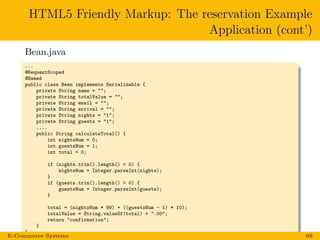
Bean.java
...
@RequestScoped
@Named
public class Bean implements Serializable {
private String name = "";
private String totalValue = "";
private String email = "";
private String arrival = "";
private String nights = "1";
private String guests = "1";
....
public String calculateTotal() {
int nightsNum = 0;
int guestsNum = 1;
int total = 0;
if (nights.trim().length() > 0) {
nightsNum = Integer.parseInt(nights);
}
if (guests.trim().length() > 0) {
guestsNum = Integer.parseInt(guests);
}
total = (nightsNum * 99) + ((guestsNum - 1) * 10);
totalValue = String.valueOf(total) + ".00";
return "confirmation";
}
}
E-Commerce Systems 69
Questions?

Lec5 ecom fall16_modified7_november16

  • 1.
    e-Commerce Systems Zainab KHALLOUF,Ph.D. Lecture 5: JavaServer Faces (JSF) : Introduction and Overview
  • 2.
    Lecture References The JavaEE 7 Tutorial. http://docs.oracle.com/javaee/7/tutorial/doc/javaeetutorial7.pdf The figure in slide 4 is from: Mastering JavaServer Faces, by Bill Dudney, Jonathan Lehr, Bill Willis, and LeRoy Mattingly. JSF 2.0 lecture notes by Dr. Beatrice Amrhein, available from: http://sws.bfh.ch/~amrhein/ E-Commerce Systems 2
  • 3.
    JavaServer Faces (JSF): Introduction JavaServer Faces (JSF) is a user interface (GUI) component framework for developing Java web applications. JavaServer Faces UI components are configurable, reusable elements that compose the user interfaces of JavaServer Faces applications. A component can be simple, such as a button, or can be compound, such as a table, composed of multiple components. (For more information about HTML Tag Library Tags, return to page 164 from : The Java EE 7 Tutorial). E-Commerce Systems 3
  • 4.
    JavaServer Faces (JSF): Introduction (cont’) JSF works in the web tier from the server-side. JSF is the ”official” presentation technology in Java EE7 standard. JavaServer Faces technology APIs are layered directly on top of the Servlet API. E-Commerce Systems 4
  • 5.
    JavaServer Faces (JSF): Introduction (cont’) JSF is a MVC (Model-View-Controller) framework. MVC is a design pattern that divides the application into three interoperable components: Model: Classes that represent the business data and any business logic that govern access to and modification of the data. View: Pages that your application uses to dynamically generate HTML responses. The view renders the contents of a model. A view also forwards user inputs to a controller. Controller: Classes that handle incoming browser requests, and it defines application behavior. It selects views for presentation. It interprets user inputs and maps them into actions to be performed by the model. A controller selects the next view to display based on the user interactions and the outcome of the model operations. E-Commerce Systems 5
  • 6.
    JavaServer Faces (JSF): Introduction (cont’) JSF is a MVC framework. Controller: The JSF controller consists primarily of a servlet called FacesServlet. View: Represented by a set of web pages composed of a tree of UI components. Model: Model objects referenced by the backing beans. The backing beans can include some controller functions like page selection. E-Commerce Systems 6
  • 7.
    What Is aJavaServer Faces Application? A typical JavaServer Faces application includes the following parts: 1 A set of web pages, JSF uses JavaServer Pages (JSP) or Facelets (recommended) for its presentation technology. JavaServer Pages (JSP) technology does not support all the new features available in JSF in the Java EE 7 platform. 2 A set of backing beans (managed beans), which are JavaBeans components that define properties and functions for components on a page. 3 A web deployment descriptor (web.xml) file. 4 Optionally, one or more application configuration resource files, such as a faces-config.xml file, which can be used to define user-defined navigation rules and configure beans and other custom objects, such as custom components. 5 Optionally, a set of custom objects, which can include custom components, validators, converters, or listeners, created by the application developer. E-Commerce Systems 7
  • 8.
    What Is Facelets? Theterm Facelets refers to the view declaration language for JavaServer Faces. Facelets views are created as XHTML pages. JSF EL expression use #{. . . }, while JSP EL expressions use the ${. . . } syntax. Return to page 130 from: The Java EE 7 Tutorial. http://docs.oracle.com/javaee/7/tutorial/doc/javaeetutorial7.pdf E-Commerce Systems 8
  • 9.
    The tag librariessupported by Facelets JavaServer Faces technology supports various tag libraries to add components to a web page. To support the JavaServer Faces tag library mechanism, Facelets uses XML namespace declarations. E-Commerce Systems 9
  • 10.
    The tag librariessupported by Facelets (cont’) E-Commerce Systems 10
  • 11.
    The tag librariessupported by Facelets (cont’) Example of using XML namespace declarations in Facelets. E-Commerce Systems 11
  • 12.
    The interaction betweenclient and server in a typical JSF application The Java EE 6 Tutorial. http://download.oracle.com/javaee/6/tutorial/doc/javaeetutorial6.pdf E-Commerce Systems 12
  • 13.
    JavaServer Faces (JSF): Introduction (cont’) To use JSF you need: JSF Implementation (in the form of the JSF jars). The JavaServer Pages Standard Tag Library (JSTL) tags library. A Java runtime environment. A web-container to use JSF in (for example Tomcat). E-Commerce Systems 13
  • 14.
    Some existing JSFImplementations Sun implementation (Mojarra) (open source) used in many ASs. JBoss RichFaces (open source). Primefaces, (open source). Apache MyFaces, (open source). E-Commerce Systems 14
  • 15.
    Creating a JSFApplication Using NetBeans IDE
  • 16.
    Creating a JSFApplication Using an IDE, such as NetBeans E-Commerce Systems 16
  • 17.
    Creating a JSFApplication Using NetBeans (cont’) E-Commerce Systems 17
  • 18.
    Creating a JSFApplication Using NetBeans (cont’) E-Commerce Systems 18
  • 19.
    Creating a JSFApplication Using NetBeans (cont’) E-Commerce Systems 19
  • 20.
    Creating a JSFApplication Using NetBeans (cont’) E-Commerce Systems 20
  • 21.
    Creating a JSFApplication Using NetBeans (cont’) E-Commerce Systems 21
  • 22.
  • 23.
  • 24.
    Creating a SimpleJavaServer Faces Application 1 Developing backing beans. 2 Adding managed bean annotations (declaration). 3 Creating web pages using Facelets or JSP tags. 4 Mapping the FacesServlet instance. E-Commerce Systems 24
  • 25.
    Developing the BackingBean E-Commerce Systems 25
  • 26.
    Developing the BackingBean E-Commerce Systems 26
  • 27.
    Developing the BackingBean E-Commerce Systems 27
  • 28.
    Developing the BackingBean E-Commerce Systems 28
  • 29.
    Developing the BackingBean (cont’) The @Named annotation makes the managed bean accessible through the EL. You can specify an argument to the @Named to use a nondefault name. Example : @Named(”Hello”). With this annotation, the Facelets page would refer to the bean as Hello. Managed beans are created and initialized the first time they are requested by an EL expression. The @RequestScoped annotation controls the lifespan of the managed bean. Managed beans are automatically instantiated and registered in their scope. Managed beans should be specified as serializable. E-Commerce Systems 29
  • 30.
    Creating the WebPage index.xhtml, is a simple XHTML page. It has the following content: The web page connects to the backing bean through the Expression Language (EL) value expression #{hello.world}, which retrieves the value of the world property from the backing bean Hello. E-Commerce Systems 30
  • 31.
    Mapping the FacesServletInstance Done through the web deployment descriptor (web.xml), automatically done for you if you are using an IDE such as NetBeans IDE. E-Commerce Systems 31
  • 32.
  • 33.
  • 34.
  • 35.
    Developing the BackingBean package bean; ... @RequestScoped @Named public class HelloBean implements Serializable{ private String name; private int age; private String helloText; public int getAge() { return age; } public void setAge(int age) { this.age = age; } public String getHelloText() { return helloText; } .... .... /** Define the text to say hello. */ public String sayHello() { if (age < 11) { helloText = "Hello " + name + "!"; } else { helloText = "Good Morning " + name + "!"; } return ("home"); } } E-Commerce Systems 35
  • 36.
    Creating the WebPages index.xhtml <?xml version=’1.0’ encoding=’UTF-8’ ?> <!DOCTYPE html PUBLIC "-//W3C//DTD XHTML 1.0 Transitional//EN" "http://www.w3.org/TR/xhtml1/DTD/xhtml1-transitional.dtd"> <html xmlns="http://www.w3.org/1999/xhtml" xmlns:h="http://java.sun.com/jsf/html"> <h:head> <title>Facelet Title</title> </h:head> <h:body> <h:form id="main"> <h:outputText value="Hello World" styleClass="header" /> <table> <tr> <td><h:outputLabel for="helloInput" value="Your Name" /></td> <td><h:inputText id="helloInput" value="#{helloBean.name}" required="true" /></td> </tr> <tr> <td><h:outputLabel for="helloAge" value="Your Age" /></td> <td><h:inputText id="helloAge" value="#{helloBean.age}" /></td> </tr> </table><p /> <h:commandButton value="Say Hello" action="#{helloBean.sayHello}" /> </h:form> </h:body> </html> E-Commerce Systems 36
  • 37.
    Creating the WebPages (cont’) home.xhtml <?xml version="1.0" encoding="UTF-8"?> <!DOCTYPE html PUBLIC "-//W3C//DTD XHTML 1.0 Strict//EN" "http://www.w3.org/TR/xhtml1/DTD/xhtml1-strict.dtd"> <html xmlns="http://www.w3.org/1999/xhtml"> <head> <meta http-equiv="Content-Type" content="text/html; charset=UTF-8"/> <title>TODO supply a title</title> </head> <body> <p> #{helloBean.helloText} </p> </body> </html> E-Commerce Systems 37
  • 38.
    Example 3 :Guessing Game
  • 39.
    Developing the BackingBean package bean; ... @SessionScoped @Named public class GuessBean implements Serializable{ private int target; private int guess = -1; private int attempts; private String message; public GuessBean() { target = (int) (Math.random() * 100); } //Setters and getters .... .... public String guessCommand() { if (guess == target) { FacesContext context = FacesContext.getCurrentInstance(); HttpSession session = (HttpSession) context.getExternalContext().getSession(false); session.invalidate(); return ("sucess"); } else { this.attempts++; this.message = "Your guess is incorrect, guess again please"; return ("index"); } } } E-Commerce Systems 39
  • 40.
    Creating the WebPages index.xhtml ... <h:form> <h:inputText id="guess" value="#{guessBean.guess}"> <f:validateLongRange minimum="0" maximum="100"/> </h:inputText> <h:message showSummary="true" showDetail="false" styleClass="error" for="guess"/> <h:commandButton id="cmd" value="Try" action="#{guessBean.guessCommand}"/> <br/> <h:outputText id="msg" value="#{guessBean.message}" rendered="#{guessBean.attempts gt 0}"/> <br/> <h:outputText id="attem" value="Attempts: #{guessBean.attempts}" rendered="#{guessBean.attempts gt 0}"/> </h:form> ... f:validateLongRange : A standard validator tag to validate the input value. rendered : Specifies a condition under which the component should be rendered. If the condition is not satisfied, the component is not rendered. E-Commerce Systems 40
  • 41.
    Creating the WebPages (cont’) sucess.xhtml ... <html xmlns="http://www.w3.org/1999/xhtml"> <head> <meta http-equiv="Content-Type" content="text/html; charset=UTF-8"/> <title>Congratulations</title> </head> <body> <p> Congratulations </p> </body> </html> E-Commerce Systems 41
  • 42.
    Example 4 :A simple application to illustrate the use of entities, facade session bean and JSF.
  • 43.
  • 44.
    Example 4 (cont.) Account.java ... @Entity publicclass Account implements Serializable { private static final long serialVersionUID = 1L; @Id @GeneratedValue(strategy = GenerationType.AUTO) private Long id; private String ownerName; private int balance; public Account() { } ... //setters and getters public void deposit(int amount) { balance += amount; } public int withdraw(int amount) { if (amount > balance) { return 0; } else { balance -= amount; return amount; } } } E-Commerce Systems 44
  • 45.
    Example 4 (cont.) AccountFacade.java ... @Stateless publicclass AccountFacade { @PersistenceContext(unitName = "BankEntityWebApplicationPU") private EntityManager em; public Account openAccount(String ownerName, int balance) { Account account = new Account(); account.setOwnerName(ownerName); account.setBalance(balance); em.persist(account); return account; } public void deposit(int accountNumber, int amount) { Account account = em.find(Account.class, accountNumber); account.deposit(amount); } public int withdraw(int accountNumber, int amount) { Account account = em.find(Account.class, accountNumber); return account.withdraw(amount); } public void close(int accountNumber) { Account account = em.find(Account.class, accountNumber); em.remove(account); } public List<Account> listAccounts() { Query query = em.createQuery("SELECT a FROM Account a"); return query.getResultList(); } }E-Commerce Systems 45
  • 46.
    Example 4 (cont.) AccountInfoView.java ... @RequestScoped @Named publicclass AccountInfoView implements Serializable{ @EJB private AccountFacade accountFacade; private Account account; public List<Account> getAccounts() { return (accountFacade.listAccounts()); } public Account getAccount() { return account; } public void setAccount(Account account) { this.account = account; } public AccountInfoView() { this.account = new Account(); } public void SetAccountInfo(String ownername, int balance) { account.setOwnerName(ownername); account.setBalance(balance); } public String creatAccount() { this.accountFacade.openAccount(account.getOwnerName(), account.getBalance()); return "response"; } } E-Commerce Systems 46
  • 47.
    Example 4 (cont.) index.xhtml <?xmlversion=’1.0’ encoding=’UTF-8’ ?> <!DOCTYPE html PUBLIC "-//W3C//DTD XHTML 1.0 Transitional//EN" "http://www.w3.org/TR/xhtml1/DTD/xhtml1-transitional.dtd"> <html xmlns="http://www.w3.org/1999/xhtml" xmlns:h="http://java.sun.com/jsf/html" xmlns:f="http://java.sun.com/jsf/core"> <h:head> <title>Facelet Title</title> </h:head> <h:body> <f:view> <h:form> <h:outputLabel value="Client Name:"/> <h:inputText value="#{accountInfoView.account.ownerName}"/> <h:outputLabel value="Balance:"/> <h:inputText value="#{accountInfoView.account.balance}"/> <h:commandButton action="#{accountInfoView.creatAccount}" value="Create Account"/> </h:form> </f:view> </h:body> </html> E-Commerce Systems 47
  • 48.
    Example 4 (cont.) response.xhtml: Using h:dataTable. <?xml version="1.0" encoding="UTF-8"?> <!DOCTYPE html PUBLIC "-//W3C//DTD XHTML 1.0 Strict//EN" "http://www.w3.org/TR/xhtml1/DTD/xhtml1-strict.dtd"> <html xmlns="http://www.w3.org/1999/xhtml" xmlns:h="http://java.sun.com/jsf/html" xmlns:f="http://java.sun.com/jsf/core"> <head> <meta http-equiv="Content-Type" content="text/html; charset=UTF-8"/> </head> <body> <p> <h:dataTable var="acc" value="#{accountInfoView.accounts}" border="1"> <h:column> <f:facet name="header">Owner Name</f:facet> #{acc.ownerName} </h:column> <h:column> <f:facet name="header">Balance</f:facet> #{acc.balance} </h:column> </h:dataTable> </p> </body> </html> E-Commerce Systems 48
  • 49.
    Example 4 (cont.) response.xhtml: Using ui:repeat. <?xml version="1.0" encoding="UTF-8"?> <!DOCTYPE html PUBLIC "-//W3C//DTD XHTML 1.0 Strict//EN" "http://www.w3.org/TR/xhtml1/DTD/xhtml1-strict.dtd"> <html xmlns="http://www.w3.org/1999/xhtml" xmlns:ui="http://xmlns.jcp.org/jsf/facelets"> <head> <meta http-equiv="Content-Type" content="text/html; charset=UTF-8"/> </head> <body> <p> <ul> <ui:repeat var="acc" value="#{accountInfoView.accounts}"> <li> #{acc.ownerName} , #{acc.balance}</li> </ui:repeat> </ul> </p> </body> </html> E-Commerce Systems 49
  • 50.
    Generating JSF pagesfor Entities in Netbeans E-Commerce Systems 50
  • 51.
  • 52.
    Templating Templating is auseful Facelets feature that allows you to create a page that will act as the base, or template, for the other pages in an application. By using templates, you can reuse code and avoid recreating similarly constructed pages. The NetBeans IDE provides a Facelets Template wizard for creating Facelets templates, and a Facelets Template Client wizard for creating files that rely on a template. The Java EE 6 Tutorial. E-Commerce Systems 52
  • 53.
    Basic Steps toUse Templating 1 Creating template file Content that will appear in all clients is entered directly. Content that can be replaced in client files is marked with ui:insert (with default values in case client does not supply content). 2 Creating template client files Use ui:composition to specify the template file used. Use ui:define to override content for each replaceable section in template (marked in template with ui:insert). http://www.coreservlets.com/JSF-Tutorial/jsf2/ E-Commerce Systems 53
  • 54.
  • 55.
  • 56.
    Templating Example (cont’) CreatingTemplate File: E-Commerce Systems 56
  • 57.
    Templating Example (cont’) CreatingTemplate Client File: E-Commerce Systems 57
  • 58.
  • 59.
    HTML5 Friendly Markup JavaServerFaces technology supports HTML5 by allowing to use HTML5 markup directly. It also allows you to use HTML5 attributes within JavaServer Faces elements. JavaServer Faces technology support for HTML5 falls into two categories: Pass-through elements. Pass-through attributes. Return to page 145 from: The Java EE 7 Tutorial. http://docs.oracle.com/javaee/7/tutorial/doc/javaeetutorial7.pdf E-Commerce Systems 59
  • 60.
    HTML5 Friendly Markup:Pass-through elements Pass-through elements allow you to use HTML5 tags and attributes and to treat them as equivalent to JavaServer Faces components. To make a non-JavaServer Faces element a pass-through element, specify at least one of its attributes using the http://xmlns.jcp.org/jsf namespace. For example, the following code declares the namespace with the short name jsf: <input type="email" jsf:id="email" name="email" value="#{bean.email}" required="required"/> Here, the jsf prefix is placed on the id attribute so that the HTML5 input tag’s attributes are treated as part of the Facelets page. This means that, for example, you can use EL expressions to retrieve managed bean properties. E-Commerce Systems 60
  • 61.
    HTML5 Friendly Markup:Using Pass-through Attributes They allow you to pass non-JavaServer Faces attributes. There are several ways to specify pass-through attributes, in his lecture we will focus on one method: Use the JavaServer Faces namespace: xmlns:p=”http://xmlns.jcp.org/jsf/passthrough, to prefix the attribute names within a JavaServer Faces component. Example : The following code passes the type, min, max, required, and title attributes through to the JSF input component: <html ... xmlns:p="http://xmlns.jcp.org/jsf/passthrough" ... <h:inputText id="nights" p:type="number" value="#{bean.nights}" p:min="1" p:max="30" p:required="required" p:title="Enter a number between 1 and 30 inclusive."/> E-Commerce Systems 61
  • 62.
    HTML5 Friendly Markup:The reservation Example Application The reservation example application simulates purchasing tickets. It consists of two Facelets pages, reservation.xhtml and confirmation.xhtml, and a backing bean, Bean.java. The pages use both pass-through attributes and pass-through elements. The Java EE 7 Tutorial. http://docs.oracle.com/javaee/7/tutorial/doc/javaeetutorial7.pdf E-Commerce Systems 62
  • 63.
    HTML5 Friendly Markup:The reservation Example Application (cont’) E-Commerce Systems 63
  • 64.
    HTML5 Friendly Markup:The reservation Example Application (cont’) E-Commerce Systems 64
  • 65.
    HTML5 Friendly Markup:The reservation Example Application (cont’) E-Commerce Systems 65
  • 66.
    HTML5 Friendly Markup:The reservation Example Application (cont’) reservation.xhtml ... <!DOCTYPE html> <html xmlns="http://www.w3.org/1999/xhtml" xmlns:f="http://xmlns.jcp.org/jsf/core" xmlns:h="http://xmlns.jcp.org/jsf/html" xmlns:p="http://xmlns.jcp.org/jsf/passthrough" xmlns:jsf="http://xmlns.jcp.org/jsf"> <h:head> </h:head> <h:form prependId="false"> <p> <label>Name (First Last):</label> <br/> <input type="text" jsf:id="full_name" name="full_name" placeholder="John Doe" value="#{bean.name}" required="required"/> </p> <p> <label>Email:</label> <br/> <input type="email" jsf:id="email" name="email" value="#{bean.email}" required="required"/> </p> E-Commerce Systems 66
  • 67.
    HTML5 Friendly Markup:The reservation Example Application (cont’) reservation.xhtml (cont’) <p> <label>Date Of Arrival:</label> <br/> <input type="date" jsf:id="arrival" name="arrival" value="#{bean.arrival}" required="required"/> </p> <p> <label>Number Of Nights:</label> <br/> <h:inputText id="nights" p:type="number" value="#{bean.nights}" p:min="1" p:max="30" p:required="required" p:title="Enter a number between 1 and 30 inclusive."/> </p> <p> <label>Number Of Guests:</label> <br/> <input jsf:id="guests" type="number" value="#{bean.guests}" min="1" max="4" required="required" title="Enter a number between 1 and 4 inclusive."/> </p> <p> <h:commandButton value="Make Reservation" action="#{bean.calculateTotal}"/> </p> </h:form> </html> E-Commerce Systems 67
  • 68.
    HTML5 Friendly Markup:The reservation Example Application (cont’) confirmation.xhtml <!DOCTYPE html> <html xmlns="http://www.w3.org/1999/xhtml" xmlns:h="http://xmlns.jcp.org/jsf/html" xmlns:jsf="http://xmlns.jcp.org/jsf"> <h:head> </h:head> <h:outputStylesheet name="stylesheet.css" /> <h:form> <output jsf:id="confirm" name="confirm"> Thanks for your reservation, #{bean.name}. #{bean.guests} guests are confirmed for #{bean.arrival}. A fictitous email has been sent to #{bean.email}. <p> <label>Estimated Total:</label> <br/> <output jsf:id="total" name="total">#{bean.totalValue}</output> </p> </output> <p> <h:commandButton value="Back" action="reservation"/> </p> </h:form> </html> E-Commerce Systems 68
  • 69.
    HTML5 Friendly Markup:The reservation Example Application (cont’) Bean.java ... @RequestScoped @Named public class Bean implements Serializable { private String name = ""; private String totalValue = ""; private String email = ""; private String arrival = ""; private String nights = "1"; private String guests = "1"; .... public String calculateTotal() { int nightsNum = 0; int guestsNum = 1; int total = 0; if (nights.trim().length() > 0) { nightsNum = Integer.parseInt(nights); } if (guests.trim().length() > 0) { guestsNum = Integer.parseInt(guests); } total = (nightsNum * 99) + ((guestsNum - 1) * 10); totalValue = String.valueOf(total) + ".00"; return "confirmation"; } } E-Commerce Systems 69
  • 70.