Java Server Faces (JSF)
Brief Introduction and Market Trends


                                       Created by :Ashish Gupta
Instruction Guide Contents

MVC                                       3


Request Based & Component Based Frameworks 4


Introduction to JSF                       5


Lifecycle of JSF                          7


JSF Components                            9


Introduction to Facelets                 15


Difference between JSF and JSF 2         16


Comparison of Top 3 MVC                  17


Google Trends                            18


Market Trends                            19
What is MVC ?

The model-view-controller (MVC) architecture provides a set of design patterns that
help you separate the areas of concern involved in building and running a GUI or Web
based application:

MODEL
 encapsulates the business logic and persistence code for the application.
 It should be as view-technology-agnostic as possible.
 For example, the same model should be usable with a Swing application, a Struts app,
 or a JSF app.

VIEW
 should display model objects and contain presentation logic only.
 There should be no business logic or controller logic in the view.

CONTROLLER
 acts as the mediator between the view and the model.
 The controller talks to the model and delivers model objects to the view to display.
 In an MVC architecture the controller always selects the next view.

.
Diff. between Request and Component Based Frameworks
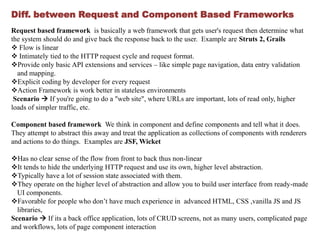
Request based framework is basically a web framework that gets user's request then determine what
the system should do and give back the response back to the user. Example are Struts 2, Grails
 Flow is linear
 Intimately tied to the HTTP request cycle and request format.
Provide only basic API extensions and services – like simple page navigation, data entry validation
  and mapping.
Explicit coding by developer for every request
Action Framework is work better in stateless environments
 Scenario  If you're going to do a "web site", where URLs are important, lots of read only, higher
loads of simpler traffic, etc.

Component based framework We think in component and define components and tell what it does.
They attempt to abstract this away and treat the application as collections of components with renderers
and actions to do things. Examples are JSF, Wicket

Has no clear sense of the flow from front to back thus non-linear
It tends to hide the underlying HTTP request and use its own, higher level abstraction.
Typically have a lot of session state associated with them.
They operate on the higher level of abstraction and allow you to build user interface from ready-made
  UI components.
Favorable for people who don’t have much experience in advanced HTML, CSS ,vanilla JS and JS
  libraries,
Scenario  If its a back office application, lots of CRUD screens, not as many users, complicated page
and workflows, lots of page component interaction
Introduction to JSF

JavaServer Faces (JSF) is the well-established standard for web-development
frameworks in Java.
A component based MVC framework which is built on top of Servlet API
Providing components in the type of taglibs which can be used in JSP or Facelets.
(Both are view technologies)

A typical JSF application consists of the following parts:
Event-driven development (via listeners as in traditional GUI development).
Pages that represent MVC-style views and set of tags to add components to the web
pages.
A set of managed beans (POJOs) They support services, such as resource injection,
lifecycle callbacks and interceptors.
Optionally, one or more application configuration resource files, such as a faces-
config.xml file, which can be used to define page navigation rules and configure beans
and other custom objects, such as custom components.
A set of custom objects, which can include custom components, validators, converters,
or listeners, created by developers.
Introduction to JSF (cont.)


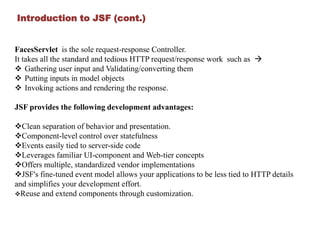
FacesServlet is the sole request-response Controller.
It takes all the standard and tedious HTTP request/response work such as 
 Gathering user input and Validating/converting them
 Putting inputs in model objects
 Invoking actions and rendering the response.

JSF provides the following development advantages:

Clean separation of behavior and presentation.
Component-level control over statefulness
Events easily tied to server-side code
Leverages familiar UI-component and Web-tier concepts
Offers multiple, standardized vendor implementations
JSF's fine-tuned event model allows your applications to be less tied to HTTP details
and simplifies your development effort.
Reuse and extend components through customization.
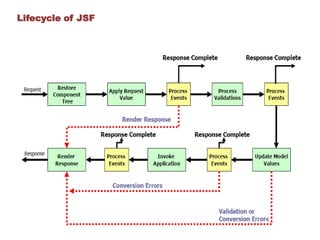
Lifecycle of JSF
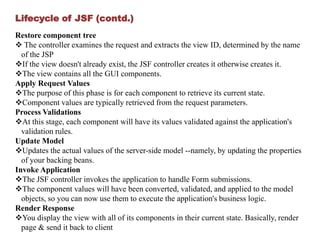
Lifecycle of JSF (contd.)
Restore component tree
 The controller examines the request and extracts the view ID, determined by the name
  of the JSP
If the view doesn't already exist, the JSF controller creates it otherwise creates it.
The view contains all the GUI components.
Apply Request Values
The purpose of this phase is for each component to retrieve its current state.
Component values are typically retrieved from the request parameters.
Process Validations
At this stage, each component will have its values validated against the application's
  validation rules.
Update Model
Updates the actual values of the server-side model --namely, by updating the properties
  of your backing beans.
Invoke Application
The JSF controller invokes the application to handle Form submissions.
The component values will have been converted, validated, and applied to the model
  objects, so you can now use them to execute the application's business logic.
Render Response
You display the view with all of its components in their current state. Basically, render
  page & send it back to client
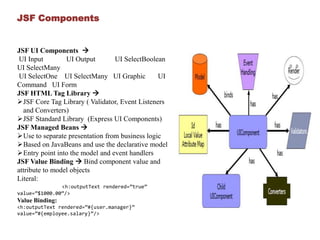
JSF Components


JSF UI Components 
 UI Input        UI Output       UI SelectBoolean
UI SelectMany
 UI SelectOne UI SelectMany UI Graphic          UI
Command UI Form
JSF HTML Tag Library 
JSF Core Tag Library ( Validator, Event Listeners
  and Converters)
JSF Standard Library (Express UI Components)
JSF Managed Beans 
Use to separate presentation from business logic
Based on JavaBeans and use the declarative model
Entry point into the model and event handlers
JSF Value Binding  Bind component value and
attribute to model objects
Literal:
               <h:outputText rendered=”true”
value=”$1000.00”/>
Value Binding:
<h:outputText rendered=”#{user.manager}”
value=”#{employee.salary}”/>
JSF Value binding expression can accept
Bean properties
List
Array
Map
Predefine objects-header, header values, request parameters, cookie,
request/session/application scope attributes, initial parameters

JSF Method Binding --> Binding an event handler to a method

             <h:commandButton action=“#{user.login}”/>


Four component attributes:
Action
Action listener
Value change listener
Validator
JSF Events are fired by each UI component. Event handlers are registered with each
component
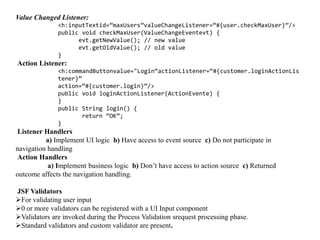
Value Changed Listener:
              <h:inputTextid=”maxUsers”valueChangeListener=“#{user.checkMaxUser}”/>
              public void checkMaxUser(ValueChangeEventevt) {
                    evt.getNewValue(); // new value
                    evt.getOldValue(); // old value
              }
Action Listener:
              <h:commandButtonvalue="Login“actionListener=“#{customer.loginActionLis
              tener}”
              action=“#{customer.login}”/>
              public void loginActionListener(ActionEvente) {
              }
              public String login() {
                      return “OK”;
              }
Listener Handlers
          a) Implement UI logic b) Have access to event source c) Do not participate in
navigation handling
Action Handlers
           a) Implement business logic b) Don’t have access to action source c) Returned
outcome affects the navigation handling.

JSF Validators
For validating user input
0 or more validators can be registered with a UI Input component
Validators are invoked during the Process Validation srequest processing phase.
Standard validators and custom validator are present.
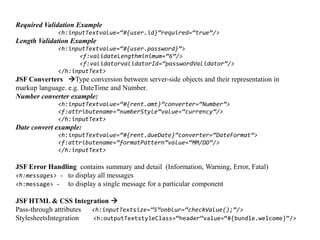
Required Validation Example
             <h:inputTextvalue=“#{user.id}”required=“true”/>
Length Validation Example
             <h:inputTextvalue=“#{user.password}”>
                   <f:validateLengthminimum=“6”/>
                   <f:validatorvalidatorId=“passwordValidator”/>
             </h:inputText>
JSF Converters Type conversion between server-side objects and their representation in
markup language. e.g. DateTime and Number.
Number converter example:
             <h:inputTextvalue=“#{rent.amt}”converter=“Number”>
             <f:attributename=“numberStyle”value=“currency”/>
             </h:inputText>
Date convert example:
             <h:inputTextvalue=“#{rent.dueDate}”converter=“DateFormat”>
             <f:attributename=“formatPattern”value=“MM/DD”/>
             </h:inputText>

JSF Error Handling contains summary and detail (Information, Warning, Error, Fatal)
<h:messages> - to display all messages
<h:message> - to display a single message for a particular component

JSF HTML & CSS Integration 
Pass-through attributes <h:inputTextsize=“5”onblur=“checkValue();”/>
StylesheetsIntegration  <h:outputTextstyleClass=“header”value=“#{bundle.welcome}”/>
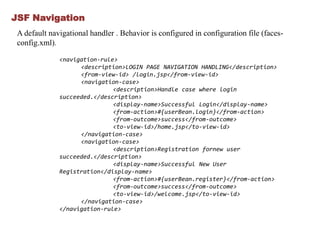
JSF Navigation
 A default navigational handler . Behavior is configured in configuration file (faces-
 config.xml).

              <navigation-rule>
                    <description>LOGIN PAGE NAVIGATION HANDLING</description>
                    <from-view-id> /login.jsp</from-view-id>
                    <navigation-case>
                              <description>Handle case where login
              succeeded.</description>
                              <display-name>Successful Login</display-name>
                              <from-action>#{userBean.login}</from-action>
                              <from-outcome>success</from-outcome>
                              <to-view-id>/home.jsp</to-view-id>
                    </navigation-case>
                    <navigation-case>
                              <description>Registration fornew user
              succeeded.</description>
                              <display-name>Successful New User
              Registration</display-name>
                              <from-action>#{userBean.register}</from-action>
                              <from-outcome>success</from-outcome>
                              <to-view-id>/welcome.jsp</to-view-id>
                    </navigation-case>
              </navigation-rule>
JSF HTML Tag Library

      <f:view>
         <h:form id=”logonForm”>
             <h:panelGrid columns=”2”>
                  <h:outputLabel for=”username”>
                        <h:outputLext value=”Username:”/>
                   </h:outputLabel>
                   <h:inputText id=”username” value=”#{logonBean.username}”/>
                    <h:outputLabel for=”password”>
                        <h:outputText value=”Password:”/>
                    </h:outputLabel>
                        <h:inputSecret id=”password”
      value=”#{logonBean.password}”/>
                    <h:commandButton id=”submitButton”type=”SUBMIT”
      action=”#{logonBean.logon}”/>
                    <h:commandButton id=”resetButton” type=”RESET”/>
               </h:panelGrid>
            </h:form>
       </f:view>
Introduction to Facelets

   Facelets is an open source XML-based view technology designed specifically for JSF
   Advantages
   Provides great templating capabilities such as composite components whereas JSP provides
     include directive only.
    Default view handler technology for JSF 2.
    Faster compilation time and High-performance rendering then JSP
    Compile-time EL validation
    Support for code reuse through templating and composite components.


       Tag Library          Prefix     Example                      URI                                 Contents

JavaServer Faces Facelets             ui:component
                             ui:                        http://java.sun.com/jsf/facelet             Tags for templating
Tag Library                              ui:insert
                                                                       s
                                          h:head
JavaServer Faces HTML Tag                 h:body                                          JavaServer Faces component tags for all
                              h:                         http://java.sun.com/jsf/html
Library                               h:outputText                                                UIComponentobjects
                                       h:inputText
                                                                                            Tags for JavaServer Faces custom
JavaServer Faces Core Tag            f:actionListener
                              f:                         http://java.sun.com/jsf/core       actions that are independent of any
Library                                 f:attribute
                                                                                                    particular render kit
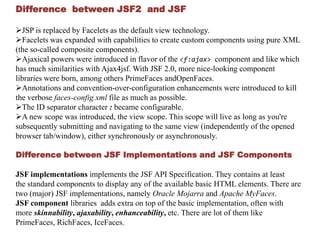
Difference between JSF2 and JSF

JSP is replaced by Facelets as the default view technology.
Facelets was expanded with capabilities to create custom components using pure XML
(the so-called composite components).
Ajaxical powers were introduced in flavor of the <f:ajax> component and like which
has much similarities with Ajax4jsf. With JSF 2.0, more nice-looking component
libraries were born, among others PrimeFaces andOpenFaces.
Annotations and convention-over-configuration enhancements were introduced to kill
the verbose faces-config.xml file as much as possible.
The ID separator character : became configurable.
A new scope was introduced, the view scope. This scope will live as long as you're
subsequently submitting and navigating to the same view (independently of the opened
browser tab/window), either synchronously or asynchronously.

Difference between JSF Implementations and JSF Components

JSF implementations implements the JSF API Specification. They contains at least
the standard components to display any of the available basic HTML elements. There are
two (major) JSF implementations, namely Oracle Mojarra and Apache MyFaces.
JSF component libraries adds extra on top of the basic implementation, often with
more skinnability, ajaxability, enhanceability, etc. There are lot of them like
PrimeFaces, RichFaces, IceFaces.
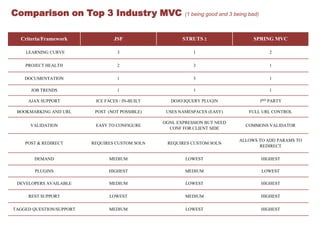
Comparison on Top 3 Industry MVC                          (1 being good and 3 being bad)


  Criteria/Framework               JSF                   STRUTS 2                    SPRING MVC

    LEARNING CURVE                  3                        1                                 2

    PROJECT HEALTH                  2                        3                                 1

    DOCUMENTATION                   1                        3                                 1

      JOB TRENDS                    1                        1                                 1

     AJAX SUPPORT          ICE FACES / IN-BUILT      DOJO/JQUERY PLUGIN                    3RD PARTY

 BOOKMARKING AND URL       POST (NOT POSSIBLE)     USES NAMESPACES (EASY)           FULL URL CONTROL

                                                  OGNL EXPRESSION BUT NEED
      VALIDATION           EASY TO CONFIGURE                                      COMMONS VALIDATOR
                                                    CONF FOR CLIENT SIDE

                                                                                ALLOWS TO ADD PARAMS TO
    POST & REDIRECT       REQUIRES CUSTOM SOLN     REQUIRES CUSTOM SOLN
                                                                                       REDIRECT

       DEMAND                   MEDIUM                    LOWEST                           HIGHEST

        PLUGINS                 HIGHEST                   MEDIUM                           LOWEST

 DEVELOPERS AVAILABLE           MEDIUM                    LOWEST                           HIGHEST

     REST SUPPORT                LOWEST                   MEDIUM                           HIGHEST

TAGGED QUESTION/SUPPORT         MEDIUM                    LOWEST                           HIGHEST
Google Trends


Last 12 months with Spring MVC
Market Trends
THANKS !!!!!!

Jsf presentation

  • 1.
    Java Server Faces(JSF) Brief Introduction and Market Trends Created by :Ashish Gupta
  • 2.
    Instruction Guide Contents MVC 3 Request Based & Component Based Frameworks 4 Introduction to JSF 5 Lifecycle of JSF 7 JSF Components 9 Introduction to Facelets 15 Difference between JSF and JSF 2 16 Comparison of Top 3 MVC 17 Google Trends 18 Market Trends 19
  • 3.
    What is MVC? The model-view-controller (MVC) architecture provides a set of design patterns that help you separate the areas of concern involved in building and running a GUI or Web based application: MODEL  encapsulates the business logic and persistence code for the application.  It should be as view-technology-agnostic as possible.  For example, the same model should be usable with a Swing application, a Struts app, or a JSF app. VIEW  should display model objects and contain presentation logic only.  There should be no business logic or controller logic in the view. CONTROLLER  acts as the mediator between the view and the model.  The controller talks to the model and delivers model objects to the view to display.  In an MVC architecture the controller always selects the next view. .
  • 4.
    Diff. between Requestand Component Based Frameworks Request based framework is basically a web framework that gets user's request then determine what the system should do and give back the response back to the user. Example are Struts 2, Grails  Flow is linear  Intimately tied to the HTTP request cycle and request format. Provide only basic API extensions and services – like simple page navigation, data entry validation and mapping. Explicit coding by developer for every request Action Framework is work better in stateless environments Scenario  If you're going to do a "web site", where URLs are important, lots of read only, higher loads of simpler traffic, etc. Component based framework We think in component and define components and tell what it does. They attempt to abstract this away and treat the application as collections of components with renderers and actions to do things. Examples are JSF, Wicket Has no clear sense of the flow from front to back thus non-linear It tends to hide the underlying HTTP request and use its own, higher level abstraction. Typically have a lot of session state associated with them. They operate on the higher level of abstraction and allow you to build user interface from ready-made UI components. Favorable for people who don’t have much experience in advanced HTML, CSS ,vanilla JS and JS libraries, Scenario  If its a back office application, lots of CRUD screens, not as many users, complicated page and workflows, lots of page component interaction
  • 5.
    Introduction to JSF JavaServerFaces (JSF) is the well-established standard for web-development frameworks in Java. A component based MVC framework which is built on top of Servlet API Providing components in the type of taglibs which can be used in JSP or Facelets. (Both are view technologies) A typical JSF application consists of the following parts: Event-driven development (via listeners as in traditional GUI development). Pages that represent MVC-style views and set of tags to add components to the web pages. A set of managed beans (POJOs) They support services, such as resource injection, lifecycle callbacks and interceptors. Optionally, one or more application configuration resource files, such as a faces- config.xml file, which can be used to define page navigation rules and configure beans and other custom objects, such as custom components. A set of custom objects, which can include custom components, validators, converters, or listeners, created by developers.
  • 6.
    Introduction to JSF(cont.) FacesServlet is the sole request-response Controller. It takes all the standard and tedious HTTP request/response work such as   Gathering user input and Validating/converting them  Putting inputs in model objects  Invoking actions and rendering the response. JSF provides the following development advantages: Clean separation of behavior and presentation. Component-level control over statefulness Events easily tied to server-side code Leverages familiar UI-component and Web-tier concepts Offers multiple, standardized vendor implementations JSF's fine-tuned event model allows your applications to be less tied to HTTP details and simplifies your development effort. Reuse and extend components through customization.
  • 7.
  • 8.
    Lifecycle of JSF(contd.) Restore component tree  The controller examines the request and extracts the view ID, determined by the name of the JSP If the view doesn't already exist, the JSF controller creates it otherwise creates it. The view contains all the GUI components. Apply Request Values The purpose of this phase is for each component to retrieve its current state. Component values are typically retrieved from the request parameters. Process Validations At this stage, each component will have its values validated against the application's validation rules. Update Model Updates the actual values of the server-side model --namely, by updating the properties of your backing beans. Invoke Application The JSF controller invokes the application to handle Form submissions. The component values will have been converted, validated, and applied to the model objects, so you can now use them to execute the application's business logic. Render Response You display the view with all of its components in their current state. Basically, render page & send it back to client
  • 9.
    JSF Components JSF UIComponents  UI Input UI Output UI SelectBoolean UI SelectMany UI SelectOne UI SelectMany UI Graphic UI Command UI Form JSF HTML Tag Library  JSF Core Tag Library ( Validator, Event Listeners and Converters) JSF Standard Library (Express UI Components) JSF Managed Beans  Use to separate presentation from business logic Based on JavaBeans and use the declarative model Entry point into the model and event handlers JSF Value Binding  Bind component value and attribute to model objects Literal: <h:outputText rendered=”true” value=”$1000.00”/> Value Binding: <h:outputText rendered=”#{user.manager}” value=”#{employee.salary}”/>
  • 10.
    JSF Value bindingexpression can accept Bean properties List Array Map Predefine objects-header, header values, request parameters, cookie, request/session/application scope attributes, initial parameters JSF Method Binding --> Binding an event handler to a method <h:commandButton action=“#{user.login}”/> Four component attributes: Action Action listener Value change listener Validator JSF Events are fired by each UI component. Event handlers are registered with each component
  • 11.
    Value Changed Listener: <h:inputTextid=”maxUsers”valueChangeListener=“#{user.checkMaxUser}”/> public void checkMaxUser(ValueChangeEventevt) { evt.getNewValue(); // new value evt.getOldValue(); // old value } Action Listener: <h:commandButtonvalue="Login“actionListener=“#{customer.loginActionLis tener}” action=“#{customer.login}”/> public void loginActionListener(ActionEvente) { } public String login() { return “OK”; } Listener Handlers a) Implement UI logic b) Have access to event source c) Do not participate in navigation handling Action Handlers a) Implement business logic b) Don’t have access to action source c) Returned outcome affects the navigation handling. JSF Validators For validating user input 0 or more validators can be registered with a UI Input component Validators are invoked during the Process Validation srequest processing phase. Standard validators and custom validator are present.
  • 12.
    Required Validation Example <h:inputTextvalue=“#{user.id}”required=“true”/> Length Validation Example <h:inputTextvalue=“#{user.password}”> <f:validateLengthminimum=“6”/> <f:validatorvalidatorId=“passwordValidator”/> </h:inputText> JSF Converters Type conversion between server-side objects and their representation in markup language. e.g. DateTime and Number. Number converter example: <h:inputTextvalue=“#{rent.amt}”converter=“Number”> <f:attributename=“numberStyle”value=“currency”/> </h:inputText> Date convert example: <h:inputTextvalue=“#{rent.dueDate}”converter=“DateFormat”> <f:attributename=“formatPattern”value=“MM/DD”/> </h:inputText> JSF Error Handling contains summary and detail (Information, Warning, Error, Fatal) <h:messages> - to display all messages <h:message> - to display a single message for a particular component JSF HTML & CSS Integration  Pass-through attributes <h:inputTextsize=“5”onblur=“checkValue();”/> StylesheetsIntegration <h:outputTextstyleClass=“header”value=“#{bundle.welcome}”/>
  • 13.
    JSF Navigation Adefault navigational handler . Behavior is configured in configuration file (faces- config.xml). <navigation-rule> <description>LOGIN PAGE NAVIGATION HANDLING</description> <from-view-id> /login.jsp</from-view-id> <navigation-case> <description>Handle case where login succeeded.</description> <display-name>Successful Login</display-name> <from-action>#{userBean.login}</from-action> <from-outcome>success</from-outcome> <to-view-id>/home.jsp</to-view-id> </navigation-case> <navigation-case> <description>Registration fornew user succeeded.</description> <display-name>Successful New User Registration</display-name> <from-action>#{userBean.register}</from-action> <from-outcome>success</from-outcome> <to-view-id>/welcome.jsp</to-view-id> </navigation-case> </navigation-rule>
  • 14.
    JSF HTML TagLibrary <f:view> <h:form id=”logonForm”> <h:panelGrid columns=”2”> <h:outputLabel for=”username”> <h:outputLext value=”Username:”/> </h:outputLabel> <h:inputText id=”username” value=”#{logonBean.username}”/> <h:outputLabel for=”password”> <h:outputText value=”Password:”/> </h:outputLabel> <h:inputSecret id=”password” value=”#{logonBean.password}”/> <h:commandButton id=”submitButton”type=”SUBMIT” action=”#{logonBean.logon}”/> <h:commandButton id=”resetButton” type=”RESET”/> </h:panelGrid> </h:form> </f:view>
  • 15.
    Introduction to Facelets Facelets is an open source XML-based view technology designed specifically for JSF Advantages Provides great templating capabilities such as composite components whereas JSP provides include directive only.  Default view handler technology for JSF 2.  Faster compilation time and High-performance rendering then JSP  Compile-time EL validation  Support for code reuse through templating and composite components. Tag Library Prefix Example URI Contents JavaServer Faces Facelets ui:component ui: http://java.sun.com/jsf/facelet Tags for templating Tag Library ui:insert s h:head JavaServer Faces HTML Tag h:body JavaServer Faces component tags for all h: http://java.sun.com/jsf/html Library h:outputText UIComponentobjects h:inputText Tags for JavaServer Faces custom JavaServer Faces Core Tag f:actionListener f: http://java.sun.com/jsf/core actions that are independent of any Library f:attribute particular render kit
  • 16.
    Difference between JSF2and JSF JSP is replaced by Facelets as the default view technology. Facelets was expanded with capabilities to create custom components using pure XML (the so-called composite components). Ajaxical powers were introduced in flavor of the <f:ajax> component and like which has much similarities with Ajax4jsf. With JSF 2.0, more nice-looking component libraries were born, among others PrimeFaces andOpenFaces. Annotations and convention-over-configuration enhancements were introduced to kill the verbose faces-config.xml file as much as possible. The ID separator character : became configurable. A new scope was introduced, the view scope. This scope will live as long as you're subsequently submitting and navigating to the same view (independently of the opened browser tab/window), either synchronously or asynchronously. Difference between JSF Implementations and JSF Components JSF implementations implements the JSF API Specification. They contains at least the standard components to display any of the available basic HTML elements. There are two (major) JSF implementations, namely Oracle Mojarra and Apache MyFaces. JSF component libraries adds extra on top of the basic implementation, often with more skinnability, ajaxability, enhanceability, etc. There are lot of them like PrimeFaces, RichFaces, IceFaces.
  • 17.
    Comparison on Top3 Industry MVC (1 being good and 3 being bad) Criteria/Framework JSF STRUTS 2 SPRING MVC LEARNING CURVE 3 1 2 PROJECT HEALTH 2 3 1 DOCUMENTATION 1 3 1 JOB TRENDS 1 1 1 AJAX SUPPORT ICE FACES / IN-BUILT DOJO/JQUERY PLUGIN 3RD PARTY BOOKMARKING AND URL POST (NOT POSSIBLE) USES NAMESPACES (EASY) FULL URL CONTROL OGNL EXPRESSION BUT NEED VALIDATION EASY TO CONFIGURE COMMONS VALIDATOR CONF FOR CLIENT SIDE ALLOWS TO ADD PARAMS TO POST & REDIRECT REQUIRES CUSTOM SOLN REQUIRES CUSTOM SOLN REDIRECT DEMAND MEDIUM LOWEST HIGHEST PLUGINS HIGHEST MEDIUM LOWEST DEVELOPERS AVAILABLE MEDIUM LOWEST HIGHEST REST SUPPORT LOWEST MEDIUM HIGHEST TAGGED QUESTION/SUPPORT MEDIUM LOWEST HIGHEST
  • 18.
    Google Trends Last 12months with Spring MVC
  • 19.
  • 20.