



1
By Shaharyar Khan
shaharyar.khan555@gmail.com
 Java Server Faces (JSF) is a Java-based Web application
framework intended to simplify development integration of
web-based user interfaces
 It is part of the Java Platform, Enterprise Edition
 a standard framework for building presentation tiers for web
applications
 JSF is a spec which defines a component-based MVC
framework
2
shaharyar.khan555@gmail.com
 JSF is a request-driven MVC web framework for constructing
user interfaces using components
 Provides an event model for wiring the interactions between
the UI and the application objects
 Also provide us strong navigation rules and support with
other technologies like AJAX
3
shaharyar.khan555@gmail.com
4
 JSF 2.1 (2010-10-22) — Current version. Second maintenance release
of 2.0. Only very minor amount of spec changes
 JSF 2.0 (2009-06-28) — Major release for ease of use, enhanced
functionality, and performance. Coincides with Java EE 6.
 JSF 1.2 (2006-05-11) — Many improvements to core systems and
APIs. Coincides with Java EE 5. Initial adoption into Java EE.
 JSF 1.1 (2004-05-27) — (DEPRECATED) bug fix release. There were
no spec or HTML renderkit changes.
 JSF 1.0 (2004-03-11) — (DEPRECATED) the initial release of the JSF
specification. Separate release that wasn't part of any Java EE/J2EE
release.
shaharyar.khan555@gmail.com
5
Stable release
2.1.9 (Mojarra Reference
Implementation) / May 31, 2012;
a month ago
Website
javaserverfaces.java.net
The spec was developed by involving many people from
orgs like Sun, Apache, IBM, Oracle
shaharyar.khan555@gmail.com
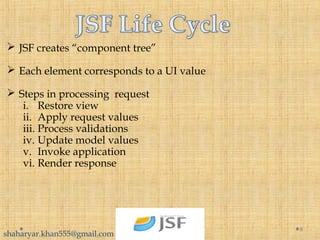
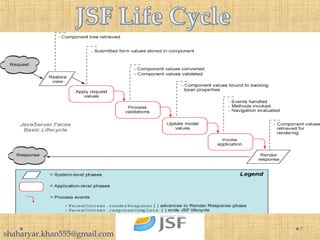
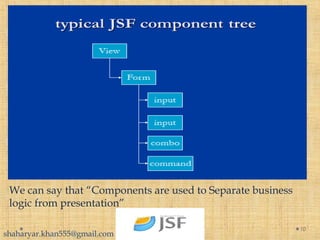
 JSF creates “component tree”
 Each element corresponds to a UI value
 Steps in processing request
i. Restore view
ii. Apply request values
iii. Process validations
iv. Update model values
v. Invoke application
vi. Render response
6
shaharyar.khan555@gmail.com
7
shaharyar.khan555@gmail.com
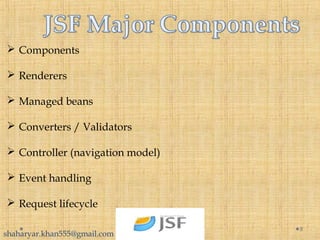
 Components
 Renderers
 Managed beans
 Converters / Validators
 Controller (navigation model)
 Event handling
 Request lifecycle
8
shaharyar.khan555@gmail.com
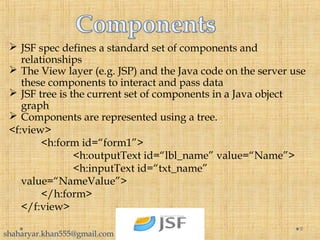
 JSF spec defines a standard set of components and
relationships
 The View layer (e.g. JSP) and the Java code on the server use
these components to interact and pass data
 JSF tree is the current set of components in a Java object
graph
 Components are represented using a tree.
<f:view>
<h:form id=“form1”>
<h:outputText id=“lbl_name” value=“Name”>
<h:inputText id=“txt_name”
value=“NameValue”>
</h:form>
</f:view>
9
shaharyar.khan555@gmail.com
10
We can say that “Components are used to Separate business
logic from presentation”
shaharyar.khan555@gmail.com
 Component renderer encodes (generates the HTML) for the
component
 Renderer also decodes (sets component values from URL
query string and form vars)
 Render is basically a response for the user
 view the page that was originally requested
 Or render a different page
 Renderers are grouped into render kits
 Default render kit is HTML
 Provide device independence w/o changing the
templating language or components themselves
11
shaharyar.khan555@gmail.com
 Glues the UI given by jsp files to the business logic of your
application
 Are simply JavaBeans following standard rules
 a zero-argument (empty) constructor -- either by explicitly defining
such a constructor or omit all constructors
 no public instance variables (fields)
 use accessor methods instead of allowing direct access to fields
 accessed through methods called getXxx and setXxx
 If class has method getTitle that returns a String, class issaid to have
a String property named title
 Boolean properties use isXxx instead of getXxx
12
 Managed by the framework in Application, Session, View,
Request, or no scope
shaharyar.khan555@gmail.com
@NoneScoped
Managed beans with a none scope are not instantiated nor stored
in any other scope.Instead, they are instantiated on demand by
another managed bean. Once created, they will persist as long as
the calling bean stays alive because their scope will match the
calling bean’s scope.
@RequestScoped
Managed beans registered with request scope will be instantiated
and stay available throughout a single HTTP request. This means
that the bean can survive a navigation to another page, provided it
was during the same HTTP request.
13
shaharyar.khan555@gmail.com
@ViewScoped
Managed beans registered in view scope remain available as long as
the user stays on the same view. Navigating away from that view
will cause beans registered in that view’s scope to be deallocated.
@SessionScoped
Managed beans registered with a session scope will be stored on the
HTTP session.This means that the values in the managed bean will
persist beyond a single HTTP request for a single user. This is ideal
for a shopping cart type of usage where values must be stored and
made available during multiple requests.
14
shaharyar.khan555@gmail.com
@ApplicationScoped
Managed beans registered with an application scope retain their
values throughout the lifetime of the application and are available
to all users.
Another scope which is “CustomScope” is also available but it is not
important , So we skip that scope right now
15
shaharyar.khan555@gmail.com
 A kind of managed beans, although no technical
difference with managed bean
Backing beans – focus on UI of the application
16
shaharyar.khan555@gmail.com
17
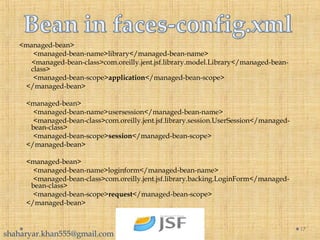
<managed-bean>
<managed-bean-name>library</managed-bean-name>
<managed-bean-class>com.oreilly.jent.jsf.library.model.Library</managed-bean-
class>
<managed-bean-scope>application</managed-bean-scope>
</managed-bean>
<managed-bean>
<managed-bean-name>usersession</managed-bean-name>
<managed-bean-class>com.oreilly.jent.jsf.library.session.UserSession</managed-
bean-class>
<managed-bean-scope>session</managed-bean-scope>
</managed-bean>
<managed-bean>
<managed-bean-name>loginform</managed-bean-name>
<managed-bean-class>com.oreilly.jent.jsf.library.backing.LoginForm</managed-
bean-class>
<managed-bean-scope>request</managed-bean-scope>
</managed-bean>
shaharyar.khan555@gmail.com
 JSF provides a very easy and best way for conversion and
validation
<h:inputText id="salary" value="#{testBean.salary}"
             required="true">
    <f:convertNumber type="currency"/>
</h:inputText>
it may display $1999, if the locale(faces-config.xml) is pointing to
US.
_______________________________________________
<h:inputText id="discount" value="#{testBean.discount}"
            required="true">
    <f:convertNumber type="percent"/>
</h:inputText>
By specifying the type as 'percentage', the display value will have a '%'
symbol followed by the original value.
18
We can create our own custom converters.
shaharyar.khan555@gmail.com
 JSF provide a very smart way to validate the fields and if
validation fails then generate a error message define by a
developer.
 JSF provides different tags to handle and display messages
on the view.
 There are two message tags in SUN’s reference
implementation of JSF HTML library:
<h:message />
<h:messages />
 We can place tag at the top of the form and set it to display
only global messages
<h:messages globalOnly="true" />
19
shaharyar.khan555@gmail.com
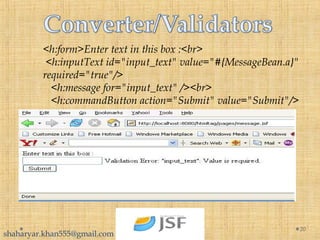
<h:form>Enter text in this box :<br>
 <h:inputText id="input_text" value="#{MessageBean.a}" 
required="true"/>
   <h:message for="input_text" /><br>
   <h:commandButton action="Submit" value="Submit"/>
20
shaharyar.khan555@gmail.com
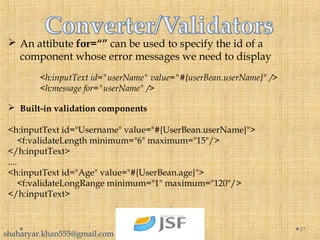
 An attibute for=“” can be used to specify the id of a
component whose error messages we need to display
<h:inputText id="userName" value="#{userBean.userName}" />
<h:message for="userName" />
 Built-in validation components
<h:inputText id="Username" value="#{UserBean.userName}">
    <f:validateLength minimum="6" maximum="15"/>
</h:inputText>
....
<h:inputText id="Age" value="#{UserBean.age}">
    <f:validateLongRange minimum="1" maximum="120"/>
</h:inputText>
21
shaharyar.khan555@gmail.com
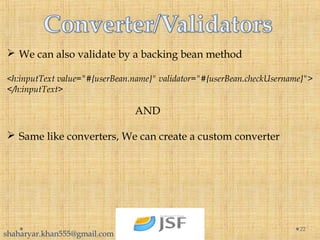
 We can also validate by a backing bean method
<h:inputText value="#{userBean.name}" validator="#{userBean.checkUsername}">
</h:inputText>
AND
 Same like converters, We can create a custom converter
22
shaharyar.khan555@gmail.com
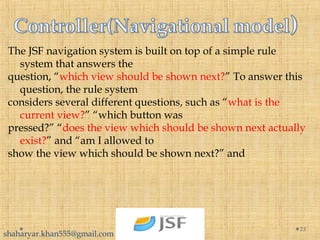
The JSF navigation system is built on top of a simple rule
system that answers the
question, “which view should be shown next?” To answer this
question, the rule system
considers several different questions, such as “what is the
current view?” “which button was
pressed?” “does the view which should be shown next actually
exist?” and “am I allowed to
show the view which should be shown next?” and
23
shaharyar.khan555@gmail.com
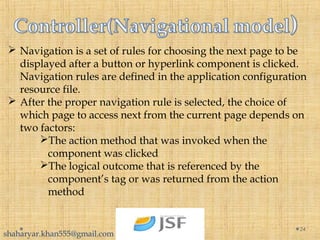
 Navigation is a set of rules for choosing the next page to be
displayed after a button or hyperlink component is clicked.
Navigation rules are defined in the application configuration
resource file.
 After the proper navigation rule is selected, the choice of
which page to access next from the current page depends on
two factors:
The action method that was invoked when the
component was clicked
The logical outcome that is referenced by the
component’s tag or was returned from the action
method
24
shaharyar.khan555@gmail.com
25
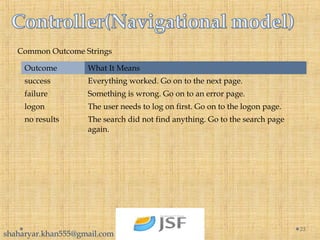
Outcome What It Means
success Everything worked. Go on to the next page.
failure Something is wrong. Go on to an error page.
logon The user needs to log on first. Go on to the logon page.
no results The search did not find anything. Go to the search page
again.
Common Outcome Strings
shaharyar.khan555@gmail.com
26
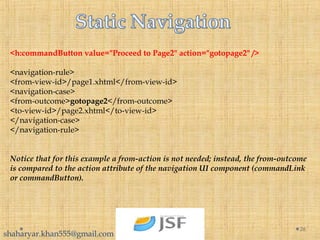
<h:commandButton value="Proceed to Page2" action="gotopage2" />
<navigation-rule>
<from-view-id>/page1.xhtml</from-view-id>
<navigation-case>
<from-outcome>gotopage2</from-outcome>
<to-view-id>/page2.xhtml</to-view-id>
</navigation-case>
</navigation-rule>
Notice that for this example a from-action is not needed; instead, the from-outcome
is compared to the action attribute of the navigation UI component (commandLink
or commandButton).
shaharyar.khan555@gmail.com
27
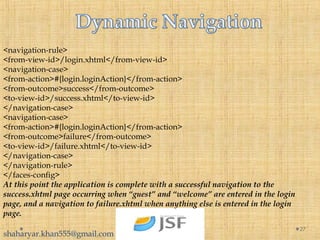
<navigation-rule>
<from-view-id>/login.xhtml</from-view-id>
<navigation-case>
<from-action>#{login.loginAction}</from-action>
<from-outcome>success</from-outcome>
<to-view-id>/success.xhtml</to-view-id>
</navigation-case>
<navigation-case>
<from-action>#{login.loginAction}</from-action>
<from-outcome>failure</from-outcome>
<to-view-id>/failure.xhtml</to-view-id>
</navigation-case>
</navigation-rule>
</faces-config>
At this point the application is complete with a successful navigation to the
success.xhtml page occurring when “guest” and “welcome” are entered in the login
page, and a navigation to failure.xhtml when anything else is entered in the login
page.
shaharyar.khan555@gmail.com
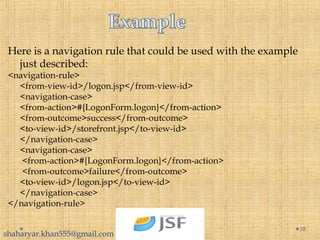
Here is a navigation rule that could be used with the example
just described:
<navigation-rule>
<from-view-id>/logon.jsp</from-view-id>
<navigation-case>
<from-action>#{LogonForm.logon}</from-action>
<from-outcome>success</from-outcome>
<to-view-id>/storefront.jsp</to-view-id>
</navigation-case>
<navigation-case>
<from-action>#{LogonForm.logon}</from-action>
<from-outcome>failure</from-outcome>
<to-view-id>/logon.jsp</to-view-id>
</navigation-case>
</navigation-rule>
28
shaharyar.khan555@gmail.com
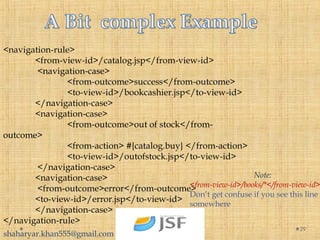
<navigation-rule>
<from-view-id>/catalog.jsp</from-view-id>
<navigation-case>
<from-outcome>success</from-outcome>
<to-view-id>/bookcashier.jsp</to-view-id>
</navigation-case>
<navigation-case>
<from-outcome>out of stock</from-
outcome>
<from-action> #{catalog.buy} </from-action>
<to-view-id>/outofstock.jsp</to-view-id>
</navigation-case>
<navigation-case>
<from-outcome>error</from-outcome>
<to-view-id>/error.jsp</to-view-id>
</navigation-case>
</navigation-rule>
29
Note:
<from-view-id>/books/*</from-view-id>
Don’t get confuse if you see this line
somewhere
shaharyar.khan555@gmail.com
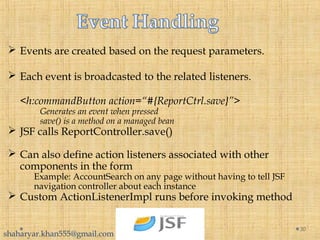
 Events are created based on the request parameters.
 Each event is broadcasted to the related listeners.
<h:commandButton action=“#{ReportCtrl.save}”>
Generates an event when pressed
save() is a method on a managed bean
 JSF calls ReportController.save()
 Can also define action listeners associated with other
components in the form
Example: AccountSearch on any page without having to tell JSF
navigation controller about each instance
 Custom ActionListenerImpl runs before invoking method
30
shaharyar.khan555@gmail.com
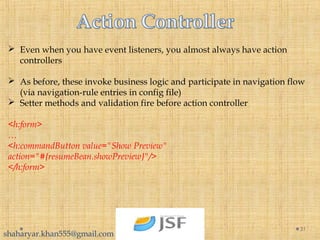
 Even when you have event listeners, you almost always have action
controllers
 As before, these invoke business logic and participate in navigation flow
(via navigation-rule entries in config file)
 Setter methods and validation fire before action controller
<h:form>
…
<h:commandButton value="Show Preview"
action="#{resumeBean.showPreview}"/>
</h:form>
31
shaharyar.khan555@gmail.com
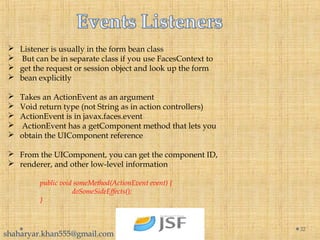
 Listener is usually in the form bean class
 But can be in separate class if you use FacesContext to
 get the request or session object and look up the form
 bean explicitly
 Takes an ActionEvent as an argument
 Void return type (not String as in action controllers)
 ActionEvent is in javax.faces.event
 ActionEvent has a getComponent method that lets you
 obtain the UIComponent reference
 From the UIComponent, you can get the component ID,
 renderer, and other low-level information
public void someMethod(ActionEvent event) {
doSomeSideEffects();
}
32
shaharyar.khan555@gmail.com
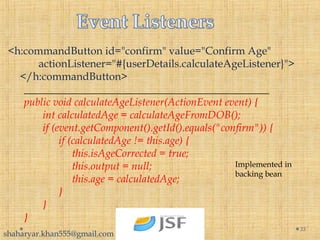
<h:commandButton id="confirm" value="Confirm Age"
       actionListener="#{userDetails.calculateAgeListener}">
</h:commandButton>
______________________________________________
public void calculateAgeListener(ActionEvent event) {
       int calculatedAge = calculateAgeFromDOB();
       if (event.getComponent().getId().equals("confirm")) {
             if (calculatedAge != this.age) {
                  this.isAgeCorrected = true;
                  this.output = null;
                  this.age = calculatedAge;
             }
       }
}
33
Implemented in
backing bean
shaharyar.khan555@gmail.com
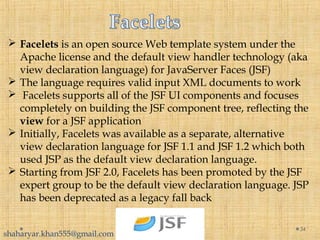
 Facelets is an open source Web template system under the
Apache license and the default view handler technology (aka
view declaration language) for JavaServer Faces (JSF)
 The language requires valid input XML documents to work
 Facelets supports all of the JSF UI components and focuses
completely on building the JSF component tree, reflecting the
view for a JSF application
 Initially, Facelets was available as a separate, alternative
view declaration language for JSF 1.1 and JSF 1.2 which both
used JSP as the default view declaration language.
 Starting from JSF 2.0, Facelets has been promoted by the JSF
expert group to be the default view declaration language. JSP
has been deprecated as a legacy fall back
34
shaharyar.khan555@gmail.com
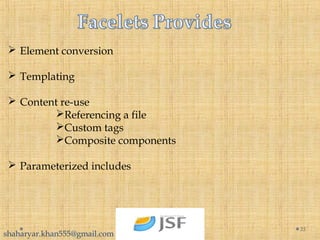
 Element conversion
 Templating
 Content re-use
Referencing a file
Custom tags
Composite components
 Parameterized includes
35
shaharyar.khan555@gmail.com
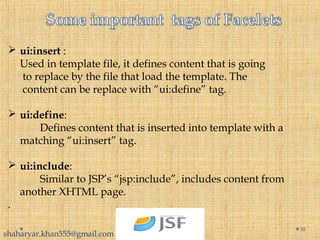
 ui:insert :
Used in template file, it defines content that is going
to replace by the file that load the template. The
content can be replace with “ui:define” tag.
 ui:define:
Defines content that is inserted into template with a
matching “ui:insert” tag.
 ui:include:
Similar to JSP’s “jsp:include”, includes content from
another XHTML page.
.
36
shaharyar.khan555@gmail.com
 ui:composition:
If used with “template” attribute, the specified template is
loaded, and the children of this tag defines the template
layout; Otherwise, it’s a group of elements, that can be
inserted somewhere. In addition, JSF removes all tags
“outside” of “ui:composition” tag
37
shaharyar.khan555@gmail.com
38
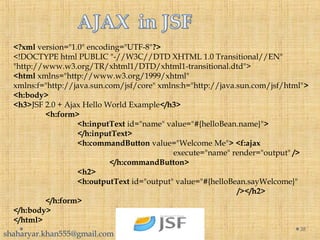
<?xml version="1.0" encoding="UTF-8"?>
<!DOCTYPE html PUBLIC "-//W3C//DTD XHTML 1.0 Transitional//EN"
"http://www.w3.org/TR/xhtml1/DTD/xhtml1-transitional.dtd">
<html xmlns="http://www.w3.org/1999/xhtml"
xmlns:f="http://java.sun.com/jsf/core" xmlns:h="http://java.sun.com/jsf/html">
<h:body>
<h3>JSF 2.0 + Ajax Hello World Example</h3>
<h:form>
<h:inputText id="name" value="#{helloBean.name}">
</h:inputText>
<h:commandButton value="Welcome Me"> <f:ajax
execute="name" render="output" />
</h:commandButton>
<h2>
<h:outputText id="output" value="#{helloBean.sayWelcome}"
/></h2>
</h:form>
</h:body>
</html>
shaharyar.khan555@gmail.com
 Apache MyFaces, Mojarra (or) Sun JSF also known as
RI(reference implementation) , PrimeFaces are all JSF
standard implementations
 When we need additional features then we have to include
these implementations
 All these implementations provide us Additional tags and
features which are not available in JSF core.
39
shaharyar.khan555@gmail.com
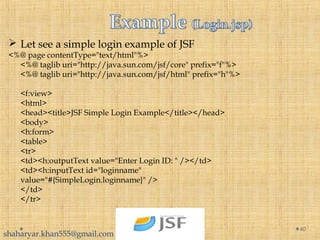
 Let see a simple login example of JSF
<%@ page contentType="text/html"%>
<%@ taglib uri="http://java.sun.com/jsf/core" prefix="f"%>
<%@ taglib uri="http://java.sun.com/jsf/html" prefix="h"%>
<f:view>
<html>
<head><title>JSF Simple Login Example</title></head>
<body>
<h:form>
<table>
<tr>
<td><h:outputText value="Enter Login ID: " /></td>
<td><h:inputText id="loginname"
value="#{SimpleLogin.loginname}" />
</td>
</tr>
40
shaharyar.khan555@gmail.com
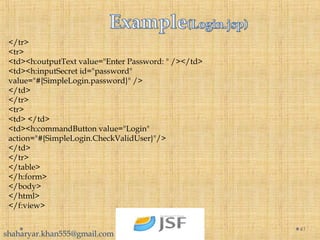
</tr>
<tr>
<td><h:outputText value="Enter Password: " /></td>
<td><h:inputSecret id="password"
value="#{SimpleLogin.password}" />
</td>
</tr>
<tr>
<td> </td>
<td><h:commandButton value="Login"
action="#{SimpleLogin.CheckValidUser}"/>
</td>
</tr>
</table>
</h:form>
</body>
</html>
</f:view>
41
shaharyar.khan555@gmail.com
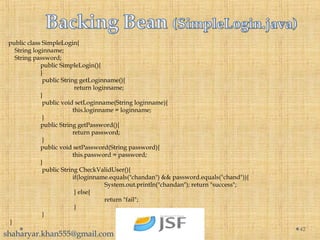
public class SimpleLogin{
String loginname;
String password;
public SimpleLogin(){
}
public String getLoginname(){
return loginname;
}
public void setLoginname(String loginname){
this.loginname = loginname;
}
public String getPassword(){
return password;
}
public void setPassword(String password){
this.password = password;
}
public String CheckValidUser(){
if(loginname.equals("chandan") && password.equals("chand")){
System.out.println("chandan"); return "success";
} else{
return "fail";
}
}
}
42
shaharyar.khan555@gmail.com
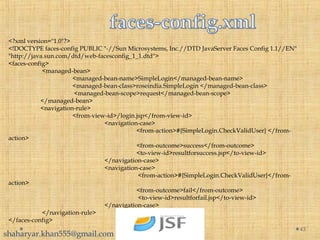
<?xml version="1.0"?>
<!DOCTYPE faces-config PUBLIC "-//Sun Microsystems, Inc.//DTD JavaServer Faces Config 1.1//EN"
"http://java.sun.com/dtd/web-facesconfig_1_1.dtd">
<faces-config>
<managed-bean>
<managed-bean-name>SimpleLogin</managed-bean-name>
<managed-bean-class>roseindia.SimpleLogin </managed-bean-class>
<managed-bean-scope>request</managed-bean-scope>
</managed-bean>
<navigation-rule>
<from-view-id>/login.jsp</from-view-id>
<navigation-case>
<from-action>#{SimpleLogin.CheckValidUser} </from-
action>
<from-outcome>success</from-outcome>
<to-view-id>resultforsuccess.jsp</to-view-id>
</navigation-case>
<navigation-case>
<from-action>#{SimpleLogin.CheckValidUser}</from-
action>
<from-outcome>fail</from-outcome>
<to-view-id>resultforfail.jsp</to-view-id>
</navigation-case>
</navigation-rule>
</faces-config>
43
shaharyar.khan555@gmail.com
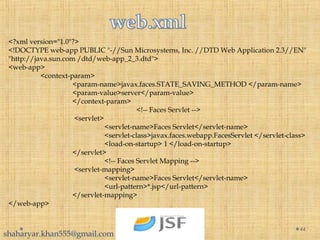
<?xml version="1.0"?>
<!DOCTYPE web-app PUBLIC "-//Sun Microsystems, Inc. //DTD Web Application 2.3//EN"
"http://java.sun.com /dtd/web-app_2_3.dtd">
<web-app>
<context-param>
<param-name>javax.faces.STATE_SAVING_METHOD </param-name>
<param-value>server</param-value>
</context-param>
<!-- Faces Servlet -->
<servlet>
<servlet-name>Faces Servlet</servlet-name>
<servlet-class>javax.faces.webapp.FacesServlet </servlet-class>
<load-on-startup> 1 </load-on-startup>
</servlet>
<!-- Faces Servlet Mapping -->
<servlet-mapping>
<servlet-name>Faces Servlet</servlet-name>
<url-pattern>*.jsp</url-pattern>
</servlet-mapping>
</web-app>
44
shaharyar.khan555@gmail.com
 Annotations are very powerful and helpful mehanism.
 Now it is provided in every part of even JAVA as well as in
many framesworks like JSF , Hibernate , JPA , EJB’s etc
 Let see how annotations are helpful for programmers.
 In previous slides We have seen that for navigation and
setting bean properties , We used faces-config.xml
 It is very annoying that we have to edit faces-config.xml file
for every navigation and for setting bean classes or
properties.
 Annotations gives us facility to handle these things without
this hectic configurations.
 Let see How 
45
shaharyar.khan555@gmail.com
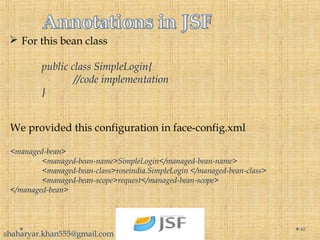
 For this bean class
public class SimpleLogin{
//code implementation
}
46
We provided this configuration in face-config.xml
<managed-bean>
<managed-bean-name>SimpleLogin</managed-bean-name>
<managed-bean-class>roseindia.SimpleLogin </managed-bean-class>
<managed-bean-scope>request</managed-bean-scope>
</managed-bean>
shaharyar.khan555@gmail.com
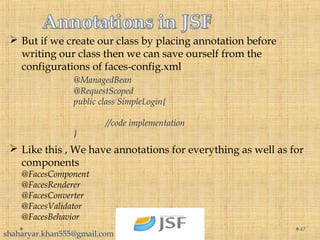
 But if we create our class by placing annotation before
writing our class then we can save ourself from the
configurations of faces-config.xml
@ManagedBean
@RequestScoped
public class SimpleLogin{
//code implementation
}
47
 Like this , We have annotations for everything as well as for
components
@FacesComponent
@FacesRenderer
@FacesConverter
@FacesValidator
@FacesBehavior
shaharyar.khan555@gmail.com
48

Jsf

  • 1.
  • 2.
     Java ServerFaces (JSF) is a Java-based Web application framework intended to simplify development integration of web-based user interfaces  It is part of the Java Platform, Enterprise Edition  a standard framework for building presentation tiers for web applications  JSF is a spec which defines a component-based MVC framework 2 shaharyar.khan555@gmail.com
  • 3.
     JSF isa request-driven MVC web framework for constructing user interfaces using components  Provides an event model for wiring the interactions between the UI and the application objects  Also provide us strong navigation rules and support with other technologies like AJAX 3 shaharyar.khan555@gmail.com
  • 4.
    4  JSF 2.1(2010-10-22) — Current version. Second maintenance release of 2.0. Only very minor amount of spec changes  JSF 2.0 (2009-06-28) — Major release for ease of use, enhanced functionality, and performance. Coincides with Java EE 6.  JSF 1.2 (2006-05-11) — Many improvements to core systems and APIs. Coincides with Java EE 5. Initial adoption into Java EE.  JSF 1.1 (2004-05-27) — (DEPRECATED) bug fix release. There were no spec or HTML renderkit changes.  JSF 1.0 (2004-03-11) — (DEPRECATED) the initial release of the JSF specification. Separate release that wasn't part of any Java EE/J2EE release. shaharyar.khan555@gmail.com
  • 5.
    5 Stable release 2.1.9 (MojarraReference Implementation) / May 31, 2012; a month ago Website javaserverfaces.java.net The spec was developed by involving many people from orgs like Sun, Apache, IBM, Oracle shaharyar.khan555@gmail.com
  • 6.
     JSF creates“component tree”  Each element corresponds to a UI value  Steps in processing request i. Restore view ii. Apply request values iii. Process validations iv. Update model values v. Invoke application vi. Render response 6 shaharyar.khan555@gmail.com
  • 7.
  • 8.
     Components  Renderers Managed beans  Converters / Validators  Controller (navigation model)  Event handling  Request lifecycle 8 shaharyar.khan555@gmail.com
  • 9.
     JSF specdefines a standard set of components and relationships  The View layer (e.g. JSP) and the Java code on the server use these components to interact and pass data  JSF tree is the current set of components in a Java object graph  Components are represented using a tree. <f:view> <h:form id=“form1”> <h:outputText id=“lbl_name” value=“Name”> <h:inputText id=“txt_name” value=“NameValue”> </h:form> </f:view> 9 shaharyar.khan555@gmail.com
  • 10.
    10 We can saythat “Components are used to Separate business logic from presentation” shaharyar.khan555@gmail.com
  • 11.
     Component rendererencodes (generates the HTML) for the component  Renderer also decodes (sets component values from URL query string and form vars)  Render is basically a response for the user  view the page that was originally requested  Or render a different page  Renderers are grouped into render kits  Default render kit is HTML  Provide device independence w/o changing the templating language or components themselves 11 shaharyar.khan555@gmail.com
  • 12.
     Glues theUI given by jsp files to the business logic of your application  Are simply JavaBeans following standard rules  a zero-argument (empty) constructor -- either by explicitly defining such a constructor or omit all constructors  no public instance variables (fields)  use accessor methods instead of allowing direct access to fields  accessed through methods called getXxx and setXxx  If class has method getTitle that returns a String, class issaid to have a String property named title  Boolean properties use isXxx instead of getXxx 12  Managed by the framework in Application, Session, View, Request, or no scope shaharyar.khan555@gmail.com
  • 13.
    @NoneScoped Managed beans witha none scope are not instantiated nor stored in any other scope.Instead, they are instantiated on demand by another managed bean. Once created, they will persist as long as the calling bean stays alive because their scope will match the calling bean’s scope. @RequestScoped Managed beans registered with request scope will be instantiated and stay available throughout a single HTTP request. This means that the bean can survive a navigation to another page, provided it was during the same HTTP request. 13 shaharyar.khan555@gmail.com
  • 14.
    @ViewScoped Managed beans registeredin view scope remain available as long as the user stays on the same view. Navigating away from that view will cause beans registered in that view’s scope to be deallocated. @SessionScoped Managed beans registered with a session scope will be stored on the HTTP session.This means that the values in the managed bean will persist beyond a single HTTP request for a single user. This is ideal for a shopping cart type of usage where values must be stored and made available during multiple requests. 14 shaharyar.khan555@gmail.com
  • 15.
    @ApplicationScoped Managed beans registeredwith an application scope retain their values throughout the lifetime of the application and are available to all users. Another scope which is “CustomScope” is also available but it is not important , So we skip that scope right now 15 shaharyar.khan555@gmail.com
  • 16.
     A kindof managed beans, although no technical difference with managed bean Backing beans – focus on UI of the application 16 shaharyar.khan555@gmail.com
  • 17.
  • 18.
     JSF providesa very easy and best way for conversion and validation <h:inputText id="salary" value="#{testBean.salary}"              required="true">     <f:convertNumber type="currency"/> </h:inputText> it may display $1999, if the locale(faces-config.xml) is pointing to US. _______________________________________________ <h:inputText id="discount" value="#{testBean.discount}"             required="true">     <f:convertNumber type="percent"/> </h:inputText> By specifying the type as 'percentage', the display value will have a '%' symbol followed by the original value. 18 We can create our own custom converters. shaharyar.khan555@gmail.com
  • 19.
     JSF providea very smart way to validate the fields and if validation fails then generate a error message define by a developer.  JSF provides different tags to handle and display messages on the view.  There are two message tags in SUN’s reference implementation of JSF HTML library: <h:message /> <h:messages />  We can place tag at the top of the form and set it to display only global messages <h:messages globalOnly="true" /> 19 shaharyar.khan555@gmail.com
  • 20.
    <h:form>Enter text inthis box :<br>  <h:inputText id="input_text" value="#{MessageBean.a}"  required="true"/>    <h:message for="input_text" /><br>    <h:commandButton action="Submit" value="Submit"/> 20 shaharyar.khan555@gmail.com
  • 21.
     An attibutefor=“” can be used to specify the id of a component whose error messages we need to display <h:inputText id="userName" value="#{userBean.userName}" /> <h:message for="userName" />  Built-in validation components <h:inputText id="Username" value="#{UserBean.userName}">     <f:validateLength minimum="6" maximum="15"/> </h:inputText> .... <h:inputText id="Age" value="#{UserBean.age}">     <f:validateLongRange minimum="1" maximum="120"/> </h:inputText> 21 shaharyar.khan555@gmail.com
  • 22.
     We canalso validate by a backing bean method <h:inputText value="#{userBean.name}" validator="#{userBean.checkUsername}"> </h:inputText> AND  Same like converters, We can create a custom converter 22 shaharyar.khan555@gmail.com
  • 23.
    The JSF navigationsystem is built on top of a simple rule system that answers the question, “which view should be shown next?” To answer this question, the rule system considers several different questions, such as “what is the current view?” “which button was pressed?” “does the view which should be shown next actually exist?” and “am I allowed to show the view which should be shown next?” and 23 shaharyar.khan555@gmail.com
  • 24.
     Navigation isa set of rules for choosing the next page to be displayed after a button or hyperlink component is clicked. Navigation rules are defined in the application configuration resource file.  After the proper navigation rule is selected, the choice of which page to access next from the current page depends on two factors: The action method that was invoked when the component was clicked The logical outcome that is referenced by the component’s tag or was returned from the action method 24 shaharyar.khan555@gmail.com
  • 25.
    25 Outcome What ItMeans success Everything worked. Go on to the next page. failure Something is wrong. Go on to an error page. logon The user needs to log on first. Go on to the logon page. no results The search did not find anything. Go to the search page again. Common Outcome Strings shaharyar.khan555@gmail.com
  • 26.
    26 <h:commandButton value="Proceed toPage2" action="gotopage2" /> <navigation-rule> <from-view-id>/page1.xhtml</from-view-id> <navigation-case> <from-outcome>gotopage2</from-outcome> <to-view-id>/page2.xhtml</to-view-id> </navigation-case> </navigation-rule> Notice that for this example a from-action is not needed; instead, the from-outcome is compared to the action attribute of the navigation UI component (commandLink or commandButton). shaharyar.khan555@gmail.com
  • 27.
  • 28.
    Here is anavigation rule that could be used with the example just described: <navigation-rule> <from-view-id>/logon.jsp</from-view-id> <navigation-case> <from-action>#{LogonForm.logon}</from-action> <from-outcome>success</from-outcome> <to-view-id>/storefront.jsp</to-view-id> </navigation-case> <navigation-case> <from-action>#{LogonForm.logon}</from-action> <from-outcome>failure</from-outcome> <to-view-id>/logon.jsp</to-view-id> </navigation-case> </navigation-rule> 28 shaharyar.khan555@gmail.com
  • 29.
    <navigation-rule> <from-view-id>/catalog.jsp</from-view-id> <navigation-case> <from-outcome>success</from-outcome> <to-view-id>/bookcashier.jsp</to-view-id> </navigation-case> <navigation-case> <from-outcome>out of stock</from- outcome> <from-action>#{catalog.buy} </from-action> <to-view-id>/outofstock.jsp</to-view-id> </navigation-case> <navigation-case> <from-outcome>error</from-outcome> <to-view-id>/error.jsp</to-view-id> </navigation-case> </navigation-rule> 29 Note: <from-view-id>/books/*</from-view-id> Don’t get confuse if you see this line somewhere shaharyar.khan555@gmail.com
  • 30.
     Events arecreated based on the request parameters.  Each event is broadcasted to the related listeners. <h:commandButton action=“#{ReportCtrl.save}”> Generates an event when pressed save() is a method on a managed bean  JSF calls ReportController.save()  Can also define action listeners associated with other components in the form Example: AccountSearch on any page without having to tell JSF navigation controller about each instance  Custom ActionListenerImpl runs before invoking method 30 shaharyar.khan555@gmail.com
  • 31.
     Even whenyou have event listeners, you almost always have action controllers  As before, these invoke business logic and participate in navigation flow (via navigation-rule entries in config file)  Setter methods and validation fire before action controller <h:form> … <h:commandButton value="Show Preview" action="#{resumeBean.showPreview}"/> </h:form> 31 shaharyar.khan555@gmail.com
  • 32.
     Listener isusually in the form bean class  But can be in separate class if you use FacesContext to  get the request or session object and look up the form  bean explicitly  Takes an ActionEvent as an argument  Void return type (not String as in action controllers)  ActionEvent is in javax.faces.event  ActionEvent has a getComponent method that lets you  obtain the UIComponent reference  From the UIComponent, you can get the component ID,  renderer, and other low-level information public void someMethod(ActionEvent event) { doSomeSideEffects(); } 32 shaharyar.khan555@gmail.com
  • 33.
    <h:commandButton id="confirm" value="ConfirmAge"        actionListener="#{userDetails.calculateAgeListener}"> </h:commandButton> ______________________________________________ public void calculateAgeListener(ActionEvent event) {        int calculatedAge = calculateAgeFromDOB();        if (event.getComponent().getId().equals("confirm")) {              if (calculatedAge != this.age) {                   this.isAgeCorrected = true;                   this.output = null;                   this.age = calculatedAge;              }        } } 33 Implemented in backing bean shaharyar.khan555@gmail.com
  • 34.
     Facelets isan open source Web template system under the Apache license and the default view handler technology (aka view declaration language) for JavaServer Faces (JSF)  The language requires valid input XML documents to work  Facelets supports all of the JSF UI components and focuses completely on building the JSF component tree, reflecting the view for a JSF application  Initially, Facelets was available as a separate, alternative view declaration language for JSF 1.1 and JSF 1.2 which both used JSP as the default view declaration language.  Starting from JSF 2.0, Facelets has been promoted by the JSF expert group to be the default view declaration language. JSP has been deprecated as a legacy fall back 34 shaharyar.khan555@gmail.com
  • 35.
     Element conversion Templating  Content re-use Referencing a file Custom tags Composite components  Parameterized includes 35 shaharyar.khan555@gmail.com
  • 36.
     ui:insert : Usedin template file, it defines content that is going to replace by the file that load the template. The content can be replace with “ui:define” tag.  ui:define: Defines content that is inserted into template with a matching “ui:insert” tag.  ui:include: Similar to JSP’s “jsp:include”, includes content from another XHTML page. . 36 shaharyar.khan555@gmail.com
  • 37.
     ui:composition: If usedwith “template” attribute, the specified template is loaded, and the children of this tag defines the template layout; Otherwise, it’s a group of elements, that can be inserted somewhere. In addition, JSF removes all tags “outside” of “ui:composition” tag 37 shaharyar.khan555@gmail.com
  • 38.
    38 <?xml version="1.0" encoding="UTF-8"?> <!DOCTYPEhtml PUBLIC "-//W3C//DTD XHTML 1.0 Transitional//EN" "http://www.w3.org/TR/xhtml1/DTD/xhtml1-transitional.dtd"> <html xmlns="http://www.w3.org/1999/xhtml" xmlns:f="http://java.sun.com/jsf/core" xmlns:h="http://java.sun.com/jsf/html"> <h:body> <h3>JSF 2.0 + Ajax Hello World Example</h3> <h:form> <h:inputText id="name" value="#{helloBean.name}"> </h:inputText> <h:commandButton value="Welcome Me"> <f:ajax execute="name" render="output" /> </h:commandButton> <h2> <h:outputText id="output" value="#{helloBean.sayWelcome}" /></h2> </h:form> </h:body> </html> shaharyar.khan555@gmail.com
  • 39.
     Apache MyFaces,Mojarra (or) Sun JSF also known as RI(reference implementation) , PrimeFaces are all JSF standard implementations  When we need additional features then we have to include these implementations  All these implementations provide us Additional tags and features which are not available in JSF core. 39 shaharyar.khan555@gmail.com
  • 40.
     Let seea simple login example of JSF <%@ page contentType="text/html"%> <%@ taglib uri="http://java.sun.com/jsf/core" prefix="f"%> <%@ taglib uri="http://java.sun.com/jsf/html" prefix="h"%> <f:view> <html> <head><title>JSF Simple Login Example</title></head> <body> <h:form> <table> <tr> <td><h:outputText value="Enter Login ID: " /></td> <td><h:inputText id="loginname" value="#{SimpleLogin.loginname}" /> </td> </tr> 40 shaharyar.khan555@gmail.com
  • 41.
    </tr> <tr> <td><h:outputText value="Enter Password:" /></td> <td><h:inputSecret id="password" value="#{SimpleLogin.password}" /> </td> </tr> <tr> <td> </td> <td><h:commandButton value="Login" action="#{SimpleLogin.CheckValidUser}"/> </td> </tr> </table> </h:form> </body> </html> </f:view> 41 shaharyar.khan555@gmail.com
  • 42.
    public class SimpleLogin{ Stringloginname; String password; public SimpleLogin(){ } public String getLoginname(){ return loginname; } public void setLoginname(String loginname){ this.loginname = loginname; } public String getPassword(){ return password; } public void setPassword(String password){ this.password = password; } public String CheckValidUser(){ if(loginname.equals("chandan") && password.equals("chand")){ System.out.println("chandan"); return "success"; } else{ return "fail"; } } } 42 shaharyar.khan555@gmail.com
  • 43.
    <?xml version="1.0"?> <!DOCTYPE faces-configPUBLIC "-//Sun Microsystems, Inc.//DTD JavaServer Faces Config 1.1//EN" "http://java.sun.com/dtd/web-facesconfig_1_1.dtd"> <faces-config> <managed-bean> <managed-bean-name>SimpleLogin</managed-bean-name> <managed-bean-class>roseindia.SimpleLogin </managed-bean-class> <managed-bean-scope>request</managed-bean-scope> </managed-bean> <navigation-rule> <from-view-id>/login.jsp</from-view-id> <navigation-case> <from-action>#{SimpleLogin.CheckValidUser} </from- action> <from-outcome>success</from-outcome> <to-view-id>resultforsuccess.jsp</to-view-id> </navigation-case> <navigation-case> <from-action>#{SimpleLogin.CheckValidUser}</from- action> <from-outcome>fail</from-outcome> <to-view-id>resultforfail.jsp</to-view-id> </navigation-case> </navigation-rule> </faces-config> 43 shaharyar.khan555@gmail.com
  • 44.
    <?xml version="1.0"?> <!DOCTYPE web-appPUBLIC "-//Sun Microsystems, Inc. //DTD Web Application 2.3//EN" "http://java.sun.com /dtd/web-app_2_3.dtd"> <web-app> <context-param> <param-name>javax.faces.STATE_SAVING_METHOD </param-name> <param-value>server</param-value> </context-param> <!-- Faces Servlet --> <servlet> <servlet-name>Faces Servlet</servlet-name> <servlet-class>javax.faces.webapp.FacesServlet </servlet-class> <load-on-startup> 1 </load-on-startup> </servlet> <!-- Faces Servlet Mapping --> <servlet-mapping> <servlet-name>Faces Servlet</servlet-name> <url-pattern>*.jsp</url-pattern> </servlet-mapping> </web-app> 44 shaharyar.khan555@gmail.com
  • 45.
     Annotations arevery powerful and helpful mehanism.  Now it is provided in every part of even JAVA as well as in many framesworks like JSF , Hibernate , JPA , EJB’s etc  Let see how annotations are helpful for programmers.  In previous slides We have seen that for navigation and setting bean properties , We used faces-config.xml  It is very annoying that we have to edit faces-config.xml file for every navigation and for setting bean classes or properties.  Annotations gives us facility to handle these things without this hectic configurations.  Let see How  45 shaharyar.khan555@gmail.com
  • 46.
     For thisbean class public class SimpleLogin{ //code implementation } 46 We provided this configuration in face-config.xml <managed-bean> <managed-bean-name>SimpleLogin</managed-bean-name> <managed-bean-class>roseindia.SimpleLogin </managed-bean-class> <managed-bean-scope>request</managed-bean-scope> </managed-bean> shaharyar.khan555@gmail.com
  • 47.
     But ifwe create our class by placing annotation before writing our class then we can save ourself from the configurations of faces-config.xml @ManagedBean @RequestScoped public class SimpleLogin{ //code implementation } 47  Like this , We have annotations for everything as well as for components @FacesComponent @FacesRenderer @FacesConverter @FacesValidator @FacesBehavior shaharyar.khan555@gmail.com
  • 48.