Spring Web Flow:
        A little flow of happiness.


Сергей Моренец
17 января 2013 г.
Agenda

•   Overview of the navigation history
•   Basics of SWF
•   Practical usage
•   Pros & Contras
•   Q&A
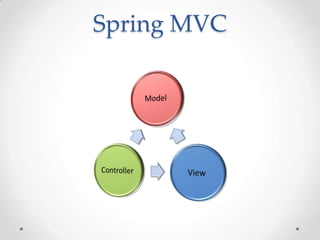
Spring MVC
Navigation overview
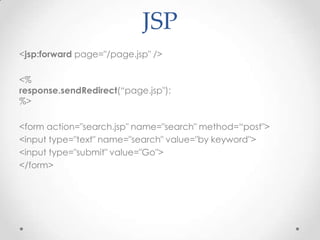
JSP
<jsp:forward page="/page.jsp" />

<%
response.sendRedirect(“page.jsp");
%>

<form action="search.jsp" name="search" method=“post">
<input type="text" name="search" value="by keyword">
<input type="submit" value="Go">
</form>
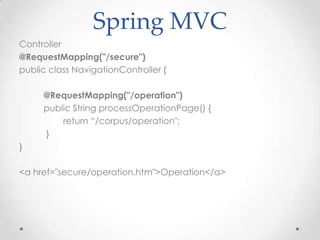
Spring MVC
Controller
@RequestMapping("/secure")
public class NavigationController {

     @RequestMapping("/operation")
     public String processOperationPage() {
         return “/corpus/operation";
     }
}

<a href="secure/operation.htm">Operation</a>
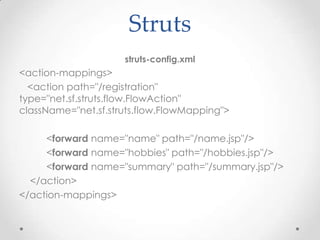
Struts
                     struts-config.xml
<action-mappings>
  <action path="/registration"
type="net.sf.struts.flow.FlowAction"
className="net.sf.struts.flow.FlowMapping">

     <forward name="name" path="/name.jsp"/>
     <forward name="hobbies" path="/hobbies.jsp"/>
     <forward name="summary" path="/summary.jsp"/>
  </action>
</action-mappings>
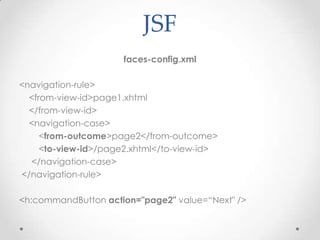
JSF
                      faces-config.xml

<navigation-rule>
  <from-view-id>page1.xhtml
  </from-view-id>
  <navigation-case>
     <from-outcome>page2</from-outcome>
     <to-view-id>/page2.xhtml</to-view-id>
  </navigation-case>
</navigation-rule>

<h:commandButton action="page2" value=“Next" />
Disadvantages
•   Visualizing the flow is very difficult
•   Mixed navigation and view
•   Overall navigation rules complexity
•   All-in-one navigation storage
•   Lack of state control/navigation customization
What is Spring Web Flow?
•   Developed by Erwin Vervaet in 2004
•   Initial version released in October, 2006
•   Spring MVC extension
•   Introduces flows concept
•   Extends application scopes
•   SWF 2.3.1 released in April, 2012
Erwin Vervaet
• Belgium citizen
• Holds master's degree in computer science
• Originator of Spring Web Flow Project
• Senior project manager together with Keith Donald
• Speaker on the most Java and Spring related
  themes
• Independent consultant www.ervacon.com
What is SWF for?
• How do you express page navigation rules?
• How do you manage navigation and conversational
  state?
• How do you facilitate modularization and reuse?
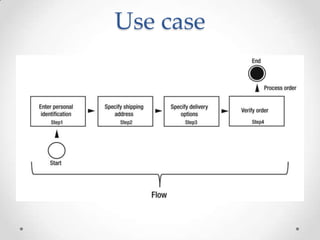
Use case
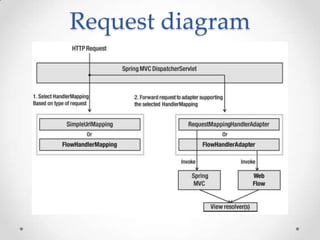
Request diagram
Flow definition
• XML document with predefined elements
• Flow definition is composed of a set of states
• Each state has one or more transitions that are used to
  move to another state
• A transition is triggered by an event
Sample flow
<flow xmlns="http://www.springframework.org/schema/webflow"
xmlns:xsi="http://www.w3.org/2001/XMLSchema-instance"
xsi:schemaLocation="http://www.springframework.org/schema/
webflow
http://www.springframework.org/schema/webflow/spring-
webflow-2.0.xsd">

[variables]

[input parameters]

[states]

</flow>
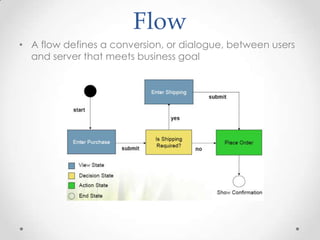
Flow
• A flow defines a conversion, or dialogue, between users
  and server that meets business goal
State
•   Action state
•   View state
•   Subflow state
•   Decision state
•   End state
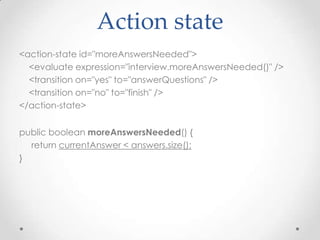
Action state
<action-state id="moreAnswersNeeded">
  <evaluate expression="interview.moreAnswersNeeded()" />
  <transition on="yes" to="answerQuestions" />
  <transition on="no" to="finish" />
</action-state>


public boolean moreAnswersNeeded() {
  return currentAnswer < answers.size();
}
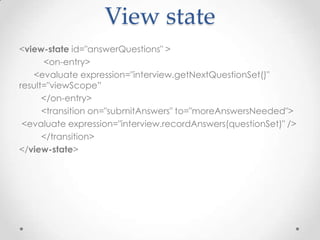
View state
<view-state id="answerQuestions" >
      <on-entry>
   <evaluate expression="interview.getNextQuestionSet()"
result="viewScope”
      </on-entry>
      <transition on="submitAnswers" to="moreAnswersNeeded">
 <evaluate expression="interview.recordAnswers(questionSet)" />
      </transition>
</view-state>
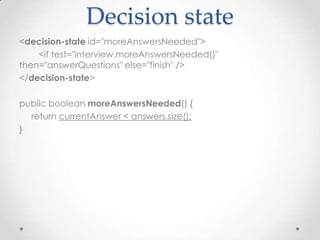
Decision state
<decision-state id="moreAnswersNeeded">
    <if test="interview.moreAnswersNeeded()"
then="answerQuestions" else="finish" />
</decision-state>

public boolean moreAnswersNeeded() {
  return currentAnswer < answers.size();
}
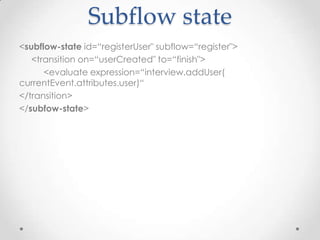
Subflow state
<subflow-state id=“registerUser" subflow=“register">
   <transition on=“userCreated" to=“finish">
      <evaluate expression=“interview.addUser(
currentEvent.attributes.user)“
</transition>
</subfow-state>
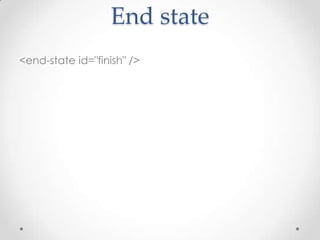
End state
<end-state id="finish" />
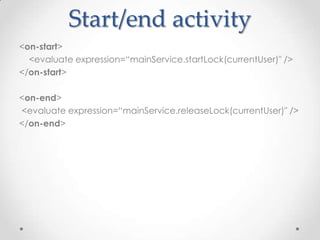
Start/end activity
<on-start>
  <evaluate expression=“mainService.startLock(currentUser)" />
</on-start>

<on-end>
<evaluate expression=“mainService.releaseLock(currentUser)" />
</on-end>
Transition binding
JSF
<h:form>
              <h:commandButton action="save"
value="#{msg['buttons.save']}" />
              <h:commandButton action="cancel"
value="#{msg['buttons.cancel']}"
                     immediate="true" />
</h:form>
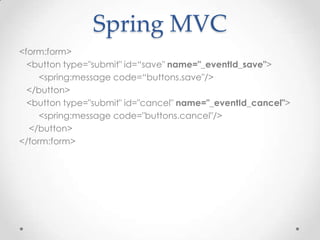
Spring MVC
<form:form>
  <button type="submit" id=“save" name="_eventId_save">
     <spring:message code=“buttons.save"/>
  </button>
  <button type="submit" id="cancel" name="_eventId_cancel">
     <spring:message code="buttons.cancel"/>
  </button>
</form:form>
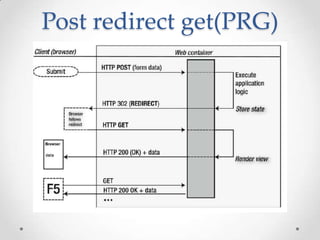
Post redirect get(PRG)
Variables scope
Spring
•   Singleton
•   Prototype
•   Request
•   Session
•   Global-session
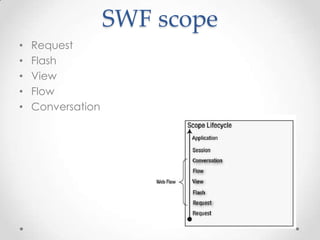
SWF scope
•   Request
•   Flash
•   View
•   Flow
•   Conversation
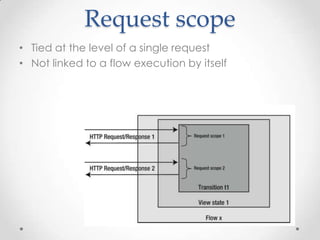
Request scope
• Tied at the level of a single request
• Not linked to a flow execution by itself
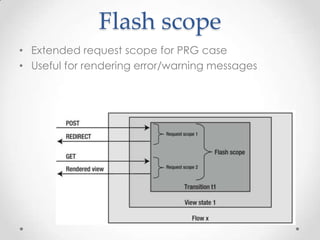
Flash scope
• Extended request scope for PRG case
• Useful for rendering error/warning messages
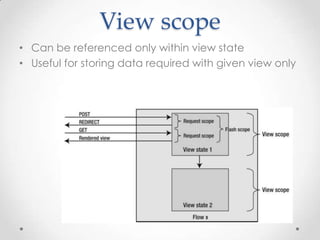
View scope
• Can be referenced only within view state
• Useful for storing data required with given view only
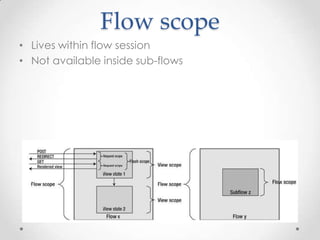
Flow scope
• Lives within flow session
• Not available inside sub-flows
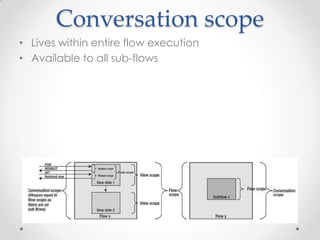
Conversation scope
• Lives within entire flow execution
• Available to all sub-flows
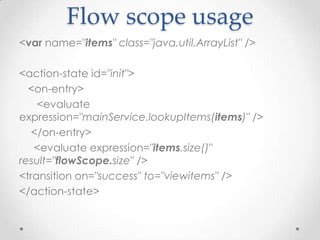
Flow scope usage
<var name="items" class="java.util.ArrayList" />

<action-state id="init">
  <on-entry>
    <evaluate
expression="mainService.lookupItems(items)" />
   </on-entry>
   <evaluate expression="items.size()"
result="flowScope.size" />
<transition on="success" to="viewitems" />
</action-state>
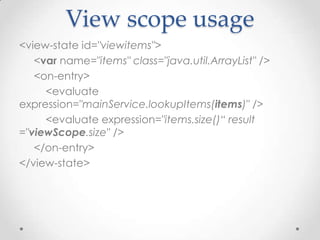
View scope usage
<view-state id="viewitems">
   <var name="items" class="java.util.ArrayList" />
   <on-entry>
     <evaluate
expression="mainService.lookupItems(items)" />
     <evaluate expression="items.size()“ result
="viewScope.size" />
   </on-entry>
</view-state>
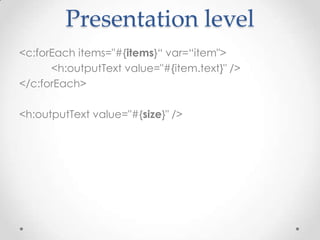
Presentation level
<c:forEach items="#{items}“ var=“item">
      <h:outputText value="#{item.text}" />
</c:forEach>

<h:outputText value="#{size}" />
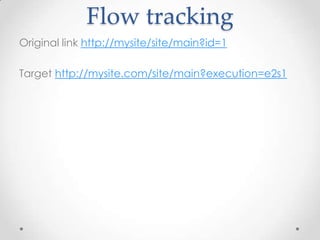
Flow tracking
Original link http://mysite/site/main?id=1

Target http://mysite.com/site/main?execution=e2s1
Flow tracking
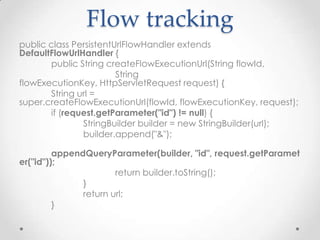
public class PersistentUrlFlowHandler extends
DefaultFlowUrlHandler {
       public String createFlowExecutionUrl(String flowId,
                        String
flowExecutionKey, HttpServletRequest request) {
       String url =
super.createFlowExecutionUrl(flowId, flowExecutionKey, request);
       if (request.getParameter("id") != null) {
               StringBuilder builder = new StringBuilder(url);
               builder.append("&");

         appendQueryParameter(builder, "id", request.getParamet
er("id"));
                       return builder.toString();
               }
               return url;
         }
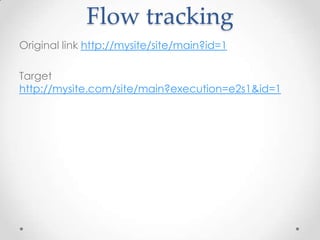
Flow tracking
Original link http://mysite/site/main?id=1

Target
http://mysite.com/site/main?execution=e2s1&id=1
Exception handling
• Transition on exception
• Custom exception handler
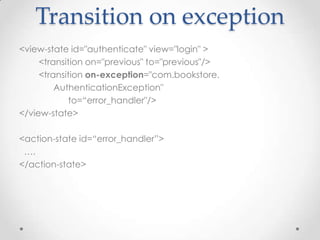
Transition on exception
<view-state id="authenticate" view="login" >
     <transition on="previous" to="previous"/>
     <transition on-exception="com.bookstore.
         AuthenticationException"
            to=“error_handler"/>
</view-state>

<action-state id=“error_handler”>
 ….
</action-state>
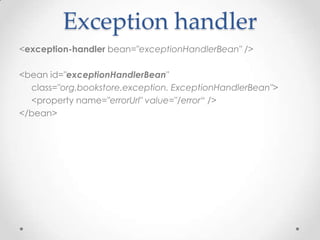
Exception handler
<exception-handler bean="exceptionHandlerBean" />

<bean id="exceptionHandlerBean"
  class="org.bookstore.exception. ExceptionHandlerBean">
  <property name="errorUrl" value="/error“ />
</bean>
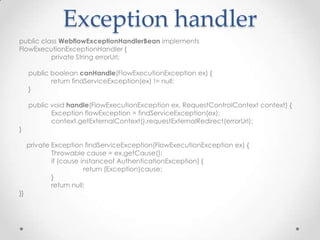
Exception handler
public class WebflowExceptionHandlerBean implements
FlowExecutionExceptionHandler {
          private String errorUrl;

     public boolean canHandle(FlowExecutionException ex) {
            return findServiceException(ex) != null;
     }

     public void handle(FlowExecutionException ex, RequestControlContext context) {
            Exception flowException = findServiceException(ex);
            context.getExternalContext().requestExternalRedirect(errorUrl);
}

     private Exception findServiceException(FlowExecutionException ex) {
             Throwable cause = ex.getCause();
             if (cause instanceof AuthenticationException) {
                        return (Exception)cause;
             }
             return null;
}}
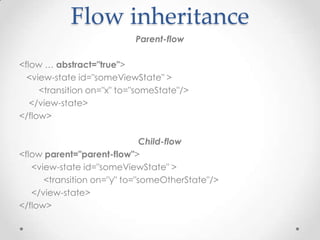
Flow inheritance
                           Parent-flow

<flow … abstract="true">
  <view-state id="someViewState" >
     <transition on="x" to="someState"/>
   </view-state>
</flow>

                              Child-flow
<flow parent="parent-flow">
   <view-state id="someViewState" >
      <transition on="y" to="someOtherState"/>
   </view-state>
</flow>
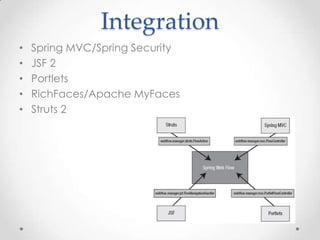
Integration
•   Spring MVC/Spring Security
•   JSF 2
•   Portlets
•   RichFaces/Apache MyFaces
•   Struts 2
Pros
• High-level navigation control with clear observable
  lifecycle
• Designed to be self contained
• Compile-independent
• Easy to understand and visualize
• Expression language support
• Custom validation (including AJAX)
• Integrates with major web frameworks
Cons
•   Requires Spring framework
•   Separate Spring project
•   Additional performance overhead
•   Lack of community support
•   Not suitable for simple or flow-free applications
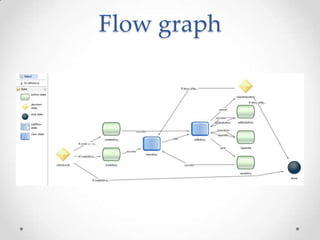
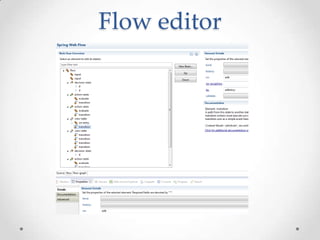
Spring Tools Suite
• Eclipse development environment for building
  Spring-powered enterprise applications
• Visualization of Spring Web Flow
Flow graph
Flow editor
References
• Spring Web Flow 2 Web Development. Markus
  Stäuble, Sven Lüppken
• Pro Spring MVC: With Web Flow. Marten
  Deinum, Koen Serneels, Colin Yates, Seth
  Ladd, Christophe Vanfleteren
• Spring in Action.3rd edition .Craig Walls
Q&A


• Сергей Моренец, morenets@mail.ru

Spring Web Flow. A little flow of happiness.

  • 1.
    Spring Web Flow: A little flow of happiness. Сергей Моренец 17 января 2013 г.
  • 2.
    Agenda • Overview of the navigation history • Basics of SWF • Practical usage • Pros & Contras • Q&A
  • 4.
  • 5.
  • 6.
    JSP <jsp:forward page="/page.jsp" /> <% response.sendRedirect(“page.jsp"); %> <formaction="search.jsp" name="search" method=“post"> <input type="text" name="search" value="by keyword"> <input type="submit" value="Go"> </form>
  • 7.
    Spring MVC Controller @RequestMapping("/secure") public classNavigationController { @RequestMapping("/operation") public String processOperationPage() { return “/corpus/operation"; } } <a href="secure/operation.htm">Operation</a>
  • 8.
    Struts struts-config.xml <action-mappings> <action path="/registration" type="net.sf.struts.flow.FlowAction" className="net.sf.struts.flow.FlowMapping"> <forward name="name" path="/name.jsp"/> <forward name="hobbies" path="/hobbies.jsp"/> <forward name="summary" path="/summary.jsp"/> </action> </action-mappings>
  • 9.
    JSF faces-config.xml <navigation-rule> <from-view-id>page1.xhtml </from-view-id> <navigation-case> <from-outcome>page2</from-outcome> <to-view-id>/page2.xhtml</to-view-id> </navigation-case> </navigation-rule> <h:commandButton action="page2" value=“Next" />
  • 10.
    Disadvantages • Visualizing the flow is very difficult • Mixed navigation and view • Overall navigation rules complexity • All-in-one navigation storage • Lack of state control/navigation customization
  • 11.
    What is SpringWeb Flow? • Developed by Erwin Vervaet in 2004 • Initial version released in October, 2006 • Spring MVC extension • Introduces flows concept • Extends application scopes • SWF 2.3.1 released in April, 2012
  • 12.
    Erwin Vervaet • Belgiumcitizen • Holds master's degree in computer science • Originator of Spring Web Flow Project • Senior project manager together with Keith Donald • Speaker on the most Java and Spring related themes • Independent consultant www.ervacon.com
  • 13.
    What is SWFfor? • How do you express page navigation rules? • How do you manage navigation and conversational state? • How do you facilitate modularization and reuse?
  • 14.
  • 15.
  • 16.
    Flow definition • XMLdocument with predefined elements • Flow definition is composed of a set of states • Each state has one or more transitions that are used to move to another state • A transition is triggered by an event
  • 17.
  • 18.
    Flow • A flowdefines a conversion, or dialogue, between users and server that meets business goal
  • 19.
    State • Action state • View state • Subflow state • Decision state • End state
  • 20.
    Action state <action-state id="moreAnswersNeeded"> <evaluate expression="interview.moreAnswersNeeded()" /> <transition on="yes" to="answerQuestions" /> <transition on="no" to="finish" /> </action-state> public boolean moreAnswersNeeded() { return currentAnswer < answers.size(); }
  • 21.
    View state <view-state id="answerQuestions"> <on-entry> <evaluate expression="interview.getNextQuestionSet()" result="viewScope” </on-entry> <transition on="submitAnswers" to="moreAnswersNeeded"> <evaluate expression="interview.recordAnswers(questionSet)" /> </transition> </view-state>
  • 22.
    Decision state <decision-state id="moreAnswersNeeded"> <if test="interview.moreAnswersNeeded()" then="answerQuestions" else="finish" /> </decision-state> public boolean moreAnswersNeeded() { return currentAnswer < answers.size(); }
  • 23.
    Subflow state <subflow-state id=“registerUser"subflow=“register"> <transition on=“userCreated" to=“finish"> <evaluate expression=“interview.addUser( currentEvent.attributes.user)“ </transition> </subfow-state>
  • 24.
  • 25.
    Start/end activity <on-start> <evaluate expression=“mainService.startLock(currentUser)" /> </on-start> <on-end> <evaluate expression=“mainService.releaseLock(currentUser)" /> </on-end>
  • 26.
  • 27.
    JSF <h:form> <h:commandButton action="save" value="#{msg['buttons.save']}" /> <h:commandButton action="cancel" value="#{msg['buttons.cancel']}" immediate="true" /> </h:form>
  • 28.
    Spring MVC <form:form> <button type="submit" id=“save" name="_eventId_save"> <spring:message code=“buttons.save"/> </button> <button type="submit" id="cancel" name="_eventId_cancel"> <spring:message code="buttons.cancel"/> </button> </form:form>
  • 29.
  • 30.
  • 31.
    Spring • Singleton • Prototype • Request • Session • Global-session
  • 32.
    SWF scope • Request • Flash • View • Flow • Conversation
  • 33.
    Request scope • Tiedat the level of a single request • Not linked to a flow execution by itself
  • 34.
    Flash scope • Extendedrequest scope for PRG case • Useful for rendering error/warning messages
  • 35.
    View scope • Canbe referenced only within view state • Useful for storing data required with given view only
  • 36.
    Flow scope • Liveswithin flow session • Not available inside sub-flows
  • 37.
    Conversation scope • Liveswithin entire flow execution • Available to all sub-flows
  • 38.
    Flow scope usage <varname="items" class="java.util.ArrayList" /> <action-state id="init"> <on-entry> <evaluate expression="mainService.lookupItems(items)" /> </on-entry> <evaluate expression="items.size()" result="flowScope.size" /> <transition on="success" to="viewitems" /> </action-state>
  • 39.
    View scope usage <view-stateid="viewitems"> <var name="items" class="java.util.ArrayList" /> <on-entry> <evaluate expression="mainService.lookupItems(items)" /> <evaluate expression="items.size()“ result ="viewScope.size" /> </on-entry> </view-state>
  • 40.
    Presentation level <c:forEach items="#{items}“var=“item"> <h:outputText value="#{item.text}" /> </c:forEach> <h:outputText value="#{size}" />
  • 41.
    Flow tracking Original linkhttp://mysite/site/main?id=1 Target http://mysite.com/site/main?execution=e2s1
  • 42.
    Flow tracking public classPersistentUrlFlowHandler extends DefaultFlowUrlHandler { public String createFlowExecutionUrl(String flowId, String flowExecutionKey, HttpServletRequest request) { String url = super.createFlowExecutionUrl(flowId, flowExecutionKey, request); if (request.getParameter("id") != null) { StringBuilder builder = new StringBuilder(url); builder.append("&"); appendQueryParameter(builder, "id", request.getParamet er("id")); return builder.toString(); } return url; }
  • 43.
    Flow tracking Original linkhttp://mysite/site/main?id=1 Target http://mysite.com/site/main?execution=e2s1&id=1
  • 44.
    Exception handling • Transitionon exception • Custom exception handler
  • 45.
    Transition on exception <view-stateid="authenticate" view="login" > <transition on="previous" to="previous"/> <transition on-exception="com.bookstore. AuthenticationException" to=“error_handler"/> </view-state> <action-state id=“error_handler”> …. </action-state>
  • 46.
    Exception handler <exception-handler bean="exceptionHandlerBean"/> <bean id="exceptionHandlerBean" class="org.bookstore.exception. ExceptionHandlerBean"> <property name="errorUrl" value="/error“ /> </bean>
  • 47.
    Exception handler public classWebflowExceptionHandlerBean implements FlowExecutionExceptionHandler { private String errorUrl; public boolean canHandle(FlowExecutionException ex) { return findServiceException(ex) != null; } public void handle(FlowExecutionException ex, RequestControlContext context) { Exception flowException = findServiceException(ex); context.getExternalContext().requestExternalRedirect(errorUrl); } private Exception findServiceException(FlowExecutionException ex) { Throwable cause = ex.getCause(); if (cause instanceof AuthenticationException) { return (Exception)cause; } return null; }}
  • 48.
    Flow inheritance Parent-flow <flow … abstract="true"> <view-state id="someViewState" > <transition on="x" to="someState"/> </view-state> </flow> Child-flow <flow parent="parent-flow"> <view-state id="someViewState" > <transition on="y" to="someOtherState"/> </view-state> </flow>
  • 49.
    Integration • Spring MVC/Spring Security • JSF 2 • Portlets • RichFaces/Apache MyFaces • Struts 2
  • 50.
    Pros • High-level navigationcontrol with clear observable lifecycle • Designed to be self contained • Compile-independent • Easy to understand and visualize • Expression language support • Custom validation (including AJAX) • Integrates with major web frameworks
  • 51.
    Cons • Requires Spring framework • Separate Spring project • Additional performance overhead • Lack of community support • Not suitable for simple or flow-free applications
  • 52.
    Spring Tools Suite •Eclipse development environment for building Spring-powered enterprise applications • Visualization of Spring Web Flow
  • 53.
  • 54.
  • 55.
    References • Spring WebFlow 2 Web Development. Markus Stäuble, Sven Lüppken • Pro Spring MVC: With Web Flow. Marten Deinum, Koen Serneels, Colin Yates, Seth Ladd, Christophe Vanfleteren • Spring in Action.3rd edition .Craig Walls
  • 56.