1
Basic Topics:
 What is JavaFX ?
 JavaFX 3D Overview
 3D Shapes in JavaFX
 Add camera
 Add lighting
 Apply shape materials
 Interacting with 3D Shapes
2
JavaFX
 JavaFX is a graphical user interface (GUI) from Oracle.
 It provides lightweight , hardware-accelerated platform.
 As of version JDK 7 , it comes included with the Java install.
3
4
Overview
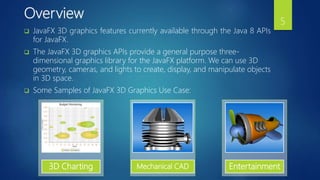
 JavaFX 3D graphics features currently available through the Java 8 APIs
for JavaFX.
 The JavaFX 3D graphics APIs provide a general purpose three-
dimensional graphics library for the JavaFX platform. We can use 3D
geometry, cameras, and lights to create, display, and manipulate objects
in 3D space.
 Some Samples of JavaFX 3D Graphics Use Case:
3D Charting Mechanical CAD Entertainment
5
3D Shapes
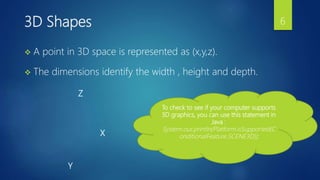
 A point in 3D space is represented as (x,y,z).
 The dimensions identify the width , height and depth.
X
Z
Y
To check to see if your computer supports
3D graphics, you can use this statement in
Java :
System.out.println(Platform.isSupported(C
onditionalFeature.SCENE3D));
6
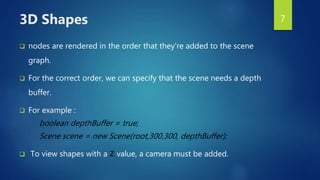
 nodes are rendered in the order that they're added to the scene
graph.
 For the correct order, we can specify that the scene needs a depth
buffer.
 For example :
boolean depthBuffer = true;
Scene scene = new Scene(root,300,300, depthBuffer);
 To view shapes with a Z value, a camera must be added.
3D Shapes 7
 All shapes have a material, draw mode, and cull face.
 Material gives shapes color.
 Draw mode indicates how the shape is rendered.
 face culling is a technique used to only render the visible
portions of your 3D image.
3D Shapes 8
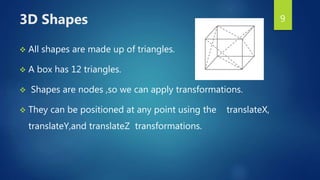
 All shapes are made up of triangles.
 A box has 12 triangles.
 Shapes are nodes ,so we can apply transformations.
 They can be positioned at any point using the translateX,
translateY,and translateZ transformations.
3D Shapes 9
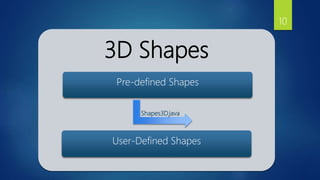
3D Shapes
Pre-defined Shapes
User-Defined Shapes
Shapes3D.java
10
 To create 3D shapes, we use a triangle mesh.
 JavaFX has a MeshView class to represents user-defined 3D
shapes.
 A triangle mesh needs data for three aspects of a 3D object :
texture coordinates, points and faces.
User-Defined Shapes 11
 The texture is an image is of a 2D object mapped to the vertices
of the triangles.
 Points are the vertices of the triangles in the mesh.
 faces are the planes created by joining these vertices.
User-Defined Shapes
PyramidExample.java
12
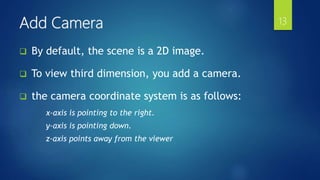
 By default, the scene is a 2D image.
 To view third dimension, you add a camera.
 the camera coordinate system is as follows:
x-axis is pointing to the right.
y-axis is pointing down.
z-axis points away from the viewer
Add Camera 13
 The camera sets the viewing perspective of having a
third dimension.
 A camera is a node in JavaFX.
 When adding a camera, we can specify clipping panes.
Add Camera
Shapes3D_with_camera.java
CameraExample.java
14
Add Lighting
 Light is also a node in Java FX.
 Ambient and point light represent light from external source.
 Each light node can a different color.
 Ambient Light is a non-directional light.
 Point Light represents appoint light source.
 This is a fixed point in space and radiates light equally in all
direction.
 The intensity decreases as the distance increases. Shapes3D_with_light.java
15
Shape materials
 Shading material mixes light, color, and shade .
 This gives the illusion of a 3D effect.
 A special type of shading material called Phong.
 Phong shading is a technique used to render 3D objects.
MaterialDemo.java
16
Interacting with 3D Shapes
17
In
this
Video
18

Java fx 3d

  • 1.
  • 2.
    Basic Topics:  Whatis JavaFX ?  JavaFX 3D Overview  3D Shapes in JavaFX  Add camera  Add lighting  Apply shape materials  Interacting with 3D Shapes 2
  • 3.
    JavaFX  JavaFX isa graphical user interface (GUI) from Oracle.  It provides lightweight , hardware-accelerated platform.  As of version JDK 7 , it comes included with the Java install. 3
  • 4.
  • 5.
    Overview  JavaFX 3Dgraphics features currently available through the Java 8 APIs for JavaFX.  The JavaFX 3D graphics APIs provide a general purpose three- dimensional graphics library for the JavaFX platform. We can use 3D geometry, cameras, and lights to create, display, and manipulate objects in 3D space.  Some Samples of JavaFX 3D Graphics Use Case: 3D Charting Mechanical CAD Entertainment 5
  • 6.
    3D Shapes  Apoint in 3D space is represented as (x,y,z).  The dimensions identify the width , height and depth. X Z Y To check to see if your computer supports 3D graphics, you can use this statement in Java : System.out.println(Platform.isSupported(C onditionalFeature.SCENE3D)); 6
  • 7.
     nodes arerendered in the order that they're added to the scene graph.  For the correct order, we can specify that the scene needs a depth buffer.  For example : boolean depthBuffer = true; Scene scene = new Scene(root,300,300, depthBuffer);  To view shapes with a Z value, a camera must be added. 3D Shapes 7
  • 8.
     All shapeshave a material, draw mode, and cull face.  Material gives shapes color.  Draw mode indicates how the shape is rendered.  face culling is a technique used to only render the visible portions of your 3D image. 3D Shapes 8
  • 9.
     All shapesare made up of triangles.  A box has 12 triangles.  Shapes are nodes ,so we can apply transformations.  They can be positioned at any point using the translateX, translateY,and translateZ transformations. 3D Shapes 9
  • 10.
  • 11.
     To create3D shapes, we use a triangle mesh.  JavaFX has a MeshView class to represents user-defined 3D shapes.  A triangle mesh needs data for three aspects of a 3D object : texture coordinates, points and faces. User-Defined Shapes 11
  • 12.
     The textureis an image is of a 2D object mapped to the vertices of the triangles.  Points are the vertices of the triangles in the mesh.  faces are the planes created by joining these vertices. User-Defined Shapes PyramidExample.java 12
  • 13.
     By default,the scene is a 2D image.  To view third dimension, you add a camera.  the camera coordinate system is as follows: x-axis is pointing to the right. y-axis is pointing down. z-axis points away from the viewer Add Camera 13
  • 14.
     The camerasets the viewing perspective of having a third dimension.  A camera is a node in JavaFX.  When adding a camera, we can specify clipping panes. Add Camera Shapes3D_with_camera.java CameraExample.java 14
  • 15.
    Add Lighting  Lightis also a node in Java FX.  Ambient and point light represent light from external source.  Each light node can a different color.  Ambient Light is a non-directional light.  Point Light represents appoint light source.  This is a fixed point in space and radiates light equally in all direction.  The intensity decreases as the distance increases. Shapes3D_with_light.java 15
  • 16.
    Shape materials  Shadingmaterial mixes light, color, and shade .  This gives the illusion of a 3D effect.  A special type of shading material called Phong.  Phong shading is a technique used to render 3D objects. MaterialDemo.java 16
  • 17.
    Interacting with 3DShapes 17 In this Video
  • 18.