COMPUTER GRAPHICS AND IMAGE PROCESSING-1151CS113 JAGANRAJA.V AP/CSE
SCHOOL OF COMPUTING
DEPARTMENT OF COMPUTER SCIENCE & ENGINEERING
PRESENTED BY
JAGANRAJA.V
ASSISTANT PROFESSOR
TTS2918
1151CS113-COMPUTER GRAPHICS AND IMAGE
PROCESSING
COMPUTER GRAPHICS AND IMAGE PROCESSING-1151CS113 JAGANRAJA.V AP/CSE
COMPUTER GRAPHICS AND IMAGE PROCESSING
Course Category: Program Core
Pre-requisite
Link to Other courses
• Multimedia Systems
• Computer Vision
SL.NO Course Code Course Name
1 1150MA103 Engineering Mathematics 2
2 1150CS201 Problem Solving using C
COMPUTER GRAPHICS AND IMAGE PROCESSING-1151CS113 JAGANRAJA.V AP/CSE
COMPUTER GRAPHICS AND IMAGE PROCESSING
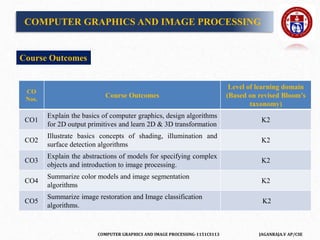
CO
Nos.
Course Outcomes
Level of learning domain
(Based on revised Bloom’s
taxonomy)
CO1
Explain the basics of computer graphics, design algorithms
for 2D output primitives and learn 2D & 3D transformation
K2
CO2
Illustrate basics concepts of shading, illumination and
surface detection algorithms
K2
CO3
Explain the abstractions of models for specifying complex
objects and introduction to image processing.
K2
CO4
Summarize color models and image segmentation
algorithms
K2
CO5
Summarize image restoration and Image classification
algorithms.
K2
Course Outcomes
COMPUTER GRAPHICS AND IMAGE PROCESSING-1151CS113 JAGANRAJA.V AP/CSE
REVIEW OF GRAPHICS FUNDAMENTALS
Basic raster graphical algorithm for 2D primitives, Line drawing algorithm,
Circle drawing algorithm, Ellipse drawing algorithm, 2D and 3D
transformations; Window, Viewport, Clipping algorithm, Bezier curve, b-
spline curve, surfaces and Solid modeling.
REFERENCES
1. Hearn & Baker, “Computer Graphics C version”, 2nd ed. Pearson
Education, 2012.
2. www.slideshare.net/.../computer-graphics-image-processing-lecture-n.
UNIT-1
COMPUTER GRAPHICS AND IMAGE PROCESSING-1151CS113 JAGANRAJA.V AP/CSE
Computer graphics is an art of drawing pictures, lines, charts, etc using
computers with the help of programming. Computer graphics is made up of
number of pixels.
Image processing is a method to perform some operations on an image, in
order to get an enhanced image or to extract some useful information from
it.
Definition of Computer Graphics:
It is the use of computers to create and manipulate pictures on a display
device. It comprises of software techniques to create, store, modify,
represents pictures.
INTRODUCTION
COMPUTER GRAPHICS AND IMAGE PROCESSING-1151CS113 JAGANRAJA.V AP/CSE
Application of Computer Graphics
• Computer-Aided Design for engineering and architectural systems etc.
• Presentation Graphics
• Computer Art
• Entertainment
• Education and Training
• Visualization
• Image Processing
• Graphical User Interface
COMPUTER GRAPHICS AND IMAGE PROCESSING-1151CS113 JAGANRAJA.V AP/CSE
HOW COMPUTER GRAPHICS
WORKS IN MOVIES??
COMPUTER GRAPHICS AND IMAGE PROCESSING-1151CS113 JAGANRAJA.V AP/CSE
Pixel
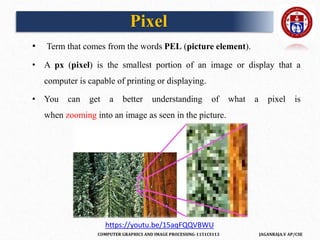
• Term that comes from the words PEL (picture element).
• A px (pixel) is the smallest portion of an image or display that a
computer is capable of printing or displaying.
• You can get a better understanding of what a pixel is
when zooming into an image as seen in the picture.
https://youtu.be/15aqFQQVBWU
COMPUTER GRAPHICS AND IMAGE PROCESSING-1151CS113 JAGANRAJA.V AP/CSE
Raster Images
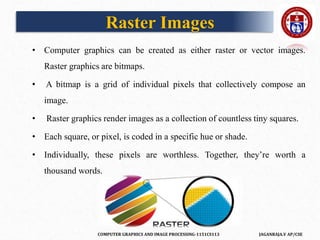
• Computer graphics can be created as either raster or vector images.
Raster graphics are bitmaps.
• A bitmap is a grid of individual pixels that collectively compose an
image.
• Raster graphics render images as a collection of countless tiny squares.
• Each square, or pixel, is coded in a specific hue or shade.
• Individually, these pixels are worthless. Together, they’re worth a
thousand words.
COMPUTER GRAPHICS AND IMAGE PROCESSING-1151CS113 JAGANRAJA.V AP/CSE
Vector Graphics
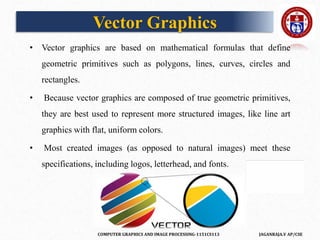
• Vector graphics are based on mathematical formulas that define
geometric primitives such as polygons, lines, curves, circles and
rectangles.
• Because vector graphics are composed of true geometric primitives,
they are best used to represent more structured images, like line art
graphics with flat, uniform colors.
• Most created images (as opposed to natural images) meet these
specifications, including logos, letterhead, and fonts.
COMPUTER GRAPHICS AND IMAGE PROCESSING-1151CS113 JAGANRAJA.V AP/CSE
Rasterisation
• Rasterisation (or rasterization) is the task of taking an image
described in a vector graphics format (shapes) and converting it into
a raster image (a series of pixels, dots or lines, which, when displayed
together, create the image which was represented via shapes).
• The rasterised image may then be displayed on a computer
display, video display or printer, or stored in a bitmap file format.
• Rasterisation may refer to the technique of drawing 3D models, or the
conversion of 2D rendering primitives such as polygons, line
segments into a rasterized format
COMPUTER GRAPHICS AND IMAGE PROCESSING-1151CS113 JAGANRAJA.V AP/CSE
Basic raster graphical algorithm for 2D primitives
• Idea is to approximate mathematical “ideal” primitives, described in
Cartesian space, by sets of pixels on a raster display (bitmap in
memory or frame buffer)
• Fundamental algorithms for scan converting primitives to pixels, and
clipping them
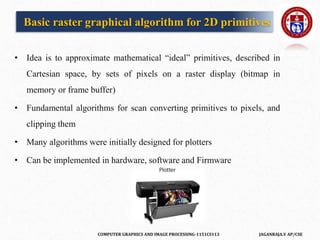
• Many algorithms were initially designed for plotters
• Can be implemented in hardware, software and Firmware
COMPUTER GRAPHICS AND IMAGE PROCESSING-1151CS113 JAGANRAJA.V AP/CSE
– lines
– circles, arcs, ellipses
– region filling
– clipping
– alphanumeric symbols – text
– lines, circles, character generators (bitmaps), fonts
• Want efficiency & speed (often drawing many primitives)
Primitives
COMPUTER GRAPHICS AND IMAGE PROCESSING-1151CS113 JAGANRAJA.V AP/CSE
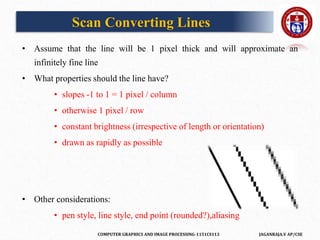
Scan Converting Lines
• Assume that the line will be 1 pixel thick and will approximate an
infinitely fine line
• What properties should the line have?
• slopes -1 to 1 = 1 pixel / column
• otherwise 1 pixel / row
• constant brightness (irrespective of length or orientation)
• drawn as rapidly as possible
• Other considerations:
• pen style, line style, end point (rounded?),aliasing
COMPUTER GRAPHICS AND IMAGE PROCESSING-1151CS113 JAGANRAJA.V AP/CSE
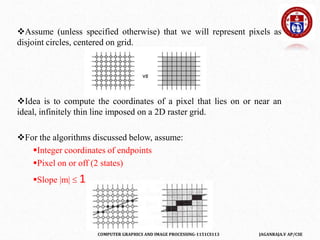
Assume (unless specified otherwise) that we will represent pixels as
disjoint circles, centered on grid.
Idea is to compute the coordinates of a pixel that lies on or near an
ideal, infinitely thin line imposed on a 2D raster grid.
For the algorithms discussed below, assume:
Integer coordinates of endpoints
Pixel on or off (2 states)
Slope |m|  1
COMPUTER GRAPHICS AND IMAGE PROCESSING-1151CS113 JAGANRAJA.V AP/CSE
Introduction to Line Drawing Algorithm
Line drawing on the computer means the computer screen is dividing into
two parts rows and columns.
Those rows and columns are also known as Pixels.
In case we have to draw a line on the computer, first of all, we need to
know which pixels should be on.
A line is a part of a straight line that extends in the opposite direction
indefinitely.
The line is defined by two Endpoints. Its density should be separate from
the length of the line.
The formula for a line interception of the slope:
Y = mx + b
COMPUTER GRAPHICS AND IMAGE PROCESSING-1151CS113 JAGANRAJA.V AP/CSE
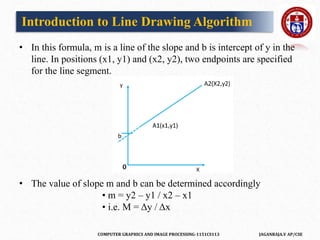
• In this formula, m is a line of the slope and b is intercept of y in the
line. In positions (x1, y1) and (x2, y2), two endpoints are specified
for the line segment.
• The value of slope m and b can be determined accordingly
• m = y2 – y1 / x2 – x1
• i.e. M = Δy / Δx
Introduction to Line Drawing Algorithm
COMPUTER GRAPHICS AND IMAGE PROCESSING-1151CS113 JAGANRAJA.V AP/CSE
EXAMPLE
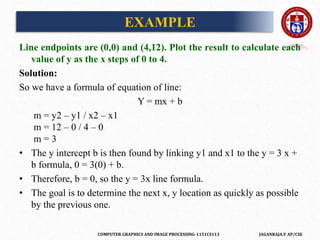
Line endpoints are (0,0) and (4,12). Plot the result to calculate each
value of y as the x steps of 0 to 4.
Solution:
So we have a formula of equation of line:
Y = mx + b
m = y2 – y1 / x2 – x1
m = 12 – 0 / 4 – 0
m = 3
• The y intercept b is then found by linking y1 and x1 to the y = 3 x +
b formula, 0 = 3(0) + b.
• Therefore, b = 0, so the y = 3x line formula.
• The goal is to determine the next x, y location as quickly as possible
by the previous one.
COMPUTER GRAPHICS AND IMAGE PROCESSING-1151CS113 JAGANRAJA.V AP/CSE
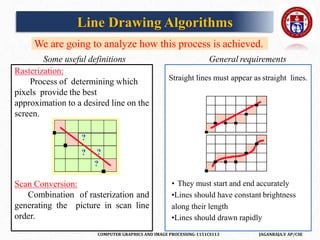
We are going to analyze how this process is achieved.
Some useful definitions General requirements
Straight lines must appear as straight lines.
• They must start and end accurately
•Lines should have constant brightness
along their length
•Lines should drawn rapidly
Rasterization:
Process of determining which
pixels provide the best
approximation to a desired line on the
screen.
Scan Conversion:
Combination of rasterization and
generating the picture in scan line
order.
Line Drawing Algorithms
COMPUTER GRAPHICS AND IMAGE PROCESSING-1151CS113 JAGANRAJA.V AP/CSE
Line Drawing Algorithms
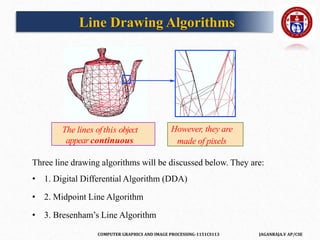
Three line drawing algorithms will be discussed below. They are:
• 1. Digital Differential Algorithm (DDA)
• 2. Midpoint Line Algorithm
• 3. Bresenham’s Line Algorithm
The lines ofthis object
appear continuous
However, they are
made of pixels
COMPUTER GRAPHICS AND IMAGE PROCESSING-1151CS113 JAGANRAJA.V AP/CSE
1. Digital Differential Algorithm ( DDA)
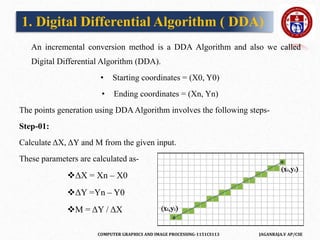
An incremental conversion method is a DDA Algorithm and also we called
Digital Differential Algorithm (DDA).
• Starting coordinates = (X0, Y0)
• Ending coordinates = (Xn, Yn)
The points generation using DDA Algorithm involves the following steps-
Step-01:
Calculate ΔX, ΔY and M from the given input.
These parameters are calculated as-
ΔX = Xn – X0
ΔY =Yn – Y0
M = ΔY / ΔX
COMPUTER GRAPHICS AND IMAGE PROCESSING-1151CS113 JAGANRAJA.V AP/CSE
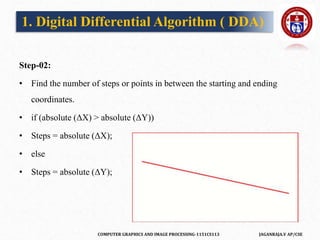
Step-02:
• Find the number of steps or points in between the starting and ending
coordinates.
• if (absolute (ΔX) > absolute (ΔY))
• Steps = absolute (ΔX);
• else
• Steps = absolute (ΔY);
1. Digital Differential Algorithm ( DDA)
COMPUTER GRAPHICS AND IMAGE PROCESSING-1151CS113 JAGANRAJA.V AP/CSE
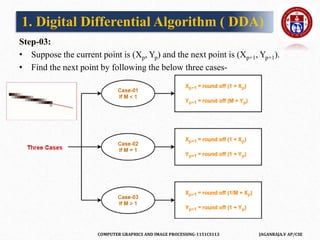
Step-03:
• Suppose the current point is (Xp, Yp) and the next point is (Xp+1, Yp+1).
• Find the next point by following the below three cases-
1. Digital Differential Algorithm ( DDA)
COMPUTER GRAPHICS AND IMAGE PROCESSING-1151CS113 JAGANRAJA.V AP/CSE
Step-04:
• Keep repeating Step-03 until the end point is reached or the number of
generated new points (including the starting and ending points) equals to the
steps count.
PRACTICE PROBLEMS BASED ON DDAALGORITHM-
Problem-01:
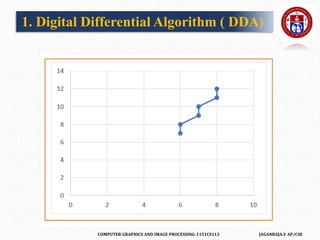
Calculate the points between the starting point (5, 6) and ending point (8, 12).
Solution-
• Given-
• Starting coordinates = (X0, Y0) = (5, 6)
• Ending coordinates = (Xn, Yn) = (8, 12)
1. Digital Differential Algorithm ( DDA)
COMPUTER GRAPHICS AND IMAGE PROCESSING-1151CS113 JAGANRAJA.V AP/CSE
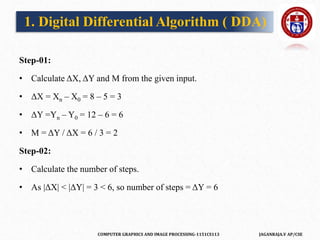
Step-01:
• Calculate ΔX, ΔY and M from the given input.
• ΔX = Xn – X0 = 8 – 5 = 3
• ΔY =Yn – Y0 = 12 – 6 = 6
• M = ΔY / ΔX = 6 / 3 = 2
Step-02:
• Calculate the number of steps.
• As |ΔX| < |ΔY| = 3 < 6, so number of steps = ΔY = 6
1. Digital Differential Algorithm ( DDA)
COMPUTER GRAPHICS AND IMAGE PROCESSING-1151CS113 JAGANRAJA.V AP/CSE
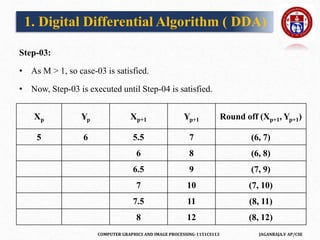
Step-03:
• As M > 1, so case-03 is satisfied.
• Now, Step-03 is executed until Step-04 is satisfied.
Xp Yp Xp+1 Yp+1 Round off (Xp+1, Yp+1)
5 6 5.5 7 (6, 7)
6 8 (6, 8)
6.5 9 (7, 9)
7 10 (7, 10)
7.5 11 (8, 11)
8 12 (8, 12)
1. Digital Differential Algorithm ( DDA)
COMPUTER GRAPHICS AND IMAGE PROCESSING-1151CS113 JAGANRAJA.V AP/CSE
1. Digital Differential Algorithm ( DDA)
COMPUTER GRAPHICS AND IMAGE PROCESSING-1151CS113 JAGANRAJA.V AP/CSE
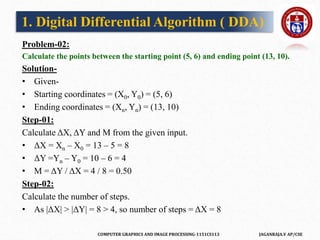
Problem-02:
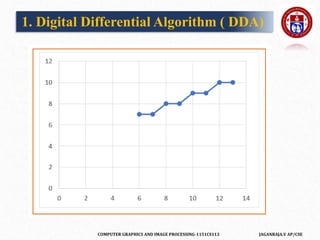
Calculate the points between the starting point (5, 6) and ending point (13, 10).
Solution-
• Given-
• Starting coordinates = (X0, Y0) = (5, 6)
• Ending coordinates = (Xn, Yn) = (13, 10)
Step-01:
Calculate ΔX, ΔY and M from the given input.
• ΔX = Xn – X0 = 13 – 5 = 8
• ΔY =Yn – Y0 = 10 – 6 = 4
• M = ΔY / ΔX = 4 / 8 = 0.50
Step-02:
Calculate the number of steps.
• As |ΔX| > |ΔY| = 8 > 4, so number of steps = ΔX = 8
1. Digital Differential Algorithm ( DDA)
COMPUTER GRAPHICS AND IMAGE PROCESSING-1151CS113 JAGANRAJA.V AP/CSE
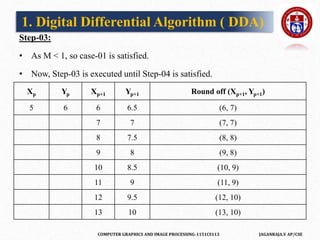
Step-03:
• As M < 1, so case-01 is satisfied.
• Now, Step-03 is executed until Step-04 is satisfied.
1. Digital Differential Algorithm ( DDA)
Xp Yp Xp+1 Yp+1 Round off (Xp+1, Yp+1)
5 6 6 6.5 (6, 7)
7 7 (7, 7)
8 7.5 (8, 8)
9 8 (9, 8)
10 8.5 (10, 9)
11 9 (11, 9)
12 9.5 (12, 10)
13 10 (13, 10)
COMPUTER GRAPHICS AND IMAGE PROCESSING-1151CS113 JAGANRAJA.V AP/CSE
1. Digital Differential Algorithm ( DDA)
COMPUTER GRAPHICS AND IMAGE PROCESSING-1151CS113 JAGANRAJA.V AP/CSE
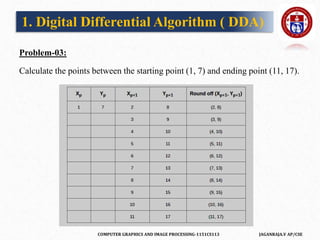
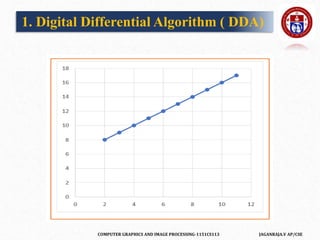
Problem-03:
Calculate the points between the starting point (1, 7) and ending point (11, 17).
1. Digital Differential Algorithm ( DDA)
COMPUTER GRAPHICS AND IMAGE PROCESSING-1151CS113 JAGANRAJA.V AP/CSE
1. Digital Differential Algorithm ( DDA)
COMPUTER GRAPHICS AND IMAGE PROCESSING-1151CS113 JAGANRAJA.V AP/CSE
Advantages of DDAAlgorithm-
• It is a simple algorithm.
• It is easy to implement.
• It avoids using the multiplication operation which is costly in terms of time
complexity.
Disadvantages of DDAAlgorithm-
• There is an extra overhead of using round off( ) function.
• Using round off( ) function increases time complexity of the algorithm.
• Resulted lines are not smooth because of round off( ) function.
• The points generated by this algorithm are not accurate.
1. Digital Differential Algorithm ( DDA)
COMPUTER GRAPHICS AND IMAGE PROCESSING-1151CS113 JAGANRAJA.V AP/CSE
2.Bresenham Line Drawing Algorithm
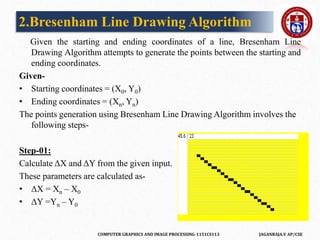
Given the starting and ending coordinates of a line, Bresenham Line
Drawing Algorithm attempts to generate the points between the starting and
ending coordinates.
Given-
• Starting coordinates = (X0, Y0)
• Ending coordinates = (Xn, Yn)
The points generation using Bresenham Line Drawing Algorithm involves the
following steps-
Step-01:
Calculate ΔX and ΔY from the given input.
These parameters are calculated as-
• ΔX = Xn – X0
• ΔY =Yn – Y0
COMPUTER GRAPHICS AND IMAGE PROCESSING-1151CS113 JAGANRAJA.V AP/CSE
Step-02:
• Calculate the decision parameter Pk.
• It is calculated as-
• Pk = 2ΔY – ΔX
Step-03:
• Suppose the current point is (Xk, Yk) and the next point is (Xk+1, Yk+1).
• Find the next point depending on the value of decision parameter Pk.
• Follow the below two cases-
2.Bresenham Line Drawing Algorithm
COMPUTER GRAPHICS AND IMAGE PROCESSING-1151CS113 JAGANRAJA.V AP/CSE
2.Bresenham Line Drawing Algorithm
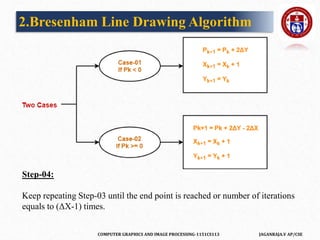
Step-04:
Keep repeating Step-03 until the end point is reached or number of iterations
equals to (ΔX-1) times.
COMPUTER GRAPHICS AND IMAGE PROCESSING-1151CS113 JAGANRAJA.V AP/CSE
PRACTICE PROBLEMS BASED ON BRESENHAM LINE DRAWING
ALGORITHM-
Problem-01:
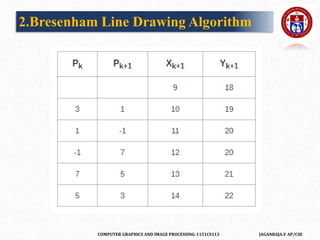
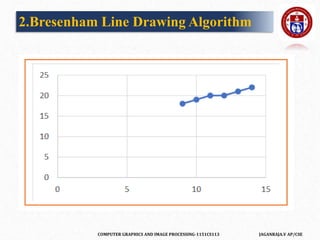
Calculate the points between the starting coordinates (9, 18) and ending
coordinates (14, 22).
Solution-
Given-
Starting coordinates = (X0, Y0) = (9, 18)
Ending coordinates = (Xn, Yn) = (14, 22)
2.Bresenham Line Drawing Algorithm
COMPUTER GRAPHICS AND IMAGE PROCESSING-1151CS113 JAGANRAJA.V AP/CSE
Step-01:
Calculate ΔX and ΔY from the given input.
ΔX = Xn – X0 = 14 – 9 = 5
ΔY =Yn – Y0 = 22 – 18 = 4
Step-02:
Calculate the decision parameter.
Pk
= 2ΔY – ΔX
= 2 x 4 – 5
= 3 So, decision parameter Pk = 3
2.Bresenham Line Drawing Algorithm
COMPUTER GRAPHICS AND IMAGE PROCESSING-1151CS113 JAGANRAJA.V AP/CSE
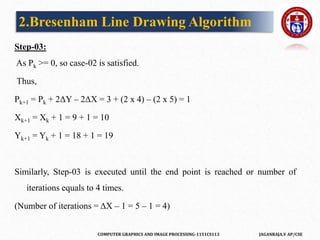
Step-03:
As Pk >= 0, so case-02 is satisfied.
Thus,
Pk+1 = Pk + 2ΔY – 2ΔX = 3 + (2 x 4) – (2 x 5) = 1
Xk+1 = Xk + 1 = 9 + 1 = 10
Yk+1 = Yk + 1 = 18 + 1 = 19
Similarly, Step-03 is executed until the end point is reached or number of
iterations equals to 4 times.
(Number of iterations = ΔX – 1 = 5 – 1 = 4)
2.Bresenham Line Drawing Algorithm
COMPUTER GRAPHICS AND IMAGE PROCESSING-1151CS113 JAGANRAJA.V AP/CSE
2.Bresenham Line Drawing Algorithm
COMPUTER GRAPHICS AND IMAGE PROCESSING-1151CS113 JAGANRAJA.V AP/CSE
2.Bresenham Line Drawing Algorithm
COMPUTER GRAPHICS AND IMAGE PROCESSING-1151CS113 JAGANRAJA.V AP/CSE
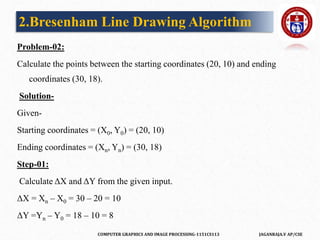
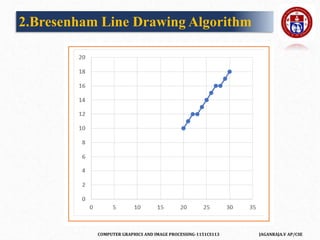
Problem-02:
Calculate the points between the starting coordinates (20, 10) and ending
coordinates (30, 18).
Solution-
Given-
Starting coordinates = (X0, Y0) = (20, 10)
Ending coordinates = (Xn, Yn) = (30, 18)
Step-01:
Calculate ΔX and ΔY from the given input.
ΔX = Xn – X0 = 30 – 20 = 10
ΔY =Yn – Y0 = 18 – 10 = 8
2.Bresenham Line Drawing Algorithm
COMPUTER GRAPHICS AND IMAGE PROCESSING-1151CS113 JAGANRAJA.V AP/CSE
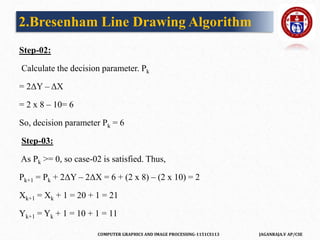
Step-02:
Calculate the decision parameter. Pk
= 2ΔY – ΔX
= 2 x 8 – 10= 6
So, decision parameter Pk = 6
Step-03:
As Pk >= 0, so case-02 is satisfied. Thus,
Pk+1 = Pk + 2ΔY – 2ΔX = 6 + (2 x 8) – (2 x 10) = 2
Xk+1 = Xk + 1 = 20 + 1 = 21
Yk+1 = Yk + 1 = 10 + 1 = 11
2.Bresenham Line Drawing Algorithm
COMPUTER GRAPHICS AND IMAGE PROCESSING-1151CS113 JAGANRAJA.V AP/CSE
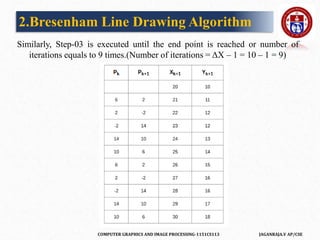
Similarly, Step-03 is executed until the end point is reached or number of
iterations equals to 9 times.(Number of iterations = ΔX – 1 = 10 – 1 = 9)
2.Bresenham Line Drawing Algorithm
COMPUTER GRAPHICS AND IMAGE PROCESSING-1151CS113 JAGANRAJA.V AP/CSE
2.Bresenham Line Drawing Algorithm
COMPUTER GRAPHICS AND IMAGE PROCESSING-1151CS113 JAGANRAJA.V AP/CSE
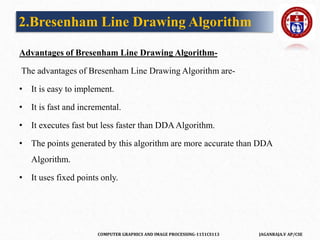
Advantages of Bresenham Line Drawing Algorithm-
The advantages of Bresenham Line Drawing Algorithm are-
• It is easy to implement.
• It is fast and incremental.
• It executes fast but less faster than DDAAlgorithm.
• The points generated by this algorithm are more accurate than DDA
Algorithm.
• It uses fixed points only.
2.Bresenham Line Drawing Algorithm
COMPUTER GRAPHICS AND IMAGE PROCESSING-1151CS113 JAGANRAJA.V AP/CSE
Disadvantages of Bresenham Line Drawing Algorithm-
• The disadvantages of Bresenham Line Drawing Algorithm are-
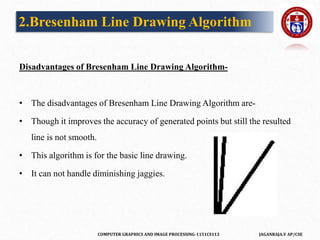
• Though it improves the accuracy of generated points but still the resulted
line is not smooth.
• This algorithm is for the basic line drawing.
• It can not handle diminishing jaggies.
2.Bresenham Line Drawing Algorithm
COMPUTER GRAPHICS AND IMAGE PROCESSING-1151CS113 JAGANRAJA.V AP/CSE
Given the starting and ending coordinates of a line, Mid Point Line Drawing
Algorithm attempts to generate the points between the starting and ending
coordinates.
Given-
Starting coordinates = (X0, Y0)
Ending coordinates = (Xn, Yn)
The points generation using Mid Point Line Drawing Algorithm involves the
following steps-
Step-01:
Calculate ΔX and ΔY from the given input.
These parameters are calculated as-
ΔX = Xn – X0
ΔY =Yn – Y0
3.MidPoint Line Drawing Algorithm
COMPUTER GRAPHICS AND IMAGE PROCESSING-1151CS113 JAGANRAJA.V AP/CSE
Step-02:
Calculate the value of initial decision parameter and ΔD.
These parameters are calculated as-
• Dinitial = 2ΔY – ΔX
• ΔD = 2(ΔY – ΔX)
Step-03:
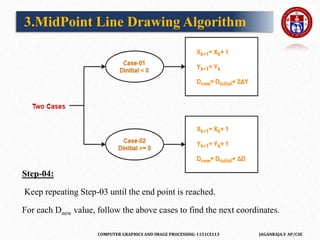
The decision whether to increment X or Y coordinate depends upon the
flowing values of Dinitial.
Follow the below two cases-
3.MidPoint Line Drawing Algorithm
COMPUTER GRAPHICS AND IMAGE PROCESSING-1151CS113 JAGANRAJA.V AP/CSE
Step-04:
Keep repeating Step-03 until the end point is reached.
For each Dnew value, follow the above cases to find the next coordinates.
3.MidPoint Line Drawing Algorithm
COMPUTER GRAPHICS AND IMAGE PROCESSING-1151CS113 JAGANRAJA.V AP/CSE
PRACTICE PROBLEMS BASED ON MID POINT LINE DRAWING
ALGORITHM-
Problem-01:
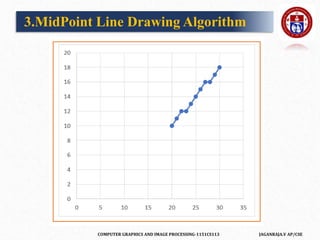
Calculate the points between the starting coordinates (20, 10) and ending
coordinates (30, 18).
Solution-
Given-
Starting coordinates = (X0, Y0) = (20, 10)
Ending coordinates = (Xn, Yn) = (30, 18)
3.MidPoint Line Drawing Algorithm
COMPUTER GRAPHICS AND IMAGE PROCESSING-1151CS113 JAGANRAJA.V AP/CSE
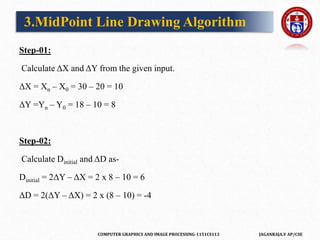
Step-01:
Calculate ΔX and ΔY from the given input.
ΔX = Xn – X0 = 30 – 20 = 10
ΔY =Yn – Y0 = 18 – 10 = 8
Step-02:
Calculate Dinitial and ΔD as-
Dinitial = 2ΔY – ΔX = 2 x 8 – 10 = 6
ΔD = 2(ΔY – ΔX) = 2 x (8 – 10) = -4
3.MidPoint Line Drawing Algorithm
COMPUTER GRAPHICS AND IMAGE PROCESSING-1151CS113 JAGANRAJA.V AP/CSE
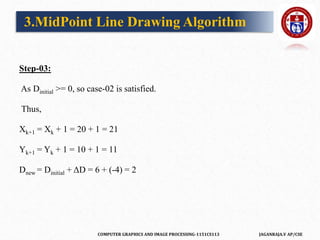
Step-03:
As Dinitial >= 0, so case-02 is satisfied.
Thus,
Xk+1 = Xk + 1 = 20 + 1 = 21
Yk+1 = Yk + 1 = 10 + 1 = 11
Dnew = Dinitial + ΔD = 6 + (-4) = 2
3.MidPoint Line Drawing Algorithm
COMPUTER GRAPHICS AND IMAGE PROCESSING-1151CS113 JAGANRAJA.V AP/CSE
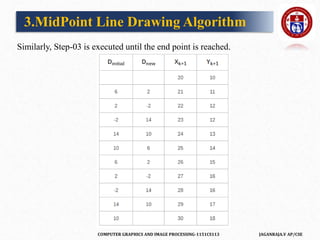
Similarly, Step-03 is executed until the end point is reached.
3.MidPoint Line Drawing Algorithm
COMPUTER GRAPHICS AND IMAGE PROCESSING-1151CS113 JAGANRAJA.V AP/CSE
3.MidPoint Line Drawing Algorithm
COMPUTER GRAPHICS AND IMAGE PROCESSING-1151CS113 JAGANRAJA.V AP/CSE
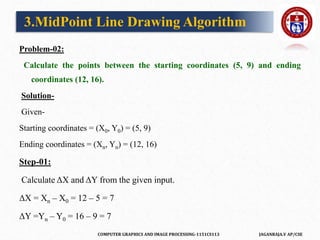
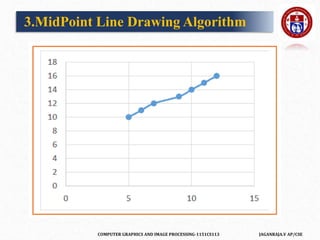
Problem-02:
Calculate the points between the starting coordinates (5, 9) and ending
coordinates (12, 16).
Solution-
Given-
Starting coordinates = (X0, Y0) = (5, 9)
Ending coordinates = (Xn, Yn) = (12, 16)
Step-01:
Calculate ΔX and ΔY from the given input.
ΔX = Xn – X0 = 12 – 5 = 7
ΔY =Yn – Y0 = 16 – 9 = 7
3.MidPoint Line Drawing Algorithm
COMPUTER GRAPHICS AND IMAGE PROCESSING-1151CS113 JAGANRAJA.V AP/CSE
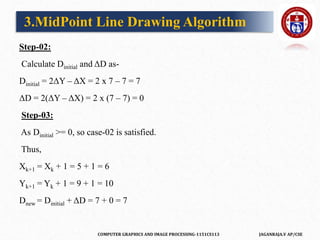
Step-02:
Calculate Dinitial and ΔD as-
Dinitial = 2ΔY – ΔX = 2 x 7 – 7 = 7
ΔD = 2(ΔY – ΔX) = 2 x (7 – 7) = 0
Step-03:
As Dinitial >= 0, so case-02 is satisfied.
Thus,
Xk+1 = Xk + 1 = 5 + 1 = 6
Yk+1 = Yk + 1 = 9 + 1 = 10
Dnew = Dinitial + ΔD = 7 + 0 = 7
3.MidPoint Line Drawing Algorithm
COMPUTER GRAPHICS AND IMAGE PROCESSING-1151CS113 JAGANRAJA.V AP/CSE
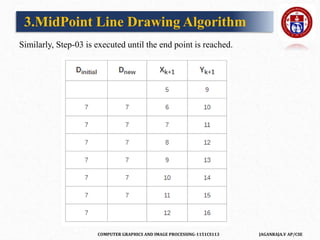
Similarly, Step-03 is executed until the end point is reached.
3.MidPoint Line Drawing Algorithm
COMPUTER GRAPHICS AND IMAGE PROCESSING-1151CS113 JAGANRAJA.V AP/CSE
3.MidPoint Line Drawing Algorithm
COMPUTER GRAPHICS AND IMAGE PROCESSING-1151CS113 JAGANRAJA.V AP/CSE
Advantages of Mid Point Line Drawing Algorithm-
The advantages of Mid Point Line Drawing Algorithm are-
• Accuracy of finding points is a key feature of this algorithm.
• It is simple to implement.
• It uses basic arithmetic operations.
• It takes less time for computation.
• The resulted line is smooth as compared to other line drawing algorithms.
3.MidPoint Line Drawing Algorithm
COMPUTER GRAPHICS AND IMAGE PROCESSING-1151CS113 JAGANRAJA.V AP/CSE
Disadvantages of Mid Point Line Drawing Algorithm-
• The disadvantages of Mid Point Line Drawing Algorithm are-
• This algorithm may not be an ideal choice for complex graphics and
images.
• In terms of accuracy of finding points, improvement is still needed.
• There is no any remarkable improvement made by this algorithm.
3.MidPoint Line Drawing Algorithm
COMPUTER GRAPHICS AND IMAGE PROCESSING-1151CS113 JAGANRAJA.V AP/CSE
 It is not easy to display a continuous smooth arc on the computer screen as
our computer screen is made of pixels organized in matrix form.
 So, to draw a circle on a computer screen we should always choose the
nearest pixels from a printed pixel so as they could form an arc.
 There are two algorithm to do this:
• Mid-Point circle drawing algorithm
• Bresenham’s circle drawing algorithm
Circle Drawing Algorithm
COMPUTER GRAPHICS AND IMAGE PROCESSING-1151CS113 JAGANRAJA.V AP/CSE
Midpoint Circle Drawing Algorithm
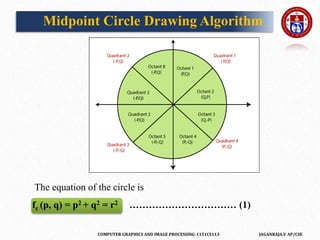
• The midpoint circle drawing algorithm helps us to calculate the complete
perimeter points of a circle for the first octant.
• We can quickly find and calculate the points of other octants with the help
of the first octant points.
• The remaining points are the mirror reflection of the first octant points
• In this algorithm, we define the unit interval and consider the nearest point
of the circle boundary in each step.
• Let us assume we have a point a (p, q) on the boundary of the circle and
with r radius satisfying the equation fc (p, q) = 0
COMPUTER GRAPHICS AND IMAGE PROCESSING-1151CS113 JAGANRAJA.V AP/CSE
Midpoint Circle Drawing Algorithm
The equation of the circle is
fc (p, q) = p2 + q2 = r2 …………………………… (1)
COMPUTER GRAPHICS AND IMAGE PROCESSING-1151CS113 JAGANRAJA.V AP/CSE
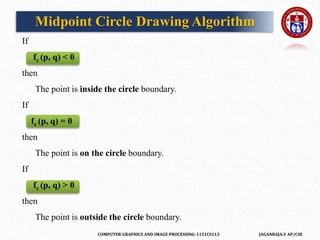
If
fc (p, q) < 0
then
The point is inside the circle boundary.
If
fc (p, q) = 0
then
The point is on the circle boundary.
If
fc (p, q) > 0
then
The point is outside the circle boundary.
Midpoint Circle Drawing Algorithm
COMPUTER GRAPHICS AND IMAGE PROCESSING-1151CS113 JAGANRAJA.V AP/CSE
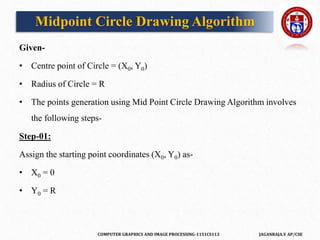
Given-
• Centre point of Circle = (X0, Y0)
• Radius of Circle = R
• The points generation using Mid Point Circle Drawing Algorithm involves
the following steps-
Step-01:
Assign the starting point coordinates (X0, Y0) as-
• X0 = 0
• Y0 = R
Midpoint Circle Drawing Algorithm
COMPUTER GRAPHICS AND IMAGE PROCESSING-1151CS113 JAGANRAJA.V AP/CSE
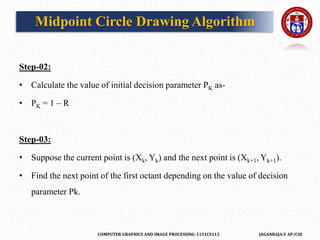
Step-02:
• Calculate the value of initial decision parameter PK as-
• PK = 1 – R
Step-03:
• Suppose the current point is (Xk, Yk) and the next point is (Xk+1, Yk+1).
• Find the next point of the first octant depending on the value of decision
parameter Pk.
Midpoint Circle Drawing Algorithm
COMPUTER GRAPHICS AND IMAGE PROCESSING-1151CS113 JAGANRAJA.V AP/CSE
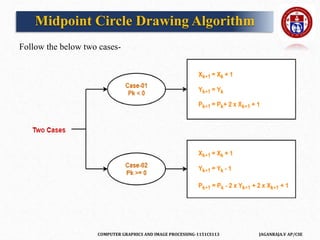
Follow the below two cases-
Midpoint Circle Drawing Algorithm
COMPUTER GRAPHICS AND IMAGE PROCESSING-1151CS113 JAGANRAJA.V AP/CSE
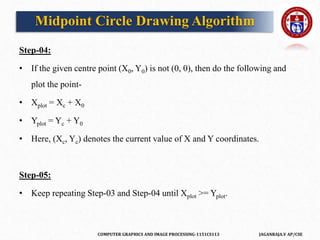
Step-04:
• If the given centre point (X0, Y0) is not (0, 0), then do the following and
plot the point-
• Xplot = Xc + X0
• Yplot = Yc + Y0
• Here, (Xc, Yc) denotes the current value of X and Y coordinates.
Step-05:
• Keep repeating Step-03 and Step-04 until Xplot >= Yplot.
Midpoint Circle Drawing Algorithm
COMPUTER GRAPHICS AND IMAGE PROCESSING-1151CS113 JAGANRAJA.V AP/CSE
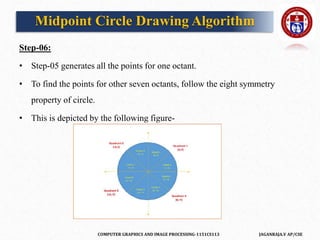
Step-06:
• Step-05 generates all the points for one octant.
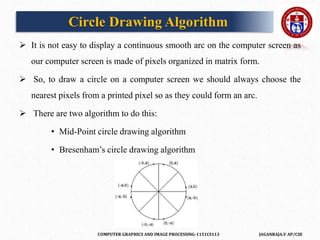
• To find the points for other seven octants, follow the eight symmetry
property of circle.
• This is depicted by the following figure-
Midpoint Circle Drawing Algorithm
COMPUTER GRAPHICS AND IMAGE PROCESSING-1151CS113 JAGANRAJA.V AP/CSE
PRACTICE PROBLEMS BASED ON MID POINT CIRCLE DRAWING
ALGORITHM
Problem-01:
Given the centre point coordinates (0, 0) and radius as 10, generate all the
points to form a circle.
Solution-
Given-
• Centre Coordinates of Circle (X0, Y0) = (0, 0)
• Radius of Circle = 10
Midpoint Circle Drawing Algorithm
COMPUTER GRAPHICS AND IMAGE PROCESSING-1151CS113 JAGANRAJA.V AP/CSE
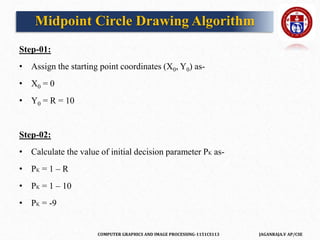
Step-01:
• Assign the starting point coordinates (X0, Y0) as-
• X0 = 0
• Y0 = R = 10
Step-02:
• Calculate the value of initial decision parameter PK as-
• PK = 1 – R
• PK = 1 – 10
• PK = -9
Midpoint Circle Drawing Algorithm
COMPUTER GRAPHICS AND IMAGE PROCESSING-1151CS113 JAGANRAJA.V AP/CSE
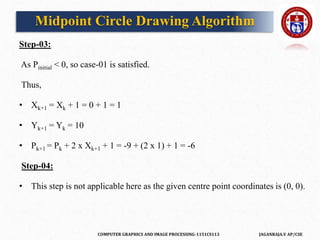
Step-03:
As Pinitial < 0, so case-01 is satisfied.
Thus,
• Xk+1 = Xk + 1 = 0 + 1 = 1
• Yk+1 = Yk = 10
• Pk+1 = Pk + 2 x Xk+1 + 1 = -9 + (2 x 1) + 1 = -6
Step-04:
• This step is not applicable here as the given centre point coordinates is (0, 0).
Midpoint Circle Drawing Algorithm
COMPUTER GRAPHICS AND IMAGE PROCESSING-1151CS113 JAGANRAJA.V AP/CSE
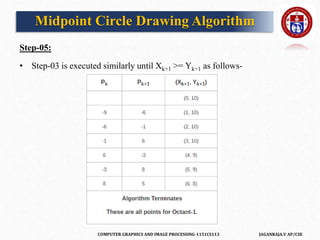
Step-05:
• Step-03 is executed similarly until Xk+1 >= Yk+1 as follows-
Midpoint Circle Drawing Algorithm
COMPUTER GRAPHICS AND IMAGE PROCESSING-1151CS113 JAGANRAJA.V AP/CSE
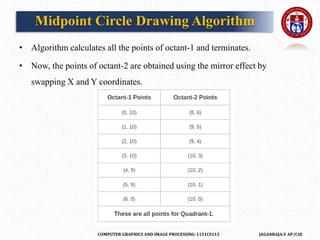
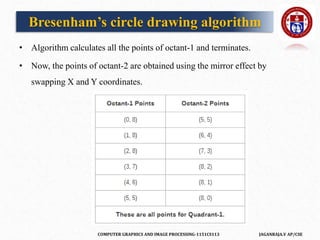
• Algorithm calculates all the points of octant-1 and terminates.
• Now, the points of octant-2 are obtained using the mirror effect by
swapping X and Y coordinates.
Midpoint Circle Drawing Algorithm
COMPUTER GRAPHICS AND IMAGE PROCESSING-1151CS113 JAGANRAJA.V AP/CSE
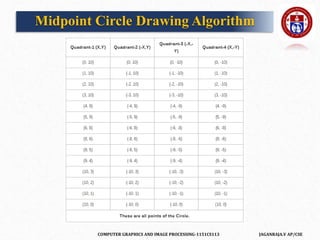
• Now, the points for rest of the part are generated by following the signs of
other quadrants.
• The other points can also be generated by calculating each octant
separately.
• Here, all the points have been generated with respect to quadrant-1-
Midpoint Circle Drawing Algorithm
COMPUTER GRAPHICS AND IMAGE PROCESSING-1151CS113 JAGANRAJA.V AP/CSE
Midpoint Circle Drawing Algorithm
COMPUTER GRAPHICS AND IMAGE PROCESSING-1151CS113 JAGANRAJA.V AP/CSE
Advantages of Midpoint circle drawing algorithm
 It is a powerful and efficient algorithm.
 The midpoint circle drawing algorithm is easy to implement.
 It is also an algorithm based on a simple circle equation (x2 + y2 = r2).
 This algorithm helps to create curves on a raster display.
Disadvantages of Midpoint circle drawing algorithm
 It is a time-consuming algorithm.
 Sometimes the points of the circle are not accurate.
Midpoint Circle Drawing Algorithm
COMPUTER GRAPHICS AND IMAGE PROCESSING-1151CS113 JAGANRAJA.V AP/CSE
• Bresenham’s algorithm is also used for circle drawing. It is known as
Bresenhams’s circle drawing algorithm.
• It helps us to draw a circle. The circle generation is more complicated than
drawing a line.
• In this algorithm, we will select the closest pixel position to complete the
arc. We cannot represent the continuous arc in the raster display system.
• The different part of this algorithm is that we only use arithmetic integer.
We can perform the calculation faster than other algorithms.
Bresenham’s circle drawing algorithm
COMPUTER GRAPHICS AND IMAGE PROCESSING-1151CS113 JAGANRAJA.V AP/CSE
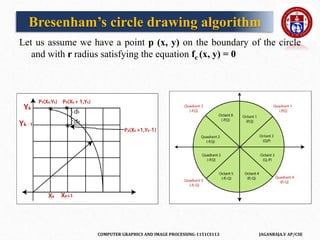
Let us assume we have a point p (x, y) on the boundary of the circle
and with r radius satisfying the equation fc (x, y) = 0
Bresenham’s circle drawing algorithm
COMPUTER GRAPHICS AND IMAGE PROCESSING-1151CS113 JAGANRAJA.V AP/CSE
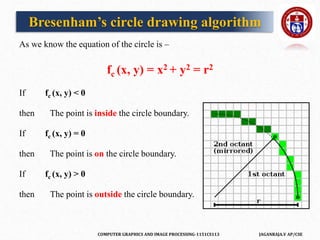
As we know the equation of the circle is –
fc (x, y) = x2 + y2 = r2
If fc (x, y) < 0
then The point is inside the circle boundary.
If fc (x, y) = 0
then The point is on the circle boundary.
If fc (x, y) > 0
then The point is outside the circle boundary.
Bresenham’s circle drawing algorithm
COMPUTER GRAPHICS AND IMAGE PROCESSING-1151CS113 JAGANRAJA.V AP/CSE
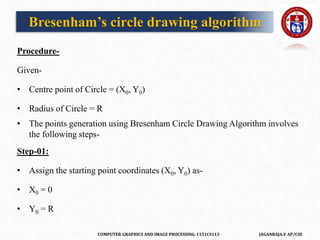
Procedure-
Given-
• Centre point of Circle = (X0, Y0)
• Radius of Circle = R
• The points generation using Bresenham Circle Drawing Algorithm involves
the following steps-
Step-01:
• Assign the starting point coordinates (X0, Y0) as-
• X0 = 0
• Y0 = R
Bresenham’s circle drawing algorithm
COMPUTER GRAPHICS AND IMAGE PROCESSING-1151CS113 JAGANRAJA.V AP/CSE
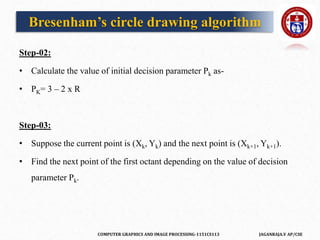
Step-02:
• Calculate the value of initial decision parameter Pk as-
• PK= 3 – 2 x R
Step-03:
• Suppose the current point is (Xk, Yk) and the next point is (Xk+1, Yk+1).
• Find the next point of the first octant depending on the value of decision
parameter Pk.
Bresenham’s circle drawing algorithm
COMPUTER GRAPHICS AND IMAGE PROCESSING-1151CS113 JAGANRAJA.V AP/CSE
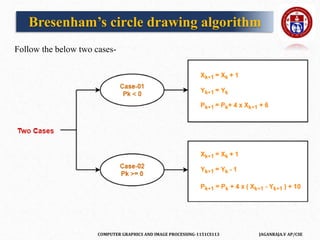
Follow the below two cases-
Bresenham’s circle drawing algorithm
COMPUTER GRAPHICS AND IMAGE PROCESSING-1151CS113 JAGANRAJA.V AP/CSE
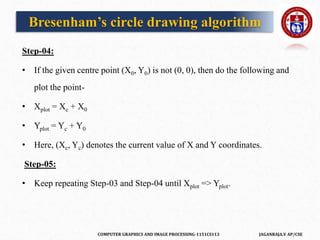
Step-04:
• If the given centre point (X0, Y0) is not (0, 0), then do the following and
plot the point-
• Xplot = Xc + X0
• Yplot = Yc + Y0
• Here, (Xc, Yc) denotes the current value of X and Y coordinates.
Step-05:
• Keep repeating Step-03 and Step-04 until Xplot => Yplot.
Bresenham’s circle drawing algorithm
COMPUTER GRAPHICS AND IMAGE PROCESSING-1151CS113 JAGANRAJA.V AP/CSE
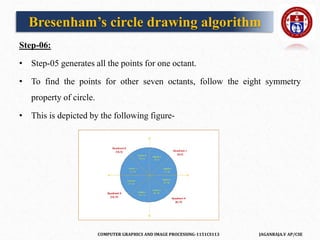
Step-06:
• Step-05 generates all the points for one octant.
• To find the points for other seven octants, follow the eight symmetry
property of circle.
• This is depicted by the following figure-
Bresenham’s circle drawing algorithm
COMPUTER GRAPHICS AND IMAGE PROCESSING-1151CS113 JAGANRAJA.V AP/CSE
PRACTICE PROBLEMS BASED ON BRESENHAM CIRCLE
DRAWING ALGORITHM
Problem-01:
• Given the centre point coordinates (0, 0) and radius as 8, generate all the
points to form a circle.
Solution-
Given-
• Centre Coordinates of Circle (X0, Y0) = (0, 0)
• Radius of Circle = 8
Bresenham’s circle drawing algorithm
COMPUTER GRAPHICS AND IMAGE PROCESSING-1151CS113 JAGANRAJA.V AP/CSE
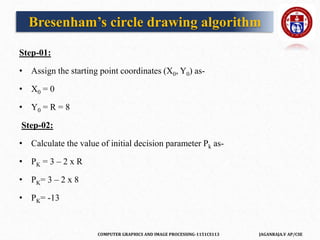
Step-01:
• Assign the starting point coordinates (X0, Y0) as-
• X0 = 0
• Y0 = R = 8
Step-02:
• Calculate the value of initial decision parameter Pk as-
• PK = 3 – 2 x R
• PK= 3 – 2 x 8
• PK= -13
Bresenham’s circle drawing algorithm
COMPUTER GRAPHICS AND IMAGE PROCESSING-1151CS113 JAGANRAJA.V AP/CSE
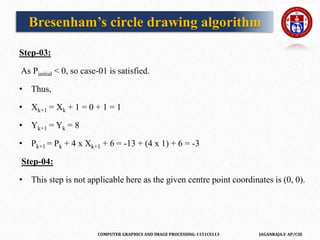
Step-03:
As Pinitial < 0, so case-01 is satisfied.
• Thus,
• Xk+1 = Xk + 1 = 0 + 1 = 1
• Yk+1 = Yk = 8
• Pk+1 = Pk + 4 x Xk+1 + 6 = -13 + (4 x 1) + 6 = -3
Step-04:
• This step is not applicable here as the given centre point coordinates is (0, 0).
Bresenham’s circle drawing algorithm
COMPUTER GRAPHICS AND IMAGE PROCESSING-1151CS113 JAGANRAJA.V AP/CSE
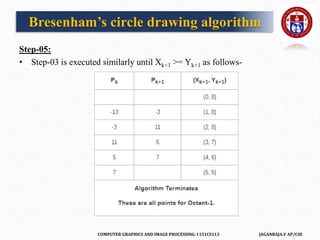
Step-05:
• Step-03 is executed similarly until Xk+1 >= Yk+1 as follows-
Bresenham’s circle drawing algorithm
COMPUTER GRAPHICS AND IMAGE PROCESSING-1151CS113 JAGANRAJA.V AP/CSE
• Algorithm calculates all the points of octant-1 and terminates.
• Now, the points of octant-2 are obtained using the mirror effect by
swapping X and Y coordinates.
Bresenham’s circle drawing algorithm
COMPUTER GRAPHICS AND IMAGE PROCESSING-1151CS113 JAGANRAJA.V AP/CSE
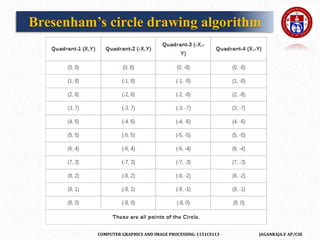
• Now, the points for rest of the part are generated by following the signs of
other quadrants.
• The other points can also be generated by calculating each octant
separately.
• Here, all the points have been generated with respect to quadrant-1-
Bresenham’s circle drawing algorithm
COMPUTER GRAPHICS AND IMAGE PROCESSING-1151CS113 JAGANRAJA.V AP/CSE
Bresenham’s circle drawing algorithm
COMPUTER GRAPHICS AND IMAGE PROCESSING-1151CS113 JAGANRAJA.V AP/CSE
Advantages of Bresenham’s Circle Drawing Algorithm
 It is simple and easy to implement.
 The algorithm is based on simple equation x2 + y2 = r2.
Disadvantages of Bresenham’s Circle Drawing Algorithm
 The plotted points are less accurate than the midpoint circle drawing.
 It is not so good for complex images and high graphics images.
Bresenham’s circle drawing algorithm
COMPUTER GRAPHICS AND IMAGE PROCESSING-1151CS113 JAGANRAJA.V AP/CSE
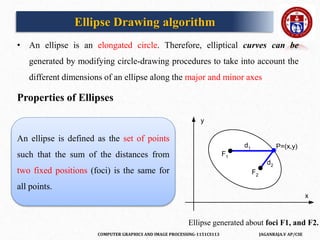
• An ellipse is an elongated circle. Therefore, elliptical curves can be
generated by modifying circle-drawing procedures to take into account the
different dimensions of an ellipse along the major and minor axes
Properties of Ellipses
Ellipse Drawing algorithm
Ellipse generated about foci F1, and F2.
An ellipse is defined as the set of points
such that the sum of the distances from
two fixed positions (foci) is the same for
all points.
y
x
d1
d2
P=(x,y)
F1
F2
COMPUTER GRAPHICS AND IMAGE PROCESSING-1151CS113 JAGANRAJA.V AP/CSE
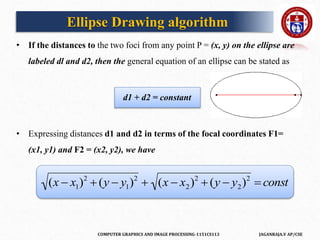
• If the distances to the two foci from any point P = (x, y) on the ellipse are
labeled dl and d2, then the general equation of an ellipse can be stated as
d1 + d2 = constant
• Expressing distances d1 and d2 in terms of the focal coordinates F1=
(x1, y1) and F2 = (x2, y2), we have
Ellipse Drawing algorithm

(x  x1)2
 (y  y1)2
 (x  x2)2
 (y  y2)2
 const
COMPUTER GRAPHICS AND IMAGE PROCESSING-1151CS113 JAGANRAJA.V AP/CSE
• Equation simplified if ellipse axis parallel to coordinate axis
• Parametric form

x  xc
rx






2

y  yc
ry








2
1

x  xc  rx cos
y  yc  ry sin
y
x
ry
rx
xc
yc
Ellipse Drawing algorithm
COMPUTER GRAPHICS AND IMAGE PROCESSING-1151CS113 JAGANRAJA.V AP/CSE
Symmetry Considerations
• 4-way symmetry
• Unit steps in x until reach region boundary
• Switch to unit steps in y
(x,y)
ry
rx
(x,-y)
(-x,y)
(-x,-y)
Region
1
Region 2
S
l
o
p
e
=
-
1
• Step in x while
• Switch to steps in y when
ry
2
x  rx
2
y
ry
2
x  rx
2
y
Ellipse Drawing algorithm
f (x,y)  ry
2
x2
 rx
2
y2
 rx
2
ry
2
dy
dx
 
ry
2
x
rx
2
y
dy
dx
 1
ry
2
x  rx
2
y
COMPUTER GRAPHICS AND IMAGE PROCESSING-1151CS113 JAGANRAJA.V AP/CSE
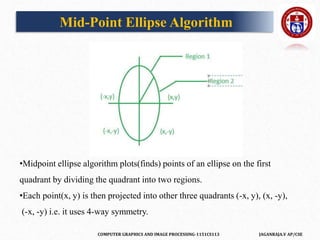
•Midpoint ellipse algorithm plots(finds) points of an ellipse on the first
quadrant by dividing the quadrant into two regions.
•Each point(x, y) is then projected into other three quadrants (-x, y), (x, -y),
(-x, -y) i.e. it uses 4-way symmetry.
Mid-Point Ellipse Algorithm
COMPUTER GRAPHICS AND IMAGE PROCESSING-1151CS113 JAGANRAJA.V AP/CSE
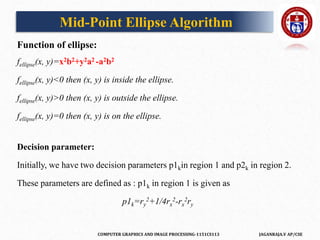
Function of ellipse:
fellipse(x, y)=x2b2+y2a2 -a2b2
fellipse(x, y)<0 then (x, y) is inside the ellipse.
fellipse(x, y)>0 then (x, y) is outside the ellipse.
fellipse(x, y)=0 then (x, y) is on the ellipse.
Decision parameter:
Initially, we have two decision parameters p1kin region 1 and p2k in region 2.
These parameters are defined as : p1k in region 1 is given as
p1k=ry
2+1/4rx
2-rx
2ry
Mid-Point Ellipse Algorithm
COMPUTER GRAPHICS AND IMAGE PROCESSING-1151CS113 JAGANRAJA.V AP/CSE
• In this algorithm the ellipse will be drawn. The center of the ellipse will be
(0,0).
• To draw an ellipse, we solve the algorithm for the first quadrant.
• Points on the other quadrant will be mirrored from the first quadrant.
• The first quadrant has two regions.
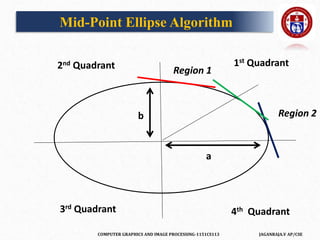
• If we draw a tangent at any point on the ellipse at region 1, the slope of the
tangent must be m<1.
• In the diagram the red tangent with slope <1
• Similarly, if we draw a tangent on the ellipse at any point of region 2, the
slope of the tangent must be greater than one (m>1). In the diagram blue
tangent has a slope >1
Mid-Point Ellipse Algorithm
COMPUTER GRAPHICS AND IMAGE PROCESSING-1151CS113 JAGANRAJA.V AP/CSE
b
a
Mid-Point Ellipse Algorithm
1st Quadrant
2nd Quadrant
3rd Quadrant 4th Quadrant
Region 1
Region 2
COMPUTER GRAPHICS AND IMAGE PROCESSING-1151CS113 JAGANRAJA.V AP/CSE
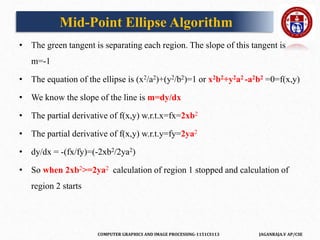
• The green tangent is separating each region. The slope of this tangent is
m=-1
• The equation of the ellipse is (x2/a2)+(y2/b2)=1 or x2b2+y2a2 -a2b2 =0=f(x,y)
• We know the slope of the line is m=dy/dx
• The partial derivative of f(x,y) w.r.t.x=fx=2xb2
• The partial derivative of f(x,y) w.r.t.y=fy=2ya2
• dy/dx = -(fx/fy)=(-2xb2/2ya2)
• So when 2xb2>=2ya2 calculation of region 1 stopped and calculation of
region 2 starts
Mid-Point Ellipse Algorithm
COMPUTER GRAPHICS AND IMAGE PROCESSING-1151CS113 JAGANRAJA.V AP/CSE
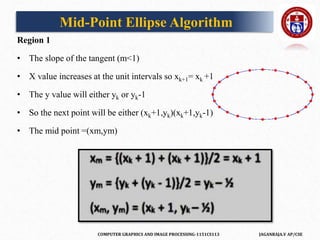
Region 1
• The slope of the tangent (m<1)
• X value increases at the unit intervals so xk+1= xk +1
• The y value will either yk or yk-1
• So the next point will be either (xk+1,yk)(xk+1,yk-1)
• The mid point =(xm,ym)
Mid-Point Ellipse Algorithm
COMPUTER GRAPHICS AND IMAGE PROCESSING-1151CS113 JAGANRAJA.V AP/CSE
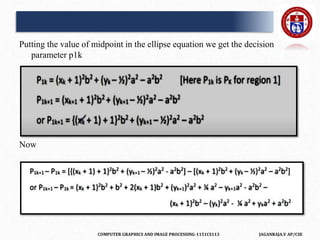
Putting the value of midpoint in the ellipse equation we get the decision
parameter p1k
Now
COMPUTER GRAPHICS AND IMAGE PROCESSING-1151CS113 JAGANRAJA.V AP/CSE
The Ellipse starts from (0,b), therefore putting (0,b) in P1k we get ,
P1k =(0+1)2b2+(b-1/2)2a2-a2b2
Or
P1k =b2+ b2 a2+1/4a2-a2b- a2b2
or
P1k =b2+1/4a2-a2b[initial decision parameter for first region]
Now, if P1k =>=0 then the next coordinate is (xk+1,yk-1)
Else if P1k <0 then the next coordinate is (xk+1,yk)
Mid-Point Ellipse Algorithm
COMPUTER GRAPHICS AND IMAGE PROCESSING-1151CS113 JAGANRAJA.V AP/CSE
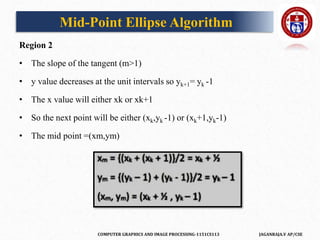
Region 2
• The slope of the tangent (m>1)
• y value decreases at the unit intervals so yk+1= yk -1
• The x value will either xk or xk+1
• So the next point will be either (xk,yk -1) or (xk+1,yk-1)
• The mid point =(xm,ym)
Mid-Point Ellipse Algorithm
COMPUTER GRAPHICS AND IMAGE PROCESSING-1151CS113 JAGANRAJA.V AP/CSE
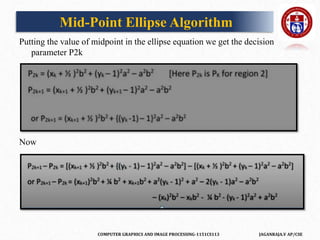
Putting the value of midpoint in the ellipse equation we get the decision
parameter P2k
Now
Mid-Point Ellipse Algorithm
COMPUTER GRAPHICS AND IMAGE PROCESSING-1151CS113 JAGANRAJA.V AP/CSE
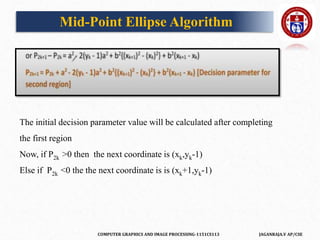
The initial decision parameter value will be calculated after completing
the first region
Now, if P2k >0 then the next coordinate is (xk,yk-1)
Else if P2k <0 the the next coordinate is is (xk+1,yk-1)
Mid-Point Ellipse Algorithm
COMPUTER GRAPHICS AND IMAGE PROCESSING-1151CS113 JAGANRAJA.V AP/CSE
2D and 3D Transformations
Transformations
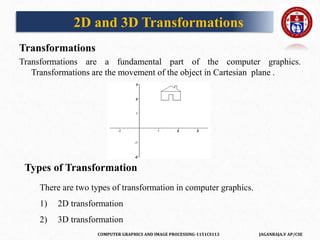
Transformations are a fundamental part of the computer graphics.
Transformations are the movement of the object in Cartesian plane .
Types of Transformation
There are two types of transformation in computer graphics.
1) 2D transformation
2) 3D transformation
COMPUTER GRAPHICS AND IMAGE PROCESSING-1151CS113 JAGANRAJA.V AP/CSE
Types of 2D and 3D transformation
1) Translation
2) Rotation
3) Scaling
4) Shearing
5) Mirror reflection
Why we use Transformation ?
Transformation are used to position objects , to shape object , to change
viewing positions , and even how something is viewed.
In simple words transformation is used for
1) Modeling
2) Viewing
2D and 3D Transformations
https://www.mathwarehouse.com/animated-gifs/transformations.php
COMPUTER GRAPHICS AND IMAGE PROCESSING-1151CS113 JAGANRAJA.V AP/CSE
 When the transformation takes place on a 2D plane .it is called 2D
transformation.
 2D means two dimensional (x-axis and Y-axis
Object Transformation in 2D
 Alter the coordinates descriptions an object
Translation , rotation , scaling , shearing, reflection.
Coordinate system unchanged
Coordinate transformation in 2D
 Produce a different coordinate system
2D Transformation
COMPUTER GRAPHICS AND IMAGE PROCESSING-1151CS113 JAGANRAJA.V AP/CSE
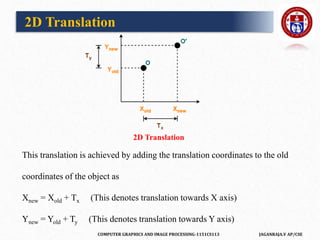
2D Translation is a process of moving an object from one
position to another in a two dimensional plane.
Let-
• Initial coordinates of the object O = (Xold, Yold)
• New coordinates of the object O after translation = (Xnew, Ynew)
• Translation vector or Shift vector = (Tx, Ty)
Given a Translation vector (Tx, Ty)-
• Tx defines the distance the Xold coordinate has to be moved.
• Ty defines the distance the Yold coordinate has to be moved.
2D Translation
COMPUTER GRAPHICS AND IMAGE PROCESSING-1151CS113 JAGANRAJA.V AP/CSE
This translation is achieved by adding the translation coordinates to the old
coordinates of the object as
Xnew = Xold + Tx (This denotes translation towards X axis)
Ynew = Yold + Ty (This denotes translation towards Y axis)
2D Translation
2D Translation
COMPUTER GRAPHICS AND IMAGE PROCESSING-1151CS113 JAGANRAJA.V AP/CSE
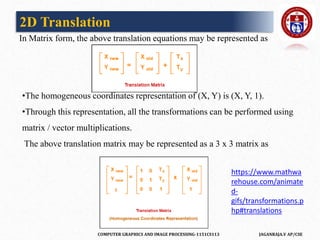
In Matrix form, the above translation equations may be represented as
•The homogeneous coordinates representation of (X, Y) is (X, Y, 1).
•Through this representation, all the transformations can be performed using
matrix / vector multiplications.
The above translation matrix may be represented as a 3 x 3 matrix as
2D Translation
https://www.mathwa
rehouse.com/animate
d-
gifs/transformations.p
hp#translations
COMPUTER GRAPHICS AND IMAGE PROCESSING-1151CS113 JAGANRAJA.V AP/CSE
PRACTICE PROBLEMS BASED ON 2D TRANSLATION
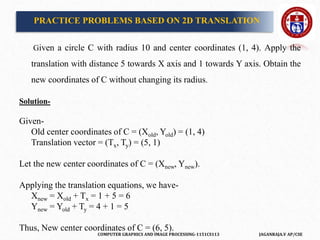
Given a circle C with radius 10 and center coordinates (1, 4). Apply the
translation with distance 5 towards X axis and 1 towards Y axis. Obtain the
new coordinates of C without changing its radius.
Solution-
Given-
Old center coordinates of C = (Xold, Yold) = (1, 4)
Translation vector = (Tx, Ty) = (5, 1)
Let the new center coordinates of C = (Xnew, Ynew).
Applying the translation equations, we have-
Xnew = Xold + Tx = 1 + 5 = 6
Ynew = Yold + Ty = 4 + 1 = 5
Thus, New center coordinates of C = (6, 5).
COMPUTER GRAPHICS AND IMAGE PROCESSING-1151CS113 JAGANRAJA.V AP/CSE
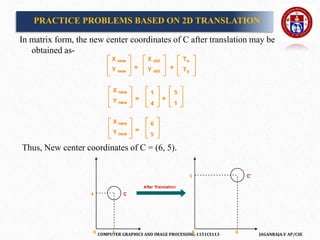
In matrix form, the new center coordinates of C after translation may be
obtained as-
Thus, New center coordinates of C = (6, 5).
PRACTICE PROBLEMS BASED ON 2D TRANSLATION
COMPUTER GRAPHICS AND IMAGE PROCESSING-1151CS113 JAGANRAJA.V AP/CSE
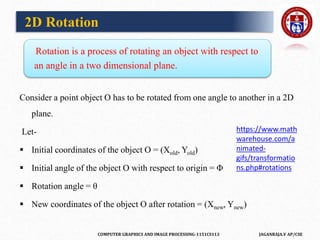
Rotation is a process of rotating an object with respect to
an angle in a two dimensional plane.
Consider a point object O has to be rotated from one angle to another in a 2D
plane.
Let-
 Initial coordinates of the object O = (Xold, Yold)
 Initial angle of the object O with respect to origin = Φ
 Rotation angle = θ
 New coordinates of the object O after rotation = (Xnew, Ynew)
2D Rotation
https://www.math
warehouse.com/a
nimated-
gifs/transformatio
ns.php#rotations
COMPUTER GRAPHICS AND IMAGE PROCESSING-1151CS113 JAGANRAJA.V AP/CSE
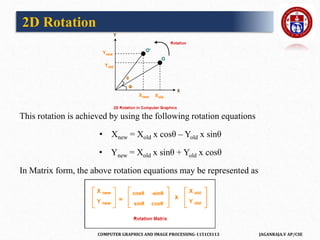
This rotation is achieved by using the following rotation equations
• Xnew = Xold x cosθ – Yold x sinθ
• Ynew = Xold x sinθ + Yold x cosθ
In Matrix form, the above rotation equations may be represented as
2D Rotation
COMPUTER GRAPHICS AND IMAGE PROCESSING-1151CS113 JAGANRAJA.V AP/CSE
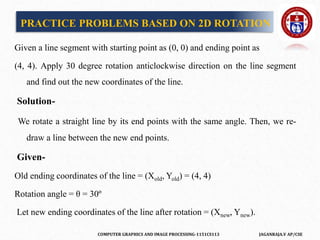
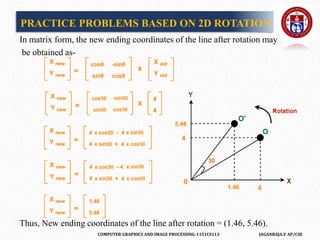
Given a line segment with starting point as (0, 0) and ending point as
(4, 4). Apply 30 degree rotation anticlockwise direction on the line segment
and find out the new coordinates of the line.
Solution-
We rotate a straight line by its end points with the same angle. Then, we re-
draw a line between the new end points.
Given-
Old ending coordinates of the line = (Xold, Yold) = (4, 4)
Rotation angle = θ = 30º
Let new ending coordinates of the line after rotation = (Xnew, Ynew).
PRACTICE PROBLEMS BASED ON 2D ROTATION
COMPUTER GRAPHICS AND IMAGE PROCESSING-1151CS113 JAGANRAJA.V AP/CSE
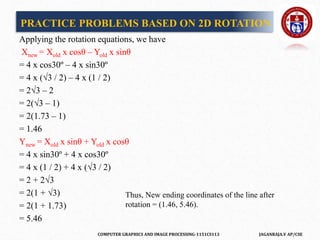
Applying the rotation equations, we have
Xnew = Xold x cosθ – Yold x sinθ
= 4 x cos30º – 4 x sin30º
= 4 x (√3 / 2) – 4 x (1 / 2)
= 2√3 – 2
= 2(√3 – 1)
= 2(1.73 – 1)
= 1.46
Ynew = Xold x sinθ + Yold x cosθ
= 4 x sin30º + 4 x cos30º
= 4 x (1 / 2) + 4 x (√3 / 2)
= 2 + 2√3
= 2(1 + √3)
= 2(1 + 1.73)
= 5.46
PRACTICE PROBLEMS BASED ON 2D ROTATION
Thus, New ending coordinates of the line after
rotation = (1.46, 5.46).
COMPUTER GRAPHICS AND IMAGE PROCESSING-1151CS113 JAGANRAJA.V AP/CSE
In matrix form, the new ending coordinates of the line after rotation may
be obtained as-
Thus, New ending coordinates of the line after rotation = (1.46, 5.46).
PRACTICE PROBLEMS BASED ON 2D ROTATION
COMPUTER GRAPHICS AND IMAGE PROCESSING-1151CS113 JAGANRAJA.V AP/CSE
2D Scaling
Scaling is a process of modifying or altering the size of objects.
• Scaling may be used to increase or reduce the size of object.
• Scaling subjects the coordinate points of the original object to change.
• Scaling factor determines whether the object size is to be increased or
reduced.
• If scaling factor > 1, then the object size is increased.
• If scaling factor < 1, then the object size is reduce
COMPUTER GRAPHICS AND IMAGE PROCESSING-1151CS113 JAGANRAJA.V AP/CSE
Consider a point object O has to be scaled in a 2D plane.
Let-
• Initial coordinates of the object O = (Xold, Yold)
• Scaling factor for X-axis = Sx
• Scaling factor for Y-axis = Sy
• New coordinates of the object O after scaling = (Xnew, Ynew)
This scaling is achieved by using the following scaling equations
Xnew = Xold x Sx
Ynew = Yold x Sy
2D Scaling
COMPUTER GRAPHICS AND IMAGE PROCESSING-1151CS113 JAGANRAJA.V AP/CSE
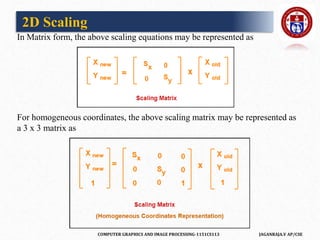
In Matrix form, the above scaling equations may be represented as
For homogeneous coordinates, the above scaling matrix may be represented as
a 3 x 3 matrix as
2D Scaling
COMPUTER GRAPHICS AND IMAGE PROCESSING-1151CS113 JAGANRAJA.V AP/CSE
Given a square object with coordinate points A(0, 3), B(3, 3), C(3, 0), D(0, 0).
Apply the scaling parameter 2 towards X axis and 3 towards Y axis and
obtain the new coordinates of the object.
Solution-
Given-
• Old corner coordinates of the square = A (0, 3), B(3, 3), C(3, 0), D(0, 0)
• Scaling factor along X axis = 2
• Scaling factor along Y axis = 3
PRACTICE PROBLEMS BASED ON 2D SCALING
COMPUTER GRAPHICS AND IMAGE PROCESSING-1151CS113 JAGANRAJA.V AP/CSE
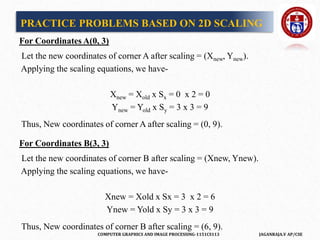
For Coordinates A(0, 3)
Let the new coordinates of corner A after scaling = (Xnew, Ynew).
Applying the scaling equations, we have-
Xnew = Xold x Sx = 0 x 2 = 0
Ynew = Yold x Sy = 3 x 3 = 9
Thus, New coordinates of corner A after scaling = (0, 9).
For Coordinates B(3, 3)
Let the new coordinates of corner B after scaling = (Xnew, Ynew).
Applying the scaling equations, we have-
Xnew = Xold x Sx = 3 x 2 = 6
Ynew = Yold x Sy = 3 x 3 = 9
Thus, New coordinates of corner B after scaling = (6, 9).
PRACTICE PROBLEMS BASED ON 2D SCALING
COMPUTER GRAPHICS AND IMAGE PROCESSING-1151CS113 JAGANRAJA.V AP/CSE
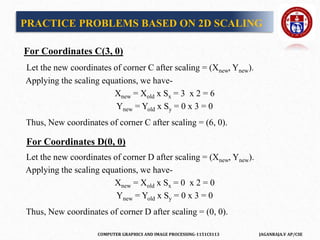
For Coordinates C(3, 0)
Let the new coordinates of corner C after scaling = (Xnew, Ynew).
Applying the scaling equations, we have-
Xnew = Xold x Sx = 3 x 2 = 6
Ynew = Yold x Sy = 0 x 3 = 0
Thus, New coordinates of corner C after scaling = (6, 0).
For Coordinates D(0, 0)
Let the new coordinates of corner D after scaling = (Xnew, Ynew).
Applying the scaling equations, we have-
Xnew = Xold x Sx = 0 x 2 = 0
Ynew = Yold x Sy = 0 x 3 = 0
Thus, New coordinates of corner D after scaling = (0, 0).
PRACTICE PROBLEMS BASED ON 2D SCALING
COMPUTER GRAPHICS AND IMAGE PROCESSING-1151CS113 JAGANRAJA.V AP/CSE
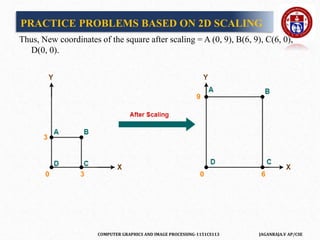
Thus, New coordinates of the square after scaling = A (0, 9), B(6, 9), C(6, 0),
D(0, 0).
PRACTICE PROBLEMS BASED ON 2D SCALING
COMPUTER GRAPHICS AND IMAGE PROCESSING-1151CS113 JAGANRAJA.V AP/CSE
• Reflection is a kind of rotation where the angle of rotation is 180 degree.
• The reflected object is always formed on the other side of mirror.
• The size of reflected object is same as the size of original object.
• Consider a point object O has to be reflected in a 2D plane.
Let-
• Initial coordinates of the object O = (Xold, Yold)
• New coordinates of the reflected object O after reflection
= (Xnew, Ynew)
2D Reflection
COMPUTER GRAPHICS AND IMAGE PROCESSING-1151CS113 JAGANRAJA.V AP/CSE
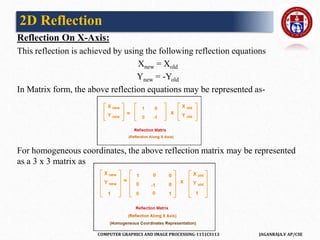
Reflection On X-Axis:
This reflection is achieved by using the following reflection equations
Xnew = Xold
Ynew = -Yold
In Matrix form, the above reflection equations may be represented as-
For homogeneous coordinates, the above reflection matrix may be represented
as a 3 x 3 matrix as
2D Reflection
COMPUTER GRAPHICS AND IMAGE PROCESSING-1151CS113 JAGANRAJA.V AP/CSE
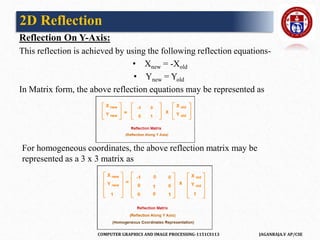
Reflection On Y-Axis:
This reflection is achieved by using the following reflection equations-
• Xnew = -Xold
• Ynew = Yold
In Matrix form, the above reflection equations may be represented as
For homogeneous coordinates, the above reflection matrix may be
represented as a 3 x 3 matrix as
2D Reflection
COMPUTER GRAPHICS AND IMAGE PROCESSING-1151CS113 JAGANRAJA.V AP/CSE
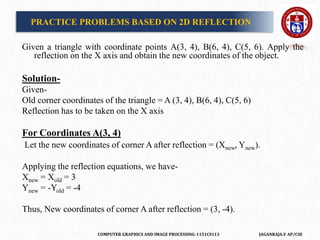
PRACTICE PROBLEMS BASED ON 2D REFLECTION
Given a triangle with coordinate points A(3, 4), B(6, 4), C(5, 6). Apply the
reflection on the X axis and obtain the new coordinates of the object.
Solution-
Given-
Old corner coordinates of the triangle = A (3, 4), B(6, 4), C(5, 6)
Reflection has to be taken on the X axis
For Coordinates A(3, 4)
Let the new coordinates of corner A after reflection = (Xnew, Ynew).
Applying the reflection equations, we have-
Xnew = Xold = 3
Ynew = -Yold = -4
Thus, New coordinates of corner A after reflection = (3, -4).
COMPUTER GRAPHICS AND IMAGE PROCESSING-1151CS113 JAGANRAJA.V AP/CSE
For Coordinates B(6, 4)
Let the new coordinates of corner B after reflection = (Xnew, Ynew).
Applying the reflection equations, we have-
Xnew = Xold = 6
Ynew = -Yold = -4
Thus, New coordinates of corner B after reflection = (6, -4).
For Coordinates C(5, 6)
Let the new coordinates of corner C after reflection = (Xnew, Ynew).
Applying the reflection equations, we have-
Xnew = Xold = 5
Ynew = -Yold = -6
Thus, New coordinates of corner C after reflection = (5, -6).
PRACTICE PROBLEMS BASED ON 2D REFLECTION
COMPUTER GRAPHICS AND IMAGE PROCESSING-1151CS113 JAGANRAJA.V AP/CSE
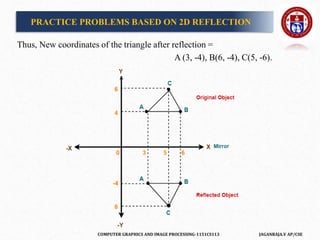
Thus, New coordinates of the triangle after reflection =
A (3, -4), B(6, -4), C(5, -6).
PRACTICE PROBLEMS BASED ON 2D REFLECTION
COMPUTER GRAPHICS AND IMAGE PROCESSING-1151CS113 JAGANRAJA.V AP/CSE
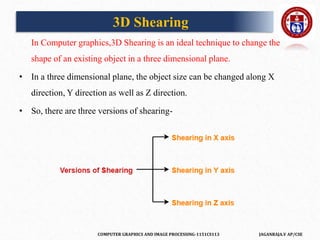
2D Shearing
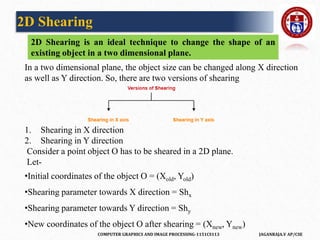
2D Shearing is an ideal technique to change the shape of an
existing object in a two dimensional plane.
In a two dimensional plane, the object size can be changed along X direction
as well as Y direction. So, there are two versions of shearing
1. Shearing in X direction
2. Shearing in Y direction
Consider a point object O has to be sheared in a 2D plane.
Let-
•Initial coordinates of the object O = (Xold, Yold)
•Shearing parameter towards X direction = Shx
•Shearing parameter towards Y direction = Shy
•New coordinates of the object O after shearing = (Xnew, Ynew)
COMPUTER GRAPHICS AND IMAGE PROCESSING-1151CS113 JAGANRAJA.V AP/CSE
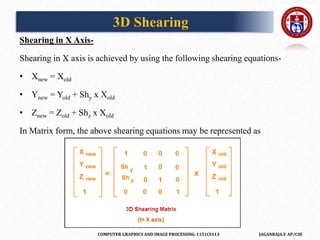
Shearing in X Axis-
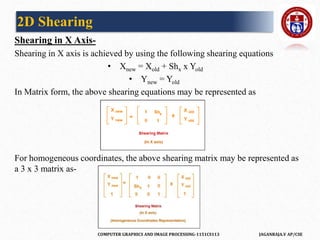
Shearing in X axis is achieved by using the following shearing equations
• Xnew = Xold + Shx x Yold
• Ynew = Yold
In Matrix form, the above shearing equations may be represented as
For homogeneous coordinates, the above shearing matrix may be represented as
a 3 x 3 matrix as-
2D Shearing
COMPUTER GRAPHICS AND IMAGE PROCESSING-1151CS113 JAGANRAJA.V AP/CSE
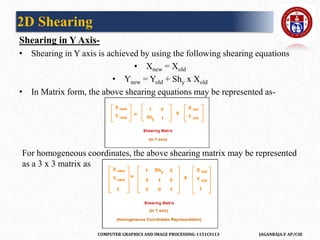
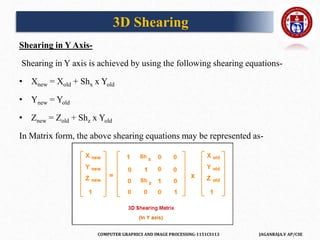
Shearing in Y Axis-
• Shearing in Y axis is achieved by using the following shearing equations
• Xnew = Xold
• Ynew = Yold + Shy x Xold
• In Matrix form, the above shearing equations may be represented as-
For homogeneous coordinates, the above shearing matrix may be represented
as a 3 x 3 matrix as
2D Shearing
COMPUTER GRAPHICS AND IMAGE PROCESSING-1151CS113 JAGANRAJA.V AP/CSE
PRACTICE PROBLEMS BASED ON 2D SHEARING IN COMPUTER
GRAPHICS-
Problem-01:
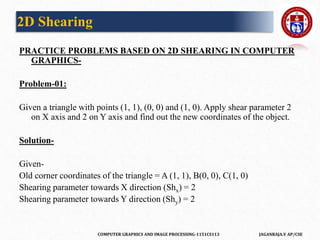
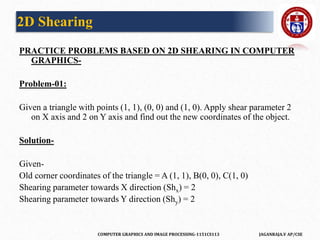
Given a triangle with points (1, 1), (0, 0) and (1, 0). Apply shear parameter 2
on X axis and 2 on Y axis and find out the new coordinates of the object.
Solution-
Given-
Old corner coordinates of the triangle = A (1, 1), B(0, 0), C(1, 0)
Shearing parameter towards X direction (Shx) = 2
Shearing parameter towards Y direction (Shy) = 2
2D Shearing
COMPUTER GRAPHICS AND IMAGE PROCESSING-1151CS113 JAGANRAJA.V AP/CSE
Shearing in X Axis-
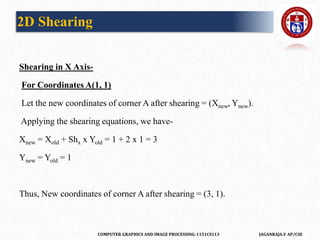
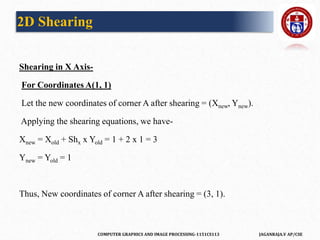
For Coordinates A(1, 1)
Let the new coordinates of corner A after shearing = (Xnew, Ynew).
Applying the shearing equations, we have-
Xnew = Xold + Shx x Yold = 1 + 2 x 1 = 3
Ynew = Yold = 1
Thus, New coordinates of corner A after shearing = (3, 1).
2D Shearing
COMPUTER GRAPHICS AND IMAGE PROCESSING-1151CS113 JAGANRAJA.V AP/CSE
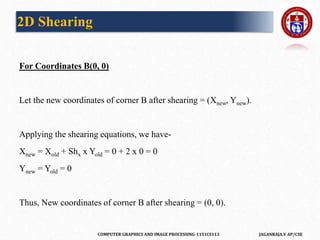
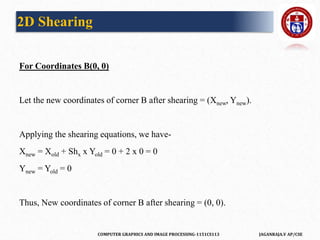
For Coordinates B(0, 0)
Let the new coordinates of corner B after shearing = (Xnew, Ynew).
Applying the shearing equations, we have-
Xnew = Xold + Shx x Yold = 0 + 2 x 0 = 0
Ynew = Yold = 0
Thus, New coordinates of corner B after shearing = (0, 0).
2D Shearing
COMPUTER GRAPHICS AND IMAGE PROCESSING-1151CS113 JAGANRAJA.V AP/CSE
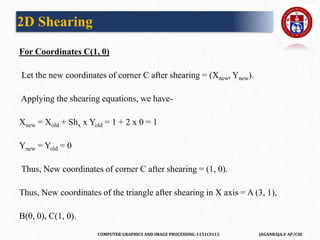
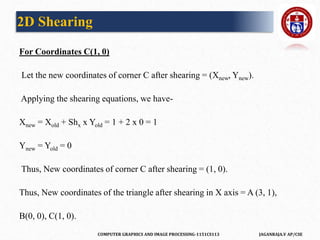
For Coordinates C(1, 0)
Let the new coordinates of corner C after shearing = (Xnew, Ynew).
Applying the shearing equations, we have-
Xnew = Xold + Shx x Yold = 1 + 2 x 0 = 1
Ynew = Yold = 0
Thus, New coordinates of corner C after shearing = (1, 0).
Thus, New coordinates of the triangle after shearing in X axis = A (3, 1),
B(0, 0), C(1, 0).
2D Shearing
COMPUTER GRAPHICS AND IMAGE PROCESSING-1151CS113 JAGANRAJA.V AP/CSE
Shearing in Y Axis-
For Coordinates A(1, 1)
Let the new coordinates of corner A after shearing = (Xnew, Ynew).
Applying the shearing equations, we have-
Xnew = Xold = 1
Ynew = Yold + Shy x Xold = 1 + 2 x 1 = 3
Thus, New coordinates of corner A after shearing = (1, 3).
2D Shearing
COMPUTER GRAPHICS AND IMAGE PROCESSING-1151CS113 JAGANRAJA.V AP/CSE
For Coordinates B(0, 0)
Let the new coordinates of corner B after shearing = (Xnew, Ynew).
Applying the shearing equations, we have-
Xnew = Xold = 0
Ynew = Yold + Shy x Xold = 0 + 2 x 0 = 0
Thus, New coordinates of corner B after shearing = (0, 0).
2D Shearing
COMPUTER GRAPHICS AND IMAGE PROCESSING-1151CS113 JAGANRAJA.V AP/CSE
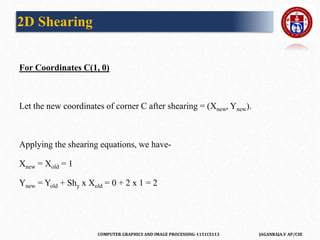
For Coordinates C(1, 0)
Let the new coordinates of corner C after shearing = (Xnew, Ynew).
Applying the shearing equations, we have-
Xnew = Xold = 1
Ynew = Yold + Shy x Xold = 0 + 2 x 1 = 2
2D Shearing
COMPUTER GRAPHICS AND IMAGE PROCESSING-1151CS113 JAGANRAJA.V AP/CSE
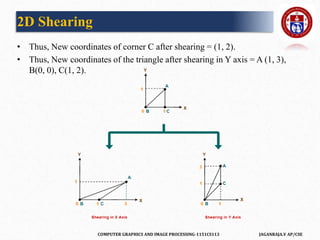
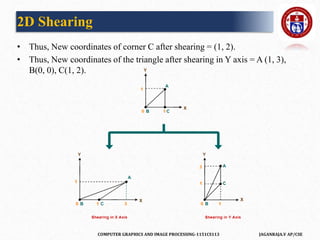
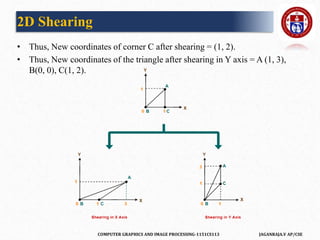
• Thus, New coordinates of corner C after shearing = (1, 2).
• Thus, New coordinates of the triangle after shearing in Y axis = A (1, 3),
B(0, 0), C(1, 2).
2D Shearing
COMPUTER GRAPHICS AND IMAGE PROCESSING-1151CS113 JAGANRAJA.V AP/CSE
PRACTICE PROBLEMS BASED ON 2D SHEARING IN COMPUTER
GRAPHICS-
Problem-01:
Given a triangle with points (1, 1), (0, 0) and (1, 0). Apply shear parameter 2
on X axis and 2 on Y axis and find out the new coordinates of the object.
Solution-
Given-
Old corner coordinates of the triangle = A (1, 1), B(0, 0), C(1, 0)
Shearing parameter towards X direction (Shx) = 2
Shearing parameter towards Y direction (Shy) = 2
2D Shearing
COMPUTER GRAPHICS AND IMAGE PROCESSING-1151CS113 JAGANRAJA.V AP/CSE
Shearing in X Axis-
For Coordinates A(1, 1)
Let the new coordinates of corner A after shearing = (Xnew, Ynew).
Applying the shearing equations, we have-
Xnew = Xold + Shx x Yold = 1 + 2 x 1 = 3
Ynew = Yold = 1
Thus, New coordinates of corner A after shearing = (3, 1).
2D Shearing
COMPUTER GRAPHICS AND IMAGE PROCESSING-1151CS113 JAGANRAJA.V AP/CSE
For Coordinates B(0, 0)
Let the new coordinates of corner B after shearing = (Xnew, Ynew).
Applying the shearing equations, we have-
Xnew = Xold + Shx x Yold = 0 + 2 x 0 = 0
Ynew = Yold = 0
Thus, New coordinates of corner B after shearing = (0, 0).
2D Shearing
COMPUTER GRAPHICS AND IMAGE PROCESSING-1151CS113 JAGANRAJA.V AP/CSE
For Coordinates C(1, 0)
Let the new coordinates of corner C after shearing = (Xnew, Ynew).
Applying the shearing equations, we have-
Xnew = Xold + Shx x Yold = 1 + 2 x 0 = 1
Ynew = Yold = 0
Thus, New coordinates of corner C after shearing = (1, 0).
Thus, New coordinates of the triangle after shearing in X axis = A (3, 1),
B(0, 0), C(1, 0).
2D Shearing
COMPUTER GRAPHICS AND IMAGE PROCESSING-1151CS113 JAGANRAJA.V AP/CSE
Shearing in Y Axis-
For Coordinates A(1, 1)
Let the new coordinates of corner A after shearing = (Xnew, Ynew).
Applying the shearing equations, we have-
Xnew = Xold = 1
Ynew = Yold + Shy x Xold = 1 + 2 x 1 = 3
Thus, New coordinates of corner A after shearing = (1, 3).
2D Shearing
COMPUTER GRAPHICS AND IMAGE PROCESSING-1151CS113 JAGANRAJA.V AP/CSE
For Coordinates B(0, 0)
Let the new coordinates of corner B after shearing = (Xnew, Ynew).
Applying the shearing equations, we have-
Xnew = Xold = 0
Ynew = Yold + Shy x Xold = 0 + 2 x 0 = 0
Thus, New coordinates of corner B after shearing = (0, 0).
2D Shearing
COMPUTER GRAPHICS AND IMAGE PROCESSING-1151CS113 JAGANRAJA.V AP/CSE
For Coordinates C(1, 0)
Let the new coordinates of corner C after shearing = (Xnew, Ynew).
Applying the shearing equations, we have-
Xnew = Xold = 1
Ynew = Yold + Shy x Xold = 0 + 2 x 1 = 2
2D Shearing
COMPUTER GRAPHICS AND IMAGE PROCESSING-1151CS113 JAGANRAJA.V AP/CSE
• Thus, New coordinates of corner C after shearing = (1, 2).
• Thus, New coordinates of the triangle after shearing in Y axis = A (1, 3),
B(0, 0), C(1, 2).
2D Shearing
COMPUTER GRAPHICS AND IMAGE PROCESSING-1151CS113 JAGANRAJA.V AP/CSE
PRACTICE PROBLEMS BASED ON 2D SHEARING IN COMPUTER
GRAPHICS-
Problem-01:
Given a triangle with points (1, 1), (0, 0) and (1, 0). Apply shear parameter 2
on X axis and 2 on Y axis and find out the new coordinates of the object.
Solution-
Given-
Old corner coordinates of the triangle = A (1, 1), B(0, 0), C(1, 0)
Shearing parameter towards X direction (Shx) = 2
Shearing parameter towards Y direction (Shy) = 2
2D Shearing
COMPUTER GRAPHICS AND IMAGE PROCESSING-1151CS113 JAGANRAJA.V AP/CSE
Shearing in X Axis-
For Coordinates A(1, 1)
Let the new coordinates of corner A after shearing = (Xnew, Ynew).
Applying the shearing equations, we have-
Xnew = Xold + Shx x Yold = 1 + 2 x 1 = 3
Ynew = Yold = 1
Thus, New coordinates of corner A after shearing = (3, 1).
2D Shearing
COMPUTER GRAPHICS AND IMAGE PROCESSING-1151CS113 JAGANRAJA.V AP/CSE
For Coordinates B(0, 0)
Let the new coordinates of corner B after shearing = (Xnew, Ynew).
Applying the shearing equations, we have-
Xnew = Xold + Shx x Yold = 0 + 2 x 0 = 0
Ynew = Yold = 0
Thus, New coordinates of corner B after shearing = (0, 0).
2D Shearing
COMPUTER GRAPHICS AND IMAGE PROCESSING-1151CS113 JAGANRAJA.V AP/CSE
For Coordinates C(1, 0)
Let the new coordinates of corner C after shearing = (Xnew, Ynew).
Applying the shearing equations, we have-
Xnew = Xold + Shx x Yold = 1 + 2 x 0 = 1
Ynew = Yold = 0
Thus, New coordinates of corner C after shearing = (1, 0).
Thus, New coordinates of the triangle after shearing in X axis = A (3, 1),
B(0, 0), C(1, 0).
2D Shearing
COMPUTER GRAPHICS AND IMAGE PROCESSING-1151CS113 JAGANRAJA.V AP/CSE
Shearing in Y Axis-
For Coordinates A(1, 1)
Let the new coordinates of corner A after shearing = (Xnew, Ynew).
Applying the shearing equations, we have-
Xnew = Xold = 1
Ynew = Yold + Shy x Xold = 1 + 2 x 1 = 3
Thus, New coordinates of corner A after shearing = (1, 3).
2D Shearing
COMPUTER GRAPHICS AND IMAGE PROCESSING-1151CS113 JAGANRAJA.V AP/CSE
For Coordinates B(0, 0)
Let the new coordinates of corner B after shearing = (Xnew, Ynew).
Applying the shearing equations, we have-
Xnew = Xold = 0
Ynew = Yold + Shy x Xold = 0 + 2 x 0 = 0
Thus, New coordinates of corner B after shearing = (0, 0).
2D Shearing
COMPUTER GRAPHICS AND IMAGE PROCESSING-1151CS113 JAGANRAJA.V AP/CSE
For Coordinates C(1, 0)
Let the new coordinates of corner C after shearing = (Xnew, Ynew).
Applying the shearing equations, we have-
Xnew = Xold = 1
Ynew = Yold + Shy x Xold = 0 + 2 x 1 = 2
2D Shearing
COMPUTER GRAPHICS AND IMAGE PROCESSING-1151CS113 JAGANRAJA.V AP/CSE
• Thus, New coordinates of corner C after shearing = (1, 2).
• Thus, New coordinates of the triangle after shearing in Y axis = A (1, 3),
B(0, 0), C(1, 2).
2D Shearing
COMPUTER GRAPHICS AND IMAGE PROCESSING-1151CS113 JAGANRAJA.V AP/CSE
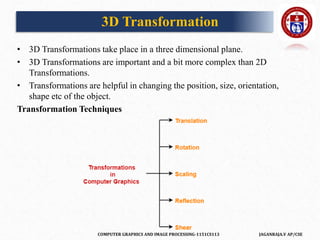
3D Transformation
• 3D Transformations take place in a three dimensional plane.
• 3D Transformations are important and a bit more complex than 2D
Transformations.
• Transformations are helpful in changing the position, size, orientation,
shape etc of the object.
Transformation Techniques
COMPUTER GRAPHICS AND IMAGE PROCESSING-1151CS113 JAGANRAJA.V AP/CSE
3D Translation
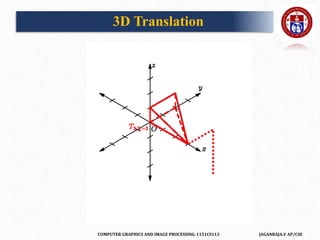
In Computer graphics,3D Translation is a process of moving an object from
one position to another in a three dimensional plane.
• Consider a point object O has to be moved from one position to another in
a 3D plane.
Let-
• Initial coordinates of the object O = (Xold, Yold, Zold)
• New coordinates of the object O after translation = (Xnew, Ynew, Zold)
• Translation vector or Shift vector = (Tx, Ty, Tz)
COMPUTER GRAPHICS AND IMAGE PROCESSING-1151CS113 JAGANRAJA.V AP/CSE
3D Translation
COMPUTER GRAPHICS AND IMAGE PROCESSING-1151CS113 JAGANRAJA.V AP/CSE
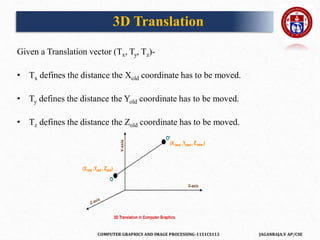
Given a Translation vector (Tx, Ty, Tz)-
• Tx defines the distance the Xold coordinate has to be moved.
• Ty defines the distance the Yold coordinate has to be moved.
• Tz defines the distance the Zold coordinate has to be moved.
3D Translation
COMPUTER GRAPHICS AND IMAGE PROCESSING-1151CS113 JAGANRAJA.V AP/CSE
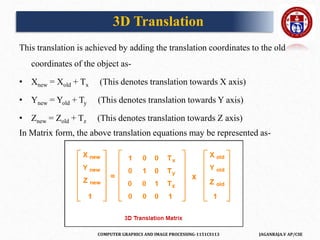
This translation is achieved by adding the translation coordinates to the old
coordinates of the object as-
• Xnew = Xold + Tx (This denotes translation towards X axis)
• Ynew = Yold + Ty (This denotes translation towards Y axis)
• Znew = Zold + Tz (This denotes translation towards Z axis)
In Matrix form, the above translation equations may be represented as-
3D Translation
COMPUTER GRAPHICS AND IMAGE PROCESSING-1151CS113 JAGANRAJA.V AP/CSE
PRACTICE PROBLEM BASED ON 3D TRANSLATION IN
COMPUTER GRAPHICS-
Problem-
Given a 3D object with coordinate points A(0, 3, 1), B(3, 3, 2), C(3, 0, 0),
D(0, 0, 0). Apply the translation with the distance 1 towards X axis, 1
towards Y axis and 2 towards Z axis and obtain the new coordinates of the
object.
Solution
Given-
Old coordinates of the object = A (0, 3, 1), B(3, 3, 2), C(3, 0, 0), D(0, 0, 0)
Translation vector = (Tx, Ty, Tz)=(1,1,2)
3D Translation
COMPUTER GRAPHICS AND IMAGE PROCESSING-1151CS113 JAGANRAJA.V AP/CSE
For Coordinates A(0, 3, 1)
Let the new coordinates of A = (Xnew, Ynew, Znew).
Applying the translation equations, we have-
Xnew = Xold + Tx = 0 + 1 = 1
Ynew = Yold + Ty = 3 + 1 = 4
Znew = Zold + Tz = 1 + 2 = 3
Thus, New coordinates of A = (1, 4, 3).
3D Translation
COMPUTER GRAPHICS AND IMAGE PROCESSING-1151CS113 JAGANRAJA.V AP/CSE
For Coordinates B(3, 3, 2)
Let the new coordinates of B = (Xnew, Ynew, Znew).
Applying the translation equations, we have-
Xnew = Xold + Tx = 3 + 1 = 4
Ynew = Yold + Ty = 3 + 1 = 4
Znew = Zold + Tz = 2 + 2 = 4
Thus, New coordinates of B = (4, 4, 4).
3D Translation
COMPUTER GRAPHICS AND IMAGE PROCESSING-1151CS113 JAGANRAJA.V AP/CSE
For Coordinates C(3, 0, 0)
Let the new coordinates of C = (Xnew, Ynew, Znew).
Applying the translation equations, we have-
Xnew = Xold + Tx = 3 + 1 = 4
Ynew = Yold + Ty = 0 + 1 = 1
Znew = Zold + Tz = 0 + 2 = 2
Thus, New coordinates of C = (4, 1, 2).
3D Translation
COMPUTER GRAPHICS AND IMAGE PROCESSING-1151CS113 JAGANRAJA.V AP/CSE
For Coordinates D(0, 0, 0)
Let the new coordinates of D = (Xnew, Ynew, Znew).
Applying the translation equations, we have-
Xnew = Xold + Tx = 0 + 1 = 1
Ynew = Yold + Ty = 0 + 1 = 1
Znew = Zold + Tz = 0 + 2 = 2
Thus, New coordinates of D = (1, 1, 2).
Thus,
New coordinates of the object = A (1, 4, 3), B(4, 4, 4), C(4, 1, 2), D(1, 1,2).
3D Translation
COMPUTER GRAPHICS AND IMAGE PROCESSING-1151CS113 JAGANRAJA.V AP/CSE
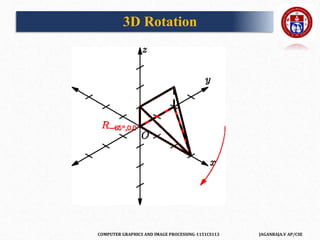
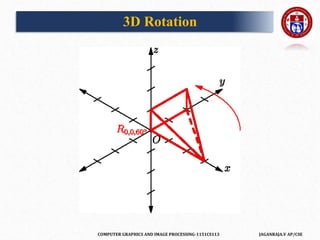
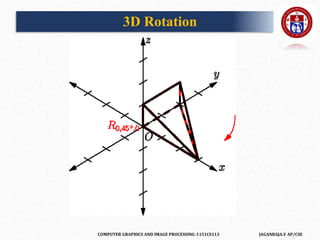
3D Rotation
In Computer graphics,3D Rotation is a process of rotating an object with
respect to an angle in a three dimensional plane.
Consider a point object O has to be rotated from one angle to another in a 3D
plane.
Let-
Initial coordinates of the object O = (Xold, Yold, Zold)
Initial angle of the object O with respect to origin = Φ
Rotation angle = θ
New coordinates of the object O after rotation = (Xnew, Ynew, Znew)
In 3 dimensions, there are 3 possible types of rotation-
X-axis Rotation,Y-axis Rotation,Z-axis Rotation
COMPUTER GRAPHICS AND IMAGE PROCESSING-1151CS113 JAGANRAJA.V AP/CSE
3D Rotation
COMPUTER GRAPHICS AND IMAGE PROCESSING-1151CS113 JAGANRAJA.V AP/CSE
3D Rotation
COMPUTER GRAPHICS AND IMAGE PROCESSING-1151CS113 JAGANRAJA.V AP/CSE
3D Rotation
COMPUTER GRAPHICS AND IMAGE PROCESSING-1151CS113 JAGANRAJA.V AP/CSE
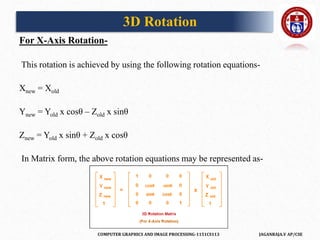
For X-Axis Rotation-
This rotation is achieved by using the following rotation equations-
Xnew = Xold
Ynew = Yold x cosθ – Zold x sinθ
Znew = Yold x sinθ + Zold x cosθ
In Matrix form, the above rotation equations may be represented as-
3D Rotation
COMPUTER GRAPHICS AND IMAGE PROCESSING-1151CS113 JAGANRAJA.V AP/CSE
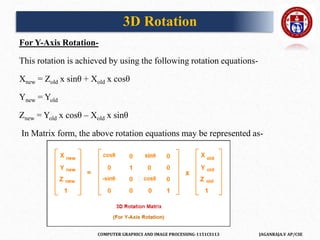
For Y-Axis Rotation-
This rotation is achieved by using the following rotation equations-
Xnew = Zold x sinθ + Xold x cosθ
Ynew = Yold
Znew = Yold x cosθ – Xold x sinθ
In Matrix form, the above rotation equations may be represented as-
3D Rotation
COMPUTER GRAPHICS AND IMAGE PROCESSING-1151CS113 JAGANRAJA.V AP/CSE
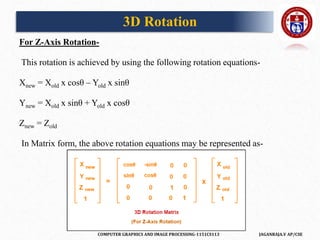
For Z-Axis Rotation-
This rotation is achieved by using the following rotation equations-
Xnew = Xold x cosθ – Yold x sinθ
Ynew = Xold x sinθ + Yold x cosθ
Znew = Zold
In Matrix form, the above rotation equations may be represented as-
3D Rotation
COMPUTER GRAPHICS AND IMAGE PROCESSING-1151CS113 JAGANRAJA.V AP/CSE
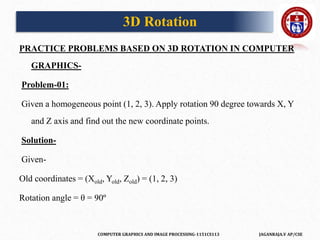
PRACTICE PROBLEMS BASED ON 3D ROTATION IN COMPUTER
GRAPHICS-
Problem-01:
Given a homogeneous point (1, 2, 3). Apply rotation 90 degree towards X, Y
and Z axis and find out the new coordinate points.
Solution-
Given-
Old coordinates = (Xold, Yold, Zold) = (1, 2, 3)
Rotation angle = θ = 90º
3D Rotation
COMPUTER GRAPHICS AND IMAGE PROCESSING-1151CS113 JAGANRAJA.V AP/CSE
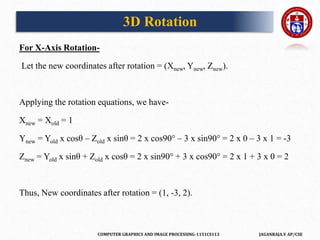
For X-Axis Rotation-
Let the new coordinates after rotation = (Xnew, Ynew, Znew).
Applying the rotation equations, we have-
Xnew = Xold = 1
Ynew = Yold x cosθ – Zold x sinθ = 2 x cos90° – 3 x sin90° = 2 x 0 – 3 x 1 = -3
Znew = Yold x sinθ + Zold x cosθ = 2 x sin90° + 3 x cos90° = 2 x 1 + 3 x 0 = 2
Thus, New coordinates after rotation = (1, -3, 2).
3D Rotation
COMPUTER GRAPHICS AND IMAGE PROCESSING-1151CS113 JAGANRAJA.V AP/CSE
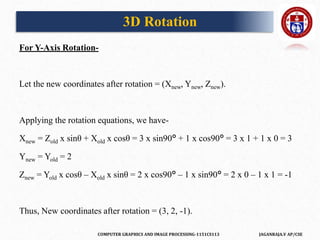
For Y-Axis Rotation-
Let the new coordinates after rotation = (Xnew, Ynew, Znew).
Applying the rotation equations, we have-
Xnew = Zold x sinθ + Xold x cosθ = 3 x sin90° + 1 x cos90° = 3 x 1 + 1 x 0 = 3
Ynew = Yold = 2
Znew = Yold x cosθ – Xold x sinθ = 2 x cos90° – 1 x sin90° = 2 x 0 – 1 x 1 = -1
Thus, New coordinates after rotation = (3, 2, -1).
3D Rotation
COMPUTER GRAPHICS AND IMAGE PROCESSING-1151CS113 JAGANRAJA.V AP/CSE
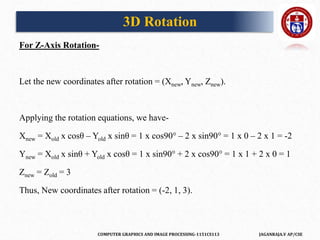
For Z-Axis Rotation-
Let the new coordinates after rotation = (Xnew, Ynew, Znew).
Applying the rotation equations, we have-
Xnew = Xold x cosθ – Yold x sinθ = 1 x cos90° – 2 x sin90° = 1 x 0 – 2 x 1 = -2
Ynew = Xold x sinθ + Yold x cosθ = 1 x sin90° + 2 x cos90° = 1 x 1 + 2 x 0 = 1
Znew = Zold = 3
Thus, New coordinates after rotation = (-2, 1, 3).
3D Rotation
COMPUTER GRAPHICS AND IMAGE PROCESSING-1151CS113 JAGANRAJA.V AP/CSE
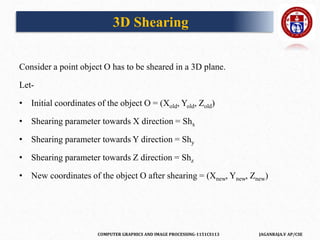
3D Scaling
In computer graphics, scaling is a process of modifying or altering the size of
objects.
• Scaling may be used to increase or reduce the size of object.
• Scaling subjects the coordinate points of the original object to change.
• Scaling factor determines whether the object size is to be increased or
reduced.
• If scaling factor > 1, then the object size is increased.
• If scaling factor < 1, then the object size is reduced.
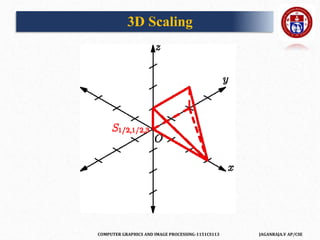
• Consider a point object O has to be scaled in a 3D plane
COMPUTER GRAPHICS AND IMAGE PROCESSING-1151CS113 JAGANRAJA.V AP/CSE
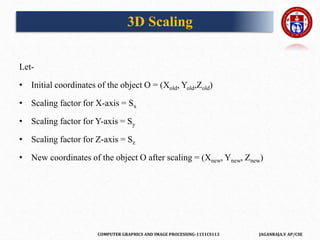
Let-
• Initial coordinates of the object O = (Xold, Yold,Zold)
• Scaling factor for X-axis = Sx
• Scaling factor for Y-axis = Sy
• Scaling factor for Z-axis = Sz
• New coordinates of the object O after scaling = (Xnew, Ynew, Znew)
3D Scaling
COMPUTER GRAPHICS AND IMAGE PROCESSING-1151CS113 JAGANRAJA.V AP/CSE
3D Scaling
COMPUTER GRAPHICS AND IMAGE PROCESSING-1151CS113 JAGANRAJA.V AP/CSE
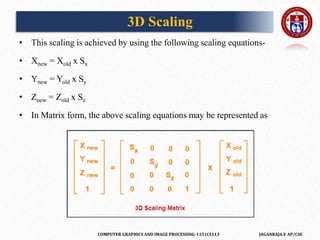
• This scaling is achieved by using the following scaling equations-
• Xnew = Xold x Sx
• Ynew = Yold x Sy
• Znew = Zold x Sz
• In Matrix form, the above scaling equations may be represented as
3D Scaling
COMPUTER GRAPHICS AND IMAGE PROCESSING-1151CS113 JAGANRAJA.V AP/CSE
PRACTICE PROBLEMS BASED ON 3D SCALING IN COMPUTER
GRAPHICS
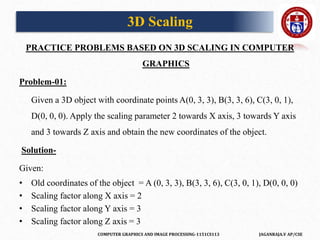
Problem-01:
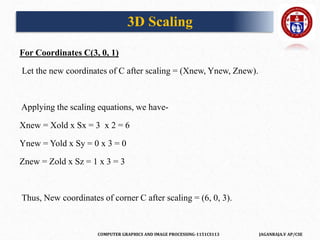
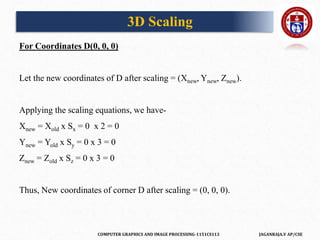
Given a 3D object with coordinate points A(0, 3, 3), B(3, 3, 6), C(3, 0, 1),
D(0, 0, 0). Apply the scaling parameter 2 towards X axis, 3 towards Y axis
and 3 towards Z axis and obtain the new coordinates of the object.
Solution-
Given:
• Old coordinates of the object = A (0, 3, 3), B(3, 3, 6), C(3, 0, 1), D(0, 0, 0)
• Scaling factor along X axis = 2
• Scaling factor along Y axis = 3
• Scaling factor along Z axis = 3
3D Scaling
COMPUTER GRAPHICS AND IMAGE PROCESSING-1151CS113 JAGANRAJA.V AP/CSE
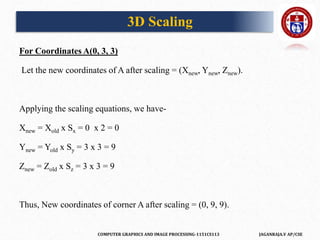
For Coordinates A(0, 3, 3)
Let the new coordinates of A after scaling = (Xnew, Ynew, Znew).
Applying the scaling equations, we have-
Xnew = Xold x Sx = 0 x 2 = 0
Ynew = Yold x Sy = 3 x 3 = 9
Znew = Zold x Sz = 3 x 3 = 9
Thus, New coordinates of corner A after scaling = (0, 9, 9).
3D Scaling
COMPUTER GRAPHICS AND IMAGE PROCESSING-1151CS113 JAGANRAJA.V AP/CSE
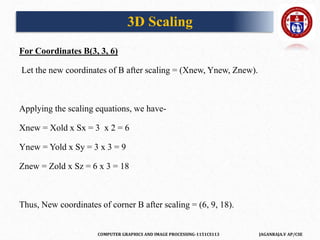
For Coordinates B(3, 3, 6)
Let the new coordinates of B after scaling = (Xnew, Ynew, Znew).
Applying the scaling equations, we have-
Xnew = Xold x Sx = 3 x 2 = 6
Ynew = Yold x Sy = 3 x 3 = 9
Znew = Zold x Sz = 6 x 3 = 18
Thus, New coordinates of corner B after scaling = (6, 9, 18).
3D Scaling
COMPUTER GRAPHICS AND IMAGE PROCESSING-1151CS113 JAGANRAJA.V AP/CSE
For Coordinates C(3, 0, 1)
Let the new coordinates of C after scaling = (Xnew, Ynew, Znew).
Applying the scaling equations, we have-
Xnew = Xold x Sx = 3 x 2 = 6
Ynew = Yold x Sy = 0 x 3 = 0
Znew = Zold x Sz = 1 x 3 = 3
Thus, New coordinates of corner C after scaling = (6, 0, 3).
3D Scaling
COMPUTER GRAPHICS AND IMAGE PROCESSING-1151CS113 JAGANRAJA.V AP/CSE
For Coordinates D(0, 0, 0)
Let the new coordinates of D after scaling = (Xnew, Ynew, Znew).
Applying the scaling equations, we have-
Xnew = Xold x Sx = 0 x 2 = 0
Ynew = Yold x Sy = 0 x 3 = 0
Znew = Zold x Sz = 0 x 3 = 0
Thus, New coordinates of corner D after scaling = (0, 0, 0).
3D Scaling
COMPUTER GRAPHICS AND IMAGE PROCESSING-1151CS113 JAGANRAJA.V AP/CSE
• Reflection is a kind of rotation where the angle of rotation is 180 degree.
• The reflected object is always formed on the other side of mirror.
• The size of reflected object is same as the size of original object.
Consider a point object O has to be reflected in a 3D plane.
Let-
• Initial coordinates of the object O = (Xold, Yold, Zold)
• New coordinates of the reflected object O after reflection = (Xnew,
Ynew,Znew)
3D Reflection
COMPUTER GRAPHICS AND IMAGE PROCESSING-1151CS113 JAGANRAJA.V AP/CSE
In 3 dimensions, there are 3 possible types of reflection
• Reflection relative to XY plane
• Reflection relative to YZ plane
• Reflection relative to XZ plane
3D Reflection
COMPUTER GRAPHICS AND IMAGE PROCESSING-1151CS113 JAGANRAJA.V AP/CSE
3D Reflection
COMPUTER GRAPHICS AND IMAGE PROCESSING-1151CS113 JAGANRAJA.V AP/CSE
Reflection Relative to XY Plane:
This reflection is achieved by using the following reflection equations-
• Xnew = Xold
• Ynew = Yold
• Znew = -Zold
In Matrix form, the above reflection equations may be represented as-
3D Reflection
COMPUTER GRAPHICS AND IMAGE PROCESSING-1151CS113 JAGANRAJA.V AP/CSE
Reflection Relative to YZ Plane:
This reflection is achieved by using the following reflection equations-
• Xnew = -Xold
• Ynew = Yold
• Znew = Zold
In Matrix form, the above reflection equations may be represented as-
3D Reflection
COMPUTER GRAPHICS AND IMAGE PROCESSING-1151CS113 JAGANRAJA.V AP/CSE
Reflection Relative to XZ Plane:
This reflection is achieved by using the following reflection equations-
• Xnew = Xold
• Ynew = -Yold
• Znew = Zold
In Matrix form, the above reflection equations may be represented as-
3D Reflection
COMPUTER GRAPHICS AND IMAGE PROCESSING-1151CS113 JAGANRAJA.V AP/CSE
PRACTICE PROBLEMS BASED ON 3D REFLECTION IN
COMPUTER GRAPHICS
Problem-01:
Given a 3D triangle with coordinate points A(3, 4, 1), B(6, 4, 2), C(5, 6, 3).
Apply the reflection on the XY plane and find out the new coordinates of
the object.
Solution-
Given-
Old corner coordinates of the triangle = A (3, 4, 1), B(6, 4, 2), C(5, 6, 3)
Reflection has to be taken on the XY plane
3D Reflection
COMPUTER GRAPHICS AND IMAGE PROCESSING-1151CS113 JAGANRAJA.V AP/CSE
For Coordinates A(3, 4, 1)
Let the new coordinates of corner A after reflection = (Xnew, Ynew, Znew).
Applying the reflection equations, we have-
• Xnew = Xold = 3
• Ynew = Yold = 4
• Znew = -Zold = -1
Thus, New coordinates of corner A after reflection = (3, 4, -1).
3D Reflection
COMPUTER GRAPHICS AND IMAGE PROCESSING-1151CS113 JAGANRAJA.V AP/CSE
For Coordinates B(6, 4, 2)
Let the new coordinates of corner B after reflection = (Xnew, Ynew, Znew).
Applying the reflection equations, we have-
• Xnew = Xold = 6
• Ynew = Yold = 4
• Znew = -Zold = -2
Thus, New coordinates of corner B after reflection = (6, 4, -2).
3D Reflection
COMPUTER GRAPHICS AND IMAGE PROCESSING-1151CS113 JAGANRAJA.V AP/CSE
For Coordinates C(5, 6, 3)
Let the new coordinates of corner C after reflection = (Xnew, Ynew, Znew).
Applying the reflection equations, we have-
• Xnew = Xold = 5
• Ynew = Yold = 6
• Znew = -Zold = -3
Thus, New coordinates of corner C after reflection = (5, 6, -3).
Thus, New coordinates of the triangle after reflection =
A (3, 4, -1), B(6, 4, -2), C(5, 6, -3).
3D Reflection
COMPUTER GRAPHICS AND IMAGE PROCESSING-1151CS113 JAGANRAJA.V AP/CSE
Problem-02:
Given a 3D triangle with coordinate points A(3, 4, 1), B(6, 4, 2), C(5, 6, 3).
Apply the reflection on the XZ plane and find out the new coordinates of
the object.
Ans:
Thus, New coordinates of the triangle after reflection = A (3, -4, 1), B(6, -4, 2),
C(5, -6, 3).
3D Reflection
COMPUTER GRAPHICS AND IMAGE PROCESSING-1151CS113 JAGANRAJA.V AP/CSE
In Computer graphics,3D Shearing is an ideal technique to change the
shape of an existing object in a three dimensional plane.
• In a three dimensional plane, the object size can be changed along X
direction, Y direction as well as Z direction.
• So, there are three versions of shearing-
3D Shearing
COMPUTER GRAPHICS AND IMAGE PROCESSING-1151CS113 JAGANRAJA.V AP/CSE
Consider a point object O has to be sheared in a 3D plane.
Let-
• Initial coordinates of the object O = (Xold, Yold, Zold)
• Shearing parameter towards X direction = Shx
• Shearing parameter towards Y direction = Shy
• Shearing parameter towards Z direction = Shz
• New coordinates of the object O after shearing = (Xnew, Ynew, Znew)
3D Shearing
COMPUTER GRAPHICS AND IMAGE PROCESSING-1151CS113 JAGANRAJA.V AP/CSE
Shearing in X Axis-
Shearing in X axis is achieved by using the following shearing equations-
• Xnew = Xold
• Ynew = Yold + Shy x Xold
• Znew = Zold + Shz x Xold
In Matrix form, the above shearing equations may be represented as
3D Shearing
COMPUTER GRAPHICS AND IMAGE PROCESSING-1151CS113 JAGANRAJA.V AP/CSE
Shearing in Y Axis-
Shearing in Y axis is achieved by using the following shearing equations-
• Xnew = Xold + Shx x Yold
• Ynew = Yold
• Znew = Zold + Shz x Yold
In Matrix form, the above shearing equations may be represented as-
3D Shearing
COMPUTER GRAPHICS AND IMAGE PROCESSING-1151CS113 JAGANRAJA.V AP/CSE
Shearing in Z Axis-
Shearing in Z axis is achieved by using the following shearing equations-
• Xnew = Xold + Shx x Zold
• Ynew = Yold + Shy x Zold
• Znew = Zold
In Matrix form, the above shearing equations may be represented as-
3D Shearing
COMPUTER GRAPHICS AND IMAGE PROCESSING-1151CS113 JAGANRAJA.V AP/CSE
PRACTICE PROBLEMS BASED ON 3D SHEARING IN COMPUTER
GRAPHICS
Problem-01:
Given a 3D triangle with points (0, 0, 0), (1, 1, 2) and (1, 1, 3). Apply shear
parameter 2 on X axis, 2 on Y axis and 3 on Z axis and find out the new
coordinates of the object.
Solution-
Given-
• Old corner coordinates of the triangle = A (0, 0, 0), B(1, 1, 2), C(1, 1, 3)
• Shearing parameter towards X direction (Shx) = 2
• Shearing parameter towards Y direction (Shy) = 2
• Shearing parameter towards Y direction (Shz) = 3
3D Shearing
COMPUTER GRAPHICS AND IMAGE PROCESSING-1151CS113 JAGANRAJA.V AP/CSE
Shearing in X Axis-
For Coordinates A(0, 0, 0)
Let the new coordinates of corner A after shearing = (Xnew, Ynew, Znew).
Applying the shearing equations, we have-
• Xnew = Xold = 0
• Ynew = Yold + Shy x Xold = 0 + 2 x 0 = 0
• Znew = Zold + Shz x Xold = 0 + 3 x 0 = 0
Thus, New coordinates of corner A after shearing = (0, 0, 0).
3D Shearing
COMPUTER GRAPHICS AND IMAGE PROCESSING-1151CS113 JAGANRAJA.V AP/CSE
For Coordinates B(1, 1, 2)
Let the new coordinates of corner B after shearing = (Xnew, Ynew, Znew).
Applying the shearing equations, we have-
• Xnew = Xold = 1
• Ynew = Yold + Shy x Xold = 1 + 2 x 1 = 3
• Znew = Zold + Shz x Xold = 2 + 3 x 1 = 5
Thus, New coordinates of corner B after shearing = (1, 3, 5).
3D Shearing
COMPUTER GRAPHICS AND IMAGE PROCESSING-1151CS113 JAGANRAJA.V AP/CSE
For Coordinates C(1, 1, 3)
Let the new coordinates of corner C after shearing = (Xnew, Ynew, Znew).
Applying the shearing equations, we have-
• Xnew = Xold = 1
• Ynew = Yold + Shy x Xold = 1 + 2 x 1 = 3
• Znew = Zold + Shz x Xold = 3 + 3 x 1 = 6
Thus, New coordinates of corner C after shearing = (1, 3, 6).
Thus, New coordinates of the triangle after shearing in X axis =
A (0, 0, 0), B(1, 3, 5), C(1, 3, 6).
3D Shearing
COMPUTER GRAPHICS AND IMAGE PROCESSING-1151CS113 JAGANRAJA.V AP/CSE
Shearing in Y Axis-
For Coordinates A(0, 0, 0)
Let the new coordinates of corner A after shearing = (Xnew, Ynew, Znew).
Applying the shearing equations, we have-
• Xnew = Xold + Shx x Yold = 0 + 2 x 0 = 0
• Ynew = Yold = 0
• Znew = Zold + Shz x Yold = 0 + 3 x 0 = 0
Thus, New coordinates of corner A after shearing = (0, 0, 0).
3D Shearing
COMPUTER GRAPHICS AND IMAGE PROCESSING-1151CS113 JAGANRAJA.V AP/CSE
For Coordinates B(1, 1, 2)
Let the new coordinates of corner B after shearing = (Xnew, Ynew, Znew).
Applying the shearing equations, we have-
• Xnew = Xold + Shx x Yold = 1 + 2 x 1 = 3
• Ynew = Yold = 1
• Znew = Zold + Shz x Yold = 2 + 3 x 1 = 5
Thus, New coordinates of corner B after shearing = (3, 1, 5).
3D Shearing
COMPUTER GRAPHICS AND IMAGE PROCESSING-1151CS113 JAGANRAJA.V AP/CSE
For Coordinates C(1, 1, 3)
Let the new coordinates of corner C after shearing = (Xnew, Ynew, Znew).
Applying the shearing equations, we have-
• Xnew = Xold + Shx x Yold = 1 + 2 x 1 = 3
• Ynew = Yold = 1
• Znew = Zold + Shz x Yold = 3 + 3 x 1 = 6
Thus, New coordinates of corner C after shearing = (3, 1, 6).
Thus, New coordinates of the triangle after shearing in Y axis = A (0, 0, 0),
B(3, 1, 5), C(3, 1, 6).
3D Shearing
COMPUTER GRAPHICS AND IMAGE PROCESSING-1151CS113 JAGANRAJA.V AP/CSE
Shearing in Z Axis-
For Coordinates A(0, 0, 0)
Let the new coordinates of corner A after shearing = (Xnew, Ynew, Znew).
Applying the shearing equations, we have-
• Xnew = Xold + Shx x Zold = 0 + 2 x 0 = 0
• Ynew = Yold + Shy x Zold = 0 + 2 x 0 = 0
• Znew = Zold = 0
Thus, New coordinates of corner A after shearing = (0, 0, 0).
3D Shearing
COMPUTER GRAPHICS AND IMAGE PROCESSING-1151CS113 JAGANRAJA.V AP/CSE
For Coordinates B(1, 1, 2)
Let the new coordinates of corner B after shearing = (Xnew, Ynew, Znew).
Applying the shearing equations, we have-
• Xnew = Xold + Shx x Zold = 1 + 2 x 2 = 5
• Ynew = Yold + Shy x Zold = 1 + 2 x 2 = 5
• Znew = Zold = 2
Thus, New coordinates of corner B after shearing = (5, 5, 2).
3D Shearing
COMPUTER GRAPHICS AND IMAGE PROCESSING-1151CS113 JAGANRAJA.V AP/CSE
For Coordinates C(1, 1, 3)
Let the new coordinates of corner C after shearing = (Xnew, Ynew, Znew).
Applying the shearing equations, we have-
• Xnew = Xold + Shx x Zold = 1 + 2 x 3 = 7
• Ynew = Yold + Shy x Zold = 1 + 2 x 3 = 7
• Znew = Zold = 3
Thus, New coordinates of corner C after shearing = (7, 7, 3).
Thus, New coordinates of the triangle after shearing in Z axis = A (0, 0, 0),
B(5, 5, 2), C(7, 7, 3).
3D Shearing
COMPUTER GRAPHICS AND IMAGE PROCESSING-1151CS113 JAGANRAJA.V AP/CSE
Windows Port
• The window port can be confused with the computer window but it isn’t
the same. The window port is the area chosen from the real world for
display. This window port decides what portion of the real world should be
captured and be displayed on the screen. The widow port can thus be
defined as,
"A world-coordinate area selected for display is called a window.
A window defines a rectangular area in the world coordinates."
COMPUTER GRAPHICS AND IMAGE PROCESSING-1151CS113 JAGANRAJA.V AP/CSE
Viewport
The Viewport is the area on a display device to which a window is mapped.
Thus, the viewport is nothing else but our device’s screen. The viewport
can thus be defined as follows:
"A viewport is a polygon viewing region in computer graphics. The viewport
is an area expressed in rendering-device-specific coordinates, e.g. pixels
for screen coordinates, in which the objects of interest are going to be
rendered."
COMPUTER GRAPHICS AND IMAGE PROCESSING-1151CS113 JAGANRAJA.V AP/CSE
Difference between Window Port and Viewport
Window Port Viewport
Window port is the coordinate area specially
selected for the display.
Viewport is the display area of viewport in which
the window is perfectly mapped.
Region Created according to World Coordinates. Region Created according to Device Coordinates.
It is a region selected form the real world. It is a
graphically control thing and composed of visual
areas along with some of its program controlled
with help of window decoration.
It is the region in computer graphics which is a
polygon viewing region.
A window port can be defined with the help of a
GWINDOW statement.
A viewport is defined by the GPORT command.
COMPUTER GRAPHICS AND IMAGE PROCESSING-1151CS113 JAGANRAJA.V AP/CSE
Clipping
Clipping means identifying portions of a scene that are outside a specified
region. For a 2D graphics the region defining what is to be clipped is called
the clip window.
Types of clipping:
1. All-or-none clipping: If any part of object outside clip window then the
whole object is rejected.
2. Point clipping: Only keep the points that are inside clip window.
3. Line clipping: Only keep segment of line inside clip window.
4. Polygon clipping: Only keep segment of polygon inside clip window.
5. Text clipping.
COMPUTER GRAPHICS AND IMAGE PROCESSING-1151CS113 JAGANRAJA.V AP/CSE
Point Clipping
• Suppose that the clip window is a rectangle. The point P = (x, y) is saved
for display if the following are satisfied:
xwmin ≤ x ≤ xwmax
ywmin ≤ y ≤ ywmax
• Otherwise, the point will be clipped (not saved for display).
Example of Point Clipping
P1= (10,20), P2= (30,50), P3= (60,90), and P4= (130,150). Suppose that the coordinates of the
two opposite corners of the clip window are (xwmin, ywmin) = (30, 30) and (xwmax, ywmax)
= (130, 110). Which of the above points will be clipped?
• P2 and P3 will saved because:
• For P2: 30 ≤ 30 ≤ 130 and 30 ≤ 50 ≤ 110.
• For P3: 30 ≤ 60 ≤ 130 and 30 ≤ 90 ≤ 110.
COMPUTER GRAPHICS AND IMAGE PROCESSING-1151CS113 JAGANRAJA.V AP/CSE
Line Clipping
The concept of line clipping is same as point clipping. In line clipping, we
will cut the portion of line which is outside of window and keep only the
portion that is inside the window.
Cohen-Sutherland Line Clippings
This algorithm uses the clipping window as shown in the below figure. The
minimum coordinate for the clipping region is (XWmin,YWmin) and the
maximum coordinate for the clipping region is (XWmax,YWmax)
COMPUTER GRAPHICS AND IMAGE PROCESSING-1151CS113 JAGANRAJA.V AP/CSE
 We will use 4-bits to divide the entire region.
 These 4 bits represent the Top, Bottom, Right, and Left of the region as
shown in the below figure.
 Here, the TOP and LEFT bit is set to 1 because it is the TOP-
LEFT corner.
Line Clipping
COMPUTER GRAPHICS AND IMAGE PROCESSING-1151CS113 JAGANRAJA.V AP/CSE
3 possibilities for the line
• Line can be completely inside the window
This line should be accepted This line should NOT be rejected.
• Line can be completely outside of the window
This line will be completely removed from the region
• Line can be partially inside the window
We will find intersection point and draw only that portion of line that is
inside region
Line Clipping
COMPUTER GRAPHICS AND IMAGE PROCESSING-1151CS113 JAGANRAJA.V AP/CSE
Mid Point Subdivision Line Clipping Algorithm
• It is used for clipping line. The line is divided in two parts. Mid points of
line is obtained by dividing it in two short segments. Again division is
done, by finding midpoint. This process is continued until line of visible
and invisible category is obtained. Let (xi,yi) are midpoint
COMPUTER GRAPHICS AND IMAGE PROCESSING-1151CS113 JAGANRAJA.V AP/CSE
• x5lie on point of intersection of boundary of window.
Advantage of midpoint subdivision Line Clipping:
• It is suitable for machines in which multiplication and division operation is
not possible. Because it can be performed by introducing clipping divides
in hardware.
Mid Point Subdivision Line Clipping Algorithm
COMPUTER GRAPHICS AND IMAGE PROCESSING-1151CS113 JAGANRAJA.V AP/CSE
Example: Window size is (-3, 1) to (2, 6). A line AB is given having co-
ordinates of A (-4, 2) and B (-1, 7). Does this line visible. Find the visible
portion of the line using midpoint subdivision?
Solution:
• Step1: Fix point A (-4, 2)
Mid Point Subdivision Line Clipping Algorithm
COMPUTER GRAPHICS AND IMAGE PROCESSING-1151CS113 JAGANRAJA.V AP/CSE
Mid Point Subdivision Line Clipping Algorithm
COMPUTER GRAPHICS AND IMAGE PROCESSING-1151CS113 JAGANRAJA.V AP/CSE
Step2: Find b"=mid of b'and b
So (-1, 5) is better than (2, 4) Find b"&bb''(-1, 5) b (-1, 7)
Mid Point Subdivision Line Clipping Algorithm
COMPUTER GRAPHICS AND IMAGE PROCESSING-1151CS113 JAGANRAJA.V AP/CSE
• So B""to B length of line will be clipped from upper side
• Now considered left-hand side portion.
• A and B""are now endpoints
• Find mid of A and B""
• A (-4, 2) B ""(-1, 6)
Mid Point Subdivision Line Clipping Algorithm
COMPUTER GRAPHICS AND IMAGE PROCESSING-1151CS113 JAGANRAJA.V AP/CSE
Mid Point Subdivision Line Clipping Algorithm
COMPUTER GRAPHICS AND IMAGE PROCESSING-1151CS113 JAGANRAJA.V AP/CSE
Mid Point Subdivision Line Clipping Algorithm
COMPUTER GRAPHICS AND IMAGE PROCESSING-1151CS113 JAGANRAJA.V AP/CSE
Liang-Barsky Line Clipping Algorithm
• The Liang-Barsky algorithm is a line clipping algorithm.
• This algorithm is more efficient than Cohen–Sutherland line clipping
algorithm and can be extended to 3-Dimensional clipping.
• This algorithm is considered to be the faster parametric line-clipping
algorithm.
• The following concepts are used in this clipping:
– The parametric equation of the line.
– The inequalities describing the range of the clipping window which is
used to determine the intersections between the line and the clip
window.
COMPUTER GRAPHICS AND IMAGE PROCESSING-1151CS113 JAGANRAJA.V AP/CSE
The parametric equation of a line can be given by,
X = x1 + t(x2-x1)
Y = y1 + t(y2-y1)
• Where, t is between 0 and 1.
• Then, writing the point-clipping conditions in the parametric form:
xwmin <= x1 + t(x2-x1) <= xwmax
ywmin <= y1 + t(y2-y1) <= ywmax
The above 4 inequalities can be expressed as,
• Where k = 1, 2, 3, 4 (correspond to the left, right, bottom, and top
boundaries, respectively).
• The p and q are defined as,
Liang-Barsky Line Clipping Algorithm
COMPUTER GRAPHICS AND IMAGE PROCESSING-1151CS113 JAGANRAJA.V AP/CSE
p1 = -(x2-x1), q1 = x1 - xwmin (Left Boundary)
p2 = (x2-x1), q2 = xwmax - x1 (Right Boundary)
p3 = -(y2-y1), q3 = y1 - ywmin (Bottom Boundary)
p4 = (y2-y1), q4 = ywmax - y1 (Top Boundary)
When the line is parallel to a view window boundary, the p value for that
boundary is zero.
• When pk < 0, as t increase line goes from the outside to inside (entering).
• When pk > 0, line goes from inside to outside (exiting).
Liang-Barsky Line Clipping Algorithm
COMPUTER GRAPHICS AND IMAGE PROCESSING-1151CS113 JAGANRAJA.V AP/CSE
• When pk = 0 and qk < 0 then line is trivially invisible because it is outside
view window.
• When pk = 0 and qk > 0 then the line is inside the corresponding window
boundary.
Using the following conditions, the position of line can be determined:
Condition Position of line
pk = 0 parallel to the clipping boundaries
pk = 0 and qk < 0 completely outside the boundary
pk = 0 and qk >= 0 inside the parallel clipping boundary
pk < 0 line proceeds from outside to inside
pk > 0 line proceeds from inside to outside
Liang-Barsky Line Clipping Algorithm
COMPUTER GRAPHICS AND IMAGE PROCESSING-1151CS113 JAGANRAJA.V AP/CSE
• Parameters t1 and t2 can be calculated that define the part of line that lies
within the clip rectangle.
When,
• pk < 0, maximum(0, qk/pk) is taken.
• pk > 0, minimum(1, qk/pk) is taken.
• If t1 > t2, the line is completely outside the clip window and it can be
rejected. Otherwise, the endpoints of the clipped line are calculated from
the two values of parameter t.
Liang-Barsky Line Clipping Algorithm
COMPUTER GRAPHICS AND IMAGE PROCESSING-1151CS113 JAGANRAJA.V AP/CSE
Liang-Barsky Line Clipping Algorithm
COMPUTER GRAPHICS AND IMAGE PROCESSING-1151CS113 JAGANRAJA.V AP/CSE
Liang-Barsky Line Clipping Algorithm
COMPUTER GRAPHICS AND IMAGE PROCESSING-1151CS113 JAGANRAJA.V AP/CSE
• We have umin = 1/4 and umax = 3/4
• Pend - P0 = (15+5,9-3) = (20,6)
• ƒ
If umin < umax , there is a line segment
-compute endpoints by substituting u values ƒ
• Draw a line from (-5+(20)·(1/4), 3+(6)·(1/4))
to
(-5+(20)·(3/4), 3+(6)·(3/4))
Liang-Barsky Line Clipping Algorithm
COMPUTER GRAPHICS AND IMAGE PROCESSING-1151CS113 JAGANRAJA.V AP/CSE
In a polygon, all lines are connected. Lines can be a combination of edges
and vertices, which together form a polygon. A polygon refers to a two-
dimensional architecture made up of a number of straight lines.
Some Examples of the polygon:
• Triangles
• Pentagons
• Hexagons
• Quadrilaterals
• The polygon’s name defines how many sides the architecture contains.
Polygon Clipping
COMPUTER GRAPHICS AND IMAGE PROCESSING-1151CS113 JAGANRAJA.V AP/CSE
• Triangle: It has three sides.
• Pentagon: A pentagon has five sides.
Polygon Clipping
COMPUTER GRAPHICS AND IMAGE PROCESSING-1151CS113 JAGANRAJA.V AP/CSE
• Hexagon: It contains six sides.
• Quadrilaterals: It contains four sides.
Polygon Clipping
COMPUTER GRAPHICS AND IMAGE PROCESSING-1151CS113 JAGANRAJA.V AP/CSE
Types of Polygon
• There are two basic types of polygon-
• Concave Polygon
• Convex Polygon
• Concave Polygon: The concave polygon does not have any part of its
diagonals in its exterior. In a concave polygon, at least one angle should be
greater than 180° (angle >180°).
Polygon Clipping
COMPUTER GRAPHICS AND IMAGE PROCESSING-1151CS113 JAGANRAJA.V AP/CSE
Convex Polygon: The convex polygon has at least one part of diagonal in its
exterior. In a convex polygon, all the angles should be less than 180°
(angle<180°).
Polygon Clipping
Polygon clipping is a process in which we only consider the part which is
inside the view pane or window. We will remove or clip the part that is
outside the window. We will use the following algorithms for polygon
clipping-
• Sutherland-Hodgeman polygon clipping algorithm
• Weiler-Atherton polygon clipping algorithm
Polygon Clipping
COMPUTER GRAPHICS AND IMAGE PROCESSING-1151CS113 JAGANRAJA.V AP/CSE
• A polygon can also be clipped by specifying the clipping window.
• Sutherland Hodgeman polygon clipping algorithm is used for polygon
clipping.
• In this algorithm, all the vertices of the polygon are clipped against each
edge of the clipping window.
• First the polygon is clipped against the left edge of the polygon window to
get new vertices of the polygon.
• These new vertices are used to clip the polygon against right edge, top
edge, bottom edge, of the clipping window as shown in the following
figure.
Sutherland Hodgeman Polygon Clipping
COMPUTER GRAPHICS AND IMAGE PROCESSING-1151CS113 JAGANRAJA.V AP/CSE
• While processing an edge of a polygon with clipping window, an
intersection point is found if edge is not completely inside clipping window
and the a partial edge from the intersection point to the outside edge is
clipped.
Polygon Clipping
COMPUTER GRAPHICS AND IMAGE PROCESSING-1151CS113 JAGANRAJA.V AP/CSE
• The following figures show left, right, top and bottom edge clippings
Polygon Clipping
COMPUTER GRAPHICS AND IMAGE PROCESSING-1151CS113 JAGANRAJA.V AP/CSE
Weiler-Atherton polygon clipping algorithm
• This algorithm helps us to clip a filled area.
• The filled area may be a convex polygon or concave polygon.
• This algorithm was introduced to identify the visible surfaces.
• This algorithm helps to create individual polygons in some cases.
• In the Weiler-Atherton algorithm, we consider the view pane boundaries
instead of edges and vertices of the polygon.
Explanation:
1. Finding all the intersection points and grouping them
Here, let there be a polygon ABCD and another polygon VWXYZ. Let
ABCD be the clipping polygon and let VWXYZ be the clipped polygon.
COMPUTER GRAPHICS AND IMAGE PROCESSING-1151CS113 JAGANRAJA.V AP/CSE
Weiler-Atherton polygon clipping algorithm
So, we can find the intersection points using any method. For example, we
can find the intersecting points separately and then find for each intersecting
point find if it is entering or leaving, or, we can use Cyrus Beck and find all
the intersecting points and also get if a point is entering or exiting.
Refer Cyrus Beck for more information on this algorithm.
COMPUTER GRAPHICS AND IMAGE PROCESSING-1151CS113 JAGANRAJA.V AP/CSE
2. Making and filling of two lists
Now, we make two lists. One for the clipping polygon and one for the
clipped polygon.
Now this is how we fill it:
Weiler-Atherton polygon clipping algorithm
COMPUTER GRAPHICS AND IMAGE PROCESSING-1151CS113 JAGANRAJA.V AP/CSE
Weiler-Atherton polygon clipping algorithm
COMPUTER GRAPHICS AND IMAGE PROCESSING-1151CS113 JAGANRAJA.V AP/CSE
3. Running of the algorithm
• We start at the clipped polygon’s list, i.e. VWXYZ.
• Now, we find the first intersecting point that is entering.
• Hence we choose i1.
• From here we begin the making of the list of vertices (or vector) to make a
clipped sub-polygon.
Weiler-Atherton polygon clipping algorithm
COMPUTER GRAPHICS AND IMAGE PROCESSING-1151CS113 JAGANRAJA.V AP/CSE
Weiler-Atherton polygon clipping algorithm
COMPUTER GRAPHICS AND IMAGE PROCESSING-1151CS113 JAGANRAJA.V AP/CSE
According to the given example, i1 Y i2 is a clipped sub-polygon.
Similarly, we get:
Weiler-Atherton polygon clipping algorithm
COMPUTER GRAPHICS AND IMAGE PROCESSING-1151CS113 JAGANRAJA.V AP/CSE
• i0 V i3 as another sub-polygon also.
• Hence, we were able to get two sub-polygons as a result of this polygon
clipping, which involved a concave polygon, which resulted in:
• Similarly, this clipping works for convex polygons
Weiler-Atherton polygon clipping algorithm
COMPUTER GRAPHICS AND IMAGE PROCESSING-1151CS113 JAGANRAJA.V AP/CSE
Limitations:
• This polygon clipping algorithm does not work for self – intersecting
polygons, although some methods have been proposed to be able to solve
this issue also, and have successfully worked.
Weiler-Atherton polygon clipping algorithm
COMPUTER GRAPHICS AND IMAGE PROCESSING-1151CS113 JAGANRAJA.V AP/CSE
• Various techniques are used to provide text clipping in a computer
graphics. It depends on the methods used to generate characters and the
requirements of a particular application. There are three methods for text
clipping which are listed below
All or none string clipping
All or none character clipping
Text clipping
All or none string clipping
In all or none string clipping method, either we keep the entire string or we reject
entire string based on the clipping window.
Text Clipping
COMPUTER GRAPHICS AND IMAGE PROCESSING-1151CS113 JAGANRAJA.V AP/CSE
All or none character clipping
This clipping method is based on characters rather than entire string. In this
method if the string is entirely inside the clipping window, then we keep it.
If it is partially outside the window, then −
• You reject only the portion of the string being outside
• If the character is on the boundary of the clipping window, then we discard
that entire character and keep the rest string.
Text Clipping
COMPUTER GRAPHICS AND IMAGE PROCESSING-1151CS113 JAGANRAJA.V AP/CSE
Text clipping
This clipping method is based on characters rather than the entire string. In
this method if the string is entirely inside the clipping window, then we
keep it. If it is partially outside the window, then
• You reject only the portion of string being outside.
• If the character is on the boundary of the clipping window, then we discard
only that portion of character that is outside of the clipping window.
Text Clipping
COMPUTER GRAPHICS AND IMAGE PROCESSING-1151CS113 JAGANRAJA.V AP/CSE
Bezier Curve
Bezier Curve may be defined as-
• Bezier Curve is parametric curve defined by a set of control points.
• Two points are ends of the curve.
• Other points determine the shape of the curve.
• The concept of Bezier curves was given by Pierre Bezier.
Here,
•This Bezier curve is defined by a set of control points b0, b1, b2 and b3.
•Points b0 and b3 are ends of the curve.
•Points b1 and b2 determine the shape of the curve.
COMPUTER GRAPHICS AND IMAGE PROCESSING-1151CS113 JAGANRAJA.V AP/CSE
What are Bezier curves used for?
• Bezier curves are used in computer graphics to draw shapes, for CSS
animation and in many other places.
• They are a very simple thing, worth to study once and then feel
comfortable in the world of vector graphics and advanced animations.
Bezier Curve
COMPUTER GRAPHICS AND IMAGE PROCESSING-1151CS113 JAGANRAJA.V AP/CSE
Bezier Curve
COMPUTER GRAPHICS AND IMAGE PROCESSING-1151CS113 JAGANRAJA.V AP/CSE
Bezier Curve Properties-
• Few important properties of a bezier curve are-
Property-01:
Bezier curve is always contained within a polygon called as convex hull of its
control points.
Property-02:
Bezier curve generally follows the shape of its defining polygon.
The first and last points of the curve are coincident with the first and last points
of the defining polygon.
Bezier Curve
COMPUTER GRAPHICS AND IMAGE PROCESSING-1151CS113 JAGANRAJA.V AP/CSE
Property-03:
• The degree of the polynomial defining the curve segment is one less than
the total number of control points.
Degree = Number of Control Points – 1
Property-04:
• The order of the polynomial defining the curve segment is equal to the total
number of control points.
Order = Number of Control Points
Property-05:
• Bezier curve exhibits the variation diminishing property.
• It means the curve do not oscillate about any straight line more often than
the defining polygon.
Bezier Curve
COMPUTER GRAPHICS AND IMAGE PROCESSING-1151CS113 JAGANRAJA.V AP/CSE
Bezier Curve Equation-
A bezier curve is parametrically represented by-
Here,
t is any parameter where 0 <= t <= 1
P(t) = Any point lying on the bezier curve
Bi = ith control point of the bezier curve
n = degree of the curve
Jn,i(t) = Blending function = C(n,i)ti(1-t)n-i where C(n,i) = n! / i!(n-i)!
Bezier Curve
COMPUTER GRAPHICS AND IMAGE PROCESSING-1151CS113 JAGANRAJA.V AP/CSE
1. Computer Graphics
• Bezier curves are widely used in computer graphics to model smooth curves.
2. Animation
• Bezier curves are used to outline movement in animation applications such
as Adobe Flash and synfig.
• The application creates the needed frames for the object to move along the
path.
• For 3D animation, bezier curves are often used to define 3D paths as well as
2D curves.
3. Fonts-
• True type fonts use composite bezier curves composed of quadratic bezier
curves.
• Modern imaging systems like postscript, asymptote etc use composite bezier
curves composed of cubic bezier curves for drawing curved shapes.
Applications of Bezier Curve
COMPUTER GRAPHICS AND IMAGE PROCESSING-1151CS113 JAGANRAJA.V AP/CSE
B-Spline Curves
The Bezier-curve produced by the Bernstein basis function has limited
flexibility.
 First, the number of specified polygon vertices fixes the order of the
resulting polynomial which defines the curve.
 The second limiting characteristic is that the value of the blending
function is nonzero for all parameter values over the entire curve.
• The B-spline basis contains the Bernstein basis as the special case. The B-
spline basis is non-global.
COMPUTER GRAPHICS AND IMAGE PROCESSING-1151CS113 JAGANRAJA.V AP/CSE
• B-splines can be used for curve-fitting and numerical differentiation of
experimental data. In computer-aided design and computer graphics, spline
functions are constructed as linear combinations of B-splines with a set of
control points.
B-Spline Curves
COMPUTER GRAPHICS AND IMAGE PROCESSING-1151CS113 JAGANRAJA.V AP/CSE
B-Spline Curves
COMPUTER GRAPHICS AND IMAGE PROCESSING-1151CS113 JAGANRAJA.V AP/CSE
B-Spline Curves
COMPUTER GRAPHICS AND IMAGE PROCESSING-1151CS113 JAGANRAJA.V AP/CSE
A B-spline curve is defined as a linear combination of control points Pi and B-
spline basis function Ni, k t given by
C(t)=∑ni=0PiNi,k(t), n≥k−1, tϵ[tk−1,tn+1]
Where,
• {pi: i=0, 1, 2….n} are the control points
• k is the order of the polynomial segments of the B-spline curve. Order k
means that the curve is made up of piecewise polynomial segments of
degree k - 1,
• the Ni,k(t) are the “normalized B-spline blending functions”. They are
described by the order k and by a non-decreasing sequence of real numbers
normally called the “knot sequence”.
B-Spline Curves
COMPUTER GRAPHICS AND IMAGE PROCESSING-1151CS113 JAGANRAJA.V AP/CSE
ti:i=0,...n+K
The Ni, k functions are described as follows −
and if k > 1,
and
tϵ[tk−1,tn+1)
B-Spline Curves
COMPUTER GRAPHICS AND IMAGE PROCESSING-1151CS113 JAGANRAJA.V AP/CSE
Properties of B-spline Curve
B-spline curves have the following properties −
• The sum of the B-spline basis functions for any parameter value is 1.
• Each basis function is positive or zero for all parameter values.
• Each basis function has precisely one maximum value, except for k=1.
• The maximum order of the curve is equal to the number of vertices of
defining polygon.
• The degree of B-spline polynomial is independent on the number of
vertices of defining polygon.
B-Spline Curves
COMPUTER GRAPHICS AND IMAGE PROCESSING-1151CS113 JAGANRAJA.V AP/CSE
• B-spline allows the local control over the curve surface because each vertex
affects the shape of a curve only over a range of parameter values where its
associated basis function is nonzero.
• The curve exhibits the variation diminishing property.
• The curve generally follows the shape of defining polygon.
• Any affine transformation can be applied to the curve by applying it to the
vertices of defining polygon.
• The curve line within the convex hull of its defining polygon.
B-Spline Curves
COMPUTER GRAPHICS AND IMAGE PROCESSING-1151CS113 JAGANRAJA.V AP/CSE
B-Spline Curves-Real time Example
Creation of anatomical points model a) B-spline curves created on the femur polygonal model, b) Seven
sections of the first basic spline curve, c) First basic spline curve sections and its interpolation .
COMPUTER GRAPHICS AND IMAGE PROCESSING-1151CS113 JAGANRAJA.V AP/CSE
Three-Dimensional Modeling
• 3-D models include X, Y, and Z dimensions
• Allows better definition of three dimensional objects
• There are three general types of 3-D models
- Wire Frame Models
- Surface Models
- Solid Models
COMPUTER GRAPHICS AND IMAGE PROCESSING-1151CS113 JAGANRAJA.V AP/CSE
Wire Frame Models
COMPUTER GRAPHICS AND IMAGE PROCESSING-1151CS113 JAGANRAJA.V AP/CSE
Wire Frame Models
• Oldest form of 3D modeling
• Old technology - not used today
• Model Contains edges and vertices
• Cannot represent complex surfaces
• No details regarding interior of part
• Ambiguous
COMPUTER GRAPHICS AND IMAGE PROCESSING-1151CS113 JAGANRAJA.V AP/CSE
Wireframe models are Ambiguous…
What does this object really look like?
Wireframe Ambiguity
Which face is front and which is back?
Wire Frame Models
COMPUTER GRAPHICS AND IMAGE PROCESSING-1151CS113 JAGANRAJA.V AP/CSE
Surface Models
• Came after Wireframe models
• Still used today
• Model Contains edges and vertices and
exterior surfaces
• Can represent complex exterior surfaces
• No details regarding interior of part
• Too ambiguous for engineering analysis
COMPUTER GRAPHICS AND IMAGE PROCESSING-1151CS113 JAGANRAJA.V AP/CSE
SURFACE MODELING
COMPUTER GRAPHICS AND IMAGE PROCESSING-1151CS113 JAGANRAJA.V AP/CSE
DISADVANTAGES:
• Surface models provide no information about the inside of an object.
• Complicated computation, depending on the number of surfaces .
SURFACE MODELING
COMPUTER GRAPHICS AND IMAGE PROCESSING-1151CS113 JAGANRAJA.V AP/CSE
ADVANTAGES:
• Eliminates ambiguity and non-uniqueness present in WFM
• Renders the model for better visualization and presentation
• Objects appear more realistic.
• Provides the surface geometry for CNC machining.
• Provides the geometry needed for mold and die design.
• Can be used to design and analyze complex free-formed surfaces (ship
hulls, airplane wings, car bodies, …).
• Surface properties such as roughness, color and reflectivity can be assigned
and demonstrated.
SURFACE MODELING
COMPUTER GRAPHICS AND IMAGE PROCESSING-1151CS113 JAGANRAJA.V AP/CSE
Wire Frame Model to Solid Model
COMPUTER GRAPHICS AND IMAGE PROCESSING-1151CS113 JAGANRAJA.V AP/CSE
Solid Models
Definition
A Solid of an object is more complete representation than its surface
(wireframe )model. It provides more topological information in addition
to the geometrical Information which helps to represent the solid
unambiguously
COMPUTER GRAPHICS AND IMAGE PROCESSING-1151CS113 JAGANRAJA.V AP/CSE
Solid Models
COMPUTER GRAPHICS AND IMAGE PROCESSING-1151CS113 JAGANRAJA.V AP/CSE
Solid Models
• Current “state of the art”
• Model Contains edges and vertices ,
exterior Surfaces, and interior details
• Part is unambiguously defined
• May be used for engineering analysis
COMPUTER GRAPHICS AND IMAGE PROCESSING-1151CS113 JAGANRAJA.V AP/CSE
Solid modeling is based on complete, valid and unambiguous
geometric representation of physical object.
– Complete  points in space can be classified.(inside/outside)
– Valid vertices, edges, faces are connected properly.
– Unambiguous  there can only be one interpretation of object
• Analysis automation and integration is possible only with solid
Models  has properties such as weight, moment of inertia, mass.
• Solid model consist of geometric and topological data
– Geometry shape, size, location of geometric elements
– Topology connectivity and associatively of geometric
– elements non graphical, relational information
Solid Models
COMPUTER GRAPHICS AND IMAGE PROCESSING-1151CS113 JAGANRAJA.V AP/CSE
 CAD/CAM
 Finite Element Analysis
 Stereo lithography
 Component Layout
 Interference Fit
 Animation and Interaction
 Engineering
 Medical imaging
 Scientific Visualisation
Application of Solid Surfaces
COMPUTER GRAPHICS AND IMAGE PROCESSING-1151CS113 JAGANRAJA.V AP/CSE
Advantages
• Has all the advantages of surface models (uniqueness, non-ambiguous,
realistic, surface profile) plus volumetric information.
• Allows the designer to create multiple options for a design.
• 2D standard drawings, assembly drawing and exploded views are generated
form the 3D model.
• Can easily be exported to different Finite Element Methods programs for
analysis.
• Can be used in newly manufacturing techniques;
– CIM, CAM and DFM & DFA
• Mass and volumetric properties of an object can be easily obtained; total
mass, mass center, area and mass moment of inertia, volume, radius of
gyration.
Solid Models
COMPUTER GRAPHICS AND IMAGE PROCESSING-1151CS113 JAGANRAJA.V AP/CSE
Disadvantages
• More intensive computation than wireframe and surface modeling.
• Requires more powerful computers (faster with more memory and good
graphics), not a problem any more.
Solid Models
COMPUTER GRAPHICS AND IMAGE PROCESSING-1151CS113 JAGANRAJA.V AP/CSE
TEXT BOOKS
1. Hearn & Baker, “Computer Graphics C version”, 2nd ed. Pearson Education,
2012.
2. Rafael C. Gonzalez and Richard E. Woods, “Digital Image Processing”, Third
Edition,Pearson Education, 2008.
REFERENCES
1. DaveShreiner, Graham Sellers, John M. Kessenich, Bill M. Licea-Kane
,”OpenGL Programming Guide: The Official Guide to Learning OpenGL,
Version 4.3”, 8th Edition, ARB working group.
2. Hearn and Baker, “Computer Graphics using open GL”, 3rd edition, Pearson
Education,2009.
3. Rogers, “Procedural Element for Computer Graphics”, 2nd ed, Tata McGraw
Hill, 2001.
4. Peter Shirley, Michael Ashikhmin, Michael Gleicher, Stephen R Marschner,
Erik Reinhard, KelvinSung, and AK Peters, Fundamental of Computer
Graphics, CRC Press, 2010.
5. William M. Newman and Robert F.Sproull, “Principles of Interactive
Computer Graphics”, Mc GrawHill 1978.
Learning materials
COMPUTER GRAPHICS AND IMAGE PROCESSING-1151CS113 JAGANRAJA.V AP/CSE
Web References
1. ww.cs.manchester.ac.uk/ugt/COMP27112/
2. www.slideshare.net/.../computer-graphics-image-processing-lecture-n.
3. http://www.cs.kent.edu/~farrell/cg02/reference/
4. https://www.university.youth4work.com/study-material/computer-
graphics-lecture
5. http://nptel.ac.in/

COMPUTER GRAPHICS

  • 1.
    COMPUTER GRAPHICS ANDIMAGE PROCESSING-1151CS113 JAGANRAJA.V AP/CSE SCHOOL OF COMPUTING DEPARTMENT OF COMPUTER SCIENCE & ENGINEERING PRESENTED BY JAGANRAJA.V ASSISTANT PROFESSOR TTS2918 1151CS113-COMPUTER GRAPHICS AND IMAGE PROCESSING
  • 2.
    COMPUTER GRAPHICS ANDIMAGE PROCESSING-1151CS113 JAGANRAJA.V AP/CSE COMPUTER GRAPHICS AND IMAGE PROCESSING Course Category: Program Core Pre-requisite Link to Other courses • Multimedia Systems • Computer Vision SL.NO Course Code Course Name 1 1150MA103 Engineering Mathematics 2 2 1150CS201 Problem Solving using C
  • 3.
    COMPUTER GRAPHICS ANDIMAGE PROCESSING-1151CS113 JAGANRAJA.V AP/CSE COMPUTER GRAPHICS AND IMAGE PROCESSING CO Nos. Course Outcomes Level of learning domain (Based on revised Bloom’s taxonomy) CO1 Explain the basics of computer graphics, design algorithms for 2D output primitives and learn 2D & 3D transformation K2 CO2 Illustrate basics concepts of shading, illumination and surface detection algorithms K2 CO3 Explain the abstractions of models for specifying complex objects and introduction to image processing. K2 CO4 Summarize color models and image segmentation algorithms K2 CO5 Summarize image restoration and Image classification algorithms. K2 Course Outcomes
  • 4.
    COMPUTER GRAPHICS ANDIMAGE PROCESSING-1151CS113 JAGANRAJA.V AP/CSE REVIEW OF GRAPHICS FUNDAMENTALS Basic raster graphical algorithm for 2D primitives, Line drawing algorithm, Circle drawing algorithm, Ellipse drawing algorithm, 2D and 3D transformations; Window, Viewport, Clipping algorithm, Bezier curve, b- spline curve, surfaces and Solid modeling. REFERENCES 1. Hearn & Baker, “Computer Graphics C version”, 2nd ed. Pearson Education, 2012. 2. www.slideshare.net/.../computer-graphics-image-processing-lecture-n. UNIT-1
  • 5.
    COMPUTER GRAPHICS ANDIMAGE PROCESSING-1151CS113 JAGANRAJA.V AP/CSE Computer graphics is an art of drawing pictures, lines, charts, etc using computers with the help of programming. Computer graphics is made up of number of pixels. Image processing is a method to perform some operations on an image, in order to get an enhanced image or to extract some useful information from it. Definition of Computer Graphics: It is the use of computers to create and manipulate pictures on a display device. It comprises of software techniques to create, store, modify, represents pictures. INTRODUCTION
  • 6.
    COMPUTER GRAPHICS ANDIMAGE PROCESSING-1151CS113 JAGANRAJA.V AP/CSE Application of Computer Graphics • Computer-Aided Design for engineering and architectural systems etc. • Presentation Graphics • Computer Art • Entertainment • Education and Training • Visualization • Image Processing • Graphical User Interface
  • 7.
    COMPUTER GRAPHICS ANDIMAGE PROCESSING-1151CS113 JAGANRAJA.V AP/CSE HOW COMPUTER GRAPHICS WORKS IN MOVIES??
  • 8.
    COMPUTER GRAPHICS ANDIMAGE PROCESSING-1151CS113 JAGANRAJA.V AP/CSE Pixel • Term that comes from the words PEL (picture element). • A px (pixel) is the smallest portion of an image or display that a computer is capable of printing or displaying. • You can get a better understanding of what a pixel is when zooming into an image as seen in the picture. https://youtu.be/15aqFQQVBWU
  • 9.
    COMPUTER GRAPHICS ANDIMAGE PROCESSING-1151CS113 JAGANRAJA.V AP/CSE Raster Images • Computer graphics can be created as either raster or vector images. Raster graphics are bitmaps. • A bitmap is a grid of individual pixels that collectively compose an image. • Raster graphics render images as a collection of countless tiny squares. • Each square, or pixel, is coded in a specific hue or shade. • Individually, these pixels are worthless. Together, they’re worth a thousand words.
  • 10.
    COMPUTER GRAPHICS ANDIMAGE PROCESSING-1151CS113 JAGANRAJA.V AP/CSE Vector Graphics • Vector graphics are based on mathematical formulas that define geometric primitives such as polygons, lines, curves, circles and rectangles. • Because vector graphics are composed of true geometric primitives, they are best used to represent more structured images, like line art graphics with flat, uniform colors. • Most created images (as opposed to natural images) meet these specifications, including logos, letterhead, and fonts.
  • 11.
    COMPUTER GRAPHICS ANDIMAGE PROCESSING-1151CS113 JAGANRAJA.V AP/CSE Rasterisation • Rasterisation (or rasterization) is the task of taking an image described in a vector graphics format (shapes) and converting it into a raster image (a series of pixels, dots or lines, which, when displayed together, create the image which was represented via shapes). • The rasterised image may then be displayed on a computer display, video display or printer, or stored in a bitmap file format. • Rasterisation may refer to the technique of drawing 3D models, or the conversion of 2D rendering primitives such as polygons, line segments into a rasterized format
  • 12.
    COMPUTER GRAPHICS ANDIMAGE PROCESSING-1151CS113 JAGANRAJA.V AP/CSE Basic raster graphical algorithm for 2D primitives • Idea is to approximate mathematical “ideal” primitives, described in Cartesian space, by sets of pixels on a raster display (bitmap in memory or frame buffer) • Fundamental algorithms for scan converting primitives to pixels, and clipping them • Many algorithms were initially designed for plotters • Can be implemented in hardware, software and Firmware
  • 13.
    COMPUTER GRAPHICS ANDIMAGE PROCESSING-1151CS113 JAGANRAJA.V AP/CSE – lines – circles, arcs, ellipses – region filling – clipping – alphanumeric symbols – text – lines, circles, character generators (bitmaps), fonts • Want efficiency & speed (often drawing many primitives) Primitives
  • 14.
    COMPUTER GRAPHICS ANDIMAGE PROCESSING-1151CS113 JAGANRAJA.V AP/CSE Scan Converting Lines • Assume that the line will be 1 pixel thick and will approximate an infinitely fine line • What properties should the line have? • slopes -1 to 1 = 1 pixel / column • otherwise 1 pixel / row • constant brightness (irrespective of length or orientation) • drawn as rapidly as possible • Other considerations: • pen style, line style, end point (rounded?),aliasing
  • 15.
    COMPUTER GRAPHICS ANDIMAGE PROCESSING-1151CS113 JAGANRAJA.V AP/CSE Assume (unless specified otherwise) that we will represent pixels as disjoint circles, centered on grid. Idea is to compute the coordinates of a pixel that lies on or near an ideal, infinitely thin line imposed on a 2D raster grid. For the algorithms discussed below, assume: Integer coordinates of endpoints Pixel on or off (2 states) Slope |m|  1
  • 16.
    COMPUTER GRAPHICS ANDIMAGE PROCESSING-1151CS113 JAGANRAJA.V AP/CSE Introduction to Line Drawing Algorithm Line drawing on the computer means the computer screen is dividing into two parts rows and columns. Those rows and columns are also known as Pixels. In case we have to draw a line on the computer, first of all, we need to know which pixels should be on. A line is a part of a straight line that extends in the opposite direction indefinitely. The line is defined by two Endpoints. Its density should be separate from the length of the line. The formula for a line interception of the slope: Y = mx + b
  • 17.
    COMPUTER GRAPHICS ANDIMAGE PROCESSING-1151CS113 JAGANRAJA.V AP/CSE • In this formula, m is a line of the slope and b is intercept of y in the line. In positions (x1, y1) and (x2, y2), two endpoints are specified for the line segment. • The value of slope m and b can be determined accordingly • m = y2 – y1 / x2 – x1 • i.e. M = Δy / Δx Introduction to Line Drawing Algorithm
  • 18.
    COMPUTER GRAPHICS ANDIMAGE PROCESSING-1151CS113 JAGANRAJA.V AP/CSE EXAMPLE Line endpoints are (0,0) and (4,12). Plot the result to calculate each value of y as the x steps of 0 to 4. Solution: So we have a formula of equation of line: Y = mx + b m = y2 – y1 / x2 – x1 m = 12 – 0 / 4 – 0 m = 3 • The y intercept b is then found by linking y1 and x1 to the y = 3 x + b formula, 0 = 3(0) + b. • Therefore, b = 0, so the y = 3x line formula. • The goal is to determine the next x, y location as quickly as possible by the previous one.
  • 19.
    COMPUTER GRAPHICS ANDIMAGE PROCESSING-1151CS113 JAGANRAJA.V AP/CSE We are going to analyze how this process is achieved. Some useful definitions General requirements Straight lines must appear as straight lines. • They must start and end accurately •Lines should have constant brightness along their length •Lines should drawn rapidly Rasterization: Process of determining which pixels provide the best approximation to a desired line on the screen. Scan Conversion: Combination of rasterization and generating the picture in scan line order. Line Drawing Algorithms
  • 20.
    COMPUTER GRAPHICS ANDIMAGE PROCESSING-1151CS113 JAGANRAJA.V AP/CSE Line Drawing Algorithms Three line drawing algorithms will be discussed below. They are: • 1. Digital Differential Algorithm (DDA) • 2. Midpoint Line Algorithm • 3. Bresenham’s Line Algorithm The lines ofthis object appear continuous However, they are made of pixels
  • 21.
    COMPUTER GRAPHICS ANDIMAGE PROCESSING-1151CS113 JAGANRAJA.V AP/CSE 1. Digital Differential Algorithm ( DDA) An incremental conversion method is a DDA Algorithm and also we called Digital Differential Algorithm (DDA). • Starting coordinates = (X0, Y0) • Ending coordinates = (Xn, Yn) The points generation using DDA Algorithm involves the following steps- Step-01: Calculate ΔX, ΔY and M from the given input. These parameters are calculated as- ΔX = Xn – X0 ΔY =Yn – Y0 M = ΔY / ΔX
  • 22.
    COMPUTER GRAPHICS ANDIMAGE PROCESSING-1151CS113 JAGANRAJA.V AP/CSE Step-02: • Find the number of steps or points in between the starting and ending coordinates. • if (absolute (ΔX) > absolute (ΔY)) • Steps = absolute (ΔX); • else • Steps = absolute (ΔY); 1. Digital Differential Algorithm ( DDA)
  • 23.
    COMPUTER GRAPHICS ANDIMAGE PROCESSING-1151CS113 JAGANRAJA.V AP/CSE Step-03: • Suppose the current point is (Xp, Yp) and the next point is (Xp+1, Yp+1). • Find the next point by following the below three cases- 1. Digital Differential Algorithm ( DDA)
  • 24.
    COMPUTER GRAPHICS ANDIMAGE PROCESSING-1151CS113 JAGANRAJA.V AP/CSE Step-04: • Keep repeating Step-03 until the end point is reached or the number of generated new points (including the starting and ending points) equals to the steps count. PRACTICE PROBLEMS BASED ON DDAALGORITHM- Problem-01: Calculate the points between the starting point (5, 6) and ending point (8, 12). Solution- • Given- • Starting coordinates = (X0, Y0) = (5, 6) • Ending coordinates = (Xn, Yn) = (8, 12) 1. Digital Differential Algorithm ( DDA)
  • 25.
    COMPUTER GRAPHICS ANDIMAGE PROCESSING-1151CS113 JAGANRAJA.V AP/CSE Step-01: • Calculate ΔX, ΔY and M from the given input. • ΔX = Xn – X0 = 8 – 5 = 3 • ΔY =Yn – Y0 = 12 – 6 = 6 • M = ΔY / ΔX = 6 / 3 = 2 Step-02: • Calculate the number of steps. • As |ΔX| < |ΔY| = 3 < 6, so number of steps = ΔY = 6 1. Digital Differential Algorithm ( DDA)
  • 26.
    COMPUTER GRAPHICS ANDIMAGE PROCESSING-1151CS113 JAGANRAJA.V AP/CSE Step-03: • As M > 1, so case-03 is satisfied. • Now, Step-03 is executed until Step-04 is satisfied. Xp Yp Xp+1 Yp+1 Round off (Xp+1, Yp+1) 5 6 5.5 7 (6, 7) 6 8 (6, 8) 6.5 9 (7, 9) 7 10 (7, 10) 7.5 11 (8, 11) 8 12 (8, 12) 1. Digital Differential Algorithm ( DDA)
  • 27.
    COMPUTER GRAPHICS ANDIMAGE PROCESSING-1151CS113 JAGANRAJA.V AP/CSE 1. Digital Differential Algorithm ( DDA)
  • 28.
    COMPUTER GRAPHICS ANDIMAGE PROCESSING-1151CS113 JAGANRAJA.V AP/CSE Problem-02: Calculate the points between the starting point (5, 6) and ending point (13, 10). Solution- • Given- • Starting coordinates = (X0, Y0) = (5, 6) • Ending coordinates = (Xn, Yn) = (13, 10) Step-01: Calculate ΔX, ΔY and M from the given input. • ΔX = Xn – X0 = 13 – 5 = 8 • ΔY =Yn – Y0 = 10 – 6 = 4 • M = ΔY / ΔX = 4 / 8 = 0.50 Step-02: Calculate the number of steps. • As |ΔX| > |ΔY| = 8 > 4, so number of steps = ΔX = 8 1. Digital Differential Algorithm ( DDA)
  • 29.
    COMPUTER GRAPHICS ANDIMAGE PROCESSING-1151CS113 JAGANRAJA.V AP/CSE Step-03: • As M < 1, so case-01 is satisfied. • Now, Step-03 is executed until Step-04 is satisfied. 1. Digital Differential Algorithm ( DDA) Xp Yp Xp+1 Yp+1 Round off (Xp+1, Yp+1) 5 6 6 6.5 (6, 7) 7 7 (7, 7) 8 7.5 (8, 8) 9 8 (9, 8) 10 8.5 (10, 9) 11 9 (11, 9) 12 9.5 (12, 10) 13 10 (13, 10)
  • 30.
    COMPUTER GRAPHICS ANDIMAGE PROCESSING-1151CS113 JAGANRAJA.V AP/CSE 1. Digital Differential Algorithm ( DDA)
  • 31.
    COMPUTER GRAPHICS ANDIMAGE PROCESSING-1151CS113 JAGANRAJA.V AP/CSE Problem-03: Calculate the points between the starting point (1, 7) and ending point (11, 17). 1. Digital Differential Algorithm ( DDA)
  • 32.
    COMPUTER GRAPHICS ANDIMAGE PROCESSING-1151CS113 JAGANRAJA.V AP/CSE 1. Digital Differential Algorithm ( DDA)
  • 33.
    COMPUTER GRAPHICS ANDIMAGE PROCESSING-1151CS113 JAGANRAJA.V AP/CSE Advantages of DDAAlgorithm- • It is a simple algorithm. • It is easy to implement. • It avoids using the multiplication operation which is costly in terms of time complexity. Disadvantages of DDAAlgorithm- • There is an extra overhead of using round off( ) function. • Using round off( ) function increases time complexity of the algorithm. • Resulted lines are not smooth because of round off( ) function. • The points generated by this algorithm are not accurate. 1. Digital Differential Algorithm ( DDA)
  • 34.
    COMPUTER GRAPHICS ANDIMAGE PROCESSING-1151CS113 JAGANRAJA.V AP/CSE 2.Bresenham Line Drawing Algorithm Given the starting and ending coordinates of a line, Bresenham Line Drawing Algorithm attempts to generate the points between the starting and ending coordinates. Given- • Starting coordinates = (X0, Y0) • Ending coordinates = (Xn, Yn) The points generation using Bresenham Line Drawing Algorithm involves the following steps- Step-01: Calculate ΔX and ΔY from the given input. These parameters are calculated as- • ΔX = Xn – X0 • ΔY =Yn – Y0
  • 35.
    COMPUTER GRAPHICS ANDIMAGE PROCESSING-1151CS113 JAGANRAJA.V AP/CSE Step-02: • Calculate the decision parameter Pk. • It is calculated as- • Pk = 2ΔY – ΔX Step-03: • Suppose the current point is (Xk, Yk) and the next point is (Xk+1, Yk+1). • Find the next point depending on the value of decision parameter Pk. • Follow the below two cases- 2.Bresenham Line Drawing Algorithm
  • 36.
    COMPUTER GRAPHICS ANDIMAGE PROCESSING-1151CS113 JAGANRAJA.V AP/CSE 2.Bresenham Line Drawing Algorithm Step-04: Keep repeating Step-03 until the end point is reached or number of iterations equals to (ΔX-1) times.
  • 37.
    COMPUTER GRAPHICS ANDIMAGE PROCESSING-1151CS113 JAGANRAJA.V AP/CSE PRACTICE PROBLEMS BASED ON BRESENHAM LINE DRAWING ALGORITHM- Problem-01: Calculate the points between the starting coordinates (9, 18) and ending coordinates (14, 22). Solution- Given- Starting coordinates = (X0, Y0) = (9, 18) Ending coordinates = (Xn, Yn) = (14, 22) 2.Bresenham Line Drawing Algorithm
  • 38.
    COMPUTER GRAPHICS ANDIMAGE PROCESSING-1151CS113 JAGANRAJA.V AP/CSE Step-01: Calculate ΔX and ΔY from the given input. ΔX = Xn – X0 = 14 – 9 = 5 ΔY =Yn – Y0 = 22 – 18 = 4 Step-02: Calculate the decision parameter. Pk = 2ΔY – ΔX = 2 x 4 – 5 = 3 So, decision parameter Pk = 3 2.Bresenham Line Drawing Algorithm
  • 39.
    COMPUTER GRAPHICS ANDIMAGE PROCESSING-1151CS113 JAGANRAJA.V AP/CSE Step-03: As Pk >= 0, so case-02 is satisfied. Thus, Pk+1 = Pk + 2ΔY – 2ΔX = 3 + (2 x 4) – (2 x 5) = 1 Xk+1 = Xk + 1 = 9 + 1 = 10 Yk+1 = Yk + 1 = 18 + 1 = 19 Similarly, Step-03 is executed until the end point is reached or number of iterations equals to 4 times. (Number of iterations = ΔX – 1 = 5 – 1 = 4) 2.Bresenham Line Drawing Algorithm
  • 40.
    COMPUTER GRAPHICS ANDIMAGE PROCESSING-1151CS113 JAGANRAJA.V AP/CSE 2.Bresenham Line Drawing Algorithm
  • 41.
    COMPUTER GRAPHICS ANDIMAGE PROCESSING-1151CS113 JAGANRAJA.V AP/CSE 2.Bresenham Line Drawing Algorithm
  • 42.
    COMPUTER GRAPHICS ANDIMAGE PROCESSING-1151CS113 JAGANRAJA.V AP/CSE Problem-02: Calculate the points between the starting coordinates (20, 10) and ending coordinates (30, 18). Solution- Given- Starting coordinates = (X0, Y0) = (20, 10) Ending coordinates = (Xn, Yn) = (30, 18) Step-01: Calculate ΔX and ΔY from the given input. ΔX = Xn – X0 = 30 – 20 = 10 ΔY =Yn – Y0 = 18 – 10 = 8 2.Bresenham Line Drawing Algorithm
  • 43.
    COMPUTER GRAPHICS ANDIMAGE PROCESSING-1151CS113 JAGANRAJA.V AP/CSE Step-02: Calculate the decision parameter. Pk = 2ΔY – ΔX = 2 x 8 – 10= 6 So, decision parameter Pk = 6 Step-03: As Pk >= 0, so case-02 is satisfied. Thus, Pk+1 = Pk + 2ΔY – 2ΔX = 6 + (2 x 8) – (2 x 10) = 2 Xk+1 = Xk + 1 = 20 + 1 = 21 Yk+1 = Yk + 1 = 10 + 1 = 11 2.Bresenham Line Drawing Algorithm
  • 44.
    COMPUTER GRAPHICS ANDIMAGE PROCESSING-1151CS113 JAGANRAJA.V AP/CSE Similarly, Step-03 is executed until the end point is reached or number of iterations equals to 9 times.(Number of iterations = ΔX – 1 = 10 – 1 = 9) 2.Bresenham Line Drawing Algorithm
  • 45.
    COMPUTER GRAPHICS ANDIMAGE PROCESSING-1151CS113 JAGANRAJA.V AP/CSE 2.Bresenham Line Drawing Algorithm
  • 46.
    COMPUTER GRAPHICS ANDIMAGE PROCESSING-1151CS113 JAGANRAJA.V AP/CSE Advantages of Bresenham Line Drawing Algorithm- The advantages of Bresenham Line Drawing Algorithm are- • It is easy to implement. • It is fast and incremental. • It executes fast but less faster than DDAAlgorithm. • The points generated by this algorithm are more accurate than DDA Algorithm. • It uses fixed points only. 2.Bresenham Line Drawing Algorithm
  • 47.
    COMPUTER GRAPHICS ANDIMAGE PROCESSING-1151CS113 JAGANRAJA.V AP/CSE Disadvantages of Bresenham Line Drawing Algorithm- • The disadvantages of Bresenham Line Drawing Algorithm are- • Though it improves the accuracy of generated points but still the resulted line is not smooth. • This algorithm is for the basic line drawing. • It can not handle diminishing jaggies. 2.Bresenham Line Drawing Algorithm
  • 48.
    COMPUTER GRAPHICS ANDIMAGE PROCESSING-1151CS113 JAGANRAJA.V AP/CSE Given the starting and ending coordinates of a line, Mid Point Line Drawing Algorithm attempts to generate the points between the starting and ending coordinates. Given- Starting coordinates = (X0, Y0) Ending coordinates = (Xn, Yn) The points generation using Mid Point Line Drawing Algorithm involves the following steps- Step-01: Calculate ΔX and ΔY from the given input. These parameters are calculated as- ΔX = Xn – X0 ΔY =Yn – Y0 3.MidPoint Line Drawing Algorithm
  • 49.
    COMPUTER GRAPHICS ANDIMAGE PROCESSING-1151CS113 JAGANRAJA.V AP/CSE Step-02: Calculate the value of initial decision parameter and ΔD. These parameters are calculated as- • Dinitial = 2ΔY – ΔX • ΔD = 2(ΔY – ΔX) Step-03: The decision whether to increment X or Y coordinate depends upon the flowing values of Dinitial. Follow the below two cases- 3.MidPoint Line Drawing Algorithm
  • 50.
    COMPUTER GRAPHICS ANDIMAGE PROCESSING-1151CS113 JAGANRAJA.V AP/CSE Step-04: Keep repeating Step-03 until the end point is reached. For each Dnew value, follow the above cases to find the next coordinates. 3.MidPoint Line Drawing Algorithm
  • 51.
    COMPUTER GRAPHICS ANDIMAGE PROCESSING-1151CS113 JAGANRAJA.V AP/CSE PRACTICE PROBLEMS BASED ON MID POINT LINE DRAWING ALGORITHM- Problem-01: Calculate the points between the starting coordinates (20, 10) and ending coordinates (30, 18). Solution- Given- Starting coordinates = (X0, Y0) = (20, 10) Ending coordinates = (Xn, Yn) = (30, 18) 3.MidPoint Line Drawing Algorithm
  • 52.
    COMPUTER GRAPHICS ANDIMAGE PROCESSING-1151CS113 JAGANRAJA.V AP/CSE Step-01: Calculate ΔX and ΔY from the given input. ΔX = Xn – X0 = 30 – 20 = 10 ΔY =Yn – Y0 = 18 – 10 = 8 Step-02: Calculate Dinitial and ΔD as- Dinitial = 2ΔY – ΔX = 2 x 8 – 10 = 6 ΔD = 2(ΔY – ΔX) = 2 x (8 – 10) = -4 3.MidPoint Line Drawing Algorithm
  • 53.
    COMPUTER GRAPHICS ANDIMAGE PROCESSING-1151CS113 JAGANRAJA.V AP/CSE Step-03: As Dinitial >= 0, so case-02 is satisfied. Thus, Xk+1 = Xk + 1 = 20 + 1 = 21 Yk+1 = Yk + 1 = 10 + 1 = 11 Dnew = Dinitial + ΔD = 6 + (-4) = 2 3.MidPoint Line Drawing Algorithm
  • 54.
    COMPUTER GRAPHICS ANDIMAGE PROCESSING-1151CS113 JAGANRAJA.V AP/CSE Similarly, Step-03 is executed until the end point is reached. 3.MidPoint Line Drawing Algorithm
  • 55.
    COMPUTER GRAPHICS ANDIMAGE PROCESSING-1151CS113 JAGANRAJA.V AP/CSE 3.MidPoint Line Drawing Algorithm
  • 56.
    COMPUTER GRAPHICS ANDIMAGE PROCESSING-1151CS113 JAGANRAJA.V AP/CSE Problem-02: Calculate the points between the starting coordinates (5, 9) and ending coordinates (12, 16). Solution- Given- Starting coordinates = (X0, Y0) = (5, 9) Ending coordinates = (Xn, Yn) = (12, 16) Step-01: Calculate ΔX and ΔY from the given input. ΔX = Xn – X0 = 12 – 5 = 7 ΔY =Yn – Y0 = 16 – 9 = 7 3.MidPoint Line Drawing Algorithm
  • 57.
    COMPUTER GRAPHICS ANDIMAGE PROCESSING-1151CS113 JAGANRAJA.V AP/CSE Step-02: Calculate Dinitial and ΔD as- Dinitial = 2ΔY – ΔX = 2 x 7 – 7 = 7 ΔD = 2(ΔY – ΔX) = 2 x (7 – 7) = 0 Step-03: As Dinitial >= 0, so case-02 is satisfied. Thus, Xk+1 = Xk + 1 = 5 + 1 = 6 Yk+1 = Yk + 1 = 9 + 1 = 10 Dnew = Dinitial + ΔD = 7 + 0 = 7 3.MidPoint Line Drawing Algorithm
  • 58.
    COMPUTER GRAPHICS ANDIMAGE PROCESSING-1151CS113 JAGANRAJA.V AP/CSE Similarly, Step-03 is executed until the end point is reached. 3.MidPoint Line Drawing Algorithm
  • 59.
    COMPUTER GRAPHICS ANDIMAGE PROCESSING-1151CS113 JAGANRAJA.V AP/CSE 3.MidPoint Line Drawing Algorithm
  • 60.
    COMPUTER GRAPHICS ANDIMAGE PROCESSING-1151CS113 JAGANRAJA.V AP/CSE Advantages of Mid Point Line Drawing Algorithm- The advantages of Mid Point Line Drawing Algorithm are- • Accuracy of finding points is a key feature of this algorithm. • It is simple to implement. • It uses basic arithmetic operations. • It takes less time for computation. • The resulted line is smooth as compared to other line drawing algorithms. 3.MidPoint Line Drawing Algorithm
  • 61.
    COMPUTER GRAPHICS ANDIMAGE PROCESSING-1151CS113 JAGANRAJA.V AP/CSE Disadvantages of Mid Point Line Drawing Algorithm- • The disadvantages of Mid Point Line Drawing Algorithm are- • This algorithm may not be an ideal choice for complex graphics and images. • In terms of accuracy of finding points, improvement is still needed. • There is no any remarkable improvement made by this algorithm. 3.MidPoint Line Drawing Algorithm
  • 62.
    COMPUTER GRAPHICS ANDIMAGE PROCESSING-1151CS113 JAGANRAJA.V AP/CSE  It is not easy to display a continuous smooth arc on the computer screen as our computer screen is made of pixels organized in matrix form.  So, to draw a circle on a computer screen we should always choose the nearest pixels from a printed pixel so as they could form an arc.  There are two algorithm to do this: • Mid-Point circle drawing algorithm • Bresenham’s circle drawing algorithm Circle Drawing Algorithm
  • 63.
    COMPUTER GRAPHICS ANDIMAGE PROCESSING-1151CS113 JAGANRAJA.V AP/CSE Midpoint Circle Drawing Algorithm • The midpoint circle drawing algorithm helps us to calculate the complete perimeter points of a circle for the first octant. • We can quickly find and calculate the points of other octants with the help of the first octant points. • The remaining points are the mirror reflection of the first octant points • In this algorithm, we define the unit interval and consider the nearest point of the circle boundary in each step. • Let us assume we have a point a (p, q) on the boundary of the circle and with r radius satisfying the equation fc (p, q) = 0
  • 64.
    COMPUTER GRAPHICS ANDIMAGE PROCESSING-1151CS113 JAGANRAJA.V AP/CSE Midpoint Circle Drawing Algorithm The equation of the circle is fc (p, q) = p2 + q2 = r2 …………………………… (1)
  • 65.
    COMPUTER GRAPHICS ANDIMAGE PROCESSING-1151CS113 JAGANRAJA.V AP/CSE If fc (p, q) < 0 then The point is inside the circle boundary. If fc (p, q) = 0 then The point is on the circle boundary. If fc (p, q) > 0 then The point is outside the circle boundary. Midpoint Circle Drawing Algorithm
  • 66.
    COMPUTER GRAPHICS ANDIMAGE PROCESSING-1151CS113 JAGANRAJA.V AP/CSE Given- • Centre point of Circle = (X0, Y0) • Radius of Circle = R • The points generation using Mid Point Circle Drawing Algorithm involves the following steps- Step-01: Assign the starting point coordinates (X0, Y0) as- • X0 = 0 • Y0 = R Midpoint Circle Drawing Algorithm
  • 67.
    COMPUTER GRAPHICS ANDIMAGE PROCESSING-1151CS113 JAGANRAJA.V AP/CSE Step-02: • Calculate the value of initial decision parameter PK as- • PK = 1 – R Step-03: • Suppose the current point is (Xk, Yk) and the next point is (Xk+1, Yk+1). • Find the next point of the first octant depending on the value of decision parameter Pk. Midpoint Circle Drawing Algorithm
  • 68.
    COMPUTER GRAPHICS ANDIMAGE PROCESSING-1151CS113 JAGANRAJA.V AP/CSE Follow the below two cases- Midpoint Circle Drawing Algorithm
  • 69.
    COMPUTER GRAPHICS ANDIMAGE PROCESSING-1151CS113 JAGANRAJA.V AP/CSE Step-04: • If the given centre point (X0, Y0) is not (0, 0), then do the following and plot the point- • Xplot = Xc + X0 • Yplot = Yc + Y0 • Here, (Xc, Yc) denotes the current value of X and Y coordinates. Step-05: • Keep repeating Step-03 and Step-04 until Xplot >= Yplot. Midpoint Circle Drawing Algorithm
  • 70.
    COMPUTER GRAPHICS ANDIMAGE PROCESSING-1151CS113 JAGANRAJA.V AP/CSE Step-06: • Step-05 generates all the points for one octant. • To find the points for other seven octants, follow the eight symmetry property of circle. • This is depicted by the following figure- Midpoint Circle Drawing Algorithm
  • 71.
    COMPUTER GRAPHICS ANDIMAGE PROCESSING-1151CS113 JAGANRAJA.V AP/CSE PRACTICE PROBLEMS BASED ON MID POINT CIRCLE DRAWING ALGORITHM Problem-01: Given the centre point coordinates (0, 0) and radius as 10, generate all the points to form a circle. Solution- Given- • Centre Coordinates of Circle (X0, Y0) = (0, 0) • Radius of Circle = 10 Midpoint Circle Drawing Algorithm
  • 72.
    COMPUTER GRAPHICS ANDIMAGE PROCESSING-1151CS113 JAGANRAJA.V AP/CSE Step-01: • Assign the starting point coordinates (X0, Y0) as- • X0 = 0 • Y0 = R = 10 Step-02: • Calculate the value of initial decision parameter PK as- • PK = 1 – R • PK = 1 – 10 • PK = -9 Midpoint Circle Drawing Algorithm
  • 73.
    COMPUTER GRAPHICS ANDIMAGE PROCESSING-1151CS113 JAGANRAJA.V AP/CSE Step-03: As Pinitial < 0, so case-01 is satisfied. Thus, • Xk+1 = Xk + 1 = 0 + 1 = 1 • Yk+1 = Yk = 10 • Pk+1 = Pk + 2 x Xk+1 + 1 = -9 + (2 x 1) + 1 = -6 Step-04: • This step is not applicable here as the given centre point coordinates is (0, 0). Midpoint Circle Drawing Algorithm
  • 74.
    COMPUTER GRAPHICS ANDIMAGE PROCESSING-1151CS113 JAGANRAJA.V AP/CSE Step-05: • Step-03 is executed similarly until Xk+1 >= Yk+1 as follows- Midpoint Circle Drawing Algorithm
  • 75.
    COMPUTER GRAPHICS ANDIMAGE PROCESSING-1151CS113 JAGANRAJA.V AP/CSE • Algorithm calculates all the points of octant-1 and terminates. • Now, the points of octant-2 are obtained using the mirror effect by swapping X and Y coordinates. Midpoint Circle Drawing Algorithm
  • 76.
    COMPUTER GRAPHICS ANDIMAGE PROCESSING-1151CS113 JAGANRAJA.V AP/CSE • Now, the points for rest of the part are generated by following the signs of other quadrants. • The other points can also be generated by calculating each octant separately. • Here, all the points have been generated with respect to quadrant-1- Midpoint Circle Drawing Algorithm
  • 77.
    COMPUTER GRAPHICS ANDIMAGE PROCESSING-1151CS113 JAGANRAJA.V AP/CSE Midpoint Circle Drawing Algorithm
  • 78.
    COMPUTER GRAPHICS ANDIMAGE PROCESSING-1151CS113 JAGANRAJA.V AP/CSE Advantages of Midpoint circle drawing algorithm  It is a powerful and efficient algorithm.  The midpoint circle drawing algorithm is easy to implement.  It is also an algorithm based on a simple circle equation (x2 + y2 = r2).  This algorithm helps to create curves on a raster display. Disadvantages of Midpoint circle drawing algorithm  It is a time-consuming algorithm.  Sometimes the points of the circle are not accurate. Midpoint Circle Drawing Algorithm
  • 79.
    COMPUTER GRAPHICS ANDIMAGE PROCESSING-1151CS113 JAGANRAJA.V AP/CSE • Bresenham’s algorithm is also used for circle drawing. It is known as Bresenhams’s circle drawing algorithm. • It helps us to draw a circle. The circle generation is more complicated than drawing a line. • In this algorithm, we will select the closest pixel position to complete the arc. We cannot represent the continuous arc in the raster display system. • The different part of this algorithm is that we only use arithmetic integer. We can perform the calculation faster than other algorithms. Bresenham’s circle drawing algorithm
  • 80.
    COMPUTER GRAPHICS ANDIMAGE PROCESSING-1151CS113 JAGANRAJA.V AP/CSE Let us assume we have a point p (x, y) on the boundary of the circle and with r radius satisfying the equation fc (x, y) = 0 Bresenham’s circle drawing algorithm
  • 81.
    COMPUTER GRAPHICS ANDIMAGE PROCESSING-1151CS113 JAGANRAJA.V AP/CSE As we know the equation of the circle is – fc (x, y) = x2 + y2 = r2 If fc (x, y) < 0 then The point is inside the circle boundary. If fc (x, y) = 0 then The point is on the circle boundary. If fc (x, y) > 0 then The point is outside the circle boundary. Bresenham’s circle drawing algorithm
  • 82.
    COMPUTER GRAPHICS ANDIMAGE PROCESSING-1151CS113 JAGANRAJA.V AP/CSE Procedure- Given- • Centre point of Circle = (X0, Y0) • Radius of Circle = R • The points generation using Bresenham Circle Drawing Algorithm involves the following steps- Step-01: • Assign the starting point coordinates (X0, Y0) as- • X0 = 0 • Y0 = R Bresenham’s circle drawing algorithm
  • 83.
    COMPUTER GRAPHICS ANDIMAGE PROCESSING-1151CS113 JAGANRAJA.V AP/CSE Step-02: • Calculate the value of initial decision parameter Pk as- • PK= 3 – 2 x R Step-03: • Suppose the current point is (Xk, Yk) and the next point is (Xk+1, Yk+1). • Find the next point of the first octant depending on the value of decision parameter Pk. Bresenham’s circle drawing algorithm
  • 84.
    COMPUTER GRAPHICS ANDIMAGE PROCESSING-1151CS113 JAGANRAJA.V AP/CSE Follow the below two cases- Bresenham’s circle drawing algorithm
  • 85.
    COMPUTER GRAPHICS ANDIMAGE PROCESSING-1151CS113 JAGANRAJA.V AP/CSE Step-04: • If the given centre point (X0, Y0) is not (0, 0), then do the following and plot the point- • Xplot = Xc + X0 • Yplot = Yc + Y0 • Here, (Xc, Yc) denotes the current value of X and Y coordinates. Step-05: • Keep repeating Step-03 and Step-04 until Xplot => Yplot. Bresenham’s circle drawing algorithm
  • 86.
    COMPUTER GRAPHICS ANDIMAGE PROCESSING-1151CS113 JAGANRAJA.V AP/CSE Step-06: • Step-05 generates all the points for one octant. • To find the points for other seven octants, follow the eight symmetry property of circle. • This is depicted by the following figure- Bresenham’s circle drawing algorithm
  • 87.
    COMPUTER GRAPHICS ANDIMAGE PROCESSING-1151CS113 JAGANRAJA.V AP/CSE PRACTICE PROBLEMS BASED ON BRESENHAM CIRCLE DRAWING ALGORITHM Problem-01: • Given the centre point coordinates (0, 0) and radius as 8, generate all the points to form a circle. Solution- Given- • Centre Coordinates of Circle (X0, Y0) = (0, 0) • Radius of Circle = 8 Bresenham’s circle drawing algorithm
  • 88.
    COMPUTER GRAPHICS ANDIMAGE PROCESSING-1151CS113 JAGANRAJA.V AP/CSE Step-01: • Assign the starting point coordinates (X0, Y0) as- • X0 = 0 • Y0 = R = 8 Step-02: • Calculate the value of initial decision parameter Pk as- • PK = 3 – 2 x R • PK= 3 – 2 x 8 • PK= -13 Bresenham’s circle drawing algorithm
  • 89.
    COMPUTER GRAPHICS ANDIMAGE PROCESSING-1151CS113 JAGANRAJA.V AP/CSE Step-03: As Pinitial < 0, so case-01 is satisfied. • Thus, • Xk+1 = Xk + 1 = 0 + 1 = 1 • Yk+1 = Yk = 8 • Pk+1 = Pk + 4 x Xk+1 + 6 = -13 + (4 x 1) + 6 = -3 Step-04: • This step is not applicable here as the given centre point coordinates is (0, 0). Bresenham’s circle drawing algorithm
  • 90.
    COMPUTER GRAPHICS ANDIMAGE PROCESSING-1151CS113 JAGANRAJA.V AP/CSE Step-05: • Step-03 is executed similarly until Xk+1 >= Yk+1 as follows- Bresenham’s circle drawing algorithm
  • 91.
    COMPUTER GRAPHICS ANDIMAGE PROCESSING-1151CS113 JAGANRAJA.V AP/CSE • Algorithm calculates all the points of octant-1 and terminates. • Now, the points of octant-2 are obtained using the mirror effect by swapping X and Y coordinates. Bresenham’s circle drawing algorithm
  • 92.
    COMPUTER GRAPHICS ANDIMAGE PROCESSING-1151CS113 JAGANRAJA.V AP/CSE • Now, the points for rest of the part are generated by following the signs of other quadrants. • The other points can also be generated by calculating each octant separately. • Here, all the points have been generated with respect to quadrant-1- Bresenham’s circle drawing algorithm
  • 93.
    COMPUTER GRAPHICS ANDIMAGE PROCESSING-1151CS113 JAGANRAJA.V AP/CSE Bresenham’s circle drawing algorithm
  • 94.
    COMPUTER GRAPHICS ANDIMAGE PROCESSING-1151CS113 JAGANRAJA.V AP/CSE Advantages of Bresenham’s Circle Drawing Algorithm  It is simple and easy to implement.  The algorithm is based on simple equation x2 + y2 = r2. Disadvantages of Bresenham’s Circle Drawing Algorithm  The plotted points are less accurate than the midpoint circle drawing.  It is not so good for complex images and high graphics images. Bresenham’s circle drawing algorithm
  • 95.
    COMPUTER GRAPHICS ANDIMAGE PROCESSING-1151CS113 JAGANRAJA.V AP/CSE • An ellipse is an elongated circle. Therefore, elliptical curves can be generated by modifying circle-drawing procedures to take into account the different dimensions of an ellipse along the major and minor axes Properties of Ellipses Ellipse Drawing algorithm Ellipse generated about foci F1, and F2. An ellipse is defined as the set of points such that the sum of the distances from two fixed positions (foci) is the same for all points. y x d1 d2 P=(x,y) F1 F2
  • 96.
    COMPUTER GRAPHICS ANDIMAGE PROCESSING-1151CS113 JAGANRAJA.V AP/CSE • If the distances to the two foci from any point P = (x, y) on the ellipse are labeled dl and d2, then the general equation of an ellipse can be stated as d1 + d2 = constant • Expressing distances d1 and d2 in terms of the focal coordinates F1= (x1, y1) and F2 = (x2, y2), we have Ellipse Drawing algorithm  (x  x1)2  (y  y1)2  (x  x2)2  (y  y2)2  const
  • 97.
    COMPUTER GRAPHICS ANDIMAGE PROCESSING-1151CS113 JAGANRAJA.V AP/CSE • Equation simplified if ellipse axis parallel to coordinate axis • Parametric form  x  xc rx       2  y  yc ry         2 1  x  xc  rx cos y  yc  ry sin y x ry rx xc yc Ellipse Drawing algorithm
  • 98.
    COMPUTER GRAPHICS ANDIMAGE PROCESSING-1151CS113 JAGANRAJA.V AP/CSE Symmetry Considerations • 4-way symmetry • Unit steps in x until reach region boundary • Switch to unit steps in y (x,y) ry rx (x,-y) (-x,y) (-x,-y) Region 1 Region 2 S l o p e = - 1 • Step in x while • Switch to steps in y when ry 2 x  rx 2 y ry 2 x  rx 2 y Ellipse Drawing algorithm f (x,y)  ry 2 x2  rx 2 y2  rx 2 ry 2 dy dx   ry 2 x rx 2 y dy dx  1 ry 2 x  rx 2 y
  • 99.
    COMPUTER GRAPHICS ANDIMAGE PROCESSING-1151CS113 JAGANRAJA.V AP/CSE •Midpoint ellipse algorithm plots(finds) points of an ellipse on the first quadrant by dividing the quadrant into two regions. •Each point(x, y) is then projected into other three quadrants (-x, y), (x, -y), (-x, -y) i.e. it uses 4-way symmetry. Mid-Point Ellipse Algorithm
  • 100.
    COMPUTER GRAPHICS ANDIMAGE PROCESSING-1151CS113 JAGANRAJA.V AP/CSE Function of ellipse: fellipse(x, y)=x2b2+y2a2 -a2b2 fellipse(x, y)<0 then (x, y) is inside the ellipse. fellipse(x, y)>0 then (x, y) is outside the ellipse. fellipse(x, y)=0 then (x, y) is on the ellipse. Decision parameter: Initially, we have two decision parameters p1kin region 1 and p2k in region 2. These parameters are defined as : p1k in region 1 is given as p1k=ry 2+1/4rx 2-rx 2ry Mid-Point Ellipse Algorithm
  • 101.
    COMPUTER GRAPHICS ANDIMAGE PROCESSING-1151CS113 JAGANRAJA.V AP/CSE • In this algorithm the ellipse will be drawn. The center of the ellipse will be (0,0). • To draw an ellipse, we solve the algorithm for the first quadrant. • Points on the other quadrant will be mirrored from the first quadrant. • The first quadrant has two regions. • If we draw a tangent at any point on the ellipse at region 1, the slope of the tangent must be m<1. • In the diagram the red tangent with slope <1 • Similarly, if we draw a tangent on the ellipse at any point of region 2, the slope of the tangent must be greater than one (m>1). In the diagram blue tangent has a slope >1 Mid-Point Ellipse Algorithm
  • 102.
    COMPUTER GRAPHICS ANDIMAGE PROCESSING-1151CS113 JAGANRAJA.V AP/CSE b a Mid-Point Ellipse Algorithm 1st Quadrant 2nd Quadrant 3rd Quadrant 4th Quadrant Region 1 Region 2
  • 103.
    COMPUTER GRAPHICS ANDIMAGE PROCESSING-1151CS113 JAGANRAJA.V AP/CSE • The green tangent is separating each region. The slope of this tangent is m=-1 • The equation of the ellipse is (x2/a2)+(y2/b2)=1 or x2b2+y2a2 -a2b2 =0=f(x,y) • We know the slope of the line is m=dy/dx • The partial derivative of f(x,y) w.r.t.x=fx=2xb2 • The partial derivative of f(x,y) w.r.t.y=fy=2ya2 • dy/dx = -(fx/fy)=(-2xb2/2ya2) • So when 2xb2>=2ya2 calculation of region 1 stopped and calculation of region 2 starts Mid-Point Ellipse Algorithm
  • 104.
    COMPUTER GRAPHICS ANDIMAGE PROCESSING-1151CS113 JAGANRAJA.V AP/CSE Region 1 • The slope of the tangent (m<1) • X value increases at the unit intervals so xk+1= xk +1 • The y value will either yk or yk-1 • So the next point will be either (xk+1,yk)(xk+1,yk-1) • The mid point =(xm,ym) Mid-Point Ellipse Algorithm
  • 105.
    COMPUTER GRAPHICS ANDIMAGE PROCESSING-1151CS113 JAGANRAJA.V AP/CSE Putting the value of midpoint in the ellipse equation we get the decision parameter p1k Now
  • 106.
    COMPUTER GRAPHICS ANDIMAGE PROCESSING-1151CS113 JAGANRAJA.V AP/CSE The Ellipse starts from (0,b), therefore putting (0,b) in P1k we get , P1k =(0+1)2b2+(b-1/2)2a2-a2b2 Or P1k =b2+ b2 a2+1/4a2-a2b- a2b2 or P1k =b2+1/4a2-a2b[initial decision parameter for first region] Now, if P1k =>=0 then the next coordinate is (xk+1,yk-1) Else if P1k <0 then the next coordinate is (xk+1,yk) Mid-Point Ellipse Algorithm
  • 107.
    COMPUTER GRAPHICS ANDIMAGE PROCESSING-1151CS113 JAGANRAJA.V AP/CSE Region 2 • The slope of the tangent (m>1) • y value decreases at the unit intervals so yk+1= yk -1 • The x value will either xk or xk+1 • So the next point will be either (xk,yk -1) or (xk+1,yk-1) • The mid point =(xm,ym) Mid-Point Ellipse Algorithm
  • 108.
    COMPUTER GRAPHICS ANDIMAGE PROCESSING-1151CS113 JAGANRAJA.V AP/CSE Putting the value of midpoint in the ellipse equation we get the decision parameter P2k Now Mid-Point Ellipse Algorithm
  • 109.
    COMPUTER GRAPHICS ANDIMAGE PROCESSING-1151CS113 JAGANRAJA.V AP/CSE The initial decision parameter value will be calculated after completing the first region Now, if P2k >0 then the next coordinate is (xk,yk-1) Else if P2k <0 the the next coordinate is is (xk+1,yk-1) Mid-Point Ellipse Algorithm
  • 110.
    COMPUTER GRAPHICS ANDIMAGE PROCESSING-1151CS113 JAGANRAJA.V AP/CSE 2D and 3D Transformations Transformations Transformations are a fundamental part of the computer graphics. Transformations are the movement of the object in Cartesian plane . Types of Transformation There are two types of transformation in computer graphics. 1) 2D transformation 2) 3D transformation
  • 111.
    COMPUTER GRAPHICS ANDIMAGE PROCESSING-1151CS113 JAGANRAJA.V AP/CSE Types of 2D and 3D transformation 1) Translation 2) Rotation 3) Scaling 4) Shearing 5) Mirror reflection Why we use Transformation ? Transformation are used to position objects , to shape object , to change viewing positions , and even how something is viewed. In simple words transformation is used for 1) Modeling 2) Viewing 2D and 3D Transformations https://www.mathwarehouse.com/animated-gifs/transformations.php
  • 112.
    COMPUTER GRAPHICS ANDIMAGE PROCESSING-1151CS113 JAGANRAJA.V AP/CSE  When the transformation takes place on a 2D plane .it is called 2D transformation.  2D means two dimensional (x-axis and Y-axis Object Transformation in 2D  Alter the coordinates descriptions an object Translation , rotation , scaling , shearing, reflection. Coordinate system unchanged Coordinate transformation in 2D  Produce a different coordinate system 2D Transformation
  • 113.
    COMPUTER GRAPHICS ANDIMAGE PROCESSING-1151CS113 JAGANRAJA.V AP/CSE 2D Translation is a process of moving an object from one position to another in a two dimensional plane. Let- • Initial coordinates of the object O = (Xold, Yold) • New coordinates of the object O after translation = (Xnew, Ynew) • Translation vector or Shift vector = (Tx, Ty) Given a Translation vector (Tx, Ty)- • Tx defines the distance the Xold coordinate has to be moved. • Ty defines the distance the Yold coordinate has to be moved. 2D Translation
  • 114.
    COMPUTER GRAPHICS ANDIMAGE PROCESSING-1151CS113 JAGANRAJA.V AP/CSE This translation is achieved by adding the translation coordinates to the old coordinates of the object as Xnew = Xold + Tx (This denotes translation towards X axis) Ynew = Yold + Ty (This denotes translation towards Y axis) 2D Translation 2D Translation
  • 115.
    COMPUTER GRAPHICS ANDIMAGE PROCESSING-1151CS113 JAGANRAJA.V AP/CSE In Matrix form, the above translation equations may be represented as •The homogeneous coordinates representation of (X, Y) is (X, Y, 1). •Through this representation, all the transformations can be performed using matrix / vector multiplications. The above translation matrix may be represented as a 3 x 3 matrix as 2D Translation https://www.mathwa rehouse.com/animate d- gifs/transformations.p hp#translations
  • 116.
    COMPUTER GRAPHICS ANDIMAGE PROCESSING-1151CS113 JAGANRAJA.V AP/CSE PRACTICE PROBLEMS BASED ON 2D TRANSLATION Given a circle C with radius 10 and center coordinates (1, 4). Apply the translation with distance 5 towards X axis and 1 towards Y axis. Obtain the new coordinates of C without changing its radius. Solution- Given- Old center coordinates of C = (Xold, Yold) = (1, 4) Translation vector = (Tx, Ty) = (5, 1) Let the new center coordinates of C = (Xnew, Ynew). Applying the translation equations, we have- Xnew = Xold + Tx = 1 + 5 = 6 Ynew = Yold + Ty = 4 + 1 = 5 Thus, New center coordinates of C = (6, 5).
  • 117.
    COMPUTER GRAPHICS ANDIMAGE PROCESSING-1151CS113 JAGANRAJA.V AP/CSE In matrix form, the new center coordinates of C after translation may be obtained as- Thus, New center coordinates of C = (6, 5). PRACTICE PROBLEMS BASED ON 2D TRANSLATION
  • 118.
    COMPUTER GRAPHICS ANDIMAGE PROCESSING-1151CS113 JAGANRAJA.V AP/CSE Rotation is a process of rotating an object with respect to an angle in a two dimensional plane. Consider a point object O has to be rotated from one angle to another in a 2D plane. Let-  Initial coordinates of the object O = (Xold, Yold)  Initial angle of the object O with respect to origin = Φ  Rotation angle = θ  New coordinates of the object O after rotation = (Xnew, Ynew) 2D Rotation https://www.math warehouse.com/a nimated- gifs/transformatio ns.php#rotations
  • 119.
    COMPUTER GRAPHICS ANDIMAGE PROCESSING-1151CS113 JAGANRAJA.V AP/CSE This rotation is achieved by using the following rotation equations • Xnew = Xold x cosθ – Yold x sinθ • Ynew = Xold x sinθ + Yold x cosθ In Matrix form, the above rotation equations may be represented as 2D Rotation
  • 120.
    COMPUTER GRAPHICS ANDIMAGE PROCESSING-1151CS113 JAGANRAJA.V AP/CSE Given a line segment with starting point as (0, 0) and ending point as (4, 4). Apply 30 degree rotation anticlockwise direction on the line segment and find out the new coordinates of the line. Solution- We rotate a straight line by its end points with the same angle. Then, we re- draw a line between the new end points. Given- Old ending coordinates of the line = (Xold, Yold) = (4, 4) Rotation angle = θ = 30º Let new ending coordinates of the line after rotation = (Xnew, Ynew). PRACTICE PROBLEMS BASED ON 2D ROTATION
  • 121.
    COMPUTER GRAPHICS ANDIMAGE PROCESSING-1151CS113 JAGANRAJA.V AP/CSE Applying the rotation equations, we have Xnew = Xold x cosθ – Yold x sinθ = 4 x cos30º – 4 x sin30º = 4 x (√3 / 2) – 4 x (1 / 2) = 2√3 – 2 = 2(√3 – 1) = 2(1.73 – 1) = 1.46 Ynew = Xold x sinθ + Yold x cosθ = 4 x sin30º + 4 x cos30º = 4 x (1 / 2) + 4 x (√3 / 2) = 2 + 2√3 = 2(1 + √3) = 2(1 + 1.73) = 5.46 PRACTICE PROBLEMS BASED ON 2D ROTATION Thus, New ending coordinates of the line after rotation = (1.46, 5.46).
  • 122.
    COMPUTER GRAPHICS ANDIMAGE PROCESSING-1151CS113 JAGANRAJA.V AP/CSE In matrix form, the new ending coordinates of the line after rotation may be obtained as- Thus, New ending coordinates of the line after rotation = (1.46, 5.46). PRACTICE PROBLEMS BASED ON 2D ROTATION
  • 123.
    COMPUTER GRAPHICS ANDIMAGE PROCESSING-1151CS113 JAGANRAJA.V AP/CSE 2D Scaling Scaling is a process of modifying or altering the size of objects. • Scaling may be used to increase or reduce the size of object. • Scaling subjects the coordinate points of the original object to change. • Scaling factor determines whether the object size is to be increased or reduced. • If scaling factor > 1, then the object size is increased. • If scaling factor < 1, then the object size is reduce
  • 124.
    COMPUTER GRAPHICS ANDIMAGE PROCESSING-1151CS113 JAGANRAJA.V AP/CSE Consider a point object O has to be scaled in a 2D plane. Let- • Initial coordinates of the object O = (Xold, Yold) • Scaling factor for X-axis = Sx • Scaling factor for Y-axis = Sy • New coordinates of the object O after scaling = (Xnew, Ynew) This scaling is achieved by using the following scaling equations Xnew = Xold x Sx Ynew = Yold x Sy 2D Scaling
  • 125.
    COMPUTER GRAPHICS ANDIMAGE PROCESSING-1151CS113 JAGANRAJA.V AP/CSE In Matrix form, the above scaling equations may be represented as For homogeneous coordinates, the above scaling matrix may be represented as a 3 x 3 matrix as 2D Scaling
  • 126.
    COMPUTER GRAPHICS ANDIMAGE PROCESSING-1151CS113 JAGANRAJA.V AP/CSE Given a square object with coordinate points A(0, 3), B(3, 3), C(3, 0), D(0, 0). Apply the scaling parameter 2 towards X axis and 3 towards Y axis and obtain the new coordinates of the object. Solution- Given- • Old corner coordinates of the square = A (0, 3), B(3, 3), C(3, 0), D(0, 0) • Scaling factor along X axis = 2 • Scaling factor along Y axis = 3 PRACTICE PROBLEMS BASED ON 2D SCALING
  • 127.
    COMPUTER GRAPHICS ANDIMAGE PROCESSING-1151CS113 JAGANRAJA.V AP/CSE For Coordinates A(0, 3) Let the new coordinates of corner A after scaling = (Xnew, Ynew). Applying the scaling equations, we have- Xnew = Xold x Sx = 0 x 2 = 0 Ynew = Yold x Sy = 3 x 3 = 9 Thus, New coordinates of corner A after scaling = (0, 9). For Coordinates B(3, 3) Let the new coordinates of corner B after scaling = (Xnew, Ynew). Applying the scaling equations, we have- Xnew = Xold x Sx = 3 x 2 = 6 Ynew = Yold x Sy = 3 x 3 = 9 Thus, New coordinates of corner B after scaling = (6, 9). PRACTICE PROBLEMS BASED ON 2D SCALING
  • 128.
    COMPUTER GRAPHICS ANDIMAGE PROCESSING-1151CS113 JAGANRAJA.V AP/CSE For Coordinates C(3, 0) Let the new coordinates of corner C after scaling = (Xnew, Ynew). Applying the scaling equations, we have- Xnew = Xold x Sx = 3 x 2 = 6 Ynew = Yold x Sy = 0 x 3 = 0 Thus, New coordinates of corner C after scaling = (6, 0). For Coordinates D(0, 0) Let the new coordinates of corner D after scaling = (Xnew, Ynew). Applying the scaling equations, we have- Xnew = Xold x Sx = 0 x 2 = 0 Ynew = Yold x Sy = 0 x 3 = 0 Thus, New coordinates of corner D after scaling = (0, 0). PRACTICE PROBLEMS BASED ON 2D SCALING
  • 129.
    COMPUTER GRAPHICS ANDIMAGE PROCESSING-1151CS113 JAGANRAJA.V AP/CSE Thus, New coordinates of the square after scaling = A (0, 9), B(6, 9), C(6, 0), D(0, 0). PRACTICE PROBLEMS BASED ON 2D SCALING
  • 130.
    COMPUTER GRAPHICS ANDIMAGE PROCESSING-1151CS113 JAGANRAJA.V AP/CSE • Reflection is a kind of rotation where the angle of rotation is 180 degree. • The reflected object is always formed on the other side of mirror. • The size of reflected object is same as the size of original object. • Consider a point object O has to be reflected in a 2D plane. Let- • Initial coordinates of the object O = (Xold, Yold) • New coordinates of the reflected object O after reflection = (Xnew, Ynew) 2D Reflection
  • 131.
    COMPUTER GRAPHICS ANDIMAGE PROCESSING-1151CS113 JAGANRAJA.V AP/CSE Reflection On X-Axis: This reflection is achieved by using the following reflection equations Xnew = Xold Ynew = -Yold In Matrix form, the above reflection equations may be represented as- For homogeneous coordinates, the above reflection matrix may be represented as a 3 x 3 matrix as 2D Reflection
  • 132.
    COMPUTER GRAPHICS ANDIMAGE PROCESSING-1151CS113 JAGANRAJA.V AP/CSE Reflection On Y-Axis: This reflection is achieved by using the following reflection equations- • Xnew = -Xold • Ynew = Yold In Matrix form, the above reflection equations may be represented as For homogeneous coordinates, the above reflection matrix may be represented as a 3 x 3 matrix as 2D Reflection
  • 133.
    COMPUTER GRAPHICS ANDIMAGE PROCESSING-1151CS113 JAGANRAJA.V AP/CSE PRACTICE PROBLEMS BASED ON 2D REFLECTION Given a triangle with coordinate points A(3, 4), B(6, 4), C(5, 6). Apply the reflection on the X axis and obtain the new coordinates of the object. Solution- Given- Old corner coordinates of the triangle = A (3, 4), B(6, 4), C(5, 6) Reflection has to be taken on the X axis For Coordinates A(3, 4) Let the new coordinates of corner A after reflection = (Xnew, Ynew). Applying the reflection equations, we have- Xnew = Xold = 3 Ynew = -Yold = -4 Thus, New coordinates of corner A after reflection = (3, -4).
  • 134.
    COMPUTER GRAPHICS ANDIMAGE PROCESSING-1151CS113 JAGANRAJA.V AP/CSE For Coordinates B(6, 4) Let the new coordinates of corner B after reflection = (Xnew, Ynew). Applying the reflection equations, we have- Xnew = Xold = 6 Ynew = -Yold = -4 Thus, New coordinates of corner B after reflection = (6, -4). For Coordinates C(5, 6) Let the new coordinates of corner C after reflection = (Xnew, Ynew). Applying the reflection equations, we have- Xnew = Xold = 5 Ynew = -Yold = -6 Thus, New coordinates of corner C after reflection = (5, -6). PRACTICE PROBLEMS BASED ON 2D REFLECTION
  • 135.
    COMPUTER GRAPHICS ANDIMAGE PROCESSING-1151CS113 JAGANRAJA.V AP/CSE Thus, New coordinates of the triangle after reflection = A (3, -4), B(6, -4), C(5, -6). PRACTICE PROBLEMS BASED ON 2D REFLECTION
  • 136.
    COMPUTER GRAPHICS ANDIMAGE PROCESSING-1151CS113 JAGANRAJA.V AP/CSE 2D Shearing 2D Shearing is an ideal technique to change the shape of an existing object in a two dimensional plane. In a two dimensional plane, the object size can be changed along X direction as well as Y direction. So, there are two versions of shearing 1. Shearing in X direction 2. Shearing in Y direction Consider a point object O has to be sheared in a 2D plane. Let- •Initial coordinates of the object O = (Xold, Yold) •Shearing parameter towards X direction = Shx •Shearing parameter towards Y direction = Shy •New coordinates of the object O after shearing = (Xnew, Ynew)
  • 137.
    COMPUTER GRAPHICS ANDIMAGE PROCESSING-1151CS113 JAGANRAJA.V AP/CSE Shearing in X Axis- Shearing in X axis is achieved by using the following shearing equations • Xnew = Xold + Shx x Yold • Ynew = Yold In Matrix form, the above shearing equations may be represented as For homogeneous coordinates, the above shearing matrix may be represented as a 3 x 3 matrix as- 2D Shearing
  • 138.
    COMPUTER GRAPHICS ANDIMAGE PROCESSING-1151CS113 JAGANRAJA.V AP/CSE Shearing in Y Axis- • Shearing in Y axis is achieved by using the following shearing equations • Xnew = Xold • Ynew = Yold + Shy x Xold • In Matrix form, the above shearing equations may be represented as- For homogeneous coordinates, the above shearing matrix may be represented as a 3 x 3 matrix as 2D Shearing
  • 139.
    COMPUTER GRAPHICS ANDIMAGE PROCESSING-1151CS113 JAGANRAJA.V AP/CSE PRACTICE PROBLEMS BASED ON 2D SHEARING IN COMPUTER GRAPHICS- Problem-01: Given a triangle with points (1, 1), (0, 0) and (1, 0). Apply shear parameter 2 on X axis and 2 on Y axis and find out the new coordinates of the object. Solution- Given- Old corner coordinates of the triangle = A (1, 1), B(0, 0), C(1, 0) Shearing parameter towards X direction (Shx) = 2 Shearing parameter towards Y direction (Shy) = 2 2D Shearing
  • 140.
    COMPUTER GRAPHICS ANDIMAGE PROCESSING-1151CS113 JAGANRAJA.V AP/CSE Shearing in X Axis- For Coordinates A(1, 1) Let the new coordinates of corner A after shearing = (Xnew, Ynew). Applying the shearing equations, we have- Xnew = Xold + Shx x Yold = 1 + 2 x 1 = 3 Ynew = Yold = 1 Thus, New coordinates of corner A after shearing = (3, 1). 2D Shearing
  • 141.
    COMPUTER GRAPHICS ANDIMAGE PROCESSING-1151CS113 JAGANRAJA.V AP/CSE For Coordinates B(0, 0) Let the new coordinates of corner B after shearing = (Xnew, Ynew). Applying the shearing equations, we have- Xnew = Xold + Shx x Yold = 0 + 2 x 0 = 0 Ynew = Yold = 0 Thus, New coordinates of corner B after shearing = (0, 0). 2D Shearing
  • 142.
    COMPUTER GRAPHICS ANDIMAGE PROCESSING-1151CS113 JAGANRAJA.V AP/CSE For Coordinates C(1, 0) Let the new coordinates of corner C after shearing = (Xnew, Ynew). Applying the shearing equations, we have- Xnew = Xold + Shx x Yold = 1 + 2 x 0 = 1 Ynew = Yold = 0 Thus, New coordinates of corner C after shearing = (1, 0). Thus, New coordinates of the triangle after shearing in X axis = A (3, 1), B(0, 0), C(1, 0). 2D Shearing
  • 143.
    COMPUTER GRAPHICS ANDIMAGE PROCESSING-1151CS113 JAGANRAJA.V AP/CSE Shearing in Y Axis- For Coordinates A(1, 1) Let the new coordinates of corner A after shearing = (Xnew, Ynew). Applying the shearing equations, we have- Xnew = Xold = 1 Ynew = Yold + Shy x Xold = 1 + 2 x 1 = 3 Thus, New coordinates of corner A after shearing = (1, 3). 2D Shearing
  • 144.
    COMPUTER GRAPHICS ANDIMAGE PROCESSING-1151CS113 JAGANRAJA.V AP/CSE For Coordinates B(0, 0) Let the new coordinates of corner B after shearing = (Xnew, Ynew). Applying the shearing equations, we have- Xnew = Xold = 0 Ynew = Yold + Shy x Xold = 0 + 2 x 0 = 0 Thus, New coordinates of corner B after shearing = (0, 0). 2D Shearing
  • 145.
    COMPUTER GRAPHICS ANDIMAGE PROCESSING-1151CS113 JAGANRAJA.V AP/CSE For Coordinates C(1, 0) Let the new coordinates of corner C after shearing = (Xnew, Ynew). Applying the shearing equations, we have- Xnew = Xold = 1 Ynew = Yold + Shy x Xold = 0 + 2 x 1 = 2 2D Shearing
  • 146.
    COMPUTER GRAPHICS ANDIMAGE PROCESSING-1151CS113 JAGANRAJA.V AP/CSE • Thus, New coordinates of corner C after shearing = (1, 2). • Thus, New coordinates of the triangle after shearing in Y axis = A (1, 3), B(0, 0), C(1, 2). 2D Shearing
  • 147.
    COMPUTER GRAPHICS ANDIMAGE PROCESSING-1151CS113 JAGANRAJA.V AP/CSE PRACTICE PROBLEMS BASED ON 2D SHEARING IN COMPUTER GRAPHICS- Problem-01: Given a triangle with points (1, 1), (0, 0) and (1, 0). Apply shear parameter 2 on X axis and 2 on Y axis and find out the new coordinates of the object. Solution- Given- Old corner coordinates of the triangle = A (1, 1), B(0, 0), C(1, 0) Shearing parameter towards X direction (Shx) = 2 Shearing parameter towards Y direction (Shy) = 2 2D Shearing
  • 148.
    COMPUTER GRAPHICS ANDIMAGE PROCESSING-1151CS113 JAGANRAJA.V AP/CSE Shearing in X Axis- For Coordinates A(1, 1) Let the new coordinates of corner A after shearing = (Xnew, Ynew). Applying the shearing equations, we have- Xnew = Xold + Shx x Yold = 1 + 2 x 1 = 3 Ynew = Yold = 1 Thus, New coordinates of corner A after shearing = (3, 1). 2D Shearing
  • 149.
    COMPUTER GRAPHICS ANDIMAGE PROCESSING-1151CS113 JAGANRAJA.V AP/CSE For Coordinates B(0, 0) Let the new coordinates of corner B after shearing = (Xnew, Ynew). Applying the shearing equations, we have- Xnew = Xold + Shx x Yold = 0 + 2 x 0 = 0 Ynew = Yold = 0 Thus, New coordinates of corner B after shearing = (0, 0). 2D Shearing
  • 150.
    COMPUTER GRAPHICS ANDIMAGE PROCESSING-1151CS113 JAGANRAJA.V AP/CSE For Coordinates C(1, 0) Let the new coordinates of corner C after shearing = (Xnew, Ynew). Applying the shearing equations, we have- Xnew = Xold + Shx x Yold = 1 + 2 x 0 = 1 Ynew = Yold = 0 Thus, New coordinates of corner C after shearing = (1, 0). Thus, New coordinates of the triangle after shearing in X axis = A (3, 1), B(0, 0), C(1, 0). 2D Shearing
  • 151.
    COMPUTER GRAPHICS ANDIMAGE PROCESSING-1151CS113 JAGANRAJA.V AP/CSE Shearing in Y Axis- For Coordinates A(1, 1) Let the new coordinates of corner A after shearing = (Xnew, Ynew). Applying the shearing equations, we have- Xnew = Xold = 1 Ynew = Yold + Shy x Xold = 1 + 2 x 1 = 3 Thus, New coordinates of corner A after shearing = (1, 3). 2D Shearing
  • 152.
    COMPUTER GRAPHICS ANDIMAGE PROCESSING-1151CS113 JAGANRAJA.V AP/CSE For Coordinates B(0, 0) Let the new coordinates of corner B after shearing = (Xnew, Ynew). Applying the shearing equations, we have- Xnew = Xold = 0 Ynew = Yold + Shy x Xold = 0 + 2 x 0 = 0 Thus, New coordinates of corner B after shearing = (0, 0). 2D Shearing
  • 153.
    COMPUTER GRAPHICS ANDIMAGE PROCESSING-1151CS113 JAGANRAJA.V AP/CSE For Coordinates C(1, 0) Let the new coordinates of corner C after shearing = (Xnew, Ynew). Applying the shearing equations, we have- Xnew = Xold = 1 Ynew = Yold + Shy x Xold = 0 + 2 x 1 = 2 2D Shearing
  • 154.
    COMPUTER GRAPHICS ANDIMAGE PROCESSING-1151CS113 JAGANRAJA.V AP/CSE • Thus, New coordinates of corner C after shearing = (1, 2). • Thus, New coordinates of the triangle after shearing in Y axis = A (1, 3), B(0, 0), C(1, 2). 2D Shearing
  • 155.
    COMPUTER GRAPHICS ANDIMAGE PROCESSING-1151CS113 JAGANRAJA.V AP/CSE PRACTICE PROBLEMS BASED ON 2D SHEARING IN COMPUTER GRAPHICS- Problem-01: Given a triangle with points (1, 1), (0, 0) and (1, 0). Apply shear parameter 2 on X axis and 2 on Y axis and find out the new coordinates of the object. Solution- Given- Old corner coordinates of the triangle = A (1, 1), B(0, 0), C(1, 0) Shearing parameter towards X direction (Shx) = 2 Shearing parameter towards Y direction (Shy) = 2 2D Shearing
  • 156.
    COMPUTER GRAPHICS ANDIMAGE PROCESSING-1151CS113 JAGANRAJA.V AP/CSE Shearing in X Axis- For Coordinates A(1, 1) Let the new coordinates of corner A after shearing = (Xnew, Ynew). Applying the shearing equations, we have- Xnew = Xold + Shx x Yold = 1 + 2 x 1 = 3 Ynew = Yold = 1 Thus, New coordinates of corner A after shearing = (3, 1). 2D Shearing
  • 157.
    COMPUTER GRAPHICS ANDIMAGE PROCESSING-1151CS113 JAGANRAJA.V AP/CSE For Coordinates B(0, 0) Let the new coordinates of corner B after shearing = (Xnew, Ynew). Applying the shearing equations, we have- Xnew = Xold + Shx x Yold = 0 + 2 x 0 = 0 Ynew = Yold = 0 Thus, New coordinates of corner B after shearing = (0, 0). 2D Shearing
  • 158.
    COMPUTER GRAPHICS ANDIMAGE PROCESSING-1151CS113 JAGANRAJA.V AP/CSE For Coordinates C(1, 0) Let the new coordinates of corner C after shearing = (Xnew, Ynew). Applying the shearing equations, we have- Xnew = Xold + Shx x Yold = 1 + 2 x 0 = 1 Ynew = Yold = 0 Thus, New coordinates of corner C after shearing = (1, 0). Thus, New coordinates of the triangle after shearing in X axis = A (3, 1), B(0, 0), C(1, 0). 2D Shearing
  • 159.
    COMPUTER GRAPHICS ANDIMAGE PROCESSING-1151CS113 JAGANRAJA.V AP/CSE Shearing in Y Axis- For Coordinates A(1, 1) Let the new coordinates of corner A after shearing = (Xnew, Ynew). Applying the shearing equations, we have- Xnew = Xold = 1 Ynew = Yold + Shy x Xold = 1 + 2 x 1 = 3 Thus, New coordinates of corner A after shearing = (1, 3). 2D Shearing
  • 160.
    COMPUTER GRAPHICS ANDIMAGE PROCESSING-1151CS113 JAGANRAJA.V AP/CSE For Coordinates B(0, 0) Let the new coordinates of corner B after shearing = (Xnew, Ynew). Applying the shearing equations, we have- Xnew = Xold = 0 Ynew = Yold + Shy x Xold = 0 + 2 x 0 = 0 Thus, New coordinates of corner B after shearing = (0, 0). 2D Shearing
  • 161.
    COMPUTER GRAPHICS ANDIMAGE PROCESSING-1151CS113 JAGANRAJA.V AP/CSE For Coordinates C(1, 0) Let the new coordinates of corner C after shearing = (Xnew, Ynew). Applying the shearing equations, we have- Xnew = Xold = 1 Ynew = Yold + Shy x Xold = 0 + 2 x 1 = 2 2D Shearing
  • 162.
    COMPUTER GRAPHICS ANDIMAGE PROCESSING-1151CS113 JAGANRAJA.V AP/CSE • Thus, New coordinates of corner C after shearing = (1, 2). • Thus, New coordinates of the triangle after shearing in Y axis = A (1, 3), B(0, 0), C(1, 2). 2D Shearing
  • 163.
    COMPUTER GRAPHICS ANDIMAGE PROCESSING-1151CS113 JAGANRAJA.V AP/CSE 3D Transformation • 3D Transformations take place in a three dimensional plane. • 3D Transformations are important and a bit more complex than 2D Transformations. • Transformations are helpful in changing the position, size, orientation, shape etc of the object. Transformation Techniques
  • 164.
    COMPUTER GRAPHICS ANDIMAGE PROCESSING-1151CS113 JAGANRAJA.V AP/CSE 3D Translation In Computer graphics,3D Translation is a process of moving an object from one position to another in a three dimensional plane. • Consider a point object O has to be moved from one position to another in a 3D plane. Let- • Initial coordinates of the object O = (Xold, Yold, Zold) • New coordinates of the object O after translation = (Xnew, Ynew, Zold) • Translation vector or Shift vector = (Tx, Ty, Tz)
  • 165.
    COMPUTER GRAPHICS ANDIMAGE PROCESSING-1151CS113 JAGANRAJA.V AP/CSE 3D Translation
  • 166.
    COMPUTER GRAPHICS ANDIMAGE PROCESSING-1151CS113 JAGANRAJA.V AP/CSE Given a Translation vector (Tx, Ty, Tz)- • Tx defines the distance the Xold coordinate has to be moved. • Ty defines the distance the Yold coordinate has to be moved. • Tz defines the distance the Zold coordinate has to be moved. 3D Translation
  • 167.
    COMPUTER GRAPHICS ANDIMAGE PROCESSING-1151CS113 JAGANRAJA.V AP/CSE This translation is achieved by adding the translation coordinates to the old coordinates of the object as- • Xnew = Xold + Tx (This denotes translation towards X axis) • Ynew = Yold + Ty (This denotes translation towards Y axis) • Znew = Zold + Tz (This denotes translation towards Z axis) In Matrix form, the above translation equations may be represented as- 3D Translation
  • 168.
    COMPUTER GRAPHICS ANDIMAGE PROCESSING-1151CS113 JAGANRAJA.V AP/CSE PRACTICE PROBLEM BASED ON 3D TRANSLATION IN COMPUTER GRAPHICS- Problem- Given a 3D object with coordinate points A(0, 3, 1), B(3, 3, 2), C(3, 0, 0), D(0, 0, 0). Apply the translation with the distance 1 towards X axis, 1 towards Y axis and 2 towards Z axis and obtain the new coordinates of the object. Solution Given- Old coordinates of the object = A (0, 3, 1), B(3, 3, 2), C(3, 0, 0), D(0, 0, 0) Translation vector = (Tx, Ty, Tz)=(1,1,2) 3D Translation
  • 169.
    COMPUTER GRAPHICS ANDIMAGE PROCESSING-1151CS113 JAGANRAJA.V AP/CSE For Coordinates A(0, 3, 1) Let the new coordinates of A = (Xnew, Ynew, Znew). Applying the translation equations, we have- Xnew = Xold + Tx = 0 + 1 = 1 Ynew = Yold + Ty = 3 + 1 = 4 Znew = Zold + Tz = 1 + 2 = 3 Thus, New coordinates of A = (1, 4, 3). 3D Translation
  • 170.
    COMPUTER GRAPHICS ANDIMAGE PROCESSING-1151CS113 JAGANRAJA.V AP/CSE For Coordinates B(3, 3, 2) Let the new coordinates of B = (Xnew, Ynew, Znew). Applying the translation equations, we have- Xnew = Xold + Tx = 3 + 1 = 4 Ynew = Yold + Ty = 3 + 1 = 4 Znew = Zold + Tz = 2 + 2 = 4 Thus, New coordinates of B = (4, 4, 4). 3D Translation
  • 171.
    COMPUTER GRAPHICS ANDIMAGE PROCESSING-1151CS113 JAGANRAJA.V AP/CSE For Coordinates C(3, 0, 0) Let the new coordinates of C = (Xnew, Ynew, Znew). Applying the translation equations, we have- Xnew = Xold + Tx = 3 + 1 = 4 Ynew = Yold + Ty = 0 + 1 = 1 Znew = Zold + Tz = 0 + 2 = 2 Thus, New coordinates of C = (4, 1, 2). 3D Translation
  • 172.
    COMPUTER GRAPHICS ANDIMAGE PROCESSING-1151CS113 JAGANRAJA.V AP/CSE For Coordinates D(0, 0, 0) Let the new coordinates of D = (Xnew, Ynew, Znew). Applying the translation equations, we have- Xnew = Xold + Tx = 0 + 1 = 1 Ynew = Yold + Ty = 0 + 1 = 1 Znew = Zold + Tz = 0 + 2 = 2 Thus, New coordinates of D = (1, 1, 2). Thus, New coordinates of the object = A (1, 4, 3), B(4, 4, 4), C(4, 1, 2), D(1, 1,2). 3D Translation
  • 173.
    COMPUTER GRAPHICS ANDIMAGE PROCESSING-1151CS113 JAGANRAJA.V AP/CSE 3D Rotation In Computer graphics,3D Rotation is a process of rotating an object with respect to an angle in a three dimensional plane. Consider a point object O has to be rotated from one angle to another in a 3D plane. Let- Initial coordinates of the object O = (Xold, Yold, Zold) Initial angle of the object O with respect to origin = Φ Rotation angle = θ New coordinates of the object O after rotation = (Xnew, Ynew, Znew) In 3 dimensions, there are 3 possible types of rotation- X-axis Rotation,Y-axis Rotation,Z-axis Rotation
  • 174.
    COMPUTER GRAPHICS ANDIMAGE PROCESSING-1151CS113 JAGANRAJA.V AP/CSE 3D Rotation
  • 175.
    COMPUTER GRAPHICS ANDIMAGE PROCESSING-1151CS113 JAGANRAJA.V AP/CSE 3D Rotation
  • 176.
    COMPUTER GRAPHICS ANDIMAGE PROCESSING-1151CS113 JAGANRAJA.V AP/CSE 3D Rotation
  • 177.
    COMPUTER GRAPHICS ANDIMAGE PROCESSING-1151CS113 JAGANRAJA.V AP/CSE For X-Axis Rotation- This rotation is achieved by using the following rotation equations- Xnew = Xold Ynew = Yold x cosθ – Zold x sinθ Znew = Yold x sinθ + Zold x cosθ In Matrix form, the above rotation equations may be represented as- 3D Rotation
  • 178.
    COMPUTER GRAPHICS ANDIMAGE PROCESSING-1151CS113 JAGANRAJA.V AP/CSE For Y-Axis Rotation- This rotation is achieved by using the following rotation equations- Xnew = Zold x sinθ + Xold x cosθ Ynew = Yold Znew = Yold x cosθ – Xold x sinθ In Matrix form, the above rotation equations may be represented as- 3D Rotation
  • 179.
    COMPUTER GRAPHICS ANDIMAGE PROCESSING-1151CS113 JAGANRAJA.V AP/CSE For Z-Axis Rotation- This rotation is achieved by using the following rotation equations- Xnew = Xold x cosθ – Yold x sinθ Ynew = Xold x sinθ + Yold x cosθ Znew = Zold In Matrix form, the above rotation equations may be represented as- 3D Rotation
  • 180.
    COMPUTER GRAPHICS ANDIMAGE PROCESSING-1151CS113 JAGANRAJA.V AP/CSE PRACTICE PROBLEMS BASED ON 3D ROTATION IN COMPUTER GRAPHICS- Problem-01: Given a homogeneous point (1, 2, 3). Apply rotation 90 degree towards X, Y and Z axis and find out the new coordinate points. Solution- Given- Old coordinates = (Xold, Yold, Zold) = (1, 2, 3) Rotation angle = θ = 90º 3D Rotation
  • 181.
    COMPUTER GRAPHICS ANDIMAGE PROCESSING-1151CS113 JAGANRAJA.V AP/CSE For X-Axis Rotation- Let the new coordinates after rotation = (Xnew, Ynew, Znew). Applying the rotation equations, we have- Xnew = Xold = 1 Ynew = Yold x cosθ – Zold x sinθ = 2 x cos90° – 3 x sin90° = 2 x 0 – 3 x 1 = -3 Znew = Yold x sinθ + Zold x cosθ = 2 x sin90° + 3 x cos90° = 2 x 1 + 3 x 0 = 2 Thus, New coordinates after rotation = (1, -3, 2). 3D Rotation
  • 182.
    COMPUTER GRAPHICS ANDIMAGE PROCESSING-1151CS113 JAGANRAJA.V AP/CSE For Y-Axis Rotation- Let the new coordinates after rotation = (Xnew, Ynew, Znew). Applying the rotation equations, we have- Xnew = Zold x sinθ + Xold x cosθ = 3 x sin90° + 1 x cos90° = 3 x 1 + 1 x 0 = 3 Ynew = Yold = 2 Znew = Yold x cosθ – Xold x sinθ = 2 x cos90° – 1 x sin90° = 2 x 0 – 1 x 1 = -1 Thus, New coordinates after rotation = (3, 2, -1). 3D Rotation
  • 183.
    COMPUTER GRAPHICS ANDIMAGE PROCESSING-1151CS113 JAGANRAJA.V AP/CSE For Z-Axis Rotation- Let the new coordinates after rotation = (Xnew, Ynew, Znew). Applying the rotation equations, we have- Xnew = Xold x cosθ – Yold x sinθ = 1 x cos90° – 2 x sin90° = 1 x 0 – 2 x 1 = -2 Ynew = Xold x sinθ + Yold x cosθ = 1 x sin90° + 2 x cos90° = 1 x 1 + 2 x 0 = 1 Znew = Zold = 3 Thus, New coordinates after rotation = (-2, 1, 3). 3D Rotation
  • 184.
    COMPUTER GRAPHICS ANDIMAGE PROCESSING-1151CS113 JAGANRAJA.V AP/CSE 3D Scaling In computer graphics, scaling is a process of modifying or altering the size of objects. • Scaling may be used to increase or reduce the size of object. • Scaling subjects the coordinate points of the original object to change. • Scaling factor determines whether the object size is to be increased or reduced. • If scaling factor > 1, then the object size is increased. • If scaling factor < 1, then the object size is reduced. • Consider a point object O has to be scaled in a 3D plane
  • 185.
    COMPUTER GRAPHICS ANDIMAGE PROCESSING-1151CS113 JAGANRAJA.V AP/CSE Let- • Initial coordinates of the object O = (Xold, Yold,Zold) • Scaling factor for X-axis = Sx • Scaling factor for Y-axis = Sy • Scaling factor for Z-axis = Sz • New coordinates of the object O after scaling = (Xnew, Ynew, Znew) 3D Scaling
  • 186.
    COMPUTER GRAPHICS ANDIMAGE PROCESSING-1151CS113 JAGANRAJA.V AP/CSE 3D Scaling
  • 187.
    COMPUTER GRAPHICS ANDIMAGE PROCESSING-1151CS113 JAGANRAJA.V AP/CSE • This scaling is achieved by using the following scaling equations- • Xnew = Xold x Sx • Ynew = Yold x Sy • Znew = Zold x Sz • In Matrix form, the above scaling equations may be represented as 3D Scaling
  • 188.
    COMPUTER GRAPHICS ANDIMAGE PROCESSING-1151CS113 JAGANRAJA.V AP/CSE PRACTICE PROBLEMS BASED ON 3D SCALING IN COMPUTER GRAPHICS Problem-01: Given a 3D object with coordinate points A(0, 3, 3), B(3, 3, 6), C(3, 0, 1), D(0, 0, 0). Apply the scaling parameter 2 towards X axis, 3 towards Y axis and 3 towards Z axis and obtain the new coordinates of the object. Solution- Given: • Old coordinates of the object = A (0, 3, 3), B(3, 3, 6), C(3, 0, 1), D(0, 0, 0) • Scaling factor along X axis = 2 • Scaling factor along Y axis = 3 • Scaling factor along Z axis = 3 3D Scaling
  • 189.
    COMPUTER GRAPHICS ANDIMAGE PROCESSING-1151CS113 JAGANRAJA.V AP/CSE For Coordinates A(0, 3, 3) Let the new coordinates of A after scaling = (Xnew, Ynew, Znew). Applying the scaling equations, we have- Xnew = Xold x Sx = 0 x 2 = 0 Ynew = Yold x Sy = 3 x 3 = 9 Znew = Zold x Sz = 3 x 3 = 9 Thus, New coordinates of corner A after scaling = (0, 9, 9). 3D Scaling
  • 190.
    COMPUTER GRAPHICS ANDIMAGE PROCESSING-1151CS113 JAGANRAJA.V AP/CSE For Coordinates B(3, 3, 6) Let the new coordinates of B after scaling = (Xnew, Ynew, Znew). Applying the scaling equations, we have- Xnew = Xold x Sx = 3 x 2 = 6 Ynew = Yold x Sy = 3 x 3 = 9 Znew = Zold x Sz = 6 x 3 = 18 Thus, New coordinates of corner B after scaling = (6, 9, 18). 3D Scaling
  • 191.
    COMPUTER GRAPHICS ANDIMAGE PROCESSING-1151CS113 JAGANRAJA.V AP/CSE For Coordinates C(3, 0, 1) Let the new coordinates of C after scaling = (Xnew, Ynew, Znew). Applying the scaling equations, we have- Xnew = Xold x Sx = 3 x 2 = 6 Ynew = Yold x Sy = 0 x 3 = 0 Znew = Zold x Sz = 1 x 3 = 3 Thus, New coordinates of corner C after scaling = (6, 0, 3). 3D Scaling
  • 192.
    COMPUTER GRAPHICS ANDIMAGE PROCESSING-1151CS113 JAGANRAJA.V AP/CSE For Coordinates D(0, 0, 0) Let the new coordinates of D after scaling = (Xnew, Ynew, Znew). Applying the scaling equations, we have- Xnew = Xold x Sx = 0 x 2 = 0 Ynew = Yold x Sy = 0 x 3 = 0 Znew = Zold x Sz = 0 x 3 = 0 Thus, New coordinates of corner D after scaling = (0, 0, 0). 3D Scaling
  • 193.
    COMPUTER GRAPHICS ANDIMAGE PROCESSING-1151CS113 JAGANRAJA.V AP/CSE • Reflection is a kind of rotation where the angle of rotation is 180 degree. • The reflected object is always formed on the other side of mirror. • The size of reflected object is same as the size of original object. Consider a point object O has to be reflected in a 3D plane. Let- • Initial coordinates of the object O = (Xold, Yold, Zold) • New coordinates of the reflected object O after reflection = (Xnew, Ynew,Znew) 3D Reflection
  • 194.
    COMPUTER GRAPHICS ANDIMAGE PROCESSING-1151CS113 JAGANRAJA.V AP/CSE In 3 dimensions, there are 3 possible types of reflection • Reflection relative to XY plane • Reflection relative to YZ plane • Reflection relative to XZ plane 3D Reflection
  • 195.
    COMPUTER GRAPHICS ANDIMAGE PROCESSING-1151CS113 JAGANRAJA.V AP/CSE 3D Reflection
  • 196.
    COMPUTER GRAPHICS ANDIMAGE PROCESSING-1151CS113 JAGANRAJA.V AP/CSE Reflection Relative to XY Plane: This reflection is achieved by using the following reflection equations- • Xnew = Xold • Ynew = Yold • Znew = -Zold In Matrix form, the above reflection equations may be represented as- 3D Reflection
  • 197.
    COMPUTER GRAPHICS ANDIMAGE PROCESSING-1151CS113 JAGANRAJA.V AP/CSE Reflection Relative to YZ Plane: This reflection is achieved by using the following reflection equations- • Xnew = -Xold • Ynew = Yold • Znew = Zold In Matrix form, the above reflection equations may be represented as- 3D Reflection
  • 198.
    COMPUTER GRAPHICS ANDIMAGE PROCESSING-1151CS113 JAGANRAJA.V AP/CSE Reflection Relative to XZ Plane: This reflection is achieved by using the following reflection equations- • Xnew = Xold • Ynew = -Yold • Znew = Zold In Matrix form, the above reflection equations may be represented as- 3D Reflection
  • 199.
    COMPUTER GRAPHICS ANDIMAGE PROCESSING-1151CS113 JAGANRAJA.V AP/CSE PRACTICE PROBLEMS BASED ON 3D REFLECTION IN COMPUTER GRAPHICS Problem-01: Given a 3D triangle with coordinate points A(3, 4, 1), B(6, 4, 2), C(5, 6, 3). Apply the reflection on the XY plane and find out the new coordinates of the object. Solution- Given- Old corner coordinates of the triangle = A (3, 4, 1), B(6, 4, 2), C(5, 6, 3) Reflection has to be taken on the XY plane 3D Reflection
  • 200.
    COMPUTER GRAPHICS ANDIMAGE PROCESSING-1151CS113 JAGANRAJA.V AP/CSE For Coordinates A(3, 4, 1) Let the new coordinates of corner A after reflection = (Xnew, Ynew, Znew). Applying the reflection equations, we have- • Xnew = Xold = 3 • Ynew = Yold = 4 • Znew = -Zold = -1 Thus, New coordinates of corner A after reflection = (3, 4, -1). 3D Reflection
  • 201.
    COMPUTER GRAPHICS ANDIMAGE PROCESSING-1151CS113 JAGANRAJA.V AP/CSE For Coordinates B(6, 4, 2) Let the new coordinates of corner B after reflection = (Xnew, Ynew, Znew). Applying the reflection equations, we have- • Xnew = Xold = 6 • Ynew = Yold = 4 • Znew = -Zold = -2 Thus, New coordinates of corner B after reflection = (6, 4, -2). 3D Reflection
  • 202.
    COMPUTER GRAPHICS ANDIMAGE PROCESSING-1151CS113 JAGANRAJA.V AP/CSE For Coordinates C(5, 6, 3) Let the new coordinates of corner C after reflection = (Xnew, Ynew, Znew). Applying the reflection equations, we have- • Xnew = Xold = 5 • Ynew = Yold = 6 • Znew = -Zold = -3 Thus, New coordinates of corner C after reflection = (5, 6, -3). Thus, New coordinates of the triangle after reflection = A (3, 4, -1), B(6, 4, -2), C(5, 6, -3). 3D Reflection
  • 203.
    COMPUTER GRAPHICS ANDIMAGE PROCESSING-1151CS113 JAGANRAJA.V AP/CSE Problem-02: Given a 3D triangle with coordinate points A(3, 4, 1), B(6, 4, 2), C(5, 6, 3). Apply the reflection on the XZ plane and find out the new coordinates of the object. Ans: Thus, New coordinates of the triangle after reflection = A (3, -4, 1), B(6, -4, 2), C(5, -6, 3). 3D Reflection
  • 204.
    COMPUTER GRAPHICS ANDIMAGE PROCESSING-1151CS113 JAGANRAJA.V AP/CSE In Computer graphics,3D Shearing is an ideal technique to change the shape of an existing object in a three dimensional plane. • In a three dimensional plane, the object size can be changed along X direction, Y direction as well as Z direction. • So, there are three versions of shearing- 3D Shearing
  • 205.
    COMPUTER GRAPHICS ANDIMAGE PROCESSING-1151CS113 JAGANRAJA.V AP/CSE Consider a point object O has to be sheared in a 3D plane. Let- • Initial coordinates of the object O = (Xold, Yold, Zold) • Shearing parameter towards X direction = Shx • Shearing parameter towards Y direction = Shy • Shearing parameter towards Z direction = Shz • New coordinates of the object O after shearing = (Xnew, Ynew, Znew) 3D Shearing
  • 206.
    COMPUTER GRAPHICS ANDIMAGE PROCESSING-1151CS113 JAGANRAJA.V AP/CSE Shearing in X Axis- Shearing in X axis is achieved by using the following shearing equations- • Xnew = Xold • Ynew = Yold + Shy x Xold • Znew = Zold + Shz x Xold In Matrix form, the above shearing equations may be represented as 3D Shearing
  • 207.
    COMPUTER GRAPHICS ANDIMAGE PROCESSING-1151CS113 JAGANRAJA.V AP/CSE Shearing in Y Axis- Shearing in Y axis is achieved by using the following shearing equations- • Xnew = Xold + Shx x Yold • Ynew = Yold • Znew = Zold + Shz x Yold In Matrix form, the above shearing equations may be represented as- 3D Shearing
  • 208.
    COMPUTER GRAPHICS ANDIMAGE PROCESSING-1151CS113 JAGANRAJA.V AP/CSE Shearing in Z Axis- Shearing in Z axis is achieved by using the following shearing equations- • Xnew = Xold + Shx x Zold • Ynew = Yold + Shy x Zold • Znew = Zold In Matrix form, the above shearing equations may be represented as- 3D Shearing
  • 209.
    COMPUTER GRAPHICS ANDIMAGE PROCESSING-1151CS113 JAGANRAJA.V AP/CSE PRACTICE PROBLEMS BASED ON 3D SHEARING IN COMPUTER GRAPHICS Problem-01: Given a 3D triangle with points (0, 0, 0), (1, 1, 2) and (1, 1, 3). Apply shear parameter 2 on X axis, 2 on Y axis and 3 on Z axis and find out the new coordinates of the object. Solution- Given- • Old corner coordinates of the triangle = A (0, 0, 0), B(1, 1, 2), C(1, 1, 3) • Shearing parameter towards X direction (Shx) = 2 • Shearing parameter towards Y direction (Shy) = 2 • Shearing parameter towards Y direction (Shz) = 3 3D Shearing
  • 210.
    COMPUTER GRAPHICS ANDIMAGE PROCESSING-1151CS113 JAGANRAJA.V AP/CSE Shearing in X Axis- For Coordinates A(0, 0, 0) Let the new coordinates of corner A after shearing = (Xnew, Ynew, Znew). Applying the shearing equations, we have- • Xnew = Xold = 0 • Ynew = Yold + Shy x Xold = 0 + 2 x 0 = 0 • Znew = Zold + Shz x Xold = 0 + 3 x 0 = 0 Thus, New coordinates of corner A after shearing = (0, 0, 0). 3D Shearing
  • 211.
    COMPUTER GRAPHICS ANDIMAGE PROCESSING-1151CS113 JAGANRAJA.V AP/CSE For Coordinates B(1, 1, 2) Let the new coordinates of corner B after shearing = (Xnew, Ynew, Znew). Applying the shearing equations, we have- • Xnew = Xold = 1 • Ynew = Yold + Shy x Xold = 1 + 2 x 1 = 3 • Znew = Zold + Shz x Xold = 2 + 3 x 1 = 5 Thus, New coordinates of corner B after shearing = (1, 3, 5). 3D Shearing
  • 212.
    COMPUTER GRAPHICS ANDIMAGE PROCESSING-1151CS113 JAGANRAJA.V AP/CSE For Coordinates C(1, 1, 3) Let the new coordinates of corner C after shearing = (Xnew, Ynew, Znew). Applying the shearing equations, we have- • Xnew = Xold = 1 • Ynew = Yold + Shy x Xold = 1 + 2 x 1 = 3 • Znew = Zold + Shz x Xold = 3 + 3 x 1 = 6 Thus, New coordinates of corner C after shearing = (1, 3, 6). Thus, New coordinates of the triangle after shearing in X axis = A (0, 0, 0), B(1, 3, 5), C(1, 3, 6). 3D Shearing
  • 213.
    COMPUTER GRAPHICS ANDIMAGE PROCESSING-1151CS113 JAGANRAJA.V AP/CSE Shearing in Y Axis- For Coordinates A(0, 0, 0) Let the new coordinates of corner A after shearing = (Xnew, Ynew, Znew). Applying the shearing equations, we have- • Xnew = Xold + Shx x Yold = 0 + 2 x 0 = 0 • Ynew = Yold = 0 • Znew = Zold + Shz x Yold = 0 + 3 x 0 = 0 Thus, New coordinates of corner A after shearing = (0, 0, 0). 3D Shearing
  • 214.
    COMPUTER GRAPHICS ANDIMAGE PROCESSING-1151CS113 JAGANRAJA.V AP/CSE For Coordinates B(1, 1, 2) Let the new coordinates of corner B after shearing = (Xnew, Ynew, Znew). Applying the shearing equations, we have- • Xnew = Xold + Shx x Yold = 1 + 2 x 1 = 3 • Ynew = Yold = 1 • Znew = Zold + Shz x Yold = 2 + 3 x 1 = 5 Thus, New coordinates of corner B after shearing = (3, 1, 5). 3D Shearing
  • 215.
    COMPUTER GRAPHICS ANDIMAGE PROCESSING-1151CS113 JAGANRAJA.V AP/CSE For Coordinates C(1, 1, 3) Let the new coordinates of corner C after shearing = (Xnew, Ynew, Znew). Applying the shearing equations, we have- • Xnew = Xold + Shx x Yold = 1 + 2 x 1 = 3 • Ynew = Yold = 1 • Znew = Zold + Shz x Yold = 3 + 3 x 1 = 6 Thus, New coordinates of corner C after shearing = (3, 1, 6). Thus, New coordinates of the triangle after shearing in Y axis = A (0, 0, 0), B(3, 1, 5), C(3, 1, 6). 3D Shearing
  • 216.
    COMPUTER GRAPHICS ANDIMAGE PROCESSING-1151CS113 JAGANRAJA.V AP/CSE Shearing in Z Axis- For Coordinates A(0, 0, 0) Let the new coordinates of corner A after shearing = (Xnew, Ynew, Znew). Applying the shearing equations, we have- • Xnew = Xold + Shx x Zold = 0 + 2 x 0 = 0 • Ynew = Yold + Shy x Zold = 0 + 2 x 0 = 0 • Znew = Zold = 0 Thus, New coordinates of corner A after shearing = (0, 0, 0). 3D Shearing
  • 217.
    COMPUTER GRAPHICS ANDIMAGE PROCESSING-1151CS113 JAGANRAJA.V AP/CSE For Coordinates B(1, 1, 2) Let the new coordinates of corner B after shearing = (Xnew, Ynew, Znew). Applying the shearing equations, we have- • Xnew = Xold + Shx x Zold = 1 + 2 x 2 = 5 • Ynew = Yold + Shy x Zold = 1 + 2 x 2 = 5 • Znew = Zold = 2 Thus, New coordinates of corner B after shearing = (5, 5, 2). 3D Shearing
  • 218.
    COMPUTER GRAPHICS ANDIMAGE PROCESSING-1151CS113 JAGANRAJA.V AP/CSE For Coordinates C(1, 1, 3) Let the new coordinates of corner C after shearing = (Xnew, Ynew, Znew). Applying the shearing equations, we have- • Xnew = Xold + Shx x Zold = 1 + 2 x 3 = 7 • Ynew = Yold + Shy x Zold = 1 + 2 x 3 = 7 • Znew = Zold = 3 Thus, New coordinates of corner C after shearing = (7, 7, 3). Thus, New coordinates of the triangle after shearing in Z axis = A (0, 0, 0), B(5, 5, 2), C(7, 7, 3). 3D Shearing
  • 219.
    COMPUTER GRAPHICS ANDIMAGE PROCESSING-1151CS113 JAGANRAJA.V AP/CSE Windows Port • The window port can be confused with the computer window but it isn’t the same. The window port is the area chosen from the real world for display. This window port decides what portion of the real world should be captured and be displayed on the screen. The widow port can thus be defined as, "A world-coordinate area selected for display is called a window. A window defines a rectangular area in the world coordinates."
  • 220.
    COMPUTER GRAPHICS ANDIMAGE PROCESSING-1151CS113 JAGANRAJA.V AP/CSE Viewport The Viewport is the area on a display device to which a window is mapped. Thus, the viewport is nothing else but our device’s screen. The viewport can thus be defined as follows: "A viewport is a polygon viewing region in computer graphics. The viewport is an area expressed in rendering-device-specific coordinates, e.g. pixels for screen coordinates, in which the objects of interest are going to be rendered."
  • 221.
    COMPUTER GRAPHICS ANDIMAGE PROCESSING-1151CS113 JAGANRAJA.V AP/CSE Difference between Window Port and Viewport Window Port Viewport Window port is the coordinate area specially selected for the display. Viewport is the display area of viewport in which the window is perfectly mapped. Region Created according to World Coordinates. Region Created according to Device Coordinates. It is a region selected form the real world. It is a graphically control thing and composed of visual areas along with some of its program controlled with help of window decoration. It is the region in computer graphics which is a polygon viewing region. A window port can be defined with the help of a GWINDOW statement. A viewport is defined by the GPORT command.
  • 222.
    COMPUTER GRAPHICS ANDIMAGE PROCESSING-1151CS113 JAGANRAJA.V AP/CSE Clipping Clipping means identifying portions of a scene that are outside a specified region. For a 2D graphics the region defining what is to be clipped is called the clip window. Types of clipping: 1. All-or-none clipping: If any part of object outside clip window then the whole object is rejected. 2. Point clipping: Only keep the points that are inside clip window. 3. Line clipping: Only keep segment of line inside clip window. 4. Polygon clipping: Only keep segment of polygon inside clip window. 5. Text clipping.
  • 223.
    COMPUTER GRAPHICS ANDIMAGE PROCESSING-1151CS113 JAGANRAJA.V AP/CSE Point Clipping • Suppose that the clip window is a rectangle. The point P = (x, y) is saved for display if the following are satisfied: xwmin ≤ x ≤ xwmax ywmin ≤ y ≤ ywmax • Otherwise, the point will be clipped (not saved for display). Example of Point Clipping P1= (10,20), P2= (30,50), P3= (60,90), and P4= (130,150). Suppose that the coordinates of the two opposite corners of the clip window are (xwmin, ywmin) = (30, 30) and (xwmax, ywmax) = (130, 110). Which of the above points will be clipped? • P2 and P3 will saved because: • For P2: 30 ≤ 30 ≤ 130 and 30 ≤ 50 ≤ 110. • For P3: 30 ≤ 60 ≤ 130 and 30 ≤ 90 ≤ 110.
  • 224.
    COMPUTER GRAPHICS ANDIMAGE PROCESSING-1151CS113 JAGANRAJA.V AP/CSE Line Clipping The concept of line clipping is same as point clipping. In line clipping, we will cut the portion of line which is outside of window and keep only the portion that is inside the window. Cohen-Sutherland Line Clippings This algorithm uses the clipping window as shown in the below figure. The minimum coordinate for the clipping region is (XWmin,YWmin) and the maximum coordinate for the clipping region is (XWmax,YWmax)
  • 225.
    COMPUTER GRAPHICS ANDIMAGE PROCESSING-1151CS113 JAGANRAJA.V AP/CSE  We will use 4-bits to divide the entire region.  These 4 bits represent the Top, Bottom, Right, and Left of the region as shown in the below figure.  Here, the TOP and LEFT bit is set to 1 because it is the TOP- LEFT corner. Line Clipping
  • 226.
    COMPUTER GRAPHICS ANDIMAGE PROCESSING-1151CS113 JAGANRAJA.V AP/CSE 3 possibilities for the line • Line can be completely inside the window This line should be accepted This line should NOT be rejected. • Line can be completely outside of the window This line will be completely removed from the region • Line can be partially inside the window We will find intersection point and draw only that portion of line that is inside region Line Clipping
  • 227.
    COMPUTER GRAPHICS ANDIMAGE PROCESSING-1151CS113 JAGANRAJA.V AP/CSE Mid Point Subdivision Line Clipping Algorithm • It is used for clipping line. The line is divided in two parts. Mid points of line is obtained by dividing it in two short segments. Again division is done, by finding midpoint. This process is continued until line of visible and invisible category is obtained. Let (xi,yi) are midpoint
  • 228.
    COMPUTER GRAPHICS ANDIMAGE PROCESSING-1151CS113 JAGANRAJA.V AP/CSE • x5lie on point of intersection of boundary of window. Advantage of midpoint subdivision Line Clipping: • It is suitable for machines in which multiplication and division operation is not possible. Because it can be performed by introducing clipping divides in hardware. Mid Point Subdivision Line Clipping Algorithm
  • 229.
    COMPUTER GRAPHICS ANDIMAGE PROCESSING-1151CS113 JAGANRAJA.V AP/CSE Example: Window size is (-3, 1) to (2, 6). A line AB is given having co- ordinates of A (-4, 2) and B (-1, 7). Does this line visible. Find the visible portion of the line using midpoint subdivision? Solution: • Step1: Fix point A (-4, 2) Mid Point Subdivision Line Clipping Algorithm
  • 230.
    COMPUTER GRAPHICS ANDIMAGE PROCESSING-1151CS113 JAGANRAJA.V AP/CSE Mid Point Subdivision Line Clipping Algorithm
  • 231.
    COMPUTER GRAPHICS ANDIMAGE PROCESSING-1151CS113 JAGANRAJA.V AP/CSE Step2: Find b"=mid of b'and b So (-1, 5) is better than (2, 4) Find b"&bb''(-1, 5) b (-1, 7) Mid Point Subdivision Line Clipping Algorithm
  • 232.
    COMPUTER GRAPHICS ANDIMAGE PROCESSING-1151CS113 JAGANRAJA.V AP/CSE • So B""to B length of line will be clipped from upper side • Now considered left-hand side portion. • A and B""are now endpoints • Find mid of A and B"" • A (-4, 2) B ""(-1, 6) Mid Point Subdivision Line Clipping Algorithm
  • 233.
    COMPUTER GRAPHICS ANDIMAGE PROCESSING-1151CS113 JAGANRAJA.V AP/CSE Mid Point Subdivision Line Clipping Algorithm
  • 234.
    COMPUTER GRAPHICS ANDIMAGE PROCESSING-1151CS113 JAGANRAJA.V AP/CSE Mid Point Subdivision Line Clipping Algorithm
  • 235.
    COMPUTER GRAPHICS ANDIMAGE PROCESSING-1151CS113 JAGANRAJA.V AP/CSE Liang-Barsky Line Clipping Algorithm • The Liang-Barsky algorithm is a line clipping algorithm. • This algorithm is more efficient than Cohen–Sutherland line clipping algorithm and can be extended to 3-Dimensional clipping. • This algorithm is considered to be the faster parametric line-clipping algorithm. • The following concepts are used in this clipping: – The parametric equation of the line. – The inequalities describing the range of the clipping window which is used to determine the intersections between the line and the clip window.
  • 236.
    COMPUTER GRAPHICS ANDIMAGE PROCESSING-1151CS113 JAGANRAJA.V AP/CSE The parametric equation of a line can be given by, X = x1 + t(x2-x1) Y = y1 + t(y2-y1) • Where, t is between 0 and 1. • Then, writing the point-clipping conditions in the parametric form: xwmin <= x1 + t(x2-x1) <= xwmax ywmin <= y1 + t(y2-y1) <= ywmax The above 4 inequalities can be expressed as, • Where k = 1, 2, 3, 4 (correspond to the left, right, bottom, and top boundaries, respectively). • The p and q are defined as, Liang-Barsky Line Clipping Algorithm
  • 237.
    COMPUTER GRAPHICS ANDIMAGE PROCESSING-1151CS113 JAGANRAJA.V AP/CSE p1 = -(x2-x1), q1 = x1 - xwmin (Left Boundary) p2 = (x2-x1), q2 = xwmax - x1 (Right Boundary) p3 = -(y2-y1), q3 = y1 - ywmin (Bottom Boundary) p4 = (y2-y1), q4 = ywmax - y1 (Top Boundary) When the line is parallel to a view window boundary, the p value for that boundary is zero. • When pk < 0, as t increase line goes from the outside to inside (entering). • When pk > 0, line goes from inside to outside (exiting). Liang-Barsky Line Clipping Algorithm
  • 238.
    COMPUTER GRAPHICS ANDIMAGE PROCESSING-1151CS113 JAGANRAJA.V AP/CSE • When pk = 0 and qk < 0 then line is trivially invisible because it is outside view window. • When pk = 0 and qk > 0 then the line is inside the corresponding window boundary. Using the following conditions, the position of line can be determined: Condition Position of line pk = 0 parallel to the clipping boundaries pk = 0 and qk < 0 completely outside the boundary pk = 0 and qk >= 0 inside the parallel clipping boundary pk < 0 line proceeds from outside to inside pk > 0 line proceeds from inside to outside Liang-Barsky Line Clipping Algorithm
  • 239.
    COMPUTER GRAPHICS ANDIMAGE PROCESSING-1151CS113 JAGANRAJA.V AP/CSE • Parameters t1 and t2 can be calculated that define the part of line that lies within the clip rectangle. When, • pk < 0, maximum(0, qk/pk) is taken. • pk > 0, minimum(1, qk/pk) is taken. • If t1 > t2, the line is completely outside the clip window and it can be rejected. Otherwise, the endpoints of the clipped line are calculated from the two values of parameter t. Liang-Barsky Line Clipping Algorithm
  • 240.
    COMPUTER GRAPHICS ANDIMAGE PROCESSING-1151CS113 JAGANRAJA.V AP/CSE Liang-Barsky Line Clipping Algorithm
  • 241.
    COMPUTER GRAPHICS ANDIMAGE PROCESSING-1151CS113 JAGANRAJA.V AP/CSE Liang-Barsky Line Clipping Algorithm
  • 242.
    COMPUTER GRAPHICS ANDIMAGE PROCESSING-1151CS113 JAGANRAJA.V AP/CSE • We have umin = 1/4 and umax = 3/4 • Pend - P0 = (15+5,9-3) = (20,6) • ƒ If umin < umax , there is a line segment -compute endpoints by substituting u values ƒ • Draw a line from (-5+(20)·(1/4), 3+(6)·(1/4)) to (-5+(20)·(3/4), 3+(6)·(3/4)) Liang-Barsky Line Clipping Algorithm
  • 243.
    COMPUTER GRAPHICS ANDIMAGE PROCESSING-1151CS113 JAGANRAJA.V AP/CSE In a polygon, all lines are connected. Lines can be a combination of edges and vertices, which together form a polygon. A polygon refers to a two- dimensional architecture made up of a number of straight lines. Some Examples of the polygon: • Triangles • Pentagons • Hexagons • Quadrilaterals • The polygon’s name defines how many sides the architecture contains. Polygon Clipping
  • 244.
    COMPUTER GRAPHICS ANDIMAGE PROCESSING-1151CS113 JAGANRAJA.V AP/CSE • Triangle: It has three sides. • Pentagon: A pentagon has five sides. Polygon Clipping
  • 245.
    COMPUTER GRAPHICS ANDIMAGE PROCESSING-1151CS113 JAGANRAJA.V AP/CSE • Hexagon: It contains six sides. • Quadrilaterals: It contains four sides. Polygon Clipping
  • 246.
    COMPUTER GRAPHICS ANDIMAGE PROCESSING-1151CS113 JAGANRAJA.V AP/CSE Types of Polygon • There are two basic types of polygon- • Concave Polygon • Convex Polygon • Concave Polygon: The concave polygon does not have any part of its diagonals in its exterior. In a concave polygon, at least one angle should be greater than 180° (angle >180°). Polygon Clipping
  • 247.
    COMPUTER GRAPHICS ANDIMAGE PROCESSING-1151CS113 JAGANRAJA.V AP/CSE Convex Polygon: The convex polygon has at least one part of diagonal in its exterior. In a convex polygon, all the angles should be less than 180° (angle<180°). Polygon Clipping Polygon clipping is a process in which we only consider the part which is inside the view pane or window. We will remove or clip the part that is outside the window. We will use the following algorithms for polygon clipping- • Sutherland-Hodgeman polygon clipping algorithm • Weiler-Atherton polygon clipping algorithm Polygon Clipping
  • 248.
    COMPUTER GRAPHICS ANDIMAGE PROCESSING-1151CS113 JAGANRAJA.V AP/CSE • A polygon can also be clipped by specifying the clipping window. • Sutherland Hodgeman polygon clipping algorithm is used for polygon clipping. • In this algorithm, all the vertices of the polygon are clipped against each edge of the clipping window. • First the polygon is clipped against the left edge of the polygon window to get new vertices of the polygon. • These new vertices are used to clip the polygon against right edge, top edge, bottom edge, of the clipping window as shown in the following figure. Sutherland Hodgeman Polygon Clipping
  • 249.
    COMPUTER GRAPHICS ANDIMAGE PROCESSING-1151CS113 JAGANRAJA.V AP/CSE • While processing an edge of a polygon with clipping window, an intersection point is found if edge is not completely inside clipping window and the a partial edge from the intersection point to the outside edge is clipped. Polygon Clipping
  • 250.
    COMPUTER GRAPHICS ANDIMAGE PROCESSING-1151CS113 JAGANRAJA.V AP/CSE • The following figures show left, right, top and bottom edge clippings Polygon Clipping
  • 251.
    COMPUTER GRAPHICS ANDIMAGE PROCESSING-1151CS113 JAGANRAJA.V AP/CSE Weiler-Atherton polygon clipping algorithm • This algorithm helps us to clip a filled area. • The filled area may be a convex polygon or concave polygon. • This algorithm was introduced to identify the visible surfaces. • This algorithm helps to create individual polygons in some cases. • In the Weiler-Atherton algorithm, we consider the view pane boundaries instead of edges and vertices of the polygon. Explanation: 1. Finding all the intersection points and grouping them Here, let there be a polygon ABCD and another polygon VWXYZ. Let ABCD be the clipping polygon and let VWXYZ be the clipped polygon.
  • 252.
    COMPUTER GRAPHICS ANDIMAGE PROCESSING-1151CS113 JAGANRAJA.V AP/CSE Weiler-Atherton polygon clipping algorithm So, we can find the intersection points using any method. For example, we can find the intersecting points separately and then find for each intersecting point find if it is entering or leaving, or, we can use Cyrus Beck and find all the intersecting points and also get if a point is entering or exiting. Refer Cyrus Beck for more information on this algorithm.
  • 253.
    COMPUTER GRAPHICS ANDIMAGE PROCESSING-1151CS113 JAGANRAJA.V AP/CSE 2. Making and filling of two lists Now, we make two lists. One for the clipping polygon and one for the clipped polygon. Now this is how we fill it: Weiler-Atherton polygon clipping algorithm
  • 254.
    COMPUTER GRAPHICS ANDIMAGE PROCESSING-1151CS113 JAGANRAJA.V AP/CSE Weiler-Atherton polygon clipping algorithm
  • 255.
    COMPUTER GRAPHICS ANDIMAGE PROCESSING-1151CS113 JAGANRAJA.V AP/CSE 3. Running of the algorithm • We start at the clipped polygon’s list, i.e. VWXYZ. • Now, we find the first intersecting point that is entering. • Hence we choose i1. • From here we begin the making of the list of vertices (or vector) to make a clipped sub-polygon. Weiler-Atherton polygon clipping algorithm
  • 256.
    COMPUTER GRAPHICS ANDIMAGE PROCESSING-1151CS113 JAGANRAJA.V AP/CSE Weiler-Atherton polygon clipping algorithm
  • 257.
    COMPUTER GRAPHICS ANDIMAGE PROCESSING-1151CS113 JAGANRAJA.V AP/CSE According to the given example, i1 Y i2 is a clipped sub-polygon. Similarly, we get: Weiler-Atherton polygon clipping algorithm
  • 258.
    COMPUTER GRAPHICS ANDIMAGE PROCESSING-1151CS113 JAGANRAJA.V AP/CSE • i0 V i3 as another sub-polygon also. • Hence, we were able to get two sub-polygons as a result of this polygon clipping, which involved a concave polygon, which resulted in: • Similarly, this clipping works for convex polygons Weiler-Atherton polygon clipping algorithm
  • 259.
    COMPUTER GRAPHICS ANDIMAGE PROCESSING-1151CS113 JAGANRAJA.V AP/CSE Limitations: • This polygon clipping algorithm does not work for self – intersecting polygons, although some methods have been proposed to be able to solve this issue also, and have successfully worked. Weiler-Atherton polygon clipping algorithm
  • 260.
    COMPUTER GRAPHICS ANDIMAGE PROCESSING-1151CS113 JAGANRAJA.V AP/CSE • Various techniques are used to provide text clipping in a computer graphics. It depends on the methods used to generate characters and the requirements of a particular application. There are three methods for text clipping which are listed below All or none string clipping All or none character clipping Text clipping All or none string clipping In all or none string clipping method, either we keep the entire string or we reject entire string based on the clipping window. Text Clipping
  • 261.
    COMPUTER GRAPHICS ANDIMAGE PROCESSING-1151CS113 JAGANRAJA.V AP/CSE All or none character clipping This clipping method is based on characters rather than entire string. In this method if the string is entirely inside the clipping window, then we keep it. If it is partially outside the window, then − • You reject only the portion of the string being outside • If the character is on the boundary of the clipping window, then we discard that entire character and keep the rest string. Text Clipping
  • 262.
    COMPUTER GRAPHICS ANDIMAGE PROCESSING-1151CS113 JAGANRAJA.V AP/CSE Text clipping This clipping method is based on characters rather than the entire string. In this method if the string is entirely inside the clipping window, then we keep it. If it is partially outside the window, then • You reject only the portion of string being outside. • If the character is on the boundary of the clipping window, then we discard only that portion of character that is outside of the clipping window. Text Clipping
  • 263.
    COMPUTER GRAPHICS ANDIMAGE PROCESSING-1151CS113 JAGANRAJA.V AP/CSE Bezier Curve Bezier Curve may be defined as- • Bezier Curve is parametric curve defined by a set of control points. • Two points are ends of the curve. • Other points determine the shape of the curve. • The concept of Bezier curves was given by Pierre Bezier. Here, •This Bezier curve is defined by a set of control points b0, b1, b2 and b3. •Points b0 and b3 are ends of the curve. •Points b1 and b2 determine the shape of the curve.
  • 264.
    COMPUTER GRAPHICS ANDIMAGE PROCESSING-1151CS113 JAGANRAJA.V AP/CSE What are Bezier curves used for? • Bezier curves are used in computer graphics to draw shapes, for CSS animation and in many other places. • They are a very simple thing, worth to study once and then feel comfortable in the world of vector graphics and advanced animations. Bezier Curve
  • 265.
    COMPUTER GRAPHICS ANDIMAGE PROCESSING-1151CS113 JAGANRAJA.V AP/CSE Bezier Curve
  • 266.
    COMPUTER GRAPHICS ANDIMAGE PROCESSING-1151CS113 JAGANRAJA.V AP/CSE Bezier Curve Properties- • Few important properties of a bezier curve are- Property-01: Bezier curve is always contained within a polygon called as convex hull of its control points. Property-02: Bezier curve generally follows the shape of its defining polygon. The first and last points of the curve are coincident with the first and last points of the defining polygon. Bezier Curve
  • 267.
    COMPUTER GRAPHICS ANDIMAGE PROCESSING-1151CS113 JAGANRAJA.V AP/CSE Property-03: • The degree of the polynomial defining the curve segment is one less than the total number of control points. Degree = Number of Control Points – 1 Property-04: • The order of the polynomial defining the curve segment is equal to the total number of control points. Order = Number of Control Points Property-05: • Bezier curve exhibits the variation diminishing property. • It means the curve do not oscillate about any straight line more often than the defining polygon. Bezier Curve
  • 268.
    COMPUTER GRAPHICS ANDIMAGE PROCESSING-1151CS113 JAGANRAJA.V AP/CSE Bezier Curve Equation- A bezier curve is parametrically represented by- Here, t is any parameter where 0 <= t <= 1 P(t) = Any point lying on the bezier curve Bi = ith control point of the bezier curve n = degree of the curve Jn,i(t) = Blending function = C(n,i)ti(1-t)n-i where C(n,i) = n! / i!(n-i)! Bezier Curve
  • 269.
    COMPUTER GRAPHICS ANDIMAGE PROCESSING-1151CS113 JAGANRAJA.V AP/CSE 1. Computer Graphics • Bezier curves are widely used in computer graphics to model smooth curves. 2. Animation • Bezier curves are used to outline movement in animation applications such as Adobe Flash and synfig. • The application creates the needed frames for the object to move along the path. • For 3D animation, bezier curves are often used to define 3D paths as well as 2D curves. 3. Fonts- • True type fonts use composite bezier curves composed of quadratic bezier curves. • Modern imaging systems like postscript, asymptote etc use composite bezier curves composed of cubic bezier curves for drawing curved shapes. Applications of Bezier Curve
  • 270.
    COMPUTER GRAPHICS ANDIMAGE PROCESSING-1151CS113 JAGANRAJA.V AP/CSE B-Spline Curves The Bezier-curve produced by the Bernstein basis function has limited flexibility.  First, the number of specified polygon vertices fixes the order of the resulting polynomial which defines the curve.  The second limiting characteristic is that the value of the blending function is nonzero for all parameter values over the entire curve. • The B-spline basis contains the Bernstein basis as the special case. The B- spline basis is non-global.
  • 271.
    COMPUTER GRAPHICS ANDIMAGE PROCESSING-1151CS113 JAGANRAJA.V AP/CSE • B-splines can be used for curve-fitting and numerical differentiation of experimental data. In computer-aided design and computer graphics, spline functions are constructed as linear combinations of B-splines with a set of control points. B-Spline Curves
  • 272.
    COMPUTER GRAPHICS ANDIMAGE PROCESSING-1151CS113 JAGANRAJA.V AP/CSE B-Spline Curves
  • 273.
    COMPUTER GRAPHICS ANDIMAGE PROCESSING-1151CS113 JAGANRAJA.V AP/CSE B-Spline Curves
  • 274.
    COMPUTER GRAPHICS ANDIMAGE PROCESSING-1151CS113 JAGANRAJA.V AP/CSE A B-spline curve is defined as a linear combination of control points Pi and B- spline basis function Ni, k t given by C(t)=∑ni=0PiNi,k(t), n≥k−1, tϵ[tk−1,tn+1] Where, • {pi: i=0, 1, 2….n} are the control points • k is the order of the polynomial segments of the B-spline curve. Order k means that the curve is made up of piecewise polynomial segments of degree k - 1, • the Ni,k(t) are the “normalized B-spline blending functions”. They are described by the order k and by a non-decreasing sequence of real numbers normally called the “knot sequence”. B-Spline Curves
  • 275.
    COMPUTER GRAPHICS ANDIMAGE PROCESSING-1151CS113 JAGANRAJA.V AP/CSE ti:i=0,...n+K The Ni, k functions are described as follows − and if k > 1, and tϵ[tk−1,tn+1) B-Spline Curves
  • 276.
    COMPUTER GRAPHICS ANDIMAGE PROCESSING-1151CS113 JAGANRAJA.V AP/CSE Properties of B-spline Curve B-spline curves have the following properties − • The sum of the B-spline basis functions for any parameter value is 1. • Each basis function is positive or zero for all parameter values. • Each basis function has precisely one maximum value, except for k=1. • The maximum order of the curve is equal to the number of vertices of defining polygon. • The degree of B-spline polynomial is independent on the number of vertices of defining polygon. B-Spline Curves
  • 277.
    COMPUTER GRAPHICS ANDIMAGE PROCESSING-1151CS113 JAGANRAJA.V AP/CSE • B-spline allows the local control over the curve surface because each vertex affects the shape of a curve only over a range of parameter values where its associated basis function is nonzero. • The curve exhibits the variation diminishing property. • The curve generally follows the shape of defining polygon. • Any affine transformation can be applied to the curve by applying it to the vertices of defining polygon. • The curve line within the convex hull of its defining polygon. B-Spline Curves
  • 278.
    COMPUTER GRAPHICS ANDIMAGE PROCESSING-1151CS113 JAGANRAJA.V AP/CSE B-Spline Curves-Real time Example Creation of anatomical points model a) B-spline curves created on the femur polygonal model, b) Seven sections of the first basic spline curve, c) First basic spline curve sections and its interpolation .
  • 279.
    COMPUTER GRAPHICS ANDIMAGE PROCESSING-1151CS113 JAGANRAJA.V AP/CSE Three-Dimensional Modeling • 3-D models include X, Y, and Z dimensions • Allows better definition of three dimensional objects • There are three general types of 3-D models - Wire Frame Models - Surface Models - Solid Models
  • 280.
    COMPUTER GRAPHICS ANDIMAGE PROCESSING-1151CS113 JAGANRAJA.V AP/CSE Wire Frame Models
  • 281.
    COMPUTER GRAPHICS ANDIMAGE PROCESSING-1151CS113 JAGANRAJA.V AP/CSE Wire Frame Models • Oldest form of 3D modeling • Old technology - not used today • Model Contains edges and vertices • Cannot represent complex surfaces • No details regarding interior of part • Ambiguous
  • 282.
    COMPUTER GRAPHICS ANDIMAGE PROCESSING-1151CS113 JAGANRAJA.V AP/CSE Wireframe models are Ambiguous… What does this object really look like? Wireframe Ambiguity Which face is front and which is back? Wire Frame Models
  • 283.
    COMPUTER GRAPHICS ANDIMAGE PROCESSING-1151CS113 JAGANRAJA.V AP/CSE Surface Models • Came after Wireframe models • Still used today • Model Contains edges and vertices and exterior surfaces • Can represent complex exterior surfaces • No details regarding interior of part • Too ambiguous for engineering analysis
  • 284.
    COMPUTER GRAPHICS ANDIMAGE PROCESSING-1151CS113 JAGANRAJA.V AP/CSE SURFACE MODELING
  • 285.
    COMPUTER GRAPHICS ANDIMAGE PROCESSING-1151CS113 JAGANRAJA.V AP/CSE DISADVANTAGES: • Surface models provide no information about the inside of an object. • Complicated computation, depending on the number of surfaces . SURFACE MODELING
  • 286.
    COMPUTER GRAPHICS ANDIMAGE PROCESSING-1151CS113 JAGANRAJA.V AP/CSE ADVANTAGES: • Eliminates ambiguity and non-uniqueness present in WFM • Renders the model for better visualization and presentation • Objects appear more realistic. • Provides the surface geometry for CNC machining. • Provides the geometry needed for mold and die design. • Can be used to design and analyze complex free-formed surfaces (ship hulls, airplane wings, car bodies, …). • Surface properties such as roughness, color and reflectivity can be assigned and demonstrated. SURFACE MODELING
  • 287.
    COMPUTER GRAPHICS ANDIMAGE PROCESSING-1151CS113 JAGANRAJA.V AP/CSE Wire Frame Model to Solid Model
  • 288.
    COMPUTER GRAPHICS ANDIMAGE PROCESSING-1151CS113 JAGANRAJA.V AP/CSE Solid Models Definition A Solid of an object is more complete representation than its surface (wireframe )model. It provides more topological information in addition to the geometrical Information which helps to represent the solid unambiguously
  • 289.
    COMPUTER GRAPHICS ANDIMAGE PROCESSING-1151CS113 JAGANRAJA.V AP/CSE Solid Models
  • 290.
    COMPUTER GRAPHICS ANDIMAGE PROCESSING-1151CS113 JAGANRAJA.V AP/CSE Solid Models • Current “state of the art” • Model Contains edges and vertices , exterior Surfaces, and interior details • Part is unambiguously defined • May be used for engineering analysis
  • 291.
    COMPUTER GRAPHICS ANDIMAGE PROCESSING-1151CS113 JAGANRAJA.V AP/CSE Solid modeling is based on complete, valid and unambiguous geometric representation of physical object. – Complete  points in space can be classified.(inside/outside) – Valid vertices, edges, faces are connected properly. – Unambiguous  there can only be one interpretation of object • Analysis automation and integration is possible only with solid Models  has properties such as weight, moment of inertia, mass. • Solid model consist of geometric and topological data – Geometry shape, size, location of geometric elements – Topology connectivity and associatively of geometric – elements non graphical, relational information Solid Models
  • 292.
    COMPUTER GRAPHICS ANDIMAGE PROCESSING-1151CS113 JAGANRAJA.V AP/CSE  CAD/CAM  Finite Element Analysis  Stereo lithography  Component Layout  Interference Fit  Animation and Interaction  Engineering  Medical imaging  Scientific Visualisation Application of Solid Surfaces
  • 293.
    COMPUTER GRAPHICS ANDIMAGE PROCESSING-1151CS113 JAGANRAJA.V AP/CSE Advantages • Has all the advantages of surface models (uniqueness, non-ambiguous, realistic, surface profile) plus volumetric information. • Allows the designer to create multiple options for a design. • 2D standard drawings, assembly drawing and exploded views are generated form the 3D model. • Can easily be exported to different Finite Element Methods programs for analysis. • Can be used in newly manufacturing techniques; – CIM, CAM and DFM & DFA • Mass and volumetric properties of an object can be easily obtained; total mass, mass center, area and mass moment of inertia, volume, radius of gyration. Solid Models
  • 294.
    COMPUTER GRAPHICS ANDIMAGE PROCESSING-1151CS113 JAGANRAJA.V AP/CSE Disadvantages • More intensive computation than wireframe and surface modeling. • Requires more powerful computers (faster with more memory and good graphics), not a problem any more. Solid Models
  • 295.
    COMPUTER GRAPHICS ANDIMAGE PROCESSING-1151CS113 JAGANRAJA.V AP/CSE TEXT BOOKS 1. Hearn & Baker, “Computer Graphics C version”, 2nd ed. Pearson Education, 2012. 2. Rafael C. Gonzalez and Richard E. Woods, “Digital Image Processing”, Third Edition,Pearson Education, 2008. REFERENCES 1. DaveShreiner, Graham Sellers, John M. Kessenich, Bill M. Licea-Kane ,”OpenGL Programming Guide: The Official Guide to Learning OpenGL, Version 4.3”, 8th Edition, ARB working group. 2. Hearn and Baker, “Computer Graphics using open GL”, 3rd edition, Pearson Education,2009. 3. Rogers, “Procedural Element for Computer Graphics”, 2nd ed, Tata McGraw Hill, 2001. 4. Peter Shirley, Michael Ashikhmin, Michael Gleicher, Stephen R Marschner, Erik Reinhard, KelvinSung, and AK Peters, Fundamental of Computer Graphics, CRC Press, 2010. 5. William M. Newman and Robert F.Sproull, “Principles of Interactive Computer Graphics”, Mc GrawHill 1978. Learning materials
  • 296.
    COMPUTER GRAPHICS ANDIMAGE PROCESSING-1151CS113 JAGANRAJA.V AP/CSE Web References 1. ww.cs.manchester.ac.uk/ugt/COMP27112/ 2. www.slideshare.net/.../computer-graphics-image-processing-lecture-n. 3. http://www.cs.kent.edu/~farrell/cg02/reference/ 4. https://www.university.youth4work.com/study-material/computer- graphics-lecture 5. http://nptel.ac.in/