JavaFX - Rich GUIs Made Easy Carol McDonald Technology Evangelist
Agenda JavaFX Script Language Overview
Advanced features Graphics
User Input
Animation
Media
Work with Restful Web Services JavaFX Application Deployment
Summary and References
Overview of the  JavaFX SDK
JavaFX Vision * Rich Clients
Multiple devices JavaFX is  THE  platform for  creating and delivering  Rich Internet Application s  across all the screens of your life
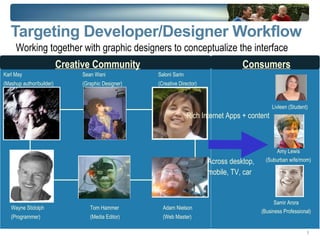
Targeting Developer/Designer Workflow Working together with graphic designers to conceptualize the interface Sean Wani (Graphic Designer)‏ Karl May (Mashup author/builder)‏ Amy Lewis (Suburban wife/mom)‏ Tom Hammer (Media Editor)‏ Saloni Sarin (Creative Director)‏ Livleen (Student)‏ Samir Arora (Business Professional)‏ Adam Nielson (Web Master)‏ Wayne Stidolph (Programmer)‏ Rich Internet Apps + content Across desktop,  mobile, TV, car Creative Community Consumers
Things You Can Build with JavaFX
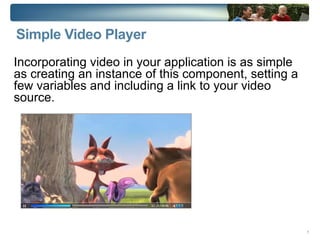
Simple Video Player Incorporating video in your application is as simple as creating an instance of this component, setting a few variables and including a link to your video source.
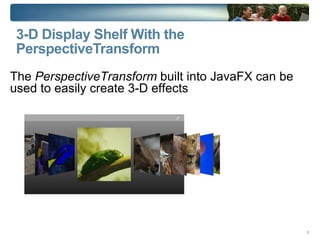
3-D Display Shelf With the PerspectiveTransform The  PerspectiveTransform  built into JavaFX can be used to easily create 3-D effects
Demo: JavaFX Sample Apps from javafx.com
JavaFX Script JavaFX Script source files are called “scripts”
Everything in JavaFX script is an expression
All blocks are expressions
The last line is the result  println(“ Hello World ”) The result of the println expression is null
JavaFX Script Programming Language  Declarative, statically-typed scripting language
Facilitates rapid GUI development
Integrates with and Leverages Java Platform
Runs on Java™ Virtual Machine Deployment options same as Java programs
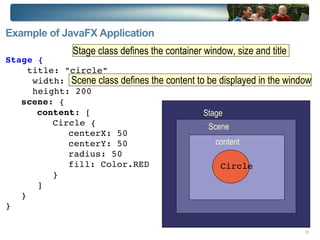
Example of JavaFX Application   Stage {  title: "circle" width: 240 height: 200 scene : { content : [ Circle {  centerX: 50 centerY: 50 radius: 50 fill: Color.RED } ] } } Stage Scene content Circle Stage class defines the container window, size and title  Scene class defines the content to be displayed in the window
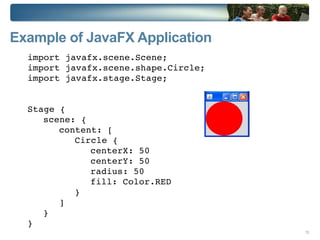
Example of JavaFX Application import javafx.scene.Scene; import javafx.scene.shape.Circle; import javafx.stage.Stage; Stage { scene: { content: [ Circle {  centerX: 50 centerY: 50 radius: 50 fill: Color.RED } ] } }
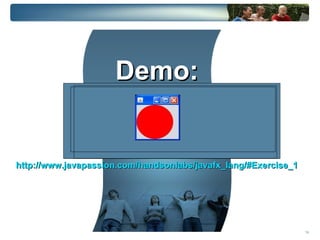
Demo: http://www.javapassion.com/handsonlabs/javafx_lang/#Exercise_1
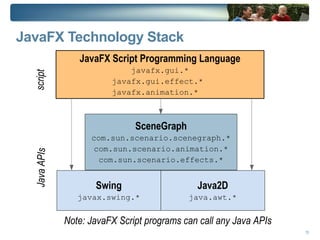
JavaFX Technology Stack Java2D java.awt.* SceneGraph com.sun.scenario.scenegraph.* com.sun.scenario.animation.* com.sun.scenario.effects.* JavaFX Script Programming Language javafx.gui.* javafx.gui.effect.*  javafx.animation.*  Java APIs script Swing javax.swing.* Note: JavaFX Script programs can call any Java APIs
(Some) Language Features
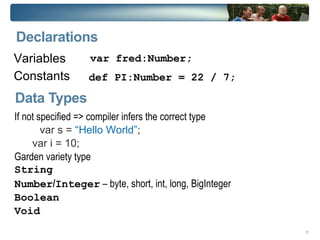
Declarations Variables
Constants  var fred:Number; def PI:Number = 22 / 7; Data Types If not specified => compiler infers the correct type var s =  “Hello World” ;
var i = 10; Garden variety type String
Number / Integer  – byte, short, int, long, BigInteger
Boolean
Void
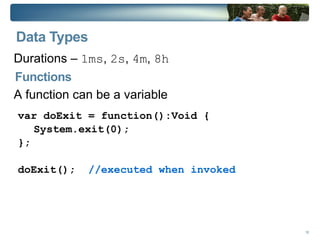
Data Types Durations –  1ms ,  2s ,  4m ,  8h  A function can be a variable var doExit = function():Void { System.exit(0); }; doExit();  //executed when invoked Functions
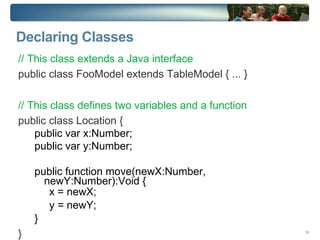
Declaring Classes // This class extends a Java interface public class FooModel extends TableModel { ... } // This class defines two variables and a function public class Location { public var x:Number; public var y:Number; public function move(newX:Number, newY:Number):Void { x = newX; y = newY; } }
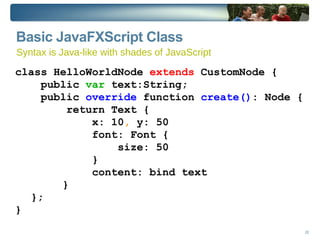
Basic JavaFXScript Class class HelloWorldNode  extends  CustomNode { public  var  text:String; public  override  function  create() : Node { return Text { x: 10 ,  y: 50 font: Font { size: 50 } content: bind text } }; } Syntax is Java-like with shades of JavaScript
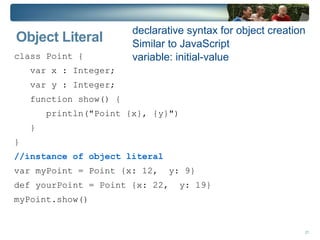
Object Literal class Point {  var x : Integer;  var y : Integer;  function show() { println("Point {x}, {y}") }  } //instance of object literal var myPoint = Point {x: 12,  y: 9} def yourPoint = Point {x: 22,  y: 19} myPoint.show() declarative syntax for object creation
Similar to JavaScript
variable: initial-value
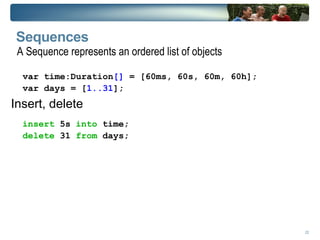
Sequences Insert, delete var time:Duration []  = [60ms, 60s, 60m, 60h]; var days = [ 1..31 ]; insert  5s  into  time; delete  31  from  days; A Sequence represents an ordered list of objects
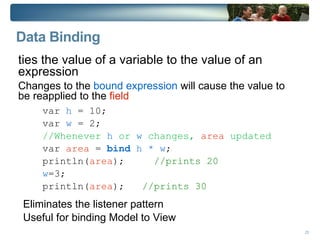
Data Binding ties the value of a variable to the value of an expression Changes to the  bound expression  will cause the value to be reapplied to the  field var  h  = 10; var  w  = 2; //Whenever  h  or  w  changes,  area  updated var  area  =  bind   h * w ; println( area );  //prints 20 w =3; println( area );  //prints 30 Eliminates the listener pattern Useful for binding Model to View
Triggers Associate a  block of code  to a  variable
When the value of the  variable changes , the  code is executed
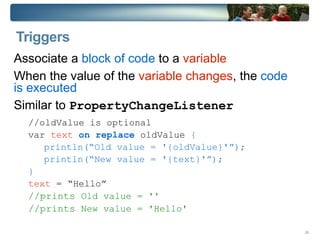
Similar to  PropertyChangeListener //oldValue is optional var  text   on replace  oldValue  { println(“Old value = '{oldValue}'”); println(“New value = '{text}'”); } text  = “Hello” //prints  Old value = '' //prints  New value = 'Hello'
Graphical Objects *   * The fun stuff
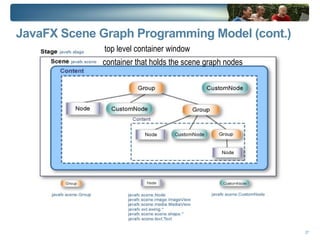
JavaFX Stage Scene  Stage  is the  top level container window Scene  is a drawing surface  container that holds the scene graph nodes. content   holds JavaFX graphical elements which define the graphical content of the application.
JavaFX Scene Graph Programming Model (cont.) top level container window container that holds the scene graph nodes
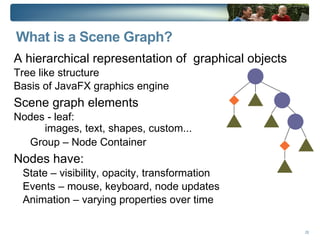
What is a Scene Graph? A hierarchical representation of  graphical objects Tree like structure
Basis of JavaFX graphics engine Scene graph elements Nodes - leaf: images, text, shapes, custom... Group – Node Container Nodes have: State – visibility, opacity, transformation
Events – mouse, keyboard, node updates
Animation – varying properties over time
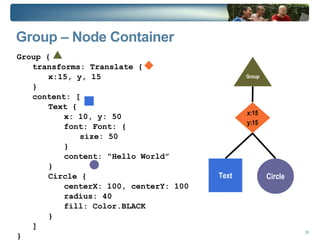
Group – Node Container  Group { transforms: Translate { x:15, y, 15 } content: [ Text { x: 10, y: 50 font: Font: { size: 50 } content: “Hello World” } Circle { centerX: 100, centerY: 100 radius: 40 fill: Color.BLACK } ] } Group Circle Text x:15 y:15
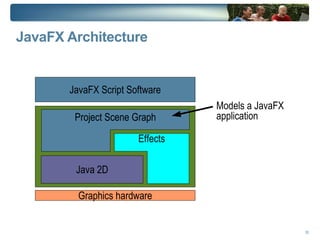
JavaFX Architecture  Models a JavaFX application Java 2D Effects Project Scene Graph
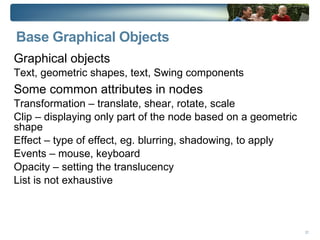
Base Graphical Objects Graphical objects Text, geometric shapes, text, Swing components Some common attributes in nodes Transformation – translate, shear, rotate, scale
Clip – displaying only part of the node based on a geometric shape
Effect – type of effect, eg. blurring, shadowing, to apply
Events – mouse, keyboard
Opacity – setting the translucency
List is not exhaustive
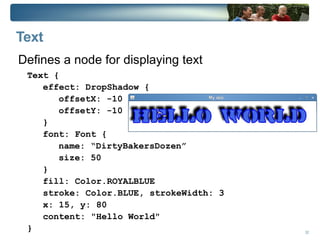
Text Defines a node for displaying text Text { effect: DropShadow { offsetX: -10 offsetY: -10 } font: Font { name: “DirtyBakersDozen” size: 50 } fill: Color.ROYALBLUE stroke: Color.BLUE, strokeWidth: 3 x: 15, y: 80 content: "Hello World" }
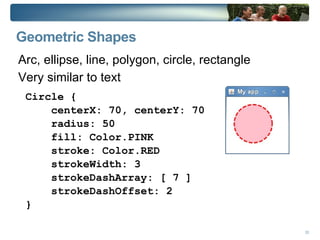
Geometric Shapes Arc, ellipse, line, polygon, circle, rectangle
Very similar to text Circle { centerX: 70, centerY: 70 radius: 50 fill: Color.PINK stroke: Color.RED strokeWidth: 3 strokeDashArray: [ 7 ] strokeDashOffset: 2 }
Custom Shapes Two ways of defining custom shapes Combining existing shapes
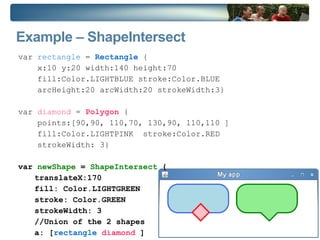
Drawing a totally new shape Combine existing shape with  ShapeIntersect  or  ShapeSubtract Either  add   or  subtract  from shape
Example – ShapeIntersect  var  rectangle  =  Rectangle  { x:10 y:20 width:140 height:70  fill:Color.LIGHTBLUE stroke:Color.BLUE arcHeight:20 arcWidth:20 strokeWidth:3} var  diamond  =  Polygon   { points:[90,90, 110,70, 130,90, 110,110 ]  fill:Color.LIGHTPINK  stroke:Color.RED strokeWidth: 3} var  newShape  =  ShapeIntersect  { translateX:170 fill: Color.LIGHTGREEN stroke: Color.GREEN strokeWidth: 3 //Union of the 2 shapes a: [ rectangle  diamond  ] }
Custom Shapes Two ways of defining custom shapes Combining existing shapes
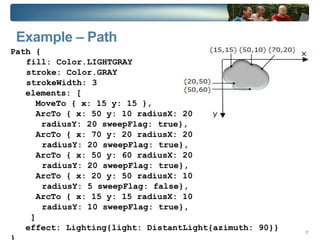
Drawing a totally new shape Draw new shapes with  Path  and path elements Path elements include  MoveTo ,  ArcTo ,  HLine ,  VLine ,  QuadCurve , etc. Can be manipulated like a regular geometric shape
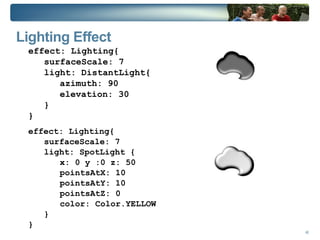
Example – Path Path { fill: Color.LIGHTGRAY stroke: Color.GRAY strokeWidth: 3 elements: [ MoveTo { x: 15 y: 15 }, ArcTo { x: 50 y: 10 radiusX: 20    radiusY: 20 sweepFlag: true}, ArcTo { x: 70 y: 20 radiusX: 20  radiusY: 20 sweepFlag: true}, ArcTo { x: 50 y: 60 radiusX: 20  radiusY: 20 sweepFlag: true}, ArcTo { x: 20 y: 50 radiusX: 10  radiusY: 5 sweepFlag:  false }, ArcTo { x: 15 y: 15 radiusX: 10  radiusY: 10 sweepFlag: true}, ] effect: Lighting{light: DistantLight{azimuth: 90}} }
Images ImageView node shows images
Image represents an in memory Image Both ImageView and Image can scale Preserve ratio
Fit within a specific width/height
When fit on Image level, keeps smaller image in memory myImageView = ImageView { image: Image { url: "file:///..."} }
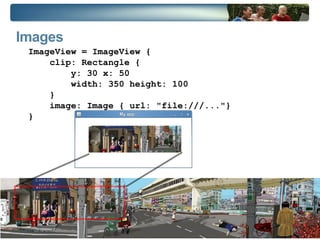
Images ImageView = ImageView { clip: Rectangle { y: 30 x: 50 width: 350 height: 100 } image: Image { url: "file:///..."} }
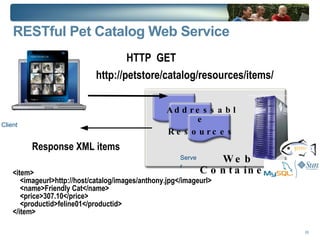
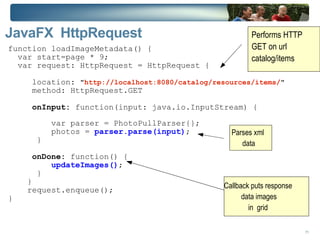
JavaFX Catalog client
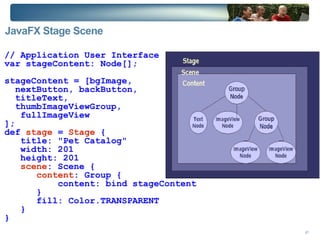
JavaFX Stage Scene   // Application User Interface var stageContent: Node[]; stageContent = [bgImage,  nextButton, backButton,  titleText,  thumbImageViewGroup,  fullImageView ]; def  stage  =  Stage  { title: "Pet Catalog" width: 201 height: 201 scene : Scene { content : Group { content: bind stageContent } fill: Color.TRANSPARENT } }
JavaFX Stage Scene  var stageContent: Node[]; stageContent  = [bgImage,  nextButton, backButton,  titleText,  thumbImageViewGroup,  fullImageView ]; def  stage  =  Stage  { title: "Pet Catalog" width: 201 height: 201 scene : Scene { content : Group { content: bind  stageContent } fill: Color.TRANSPARENT } }
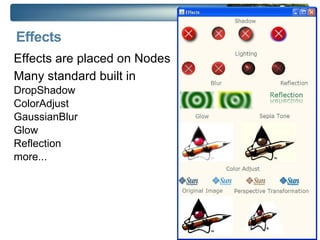
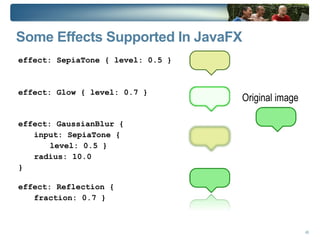
Effects  Effects are placed on Nodes
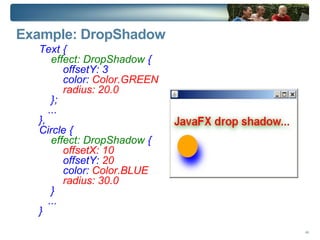
Many standard built in DropShadow

Java Fx Overview Tech Tour

  • 1.
    JavaFX - RichGUIs Made Easy Carol McDonald Technology Evangelist
  • 2.
    Agenda JavaFX ScriptLanguage Overview
  • 3.
  • 4.
  • 5.
  • 6.
  • 7.
    Work with RestfulWeb Services JavaFX Application Deployment
  • 8.
  • 9.
    Overview of the JavaFX SDK
  • 10.
    JavaFX Vision *Rich Clients
  • 11.
    Multiple devices JavaFXis THE platform for creating and delivering Rich Internet Application s across all the screens of your life
  • 12.
    Targeting Developer/Designer WorkflowWorking together with graphic designers to conceptualize the interface Sean Wani (Graphic Designer)‏ Karl May (Mashup author/builder)‏ Amy Lewis (Suburban wife/mom)‏ Tom Hammer (Media Editor)‏ Saloni Sarin (Creative Director)‏ Livleen (Student)‏ Samir Arora (Business Professional)‏ Adam Nielson (Web Master)‏ Wayne Stidolph (Programmer)‏ Rich Internet Apps + content Across desktop, mobile, TV, car Creative Community Consumers
  • 13.
    Things You CanBuild with JavaFX
  • 14.
    Simple Video PlayerIncorporating video in your application is as simple as creating an instance of this component, setting a few variables and including a link to your video source.
  • 15.
    3-D Display ShelfWith the PerspectiveTransform The PerspectiveTransform built into JavaFX can be used to easily create 3-D effects
  • 16.
    Demo: JavaFX SampleApps from javafx.com
  • 17.
    JavaFX Script JavaFXScript source files are called “scripts”
  • 18.
    Everything in JavaFXscript is an expression
  • 19.
    All blocks areexpressions
  • 20.
    The last lineis the result println(“ Hello World ”) The result of the println expression is null
  • 21.
    JavaFX Script ProgrammingLanguage Declarative, statically-typed scripting language
  • 22.
  • 23.
    Integrates with andLeverages Java Platform
  • 24.
    Runs on Java™Virtual Machine Deployment options same as Java programs
  • 25.
    Example of JavaFXApplication Stage { title: "circle" width: 240 height: 200 scene : { content : [ Circle { centerX: 50 centerY: 50 radius: 50 fill: Color.RED } ] } } Stage Scene content Circle Stage class defines the container window, size and title Scene class defines the content to be displayed in the window
  • 26.
    Example of JavaFXApplication import javafx.scene.Scene; import javafx.scene.shape.Circle; import javafx.stage.Stage; Stage { scene: { content: [ Circle { centerX: 50 centerY: 50 radius: 50 fill: Color.RED } ] } }
  • 27.
  • 28.
    JavaFX Technology StackJava2D java.awt.* SceneGraph com.sun.scenario.scenegraph.* com.sun.scenario.animation.* com.sun.scenario.effects.* JavaFX Script Programming Language javafx.gui.* javafx.gui.effect.* javafx.animation.* Java APIs script Swing javax.swing.* Note: JavaFX Script programs can call any Java APIs
  • 29.
  • 30.
  • 31.
    Constants varfred:Number; def PI:Number = 22 / 7; Data Types If not specified => compiler infers the correct type var s = “Hello World” ;
  • 32.
    var i =10; Garden variety type String
  • 33.
    Number / Integer – byte, short, int, long, BigInteger
  • 34.
  • 35.
  • 36.
    Data Types Durations– 1ms , 2s , 4m , 8h A function can be a variable var doExit = function():Void { System.exit(0); }; doExit(); //executed when invoked Functions
  • 37.
    Declaring Classes //This class extends a Java interface public class FooModel extends TableModel { ... } // This class defines two variables and a function public class Location { public var x:Number; public var y:Number; public function move(newX:Number, newY:Number):Void { x = newX; y = newY; } }
  • 38.
    Basic JavaFXScript Classclass HelloWorldNode extends CustomNode { public var text:String; public override function create() : Node { return Text { x: 10 , y: 50 font: Font { size: 50 } content: bind text } }; } Syntax is Java-like with shades of JavaScript
  • 39.
    Object Literal classPoint { var x : Integer; var y : Integer; function show() { println("Point {x}, {y}") } } //instance of object literal var myPoint = Point {x: 12, y: 9} def yourPoint = Point {x: 22, y: 19} myPoint.show() declarative syntax for object creation
  • 40.
  • 41.
  • 42.
    Sequences Insert, deletevar time:Duration [] = [60ms, 60s, 60m, 60h]; var days = [ 1..31 ]; insert 5s into time; delete 31 from days; A Sequence represents an ordered list of objects
  • 43.
    Data Binding tiesthe value of a variable to the value of an expression Changes to the bound expression will cause the value to be reapplied to the field var h = 10; var w = 2; //Whenever h or w changes, area updated var area = bind h * w ; println( area ); //prints 20 w =3; println( area ); //prints 30 Eliminates the listener pattern Useful for binding Model to View
  • 44.
    Triggers Associate a block of code to a variable
  • 45.
    When the valueof the variable changes , the code is executed
  • 46.
    Similar to PropertyChangeListener //oldValue is optional var text on replace oldValue { println(“Old value = '{oldValue}'”); println(“New value = '{text}'”); } text = “Hello” //prints Old value = '' //prints New value = 'Hello'
  • 47.
    Graphical Objects * * The fun stuff
  • 48.
    JavaFX Stage Scene Stage is the top level container window Scene is a drawing surface container that holds the scene graph nodes. content holds JavaFX graphical elements which define the graphical content of the application.
  • 49.
    JavaFX Scene GraphProgramming Model (cont.) top level container window container that holds the scene graph nodes
  • 50.
    What is aScene Graph? A hierarchical representation of graphical objects Tree like structure
  • 51.
    Basis of JavaFXgraphics engine Scene graph elements Nodes - leaf: images, text, shapes, custom... Group – Node Container Nodes have: State – visibility, opacity, transformation
  • 52.
    Events – mouse,keyboard, node updates
  • 53.
    Animation – varyingproperties over time
  • 54.
    Group – NodeContainer Group { transforms: Translate { x:15, y, 15 } content: [ Text { x: 10, y: 50 font: Font: { size: 50 } content: “Hello World” } Circle { centerX: 100, centerY: 100 radius: 40 fill: Color.BLACK } ] } Group Circle Text x:15 y:15
  • 55.
    JavaFX Architecture Models a JavaFX application Java 2D Effects Project Scene Graph
  • 56.
    Base Graphical ObjectsGraphical objects Text, geometric shapes, text, Swing components Some common attributes in nodes Transformation – translate, shear, rotate, scale
  • 57.
    Clip – displayingonly part of the node based on a geometric shape
  • 58.
    Effect – typeof effect, eg. blurring, shadowing, to apply
  • 59.
  • 60.
    Opacity – settingthe translucency
  • 61.
    List is notexhaustive
  • 62.
    Text Defines anode for displaying text Text { effect: DropShadow { offsetX: -10 offsetY: -10 } font: Font { name: “DirtyBakersDozen” size: 50 } fill: Color.ROYALBLUE stroke: Color.BLUE, strokeWidth: 3 x: 15, y: 80 content: "Hello World" }
  • 63.
    Geometric Shapes Arc,ellipse, line, polygon, circle, rectangle
  • 64.
    Very similar totext Circle { centerX: 70, centerY: 70 radius: 50 fill: Color.PINK stroke: Color.RED strokeWidth: 3 strokeDashArray: [ 7 ] strokeDashOffset: 2 }
  • 65.
    Custom Shapes Twoways of defining custom shapes Combining existing shapes
  • 66.
    Drawing a totallynew shape Combine existing shape with ShapeIntersect or ShapeSubtract Either add or subtract from shape
  • 67.
    Example – ShapeIntersect var rectangle = Rectangle { x:10 y:20 width:140 height:70 fill:Color.LIGHTBLUE stroke:Color.BLUE arcHeight:20 arcWidth:20 strokeWidth:3} var diamond = Polygon { points:[90,90, 110,70, 130,90, 110,110 ] fill:Color.LIGHTPINK stroke:Color.RED strokeWidth: 3} var newShape = ShapeIntersect { translateX:170 fill: Color.LIGHTGREEN stroke: Color.GREEN strokeWidth: 3 //Union of the 2 shapes a: [ rectangle diamond ] }
  • 68.
    Custom Shapes Twoways of defining custom shapes Combining existing shapes
  • 69.
    Drawing a totallynew shape Draw new shapes with Path and path elements Path elements include MoveTo , ArcTo , HLine , VLine , QuadCurve , etc. Can be manipulated like a regular geometric shape
  • 70.
    Example – PathPath { fill: Color.LIGHTGRAY stroke: Color.GRAY strokeWidth: 3 elements: [ MoveTo { x: 15 y: 15 }, ArcTo { x: 50 y: 10 radiusX: 20 radiusY: 20 sweepFlag: true}, ArcTo { x: 70 y: 20 radiusX: 20 radiusY: 20 sweepFlag: true}, ArcTo { x: 50 y: 60 radiusX: 20 radiusY: 20 sweepFlag: true}, ArcTo { x: 20 y: 50 radiusX: 10 radiusY: 5 sweepFlag: false }, ArcTo { x: 15 y: 15 radiusX: 10 radiusY: 10 sweepFlag: true}, ] effect: Lighting{light: DistantLight{azimuth: 90}} }
  • 71.
  • 72.
    Image represents anin memory Image Both ImageView and Image can scale Preserve ratio
  • 73.
    Fit within aspecific width/height
  • 74.
    When fit onImage level, keeps smaller image in memory myImageView = ImageView { image: Image { url: "file:///..."} }
  • 75.
    Images ImageView =ImageView { clip: Rectangle { y: 30 x: 50 width: 350 height: 100 } image: Image { url: "file:///..."} }
  • 76.
  • 77.
    JavaFX Stage Scene // Application User Interface var stageContent: Node[]; stageContent = [bgImage, nextButton, backButton, titleText, thumbImageViewGroup, fullImageView ]; def stage = Stage { title: "Pet Catalog" width: 201 height: 201 scene : Scene { content : Group { content: bind stageContent } fill: Color.TRANSPARENT } }
  • 78.
    JavaFX Stage Scene var stageContent: Node[]; stageContent = [bgImage, nextButton, backButton, titleText, thumbImageViewGroup, fullImageView ]; def stage = Stage { title: "Pet Catalog" width: 201 height: 201 scene : Scene { content : Group { content: bind stageContent } fill: Color.TRANSPARENT } }
  • 79.
    Effects Effectsare placed on Nodes
  • 80.
    Many standard builtin DropShadow

Editor's Notes

  • #5 escribe and present your product(s)/product line/service(s), technology, solution at a mid to high-level. Avoid low-level technical details (reserve to Systems Engineering training if needed) What are the business/technology value propositions? What is your BU vision and strategy? What OEM specific programs / resources do you have? How does your product/solution fit into an overall Sun open source /solution/story? JavaFX is the, Java-based, rich client platform for building RIA applications and content across multiple platforms Messages Designed to enable consistent user experiences, from desktop to mobile device to set-top box to Blu-ray Disc _________________________________________________ Zoom in on the FX portion of the Markecture diagram with a cool visual effect As Rich talks about a portion of Java FX, the component name is the only thing on the screen, high contrast, big font If there are cool visuals for the component, sprinkle them in
  • #14 Now here it is in JavaFX Script: Notice how both the frame's stage and the circle class use the same name for the background: fill. And if you want to get rid of the window's background you just set fill to null. It's consistent and easy. *that's* the value of creating a new API.
  • #18 The public-read Access Modifier The public-read access modifier defines a variable that is publicly readable, but (by default) is writeable only from within the current script. To widen its write access, prepend either the package or protected modifier (i.e. package public-read or protected public-read). Doing so will set its write access to the package or protected level. The public-init Access Modifier The public-init access modifier defines a variable that can be publicly initialized by object literals in any package. Subsequent write access, however, is controlled in the same manner as public-read (the default is write access at the script-level, but prepending package or protected will widen the access accordingly). The value of this variable is always readable from any package.
  • #19 Function An executable body of code that performs a particular task Function does not execute until it is invoked There are two levels of function: script level and object level Function can be a variable
  • #20 Classes extend classes or interfaces Scope modifiers: public, protected, package Implicitly “script private” init { } and postinit { } blocks take place of Constructors Functions and variables declared outside a class are static Multiple classes may be defined in a single Script
  • #22 Classes extend classes or interfaces Scope modifiers: public, protected, package Implicitly “script private” init { } and postinit { } blocks take place of Constructors Functions and variables declared outside a class are static Multiple classes may be defined in a single Script
  • #23 A Sequence represents an ordered list of objects; the objects of a sequence are called items. JavaFX has “Sequences”, not arrays A Sequence is an immutable ordered list of non-null elements JavaFX supports sequence comprehensions Sequences can be “sliced” Sequences can optimize memory usage
  • #24 bind is a way to tie the value of one variable to the value of an expression binding must be defined when the variable is initialized bindings are statically compiled bound variables cannot be set manually use bind with inverse for bidirectional binding
  • #38 The MoveTo class indicates the start point for the shape, and the ArcTo class creates an arc segment. All segments are combined into a shape using the Path class which represents a simple shape, and enables basic construction of a geometric path. The Path class is helpful when you need to create your own shape that is different from the primitive graphic shapes available in the javafx.scene.shape package. The Path class extends the Node class and inherits all of its instance variables and functions. Note: The sweepFlag instance variable is set to true so that the arc be drawn clockwise, in a "positive" angle. If the arcs are drawn counterclockwise, they will not curve correctly.
  • #62 The movement from the beginning to the end states, commonly called "tweening," is specified with the tween operator. The Interpolator.LINEAR value means that movement will progress at a steady rate from the beginning position to the end position.