JavaFX 101
Jasper Potts & Richard Bair
Oracle
Agenda
• Overview
• Details
• Architecture
• Roadmap
• Participation
2
What is JavaFX?
JavaFX is the evolution of the Java
rich client platform, designed to
address the needs of today’s and
tomorrow’s customers.
Who is JavaFX for?
Target Developers
• Current Java Developers
• Former Java Developers
• Web Developers
• New Developers
6
What is a rich client?
We believe rich clients are both
“native” applications and rich web
applications. We want the Java rich
client to be dominant in both domains.
Strategy
• Java is incredibly widely used
–Very popular in the enterprise
–Used for both native and web clients
• Web is becoming increasingly rich
–This is a trend we like!
–We are not competing with HTML
• Position Java for native and web clients
–Java rich client development should be for both
–Increasingly, we expect plugin-less deployment
• Work with W3C to make the web more powerful
• Standards Based 10
Why is the rich client
important?
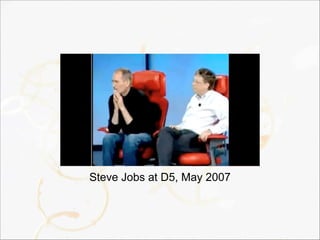
Steve Jobs at D5, May 2007
While the rich client can certainly be
in a browser, we agree with Steve that
customers want experiences which
require a rich client.
What makes JavaFX
special?
JavaFX defines itself as being a well
designed, cross platform application
development platform. It is fast. It is
flexible. It delivers exceptional value
to developers and end users.
Most importantly, it leverages the
massive existing Java ecosystem.
Nobody else offers the complete
package – exceptional developer
experience, user experience, cross
platform development and massive
ecosystem.
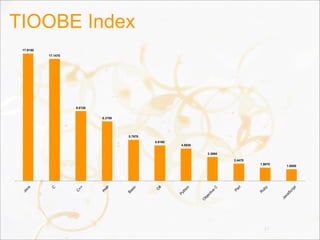
TIOOBE Index
17
Java
C
C
++
PH
P
Basic
C
#
Python
O
bjective
C
Perl
R
uby
JavaScript
1.6650
1.9070
2.4470
3.3680
4.5830
5.0160
5.7970
8.3700
9.8120
17.1470
17.9150
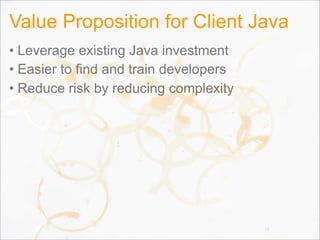
Value Proposition for Client Java
• Leverage existing Java investment
• Easier to find and train developers
• Reduce risk by reducing complexity
18
What is Oracle’s
Commitment to
Java?
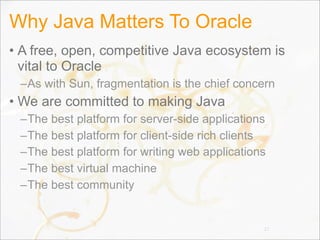
Why Java Matters To Oracle
• A free, open, competitive Java ecosystem is
vital to Oracle
–As with Sun, fragmentation is the chief concern
• We are committed to making Java
–The best platform for server-side applications
–The best platform for client-side rich clients
–The best platform for writing web applications
–The best virtual machine
–The best community
21
Agenda
• Overview
• Details
• Architecture
• Roadmap
• Participation
22
Disclaimer: The following slides
represent our current thinking and
may change before the final release.
We hope you like this pre-alpha view
on the world, and please participate in
our early access and beta programs!
Programming Languages
• Java is our primary programming language
–Release Java APIs for all of JavaFX
–Expose JavaFX Binding, Sequences as Java APIs
• Embrace all JVM languages
–Standard JVM Languages
• JRuby, Jython, Scala, Groovy, …
–JavaScript
–Emerging / Niche JVM Languages
• Gosu, Visage, ...
24
APIs and Programming Model
• Continuation from JavaFX 1.X product line
–Most APIs have simply been ported directly to Java
–Some APIs are being revisited (e.g. layout, media)
• Embrace more web technology
–JavaFX CSS to be a strict superset of CSS 3
–Use WAI-ARIA for accessibility API
–Make HTML available for rich text in all Text nodes
–Follow web specifications for drag and drop, events
• Developers use the Scenegraph not the DOM
25
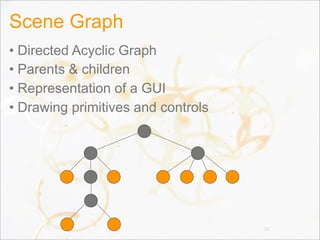
Scene Graph
• Directed Acyclic Graph
• Parents & children
• Representation of a GUI
• Drawing primitives and controls
26
Types of Nodes
• Shapes
–Rectangle, Circle, Path, Box, Sphere, 3D Path...
• Images
• Media
• Web browser
• Text
• Controls
• Charts
• Group
• Container
27
Demo
Anatomy Of A Node
• id, styleClass
• Bounding volume (bounds)
• Effects
• Transformations
• Event handlers
–Mouse, Key, Input Method, Drag, Touch, ...
• Application specific state
• visible, cursor, clip, disabled, cache, ...
• Lookup
–JQuery-like lookup syntax (in progress)
29
Scene Graph Architecture
• “Monolithic vs Polylithic Design”
–See http://www.cs.umd.edu/hcil/jazz/learn/
Toolkit_Design_2004.pdf
–Scenario was initially a polylithic design
–Experience shows the monolithic design is easier to
use and may also have better performance
characteristics
• The polylithic scene graph requires
manipulating the scene graph (or planning
ahead)
• Node is huge, but also simple and makes
working with the scene graph easy 30
Bounding Volume Hierarchy
• The Scene Graph integrates a BVH
–A BVH is a spatial data structure
–Used to simplify and accelerate culling, picking, etc
–Integrated into the Scene Graph
• Two typical types of structures for a BVH
–Bounding Sphere
–Axis Aligned Bounding Box
• Different types of bounds
–boundsInLocal
–boundsInParent (or convert it to boundsInScene)
–layoutBounds 31
Instancing
• Term given to reusing geometry among multiple
Nodes
• We currently have some support for instancing,
but it is not “enough” for our liking
–Transforms can be shared
–Effects can be shared
–Paths can be shared (** can they? They should!)
–Images can be shared
–Media can be shared
–Paints can be shared
32
Cloning (or copying, or instancing)
• What we need though is to be able to take a
complete Node (perhaps a complex Parent /
Group) and create lightweight “clones”
• Treat the entire clone as a unit
• Can change transforms, effects, id, opacity, etc
of the clone but not much else
–That is, the clone would be exposed as a Node only
33
Immediate vs. Retained Modes
• Immediate Mode
–Less memory intensive
–More CPU intensive
–More GPU intensive
–Painter’s algorithm always
• Render stuff that you won’t even see
• Retained Mode
–More memory intensive
–More optimized for the GPU
• Render a state-sorted scene graph representation
• Or maybe cache-hot sorted
• Or maybe something else 34
Retained Mode
• Our system is a Retained Mode scene graph
–Higher performance
–Memory overhead actually is not that high (anymore)
• As evidenced by our 70,000 Node demos
• Some situations require node virtualization
–ListView, TableView, TreeView
–Virtualization is simply the act of creating and deleting
Nodes as needed so that data not being shown isn’t
in the tree
–In the ideal world this wouldn’t be necessary, but
memory, while abundant, isn’t free and neither is the
GC overhead in handling large heaps 35
State Sorting
• Graphics cards choke on state changes
• Scene graphs can be state-sorted
–It is sometimes worth it to spend CPU cycles state
sorting since it makes passing data to the graphics
card so much faster
• State sorting only works if you also have a
depth buffer
–Render from front to back and use depth buffer to
avoid rendering something that will be occluded
–Doesn’t work well with transparency. Doh!
• “Render graph” is separate from scene graph
36
Transforms
• Transform the coordinate space
–translate (move something in the x, y, z planes)
–scale (resize in the x, y, z planes)
–rotate (angle of rotation and a vector to rotate about)
–affine (3x3 matrix, used in 2D)
–perspective projection (4x4 matrix, used in 3D)
• As you can see, we support 2D & 3D transforms
• All Nodes can be transformed
–Convenience variables:
• translateX, translateY, translateZ, scaleX, scaleY, ...
–Transform sequence
• Sequence<Transform> transforms
37
Transforms
• We need to work out better how to provide for
transforms that can be used by the developer
vs. library code (such as Animation Transition
library)
–Right now animated transitions use the simple
variables
–But that doesn’t work well in 3D where we need the
perspective projection
–And it clobbers anything the user might have specified
38
Effects
• “Effect” is the term we use for filter effects
–Filter effects operate on an image
• So we have to render Nodes into an image before using
filter effects
–Algorithms which apply to pixels
• Affectionately referred to as “pixel bashing”
–Leverage SSE, OpenGL, D3D
–Or use plain Java
–In some cases, software rendering is much faster
than on the GPU
• There is a certain fixed cost to setting up / tearing down
the hardware for rendering. For small images, software
may be more efficient 39
Blend Modes
• Another image-based technique for blending the
rendering of multiple layers of a Group or Parent
–First we have to render each layer into an image
–Then we blend the pixels of the two layers according
to some well known rules (BlendMode)
• In JavaFX 1.3 you could only use blend modes
on Groups
• In JavaFX 2.0, you can use blend modes on any
Parent
• For both Blend Modes and Effects, using
“cache” may increase performance
40
“Physical” vs. “Logical” Scenes
• The physical scene graph is every Parent and
every Node which makes up the scene graph
–For example, the physical scene graph includes the
Button control and the ButtonSkin (which is
technically a child of the Button control) and whatever
might be used inside the ButtonSkin
• The logical scene graph is a strict subset
–For example, the Button is part of the logic scene
graph but its Skin is not. The Button is treated
logically as if it were a leaf node, although technically
it is not
• Which do you want to traverse?
41
Traversal
• Traverse the logical tree when:
–You want to operate on the logical nodes. For
example, to find each node and add some application
domain data to them
• Traverse the physical tree when:
–You are working on a tool or are debugging
–In Swing you only had the physical tree and this led to
evil things (either intentionally or unintentionally)
• Digging around in a JComboBox and hacking with its
internal state
• Wanting to recursively disable components and
accidentally stepping into the JComboBox internals
42
Traversal
• Every Parent has a getPublicChildren
–This is the logical tree
–Returns a List<Node>
–We will likely change the name, but I don’t yet know
what we might change it to!
• To traverse the physical tree, you will probably
need to use the visitor pattern
–The exact method for traversing the physical tree is
not yet decided
• Yes, we’re discouraging walking the physical
tree (but you can if you need to)
43
Events
• Input Events
–Originate in the Operating System
–MouseEvent, KeyEvent, InputMethodEvent,
TouchEvent, DragEvent
• Window Events
• Pulse Events
–Generated 1/60th of a second
• Unless nothing has changed in the scene graph and there
are no animations. If a tree falls in a forest...
• Focus Traversal Events
• Control Events
44
Event Handling
• Based on DOM Level 2 Events Specification
–http://www.w3.org/TR/DOM-Level-2-Events/
• All of our events extend an Event object
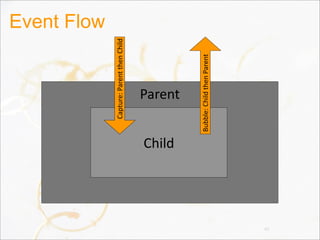
• Event flow:
–Capturing
–Bubbling
• EventHandler callback for events
–setOnMouseClicked(EventHandler<MouseEvent>)
–addMouseHandler(MouseEventID, EventHandler)
–addMouseFilter(MouseEventID, EventHandler)
• Events can be consumed 45
Event Flow
46
Parent
Child
Capture:	
  Parent	
  then	
  Child
Bubble:	
  Child	
  then	
  Parent
Pulse Event
• A “pulse” is sent from the graphics to the scene
graph once every 1/60th of a second
–Unless the system is overloaded in which case we’ll
throttle down to 1/30th of a second, or 1/15th of a
second (60fps, 30fps, etc)
• Helps reduce jerkiness
• During the pulse, we:
–Apply any CSS to nodes which have changed
–Perform any layout that needs to happen
–Synchronize state from the scene graph to the render
graph
47
3D (JAPSER HELP!!!)
• Camera
–PerspectiveCamera
–ParallelCamera
• Depth Buffer
• 3D Transforms
• 3D Primitives
• Lighting
48
Demo
Layout
• A surprisingly hard problem!
• We’ve made fairly substantial changes in each
release so far and we’re going to do so again!
• Design Goals:
–Easy to program with by hand
–Works with animated transitions
–Can be manipulated from CSS
–Easy to use with RAD tools
50
Layout Gotchas
• setWidth/setHeight on Resizable was a mistake
–It was to be called by the layout manager, but folks
would naturally want to call it and then get surprised
when it didn’t hold. setWidth was not the same as
setting the preferred width!
• HBox and VBox were too complicated
–mea culpa
• We might be backing away from layout specific
containers and going back to layout managers
–The primary reason has to do with layout from CSS
–Let the CSS author define the layout algorithm
• But layout by hand works better with containers51
CSS
• Working towards being a true superset of CSS3
• Stick to the spirit of it
–We use different attribute names & pseudoclasses
• Each Container can be styled from CSS
–Multiple border, backgrounds, images, padding, etc
• CSS animations (still to come)
• Support em, en, px, %, and all other units
• Fully spec’d (see http://javafx.com)
• Looking to add support for custom layout
algorithms such as Grid
52
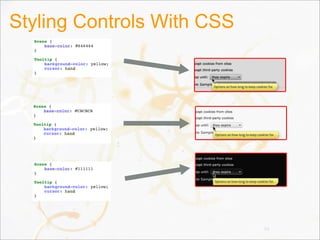
Styling Controls With CSS
53
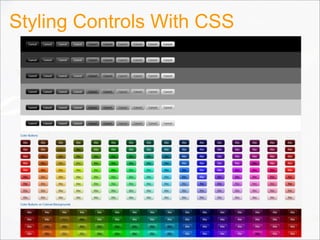
Styling Controls With CSS
54
CSS Strategy For Controls
• CSS is our strategy for styling Controls
• Caspian: default CSS stylesheet for Controls
• CSS is fast and works on all platforms
• Stick to the spirit of HTML CSS
–But do not be bound by it
55
CSS Capabilities For Controls
• Break control skins in styleable parts
• In some ways similar to HTML CSS’s Box
• Rectangle with independently rounded corners
–Or any arbitrary path
• Can have multiple
–Background fills
–Background images
–Border strokes
–Border images
56
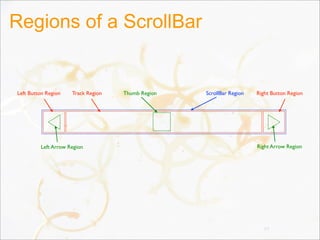
Regions of a ScrollBar
57
ScrollBar RegionThumb RegionTrack RegionLeft Button Region Right Button Region
Left Arrow Region Right Arrow Region
Demo
WebView
• Split into 3 parts:
–WebSource (url, DOM, string, etc)
–WebEngine (parses a WebSource into a DOM)
–WebView
• A single WebEngine can be used with multiple WebView’s
• WebView has no UI other than rendering the web content
• WebBrowser UI Control to be developed
–Would include search bar, buttons, etc
• WebEngine can be used independently of a
WebView (for example, to parse a DOM)
59
Demo
DOM
• Need an API for HTML DOM
–Could simply use the HTML DOM API from w3c
• But we’re not real fans of the Java DOM APIs
–Much better would be to provide new DOM and HTML
DOM APIs which are much easier to use
• Probably we would just extend the core DOM APIs so that
we still implement the “proper” interface, but make it nicer
to use
• Integrate DOM tightly with WebView
–Add DOM event listeners from Java to WebView
–Manipulate a WebView DOM from Java
• Integrate DOM tightly with web browser (applet)61
UI Controls
• Design Goals:
–Deceptively Simple
–Rich & Useful
–Convenient & complete out-of-the-box
• Unlike Swing which provided the basics and left the rest to
you!
–Extremely powerful to skin
–Easy to use from tools
–Cohesive design
62
Control & Skin
• Control is the “model” with methods on it for
manipulating that model
–For example, Button has an “armed” flag and arm()
and disarm() methods
• Skin provides the visual representation
–Binds to the control’s state
–Invokes methods on the control to change its state
–Handles both visual design and user interaction
• Most of our skins use a subclass of BehaviorBase for
implementing the user interaction, but other
implementations of Skin might do it differently
• Interface between Control & Skin is simple63
Theming and Skinning
• Easiest: use CSS
–Domain specific language for styling
–Very powerful, yet easy to use
–Designers know how to use it
• Tool Friendly: use designer tool
–Generates a Skin which relies on the designer visuals
–Requires an as-yet unreleased authoring tool
• Powerful: write a Skin by hand
–Knock yourself out
64
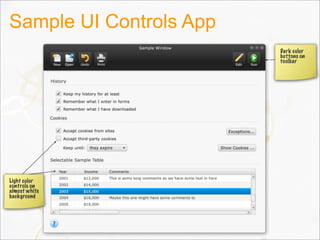
Sample UI Controls App
Light color
controls on
almost white
background
Dark color
buttons on
toolbar
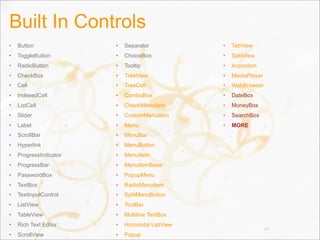
Built In Controls
• Button
• ToggleButton
• RadioButton
• CheckBox
• Cell
• IndexedCell
• ListCell
• Slider
• Label
• ScrollBar
• Hyperlink
• ProgressIndicator
• ProgressBar
• PasswordBox
• TextBox
• TextInputControl
• ListView
• TableView
• Rich Text Editor
• ScrollView
• Separator
• ChoiceBox
• Tooltip
• TreeView
• TreeCell
• ComboBox
• CheckMenuItem
• CustomMenuItem
• Menu
• MenuBar
• MenuButton
• MenuItem
• MenuItemBase
• PopupMenu
• RadioMenuItem
• SplitMenuButton
• ToolBar
• Multiline TextBox
• Horizontal ListView
• Popup
• TabView
• SplitView
• Accordion
• MediaPlayer
• WebBrowser
• DateBox
• MoneyBox
• SearchBox
• MORE
66
Demo
Improvements Over Swing
• Controls can draw outside their bounds
• Not restricted to rectangular areas
• (Almost) no visual state in the Controls
• Preferred width separated from preferred height
–getPrefWidth/getPrefHeight take alternate dimension
• Easy theming & skinning (thanks to CSS)
• Control is purely the model
–The Skin can be virtually anything
• Controls do not require specific Skins
• Controls hide Skin details (not easy to walk into
the skin details, i.e. comboBox.getChildren())68
Improvements Over Swing
• Cells instead of Renderers & Editors
–Fixes intractable issues with dynamic cells
–Makes it easy to write custom cells with dynamic
content such as video, web, etc
–Fixes intractable issues around cells containing
complex content such as TextBoxes which need their
own event handling and editing lifecycle
• Layout constraints are specified on the Node
instead of the container
–Fixes problems where to change the constraints you
have to remove & add the node to the container again
69
Rich Text
• Considering reusing TextBox and just adding a
content type
–A contentType of “text/html” (or maybe UTI type
instead of mime type) will put it into rich text mode
• Design goal:
–Display HTML-based rich text in any text node or text
control
–Text rendering should be fast
–Should be very easy to render basic rich text
• This is a work in progress. Some rich text
support may be available at time of release
70
Demo
Swing Integration
• We are FINALLY supporting embedding of
JavaFX into existing Swing applications!
• Accomplishing this requires 3 objectives:
✓Java APIs for JavaFX
–Ability to embed hardware accelerated 2D/3D scenes
–Swing API for embedding the scene
• We are currently making progress on the last
two issues and expect it to be complete by GA
• However (shed a tear), we are not going to
support embedding Swing components in
JavaFX scene graphs 72
Demo
Graphics
• Most of the graphics system is an
implementation detail beneath the scene graph
• Currently there are two graphics pipes
–Scenario
• Deprecated. We’re hoping to remove it
–Prism
• Brand new, still has that new car smell
• Has a multitude of command line switches
–All of which are private or for debug purposes only :-)
• Issues that we deal with:
–Dirty regions, tessellation, rasterization, YUV
decoding, effects, images, rendering, etc 74
Graphics
• 2D and 3D scene graph
• Hardware accelerated pipeline
–DirectX 9 on Windows XP, Windows Vista
–DirectX 11 on Windows 7
–OpenGL on Mac, Linux, Embedded
–Software (Java2D) when necessary
• Embed in Swing
–c.f. Java3D, JOGL
–Allows Swing applications to add JavaFX scenes,
charts, media, and controls
75
Odds And Ends
• Dirty Regions
–We perform dirty region culling to improve
performance for common cases
• Tessellation & Rasterization
–Currently being done by Pisces code from OpenJDK
–It is really fast (quite surprising actually)
–Code is contributed from RedHat
–Open source works!
• YUV decoding for Media
–On Prism, we don’t have to do this
–The graphics card can deal with YUV natively
76
Decora And JSL
• Java Shader Language (JSL)
–Simple shader language which compiles to:
• OpenGL
• Direct3D
• C + SSE
• Java2D
–Used by Decora for filter effects
• Decora is the name for our filter effect pipeline
• Decora & JSL are not yet public APIs
77
Prism
• Hardware accelerated pipeline coming in 2.0
• Prism can run (including 3D) on both hardware
and software renderers
–Software is used as a last resort if the system cannot
support Direct3D 9 or 11 or OpenGL
• Shaders for a good number of primitive shapes
• Performance measurement and optimization is
an ongoing effort
78
Media
• JavaFX supports both visual and audio media
• Cross platform JavaFX Media file (fxm, mp3)
• Media class represents a media file
• MediaPlayer plays a Media file
• MediaView is-a Node which displays the Media
–Many MediaViews can have the same MediaPlayer
• And it is cheap to do so
–MediaViews can scale the media proportionally or
disproportionally
–MediaView does not come with pre-built playback
controls (you need a MediaControl)
79
Media 2.0
• Media engine completely rewritten for JavaFX 2
• Much more stable (tested running media
continuously for days)
• Uses less CPU
• New Features:
–Low latency audio
–Embedding media in Jars
–Full screen video
–Programmatic media markers
–Synchronized media & animations
80
Demo
Java Beans
• The current JavaBeans pattern is insufficient
–The event model has serious deficiencies
• Passes the old & new values in the property change
listener. This is a serious performance penalty
• Requires boxing of the old & new value
• Vetoable properties are hardly used
• Lots of boilerplate
• Convention over specification makes it awkward to add
the appropriate methods to a bean and requires reflection
–String specification for each property name stinks
• We use an updated version of JavaBeans
82
Bean
• A Bean is an observable object
–You can register a Listener for any (or all) properties
on a Bean
–Whenever a property changes, you are notified
• Each property is comprised of:
–A single static PropertyReference instead of a String
–An optional getter (using the normal convention)
–An optional setter (using the normal convention)
–An accessor which returns a ValueModel
• Yep, sadly, more boilerplate. Fortunately, it is
very trivial.
83
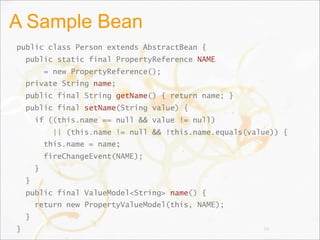
A Sample Bean
public class Person extends AbstractBean {
public static final PropertyReference NAME
= new PropertyReference();
private String name;
public final String getName() { return name; }
public final setName(String value) {
if ((this.name == null && value != null)
|| (this.name != null && !this.name.equals(value)) {
this.name = name;
fireChangeEvent(NAME);
}
}
public final ValueModel<String> name() {
return new PropertyValueModel(this, NAME);
}
} 84
Boilerplate
• Sadly, we haven’t figured out how to reduce the
boilerplate
–We mourn the loss of language support
–We tried meta-programming *cough* lombok *cough*
• But it was just too painful. We like to see all the code. We
just don’t like to type it all (and would like our IDE to
collapse it for us too please and thank you
–We’re focusing on getting support from the IDE
• We expect that we’ll see special support in
Groovy and other languages which reduce or
remove this boilerplate
85
Bean Events
• Our Listener class does not take the old or new
value
–No boxing! No explosion of primitive methods! No
instanceof checks!
• The Listener simply takes a Bean and a
PropertyReference
• Listeners are strongly referenced
–This followed a long discussion and is based on a lot
of experience across different APIs
–However we do supply a WeakListener
implementation so you can avoid memory leaks
86
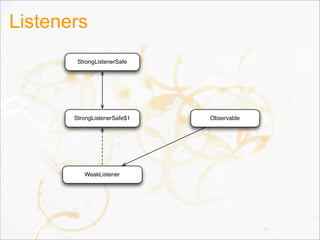
StrongListenerSafe
Observable
WeakListener
StrongListenerSafe$1
Listeners
87
Object Literals
• Ability to create & initialize an object in one go
–Makes UI code much easier to read
–Structure of the code matches the scene graph
–Avoids “constructor hell”
–Very tricky to do in Java
• Some options:
–Builders
–Constructor taking key,value pairs
–Constructor taking a Map
–Constructor taking “loose” var-args of key/value pairs
88
The Builder Pattern
• Pros
–Makes us feel all warm and fuzzy
–Strongly typed
–Relatively easy to read
–Nice code completion in IDEs
–Relatively easy to customize
–Really good performance
• Cons
–An extra class per class
–Lots of boilerplate
–Actually quite tricky in class hierarchies
89
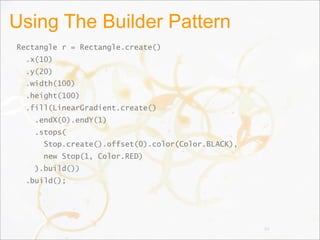
Using The Builder Pattern
Rectangle r = Rectangle.create()
.x(10)
.y(20)
.width(100)
.height(100)
.fill(LinearGradient.create()
.endX(0).endY(1)
.stops(
Stop.create().offset(0).color(Color.BLACK),
new Stop(1, Color.RED)
).build())
.build();
90
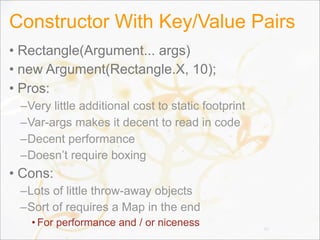
Constructor With Key/Value Pairs
• Rectangle(Argument... args)
• new Argument(Rectangle.X, 10);
• Pros:
–Very little additional cost to static footprint
–Var-args makes it decent to read in code
–Decent performance
–Doesn’t require boxing
• Cons:
–Lots of little throw-away objects
–Sort of requires a Map in the end
• For performance and / or niceness 91
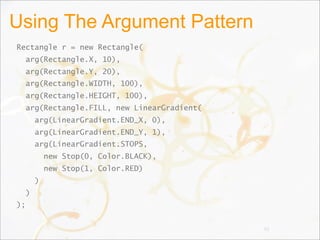
Using The Argument Pattern
Rectangle r = new Rectangle(
arg(Rectangle.X, 10),
arg(Rectangle.Y, 20),
arg(Rectangle.WIDTH, 100),
arg(Rectangle.HEIGHT, 100),
arg(Rectangle.FILL, new LinearGradient(
arg(LinearGradient.END_X, 0),
arg(LinearGradient.END_Y, 1),
arg(LinearGradient.STOPS,
new Stop(0, Color.BLACK),
new Stop(1, Color.RED)
)
)
);
92
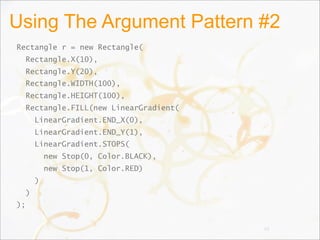
Using The Argument Pattern #2
Rectangle r = new Rectangle(
Rectangle.X(10),
Rectangle.Y(20),
Rectangle.WIDTH(100),
Rectangle.HEIGHT(100),
Rectangle.FILL(new LinearGradient(
LinearGradient.END_X(0),
LinearGradient.END_Y(1),
LinearGradient.STOPS(
new Stop(0, Color.BLACK),
new Stop(1, Color.RED)
)
)
);
93
Taking A Map
• Pros
–If we had a Map literal syntax it would be great
–Makes for a nice and clean constructor
implementation
–Very lightweight on static footprint
• Cons
–Lots of boxing
–A non-starter for Java without a Map literal syntax
94
A Map If We Had Map Literals
Rectangle r = new Rectangle([
Rectangle.X => 10,
Rectangle.Y => 20,
Rectangle.WIDTH => 100,
Rectangle.HEIGHT => 100,
Rectangle.FILL => new LinearGradient([
LinearGradient.END_X => 0,
LinearGradient.END_Y => 1,
LinearGradient.STOPS => new Stop[] {
new Stop(0, Color.BLACK),
new Stop(1, Color.RED)
}
])
)]
95
Loose Key/Value Pairs
• Pros
–Pretty light on the eyes (few syntactic tokens)
• Cons
–Boxing of primitives
–Easy to type incorrectly
–No compiler help
96
Using Loose Key/Value Pairs
Rectangle r = new Rectangle(
Rectangle.X, 10,
Rectangle.Y, 20,
Rectangle.WIDTH, 100,
Rectangle.HEIGHT, 100,
Rectangle.FILL, new LinearGradient(
LinearGradient.END_X, 0,
LinearGradient.END_Y, 1,
LinearGradient.STOPS, new Stop[] {
new Stop(0, Color.BLACK),
new Stop(1, Color.RED)
}
)
)
97
Binding
• There are two different forms of binding:
–PropertyBinding
• Essentially JavaFX Script like binding
• A property of an object is defined based on some binding
expression which can be quite complex
• Highly sensitive performance concerns
–DataBinding
• Essentially a Beans Binding like binding
• A user interface Control is bound to some data model
such that when the control is edited, the data model is
updated, and vice versa.
• Not particularly sensitive in terms of performance
98
Property Binding
• A property is defined by its binding
• Such a property cannot be set manually
–Attempts to call setFoo would result in an Exception
• Property bindings must be established by
creating an object with the object literal syntax
• Property bindings use ValueModel’s
–A bidirectional property binding uses
WritableValueModel’s
• A PropertyBinding is also a ValueModel
–So you can chain them together and form trees of
them
99
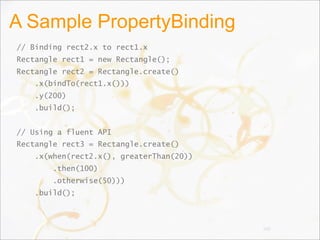
A Sample PropertyBinding
// Binding rect2.x to rect1.x
Rectangle rect1 = new Rectangle();
Rectangle rect2 = Rectangle.create()
.x(bindTo(rect1.x()))
.y(200)
.build();
// Using a fluent API
Rectangle rect3 = Rectangle.create()
.x(when(rect2.x(), greaterThan(20))
.then(100)
.otherwise(50)))
.build();
100
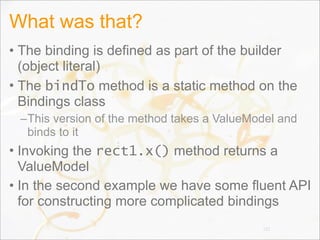
What was that?
• The binding is defined as part of the builder
(object literal)
• The bindTo method is a static method on the
Bindings class
–This version of the method takes a ValueModel and
binds to it
• Invoking the rect1.x() method returns a
ValueModel
• In the second example we have some fluent API
for constructing more complicated bindings
101
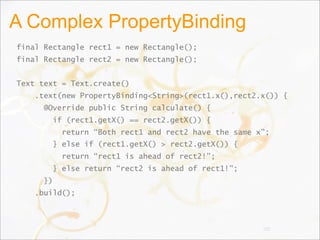
A Complex PropertyBinding
final Rectangle rect1 = new Rectangle();
final Rectangle rect2 = new Rectangle();
Text text = Text.create()
.text(new PropertyBinding<String>(rect1.x(),rect2.x()) {
@Override public String calculate() {
if (rect1.getX() == rect2.getX()) {
return “Both rect1 and rect2 have the same x”;
} else if (rect1.getX() > rect2.getX()) {
return “rect1 is ahead of rect2!”;
} else return “rect2 is ahead of rect1!”;
})
.build();
102
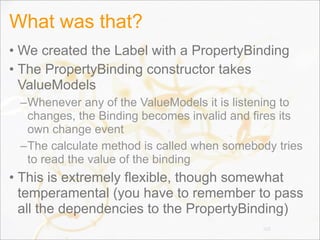
What was that?
• We created the Label with a PropertyBinding
• The PropertyBinding constructor takes
ValueModels
–Whenever any of the ValueModels it is listening to
changes, the Binding becomes invalid and fires its
own change event
–The calculate method is called when somebody tries
to read the value of the binding
• This is extremely flexible, though somewhat
temperamental (you have to remember to pass
all the dependencies to the PropertyBinding)
103
High Performance Bindings
• Since a tree of bindings can be established,
partial re-evaluation is easy to support
–Suppose you have three bindings, A, B, C
–Binding A and B are independent
–Binding C requires both A and B to compute its value
–If A changes but not B, we don’t need to recompute
B’s value to compute C’s. B caches its value.
• No boxing of primitives
• Cache computed values
• Recompute lazily on demand
104
Data Binding
• Specifically designed to bind the data model of
a user interface Control to some application
data
–WritableValueModel is used for binding the text of a
TextBox, for example.
–ListModel is used for binding a ListView to some list
data model
–TableModel is used for binding to a TableView
–etc
• Supports conversion & validation
105
Observable Lists, Maps
• ObservableList
–A java.util.List interface which adds observability
–addObserver(ListObserver), removeObserver
• ListObserver
–Listener designed to be simple yet high performing
–Based on our experience with sequences in FX Script
• ObservableMap
–A java.util.Map interface with observability
–addObserver(MapObserver), removeObserver
• Both are still a work in progress
106
Application Framework
• JavaFX 2.0 needs a basic app framework
–The main entry point for a JavaFX 2.0 application
–Simplifies application launch, threading
–Need basic lifecycle methods
• There is no “Applet” in JavaFX 2.0 because Applet is tied
to AWT. So Application needs those lifecycle methods for
the plugin to utilize
• Future releases will continue to improve the
application framework
–Resource management
–Event Bus
–etc 107
Threading
• Design Goals
–Simplify multithreading
–Separate application & rendering threads
–Allow naive applications to ignore threading
–Use a threading scheme that works in the browser
• Some of the threads we use
–Application thread (aka UI thread)
–Rendering thread
–Toolkit thread
–Media thread
• The developer only sees the Application thread108
Application Thread
• The main thread for the application
–When the application starts, it is on this thread
–If the developer never uses a background thread,
then their entire application will run on the app thread
• Rendering is not performed on this thread
• Background Tasks can be created to perform
work on worker threads
–The Task API is much as it was in previous releases
–Tasks all expose a common interface useful for UIs
109
Scene Graph Thread Rules
• A scene graph should only be accessed from a
single thread
–This does not have to be the Application Thread
–You can create scene graphs on background threads
and then pass them to scene graphs created on other
threads
• For example, you can create your main scene graph on
the app thread and then create some content on a
background thread. Once the content is created you can
attach it to the main scene graph. However, you must take
care not to then mutate those nodes from the background
thread!
• We need to warn of thread misuses 110
Rendering Thread
• Rendering typically must happen on the thread
that created a native OpenGL / D3D context
• The Rendering Thread talks to the hardware
and creates worker threads
–Multiple workers can be created to rasterize
–Or to state sort the scene graph
–Or to cache sort the scene graph
–Or other work
• Rendering & event handling are concurrent
• The rendering and app threads only wait on
each other during the synchronization step111
Toolkit Thread
• Handles interactions with the OS
• May or may not be the same thread as the
rendering thread (we’re still figuring it all out)
• Native events come on this thread, and are then
passed to the App thread for dispatch
• Typically the Toolkit Thread is the main thread
(or the thread on which the java main() method
is called)
112
Media Thread
• Thread on which the main media engine runs
• Multiple background threads may be created to
process multiple media streams
–Typically one thread is used to process each media
stream
113
Tasks
• The preferred way to work with threading
• A Task is a one-shot worker
–Somewhat like a Callable with a lot more API
–Can report:
• Total amount of work to do
• Amount of work complete
• Percentage complete
• Errors
• Notification on completion
–Implementations should also yield one or more
“products” when they complete operation
114
How To Write A Background Task
1.Define input parameters
2.Define the results
3.Define the implementation
115
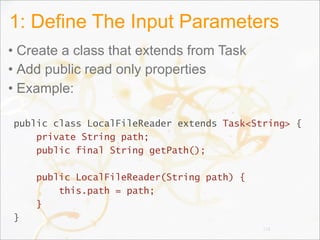
1: Define The Input Parameters
• Create a class that extends from Task
• Add public read only properties
• Example:
public class LocalFileReader extends Task<String> {
private String path;
public final String getPath();
public LocalFileReader(String path) {
this.path = path;
}
}
116
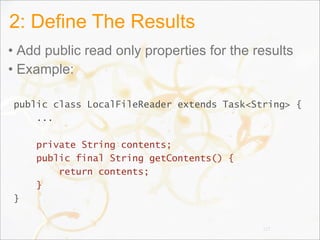
2: Define The Results
• Add public read only properties for the results
• Example:
public class LocalFileReader extends Task<String> {
...
private String contents;
public final String getContents() {
return contents;
}
}
117
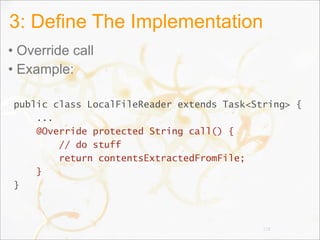
3: Define The Implementation
• Override call
• Example:
public class LocalFileReader extends Task<String> {
...
@Override protected String call() {
// do stuff
return contentsExtractedFromFile;
}
}
118
Web Services
• HttpRequest
–Similar to XMLHttpRequest
–Simple API to read/set headers, parameters
–HttpRequest is-a Task
• So easy to monitor progress
• React to errors, success
–Adds callbacks for different stages of the request /
response cycle
• Fate of the JavaFX XML/JSON pull parsers is
uncertain
–It was designed for very constrained devices, we
might opt for something nicer (but more intensive)119
Animations
• Timeline-based keyframe animation
• Animated transitions
120
Timeline-Based Animation
• Timeline
–Modifies values of variables specified by KeyFrames
–Doesn’t necessarily do any animation itself
• KeyFrame: specifies that a variable should
have...
–A particular value
–At a particular time
• How is animation actually done?
–Arrange for a KeyFrame to modify an interesting
Node variable
• x, rotate, opacity, fill, ...
121
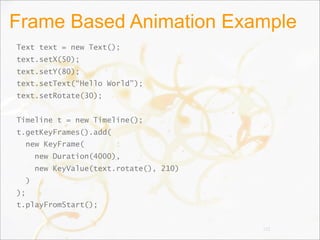
Frame Based Animation Example
Text text = new Text();
text.setX(50);
text.setY(80);
text.setText(“Hello World”);
text.setRotate(30);
Timeline t = new Timeline();
t.getKeyFrames().add(
new KeyFrame(
new Duration(4000),
new KeyValue(text.rotate(), 210)
)
);
t.playFromStart();
122
Animated Transitions
• Predefined, single-purpose animations
–Fade, Path, Pause, Rotate, Scale, Translate
–Can specify to, from, and by values
• Container transitions
–Parallel, Sequential
–Can be nested arbitrarily
• Transitions and Timelines have a similar
ancestry
–A timeline can be added to a Parallel / Sequential
transition
• Transitions are being optimized for speed in 2.0
123
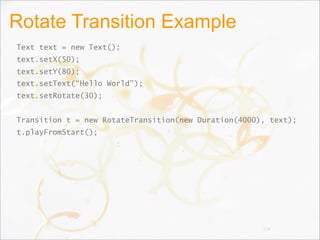
Rotate Transition Example
Text text = new Text();
text.setX(50);
text.setY(80);
text.setText(“Hello World”);
text.setRotate(30);
Transition t = new RotateTransition(new Duration(4000), text);
t.playFromStart();
124
Performance
• My #1 favorite pet project!
• Performance considerations are part of every
API design discussion
• Secret to good performance:
–Measure Measure Measure!
• Putting in place a rigorous performance testing
system, on a wide variety of hardware
–Micro-benchmarks are written by development
engineers with the same rigor as unit tests
–Higher level benchmarks are written by the
performance team
• We also run all available public benchmarks 125
Performance
• Goal: remove temporary garbage
–Some areas that still need genius ideas:
• Reducing garbage when animating Paints
• Reducing garbage when animating Fonts
• Being able to switch from “smooth” to “fast” to “smooth”
rendering during animations
–Reducing load on the GC helps extend battery life on
mobile devices (including laptops)
• Goal: meet or beat the competition on all public
benchmarks
–GUIMark2 is heavily tested
126
Java Web Toolkit
• Alternate toolkit implementation from Prism
• Used for rendering Java content in the web
browser
• Based on HTML 5, JavaScript 5, CSS 3
• Workflow:
–Developer writes to the JavaFX APIs being sure to
use those which are marked as implemented for the
“web profile”
–Developer compiles with our tool chain
–Resulting JavaScript files & artifacts are deployed to
the web
127
Demo
Details?
• Unfortunately, it is still early days, and we are
not ready to comment on the implementation
• The JWT is scheduled for Alpha at the GA of
JavaFX 2.0
• The GA of JWT is scheduled for 2nd half 2012
129
Deployment & Plugin
• Lots of work going into the plugin and “common
deployment” code base
• Dirty laundry
–There are very few tests for the current plugin
–Spaghetti comes to mind
• The deployment team is making great progress
in modularizing the plugin / deployment code
–And in adding tests!
–The modularization of the codebase means it is a lot
easier to test and to replace (as needed) modules in
the deployment code
130
AWT-less Plugin
• We’re building and will ship a version of the
plugin that doesn’t require AWT
–This means we can run Prism “natively” in the plugin
without requiring java.applet.Applet or any AWT code
to be loaded
• Faster startup is the primary goal in part due to reduced
class loading
• This version of the plugin will not likely be
extendable (i.e. you cannot plug your own
window toolkit in, it will only support Prism &
AWT)
131
Application Preloader
• Working on designs for a “preloader”
–c.f. http://prettyloaded.com
• Design space:
–Need a small jar to start rendering preloader
animations while the (large) app is downloaded
• Our tests indicate 50k jar is sufficiently large for a
preloader with custom fonts, images, effects & animations
• And really our test does all that in 25k
–Need to allow the preloader to manage transitioning
to the main application content
• Some built in transitions like fading
• Custom transitions such as the preloader being actually
part of the app like a login dialog 132
Application Preloader
• Need to be able to monitor the application
download and startup time to show progress
• May need the preloader or the application to
download potentially large resource files during
startup
• Want to support ability for 3rd party preloader
marketplace
133
Mac
• As of last week, the Mac port of Java is now
part of OpenJDK!
–This has been a long time in coming and I for one am
thrilled
• It will take some time to get this port fully
integrated and ready to ship
• Initially the JavaFX 2.0 launch will likely not be
fully available on the mac
–Primarily, the problem is the (ancient) plugin on Mac
–Without a new plugin, we can’t run the fastest Prism
134
Experiments & Blueprints
• At the same time we are working on the
platform, we are building experiments and
blueprints
• Experiments:
–Small applications meant for outside developers to
see and play with, but who’s code is not necessarily
ideal
• Blueprints:
–Larger applications meant to simulate (or actually be)
real world, and who’s code is representative of a best
practice and intended to be copied by developers
135
Agenda
• Overview
• Details
• Architecture
• Roadmap
• Participation
136
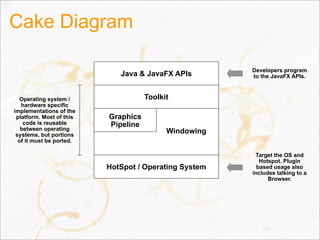
Cake Diagram
137
Developers program
to the JavaFX APIs.
Target the OS and
Hotspot. Plugin
based usage also
includes talking to a
Browser.
Operating system /
hardware specific
implementations of the
platform. Most of this
code is reusable
between operating
systems, but portions
of it must be ported.
Java & JavaFX APIs
Toolkit
Graphics
Pipeline
HotSpot / Operating System
Windowing
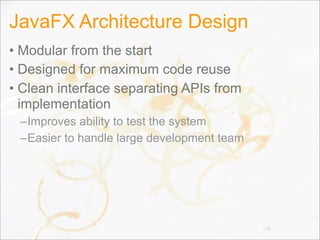
JavaFX Architecture Design
• Modular from the start
• Designed for maximum code reuse
• Clean interface separating APIs from
implementation
–Improves ability to test the system
–Easier to handle large development team
138
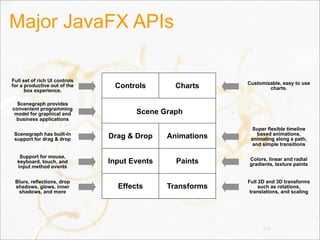
Major JavaFX APIs
139
Customizable, easy to use
charts.Controls Charts
Animations
Effects Transforms
Paints
Drag & Drop
Input Events
Full set of rich UI controls
for a productive out of the
box experience.
Scenegraph provides
convenient programming
model for graphical and
business applications
Scenegraph has built-in
support for drag & drop
Support for mouse,
keyboard, touch, and
input method events
Blurs, reflections, drop
shadows, glows, inner
shadows, and more
Super flexible timeline
based animations,
animating along a path,
and simple transitions
Colors, linear and radial
gradients, texture paints
Full 2D and 3D transforms
such as rotations,
translations, and scaling
Scene Graph
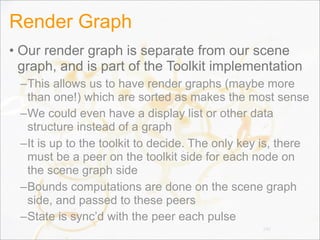
Render Graph
• Our render graph is separate from our scene
graph, and is part of the Toolkit implementation
–This allows us to have render graphs (maybe more
than one!) which are sorted as makes the most sense
–We could even have a display list or other data
structure instead of a graph
–It is up to the toolkit to decide. The only key is, there
must be a peer on the toolkit side for each node on
the scene graph side
–Bounds computations are done on the scene graph
side, and passed to these peers
–State is sync’d with the peer each pulse
140
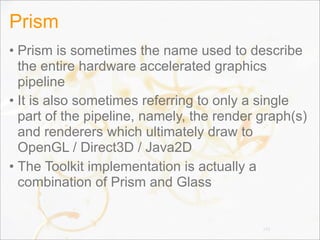
Prism
• Prism is sometimes the name used to describe
the entire hardware accelerated graphics
pipeline
• It is also sometimes referring to only a single
part of the pipeline, namely, the render graph(s)
and renderers which ultimately draw to
OpenGL / Direct3D / Java2D
• The Toolkit implementation is actually a
combination of Prism and Glass
141
Glass
• A new low level windowing system to replace
AWT
–This is an implementation detail, not something you
can access directly in code
• This is critically important. One of the reasons AWT suffers
is due to the vast amount of public API which constrains it
• Glass will ship with Prism and JavaFX 2.0 GA
142
Embedding
• Lots of work ongoing to figure out the best way
to embed JavaFX in Swing
• Primary issues are:
–Having Swing/AWT and Prism/Glass play nice with
hardware contexts
–Focus traversal
–Threading
–Copying BufferedImages to Swing from the graphics
card (this has some performance hit)
• Goal: let embedding API be toolkit agnostic to
allow for other embedding scenarios in the
future 143
Agenda
• Overview
• Details
• Architecture
• Roadmap
• Participation
144
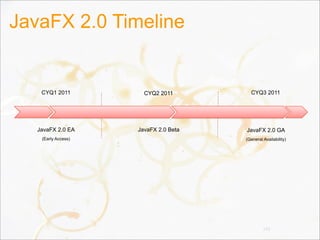
JavaFX 2.0 Timeline
145
CYQ1 2011
JavaFX 2.0 EA
(Early Access)
CYQ2 2011 CYQ3 2011
JavaFX 2.0 Beta JavaFX 2.0 GA
(General Availability)
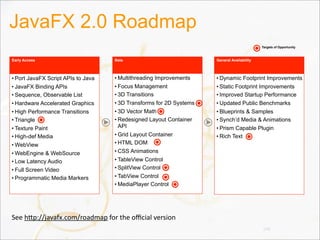
JavaFX 2.0 Roadmap
146
• Port JavaFX Script APIs to Java
• JavaFX Binding APIs
• Sequence, Observable List
• Hardware Accelerated Graphics
• High Performance Transitions
• Triangle
• Texture Paint
• High-def Media
• WebView
• WebEngine & WebSource
• Low Latency Audio
• Full Screen Video
• Programmatic Media Markers
Early Access
• Multithreading Improvements
• Focus Management
• 3D Transitions
• 3D Transforms for 2D Systems
• 3D Vector Math
• Redesigned Layout Container
API
• Grid Layout Container
• HTML DOM
• CSS Animations
• TableView Control
• SplitView Control
• TabView Control
• MediaPlayer Control
• Dynamic Footprint Improvements
• Static Footprint Improvements
• Improved Startup Performance
• Updated Public Benchmarks
• Blueprints & Samples
• Synch’d Media & Animations
• Prism Capable Plugin
• Rich Text
Targets of Opportunity
Beta General Availability
See	
  h=p://javafx.com/roadmap	
  for	
  the	
  official	
  version
Agenda
• Overview
• Details
• Architecture
• Roadmap
• Participation
147
Partner Program
• http://javafx.com/partners/
• http://javafx.com/partners/learn.jsp
• There are some qualifications to join
–You must have development experience with JavaFX
–You must be building a JavaFX application for market
• Key Benefits
–Listed as a solution provider on javafx.com
–Assigned an account manager
–Dedicated tech support
–Early access builds
–Provide feedback on roadmap and features 148
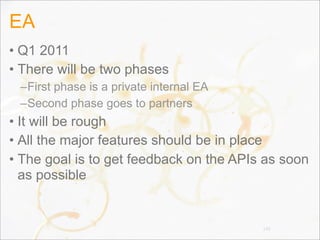
EA
• Q1 2011
• There will be two phases
–First phase is a private internal EA
–Second phase goes to partners
• It will be rough
• All the major features should be in place
• The goal is to get feedback on the APIs as soon
as possible
149
Beta
• Q2 2011
• There will be several beta drops
• This is available to all developers signed up on
the Oracle Technology Network (OTN)
• The EA partners suffered for you
• The build should be in much better shape
• The goal is still to get feedback on the APIs
• It is all about APIs and bug fixing, all the
features are done
150
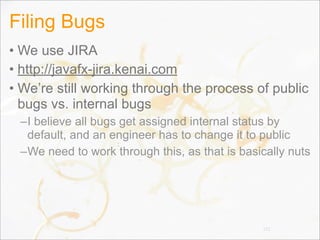
Filing Bugs
• We use JIRA
• http://javafx-jira.kenai.com
• We’re still working through the process of public
bugs vs. internal bugs
–I believe all bugs get assigned internal status by
default, and an engineer has to change it to public
–We need to work through this, as that is basically nuts
151
GA
• Q3 2011
• Learn it. Live it. Love it.
152
Open Source
• Current plans are that the UI Controls will be
open sourced (including Charts)
• Details are being worked out
–To be completely honest, we’re nailing down all the
patterns for our new Java APIs and will likely make
things open source some time after our first EA drops
–It takes time to open things up and it is going to be so
rough (not necessarily in the controls area either) until
after EA
• We expect open source parts of JavaFX to
show up in a similar manner as OpenJDK
153
The End.

JavaFX 101

  • 1.
    JavaFX 101 Jasper Potts& Richard Bair Oracle
  • 2.
    Agenda • Overview • Details •Architecture • Roadmap • Participation 2
  • 3.
  • 4.
    JavaFX is theevolution of the Java rich client platform, designed to address the needs of today’s and tomorrow’s customers.
  • 5.
  • 6.
    Target Developers • CurrentJava Developers • Former Java Developers • Web Developers • New Developers 6
  • 7.
    What is arich client?
  • 8.
    We believe richclients are both “native” applications and rich web applications. We want the Java rich client to be dominant in both domains.
  • 10.
    Strategy • Java isincredibly widely used –Very popular in the enterprise –Used for both native and web clients • Web is becoming increasingly rich –This is a trend we like! –We are not competing with HTML • Position Java for native and web clients –Java rich client development should be for both –Increasingly, we expect plugin-less deployment • Work with W3C to make the web more powerful • Standards Based 10
  • 11.
    Why is therich client important?
  • 12.
    Steve Jobs atD5, May 2007
  • 13.
    While the richclient can certainly be in a browser, we agree with Steve that customers want experiences which require a rich client.
  • 14.
  • 15.
    JavaFX defines itselfas being a well designed, cross platform application development platform. It is fast. It is flexible. It delivers exceptional value to developers and end users.
  • 16.
    Most importantly, itleverages the massive existing Java ecosystem. Nobody else offers the complete package – exceptional developer experience, user experience, cross platform development and massive ecosystem.

  • 17.
  • 18.
    Value Proposition forClient Java • Leverage existing Java investment • Easier to find and train developers • Reduce risk by reducing complexity 18
  • 19.
  • 21.
    Why Java MattersTo Oracle • A free, open, competitive Java ecosystem is vital to Oracle –As with Sun, fragmentation is the chief concern • We are committed to making Java –The best platform for server-side applications –The best platform for client-side rich clients –The best platform for writing web applications –The best virtual machine –The best community 21
  • 22.
    Agenda • Overview • Details •Architecture • Roadmap • Participation 22
  • 23.
    Disclaimer: The followingslides represent our current thinking and may change before the final release. We hope you like this pre-alpha view on the world, and please participate in our early access and beta programs!
  • 24.
    Programming Languages • Javais our primary programming language –Release Java APIs for all of JavaFX –Expose JavaFX Binding, Sequences as Java APIs • Embrace all JVM languages –Standard JVM Languages • JRuby, Jython, Scala, Groovy, … –JavaScript –Emerging / Niche JVM Languages • Gosu, Visage, ... 24
  • 25.
    APIs and ProgrammingModel • Continuation from JavaFX 1.X product line –Most APIs have simply been ported directly to Java –Some APIs are being revisited (e.g. layout, media) • Embrace more web technology –JavaFX CSS to be a strict superset of CSS 3 –Use WAI-ARIA for accessibility API –Make HTML available for rich text in all Text nodes –Follow web specifications for drag and drop, events • Developers use the Scenegraph not the DOM 25
  • 26.
    Scene Graph • DirectedAcyclic Graph • Parents & children • Representation of a GUI • Drawing primitives and controls 26
  • 27.
    Types of Nodes •Shapes –Rectangle, Circle, Path, Box, Sphere, 3D Path... • Images • Media • Web browser • Text • Controls • Charts • Group • Container 27
  • 28.
  • 29.
    Anatomy Of ANode • id, styleClass • Bounding volume (bounds) • Effects • Transformations • Event handlers –Mouse, Key, Input Method, Drag, Touch, ... • Application specific state • visible, cursor, clip, disabled, cache, ... • Lookup –JQuery-like lookup syntax (in progress) 29
  • 30.
    Scene Graph Architecture •“Monolithic vs Polylithic Design” –See http://www.cs.umd.edu/hcil/jazz/learn/ Toolkit_Design_2004.pdf –Scenario was initially a polylithic design –Experience shows the monolithic design is easier to use and may also have better performance characteristics • The polylithic scene graph requires manipulating the scene graph (or planning ahead) • Node is huge, but also simple and makes working with the scene graph easy 30
  • 31.
    Bounding Volume Hierarchy •The Scene Graph integrates a BVH –A BVH is a spatial data structure –Used to simplify and accelerate culling, picking, etc –Integrated into the Scene Graph • Two typical types of structures for a BVH –Bounding Sphere –Axis Aligned Bounding Box • Different types of bounds –boundsInLocal –boundsInParent (or convert it to boundsInScene) –layoutBounds 31
  • 32.
    Instancing • Term givento reusing geometry among multiple Nodes • We currently have some support for instancing, but it is not “enough” for our liking –Transforms can be shared –Effects can be shared –Paths can be shared (** can they? They should!) –Images can be shared –Media can be shared –Paints can be shared 32
  • 33.
    Cloning (or copying,or instancing) • What we need though is to be able to take a complete Node (perhaps a complex Parent / Group) and create lightweight “clones” • Treat the entire clone as a unit • Can change transforms, effects, id, opacity, etc of the clone but not much else –That is, the clone would be exposed as a Node only 33
  • 34.
    Immediate vs. RetainedModes • Immediate Mode –Less memory intensive –More CPU intensive –More GPU intensive –Painter’s algorithm always • Render stuff that you won’t even see • Retained Mode –More memory intensive –More optimized for the GPU • Render a state-sorted scene graph representation • Or maybe cache-hot sorted • Or maybe something else 34
  • 35.
    Retained Mode • Oursystem is a Retained Mode scene graph –Higher performance –Memory overhead actually is not that high (anymore) • As evidenced by our 70,000 Node demos • Some situations require node virtualization –ListView, TableView, TreeView –Virtualization is simply the act of creating and deleting Nodes as needed so that data not being shown isn’t in the tree –In the ideal world this wouldn’t be necessary, but memory, while abundant, isn’t free and neither is the GC overhead in handling large heaps 35
  • 36.
    State Sorting • Graphicscards choke on state changes • Scene graphs can be state-sorted –It is sometimes worth it to spend CPU cycles state sorting since it makes passing data to the graphics card so much faster • State sorting only works if you also have a depth buffer –Render from front to back and use depth buffer to avoid rendering something that will be occluded –Doesn’t work well with transparency. Doh! • “Render graph” is separate from scene graph 36
  • 37.
    Transforms • Transform thecoordinate space –translate (move something in the x, y, z planes) –scale (resize in the x, y, z planes) –rotate (angle of rotation and a vector to rotate about) –affine (3x3 matrix, used in 2D) –perspective projection (4x4 matrix, used in 3D) • As you can see, we support 2D & 3D transforms • All Nodes can be transformed –Convenience variables: • translateX, translateY, translateZ, scaleX, scaleY, ... –Transform sequence • Sequence<Transform> transforms 37
  • 38.
    Transforms • We needto work out better how to provide for transforms that can be used by the developer vs. library code (such as Animation Transition library) –Right now animated transitions use the simple variables –But that doesn’t work well in 3D where we need the perspective projection –And it clobbers anything the user might have specified 38
  • 39.
    Effects • “Effect” isthe term we use for filter effects –Filter effects operate on an image • So we have to render Nodes into an image before using filter effects –Algorithms which apply to pixels • Affectionately referred to as “pixel bashing” –Leverage SSE, OpenGL, D3D –Or use plain Java –In some cases, software rendering is much faster than on the GPU • There is a certain fixed cost to setting up / tearing down the hardware for rendering. For small images, software may be more efficient 39
  • 40.
    Blend Modes • Anotherimage-based technique for blending the rendering of multiple layers of a Group or Parent –First we have to render each layer into an image –Then we blend the pixels of the two layers according to some well known rules (BlendMode) • In JavaFX 1.3 you could only use blend modes on Groups • In JavaFX 2.0, you can use blend modes on any Parent • For both Blend Modes and Effects, using “cache” may increase performance 40
  • 41.
    “Physical” vs. “Logical”Scenes • The physical scene graph is every Parent and every Node which makes up the scene graph –For example, the physical scene graph includes the Button control and the ButtonSkin (which is technically a child of the Button control) and whatever might be used inside the ButtonSkin • The logical scene graph is a strict subset –For example, the Button is part of the logic scene graph but its Skin is not. The Button is treated logically as if it were a leaf node, although technically it is not • Which do you want to traverse? 41
  • 42.
    Traversal • Traverse thelogical tree when: –You want to operate on the logical nodes. For example, to find each node and add some application domain data to them • Traverse the physical tree when: –You are working on a tool or are debugging –In Swing you only had the physical tree and this led to evil things (either intentionally or unintentionally) • Digging around in a JComboBox and hacking with its internal state • Wanting to recursively disable components and accidentally stepping into the JComboBox internals 42
  • 43.
    Traversal • Every Parenthas a getPublicChildren –This is the logical tree –Returns a List<Node> –We will likely change the name, but I don’t yet know what we might change it to! • To traverse the physical tree, you will probably need to use the visitor pattern –The exact method for traversing the physical tree is not yet decided • Yes, we’re discouraging walking the physical tree (but you can if you need to) 43
  • 44.
    Events • Input Events –Originatein the Operating System –MouseEvent, KeyEvent, InputMethodEvent, TouchEvent, DragEvent • Window Events • Pulse Events –Generated 1/60th of a second • Unless nothing has changed in the scene graph and there are no animations. If a tree falls in a forest... • Focus Traversal Events • Control Events 44
  • 45.
    Event Handling • Basedon DOM Level 2 Events Specification –http://www.w3.org/TR/DOM-Level-2-Events/ • All of our events extend an Event object • Event flow: –Capturing –Bubbling • EventHandler callback for events –setOnMouseClicked(EventHandler<MouseEvent>) –addMouseHandler(MouseEventID, EventHandler) –addMouseFilter(MouseEventID, EventHandler) • Events can be consumed 45
  • 46.
    Event Flow 46 Parent Child Capture:  Parent  then  Child Bubble:  Child  then  Parent
  • 47.
    Pulse Event • A“pulse” is sent from the graphics to the scene graph once every 1/60th of a second –Unless the system is overloaded in which case we’ll throttle down to 1/30th of a second, or 1/15th of a second (60fps, 30fps, etc) • Helps reduce jerkiness • During the pulse, we: –Apply any CSS to nodes which have changed –Perform any layout that needs to happen –Synchronize state from the scene graph to the render graph 47
  • 48.
    3D (JAPSER HELP!!!) •Camera –PerspectiveCamera –ParallelCamera • Depth Buffer • 3D Transforms • 3D Primitives • Lighting 48
  • 49.
  • 50.
    Layout • A surprisinglyhard problem! • We’ve made fairly substantial changes in each release so far and we’re going to do so again! • Design Goals: –Easy to program with by hand –Works with animated transitions –Can be manipulated from CSS –Easy to use with RAD tools 50
  • 51.
    Layout Gotchas • setWidth/setHeighton Resizable was a mistake –It was to be called by the layout manager, but folks would naturally want to call it and then get surprised when it didn’t hold. setWidth was not the same as setting the preferred width! • HBox and VBox were too complicated –mea culpa • We might be backing away from layout specific containers and going back to layout managers –The primary reason has to do with layout from CSS –Let the CSS author define the layout algorithm • But layout by hand works better with containers51
  • 52.
    CSS • Working towardsbeing a true superset of CSS3 • Stick to the spirit of it –We use different attribute names & pseudoclasses • Each Container can be styled from CSS –Multiple border, backgrounds, images, padding, etc • CSS animations (still to come) • Support em, en, px, %, and all other units • Fully spec’d (see http://javafx.com) • Looking to add support for custom layout algorithms such as Grid 52
  • 53.
  • 54.
  • 55.
    CSS Strategy ForControls • CSS is our strategy for styling Controls • Caspian: default CSS stylesheet for Controls • CSS is fast and works on all platforms • Stick to the spirit of HTML CSS –But do not be bound by it 55
  • 56.
    CSS Capabilities ForControls • Break control skins in styleable parts • In some ways similar to HTML CSS’s Box • Rectangle with independently rounded corners –Or any arbitrary path • Can have multiple –Background fills –Background images –Border strokes –Border images 56
  • 57.
    Regions of aScrollBar 57 ScrollBar RegionThumb RegionTrack RegionLeft Button Region Right Button Region Left Arrow Region Right Arrow Region
  • 58.
  • 59.
    WebView • Split into3 parts: –WebSource (url, DOM, string, etc) –WebEngine (parses a WebSource into a DOM) –WebView • A single WebEngine can be used with multiple WebView’s • WebView has no UI other than rendering the web content • WebBrowser UI Control to be developed –Would include search bar, buttons, etc • WebEngine can be used independently of a WebView (for example, to parse a DOM) 59
  • 60.
  • 61.
    DOM • Need anAPI for HTML DOM –Could simply use the HTML DOM API from w3c • But we’re not real fans of the Java DOM APIs –Much better would be to provide new DOM and HTML DOM APIs which are much easier to use • Probably we would just extend the core DOM APIs so that we still implement the “proper” interface, but make it nicer to use • Integrate DOM tightly with WebView –Add DOM event listeners from Java to WebView –Manipulate a WebView DOM from Java • Integrate DOM tightly with web browser (applet)61
  • 62.
    UI Controls • DesignGoals: –Deceptively Simple –Rich & Useful –Convenient & complete out-of-the-box • Unlike Swing which provided the basics and left the rest to you! –Extremely powerful to skin –Easy to use from tools –Cohesive design 62
  • 63.
    Control & Skin •Control is the “model” with methods on it for manipulating that model –For example, Button has an “armed” flag and arm() and disarm() methods • Skin provides the visual representation –Binds to the control’s state –Invokes methods on the control to change its state –Handles both visual design and user interaction • Most of our skins use a subclass of BehaviorBase for implementing the user interaction, but other implementations of Skin might do it differently • Interface between Control & Skin is simple63
  • 64.
    Theming and Skinning •Easiest: use CSS –Domain specific language for styling –Very powerful, yet easy to use –Designers know how to use it • Tool Friendly: use designer tool –Generates a Skin which relies on the designer visuals –Requires an as-yet unreleased authoring tool • Powerful: write a Skin by hand –Knock yourself out 64
  • 65.
    Sample UI ControlsApp Light color controls on almost white background Dark color buttons on toolbar
  • 66.
    Built In Controls •Button • ToggleButton • RadioButton • CheckBox • Cell • IndexedCell • ListCell • Slider • Label • ScrollBar • Hyperlink • ProgressIndicator • ProgressBar • PasswordBox • TextBox • TextInputControl • ListView • TableView • Rich Text Editor • ScrollView • Separator • ChoiceBox • Tooltip • TreeView • TreeCell • ComboBox • CheckMenuItem • CustomMenuItem • Menu • MenuBar • MenuButton • MenuItem • MenuItemBase • PopupMenu • RadioMenuItem • SplitMenuButton • ToolBar • Multiline TextBox • Horizontal ListView • Popup • TabView • SplitView • Accordion • MediaPlayer • WebBrowser • DateBox • MoneyBox • SearchBox • MORE 66
  • 67.
  • 68.
    Improvements Over Swing •Controls can draw outside their bounds • Not restricted to rectangular areas • (Almost) no visual state in the Controls • Preferred width separated from preferred height –getPrefWidth/getPrefHeight take alternate dimension • Easy theming & skinning (thanks to CSS) • Control is purely the model –The Skin can be virtually anything • Controls do not require specific Skins • Controls hide Skin details (not easy to walk into the skin details, i.e. comboBox.getChildren())68
  • 69.
    Improvements Over Swing •Cells instead of Renderers & Editors –Fixes intractable issues with dynamic cells –Makes it easy to write custom cells with dynamic content such as video, web, etc –Fixes intractable issues around cells containing complex content such as TextBoxes which need their own event handling and editing lifecycle • Layout constraints are specified on the Node instead of the container –Fixes problems where to change the constraints you have to remove & add the node to the container again 69
  • 70.
    Rich Text • Consideringreusing TextBox and just adding a content type –A contentType of “text/html” (or maybe UTI type instead of mime type) will put it into rich text mode • Design goal: –Display HTML-based rich text in any text node or text control –Text rendering should be fast –Should be very easy to render basic rich text • This is a work in progress. Some rich text support may be available at time of release 70
  • 71.
  • 72.
    Swing Integration • Weare FINALLY supporting embedding of JavaFX into existing Swing applications! • Accomplishing this requires 3 objectives: ✓Java APIs for JavaFX –Ability to embed hardware accelerated 2D/3D scenes –Swing API for embedding the scene • We are currently making progress on the last two issues and expect it to be complete by GA • However (shed a tear), we are not going to support embedding Swing components in JavaFX scene graphs 72
  • 73.
  • 74.
    Graphics • Most ofthe graphics system is an implementation detail beneath the scene graph • Currently there are two graphics pipes –Scenario • Deprecated. We’re hoping to remove it –Prism • Brand new, still has that new car smell • Has a multitude of command line switches –All of which are private or for debug purposes only :-) • Issues that we deal with: –Dirty regions, tessellation, rasterization, YUV decoding, effects, images, rendering, etc 74
  • 75.
    Graphics • 2D and3D scene graph • Hardware accelerated pipeline –DirectX 9 on Windows XP, Windows Vista –DirectX 11 on Windows 7 –OpenGL on Mac, Linux, Embedded –Software (Java2D) when necessary • Embed in Swing –c.f. Java3D, JOGL –Allows Swing applications to add JavaFX scenes, charts, media, and controls 75
  • 76.
    Odds And Ends •Dirty Regions –We perform dirty region culling to improve performance for common cases • Tessellation & Rasterization –Currently being done by Pisces code from OpenJDK –It is really fast (quite surprising actually) –Code is contributed from RedHat –Open source works! • YUV decoding for Media –On Prism, we don’t have to do this –The graphics card can deal with YUV natively 76
  • 77.
    Decora And JSL •Java Shader Language (JSL) –Simple shader language which compiles to: • OpenGL • Direct3D • C + SSE • Java2D –Used by Decora for filter effects • Decora is the name for our filter effect pipeline • Decora & JSL are not yet public APIs 77
  • 78.
    Prism • Hardware acceleratedpipeline coming in 2.0 • Prism can run (including 3D) on both hardware and software renderers –Software is used as a last resort if the system cannot support Direct3D 9 or 11 or OpenGL • Shaders for a good number of primitive shapes • Performance measurement and optimization is an ongoing effort 78
  • 79.
    Media • JavaFX supportsboth visual and audio media • Cross platform JavaFX Media file (fxm, mp3) • Media class represents a media file • MediaPlayer plays a Media file • MediaView is-a Node which displays the Media –Many MediaViews can have the same MediaPlayer • And it is cheap to do so –MediaViews can scale the media proportionally or disproportionally –MediaView does not come with pre-built playback controls (you need a MediaControl) 79
  • 80.
    Media 2.0 • Mediaengine completely rewritten for JavaFX 2 • Much more stable (tested running media continuously for days) • Uses less CPU • New Features: –Low latency audio –Embedding media in Jars –Full screen video –Programmatic media markers –Synchronized media & animations 80
  • 81.
  • 82.
    Java Beans • Thecurrent JavaBeans pattern is insufficient –The event model has serious deficiencies • Passes the old & new values in the property change listener. This is a serious performance penalty • Requires boxing of the old & new value • Vetoable properties are hardly used • Lots of boilerplate • Convention over specification makes it awkward to add the appropriate methods to a bean and requires reflection –String specification for each property name stinks • We use an updated version of JavaBeans 82
  • 83.
    Bean • A Beanis an observable object –You can register a Listener for any (or all) properties on a Bean –Whenever a property changes, you are notified • Each property is comprised of: –A single static PropertyReference instead of a String –An optional getter (using the normal convention) –An optional setter (using the normal convention) –An accessor which returns a ValueModel • Yep, sadly, more boilerplate. Fortunately, it is very trivial. 83
  • 84.
    A Sample Bean publicclass Person extends AbstractBean { public static final PropertyReference NAME = new PropertyReference(); private String name; public final String getName() { return name; } public final setName(String value) { if ((this.name == null && value != null) || (this.name != null && !this.name.equals(value)) { this.name = name; fireChangeEvent(NAME); } } public final ValueModel<String> name() { return new PropertyValueModel(this, NAME); } } 84
  • 85.
    Boilerplate • Sadly, wehaven’t figured out how to reduce the boilerplate –We mourn the loss of language support –We tried meta-programming *cough* lombok *cough* • But it was just too painful. We like to see all the code. We just don’t like to type it all (and would like our IDE to collapse it for us too please and thank you –We’re focusing on getting support from the IDE • We expect that we’ll see special support in Groovy and other languages which reduce or remove this boilerplate 85
  • 86.
    Bean Events • OurListener class does not take the old or new value –No boxing! No explosion of primitive methods! No instanceof checks! • The Listener simply takes a Bean and a PropertyReference • Listeners are strongly referenced –This followed a long discussion and is based on a lot of experience across different APIs –However we do supply a WeakListener implementation so you can avoid memory leaks 86
  • 87.
  • 88.
    Object Literals • Abilityto create & initialize an object in one go –Makes UI code much easier to read –Structure of the code matches the scene graph –Avoids “constructor hell” –Very tricky to do in Java • Some options: –Builders –Constructor taking key,value pairs –Constructor taking a Map –Constructor taking “loose” var-args of key/value pairs 88
  • 89.
    The Builder Pattern •Pros –Makes us feel all warm and fuzzy –Strongly typed –Relatively easy to read –Nice code completion in IDEs –Relatively easy to customize –Really good performance • Cons –An extra class per class –Lots of boilerplate –Actually quite tricky in class hierarchies 89
  • 90.
    Using The BuilderPattern Rectangle r = Rectangle.create() .x(10) .y(20) .width(100) .height(100) .fill(LinearGradient.create() .endX(0).endY(1) .stops( Stop.create().offset(0).color(Color.BLACK), new Stop(1, Color.RED) ).build()) .build(); 90
  • 91.
    Constructor With Key/ValuePairs • Rectangle(Argument... args) • new Argument(Rectangle.X, 10); • Pros: –Very little additional cost to static footprint –Var-args makes it decent to read in code –Decent performance –Doesn’t require boxing • Cons: –Lots of little throw-away objects –Sort of requires a Map in the end • For performance and / or niceness 91
  • 92.
    Using The ArgumentPattern Rectangle r = new Rectangle( arg(Rectangle.X, 10), arg(Rectangle.Y, 20), arg(Rectangle.WIDTH, 100), arg(Rectangle.HEIGHT, 100), arg(Rectangle.FILL, new LinearGradient( arg(LinearGradient.END_X, 0), arg(LinearGradient.END_Y, 1), arg(LinearGradient.STOPS, new Stop(0, Color.BLACK), new Stop(1, Color.RED) ) ) ); 92
  • 93.
    Using The ArgumentPattern #2 Rectangle r = new Rectangle( Rectangle.X(10), Rectangle.Y(20), Rectangle.WIDTH(100), Rectangle.HEIGHT(100), Rectangle.FILL(new LinearGradient( LinearGradient.END_X(0), LinearGradient.END_Y(1), LinearGradient.STOPS( new Stop(0, Color.BLACK), new Stop(1, Color.RED) ) ) ); 93
  • 94.
    Taking A Map •Pros –If we had a Map literal syntax it would be great –Makes for a nice and clean constructor implementation –Very lightweight on static footprint • Cons –Lots of boxing –A non-starter for Java without a Map literal syntax 94
  • 95.
    A Map IfWe Had Map Literals Rectangle r = new Rectangle([ Rectangle.X => 10, Rectangle.Y => 20, Rectangle.WIDTH => 100, Rectangle.HEIGHT => 100, Rectangle.FILL => new LinearGradient([ LinearGradient.END_X => 0, LinearGradient.END_Y => 1, LinearGradient.STOPS => new Stop[] { new Stop(0, Color.BLACK), new Stop(1, Color.RED) } ]) )] 95
  • 96.
    Loose Key/Value Pairs •Pros –Pretty light on the eyes (few syntactic tokens) • Cons –Boxing of primitives –Easy to type incorrectly –No compiler help 96
  • 97.
    Using Loose Key/ValuePairs Rectangle r = new Rectangle( Rectangle.X, 10, Rectangle.Y, 20, Rectangle.WIDTH, 100, Rectangle.HEIGHT, 100, Rectangle.FILL, new LinearGradient( LinearGradient.END_X, 0, LinearGradient.END_Y, 1, LinearGradient.STOPS, new Stop[] { new Stop(0, Color.BLACK), new Stop(1, Color.RED) } ) ) 97
  • 98.
    Binding • There aretwo different forms of binding: –PropertyBinding • Essentially JavaFX Script like binding • A property of an object is defined based on some binding expression which can be quite complex • Highly sensitive performance concerns –DataBinding • Essentially a Beans Binding like binding • A user interface Control is bound to some data model such that when the control is edited, the data model is updated, and vice versa. • Not particularly sensitive in terms of performance 98
  • 99.
    Property Binding • Aproperty is defined by its binding • Such a property cannot be set manually –Attempts to call setFoo would result in an Exception • Property bindings must be established by creating an object with the object literal syntax • Property bindings use ValueModel’s –A bidirectional property binding uses WritableValueModel’s • A PropertyBinding is also a ValueModel –So you can chain them together and form trees of them 99
  • 100.
    A Sample PropertyBinding //Binding rect2.x to rect1.x Rectangle rect1 = new Rectangle(); Rectangle rect2 = Rectangle.create() .x(bindTo(rect1.x())) .y(200) .build(); // Using a fluent API Rectangle rect3 = Rectangle.create() .x(when(rect2.x(), greaterThan(20)) .then(100) .otherwise(50))) .build(); 100
  • 101.
    What was that? •The binding is defined as part of the builder (object literal) • The bindTo method is a static method on the Bindings class –This version of the method takes a ValueModel and binds to it • Invoking the rect1.x() method returns a ValueModel • In the second example we have some fluent API for constructing more complicated bindings 101
  • 102.
    A Complex PropertyBinding finalRectangle rect1 = new Rectangle(); final Rectangle rect2 = new Rectangle(); Text text = Text.create() .text(new PropertyBinding<String>(rect1.x(),rect2.x()) { @Override public String calculate() { if (rect1.getX() == rect2.getX()) { return “Both rect1 and rect2 have the same x”; } else if (rect1.getX() > rect2.getX()) { return “rect1 is ahead of rect2!”; } else return “rect2 is ahead of rect1!”; }) .build(); 102
  • 103.
    What was that? •We created the Label with a PropertyBinding • The PropertyBinding constructor takes ValueModels –Whenever any of the ValueModels it is listening to changes, the Binding becomes invalid and fires its own change event –The calculate method is called when somebody tries to read the value of the binding • This is extremely flexible, though somewhat temperamental (you have to remember to pass all the dependencies to the PropertyBinding) 103
  • 104.
    High Performance Bindings •Since a tree of bindings can be established, partial re-evaluation is easy to support –Suppose you have three bindings, A, B, C –Binding A and B are independent –Binding C requires both A and B to compute its value –If A changes but not B, we don’t need to recompute B’s value to compute C’s. B caches its value. • No boxing of primitives • Cache computed values • Recompute lazily on demand 104
  • 105.
    Data Binding • Specificallydesigned to bind the data model of a user interface Control to some application data –WritableValueModel is used for binding the text of a TextBox, for example. –ListModel is used for binding a ListView to some list data model –TableModel is used for binding to a TableView –etc • Supports conversion & validation 105
  • 106.
    Observable Lists, Maps •ObservableList –A java.util.List interface which adds observability –addObserver(ListObserver), removeObserver • ListObserver –Listener designed to be simple yet high performing –Based on our experience with sequences in FX Script • ObservableMap –A java.util.Map interface with observability –addObserver(MapObserver), removeObserver • Both are still a work in progress 106
  • 107.
    Application Framework • JavaFX2.0 needs a basic app framework –The main entry point for a JavaFX 2.0 application –Simplifies application launch, threading –Need basic lifecycle methods • There is no “Applet” in JavaFX 2.0 because Applet is tied to AWT. So Application needs those lifecycle methods for the plugin to utilize • Future releases will continue to improve the application framework –Resource management –Event Bus –etc 107
  • 108.
    Threading • Design Goals –Simplifymultithreading –Separate application & rendering threads –Allow naive applications to ignore threading –Use a threading scheme that works in the browser • Some of the threads we use –Application thread (aka UI thread) –Rendering thread –Toolkit thread –Media thread • The developer only sees the Application thread108
  • 109.
    Application Thread • Themain thread for the application –When the application starts, it is on this thread –If the developer never uses a background thread, then their entire application will run on the app thread • Rendering is not performed on this thread • Background Tasks can be created to perform work on worker threads –The Task API is much as it was in previous releases –Tasks all expose a common interface useful for UIs 109
  • 110.
    Scene Graph ThreadRules • A scene graph should only be accessed from a single thread –This does not have to be the Application Thread –You can create scene graphs on background threads and then pass them to scene graphs created on other threads • For example, you can create your main scene graph on the app thread and then create some content on a background thread. Once the content is created you can attach it to the main scene graph. However, you must take care not to then mutate those nodes from the background thread! • We need to warn of thread misuses 110
  • 111.
    Rendering Thread • Renderingtypically must happen on the thread that created a native OpenGL / D3D context • The Rendering Thread talks to the hardware and creates worker threads –Multiple workers can be created to rasterize –Or to state sort the scene graph –Or to cache sort the scene graph –Or other work • Rendering & event handling are concurrent • The rendering and app threads only wait on each other during the synchronization step111
  • 112.
    Toolkit Thread • Handlesinteractions with the OS • May or may not be the same thread as the rendering thread (we’re still figuring it all out) • Native events come on this thread, and are then passed to the App thread for dispatch • Typically the Toolkit Thread is the main thread (or the thread on which the java main() method is called) 112
  • 113.
    Media Thread • Threadon which the main media engine runs • Multiple background threads may be created to process multiple media streams –Typically one thread is used to process each media stream 113
  • 114.
    Tasks • The preferredway to work with threading • A Task is a one-shot worker –Somewhat like a Callable with a lot more API –Can report: • Total amount of work to do • Amount of work complete • Percentage complete • Errors • Notification on completion –Implementations should also yield one or more “products” when they complete operation 114
  • 115.
    How To WriteA Background Task 1.Define input parameters 2.Define the results 3.Define the implementation 115
  • 116.
    1: Define TheInput Parameters • Create a class that extends from Task • Add public read only properties • Example: public class LocalFileReader extends Task<String> { private String path; public final String getPath(); public LocalFileReader(String path) { this.path = path; } } 116
  • 117.
    2: Define TheResults • Add public read only properties for the results • Example: public class LocalFileReader extends Task<String> { ... private String contents; public final String getContents() { return contents; } } 117
  • 118.
    3: Define TheImplementation • Override call • Example: public class LocalFileReader extends Task<String> { ... @Override protected String call() { // do stuff return contentsExtractedFromFile; } } 118
  • 119.
    Web Services • HttpRequest –Similarto XMLHttpRequest –Simple API to read/set headers, parameters –HttpRequest is-a Task • So easy to monitor progress • React to errors, success –Adds callbacks for different stages of the request / response cycle • Fate of the JavaFX XML/JSON pull parsers is uncertain –It was designed for very constrained devices, we might opt for something nicer (but more intensive)119
  • 120.
    Animations • Timeline-based keyframeanimation • Animated transitions 120
  • 121.
    Timeline-Based Animation • Timeline –Modifiesvalues of variables specified by KeyFrames –Doesn’t necessarily do any animation itself • KeyFrame: specifies that a variable should have... –A particular value –At a particular time • How is animation actually done? –Arrange for a KeyFrame to modify an interesting Node variable • x, rotate, opacity, fill, ... 121
  • 122.
    Frame Based AnimationExample Text text = new Text(); text.setX(50); text.setY(80); text.setText(“Hello World”); text.setRotate(30); Timeline t = new Timeline(); t.getKeyFrames().add( new KeyFrame( new Duration(4000), new KeyValue(text.rotate(), 210) ) ); t.playFromStart(); 122
  • 123.
    Animated Transitions • Predefined,single-purpose animations –Fade, Path, Pause, Rotate, Scale, Translate –Can specify to, from, and by values • Container transitions –Parallel, Sequential –Can be nested arbitrarily • Transitions and Timelines have a similar ancestry –A timeline can be added to a Parallel / Sequential transition • Transitions are being optimized for speed in 2.0 123
  • 124.
    Rotate Transition Example Texttext = new Text(); text.setX(50); text.setY(80); text.setText(“Hello World”); text.setRotate(30); Transition t = new RotateTransition(new Duration(4000), text); t.playFromStart(); 124
  • 125.
    Performance • My #1favorite pet project! • Performance considerations are part of every API design discussion • Secret to good performance: –Measure Measure Measure! • Putting in place a rigorous performance testing system, on a wide variety of hardware –Micro-benchmarks are written by development engineers with the same rigor as unit tests –Higher level benchmarks are written by the performance team • We also run all available public benchmarks 125
  • 126.
    Performance • Goal: removetemporary garbage –Some areas that still need genius ideas: • Reducing garbage when animating Paints • Reducing garbage when animating Fonts • Being able to switch from “smooth” to “fast” to “smooth” rendering during animations –Reducing load on the GC helps extend battery life on mobile devices (including laptops) • Goal: meet or beat the competition on all public benchmarks –GUIMark2 is heavily tested 126
  • 127.
    Java Web Toolkit •Alternate toolkit implementation from Prism • Used for rendering Java content in the web browser • Based on HTML 5, JavaScript 5, CSS 3 • Workflow: –Developer writes to the JavaFX APIs being sure to use those which are marked as implemented for the “web profile” –Developer compiles with our tool chain –Resulting JavaScript files & artifacts are deployed to the web 127
  • 128.
  • 129.
    Details? • Unfortunately, itis still early days, and we are not ready to comment on the implementation • The JWT is scheduled for Alpha at the GA of JavaFX 2.0 • The GA of JWT is scheduled for 2nd half 2012 129
  • 130.
    Deployment & Plugin •Lots of work going into the plugin and “common deployment” code base • Dirty laundry –There are very few tests for the current plugin –Spaghetti comes to mind • The deployment team is making great progress in modularizing the plugin / deployment code –And in adding tests! –The modularization of the codebase means it is a lot easier to test and to replace (as needed) modules in the deployment code 130
  • 131.
    AWT-less Plugin • We’rebuilding and will ship a version of the plugin that doesn’t require AWT –This means we can run Prism “natively” in the plugin without requiring java.applet.Applet or any AWT code to be loaded • Faster startup is the primary goal in part due to reduced class loading • This version of the plugin will not likely be extendable (i.e. you cannot plug your own window toolkit in, it will only support Prism & AWT) 131
  • 132.
    Application Preloader • Workingon designs for a “preloader” –c.f. http://prettyloaded.com • Design space: –Need a small jar to start rendering preloader animations while the (large) app is downloaded • Our tests indicate 50k jar is sufficiently large for a preloader with custom fonts, images, effects & animations • And really our test does all that in 25k –Need to allow the preloader to manage transitioning to the main application content • Some built in transitions like fading • Custom transitions such as the preloader being actually part of the app like a login dialog 132
  • 133.
    Application Preloader • Needto be able to monitor the application download and startup time to show progress • May need the preloader or the application to download potentially large resource files during startup • Want to support ability for 3rd party preloader marketplace 133
  • 134.
    Mac • As oflast week, the Mac port of Java is now part of OpenJDK! –This has been a long time in coming and I for one am thrilled • It will take some time to get this port fully integrated and ready to ship • Initially the JavaFX 2.0 launch will likely not be fully available on the mac –Primarily, the problem is the (ancient) plugin on Mac –Without a new plugin, we can’t run the fastest Prism 134
  • 135.
    Experiments & Blueprints •At the same time we are working on the platform, we are building experiments and blueprints • Experiments: –Small applications meant for outside developers to see and play with, but who’s code is not necessarily ideal • Blueprints: –Larger applications meant to simulate (or actually be) real world, and who’s code is representative of a best practice and intended to be copied by developers 135
  • 136.
    Agenda • Overview • Details •Architecture • Roadmap • Participation 136
  • 137.
    Cake Diagram 137 Developers program tothe JavaFX APIs. Target the OS and Hotspot. Plugin based usage also includes talking to a Browser. Operating system / hardware specific implementations of the platform. Most of this code is reusable between operating systems, but portions of it must be ported. Java & JavaFX APIs Toolkit Graphics Pipeline HotSpot / Operating System Windowing
  • 138.
    JavaFX Architecture Design •Modular from the start • Designed for maximum code reuse • Clean interface separating APIs from implementation –Improves ability to test the system –Easier to handle large development team 138
  • 139.
    Major JavaFX APIs 139 Customizable,easy to use charts.Controls Charts Animations Effects Transforms Paints Drag & Drop Input Events Full set of rich UI controls for a productive out of the box experience. Scenegraph provides convenient programming model for graphical and business applications Scenegraph has built-in support for drag & drop Support for mouse, keyboard, touch, and input method events Blurs, reflections, drop shadows, glows, inner shadows, and more Super flexible timeline based animations, animating along a path, and simple transitions Colors, linear and radial gradients, texture paints Full 2D and 3D transforms such as rotations, translations, and scaling Scene Graph
  • 140.
    Render Graph • Ourrender graph is separate from our scene graph, and is part of the Toolkit implementation –This allows us to have render graphs (maybe more than one!) which are sorted as makes the most sense –We could even have a display list or other data structure instead of a graph –It is up to the toolkit to decide. The only key is, there must be a peer on the toolkit side for each node on the scene graph side –Bounds computations are done on the scene graph side, and passed to these peers –State is sync’d with the peer each pulse 140

  • 141.
    Prism • Prism issometimes the name used to describe the entire hardware accelerated graphics pipeline • It is also sometimes referring to only a single part of the pipeline, namely, the render graph(s) and renderers which ultimately draw to OpenGL / Direct3D / Java2D • The Toolkit implementation is actually a combination of Prism and Glass 141
  • 142.
    Glass • A newlow level windowing system to replace AWT –This is an implementation detail, not something you can access directly in code • This is critically important. One of the reasons AWT suffers is due to the vast amount of public API which constrains it • Glass will ship with Prism and JavaFX 2.0 GA 142
  • 143.
    Embedding • Lots ofwork ongoing to figure out the best way to embed JavaFX in Swing • Primary issues are: –Having Swing/AWT and Prism/Glass play nice with hardware contexts –Focus traversal –Threading –Copying BufferedImages to Swing from the graphics card (this has some performance hit) • Goal: let embedding API be toolkit agnostic to allow for other embedding scenarios in the future 143
  • 144.
    Agenda • Overview • Details •Architecture • Roadmap • Participation 144
  • 145.
    JavaFX 2.0 Timeline 145 CYQ12011 JavaFX 2.0 EA (Early Access) CYQ2 2011 CYQ3 2011 JavaFX 2.0 Beta JavaFX 2.0 GA (General Availability)
  • 146.
    JavaFX 2.0 Roadmap 146 •Port JavaFX Script APIs to Java • JavaFX Binding APIs • Sequence, Observable List • Hardware Accelerated Graphics • High Performance Transitions • Triangle • Texture Paint • High-def Media • WebView • WebEngine & WebSource • Low Latency Audio • Full Screen Video • Programmatic Media Markers Early Access • Multithreading Improvements • Focus Management • 3D Transitions • 3D Transforms for 2D Systems • 3D Vector Math • Redesigned Layout Container API • Grid Layout Container • HTML DOM • CSS Animations • TableView Control • SplitView Control • TabView Control • MediaPlayer Control • Dynamic Footprint Improvements • Static Footprint Improvements • Improved Startup Performance • Updated Public Benchmarks • Blueprints & Samples • Synch’d Media & Animations • Prism Capable Plugin • Rich Text Targets of Opportunity Beta General Availability See  h=p://javafx.com/roadmap  for  the  official  version
  • 147.
    Agenda • Overview • Details •Architecture • Roadmap • Participation 147
  • 148.
    Partner Program • http://javafx.com/partners/ •http://javafx.com/partners/learn.jsp • There are some qualifications to join –You must have development experience with JavaFX –You must be building a JavaFX application for market • Key Benefits –Listed as a solution provider on javafx.com –Assigned an account manager –Dedicated tech support –Early access builds –Provide feedback on roadmap and features 148
  • 149.
    EA • Q1 2011 •There will be two phases –First phase is a private internal EA –Second phase goes to partners • It will be rough • All the major features should be in place • The goal is to get feedback on the APIs as soon as possible 149
  • 150.
    Beta • Q2 2011 •There will be several beta drops • This is available to all developers signed up on the Oracle Technology Network (OTN) • The EA partners suffered for you • The build should be in much better shape • The goal is still to get feedback on the APIs • It is all about APIs and bug fixing, all the features are done 150
  • 151.
    Filing Bugs • Weuse JIRA • http://javafx-jira.kenai.com • We’re still working through the process of public bugs vs. internal bugs –I believe all bugs get assigned internal status by default, and an engineer has to change it to public –We need to work through this, as that is basically nuts 151
  • 152.
    GA • Q3 2011 •Learn it. Live it. Love it. 152
  • 153.
    Open Source • Currentplans are that the UI Controls will be open sourced (including Charts) • Details are being worked out –To be completely honest, we’re nailing down all the patterns for our new Java APIs and will likely make things open source some time after our first EA drops –It takes time to open things up and it is going to be so rough (not necessarily in the controls area either) until after EA • We expect open source parts of JavaFX to show up in a similar manner as OpenJDK 153
  • 154.