Topic 6: Exceptions
Reading: Chapter 11
Advanced Programming Techniques
Objective/Outline
• Objective: Study how to handle exceptions in java
• Outline:
– Introduction
– Java exception classes (Checked vs unchecked
exceptions)
– Dealing with exceptions
• Throwing exceptions
• Catching exceptions
Introduction
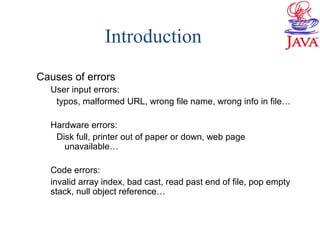
Causes of errors
User input errors:
typos, malformed URL, wrong file name, wrong info in file…
Hardware errors:
Disk full, printer out of paper or down, web page
unavailable…
Code errors:
invalid array index, bad cast, read past end of file, pop empty
stack, null object reference…
Introduction
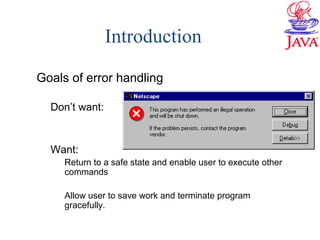
Goals of error handling
Don’t want:
Want:
Return to a safe state and enable user to execute other
commands
Allow user to save work and terminate program
gracefully.
Introduction
• Java exception handling mechanism:
Every method is allowed to have two exit paths
– No errors occur
• Method exits in the normal way
• Returns a value
• Control passed to the calling code.
– If errors occur
• Method exits via an alternative exit path
• Throws an object that encapsulates the error information
• Control passed to exception mechanism that searches for an
appropriate exception handler to deal with the error condition
Outline
Introduction
Java exception classes
Dealing with exceptions
 Throwing exceptions
 Catching exceptions
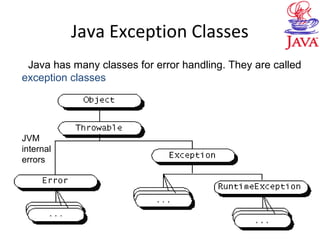
Java Exception Classes
JVM
internal
errors
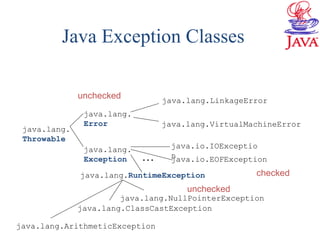
Java has many classes for error handling. They are called
exception classes
Java Exception Classes
java.io.IOExceptio
n
java.lang.VirtualMachineError
java.lang.LinkageError
java.lang.
Exception
java.lang.
Error
java.lang.
Throwable
java.lang.NullPointerException
java.lang.ArithmeticException
java.lang.RuntimeException
java.lang.ClassCastException
unchecked
unchecked
checked
java.io.EOFException…
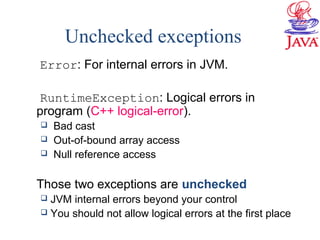
Unchecked exceptions
Error: For internal errors in JVM.
RuntimeException: Logical errors in
program (C++ logical-error).
 Bad cast
 Out-of-bound array access
 Null reference access
Those two exceptions are unchecked
 JVM internal errors beyond your control
 You should not allow logical errors at the first place
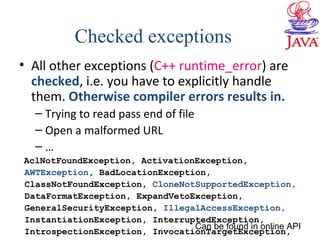
• All other exceptions (C++ runtime_error) are
checked, i.e. you have to explicitly handle
them. Otherwise compiler errors results in.
– Trying to read pass end of file
– Open a malformed URL
– …
AclNotFoundException, ActivationException,
AWTException, BadLocationException,
ClassNotFoundException, CloneNotSupportedException,
DataFormatException, ExpandVetoException,
GeneralSecurityException, IllegalAccessException,
InstantiationException, InterruptedException,
IntrospectionException, InvocationTargetException,
Checked exceptions
Can be found in online API
Exceptions
• Typically, what methods does an exception
class have?
– Check IOException
Java Exception Classes
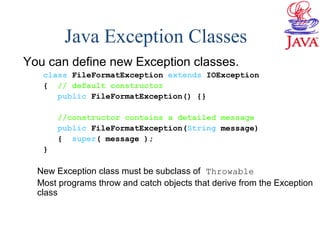
You can define new Exception classes.
class FileFormatException extends IOException
{ // default constructor
public FileFormatException() {}
//constructor contains a detailed message
public FileFormatException(String message)
{ super( message );
}
New Exception class must be subclass of Throwable
Most programs throw and catch objects that derive from the Exception
class
Outline
Introduction
Java exception classes
Dealing with exceptions
 Throwing exceptions
 Catching exceptions
Dealing with Exceptions
• Need to consider exceptions when writing
each method
– Identifying possible exceptions
• Check each line of code inside the method
– If a method from someone else is called, check API to see if it
throws exceptions
– If some other method you wrote is called, also check to see if
it throws exceptions.
– Dealing with exceptions
• If checked exceptions might be thrown at any point
inside the method, you need to deal with it
– Catching exceptions: Handle an exception in the current
method.
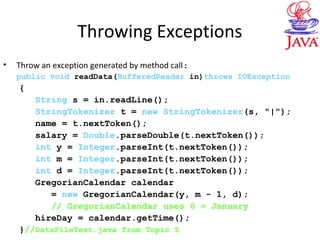
Throwing Exceptions
• Throw an exception generated by method call:
public void readData(BufferedReader in)throws IOException
{
String s = in.readLine();
StringTokenizer t = new StringTokenizer(s, "|");
name = t.nextToken();
salary = Double.parseDouble(t.nextToken());
int y = Integer.parseInt(t.nextToken());
int m = Integer.parseInt(t.nextToken());
int d = Integer.parseInt(t.nextToken());
GregorianCalendar calendar
= new GregorianCalendar(y, m - 1, d);
// GregorianCalendar uses 0 = January
hireDay = calendar.getTime();
}//DataFileTest.java from Topic 5
Throwing Exceptions
• The method readLine of
BufferedReader throws an IOExpcetion,
a checked exception
– We do not deal with this exception in the current
method. So we state that the readData method
might throw IOException.
• If you simply ignore it, compiler error results
in. Try this.
Throwing Exceptions
• Notes:
– Can throw multiple types of exceptions
public void readData(BufferedReader in)
throws IOException,
EOFException
– Overriding method in subclass cannot throw more
exceptions than corresponding method in
superclass
• If method in superclass does not throw any exceptions,
overriding method in subclass cannot either
Outline
Introduction
Java exception classes
Dealing with exceptions
 Throwing exceptions
 Catching exceptions
Catching Exceptions
Catch exceptions with try/catch block
try
{ code
more code
}
catch( ExceptionType e)
{ handler for this exception
}
If a statement in the try block throws an exception
The remaining statements in the block are skipped
Handler code inside catch block executed.
If no exceptions are thrown by codes in the try
block, the catch block is skipped.
Dealing with Exceptions
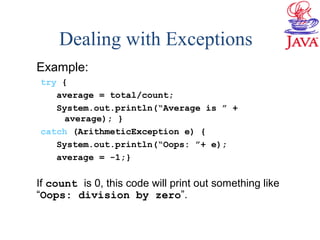
Example:
try {
average = total/count;
System.out.println(“Average is ” +
average); }
catch (ArithmeticException e) {
System.out.println(“Oops: ”+ e);
average = -1;}
If count is 0, this code will print out something like
“Oops: division by zero”.
Catching Exceptions
public static void main(String[] args)
{ try
{ BufferedReader in = new BufferedReader(
new FileReader(args[0]));
Employee[] newStaff = readData(in);
…
}
catch(IOException exception)
{ exception.printStackTrace();
}} //ExceptionTest.java
This code will exit right away with an error message if something goes
wrong in readData or in the constructor of FilerReader (an
IOException will be thrown)
Catching Multiple Exceptions
Can have multiple catchers for multiple types of exceptions:
public static void main(String[] args)
{ try
{ BufferedReader in = new BufferedReader(
new FileReader(args[0]));
Employee[] e = readData(in);
… }
catch(IOException e1)
{ exception.printStackTrace(); }
catch(ArrayIndexOutOfBoundsException e2)
{ System.out.print("No file name provided " );
System.exit(1); }
} // ExceptionTest2.java
What if GeneralSecurityException occurs in the try block?
Might throw
ArrayIndexOutOfBoundsExpection
Dealing with Exceptions
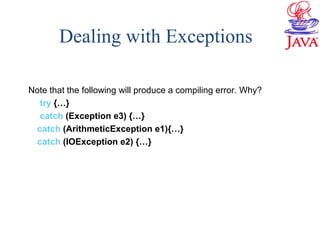
Note that the following will produce a compiling error. Why?
try {…}
catch (Exception e3) {…}
catch (ArithmeticException e1){…}
catch (IOException e2) {…}
Catching Exceptions
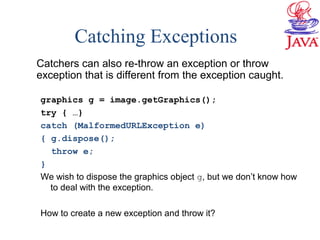
Catchers can also re-throw an exception or throw
exception that is different from the exception caught.
graphics g = image.getGraphics();
try { …}
catch (MalformedURLException e)
{ g.dispose();
throw e;
}
We wish to dispose the graphics object g, but we don’t know how
to deal with the exception.
How to create a new exception and throw it?
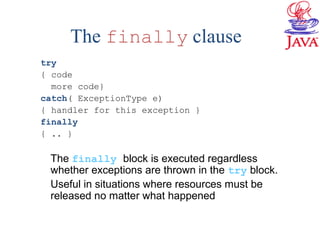
The finally clause
try
{ code
more code}
catch( ExceptionType e)
{ handler for this exception }
finally
{ .. }
The finally block is executed regardless
whether exceptions are thrown in the try block.
Useful in situations where resources must be
released no matter what happened
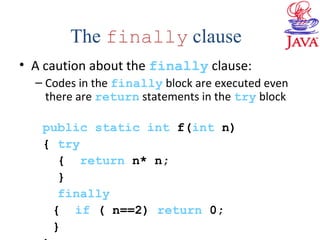
• A caution about the finally clause:
– Codes in the finally block are executed even
there are return statements in the try block
public static int f(int n)
{ try
{ return n* n;
}
finally
{ if ( n==2) return 0;
}
The finally clause
Dealing with Exceptions
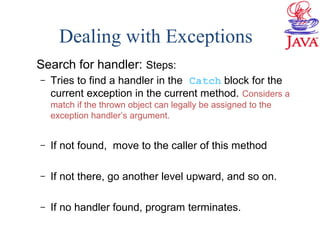
Search for handler: Steps:
– Tries to find a handler in the Catch block for the
current exception in the current method. Considers a
match if the thrown object can legally be assigned to the
exception handler’s argument.
– If not found, move to the caller of this method
– If not there, go another level upward, and so on.
– If no handler found, program terminates.
C++ Notes
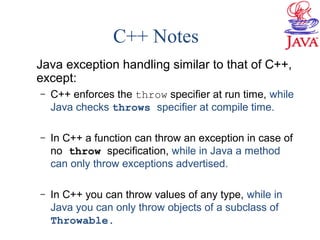
Java exception handling similar to that of C++,
except:
– C++ enforces the throw specifier at run time, while
Java checks throws specifier at compile time.
– In C++ a function can throw an exception in case of
no throw specification, while in Java a method
can only throw exceptions advertised.
– In C++ you can throw values of any type, while in
Java you can only throw objects of a subclass of
Throwable.

06 exceptions

  • 1.
    Topic 6: Exceptions Reading:Chapter 11 Advanced Programming Techniques
  • 2.
    Objective/Outline • Objective: Studyhow to handle exceptions in java • Outline: – Introduction – Java exception classes (Checked vs unchecked exceptions) – Dealing with exceptions • Throwing exceptions • Catching exceptions
  • 3.
    Introduction Causes of errors Userinput errors: typos, malformed URL, wrong file name, wrong info in file… Hardware errors: Disk full, printer out of paper or down, web page unavailable… Code errors: invalid array index, bad cast, read past end of file, pop empty stack, null object reference…
  • 4.
    Introduction Goals of errorhandling Don’t want: Want: Return to a safe state and enable user to execute other commands Allow user to save work and terminate program gracefully.
  • 5.
    Introduction • Java exceptionhandling mechanism: Every method is allowed to have two exit paths – No errors occur • Method exits in the normal way • Returns a value • Control passed to the calling code. – If errors occur • Method exits via an alternative exit path • Throws an object that encapsulates the error information • Control passed to exception mechanism that searches for an appropriate exception handler to deal with the error condition
  • 6.
    Outline Introduction Java exception classes Dealingwith exceptions  Throwing exceptions  Catching exceptions
  • 7.
    Java Exception Classes JVM internal errors Javahas many classes for error handling. They are called exception classes
  • 8.
  • 9.
    Unchecked exceptions Error: Forinternal errors in JVM. RuntimeException: Logical errors in program (C++ logical-error).  Bad cast  Out-of-bound array access  Null reference access Those two exceptions are unchecked  JVM internal errors beyond your control  You should not allow logical errors at the first place
  • 10.
    • All otherexceptions (C++ runtime_error) are checked, i.e. you have to explicitly handle them. Otherwise compiler errors results in. – Trying to read pass end of file – Open a malformed URL – … AclNotFoundException, ActivationException, AWTException, BadLocationException, ClassNotFoundException, CloneNotSupportedException, DataFormatException, ExpandVetoException, GeneralSecurityException, IllegalAccessException, InstantiationException, InterruptedException, IntrospectionException, InvocationTargetException, Checked exceptions Can be found in online API
  • 11.
    Exceptions • Typically, whatmethods does an exception class have? – Check IOException
  • 12.
    Java Exception Classes Youcan define new Exception classes. class FileFormatException extends IOException { // default constructor public FileFormatException() {} //constructor contains a detailed message public FileFormatException(String message) { super( message ); } New Exception class must be subclass of Throwable Most programs throw and catch objects that derive from the Exception class
  • 13.
    Outline Introduction Java exception classes Dealingwith exceptions  Throwing exceptions  Catching exceptions
  • 14.
    Dealing with Exceptions •Need to consider exceptions when writing each method – Identifying possible exceptions • Check each line of code inside the method – If a method from someone else is called, check API to see if it throws exceptions – If some other method you wrote is called, also check to see if it throws exceptions. – Dealing with exceptions • If checked exceptions might be thrown at any point inside the method, you need to deal with it – Catching exceptions: Handle an exception in the current method.
  • 15.
    Throwing Exceptions • Throwan exception generated by method call: public void readData(BufferedReader in)throws IOException { String s = in.readLine(); StringTokenizer t = new StringTokenizer(s, "|"); name = t.nextToken(); salary = Double.parseDouble(t.nextToken()); int y = Integer.parseInt(t.nextToken()); int m = Integer.parseInt(t.nextToken()); int d = Integer.parseInt(t.nextToken()); GregorianCalendar calendar = new GregorianCalendar(y, m - 1, d); // GregorianCalendar uses 0 = January hireDay = calendar.getTime(); }//DataFileTest.java from Topic 5
  • 16.
    Throwing Exceptions • Themethod readLine of BufferedReader throws an IOExpcetion, a checked exception – We do not deal with this exception in the current method. So we state that the readData method might throw IOException. • If you simply ignore it, compiler error results in. Try this.
  • 17.
    Throwing Exceptions • Notes: –Can throw multiple types of exceptions public void readData(BufferedReader in) throws IOException, EOFException – Overriding method in subclass cannot throw more exceptions than corresponding method in superclass • If method in superclass does not throw any exceptions, overriding method in subclass cannot either
  • 18.
    Outline Introduction Java exception classes Dealingwith exceptions  Throwing exceptions  Catching exceptions
  • 19.
    Catching Exceptions Catch exceptionswith try/catch block try { code more code } catch( ExceptionType e) { handler for this exception } If a statement in the try block throws an exception The remaining statements in the block are skipped Handler code inside catch block executed. If no exceptions are thrown by codes in the try block, the catch block is skipped.
  • 20.
    Dealing with Exceptions Example: try{ average = total/count; System.out.println(“Average is ” + average); } catch (ArithmeticException e) { System.out.println(“Oops: ”+ e); average = -1;} If count is 0, this code will print out something like “Oops: division by zero”.
  • 21.
    Catching Exceptions public staticvoid main(String[] args) { try { BufferedReader in = new BufferedReader( new FileReader(args[0])); Employee[] newStaff = readData(in); … } catch(IOException exception) { exception.printStackTrace(); }} //ExceptionTest.java This code will exit right away with an error message if something goes wrong in readData or in the constructor of FilerReader (an IOException will be thrown)
  • 22.
    Catching Multiple Exceptions Canhave multiple catchers for multiple types of exceptions: public static void main(String[] args) { try { BufferedReader in = new BufferedReader( new FileReader(args[0])); Employee[] e = readData(in); … } catch(IOException e1) { exception.printStackTrace(); } catch(ArrayIndexOutOfBoundsException e2) { System.out.print("No file name provided " ); System.exit(1); } } // ExceptionTest2.java What if GeneralSecurityException occurs in the try block? Might throw ArrayIndexOutOfBoundsExpection
  • 23.
    Dealing with Exceptions Notethat the following will produce a compiling error. Why? try {…} catch (Exception e3) {…} catch (ArithmeticException e1){…} catch (IOException e2) {…}
  • 24.
    Catching Exceptions Catchers canalso re-throw an exception or throw exception that is different from the exception caught. graphics g = image.getGraphics(); try { …} catch (MalformedURLException e) { g.dispose(); throw e; } We wish to dispose the graphics object g, but we don’t know how to deal with the exception. How to create a new exception and throw it?
  • 25.
    The finally clause try {code more code} catch( ExceptionType e) { handler for this exception } finally { .. } The finally block is executed regardless whether exceptions are thrown in the try block. Useful in situations where resources must be released no matter what happened
  • 26.
    • A cautionabout the finally clause: – Codes in the finally block are executed even there are return statements in the try block public static int f(int n) { try { return n* n; } finally { if ( n==2) return 0; } The finally clause
  • 27.
    Dealing with Exceptions Searchfor handler: Steps: – Tries to find a handler in the Catch block for the current exception in the current method. Considers a match if the thrown object can legally be assigned to the exception handler’s argument. – If not found, move to the caller of this method – If not there, go another level upward, and so on. – If no handler found, program terminates.
  • 28.
    C++ Notes Java exceptionhandling similar to that of C++, except: – C++ enforces the throw specifier at run time, while Java checks throws specifier at compile time. – In C++ a function can throw an exception in case of no throw specification, while in Java a method can only throw exceptions advertised. – In C++ you can throw values of any type, while in Java you can only throw objects of a subclass of Throwable.