Unit 4: Blackboard Features
Kristin Murner
IX 564
• Both student and teacher resources are
feature-packed and well-developed
• Superior support for online or hybrid learning
• Social network support and full mobile
compatibility
• Blackboard could use an interface overhaul so
navigation is more natural
Robust Assets: Quick overview
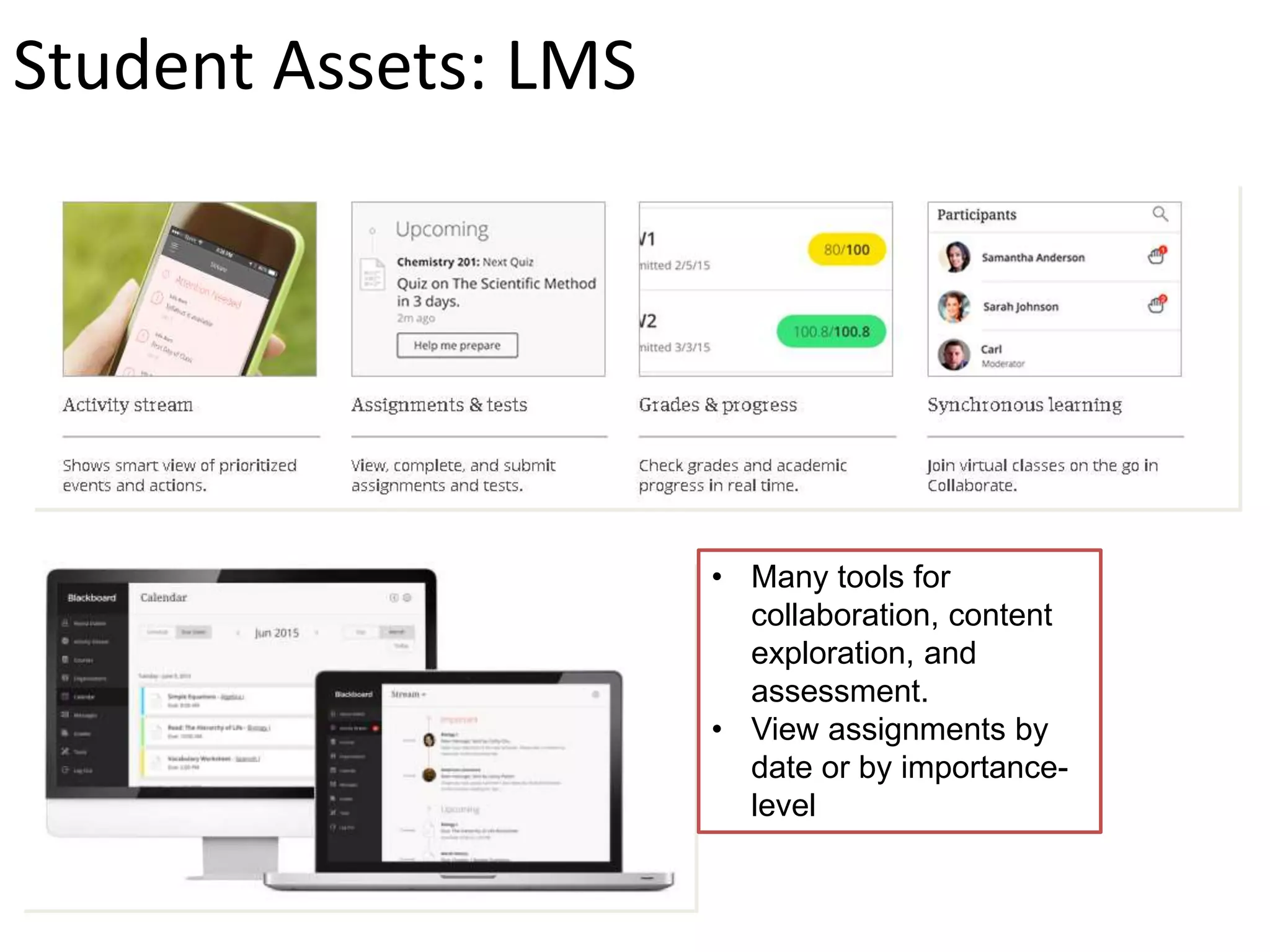
• Many tools for
collaboration, content
exploration, and
assessment.
• View assignments by
date or by importance-
level
Student Assets: LMS
Student Assets: Mobile “Students can check
grades, view
announcements, post to
blogs and discussions,
and access course
content. In addition,
students can upload
media as attachments to
blogs, journals, and
discussions directly from
their mobile device”
(Blackboard, Inc, 2015)
• Student preview
• In-line grading
• Collaborative learning
activities
• Safe-assign
• Ample training and
tutorials online
Faculty Assets:
Integrating Social Media:
While it may be a multi-step process, it is
easy to integrate social media feeds (such
as Twitter) into Blackboard.
1) Faculty need to create a widget in
Twitter, which will generate an HTML
code.
2) Open Blackboard, create a blank page
in a course/content and then paste the
HTML code there.
3) Hit “update.”
(Western University, n.d)
If I could make a wish:
I am a visual learner and really
respond to layout and navigation.
Everything about Blackboard
seems to be less than obvious to
me.
The left-hand navigation (while
better than eCollege!) isn’t
completely intuitive.
I struggled with their marketing
site-it was never clear whether
what I was looking at was for
Learn or another product. It was
easier to Google what I was
looking for than navigate the sites.
SCORM Compliance:
Blackboard Learn is fully SCORM compliant and the SCORM
engine automatically installs when Blackboard is installed or
updated. However, the Engine must be enabled by the system
administrator to allow access.
(Blackboard, n.d.)
References
Blackboard, Inc. (2015). Bb Student. Retrieved from:
http://www.blackboard.com/Images/Bb_Student_Datasheet_FINAL_06%2008%
202015_tcm21-19353.pdf
Blackboard, Inc. (2015). SCORM Engine and Open Standards Content Player.
Retrieved from: https://help.blackboard.com/en-
us/Learn/9.1_SP_10_and_SP_11/Administrator/110_Building_Blocks/010_Featu
red_Building_Blocks/SCORM_Engine_and_Open_Standards_Content_Player
Western University of Health Sciences (n.d.). Integrating Twitter Feeds into your
Blackboard Courses. Retrieved from: http://teachtech.westernu.edu/blackboard-
twitter-feeds/

Ix564 week 4 blackboard wiki

  • 1.
    Unit 4: BlackboardFeatures Kristin Murner IX 564
  • 2.
    • Both studentand teacher resources are feature-packed and well-developed • Superior support for online or hybrid learning • Social network support and full mobile compatibility • Blackboard could use an interface overhaul so navigation is more natural Robust Assets: Quick overview
  • 3.
    • Many toolsfor collaboration, content exploration, and assessment. • View assignments by date or by importance- level Student Assets: LMS
  • 4.
    Student Assets: Mobile“Students can check grades, view announcements, post to blogs and discussions, and access course content. In addition, students can upload media as attachments to blogs, journals, and discussions directly from their mobile device” (Blackboard, Inc, 2015)
  • 5.
    • Student preview •In-line grading • Collaborative learning activities • Safe-assign • Ample training and tutorials online Faculty Assets:
  • 6.
    Integrating Social Media: Whileit may be a multi-step process, it is easy to integrate social media feeds (such as Twitter) into Blackboard. 1) Faculty need to create a widget in Twitter, which will generate an HTML code. 2) Open Blackboard, create a blank page in a course/content and then paste the HTML code there. 3) Hit “update.” (Western University, n.d)
  • 7.
    If I couldmake a wish: I am a visual learner and really respond to layout and navigation. Everything about Blackboard seems to be less than obvious to me. The left-hand navigation (while better than eCollege!) isn’t completely intuitive. I struggled with their marketing site-it was never clear whether what I was looking at was for Learn or another product. It was easier to Google what I was looking for than navigate the sites.
  • 8.
    SCORM Compliance: Blackboard Learnis fully SCORM compliant and the SCORM engine automatically installs when Blackboard is installed or updated. However, the Engine must be enabled by the system administrator to allow access. (Blackboard, n.d.)
  • 9.
    References Blackboard, Inc. (2015).Bb Student. Retrieved from: http://www.blackboard.com/Images/Bb_Student_Datasheet_FINAL_06%2008% 202015_tcm21-19353.pdf Blackboard, Inc. (2015). SCORM Engine and Open Standards Content Player. Retrieved from: https://help.blackboard.com/en- us/Learn/9.1_SP_10_and_SP_11/Administrator/110_Building_Blocks/010_Featu red_Building_Blocks/SCORM_Engine_and_Open_Standards_Content_Player Western University of Health Sciences (n.d.). Integrating Twitter Feeds into your Blackboard Courses. Retrieved from: http://teachtech.westernu.edu/blackboard- twitter-feeds/